# Sparrow
[](https://github.com/katanaml/sparrow)
[](https://github.com/katanaml/sparrow/stargazers)
[](https://github.com/katanaml/sparrow/issues)
[](https://github.com/katanaml/sparrow)
[](https://www.gnu.org/licenses/gpl-3.0)
**Structured data extraction, instruction calling and agentic workflows with ML, LLM and Vision LLM**
Sparrow is an API-first platform for enterprise document intelligence. It combines accurate structured extraction from documents (invoices, statements, tables) with workflow agents and decision agents.

🚀 Try Sparrow Online | 📖 Quick Start | 🛠️ Installation | 📚 Examples | 🤖 Agents
---
## 🌟 Sparrow
[🚀 Try Sparrow Online](https://sparrow.katanaml.io)
Production-ready structured data extraction powered by ML, LLMs & Vision LLMs.
Turn invoices, receipts, statements, forms and images into clean structured data.
Sparrow is an **API-first platform** built for enterprise document intelligence. It provides RESTful APIs for structured data extraction, instruction processing, and multi-agent workflow orchestration — all running on your own infrastructure with no external API calls or cloud dependencies.
**Platform capabilities:**
- **Structured Extraction API**: Submit documents via REST and receive validated JSON — integrate directly into any backend or data pipeline
- **Instruction Processing**: Beyond document extraction — text processing, validation, and decision making via the instruction inference API
- **Agent Framework**: Orchestrate multi-step workflows with custom agents, visual monitoring via Prefect, and robust error handling
- **Pluggable Pipelines**: Mix and match Vision LLM (Sparrow Parse), Text LLM (Sparrow Instructor), and Agent pipelines depending on the task
- **Multiple Backends**: MLX on Apple Silicon, vLLM on NVIDIA, Ollama, Hugging Face, Mistral OCR — same API surface across all

### Sparrow UI Features
The web UI provides a visual interface on top of the same API:
- **Drag & Drop**: Upload documents directly
- **Real-time Processing**: See results instantly
- **Data Query**: JSON based schema for data query
- **Structured Output**: JSON structured output
## 📑 Table of Contents
- [✨ Key Features](#-key-features)
- [🏗️ Architecture](#️-architecture)
- [🚀 Quickstart](#-quickstart)
- [🛠️ Installation](#️-installation)
- [📚 Examples](#-examples)
- [💻 CLI Usage](#-cli-usage)
- [🌐 API Usage](#-api-usage)
- [🤖 Sparrow Agent](#-sparrow-agent)
- [📊 Dashboard](#-dashboard)
- [🔧 Pipeline Comparison](#-pipeline-comparison)
- [⚡ Performance Tips](#-performance-tips)
- [🔍 Troubleshooting](#-troubleshooting)
- [⭐ Star History](#-star-history)
- [📜 License](#-license)
## ✨ Key Features
🎯 **Universal Document Processing**: Handle invoices, receipts, forms, bank statements, tables
🔧 **Pluggable Architecture**: Mix and match different pipelines (Sparrow Parse, Instructor, Agents)
🖥️ **Multiple Backends**: MLX, Ollama, vLLM, Docker, Hugging Face Cloud GPU, Mistral OCR
📱 **Multi-format Support**: Images (PNG, JPG) and multi-page PDFs
🎨 **Schema Validation**: JSON schema-based extraction with automatic validation
🌐 **API-First Design**: RESTful APIs for easy integration
💬 **Instruction Calling**: Text processing, validation, decision making with Gemma, Mistral, Qwen 3.6, etc.
📊 **Visual Monitoring**: Built-in dashboard and agent workflow tracking
🔒 **Enterprise Ready**: Rate limiting, usage analytics, commercial licensing available
🚀 **Local Vision LLMs**: Mistral, Qwen 3.6, DeepSeek OCR, dots.ocr, Gemma 4, etc.
☁️ **Cloud OCR Backend**: Mistral OCR for cloud document extraction
## 🏗️ Architecture

### Core Components
| Component | Purpose | Use Case |
|-----------|---------|----------|
| **[Sparrow ML LLM](https://github.com/katanaml/sparrow/tree/main/sparrow-ml/llm)** | Main API engine | Document processing pipelines |
| **[Sparrow Parse](https://github.com/katanaml/sparrow/tree/main/sparrow-data/parse)** | Vision LLM library | Structured JSON extraction |
| **[Sparrow Agents](https://github.com/katanaml/sparrow/tree/main/sparrow-ml/agents)** | Workflow orchestration | Complex multi-step processing |
| **[Sparrow OCR](https://github.com/katanaml/sparrow/tree/main/sparrow-data/ocr)** | Text recognition | OCR preprocessing |
| **[Sparrow UI](https://github.com/katanaml/sparrow/tree/main/sparrow-ui/)** | Web interface | Interactive document processing |
## 🚀 Quickstart
### Prerequisites
- **Python 3.12.10+** (use `pyenv` for version management)
- **macOS** (for MLX backend) or **Linux/Windows** (for other backends)
- **GPU** (make sure GPU have enough memory to run selected Vision LLM)
### 30-Second Setup
```bash
# 1. Install pyenv and Python 3.12.10
pyenv install 3.12.10
pyenv global 3.12.10
# 2. Create virtual environment
python -m venv .env_sparrow_parse
source .env_sparrow_parse/bin/activate # Linux/Mac
# or .env_sparrow_parse\Scripts\activate # Windows
# 3. Install Sparrow Parse pipeline
git clone https://github.com/katanaml/sparrow.git
cd sparrow/sparrow-ml/llm
pip install -r requirements_sparrow_parse.txt
# 4. For macOS: Install poppler for PDF processing
brew install poppler
# 5. Start the API server
python api.py
```
Before running `pip install -r requirements_sparrow_parse.txt`, check your platform. If you are on macOS and want to run MLX backend, go to `requirements_sparrow_parse.txt` and make sure `sparrow-parse[mlx]` libary reference is defined. If you are running Sparrow on Linux/Windows, make sure to use `sparrow-parse` library reference, this will skip MLX related libraries.
### First Document Extraction
```bash
# Extract data from a bonds table
./sparrow.sh '[{"instrument_name":"str", "valuation":0}]' \
--pipeline "sparrow-parse" \
--options mlx \
--options mlx-community/Qwen2.5-VL-72B-Instruct-4bit \
--file-path "data/bonds_table.png"
```
**Result:**
```json
{
"data": [
{"instrument_name": "UNITS BLACKROCK...", "valuation": 19049},
{"instrument_name": "UNITS ISHARES...", "valuation": 83488}
],
"valid": "true"
}
```
Use `--options mlx` for MLX backend, `--options ollama` for Ollama backend, `--options vllm` for vLLM backend, `--options mistral` for Mistral OCR cloud backend. Make sure to provide correct Vision LLM model name, download model first separately with MLX, vLLM or Ollama.
## 🛠️ Installation
### Quick Setup
```bash
# 1. Clone repository
git clone https://github.com/katanaml/sparrow.git
cd sparrow
```
📖 **For complete installation instructions**, see our [detailed environment setup guide](environment_setup.md).
### Essential Steps Summary
1. **Python Environment**: Install Python 3.12.10 using pyenv
2. **Virtual Environments**: Create separate environments for different pipelines:
- `.env_sparrow_parse` - for Sparrow Parse (Vision LLM)
- `.env_instructor` - for Instructor (Text LLM)
- `.env_ocr` - for OCR service (optional)
3. **System Dependencies**: Install poppler for PDF processing
4. **Requirements**: Install pipeline-specific dependencies, for example:
`pip install -r requirements_sparrow_parse.txt`
### Platform-Specific Notes
**macOS:**
```bash
brew install poppler # Required for PDF processing
```
**Ubuntu/Debian:**
```bash
sudo apt-get install poppler-utils libpoppler-cpp-dev
```
**Apple Silicon**: MLX backend available for optimal performance
**NVIDIA/AMD GPU**: Use vLLM or Ollama backend
**Cloud**: Use Mistral OCR backend
**CPU Only**: Use smaller models or Hugging Face cloud backend
### Verification
```bash
# Test installation
python api.py --port 8002
# Visit http://localhost:8002/api/v1/sparrow-llm/docs
```
## 📚 Examples
### 🏦 Bank Statement Processing

```bash
# Extract all data from bank statement
./sparrow.sh "*" \
--pipeline "sparrow-parse" \
--options mlx \
--options mlx-community/Qwen2.5-VL-72B-Instruct-4bit \
--file-path "data/bank_statement.pdf"
```
📄 View Complete JSON Output
```json
{
"bank": "First Platypus Bank",
"address": "1234 Kings St., New York, NY 12123",
"account_holder": "Mary G. Orta",
"account_number": "1234567890123",
"statement_date": "3/1/2022",
"period_covered": "2/1/2022 - 3/1/2022",
"account_summary": {
"balance_on_march_1": "$25,032.23",
"total_money_in": "$10,234.23",
"total_money_out": "$10,532.51"
},
"transactions": [
{
"date": "02/01",
"description": "PGD EasyPay Debit",
"withdrawal": "203.24",
"deposit": "",
"balance": "22,098.23"
},
{
"date": "02/02",
"description": "AB&B Online Payment*****",
"withdrawal": "71.23",
"deposit": "",
"balance": "22,027.00"
},
{
"date": "02/04",
"description": "Check No. 2345",
"withdrawal": "",
"deposit": "450.00",
"balance": "22,477.00"
},
{
"date": "02/05",
"description": "Payroll Direct Dep 23422342 Giants",
"withdrawal": "",
"deposit": "2,534.65",
"balance": "25,011.65"
},
{
"date": "02/06",
"description": "Signature POS Debit - TJP",
"withdrawal": "84.50",
"deposit": "",
"balance": "24,927.15"
},
{
"date": "02/07",
"description": "Check No. 234",
"withdrawal": "1,400.00",
"deposit": "",
"balance": "23,527.15"
},
{
"date": "02/08",
"description": "Check No. 342",
"withdrawal": "",
"deposit": "25.00",
"balance": "23,552.15"
},
{
"date": "02/09",
"description": "FPB AutoPay***** Credit Card",
"withdrawal": "456.02",
"deposit": "",
"balance": "23,096.13"
},
{
"date": "02/08",
"description": "Check No. 123",
"withdrawal": "",
"deposit": "25.00",
"balance": "23,552.15"
},
{
"date": "02/09",
"description": "FPB AutoPay***** Credit Card",
"withdrawal": "156.02",
"deposit": "",
"balance": "23,096.13"
},
{
"date": "02/08",
"description": "Cash Deposit",
"withdrawal": "",
"deposit": "25.00",
"balance": "23,552.15"
}
],
"valid": "true"
}
```
### 📊 Financial Tables

```bash
# Extract structured data from financial table
./sparrow.sh '[{"instrument_name":"str", "valuation":0}]' \
--pipeline "sparrow-parse" \
--options mlx \
--options mlx-community/Qwen2.5-VL-72B-Instruct-4bit \
--file-path "data/bonds_table.png"
```
📄 View JSON Output
```json
{
"data": [
{
"instrument_name": "UNITS BLACKROCK FIX INC DUB FDS PLC ISHS EUR INV GRD CP BD IDX/INST/E",
"valuation": 19049
},
{
"instrument_name": "UNITS ISHARES III PLC CORE EUR GOVT BOND UCITS ETF/EUR",
"valuation": 83488
},
{
"instrument_name": "UNITS ISHARES III PLC EUR CORP BOND 1-5YR UCITS ETF/EUR",
"valuation": 213030
},
{
"instrument_name": "UNIT ISHARES VI PLC/JP MORGAN USD E BOND EUR HED UCITS ETF DIST/HDGD/",
"valuation": 32774
},
{
"instrument_name": "UNITS XTRACKERS II SICAV/EUR HY CORP BOND UCITS ETF/-1D-/DISTR.",
"valuation": 23643
}
],
"valid": "true"
}
```
### 🧾 Invoice Processing
```bash
# Extract invoice with cropping for better accuracy
./sparrow.sh "*" \
--pipeline "sparrow-parse" \
--options mlx \
--options mlx-community/Qwen2.5-VL-72B-Instruct-4bit \
--crop-size 60 \
--file-path "data/invoice.pdf"
```
📄 View Complete JSON Output
```json
{
"invoice_number": "61356291",
"date_of_issue": "09/06/2012",
"seller": {
"name": "Chapman, Kim and Green",
"address": "64731 James Branch, Smithmouth, NC 26872",
"tax_id": "949-84-9105",
"iban": "GB50ACIE59715038217063"
},
"client": {
"name": "Rodriguez-Stevens",
"address": "2280 Angela Plain, Hortonshire, MS 93248",
"tax_id": "939-98-8477"
},
"items": [
{
"description": "Wine Glasses Goblets Pair Clear",
"quantity": 5,
"unit": "each",
"net_price": 12.0,
"net_worth": 60.0,
"vat_percentage": 10,
"gross_worth": 66.0
},
{
"description": "With Hooks Stemware Storage Multiple Uses Iron Wine Rack Hanging",
"quantity": 4,
"unit": "each",
"net_price": 28.08,
"net_worth": 112.32,
"vat_percentage": 10,
"gross_worth": 123.55
},
{
"description": "Replacement Corkscrew Parts Spiral Worm Wine Opener Bottle Houdini",
"quantity": 1,
"unit": "each",
"net_price": 7.5,
"net_worth": 7.5,
"vat_percentage": 10,
"gross_worth": 8.25
},
{
"description": "HOME ESSENTIALS GRADIENT STEMLESS WINE GLASSES SET OF 4 20 FL OZ (591 ml) NEW",
"quantity": 1,
"unit": "each",
"net_price": 12.99,
"net_worth": 12.99,
"vat_percentage": 10,
"gross_worth": 14.29
}
],
"summary": {
"total_net_worth": 192.81,
"total_vat": 19.28,
"total_gross_worth": 212.09
}
}
```
### 📄 Multi-page PDF Processing
```bash
# Process multi-page PDF with structured output per page
./sparrow.sh '{"table": [{"description": "str", "latest_amount": 0, "previous_amount": 0}]}' \
--pipeline "sparrow-parse" \
--options mlx \
--options mlx-community/Qwen2.5-VL-72B-Instruct-4bit \
--file-path "data/financial_report.pdf" \
--debug-dir "debug/"
```
📄 View JSON Output
```json
[
{
"table": [
{
"description": "Revenues",
"latest_amount": 12453,
"previous_amount": 11445
},
{
"description": "Operating expenses",
"latest_amount": 9157,
"previous_amount": 8822
}
],
"valid": "true",
"page": 1
},
{
"table": [
{
"description": "Revenues",
"latest_amount": 12453,
"previous_amount": 11445
},
{
"description": "Operating expenses",
"latest_amount": 9157,
"previous_amount": 8822
}
],
"valid": "true",
"page": 2
}
]
```
### 💬 Text Instruction Processing
```bash
# Instruction-based processing
./sparrow.sh "instruction: do arithmetic operation, payload: 2+2=" \
--pipeline "sparrow-instructor" \
--options mlx \
--options lmstudio-community/Mistral-Small-3.2-24B-Instruct-2506-8bit
# Instruction processing with document input
./sparrow.sh "check if business entity Chapman, Kim and Green is invoice issuing party"
--pipeline "sparrow-parse"
--instruction
--options mlx --options lmstudio-community/Mistral-Small-3.2-24B-Instruct-2506-8bit
--file-path "invoice_1.jpg"
```
**JSON Output:**
```
The result of 2 + 2 is:
4
```
### 📈 Stock Data Function Calling
```bash
# Function calling example
./sparrow.sh assistant --pipeline "stocks" --query "Oracle"
```
**JSON Output:**
```json
{
"company": "Oracle Corporation",
"ticker": "ORCL"
}
```
**Additional Output:**
```
The stock price of the Oracle Corporation is 186.3699951171875. USD
```
### 🧾 Table/Form Processing with custom Sparrow logic
```bash
./sparrow.sh "{\"items\": [{\"instrument_name\":\"str\", \"quantity\": \"float\", \"valuation\":\"int\"}]}" \
--pipeline "sparrow-parse" \
--debug --table --table-template "sparrow_generic_table" \
--options mlx --options mlx-community/Ministral-3-14B-Instruct-2512-8bit \
--options mlx --options mlx-community/dots.ocr-bf16 --file-path "data/bonds_table.png"
```
### 🧾 Query Hints
```bash
./sparrow.sh "[{\"instrument_name\":\"str\", \"valuation\":\"int\"}]" \
--pipeline "sparrow-parse" --debug --options mlx \
--options mlx-community/gemma-4-31b-it-8bit \
--file-path "data/bonds_table.png" --hints-file-path "data/llm_hints_eu.json"
```
## 💻 CLI Usage
### Basic Syntax
```bash
./sparrow.sh "" --pipeline "" [OPTIONS] --file-path ""
```
### Command Line Arguments
| Argument | Type | Description | Example |
|----------|------|-------------|---------|
| `query` | JSON/String | Schema or instruction | `'[{"field":"str"}]'` |
| `--pipeline` | String | Pipeline to use | `sparrow-parse` |
| `--file-path` | Path | Input document | `data/invoice.pdf` |
| `--hints-file-path` | Path | Query hints | `data/hints.json` |
| `--options` | String | Backend configuration | `mlx,model-name` |
| `--instruction` | Boolean | Sparrow query will be used as instruction | `--instruction` |
| `--validation` | Boolean | Sparrow query will be used for field validation | `--validation` |
| `--markdown` | Boolean | Markdown pre-processing | `--markdown` |
| `--ocr` | Boolean | Experimental functionality | `--ocr` |
| `--table` | Boolean | Experimental functionality | `--table` |
| `--table-template` | String | Experimental functionality | `--name` |
| `--crop-size` | Integer | Border cropping pixels | `60` |
| `--page-type` | String | Page classification | `financial_table`
| `--debug` | Boolean | Enable debug mode | `--debug` |
| `--debug-dir` | Path | Debug output folder | `./debug/` |
### Pipeline Options
#### Sparrow Parse (Vision LLM)
```bash
# MLX Backend (Apple Silicon)
./sparrow.sh '[{"instrument_name":"str", "valuation":0}]' \
--pipeline "sparrow-parse" \
--options mlx \
--options mlx-community/Qwen3.6-35B-A3B-8bit \
--file-path "data/bonds_table.png"
# Hugging Face Cloud GPU
--options huggingface --options your-space/model-name
# Additional flags
--options tables_only # Extract only tables
--options validation_off # Disable schema validation
--options apply_annotation # Include bounding boxes
--page-type financial_table # Classify page type
```
#### Sparrow Instructor (Text LLM)
```bash
# Instruction-based processing
./sparrow.sh "instruction: do arithmetic operation, payload: 2+2=" \
--pipeline "sparrow-instructor" \
--options mlx \
--options lmstudio-community/Mistral-Small-3.2-24B-Instruct-2506-8bit
```
### Advanced Examples
```bash
# Multi-page PDF with page classification
./sparrow.sh "*" \
--page-type invoice \
--page-type table \
--pipeline "sparrow-parse" \
--options mlx \
--options mlx-community/Qwen3.6-35B-A3B-8bit \
--file-path "multi_page.pdf"
# Handle missing fields with null values
./sparrow.sh '[{"required_field":"str", "optional_field":"str or null"}]' \
--pipeline "sparrow-parse" \
--options mlx \
--options mlx-community/Qwen3.6-35B-A3B-8bit \
--file-path "document.png"
# Table extraction with cropping
./sparrow.sh '*' \
--pipeline "sparrow-parse" \
--options mlx \
--options mlx-community/Qwen3.6-35B-A3B-8bit \
--options tables_only \
--crop-size 100 \
--file-path "scan.pdf"
# Instruction execution
./sparrow.sh "check if business entity Chapman, Kim and Green is invoice issuing party"
--pipeline "sparrow-parse"
--instruction
--options mlx --options lmstudio-community/Mistral-Small-3.2-24B-Instruct-2506-8bit
--file-path "invoice_1.jpg"
# Field validation
./sparrow.sh "tax_id,shipment_code,total_gross_worth"
--pipeline "sparrow-parse"
--validation
--options mlx --options lmstudio-community/Mistral-Small-3.2-24B-Instruct-2506-8bit
--file-path "invoice_1.jpg"
{
"tax_id": true,
"shipment_code": false,
"total_gross_worth": true
}
```
## 🌐 API Usage
### Starting the Server
```bash
# Default port (8002)
python api.py
# Custom port
python api.py --port 8001
# Multiple instances
python api.py --port 8002 & # Sparrow Parse
python api.py --port 8003 & # Instructor
```
### API Endpoints
#### Document Extraction (`/inference`)
```bash
curl -X POST 'http://localhost:8002/api/v1/sparrow-llm/inference' \
-H 'Content-Type: multipart/form-data' \
-F 'query=[{"field_name":"str", "amount":0}]' \
-F 'pipeline=sparrow-parse' \
-F 'options=mlx,mlx-community/Qwen2.5-VL-72B-Instruct-4bit' \
-F 'file=@document.pdf'
```
#### Text Instructions (`/instruction-inference`)
```bash
curl -X POST 'http://localhost:8002/api/v1/sparrow-llm/instruction-inference' \
-H 'Content-Type: application/x-www-form-urlencoded' \
-d 'query=instruction: analyze data, payload: {...}' \
-d 'pipeline=sparrow-instructor' \
-d 'options=mlx,mlx-community/Qwen3.6-35B-A3B-8bit'
```
### API Documentation
Visit `http://localhost:8002/api/v1/sparrow-llm/docs` for interactive Swagger documentation.

## 🤖 Sparrow Agent

Orchestrate complex document processing workflows with visual monitoring powered by Prefect.
### Features
- **Multi-step Workflows**: Chain classification, extraction, and validation
- **Visual Monitoring**: Real-time pipeline tracking
- **Error Handling**: Robust failure recovery
- **Extensible**: Custom agents for specific use cases
### Usage
```bash
# Start agent server
cd sparrow-ml/agents
python api.py --port 8001
# Process medical prescriptions
curl -X POST 'http://localhost:8001/api/v1/sparrow-agents/execute/file' \
-F 'agent_name=medical_prescriptions' \
-F 'extraction_params={"sparrow_key":"123456"}' \
-F 'file=@prescription.pdf'
```
## 📊 Dashboard
Built-in analytics and monitoring dashboard at [sparrow.katanaml.io](https://sparrow.katanaml.io). This is part of Sparrow UI, requires local Oracle Database 23ai Free.

### Features
- **Usage Analytics**: Track API calls, success rates, performance
- **Geographic Distribution**: See usage by country
- **Model Performance**: Compare different model performance
- **Real-time Monitoring**: Live processing statistics
## 🔧 Pipeline Comparison
| Feature | Sparrow Parse | Sparrow Instructor | Sparrow Agents |
|---------|---------------|-------------------|----------------|
| **Input** | Documents + JSON schema | Text instructions | Complex workflows |
| **Output** | Structured JSON | Free-form text | Multi-step results |
| **Use Cases** | Data extraction, forms | Summarization, analysis | Enterprise workflows |
| **Validation** | Schema-based | Manual | Custom rules |
| **Complexity** | Simple | Medium | High |
| **Best For** | Invoices, tables, forms | Text processing | Multi-document flows |
### When to Use What
**Sparrow Parse**: Use for structured data extraction from documents
**Sparrow Instructor**: Use for text analysis, summarization, Q&A
**Sparrow Agents**: Use for complex multi-step document processing workflows
## ⚡ Performance Tips
### Hardware Optimization
**Apple Silicon (MLX)**
- ✅ Best performance with unified memory
- ✅ Models: Mistral Small 3.2 24B, Qwen3.6 27B Dense, Qwen3.6 35B MoE, Gemma 4 31B Dense, Gemma 4 26B MoE
- ⚠️ Requires macOS with Apple Silicon
**NVIDIA GPU (vLLM)**
- ✅ Production inference via vLLM backend
- ✅ Models: Mistral Small 3.2 24B full precision (primary), dots.ocr for large table pipelines
- ✅ Recommended: 96GB VRAM for full precision models
- ⚠️ Requires CUDA setup
**Mistral Cloud (OCR + Mistral Small)**
- ✅ No local GPU required
- ✅ OCR with structured JSON extraction
- ✅ Pay-per-use, no infrastructure overhead
- ⚠️ Requires Mistral API key
**CPU Only**
- ⚠️ Significantly slower
- ✅ Use smaller models (7B parameters max)
- ✅ Consider Hugging Face cloud backend
### Table Extraction
For large or complex tables, use the dots.ocr → Sparrow Templates pipeline instead of Vision LLM direct extraction:
```bash
./sparrow.sh "*" --pipeline "sparrow-parse" \
--debug --table --table-template "sparrow_generic_table" \
--options mlx --options mlx-community/Qwen3.6-35B-A3B-8bit \
--options mlx --options mlx-community/dots.ocr-bf16 --file-path "data/well_report.jpg"
```
- **dots.ocr**: Handles large tables with high accuracy via HTML intermediate output
- **Sparrow Templates**: Maps extracted HTML table structure to JSON schema
- Recommended for financial statements, multi-column invoices, and structured reports
### Extraction Hints
Use Sparrow hints to improve accuracy on complex documents — steer model attention to footers and fine print, disambiguate structurally similar fields (e.g., supplier vs. recipient VAT), normalize date and number formats, and resolve priority ordering for ambiguous fields:
```bash
./sparrow.sh "[{\"instrument_name\":\"str\", \"valuation\":\"int\"}]" \
--pipeline "sparrow-parse" --debug --options mlx \
--options mlx-community/gemma-4-31b-it-8bit \
--file-path "data/bonds_table.png" --hints-file-path "data/llm_hints_eu.json"
```
### Model Selection
| Use Case | Recommended Model | Backend | Notes |
|----------|-------------------|---------|-------|
| **Invoices / Forms (EU)** | Mistral Small 3.2 24B | vLLM / MLX | Primary production model |
| **Invoices / Forms (US)** | Gemma 4 31B Dense | MLX | Strong on English documents |
| **Large Tables** | dots.ocr | vLLM | Via Sparrow Templates pipeline |
| **Quick Testing** | Qwen3.6 27B Dense | MLX | Fast, good general accuracy |
| **Low Memory** | Qwen3.6 35B MoE / Gemma 4 26B MoE | MLX | Reduced memory footprint |
| **Cloud / No GPU** | Mistral OCR + Mistral Small | Mistral Cloud | No infrastructure overhead, pay-per-use |
## 🔍 Troubleshooting
### Common Issues
🚫 Installation Problems
**Python Version Issues:**
```bash
# Verify Python version
python --version # Should be 3.12.10+
# Fix with pyenv
pyenv install 3.12.10
pyenv global 3.12.10
```
**MLX Installation (Apple Silicon):**
```bash
# If MLX fails to install
pip install --upgrade pip
pip install mlx-vlm --no-cache-dir
```
```bash
# If pip install command throws AttributeError: 'NoneType' object has no attribute 'get'
# POTENTIAL SECURITY RISK - SSL verification is bypassed. Apply if you know what you are doing
pip install mlx-vlm --trusted-host pypi.org --trusted-host pypi.python.org --trusted-host files.pythonhosted.org
```
**Poppler Missing:**
```bash
# macOS
brew install poppler
# Ubuntu/Debian
sudo apt-get install poppler-utils
# Verify installation
pdftoppm -h
```
🔧 Runtime Issues
**Memory Errors:**
- Use smaller or MoE models to reduce VRAM footprint
- Enable image cropping: `--crop-size 100`
- Process single pages instead of entire PDFs
**Model Loading Fails:**
```bash
# Clear model cache
rm -rf ~/.cache/huggingface/
rm -rf ~/.mlx/
# Redownload models
python -c "from mlx_vlm import load; load('model-name')"
```
**API Connection Issues:**
```bash
# Check if server is running
curl http://localhost:8002/health
# Check logs
python api.py --debug
```
📄 Document Processing Issues
**Poor Extraction Quality:**
- Add extraction hints to steer model attention to problem fields
- Try image cropping: `--crop-size 60`
- Use `--table --table-template` with dots.ocr for table-heavy documents
- Ensure image resolution is adequate (300+ DPI)
- Use schema validation: avoid `--options validation_off`
**PDF Processing Fails:**
```bash
# Test PDF manually
pdftoppm -png input.pdf output
# Check page count
python -c "
import pypdf
with open('file.pdf', 'rb') as f:
reader = pypdf.PdfReader(f)
print(f'Pages: {len(reader.pages)}')
"
```
**JSON Schema Errors:**
- Validate JSON syntax: Use [jsonlint.com](https://jsonlint.com)
- Use proper field types: `"str"`, `0`, `0.0`, `"str or null"`
- Test with simple schema first
### Getting Help
1. **📖 Check Documentation**: Review this README and component docs
2. **🐛 Search Issues**: [GitHub Issues](https://github.com/katanaml/sparrow/issues)
3. **💬 Create Issue**: Provide logs, system info, minimal example
4. **📧 Commercial Support**: [abaranovskis@redsamuraiconsulting.com](mailto:abaranovskis@redsamuraiconsulting.com)
## ⭐ Star History
[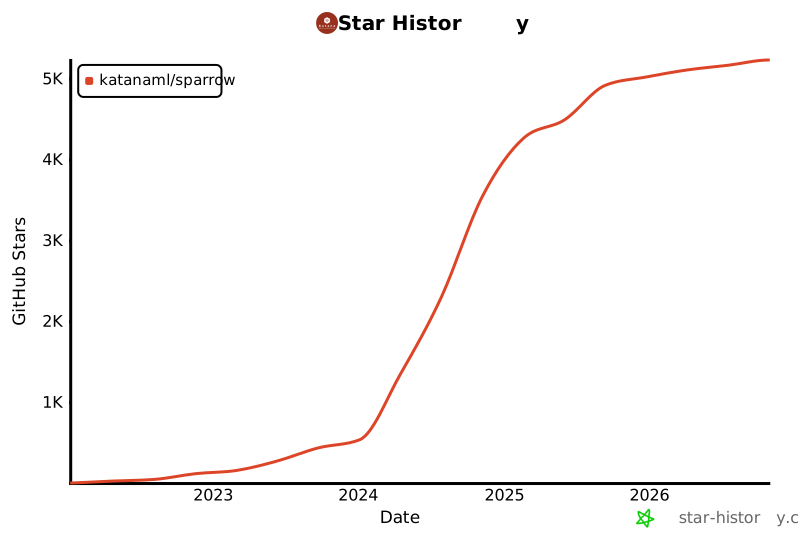](https://star-history.com/#katanaml/sparrow&Date)
## 📜 License
**Open Source**: Licensed under GPL 3.0. Free for open source projects and organizations under $5M revenue.
**Commercial**: Dual licensing available for proprietary use, enterprise features, and dedicated support.
**Contact**: [abaranovskis@redsamuraiconsulting.com](mailto:abaranovskis@redsamuraiconsulting.com) for commercial licensing and consulting.
## 👥 Authors
- **[Katana ML](https://katanaml.io)** - AI/ML consulting and solutions
- **[Andrej Baranovskij](https://github.com/abaranovskis-redsamurai)** - Lead developer
---
⭐ Star us on GitHub if Sparrow is useful for your projects!
github.com/katanaml/sparrow