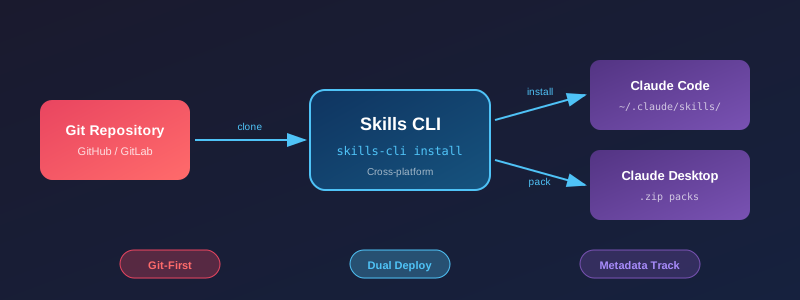

# 🛠️ Skills CLI **Cross-platform CLI for managing Claude Code and Claude Desktop skills** Skills CLI Architecture [![Python 3.10+](https://img.shields.io/badge/python-3.10+-3776AB?style=for-the-badge&logo=python&logoColor=white)](https://www.python.org/) [![License: MIT](https://img.shields.io/badge/License-MIT-yellow.svg?style=for-the-badge)](https://opensource.org/licenses/MIT) [![Platform](https://img.shields.io/badge/platform-Windows%20%7C%20macOS%20%7C%20Linux-lightgrey?style=for-the-badge)](https://github.com/kcchien/skills-cli) [![GitHub stars](https://img.shields.io/github/stars/kcchien/skills-cli?style=social)](https://github.com/kcchien/skills-cli/stargazers) [![GitHub forks](https://img.shields.io/github/forks/kcchien/skills-cli?style=social)](https://github.com/kcchien/skills-cli/network/members) --- *One definition, multiple deployments* — Deploy skills from a central Git repository to both Claude Code CLI and Claude Desktop App. [Installation](#installation) • [Usage](#usage) • [Python API](#python-api) • [Contributing](#development)

## 💡 Why Skills CLI?

🔗 Git-First

Any Git repository can become a skills source. Use official repos, fork your own, or host privately — full flexibility.

🎯 Dual Environment

One skill definition, two targets. Deploy to Claude Code CLI and pack for Claude Desktop simultaneously.

📍 Metadata Tracking

Every installed skill records its source repo, commit hash, and install time. Always know where your skills came from.

## ✨ Features | Feature | Description | |---------|-------------| | 🖥️ **Cross-platform** | Windows, macOS, Linux | | 📦 **Zero dependencies** | Uses only Python standard library | | 🔗 **Flexible repo support** | GitHub, GitLab, self-hosted Git with subdirectory paths | | 🏠 **Default repo** | Uses [Anthropic official skills](https://github.com/anthropics/skills) by default | | 🎯 **Selective installation** | Install all skills or choose specific ones | | 🛡️ **Safety controls** | `--dry-run` preview, `--backup` before overwrite | | 📍 **Source tracking** | Records installation source for each skill | | 🚀 **Dual deployment** | Claude Code (`~/.claude/skills/`) + Claude Desktop (`.zip` packs) | ## 🚀 Quick Start ```bash # Install the CLI pip install git+https://github.com/kcchien/skills-cli.git # List available skills from Anthropic's official repo skills-cli list # Install all skills skills-cli install --all # Or pick specific ones skills-cli install --skills pdf,xlsx,docx # Use your own skills repository skills-cli list --repo https://github.com/your-username/your-skills skills-cli install --repo https://github.com/your-username/your-skills --all ``` ## 📥 Installation ### macOS / Linux ```bash curl -fsSL https://raw.githubusercontent.com/kcchien/skills-cli/main/install.sh | bash ``` ### Windows PowerShell ```powershell irm https://raw.githubusercontent.com/kcchien/skills-cli/main/install.ps1 | iex ``` ### From Source (pip) ```bash git clone https://github.com/kcchien/skills-cli.git cd skills-cli pip install -e . ``` ### Direct Usage (No Install) ```bash python skills_cli.py [options] ``` ## 📖 Usage ### Getting Help ```bash # Show all available commands skills-cli --help # Show help for a specific command skills-cli list --help skills-cli install --help ``` **Example: Using custom repository** ```bash # List skills from a custom repository skills-cli list --repo https://github.com/your-username/your-skills # List skills from a specific branch skills-cli list --repo https://github.com/your-username/your-skills --branch develop # Install all skills from a custom repository skills-cli install --repo https://github.com/your-username/your-skills --all # Install specific skills from a custom repository skills-cli install --repo https://github.com/your-username/your-skills --skills my-skill,another-skill # Install from a repository subdirectory skills-cli install --repo https://github.com/org/monorepo/tree/main/packages/skills --all ``` ### List Available Skills ```bash # List skills from official Anthropic repo (default) skills-cli list # List with detailed descriptions skills-cli list --detail # List from custom repo skills-cli list --repo https://github.com/user/my-skills ``` ### List Installed Skills ```bash # Show all installed skills (global + project) skills-cli installed # Show with source tracking info skills-cli installed --detail # Show only project skills skills-cli installed --project ``` ### Install Skills ```bash # Interactive selection (from default repo) skills-cli install # Install all skills skills-cli install --all # Install specific skills skills-cli install --skills pdf,xlsx,docx # Preview what would be installed (dry run) skills-cli install --all --dry-run # Backup existing skills before overwriting skills-cli install --all --force --backup # Install to project directory (.claude/skills/) skills-cli install --all --project # Install from custom repo skills-cli install --repo https://github.com/user/skills --all ``` ### Remove Skills ```bash # Interactive selection skills-cli remove # Remove specific skills skills-cli remove --skills pdf,xlsx # Remove all skills (with confirmation) skills-cli remove --all # Preview what would be removed skills-cli remove --all --dry-run # Skip confirmation skills-cli remove --all --force ``` ### Validate Skills ```bash # Validate installed skills skills-cli validate # Validate skills from a remote repo skills-cli validate --repo https://github.com/user/skills # Validate a local skill directory skills-cli validate --path ./my-skill/ ``` ### Diagnose Issues ```bash # Check directory structure and common issues skills-cli doctor ``` ### Pack for Claude Desktop ```bash # Pack all skills to zip files skills-cli pack --output dist/desktop # Pack specific skills skills-cli pack --skills pdf,xlsx --output dist/ ``` Output: ``` dist/desktop/ ├── pdf.zip ├── xlsx.zip ├── docx.zip └── manifest.json ``` ### Sync Skills (Git Pull/Clone) ```bash # Sync to personal skills directory skills-cli sync # Sync to project directory skills-cli sync --project # Sync from custom repo skills-cli sync --repo https://github.com/user/skills ``` ## 🔗 Supported Repository URL Formats | Format | Example | |--------|---------| | GitHub (with subdirectory) | `https://github.com/anthropics/skills/tree/main/skills` | | GitHub (root) | `https://github.com/user/my-skills` | | GitLab (with subdirectory) | `https://gitlab.com/team/repo/-/tree/main/skills` | | GitLab (root) | `https://gitlab.example.com/team/skills` | | SSH | `git@github.com:user/skills.git` | | Self-hosted | `https://git.company.com/team/skills` | ## 🏗️ Architecture The CLI is organized as a Python package with a clean separation between core logic and CLI handling: ``` skills-cli/ ├── skills_cli/ │ ├── __init__.py # Public API exports │ ├── core.py # Core library (git, clone, discover, install, pack) │ └── cli.py # CLI handlers (argparse, command functions) ├── tests/ │ └── test_core.py # Unit tests ├── skills_cli.py # Entry point └── pyproject.toml ``` ### 🐍 Python API The core functions can be imported and used programmatically: ```python from skills_cli import ( parse_repo_url, discover_skills, find_skills_root, install_skill, validate_skill_md, get_claude_skills_dir, ) # Parse various repo URL formats repo_info = parse_repo_url("https://github.com/user/skills/tree/main/skills") # {'clone_url': '...', 'branch': 'main', 'subdir': 'skills', ...} # Discover skills in a directory skills = discover_skills(Path("~/.claude/skills").expanduser()) # [{'name': 'pdf', 'description': '...', 'path': Path(...), ...}, ...] # Install a skill success, message = install_skill( source_path, target_dir, force=True, backup=True ) # Validate a skill issues = validate_skill_md(Path("./my-skill")) # [] if valid, or ['Missing required field: name', ...] if issues ``` ## 📋 Requirements - Python 3.10+ - Git 2.25+ (for sparse-checkout support) ## 🧑‍💻 Development ```bash # Clone the repository git clone https://github.com/kcchien/skills-cli.git cd skills-cli # Install in development mode pip install -e ".[dev]" # Run tests pytest tests/ -v # Run a specific test pytest tests/test_core.py::TestParseRepoUrl -v ``` ## 📄 License MIT License - see [LICENSE](LICENSE) for details. ---



