# assistant
> **⚠️ Experimental Software**
>
> This is personal software shared with the community for educational purposes.
> Qustions and contributions are welcome, but don't expect stability or support.
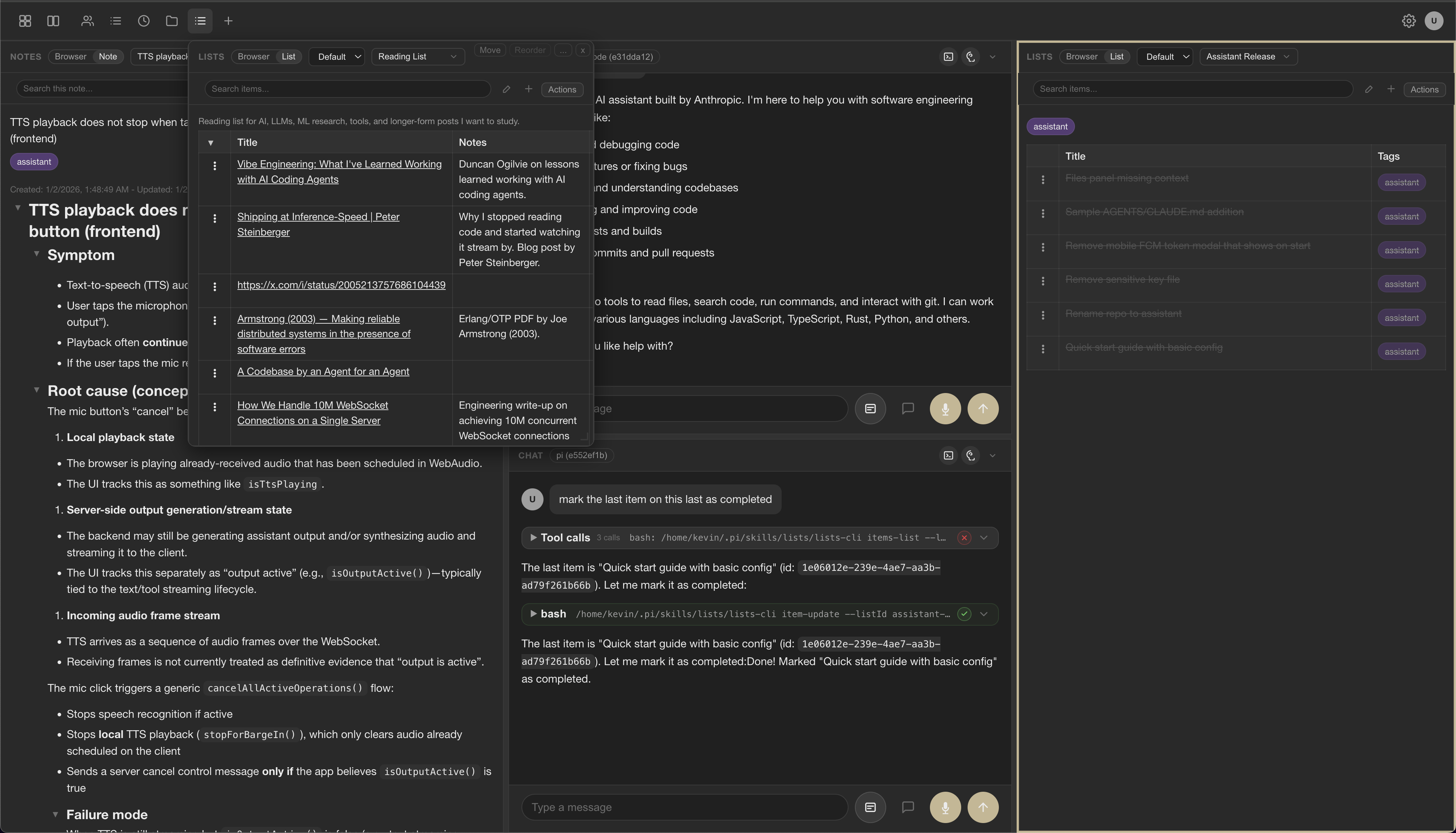
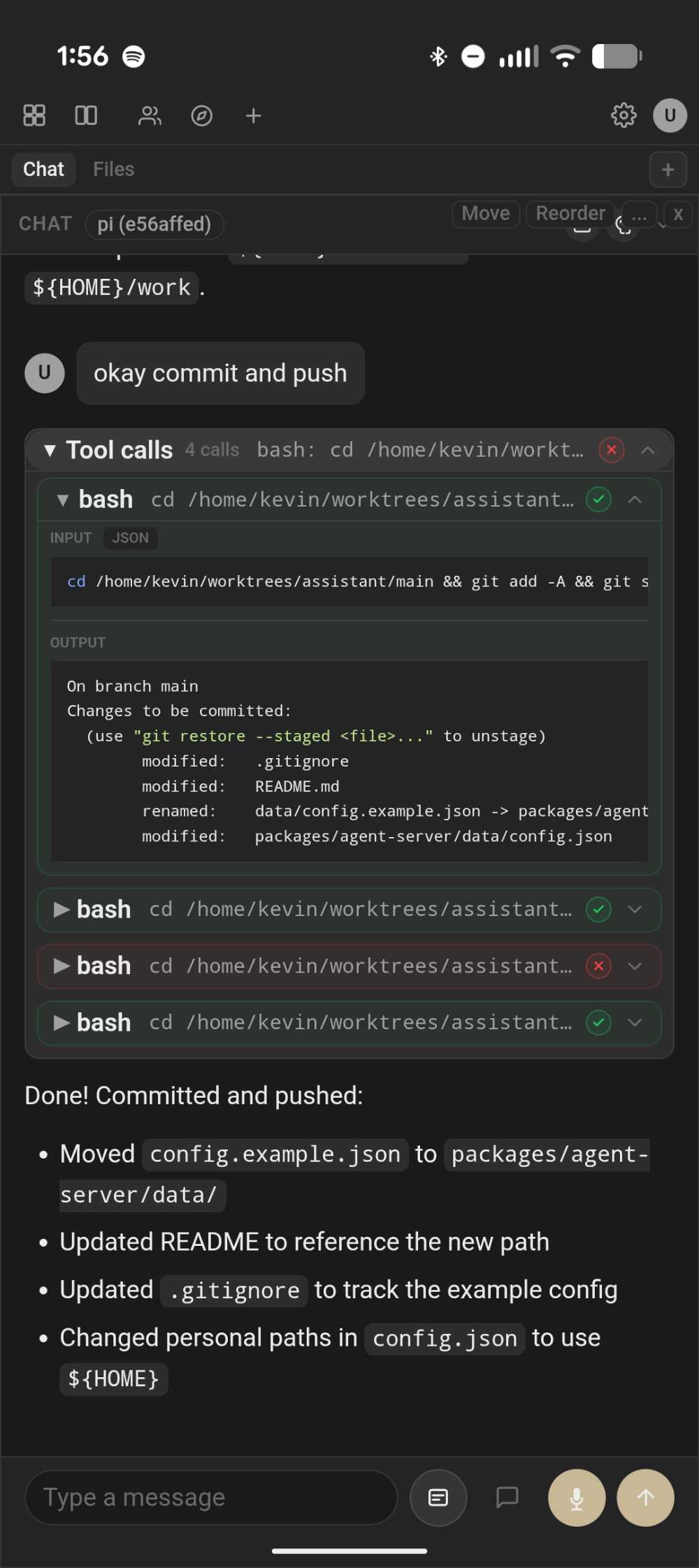
A personal AI assistant with a panel-based plugin system, multi-agent CLI integrations, and text/voice UI.
Plugins define panels and operations so agents can collaborate on lists, notes, and other workflows,
or extend the app with custom user-provided plugins.
In-process chat uses the Earendil Pi SDK for model access, tool execution, and streaming.
 |
 |
## Table of Contents
- [Features](#features)
- [Quick Start](#quick-start)
- [Repository Layout](#repository-layout)
- [Documentation](#documentation)
- [External Integrations](#external-integrations)
- [Configuration](#configuration)
- [Development](#development)
- [Architecture](#architecture)
- [License](#license)
## Features
- **Text chat** with streaming responses
- **Voice input** using browser-based speech recognition (Web Speech API)
- **Voice output** via OpenAI TTS or ElevenLabs streaming TTS (optional)
- **Android Thread voice** via [openai-speech-server](https://github.com/kcosr/openai-speech-server) for authenticated local Parakeet/Kokoro speech, with native token storage and model selection ([setup](packages/mobile-web/README.md#native-voice-runtime))
- **CLI agent integrations** (Claude, Codex, Pi) alongside built-in providers
- **Scheduled sessions** for cron-driven CLI runs
- **Panel plugins** for lists, notes, and custom workflows
- **Tool integration** via MCP (Model Context Protocol) over stdio
- **Built-in session tools** – agent can list, search, create, switch, rename, and pin sessions
- **Persistent sessions** with JSONL event logs and optional naming/pinning
- **Multi-client support** – multiple browser windows can share a session
- **Theme + font preferences** (auto/light/dark + presets, including Herdr). Dark uses nearly black
backgrounds, charcoal controls, and subtle borders; Auto uses the same palette in dark mode.
## Quick Start
Requires Node.js **22.19.0 or newer**. The in-process Pi provider uses Pi SDK 1.5.2;
CLI providers require their own separately installed executables.
```bash
# Clone the repository
git clone https://github.com/kcosr/assistant
cd assistant
# Install dependencies
npm install
# Build all packages
npm run build
# Build all packages in parallel
npm run build:parallel
# Build all packages in parallel on the remote builder
npm run build:remote
# Start the server (uses built-in config at packages/agent-server/data/config.json)
npm run start -w @assistant/agent-server
# Open http://localhost:3000 in your browser
```
In-process Pi agents reference named `chatProfiles` containing ordered `provider/model` choices,
and per-model thinking levels. Shared request overrides supply optional sampling settings. Pi’s
registry owns provider connections, authentication, capabilities, and limits, including custom models in
`~/.pi/agent/models.json` on the service host. See [Pi configuration](docs/CONFIG.md#pi-provider).
The built-in config includes Claude Code, Codex, and Pi CLI agents. For a full configuration example with all options, see `packages/agent-server/data/config.example.json`.
### Configuration Overrides
Override the default paths using environment variables:
```bash
# Use a custom data directory (sessions, events, config)
export DATA_DIR=/path/to/data
# Use a specific config file
export APP_CONFIG_PATH=/path/to/config.json
npm run start -w @assistant/agent-server
```
The server looks for config at `${DATA_DIR}/config.json` by default, or at `APP_CONFIG_PATH` if set.
### Building Skills for CLI Agents
Plugins can be exported as skills for use with CLI agents that support skills (e.g., Claude Code, Codex, Pi):
```bash
# Build all plugin skills to a directory
npm run build:plugins -- --skills-dir /tmp/skills
# Copy specific skills to your agent's skills directory
# Claude: ~/.claude/skills/ | Pi: ~/.pi/skills/ | Codex: ~/.codex/skills/
cp -r /tmp/skills/{notes,lists} ~/.pi/skills/
# Or copy all skills (ensure no name conflicts with existing skills)
cp -r /tmp/skills/* ~/.pi/skills/
# Build only specific skills directly to the skills directory
npm run build:plugins -- --skills notes,lists --skills-dir ~/.pi/skills/
```
Some skills include a CLI binary. Add the skill directories to your PATH, or reference CLIs by full path in your AGENTS.md:
```bash
# Option 1: Add to PATH (in ~/.bashrc or ~/.zshrc)
export PATH="$PATH:$HOME/.pi/skills/notes:$HOME/.pi/skills/lists"
# Option 2: Reference full paths in AGENTS.md / SKILL.md documentation
```
### Keyboard Shortcuts
| Shortcut | Action |
|----------|--------|
| `Ctrl/Cmd + K` | Open command palette |
| `Ctrl/Cmd + ]` / `Ctrl/Cmd + [` | Cycle focus between panels |
| `Ctrl + P` | Toggle layout navigation mode |
| `Ctrl + H` | Toggle header panel navigation mode |
| `Ctrl + Shift + S` | Split active panel (placement mode) |
| `Ctrl + I` | Toggle text input focus |
| `Right Option` (macOS, opt-in) | Focus the selected chat input without consuming the key event |
| `Ctrl + C/L/N` | Focus last-used chat/lists/notes panel (opens modal if none) |
| `Ctrl + R` | Toggle speech recording (if available) |
| `Cmd + Shift + S` (macOS) | Toggle sessions sidebar |
| `Cmd/Ctrl + Shift + C` | Toggle chat panel |
| `Cmd/Ctrl + Shift + ↑/↓` | Jump to top/bottom of chat |
| `Ctrl + Shift + Cmd + W` (macOS) / `Ctrl + Shift + Alt + W` (others) | Close panel (replace with placeholder) |
| `Ctrl + Shift + Cmd + X` (macOS) / `Ctrl + Shift + Alt + X` (others) | Remove panel from layout |
| `Enter` | Replace active empty panel |
| `Shift + Enter` | Submit modal form (e.g., from tags input in notes/lists) |
| `Cmd + Click` (macOS) / `Ctrl + Click` (others) | Focus a non-chat panel (chat panels focus on regular click) |
| `Tab` / `Shift + Tab` | Cycle focus between sidebar and input (when input is empty) |
| `Esc` | Cancel active operations (on mobile, closes sidebar if open; in pinned or modal chat panels, closes the panel instead) |
In layout navigation mode: arrows move between panels, `Enter` selects, `Esc` exits, `Tab` cycles tabs, `m` toggles split view, `1-9` select visible panels, `0` cycles pages.
In header navigation mode: `←/→` (or `A/D`) cycle header panels, `Enter`/`↓` activates, `Esc` exits, `1-9` select visible panels, `0` cycles pages.
In split placement mode: arrows or WASD choose region, `Enter` confirms, `Esc` cancels.
**Sessions sidebar (when focused):**
- `Arrow Up/Down` – Move between sessions (selection follows focus)
- `Enter` – Focus input
- `t` – Toggle pin
- `d` / `Delete` / `Backspace` – Delete session (with confirmation)
- `c` – Clear history (with confirmation)
**Lists panel item selection:**
- `Click` – Select item (when enabled in Settings menu)
- `Shift + Click` – Range select from last selected item to clicked item
- `Cmd + Click` (macOS) / `Ctrl + Click` (others) – Toggle individual item selection
- `Double-click` – Edit item
- `Arrow Up/Down` – Move selection
- `Shift + Arrow Up/Down` – Extend selection
- `Enter` – Edit focused item
- `Space` – Toggle completed for selection
- `n` – Add item
- `a` – Toggle AQL mode
- `w` / `s` – Move focused item up/down
- `t` / `b` – Move focused item to top/bottom
- `p` – Toggle pin
- `Cmd/Ctrl + C` / `X` / `V` – Copy / cut / paste list items (cross-list)
- `d` – Delete selection (with confirmation)
- `Esc` – Clear selection
**Lists/Notes browser (collection view):**
- `Arrow keys` – Move focus
- `Enter` – Open focused item
- `p` – Toggle pin
**Command palette (when open):**
- `Arrow Up/Down` – Move focus
- `Enter` – Launch selection
- `Shift + Enter` – Replace active panel (when available)
- `→` – Open action menu
- `Esc` – Close palette or menus
Palette commands:
- `/pinned` – Show pinned lists and notes
- `/favorites` – Show favorite lists and notes
**Notes panel:** Drag to select text, then release with `Shift` held to add selection to agent context.
### ElevenLabs Streaming TTS (Optional)
To enable ElevenLabs streaming text-to-speech (note: this can be costly):
```bash
export TTS_BACKEND=elevenlabs
export ELEVENLABS_API_KEY=
export ELEVENLABS_TTS_VOICE_ID=VUGQSU6BSEjkbudnJbOj
export ELEVENLABS_TTS_MODEL=eleven_multilingual_v2
```
### Git Versioning (Auto-Snapshots)
Git versioning is **enabled by default** for lists, notes, and time-tracker plugins. This automatically commits changes to the plugin's data directory at regular intervals, providing version history.
To disable git versioning for a plugin, remove or set `enabled: false` in the `gitVersioning` key:
```json
{
"plugins": {
"lists": {
"enabled": true,
"gitVersioning": {
"enabled": false
}
}
}
}
```
The default interval is 1 minute. You can adjust it with `intervalMinutes`.
### Recommended AGENTS.md Addition
Add this to your project or user-level `AGENTS.md` to help AI agents understand and use the assistant skills:
```markdown
## Assistant Workspace
The user runs a personal assistant workspace with panels for notes, lists, time tracking, and more. **Only use these skills when the user specifically mentions "assistant" or refers to the assistant workspace.** Otherwise, use standard file and shell operations.
### Skills
Skills are packages of instructions and optional CLI tools that integrate with the assistant workspace. Each skill has a `SKILL.md` with full documentation.
#### notes
Markdown notes with tags and search. Use for:
- Storing research, meeting notes, documentation
- Capturing information the user wants to reference later
- Organizing content with tags
Commands: `list`, `read`, `write`, `search`, `rename`, `delete`, `tags-add`, `tags-remove`
#### lists
Structured lists with items, tags, and custom fields. Use for:
- Task lists and to-dos
- Reading lists, watch lists, bookmarks
- Any ordered collection of items with metadata
Commands: `list`, `create`, `item-add`, `item-update`, `item-remove`, `items-search`
#### time-tracker
Track time against tasks with timers and manual entries. Use for:
- Starting/stopping work timers
- Logging time spent on tasks
- Querying time entries for reports
Commands: `task_create`, `task_list`, `timer_start`, `timer_stop`, `entry_create`, `entry_list`
#### panels
Panel inventory and layout management. Use for:
- Listing open panels
- Opening/closing/moving panels
- Sending events to panel instances
Commands: `list`, `selected`, `open`, `close`, `move`, `tree`
#### url-fetch
Fetch and extract content from URLs. Use for:
- Fetching web page content for analysis
- Extracting metadata (title, description) from URLs
- Getting readable text from articles
Commands: `fetch` (modes: `extracted`, `raw`, `metadata`)
### Usage
Run skill CLIs directly:
notes-cli list
lists-cli list
time-tracker-cli timer_status
All commands support `--json` for structured output.
```
## Repository Layout
Monorepo managed with npm workspaces:
| Package | Description |
| -------------------------- | ---------------------------------------------------------------------- |
| `packages/agent-server/` | Node.js backend – WebSocket server, OpenAI integration, TTS, MCP tools |
| `packages/web-client/` | Browser client – chat UI, speech input, audio playback |
| `packages/assistant-cli/` | Internal runtime used to generate plugin CLIs |
| `packages/shared/` | Shared types, protocol definitions, audio frame helpers |
| `packages/plugins/` | Plugin packages (core, official) |
| `packages/desktop/` | Canonical Electron desktop app wrapper |
| `packages/desktop-tauri/` | Transitional Tauri desktop app wrapper |
| `packages/mobile-web/` | Capacitor mobile app wrapper |
| `packages/notify-proxy/` | Push notification proxy server |
| `packages/push-cli/` | CLI for sending push notifications |
| `docs/` | Design documents and specifications |
## Documentation
For the full documentation map, see [docs/index.md](docs/index.md).
### Specifications
| Document | Description |
| ----------------------------------- | ------------------------------------------------------------------------------------------------------------------------------------------------------------------------------------- |
| [UI Specification](docs/UI_SPEC.md) | Common UI behavior and layout requirements for all client implementations (web, Android, iOS). Covers panel layouts, responsive behavior, toolbar controls, and interaction patterns. |
| [Plugin SDK](docs/PLUGIN_SDK.md) | Canonical guide for plugin structure, operations, bundles, and CLI skill generation. |
| [Config Reference](docs/CONFIG.md) | Comprehensive `config.json` reference, including agents, plugins, MCP servers, and CLI wrapper options. |
### Design Documents
| Document | Description |
| ------------------------------------------------- | ----------------------------------------------------------------------------------------------------------------------------------------------------------- |
| [Agents](docs/design/agents.md) | Agent architecture and configuration. Covers agent definitions, sessions, tool allowlists, and the relationship between agents and conversations. |
| [Preferences](docs/design/preferences.md) | Preferences storage architecture. Details server-side vs client-side storage, the `/preferences` API, per-list settings, and the optimistic update pattern. |
| [External Agents](docs/design/external-agents.md) | Design for async external agent integration. Describes how to connect out-of-process agent systems to the assistant UI via HTTP callbacks. |
| [Content Blocks](docs/design/content-blocks.md) | Output format documentation for Claude CLI and Codex CLI. Reference for implementing structured content block rendering. |
### Package Documentation
| Document | Description |
| ------------------------------------------------------ | ------------------------------------------------------------ |
| [Agent Server](packages/agent-server/README.md) | Server configuration, plugin system, and MCP tool hosting. |
| [Web Client](packages/web-client/README.md) | Browser client architecture and development. |
| [Plugin CLI Runtime](packages/assistant-cli/README.md) | Internal CLI runtime used by plugin build output. |
| [Shared](packages/shared/README.md) | Shared types, protocol definitions, and audio frame helpers. |
| [Desktop](packages/desktop/README.md) | Canonical Electron desktop app wrapper and build steps. |
| [Desktop Tauri](packages/desktop-tauri/README.md) | Transitional Tauri desktop app wrapper and build steps. |
| [Mobile Web](packages/mobile-web/README.md) | Capacitor mobile app wrapper for Android/iOS. |
| [Notify Proxy](packages/notify-proxy/README.md) | Push notification proxy server. |
| [Push CLI](packages/push-cli/README.md) | CLI for sending push notifications. |
## External Integrations
| Service | API | Purpose |
| -------------- | ---------------------------- | ----------------------------- |
| **OpenAI** | Chat Completions (streaming) | Text generation |
| **OpenAI** | Audio Speech | TTS output (default backend) |
| **ElevenLabs** | WebSocket Streaming TTS | TTS output (optional backend) |
| [**openai-speech-server**](https://github.com/kcosr/openai-speech-server) | Authenticated HTTP + WebSocket audio API | Android Thread recognition and speech |
| **MCP Server** | JSON-RPC 2.0 over stdio | Tool hosting |
## Configuration
See `docs/CONFIG.md` for environment variables and the `config.json` schema (including CLI agent providers).
Full examples live in `data/config.example.json`.
## Development
```bash
# Run tests
npm test
# Lint
npm run lint
# Format check
npm run format
# Build all packages
npm run build
```
## Architecture
```
┌─────────────────────────────────────────┐
┌─────────────────┐ WebSocket + HTTP │ Agent Server │
│ Web Client │◄──────────────────►│ (Node.js) │
│ (Browser) │ │ │
└─────────────────┘ │ • WebSocket: chat, audio streaming │
│ • HTTP: static files, REST API │
┌─────────────────┐ HTTP │ │
│ Plugin CLIs │◄──────────────────►│ │
│ (External Agent)│ REST API └──────────────────┬──────────────────────┘
└─────────────────┘ │
│
┌─────────────────┬───────────────┬───────────────┬───────────────┬───────────────┬─────────────────┐
│ │ │ │ │ │ │
▼ ▼ ▼ ▼ ▼ ▼ ▼
┌──────────────┐ ┌──────────────┐ ┌──────────────┐ ┌──────────────┐ ┌──────────────┐ ┌──────────────┐ ┌──────────────┐
│ Pi SDK Chat │ │ Claude CLI │ │ Codex CLI │ │ Pi CLI │ │ TTS Backend │ │ MCP Tools │ │ Plugins │
│ (API) │ │ (subprocess)│ │ (subprocess)│ │ (subprocess)│ │ (API) │ │ (subprocess) │ │ (files) │
└──────────────┘ └──────────────┘ └──────────────┘ └──────────────┘ └──────────────┘ └──────────────┘ └──────────────┘
```
### Client-Server Protocol
The client and server communicate over WebSocket using:
- **JSON messages** for control, text, and metadata
- **Binary frames** for audio data (TTS output)
See `packages/shared/src/protocol.ts` for message type definitions.
### Session Persistence
- **Sessions index**: `${DATA_DIR}/sessions.jsonl`
- **Session event logs**: `${DATA_DIR}/sessions//events.jsonl`
Event logs are append-only ChatEvent records containing user messages, assistant output, tool calls/results, and agent callbacks.
## License
MIT