# fv
`fv` is a command-line font viewer using terminal graphics (Sixel, iTerm,
Kitty).
Installing |
Building |
Using |
Releases
[![Releases][release-status]][Releases]
[![Discord Discussion][discord-status]][discord]
[releases]: https://github.com/kenshaw/fv/releases "Releases"
[release-status]: https://img.shields.io/github/v/release/kenshaw/fv?display_name=tag&sort=semver "Latest Release"
[discord]: https://discord.gg/WDWAgXwJqN "Discord Discussion"
[discord-status]: https://img.shields.io/discord/829150509658013727.svg?label=Discord&logo=Discord&colorB=7289da&style=flat-square "Discord Discussion"
## Overview
`fv` quick previews of TTF (and other font files) directly from the
command-line:
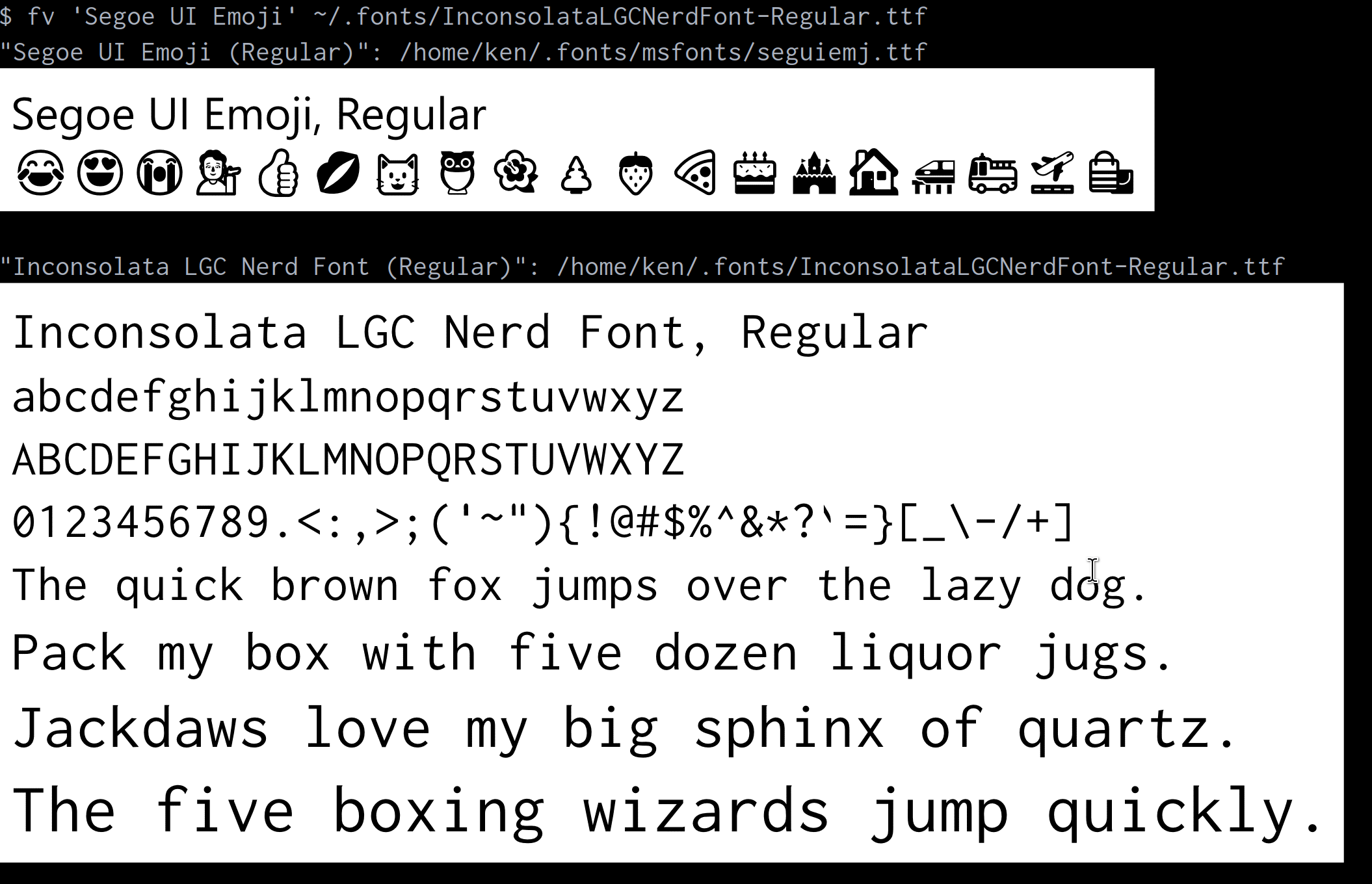
Uses [Sixel][sixel], [iTerm Inline Images][iterm], or [Kitty][kitty] graphics
protocols where available. See [Are We Sixel Yet?][arewesixelyet] for a list of
terminals known to work with this package.
[sixel]: https://saitoha.github.io/libsixel/
[iterm]: https://iterm2.com/documentation-images.html
[kitty]: https://sw.kovidgoyal.net/kitty/graphics-protocol/
[arewesixelyet]: https://www.arewesixelyet.com
## Installing
`fv` can be installed [via Release][], [via Homebrew][], [via AUR][], [via
Scoop][] or [via Go][]:
[via Release]: #installing-via-release
[via Homebrew]: #installing-via-homebrew-macos-and-linux
[via AUR]: #installing-via-aur-arch-linux
[via Scoop]: #installing-via-scoop-windows
[via Go]: #installing-via-go
### Installing via Release
1. [Download a release for your platform][releases]
2. Extract the `fv` or `fv.exe` file from the `.tar.bz2` or `.zip` file
3. Move the extracted executable to somewhere on your `$PATH` (Linux/macOS) or
`%PATH%` (Windows)
### Installing via Homebrew (macOS and Linux)
Install `fv` from the [`kenshaw/fv` tap][fv-tap] in the usual way with the [`brew`
command][homebrew]:
```sh
# install
$ brew install kenshaw/fv/fv
```
### Installing via AUR (Arch Linux)
Install `fv` from the [Arch Linux AUR][aur] in the usual way with the [`yay`
command][yay]:
```sh
# install
$ yay -S fv-cli
```
Alternately, build and [install using `makepkg`][arch-makepkg]:
```sh
# clone package repo and make/install package
$ git clone https://aur.archlinux.org/fv-cli.git && cd fv-cli
$ makepkg -si
==> Making package: fv-cli 0.4.4-1 (Sat 11 Nov 2023 02:28:28 PM WIB)
==> Checking runtime dependencies...
==> Checking buildtime dependencies...
==> Retrieving sources...
...
```
### Installing via Scoop (Windows)
Install `fv` using [Scoop](https://scoop.sh):
```powershell
# Optional: Needed to run a remote script the first time
> Set-ExecutionPolicy RemoteSigned -Scope CurrentUser
# install scoop if not already installed
> irm get.scoop.sh | iex
# install fv with scoop
> scoop install fv
```
### Installing via Go
Install `fv` in the usual Go fashion:
```sh
# install latest fv version
$ go install github.com/kenshaw/fv@latest
```
## Using
```sh
# list all system fonts
$ fv --list
# display all system fonts
$ fv --all
# display Verdana bold, italic
$ fv Verdana --style 'bold italic'
# display match information for a font
$ fv --match 'Hack'
# change the text display with the font
$ fv Arial --text "hello world"
# display a specific font file with custom text
$ fv /path/to/MyFont.woff2 --text "Cool Company Name"
# all command line options
$ fv --help
fv, a command-line font viewer using terminal graphics
Usage:
fv [flags] [font2, ..., fontN]
Flags:
--all show all system fonts
--bg color background color (default rgba(255,255,255,0))
--dpi int dpi (default 100)
--fg color foreground color (default rgba(0,0,0,0))
-h, --help help for fv
--list list system fonts
--margin int margin (default 5)
--match match system fonts
--size int font size (default 48)
--style font-style font style (default regular)
--text string display text
--variant font-variant font variant (default normal)
-v, --version version for fv
```
[homebrew]: https://brew.sh/
[fv-tap]: https://github.com/kenshaw/homebrew-fv
[aur]: https://aur.archlinux.org/packages/fv-cli
[arch-makepkg]: https://wiki.archlinux.org/title/makepkg
[yay]: https://github.com/Jguer/yay