# dsh-ui-composer-rainbow

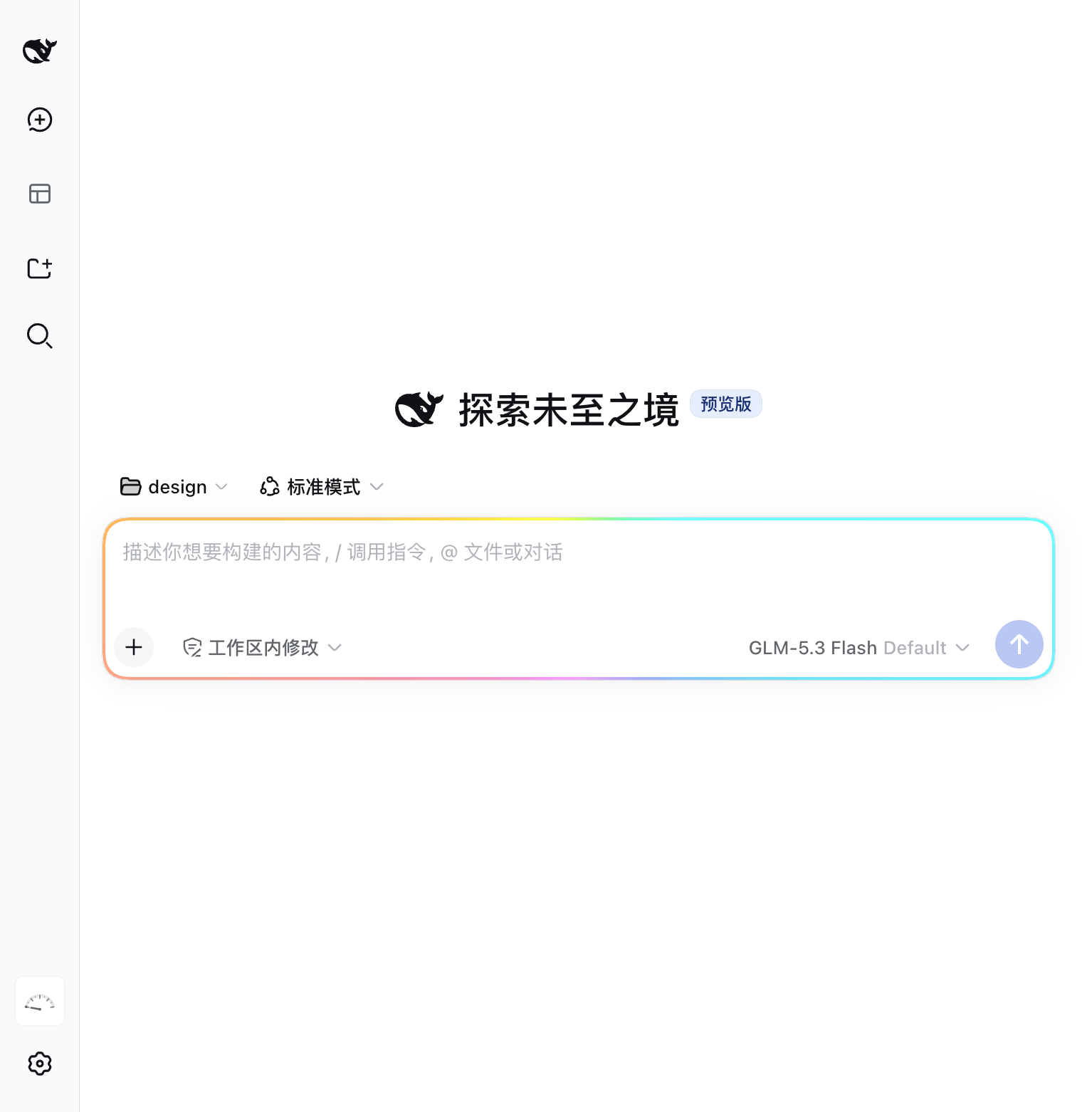
RainbowSpeak (虹语) — a flowing rainbow border for the chat composer: the input box has moods — faster while running, amber while waiting, red on failure.

GitHub stars npm version npm downloads License MIT PRs welcome GitHub last commit GitHub contributors Awesome DSH Plugin

[中文](README.md) · [English](README.en.md)
---
dsh-ui-composer-rainbow — classic rainbow border around the composer card
## ✨ Why this one ### Pure decoration, zero intrusion No slots taken over, no host patches, no tools registered, no system-prompt injections. Pure browser-side decoration: a `conic-gradient` ring masked down to the card edge, rotated by a registered custom property. 17 KB client bundle; engines without `@property` degrade to a static gradient ring. ### The border is the session state The ring mirrors the live session: it speeds up while the agent is running (4 s → 1.2 s per loop), turns amber with a slow pulse while a tool approval or ask-user prompt is pending, turns red with a fast pulse on send failures or agent errors, and plays a one-loop celebrate flash when a turn completes. You always know where the agent is without watching the screen. ### Seven palettes, one that follows your theme Classic rainbow / aurora / sunset / peach / ocean / cyberpunk neon — plus *follow theme*, derived from the host brand token via `color-mix`, tracking light/dark switches instantly. ## 🌈 Features - **Rainbow marquee border** around the composer card (`[data-composer-card]` host anchor), flowing via a registered `@property` angle so the gradient genuinely animates. Engines without `@property` degrade to a static gradient ring. - **Settings panel** (`Settings` → `Rainbow border`): enable/disable, flow speed (1–10 s per loop), ring width (1–6 px), color scheme, placement (all sides / top / bottom), reverse flow, and a breathing brightness overlay. All preferences persist in `localStorage` and apply live. ![Settings panel: seven palettes, flow speed, ring width and placement](assets/02-settings-rainbow.png) - **Seven color schemes**: classic rainbow, aurora, sunset, peach, ocean, cyberpunk neon (cyan/violet/magenta with a white lamp-flash segment), and *follow theme* — derived from the host brand token via `color-mix`. - **Session-state awareness** via the host dock seat: the ring speeds up while the agent is running (4 s → 1.2 s per loop), turns amber with a slow pulse while a tool approval or ask-user prompt is pending, turns red with a fast pulse on send failures or agent errors, and plays a one-loop celebrate flash when a turn completes. Priority: error > attention > running. - **Focus boost**: the ring brightens and saturates while the composer has focus, easing back on blur. - **Accessibility**: honors `prefers-reduced-motion` (animations disabled, static ring kept); settings controls carry localized labels and aria attributes. - **Bilingual copy** (zh/en) through the host locale registry; follows the host language setting. ## 🎨 Palettes | Cyberpunk neon | Aurora | Sunset | | --- | --- | --- | | ![Cyberpunk neon: cyan/violet/magenta on dark](assets/03-cyberpunk-dark.png) | ![Aurora: teal-green on dark](assets/04-aurora-dark.png) | ![Sunset: orange-violet on dark](assets/05-sunset-dark.png) | **Follow theme** (light mode): the ring takes the host brand color and tracks theme switches instantly. ![Follow theme: tied to the host brand color in light mode](assets/06-theme-follow-light.png) ## 📦 Install From the dsh CLI: ```sh dsh plugin add @kenz1117/dsh-ui-composer-rainbow ``` Or add it to a profile `package.json` manually: ```json { "dependencies": { "@kenz1117/dsh-ui-composer-rainbow": "*" } } ``` For local development, point the dependency at a checkout: ```json { "dependencies": { "@kenz1117/dsh-ui-composer-rainbow": "link:/absolute/path/to/dsh-ui-composer-rainbow" } } ``` then run `pnpm install` in the profile directory and restart the host. With the `link:` form, `pnpm bundle` in the plugin repo is enough for the next host restart to pick changes up — no reinstall needed. ## ⚙️ How it works - The plugin mounts a single `