WinPodX ### Click an app. Word opens. That's it.

Native Linux windows for every Windows app — real icons, real WM_CLASS,
pin-to-taskbar. FreeRDP RemoteApp + dockur/windows. Zero config.

# Latest stable release (default)
curl -fsSL https://raw.githubusercontent.com/kernalix7/winpodx/main/install.sh | bash

# Latest main HEAD (development; may be unstable)
curl -fsSL https://raw.githubusercontent.com/kernalix7/winpodx/main/install.sh | bash -s -- --main

# Uninstall (keeps Windows VM data; pass --purge to wipe everything)
curl -fsSL https://raw.githubusercontent.com/kernalix7/winpodx/main/uninstall.sh | bash -s -- --confirm
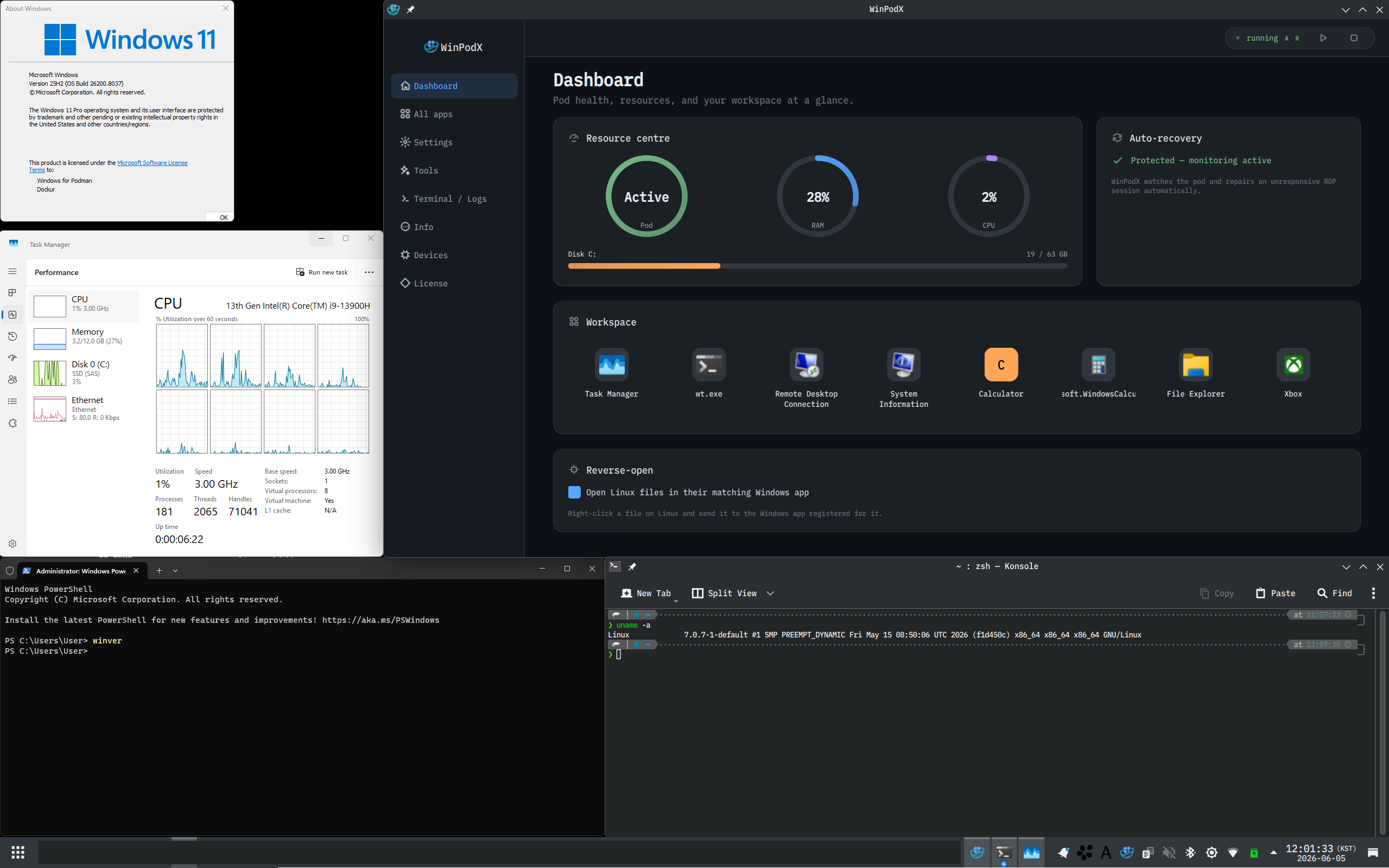
WinPodX in action — Windows apps as native Linux windows on KDE Windows About / Task Manager / PowerShell each in their own Linux window, alongside the WinPodX Dashboard (live Pod / RAM / CPU gauges, workspace tiles). [![Beta](https://img.shields.io/badge/status-beta-orange?style=for-the-badge)](#status-beta) [![Latest](https://img.shields.io/github/v/release/kernalix7/winpodx?include_prereleases&style=for-the-badge&label=latest&color=2962FF)](https://github.com/kernalix7/winpodx/releases) [![license](https://img.shields.io/github/license/kernalix7/winpodx?style=flat-square&color=blue)](LICENSE) [![python](https://img.shields.io/badge/python-3.9%2B-3776AB?style=flat-square&logo=python&logoColor=white)](https://www.python.org/) [![tests](https://img.shields.io/badge/tests-1800%2B-2EA44F?style=flat-square)](#testing) [![CI](https://img.shields.io/github/actions/workflow/status/kernalix7/winpodx/ci.yml?branch=main&style=flat-square&label=CI)](https://github.com/kernalix7/winpodx/actions/workflows/ci.yml) [![stars](https://img.shields.io/github/stars/kernalix7/winpodx?style=flat-square&color=FFD93D&logo=github&logoColor=white)](https://github.com/kernalix7/winpodx/stargazers) [![downloads](https://img.shields.io/github/downloads/kernalix7/winpodx/total?style=flat-square&color=2EA44F)](https://github.com/kernalix7/winpodx/releases) ###### Works on [![openSUSE](https://img.shields.io/badge/openSUSE-73BA25?style=flat-square&logo=opensuse&logoColor=white)](https://www.opensuse.org/) [![Fedora](https://img.shields.io/badge/Fedora-294172?style=flat-square&logo=fedora&logoColor=white)](https://fedoraproject.org/) [![Fedora Atomic Desktops](https://img.shields.io/badge/Fedora%20Atomic-294172?style=flat-square&logo=fedora&logoColor=white)](https://fedoraproject.org/atomic-desktops/) [![Debian](https://img.shields.io/badge/Debian-A81D33?style=flat-square&logo=debian&logoColor=white)](https://www.debian.org/) [![Ubuntu](https://img.shields.io/badge/Ubuntu-E95420?style=flat-square&logo=ubuntu&logoColor=white)](https://ubuntu.com/) [![RHEL family](https://img.shields.io/badge/RHEL%20%2F%20Alma%20%2F%20Rocky-EE0000?style=flat-square&logo=redhat&logoColor=white)](https://www.redhat.com/) [![Arch](https://img.shields.io/badge/Arch-1793D1?style=flat-square&logo=archlinux&logoColor=white)](https://archlinux.org/) [![NixOS](https://img.shields.io/badge/NixOS-5277C3?style=flat-square&logo=nixos&logoColor=white)](docs/INSTALL.md#nix) [![AppImage](https://img.shields.io/badge/AppImage-any%20distro-6F42C1?style=flat-square&logo=appimage&logoColor=white)](docs/INSTALL.md) **English**  ·  [한국어](docs/README.ko.md)  ·  [Install](docs/INSTALL.md)  ·  [Usage](docs/USAGE.md)  ·  [Features](docs/FEATURES.md)  ·  [Architecture](docs/ARCHITECTURE.md)  ·  [Comparison](docs/COMPARISON.md)
--- > ### Status: Beta > WinPodX is in active development (**v0.10.4**). **v0.7.0** introduced the **bare-metal disguise** (#246, opt-in / off by default): with `pod.disguise_level balanced | max` the Windows guest reads like a physical machine to VM-detection software (Nvidia GPU-passthrough "code 43", launch-gate VM checks, VM-hostile installers) — verified against al-khaser 0.82 — and the default guest username became `WPX-User`. **v0.7.1** is a UX + integration release: discovered Windows apps now register **automatic file associations** so they appear in your file manager's "Open with" menu (#545, on by default, only *added* — never set as the default handler); the GUI gains **app management** — reset-to-detected, a custom-icon picker, multi-select bulk hide/remove, and a restore list for deleted apps (#530); a **quick app launcher** (`winpodx launch`, #561) gives a Start-menu-style picker bindable to a DE hotkey; **`winpodx gui` no longer blocks the terminal** (#549); `winpodx doctor` **warns on an old FreeRDP** with broken RemoteApp windows (#546); and `install.sh --main` is now honoured on **Atomic Fedora** (#548). **v0.7.2** is a bug-fix release: it fixes a GUI crash on *Refresh Apps* (#567) and the tray *Terminate Session* / *USB Devices* submenus (#573) on KDE/Plasma, discovers apps with Chinese/Japanese/Korean names (#553), keeps the container across `pod stop` (no more recreate-on-update), and gives a clear error when Windows credentials are missing (#569). **v0.7.3** adds **reverse-open of files on the Windows VM itself** — not just your shared Home, the guest `C:` is shared over SMB and mounted with kio-fuse so a host app opens the real guest file and edits save back (#616, KDE) — an opt-in **idle auto-stop** that frees the VM's RAM (#622), and a **`+multitouch`** flag for touchscreen / stylus / pen passthrough (#623); it also fixes `winpodx app refresh` timing out on a slow guest (#619), the Dashboard RAM / Disk gauges sticking on "n/a" (#634), and removes the USB drive-letter auto-mapper that was destabilizing installs (#613, #638). **v0.7.4** lets you **choose where the Windows VM lives** (`install.sh --storage-dir`, #646) and **install from a local Windows ISO** to skip the download (`--win-iso`, #647), defaults a 24 GB+ host to **8 GB VM RAM** (#630); plus fixes — opening a second document in an already-running app, *Open with* on stripped-PATH desktops like Deepin, a clear error on a missing RDP password (#569), the GUI Logs buttons honouring the Docker backend, the `.deb` pulling in `podman-compose` (#644), and the maintenance dialog size (#550). **v0.8.0** makes app discovery **Start-Menu-only by default** — only the apps your Windows Start Menu actually shows, grouped into nested folder sub-groups, with a `desktop.full_app_scan` opt-in for the old scan-everything behaviour (#581); passes your `[pod] keyboard` to FreeRDP as the session layout (#660); stages `--win-iso` *before* compose-up so dockur installs from it instead of downloading (#647); self-heals the reverse-open listener; bumps bundled rdprrap to **0.3.0**; and fixes several GUI crashes — the *Refresh Apps* SIGSEGV, an off-thread display-scale SIGABRT, the Debloat task dialog not auto-closing (#550), and a layout-recursion SIGSEGV with long / CJK app names (#553). **v0.9.0** lets Windows apps handle **URL-scheme links** from Linux — click a `mailto:` link and Outlook opens; app schemes like `slack:` / `vnc:` route to the right Windows app, auto-harvested during discovery and registered as `x-scheme-handler`s (#421, #694). It also **hardens the trust boundary**: a discovered guest app can no longer silently become your default `http`/`https` handler (opt-in only), and the session window-reaper no longer mis-kills a just-relaunched app or mass-kills sessions on a transient scan failure (#680 follow-up); plus fixes for kio-fuse detection on multiarch/KF6 layouts (#697), the reverse-open listener autostarting with the tray (#691), the suspend/resume D-Bus subscription (#690), and the install one-liner auto-installing `git` when missing (#705). **v0.9.1** is a bug-fix + hardening release: it fixes a **data-loss bug** where a non-purge `uninstall.sh` could delete the Windows VM disk (#716), makes `uninstall --purge` actually purge on package installs, moves package cleanup to pre-remove hooks so `apt`/`dnf`/`pacman` removal works, and makes `install.sh` upgrades atomic (#720, #722); the reverse-open "Linux Apps" shortcuts now **launch an app directly**, not just open a file (#616), `install.sh` auto-installs `libxcb-cursor` for the Qt GUI (#712), and a reinstall after a non-purge uninstall repopulates the app menu (#723). **v0.10.0** rolls the pinned `dockur/windows` image forward to v6.00 then v6.02 (#721, #735, at the request of @kroese, the dockur maintainer) — broader Podman bridge-NAT and upstream QEMU updates. **v0.10.1** is a bug-fix release: RAIL app windows show their own icon on X11 (#702), tray Start / Stop / Restart work again on KDE Plasma (#725), discovery no longer aborts with FreeRDP `rc=12` on XWayland (#694), and the dockur pin moved to v6.01, dropping the forced `NETWORK=user` per the maintainer's rootless NAT fix (#735). **v0.10.2** is a bug-fix release: the guest agent stays responsive during long execs instead of looking like it repeatedly dies (#751), the installer no longer shadows an existing venv install on rpm-ostree hosts like Bazzite (#752), a missing `podman-compose` now fails loudly instead of a cryptic "no such container" (#753), `pod start` preflights host-port conflicts (e.g. Ubuntu's GNOME Remote Desktop on port 3390) instead of hanging for an hour (#754), and the dockur pin moved to v6.02 with live download progress in `wait-ready` (#735). **v0.10.3** is a hotfix: rootless Podman re-forces dockur's `NETWORK=user` (passt) networking (#770) — dropping it in 0.10.1 let the container pick bridge NAT, whose NAT-internal `172.x` guest IP was unreachable for the host-forwarded RDP port on some rootless hosts, so RDP never connected; rootful Podman and Docker keep dockur's auto-selection. It also detects a Homebrew-installed `podman-compose` even when brew's bin is off the session/tray PATH (#765, #725), fixing setup, `winpodx doctor`, and the tray Pod > Start no-op on immutable distros like Bazzite. **v0.10.4** adds `pod.home_share` to expose only a chosen directory as `\\tsclient\home` rather than your whole Home (#758), a **'Windows Desktop' launcher entry** for the full desktop (#769), **per-app RDP overrides** via a `[rdp]` block in `app.toml` (scale / extra flags / multimon, #692), an **expanded debloat** profile (#696), and README **update instructions** (#734); it also retries a slow first-boot discovery up to 5 times instead of 2 (#784). The AppImage is **Thin** (~110 MB) — only FreeRDP + Python + Qt + winpodx — and uses the host's `podman` / `docker`. The CLI surface settled in 0.6.0 stands: **`winpodx guest`** (guest-side ops), **`winpodx install`** (install / disk ops), and **`winpodx doctor`** (diagnostics with `--json` / `--quick` / `--fix`); the post-create chain is the single **`winpodx provision`**. First install still takes ~5–10 minutes (Windows VM ISO download + Sysprep + OEM apply); `winpodx pod wait-ready --logs` shows live progress. Please file issues at if something breaks. **No full-screen RDP.** Each Windows app becomes its own Linux window with its real icon — pinnable, alt-tabbable, file-associated, both directions. Drop into a full Windows desktop only when you actually want one (`winpodx app run desktop`). WinPodX runs a Windows container (via [dockur/windows](https://github.com/dockur/windows)) in the background and presents Windows apps as native Linux applications through FreeRDP RemoteApp, while a bearer-authed HTTP agent inside the guest handles the host→guest command channel without flashing a PowerShell window. The reverse direction — Linux apps surfaced in the Windows "Open with…" menu — is handled by a host-side listener that consumes JSON requests written by per-slug Rust shims inside the guest. **Near-zero external Python dependencies** (stdlib only on Python 3.11+; one pure-Python `tomli` fallback on 3.9/3.10). ## Minimum requirements **Before installing**, make sure your machine actually supports virtualisation. WinPodX runs Windows in a KVM-backed container; without these three, the install will run to completion but Windows will never boot. | Requirement | How to check | Fix | |---|---|---| | **Intel VT-x or AMD-V enabled in BIOS / UEFI** | `lscpu \| grep -i virtualization` shows `VT-x` or `AMD-V` | Reboot → firmware setup → enable "Intel Virtualization Technology" / "SVM Mode" / "VT-x". OFF by default on many laptops. | | **kvm kernel module loaded** | `lsmod \| grep kvm` lists `kvm_intel` or `kvm_amd` | `sudo modprobe kvm_intel` (Intel) or `sudo modprobe kvm_amd` (AMD). Auto-loads on next boot once BIOS allows it. | | **Your user is in the `kvm` group** | `id -nG \| tr ' ' '\n' \| grep kvm` returns `kvm` | `sudo usermod -aG kvm $USER`, then log out + back in. | Hardware: x86_64 or aarch64 CPU with virtualisation extensions, 8 GB+ RAM (12 GB+ recommended), ~30 GB free disk for the Windows image. `install.sh` aborts with the same diagnostic if `/dev/kvm` is missing after the package install step — most "install ran fine but Windows never boots" bug reports trace back to one of the rows above. ## Quick install One-liner (any supported Linux distro): ```bash curl -fsSL https://raw.githubusercontent.com/kernalix7/winpodx/main/install.sh | bash ``` Or via a native package manager: ```bash # openSUSE Tumbleweed / Leap / Slowroll sudo zypper addrepo https://download.opensuse.org/repositories/home:/Kernalix7/openSUSE_Tumbleweed/home:Kernalix7.repo sudo zypper install winpodx # Fedora 42 / 43 / 44 (dnf5 — Fedora 41+) sudo dnf config-manager addrepo --from-repofile=https://download.opensuse.org/repositories/home:/Kernalix7/Fedora_43/home:Kernalix7.repo sudo dnf install winpodx # Debian / Ubuntu — grab the matching .deb from the latest release sudo apt install ./winpodx__all_debian13.deb # AlmaLinux / Rocky / RHEL 9 / 10 — grab the matching .rpm sudo dnf install ./winpodx--0.noarch.el10.rpm # Arch yay -S winpodx # Nix nix run github:kernalix7/winpodx # AppImage (distro-agnostic, single file) # Download winpodx--x86_64.AppImage from the latest GitHub release chmod +x winpodx-*-x86_64.AppImage ./winpodx-*-x86_64.AppImage setup ``` > **After a package-manager / AppImage install:** run `winpodx setup` once to generate `~/.config/winpodx/winpodx.toml` + compose.yaml. The curl one-liner does this for you (and waits ~5–10 min for the Windows first boot); package installs ship the binary only so `apt install` / `dnf install` / `yay -S` / first AppImage launch don't trigger a 10-minute Windows ISO download out of the blue. After setup, just launching an app (`winpodx app run desktop`) auto-provisions the pod the first time. > > The Thin AppImage (0.6.0) bundles Python + Qt + winpodx + FreeRDP only — the container runtime lives on the host (`podman` ≥ 4 recommended, `docker` also supported) so the AppImage no longer fights a host stack you already have (#357, #363). Pre-0.6.0 fat AppImages bundled the whole podman stack and shadowed the host's. Host-side requirements left: a container runtime via your package manager, `/dev/kvm`, `kvm` group membership, and `/etc/subuid` / `/etc/subgid` for rootless Podman. `winpodx setup-host` fixes the kvm / subuid bits via a single `pkexec` prompt; `winpodx doctor` surfaces anything still missing. > > **Updating.** Re-run the same one-liner to pick up the latest release — it detects the existing install and upgrades it in place, keeping your config and Windows VM; a running tray / GUI restarts itself so the new version takes effect. This works unmodified on Bazzite and other rpm-ostree hosts too (no `--main`, no VM wipe). Installed via a package manager or the AppImage instead? Update it the same way you installed it — through your package manager, or by grabbing the newer `.deb` / `.rpm` / AppImage from the [latest release](https://github.com/kernalix7/winpodx/releases/latest). See [docs/INSTALL.md](docs/INSTALL.md) for offline / air-gapped builds, source installs, version pinning, updating, and uninstall. ## First-time setup If you used the `curl install.sh` one-liner, setup already ran and the Windows VM is booting -- skip to [Launch](#launch). For every other install path (package managers, AppImage, source, pip) run setup once before the first app launch: ```bash # Auto setup -- host-detected defaults, no prompts winpodx setup # Interactive wizard -- pick backend, cores, RAM, edition, language, timezone, debloat preset winpodx setup --customize ``` Setup writes `~/.config/winpodx/winpodx.toml` + `compose.yaml`, registers the GUI launcher, and confirms the host has FreeRDP + Podman / Docker + KVM. If any of those are missing, the output ends with a per-distro install command (e.g. `sudo apt install xfreerdp3 podman podman-compose` on Debian / Ubuntu, `sudo dnf install ...` on Fedora) -- run it and re-run `winpodx setup`. The first app launch then provisions the pod, pulls the dockur image, runs the Windows ISO download + Sysprep + OEM apply, and reaches a usable RDP session in ~5-10 min. `winpodx pod wait-ready --logs` tails container progress live so you can watch each phase: ```bash winpodx app run desktop # First launch -- ~5-10 min, subsequent launches near-instant winpodx pod wait-ready --logs # Optional: watch first-boot progress live ``` Run `winpodx doctor` any time afterwards to re-check host state and surface the next fix command if something drifts: ```bash winpodx doctor # Read-only -- prints what would need fixing winpodx guest apply-fixes # Re-applies guest-side runtime fixes (RDP timeouts, NIC power-save, etc.) ``` ## Launch ```bash winpodx app run word # Launch Word winpodx app run word ~/doc.docx # Open a file winpodx app run desktop # Full Windows desktop winpodx launch # Quick app launcher (Start-menu style picker) ``` Or just click an app icon in your application menu. `winpodx launch` opens a searchable picker of your Windows apps — bind it to a desktop-environment custom shortcut (KDE: *System Settings → Shortcuts → Custom*; GNOME: *Settings → Keyboard → Custom Shortcuts*) for a system-wide hotkey. See [docs/USAGE.md](docs/USAGE.md) for the full CLI, the Qt6 GUI, health checks, and configuration. ## Key features
**Bare-metal disguise (VM-detection avoidance)** — new in 0.7.0 · opt-in, off by default - Makes the Windows guest read as a **physical machine** to software that refuses to run under a detected hypervisor — Nvidia GPU-passthrough "code 43", launch-gate VM checks, VM-hostile installers - `pod.disguise_level balanced | max`: **balanced** hides the CPUID hypervisor bit + KVM signature and mirrors the host's real SMBIOS/DMI; **max** ("Hardened") adds a locally-built patched-QEMU image (`winpodx disguise build-image`) that rewrites the ACPI / disk / sensor / USB fingerprints and drops the virtio + Red-Hat PCI tells (keeps USB3) - Host-derived strings stay in the **local image only** (never committed to git); serial / UUID / asset-tag are never read - **al-khaser 0.82-verified** — enable with `winpodx config set pod.disguise_level max` or the GUI Settings "Bare-metal" selector - [Details →](docs/FEATURES.md#bare-metal-disguise-vm-detection-avoidance)
**Reverse-open** - Linux apps appear in the Windows guest's right-click "Open with…" menu by default - Correct per-app icons in both the short menu and the long "Choose another app" dialog - Selecting one round-trips the file open to host `xdg-open` - Auto-discovers host-side Linux apps + their MIME associations from freedesktop standards - Manage via `winpodx host-open` CLI or the GUI Settings panel - [Details →](docs/FEATURES.md#reverse-open-linux-apps-in-windows-open-with) **Seamless app windows** - RemoteApp (RAIL) renders each Windows app as a native Linux window — no full desktop - Per-app taskbar icons via `WM_CLASS` matching (`/wm-class:` + `StartupWMClass`) - Bidirectional file associations: double-click `.docx` in your file manager → Word opens - Multi-session RDP: bundled [rdprrap](https://github.com/kernalix7/rdprrap) auto-enables up to 10 independent sessions - Multi-monitor RAIL (0.6.0): a remote-app window keeps working input when dragged onto a second monitor — on by default (`cfg.rdp.multimon`, default `span`) - RAIL prerequisites set automatically during unattended install
**Zero-config launch** - First app click auto-provisions everything: config, container, desktop entries - Auto-discovery on first boot scans the running Windows guest and registers every installed app with its real icon (Registry App Paths, Start Menu, UWP/MSIX, Chocolatey, Scoop) - Manual rescan any time via `winpodx app refresh` or the GUI Refresh button - Multi-backend: Podman (default), Docker, manual RDP (the libvirt backend was dropped in 0.6.0 — stay on ≤0.5.x or use the manual backend for your own libvirt domain) **Peripherals & sharing** - **Clipboard**: bidirectional copy-paste (text + images) — on by default - **Sound**: RDP audio streaming (`/sound:sys:alsa`) — on by default - **Printer**: Linux printers shared to Windows — on by default - **Home directory**: shared as `\\tsclient\home` - **USB drives**: auto-mapped to drive letters (E:, F:, …) via FileSystemWatcher; subfolders work for drives plugged in after session start; the USB desktop shortcut (`\\tsclient\media`) always resolves, opening an empty folder when nothing is mounted instead of erroring - **Host USB / PCI device passthrough** (0.6.0): pass real host devices into the Windows guest — `winpodx device list / attach / detach `, a GUI "Devices" tab (two-column host↔guest mover), and a system-tray USB switcher. USB hot-plugs live (`cfg.pod.usb_live`, default on); PCI is boot-added and needs a guest restart plus a `--force` / dialog confirmation
**Automation & security** - Auto suspend / resume: container pauses when idle, resumes on next launch - Pod auto-start on login (v0.5.9, opt-in): `winpodx autostart on` installs a tray autostart entry so the pod starts/resumes at login — off by default (`autostart off|status`, or a GUI Settings checkbox) - UNRESPONSIVE → recover (v0.5.5): stalled RDP guest is detected on `RUNNING → UNRESPONSIVE` and self-healed via in-guest TermService cycle, no `pod restart` needed - Host-adaptive Windows-on-KVM tuning profile (v0.5.5): `+invtsc`, `platform_tick` and more, gated by host capability — `tuning_profile = auto|safe|off` - Password auto-rotation: 20-char cryptographic password, 7-day cycle with atomic rollback - Smart DPI scaling: auto-detects from GNOME, KDE, Sway, Hyprland, Cinnamon, xrdb - Windows debloat: telemetry, ads, Cortana, search indexing disabled by default - FreeRDP `extra_flags` allowlist (regex-validated) as the user-input safety boundary - Time sync: force Windows clock resync after host sleep/wake **Operations & resilience** - Multilingual UI (v0.5.9): tray / GUI / CLI fully translated to 7 languages (en / ko / zh / ja / de / fr / it), auto-detected from `$LANG` — override with `winpodx language ` or GUI Settings → "WinPodX UI language" - Windows disk auto-grow (v0.5.9): C: grows itself when it fills past a threshold while idle, bounded by host free space — or grow on demand (`winpodx install grow-disk [SIZE]`, `winpodx install disk-usage`, GUI Tools → Grow Disk) - Guest sync (v0.5.9): push updated agent / urlacl / rdprrap / fixes into a running guest after a host upgrade — automatic once per pod start, or `winpodx guest sync [--force]` - Offline / air-gapped install (`--source` + `--image-tar`) - One-line uninstall (keeps Windows VM data unless `--purge`) - Health checks via `winpodx doctor` (deps / pod / RDP / agent / disk / round-trip / password age; `--json` for machine-readable, `--quick` for cheap subset, `--fix` for idempotent auto-remediation of common findings) - Redesigned Qt6 GUI (0.6.0): a left Start-menu-style navigation sidebar + a new **Dashboard** home with live Pod / RAM / CPU ring gauges, disk usage, an auto-recovery status card, pinned/recent workspace tiles, and a reverse-open toggle; the app launcher is now the "All apps" page, alongside Devices / Settings / Tools / Terminal / Info — plus a lighter system tray. In-house SVG icon set, responsive reflow, and a hero search that doubles as a command bar - Stdlib-leaning Python (no pip-deps on 3.11+; one `tomli` fallback on 3.9 / 3.10)
See [docs/FEATURES.md](docs/FEATURES.md) for deep dives, including multi-session RDP internals, app profile schema, and the reverse-open architecture. ## Documentation | Document | What's inside | |----------|---------------| | [INSTALL.md](docs/INSTALL.md) | Every install path — one-liner, package managers, AppImage, offline, Nix, source | | [USAGE.md](docs/USAGE.md) | CLI reference, Qt6 GUI tour, health checks, configuration file | | [FEATURES.md](docs/FEATURES.md) | Reverse-open, multi-session RDP, peripherals, app profiles, auto-discovery | | [ARCHITECTURE.md](docs/ARCHITECTURE.md) | How it works (diagram), tech stack, source tree, data flows | | [COMPARISON.md](docs/COMPARISON.md) | WinPodX vs winapps / LinOffice / winboat, and WinPodX vs Wine | | [CHANGELOG.md](CHANGELOG.md) | Full version history | | [CONTRIBUTING.md](CONTRIBUTING.md) | Development setup and workflow | | [SECURITY.md](SECURITY.md) | Security disclosure process | ## Supported distros | Distro | Package manager | Status | |--------|-----------------|--------| | openSUSE Tumbleweed / Leap 15.6 / Leap 16.0 / Slowroll | zypper | Tested | | Fedora 42 / 43 / 44 / Rawhide | dnf | Supported | | Fedora Silverblue / Kinoite / Sericea / Bluefin / Bazzite (42 / 43 / 44) | rpm-ostree (OBS, `--apply-live`) | Supported | | Debian 12 / 13, Ubuntu 24.04 / 25.04 / 25.10 / 26.04 | apt | Supported | | AlmaLinux / Rocky / RHEL 9 / 10 | dnf | Supported | | Arch / Manjaro | pacman + `yay -S winpodx` | Supported | | NixOS (and Nix on any distro) | nix flake | Supported | Each tag push (`v*.*.*`) publishes to all channels automatically — see [packaging/](packaging/) for maintainer details. ## Testing ```bash # From repo root (no install needed) export PYTHONPATH="$PWD/src" python3 -m pytest tests/ # 1800+ tests ruff check src/ tests/ # Lint ruff format --check src/ tests/ ``` ## Contributing See [CONTRIBUTING.md](CONTRIBUTING.md) for development setup, branch naming, commit conventions, and CI expectations. ## Security For security issues, follow the process in [SECURITY.md](SECURITY.md). ## Star History Star History Chart ## Support If WinPodX makes your Linux desktop a little nicer: [![GitHub Sponsors](https://img.shields.io/badge/Sponsor-GitHub-EA4AAA?logo=githubsponsors&logoColor=white&style=for-the-badge)](https://github.com/sponsors/kernalix7) [![Ko-fi](https://img.shields.io/badge/Ko--fi-F16061?logo=ko-fi&logoColor=white&style=for-the-badge)](https://ko-fi.com/kernalix7) [![Fairy](https://img.shields.io/badge/🧚_Fairy-EE6E73?style=for-the-badge&logoColor=white)](https://fairy.hada.io/@kernalix7) GitHub Sponsors supports recurring or one-time sponsorship; Ko-fi handles international cards and PayPal; fairy.hada.io is a Korean tipping platform. Bug reports, PRs, and stars on the repo are equally appreciated and free. ## License [MIT](LICENSE) — Kim DaeHyun (kernalix7@kodenet.io)