# LinkedIn Posts Hunter MCP Server
**Automate LinkedIn job post searching and tracking with AI-powered assistance**
[](https://modelcontextprotocol.io)
[](https://www.typescriptlang.org/)
[](https://playwright.dev/)
[](https://react.dev/)
[](https://expressjs.com/)
[](https://vitejs.dev/)
[](https://tailwindcss.com/)
---
[](https://ko-fi.com/kevinweitgenant)
---
## 📖 Overview
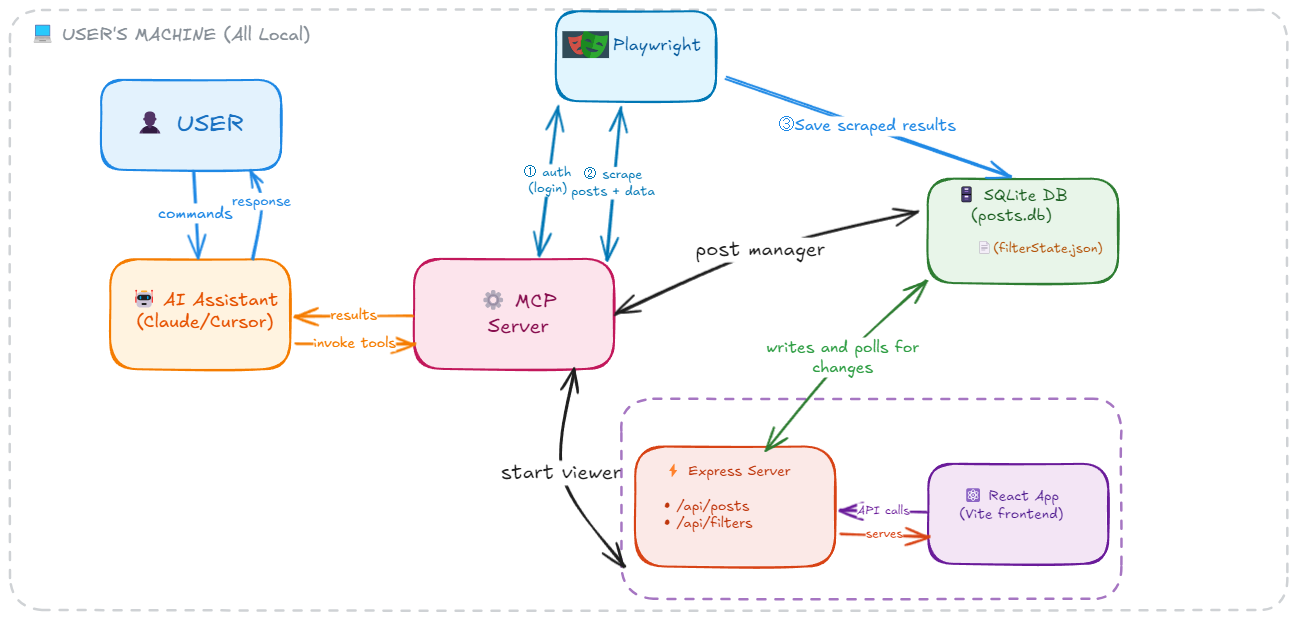
**LinkedIn Posts Hunter MCP** is a Model Context Protocol (MCP) server that provides tools for automating LinkedIn job post search and management through your AI assistant (Claude Desktop, Cursor, or other MCP-compatible clients).
**Why LinkedIn Posts?** Job opportunities often appear in LinkedIn posts first, before they're posted on traditional job boards. By monitoring LinkedIn posts, you can discover opportunities earlier and get a competitive advantage in your job search.
### How it works:
**1. Authentication & Scraping**
- The MCP server exposes a Playwright-based tool that your AI assistant can invoke to automate browser interactions with LinkedIn
- First-time use requires logging into LinkedIn through a browser window to capture session cookies
- These cookies are **stored locally on your computer** for persistent authentication
- Once authenticated, your AI assistant can call the search tool with keywords (either from your conversation or suggested by the AI) to scrape job posts
**2. Local Data Storage**
- All scraped posts are saved to a **local SQLite database** on your machine
- The database stores post content, metadata (author, dates, engagement metrics), and tracking info (whether you've applied)
- Your data never leaves your computer
**3. Visual Interface**
- A separate tool launches a **React dashboard** that renders the scraped posts from your local database
- **Visualize all your scraped posts** in table or card views with profile images and engagement metrics
- **Track your applications** by marking posts as "applied" or "saved for later" directly in the UI
- **Quick actions** let you filter, sort, and manage posts with point-and-click simplicity
- Changes made in the React app are written to the local database. And changes made through MCP commands are reflected in the UI.
**4. Dual Control**
- You can manage posts through **either** the React UI **or** through MCP tools like `manage_posts` and `viewer_filters`
- The React app updates via **polling**, so changes made through MCP commands are reflected in the UI
- This gives you flexibility: use natural language commands with your AI assistant, or point-and-click in the dashboard
---
## 🎬 Video Demo
https://github.com/user-attachments/assets/93f32db4-9ecf-4438-889f-ebe95b5b17e9
**📹 [Watch Walkthrough](https://streamable.com/m6tvef?src=player-page-share)**
*Watch the complete workflow from authentication to post management*
---
### 🎨 Diagram