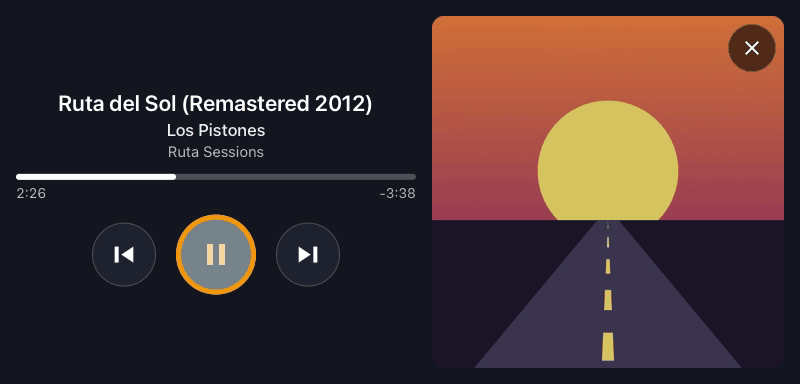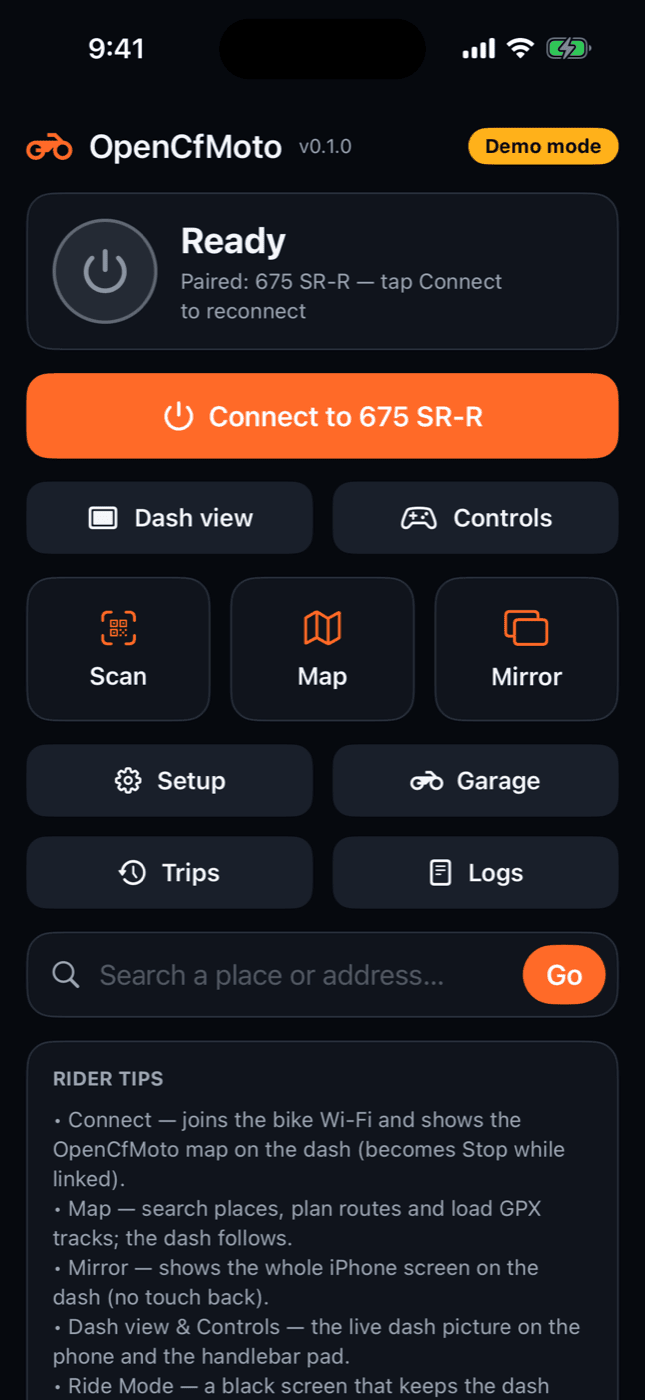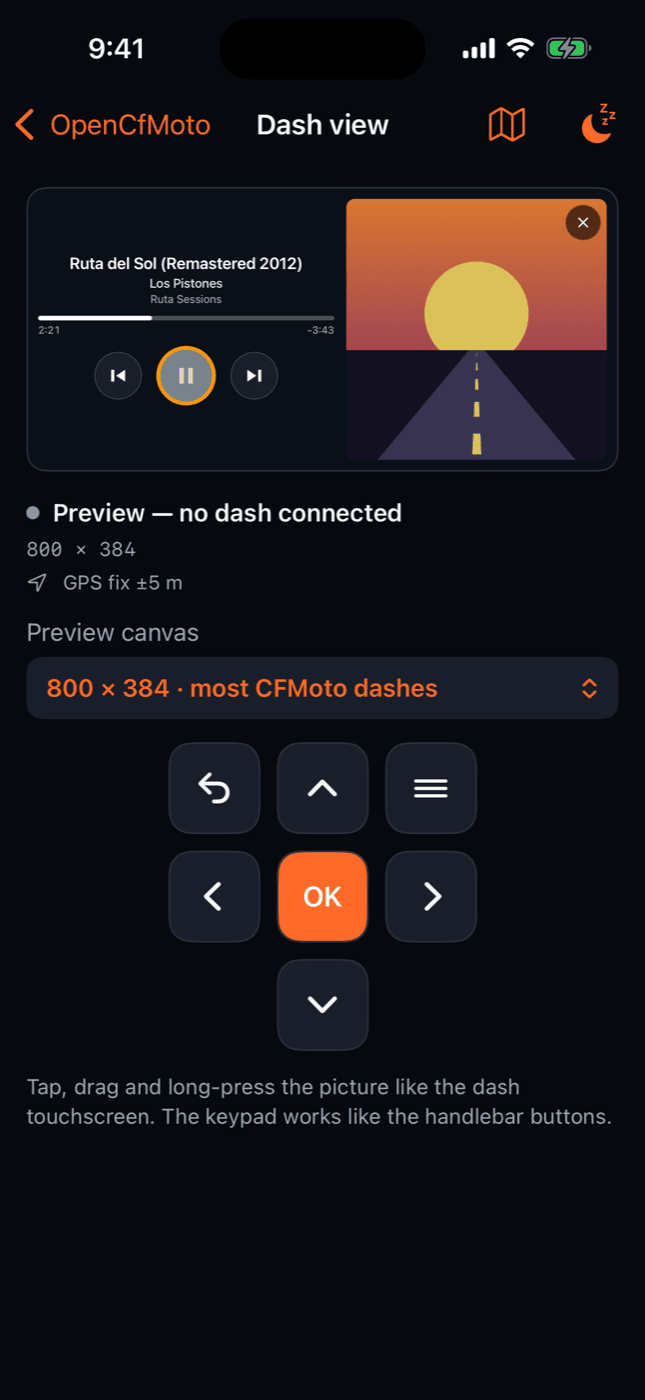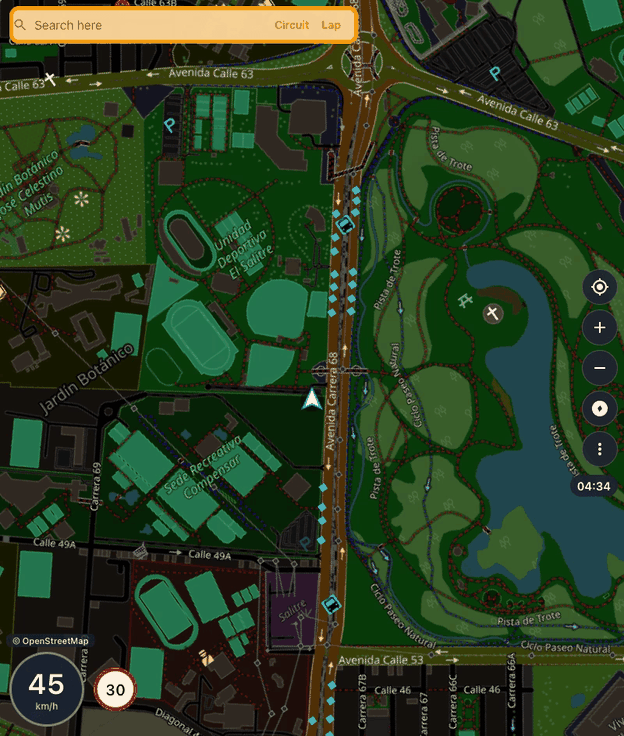
OpenCfMoto for iOS app icon: a speedometer with a navigation arrow # OpenCfMoto for iOS [![iPhone: TestFlight · probar la beta / try the beta](https://img.shields.io/badge/TestFlight-probar%20la%20beta%20%C2%B7%20try%20the%20beta-0066CC?style=for-the-badge&logo=apple&logoColor=white)](https://testflight.apple.com/join/aWur6hxp) **CFMOTO / MotoPlay dash navigation from your iPhone.** Your own map, turn-by-turn guidance and Apple Music on **CFMOTO MotoPlay** and other **Carbit / EasyConnect** motorcycle dashboards, streamed over the bike's Wi-Fi. A **CarPlay alternative for motorcycles**: 450MT · 800MT · 450SR · 675SR-R · 700MT · 1000MT-X · 800NK · Voge · Moto Morini · QJ Motor… **Navegación en el tablero de tu CFMOTO / MotoPlay desde el iPhone.** Mapa propio, indicaciones giro a giro y Apple Music en los tableros **CFMOTO MotoPlay** y otros **Carbit / EasyConnect**, por el Wi-Fi de la moto. Una **alternativa a CarPlay para motos**. [![CI](https://github.com/Kevinparra535/opencfmoto-ios/actions/workflows/ci.yml/badge.svg?branch=main)](https://github.com/Kevinparra535/opencfmoto-ios/actions/workflows/ci.yml) [![Release](https://img.shields.io/github/v/release/Kevinparra535/opencfmoto-ios)](https://github.com/Kevinparra535/opencfmoto-ios/releases/latest) [![License: AGPL-3.0-or-later](https://img.shields.io/badge/license-AGPL--3.0--or--later-blue)](LICENSE) [![Platform: iOS 17+](https://img.shields.io/badge/platform-iOS%2017%2B-lightgrey)](#requirements) [![Swift 5.9+ · SwiftUI](https://img.shields.io/badge/Swift-5.9%2B%20%C2%B7%20SwiftUI-F05138?logo=swift&logoColor=white)](https://www.swift.org) [![iOS port of OpenCfMoto (Android)](https://img.shields.io/badge/iOS%20port%20of-OpenCfMoto%20%28Android%29-2ea44f)](https://github.com/zanderp/open-cfmoto) The OpenCfMoto map streamed from an iPhone to an 800×384 CFMOTO MotoPlay dash: OpenStreetMap night map, speed, clock and the Apple Music tile with the demo song's cover (demo route) The Apple Music sheet on the motorcycle dash: demo song, cover, progress and previous / pause / next buttons (demo song)

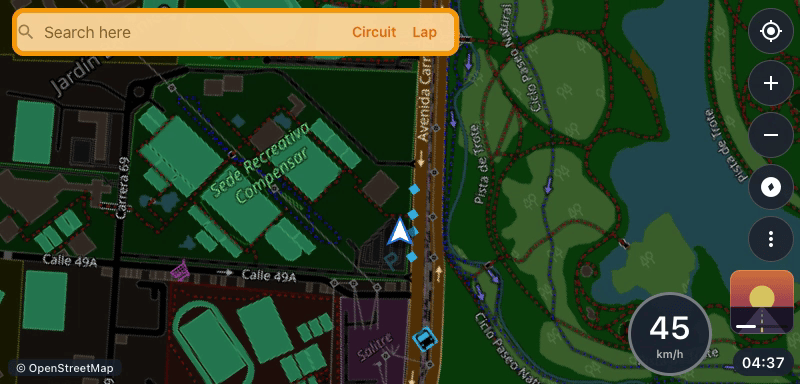
OpenCfMoto home screen on the iPhone in demo mode iPhone Dash view with the Apple Music sheet and the handlebar keypad (demo) The same map on the 800×944 portrait dash of a 1000 MT-X, with speed and speed limit (demo route) What the app streamed to a simulated dash in CI, and iOS simulator screenshots; demo data only · Map © OpenStreetMap contributors
Lo que la app envió a un tablero simulado en la CI y capturas del simulador de iOS; solo datos de demostración · Mapa © colaboradores de OpenStreetMap
### [iPhone: TestFlight](https://testflight.apple.com/join/aWur6hxp) · [Install on your iPhone / Instalar en tu iPhone](https://kevinparra535.github.io/opencfmoto-ios/) · [Try it](#try-it) · [Pruébala](#pruebala) · [Credits / Créditos](CREDITS.md) · [English](#opencfmoto-for-ios-english) · [Español](#opencfmoto-para-ios)
> **Early field testing (v0.1).** Community project, not affiliated with CFMOTO, Carbit or Apple. Set > your route before you ride. · **Pruebas de campo (v0.1).** Proyecto comunitario, sin afiliación con > CFMOTO, Carbit ni Apple. Fija la ruta antes de salir. --- # OpenCfMoto para iOS **OpenCfMoto para iOS** es una app de iPhone que envía su **propia interfaz de navegación** —mapa, indicaciones giro a giro, velocidad, límite de velocidad, hora de llegada, reloj y menús— a los tableros **Carbit / EasyConnect** de las motos (CFMoto **MotoPlay** y sus hermanos de otras marcas), usando el protocolo **PXC** obtenido por ingeniería inversa. Es un port a Swift de la app Android [OpenCfMoto](https://github.com/zanderp/open-cfmoto) (AGPL-3.0), concretamente de su modo «Mapa / GPX en el tablero». > ⚠️ Proyecto comunitario en desarrollo (v0.1). Todavía no se ha probado en todas las motos: > los informes de campo (con registros) son lo más valioso que puedes aportar. ## Pruébala - **La más fácil: la beta pública en TestFlight**, gratis y sin computador: [testflight.apple.com/join/aWur6hxp](https://testflight.apple.com/join/aWur6hxp). Instala [TestFlight](https://apps.apple.com/app/testflight/id899247664) desde la App Store, abre ese enlace en el iPhone y toca **Aceptar** e **Instalar**. Es la versión completa: se une sola al Wi-Fi de la moto. No hay que renovarla cada 7 días: cada compilación dura hasta 90 días y, cuando sale una nueva, TestFlight te la ofrece. Es una beta: envía tus comentarios desde TestFlight. Necesitas iOS 17 o posterior. Si TestFlight dice que la beta está llena, usa la opción siguiente. - **Con tu Apple ID gratuito, sin TestFlight: [kevinparra535.github.io/opencfmoto-ios](https://kevinparra535.github.io/opencfmoto-ios/#sin-testflight)**. Abre esa página en Safari en tu iPhone: eliges la herramienta (SideStore, AltStore Classic o Sideloadly) y, con SideStore o AltStore, un botón le añade la fuente de OpenCfMoto; desde ahí instalas la app con tu Apple ID gratuito. Es la versión para sideload (`OpenCfMoto-vX.Y.Z-sideload.ipa`, en [Releases](https://github.com/Kevinparra535/opencfmoto-ios/releases)). Te unes tú al Wi-Fi de la moto desde Ajustes (la app te da el nombre y la contraseña, con un botón para copiarla; la copia dura 2 minutos) y hay que renovarla cada 7 días. Paso a paso: [docs/INSTALAR.md](docs/INSTALAR.md). - **Tu propia copia, también sin Mac**: haz un fork de este repositorio y compila tu propia copia en TestFlight con GitHub Actions (cuenta de pago de Apple Developer, 99 USD al año) → [docs/TESTFLIGHT.md](docs/TESTFLIGHT.md). - **Con un Mac**: compílala con Xcode (cuenta gratuita: 7 días; de pago: hasta un año) → [Compilar e instalar](#compilar-e-instalar). - **Sin moto**: el modo demostración en el Simulador de iOS (argumento `-demo`, más abajo) o, en el iPhone, Inicio ▸ **Vista de tablero**, que dibuja la pantalla del tablero sin tablero. - **¿Tienes Android?** Usa la app original, [OpenCfMoto para Android](https://github.com/zanderp/open-cfmoto/releases/latest) (el APK está en su página de Releases). - Cuéntanos cómo te fue con un [informe de campo](https://github.com/Kevinparra535/opencfmoto-ios/issues/new?template=field-report.yml). ## Qué hace - **Mapa propio en el tablero**: el iPhone dibuja la pantalla del tablero (CoreGraphics), la codifica en H.264 (VideoToolbox) y la envía por el Wi-Fi de la moto. Teselas de OpenStreetMap, modo día/noche, ruta, cartel de giro con distancia, carriles, métricas (tiempo, llegada, distancia restante, altitud) y límite de velocidad. - **Navegación**: búsqueda de lugares y direcciones, categorías cercanas (gasolina, café, comida, aparcamiento, hotel, cajero, hospital, mirador), rutas alternativas (Rápida / Divertida), circuito de ida y vuelta, evitar peajes o autovías, seguimiento de pistas **GPX**, recálculo, avisos de voz en español o inglés, favoritos, marcadores, casa y «dónde aparqué». - **Táctil del tablero** (en los tableros táctiles) y **botones del manillar** (opcional y experimental, a través de los controles multimedia del iPhone), con asignación de gestos, preajustes por piña de mandos y lugares guardados para navegar con un botón. - **Apple Music en el tablero** (opcional, Ajustes): la portada de la canción que suena en la app **Música** sobre el mapa y, al tocarla, una hoja con título, artista, progreso y ⏮ ⏯ ⏭, sin tapar nunca la indicación de giro. También con los botones del manillar. Solo Apple Music: iOS no deja que una app vea lo que suena en Spotify, YouTube Music u otras. - **Viajes**: ordenador de viaje, registro automático de cada ruta mientras el tablero muestra el mapa, lista por días con miniaturas y exportación **GPX**. - **Garaje** con varias motos (cada una con sus propios ajustes), **conexión automática** y **recuperación** del enlace, **modo espejo** (toda la pantalla del iPhone en el tablero) y **registros** con informe de problemas (contraseñas y números de serie ocultos). - **Ajustes compatibles con Android**: los paquetes `opencfmoto.settings` y `opencfmoto.map` se importan y exportan en el mismo formato que la app Android. - Interfaz en **español e inglés** (sigue el idioma del iPhone). ## Motos y tableros compatibles (CFMOTO 450MT, 800MT, 450SR…) Cualquier tablero CFMoto MotoPlay / EasyConnect u otro tablero del entorno Carbit que muestre un **QR de emparejamiento**; no hace falta T-BOX. Estas motos están confirmadas con la app Android (el protocolo y los perfiles de tablero son los mismos en iOS): - **CFMoto**: 800MT (MT-X / Explore / Explore GT / Ibex 800) · 1000 MT-X · 800NK (US, CRCP) · 800NK Advanced · 675NK · 675SR-R · 700MT Adventure · 450MT · 450SR (+ SR-S / TC) · 450CL-C / CL-C450 · 450NK · 150SC · CFORCE 850 / 1000 · GOES Terrox 1000 / Gladiator G3 1000. - **Otras marcas**: Voge DS800 Rally / DS900X · Moto Morini X-Cape 649 / 700 / Seiemmezzo · Benelli TRK 702 / 702X (Wi-Fi introducido a mano, sin QR) · Rieju 307 · Zontes 125X · Morbidelli T1002VX / T352X · QJ Motor SRK800RR / SRK450RR / SRK250RD / SRT 600 / SRV600. Si tu tablero muestra el QR, prueba a conectar y comparte el resultado. Los tableros que se conectan al punto de acceso del teléfono (algunos Zontes / Carbit «action=128») no funcionan en iOS: iOS no permite crear un punto de acceso con el nombre que pide el tablero. ## Cómo funciona 1. **Emparejar**: escaneas el QR del tablero (o introduces el SSID y la contraseña). El QR contiene el Wi-Fi de la moto; se guarda en el llavero (Keychain) del iPhone. 2. **Conectar**: la app se une al Wi-Fi de la moto (`NEHotspotConfiguration`), abre los puertos 10920–10922, envía la sonda a `:10930` y el tablero se conecta de vuelta al iPhone. Tras el saludo (`CLIENT_INFO`, firma RSA) el tablero pide fotogramas y la app le envía el vídeo H.264 de su propia interfaz. Los toques del tablero vuelven a la app y la manejan. 3. **Internet**: el Wi-Fi de la moto no tiene internet. Búsquedas, rutas y teselas van por los datos móviles mientras estás unido a la moto (por eso se recomienda una tarifa de datos). **¿Por qué no Android Auto ni CarPlay?** La app Android retransmite Android Auto, que es un componente de Android: en iOS no existe. CarPlay solo funciona con unidades certificadas por Apple (autenticación MFi) y iOS no deja que una app capture o reenvíe el vídeo de CarPlay. Por eso la app de iOS dibuja **su propia interfaz** de navegación para el tablero, como el modo «Mapa» de Android. **Modo espejo**: con la extensión de ReplayKit puedes enviar **toda la pantalla del iPhone** al tablero (por ejemplo, para otra app de mapas). Los toques del tablero no controlan las apps duplicadas, la pantalla debe estar encendida y la emisión se detiene al bloquear el teléfono. ## Requisitos - Un **iPhone con iOS 17** o posterior y, para compilarla tú, un **Mac con Xcode 16** o posterior. **Sin Mac**: la beta pública de TestFlight ([Pruébala](#pruebala)), la versión para sideload de [Releases](https://github.com/Kevinparra535/opencfmoto-ios/releases) con un Apple ID gratuito ([docs/INSTALAR.md](docs/INSTALAR.md)) o, con la cuenta de pago, GitHub la compila y la sube a tu TestFlight ([docs/TESTFLIGHT.md](docs/TESTFLIGHT.md)). - Para compilarla tú, una **cuenta de Apple Developer**: - **De pago** (Apple Developer Program) para la variante `full`: la app se une sola al Wi-Fi de la moto (*Hotspot Configuration*) y lee el SSID actual (*Access WiFi Information*). - **Gratuita** (Personal Team) para la variante `free`: sin esos permisos, te unes al Wi-Fi de la moto desde Ajustes de iOS cuando la app te lo pide (muestra el nombre y la contraseña, con un botón para copiarla; la copia dura 2 minutos). Con una cuenta gratuita la app caduca a los 7 días (vuelve a instalarla desde Xcode), hay un máximo de 3 apps por dispositivo y la extensión de espejo usa otro App ID. - [XcodeGen](https://github.com/yonaskolb/XcodeGen) para generar el proyecto de Xcode. ## Compilar e instalar ```sh brew install xcodegen git clone https://github.com/Kevinparra535/opencfmoto-ios.git cd opencfmoto-ios cp Config/Local.xcconfig.example Config/Local.xcconfig # edita Config/Local.xcconfig: # DEVELOPMENT_TEAM = # BUNDLE_ID_PREFIX = com.tunombre (un prefijo que sea tuyo) # OCM_FLAVOR = full (o free con una cuenta gratuita) xcodegen generate open OpenCfMoto.xcodeproj ``` En Xcode elige el esquema **OpenCfMoto**, tu iPhone como destino y pulsa **Run**. Antes, en el iPhone, activa el **Modo de desarrollador** (Ajustes ▸ Privacidad y seguridad ▸ Modo de desarrollador; la opción aparece después de conectar el iPhone al Mac con Xcode abierto). Usa el Xcode más reciente: tiene que ser compatible con la versión de iOS de tu iPhone. Si iOS dice «Desarrollador no confiable» (pasa con la cuenta gratuita), confía en él en Ajustes ▸ General ▸ VPN y gestión de dispositivos. Al conectar con la moto, iOS pide permiso de **red local** y de **ubicación**: acéptalos, sin ellos la app no puede hablar con el tablero ni dibujar el mapa. `Config/Local.xcconfig` no se sube al repositorio. Para la prueba en la moto compílala en **Release** (Product ▸ Scheme ▸ Edit Scheme ▸ Run ▸ Build Configuration ▸ Release), que va más fluida que Debug. Después no necesitas el Mac: abre la app desde la pantalla de inicio. Con la cuenta de pago la instalación dura hasta un año (con la gratuita, 7 días). ### Sin Mac: TestFlight Con la cuenta de pago, el workflow **TestFlight** de GitHub Actions compila la app en un Mac en la nube, la firma y la sube a TestFlight; tú la instalas con la app TestFlight. Solo hay que crear una clave de la API de App Store Connect, guardarla como secreto en GitHub y hacer dos pasos en la web de Apple. Guía paso a paso: [docs/TESTFLIGHT.md](docs/TESTFLIGHT.md). ### Modo demostración Para probar sin moto (por ejemplo en el **Simulador**), añade el argumento de arranque `-demo` (Xcode ▸ Product ▸ Scheme ▸ Edit Scheme ▸ Run ▸ Arguments). La app usa servicios simulados: sin Wi-Fi ni tablero, con una ruta GPS de demostración para ver la interfaz del tablero en el teléfono. ### Primera prueba en la moto Sigue la guía paso a paso [docs/PRUEBA-EN-LA-MOTO.md](docs/PRUEBA-EN-LA-MOTO.md): qué esperar en cada fase de la conexión, cómo compartir registros, grabar el vídeo enviado al tablero y qué opciones probar si algo falla. ## Limitaciones conocidas - **Modo ruta en primer plano**: iOS solo garantiza el codificador de vídeo por hardware y el Wi-Fi con la app en primer plano. Durante la ruta deja la app abierta en **Modo ruta** (pantalla negra, el teléfono no se bloquea) y con el iPhone cargando. - **Teléfono bloqueado**: en segundo plano iOS no deja usar el codificador de vídeo por hardware; el tablero mantiene una imagen fija («Teléfono bloqueado: desbloquéalo para actualizar el mapa»). La build actual es de **diagnóstico**: con el teléfono bloqueado prueba si iOS da un codificador por software (si lo da, el mapa sigue moviéndose) y mide en los registros si el proceso, el Wi-Fi, el enlace, el GPS y la brújula siguen vivos, y cuánta CPU gasta (guía en [docs/PRUEBA-EN-LA-MOTO.md](docs/PRUEBA-EN-LA-MOTO.md)). No promete el mapa en vivo, y el enlace solo sigue mientras iOS conserve el Wi-Fi, lo que no está garantizado con la pantalla bloqueada. **Modo ruta** sigue siendo el modo fiable. - **Permiso de red local**: iOS lo pide la primera vez que la app busca el tablero; si lo deniegas, actívalo en Ajustes ▸ OpenCfMoto ▸ Red local. - **Botones del manillar**: solo llegan a la app que está «reproduciendo» (Now Playing). La opción es experimental y voluntaria: reproduce audio silencioso y **pausa la música de otras apps** mientras está activa; no todos los tableros envían esos botones; la pulsación larga de ★ no es detectable en iOS; los ▲/▼ de volumen solo funcionan con la opción experimental. - **Apple Music**: solo la app Música de Apple (ni Spotify ni YouTube Music: iOS no da acceso). Mientras suena, los botones ◀ ▶ ★ de la moto controlan la música; con el mando multimedia del teléfono activado, pausa la canción con ★ para devolvérselos al tablero. - **Versión para sideload** (gratuita, de Releases): te unes al Wi-Fi de la moto a mano en Ajustes (la app muestra la red y la contraseña, con un botón para copiarla; la copia dura 2 minutos), caduca a los 7 días si no la renuevas, entra en el máximo de 3 apps instaladas así y el modo espejo puede no estar disponible ([docs/INSTALAR.md](docs/INSTALAR.md)). - **App Store**: el audio silencioso para los botones y la lectura del volumen podrían no ser aceptados en la revisión de Apple. - **Licencia, TestFlight y App Store**: la licencia **AGPL** del proyecto original es difícil de compatibilizar con las condiciones de Apple. Distribuir esta app (o un derivado) en la App Store o a otras personas con TestFlight necesita el permiso de los titulares del proyecto original. La beta pública de TestFlight es una prueba abierta a la comunidad mientras pedimos ese permiso: si eres uno de los titulares y no estás de acuerdo, [abre un issue](https://github.com/Kevinparra535/opencfmoto-ios/issues) y la retiramos. El IPA de Releases, publicado junto a su código fuente, es una distribución AGPL normal. - Los servicios públicos de OpenStreetMap (teselas, Photon, Nominatim, Overpass, OSRM, Valhalla) tienen políticas de uso justo; para un uso intensivo configura tu propio servidor de teselas o una clave de OpenRouteService en Ajustes. ## Estructura del repositorio ``` project.yml Especificación de XcodeGen (app + extensión de espejo) Config/ OpenCfMoto.xcconfig (+ Local.xcconfig, tuyo, no versionado) App/Sources/ App SwiftUI: pantallas en UI//, servicios iOS en Services/ App/Resources/ Recursos; Localization/*.json → Localizable.xcstrings (español) MirrorExtension/ Extensión ReplayKit (modo espejo) Packages/OpenCfMotoKit/ Paquete Swift Sources/OpenCfMotoCore/ Swift puro: protocolo PXC, enlace, navegación, interfaz del tablero, viajes, ajustes (compila y se prueba en Linux) Sources/OpenCfMotoAppModel/ Modelos @Observable de la app (también probados en Linux) Sources/OpenCfMotoApple/ Adaptadores de Apple: red, Wi-Fi, ubicación, voz, vídeo, mapa Tests/ Pruebas XCTest docs/ARCHITECTURE.md Arquitectura y reglas del proyecto docs/spec/ Especificaciones de comportamiento extraídas de la app Android docs/TESTFLIGHT.md Instalar sin Mac: compilar y subir a TestFlight desde GitHub docs/INSTALAR.md Instalar sin Mac: la beta pública de TestFlight o un Apple ID gratuito (SideStore, AltStore, Sideloadly) .github/workflows/ ci.yml (pruebas y compilaciones), testflight.yml (TestFlight), release.yml (IPA para sideload) y pages.yml (la página de instalación) site/ La página de instalación (GitHub Pages), revisada por tools/site/ tools/ Herramientas: traducciones, CI, tablero simulado (fakedash) testflight/ App Store Connect (asc.py), firma y subida, revisión del IPA CREDITS.md, NOTICE, LICENSES/ Créditos, avisos de copyright y licencias de terceros (Apache 2.0) PRIVACY.md Privacidad: qué se queda en el iPhone y qué servicios consulta la app ``` ## Pruebas e integración continua ```sh swift test --package-path Packages/OpenCfMotoKit ``` El núcleo y los modelos de la app se prueban en Linux y macOS: unas 1700 pruebas en Linux y unas 1900 en macOS, que además prueba los adaptadores de Apple. En cada push, GitHub Actions (`.github/workflows/ci.yml`) ejecuta las pruebas en Linux, las vuelve a ejecutar en macOS compilando los adaptadores de Apple, genera el proyecto con XcodeGen y compila la app para el Simulador de iOS y para iPhone (también con el Xcode más reciente). Además ensaya el flujo de TestFlight sin credenciales: pruebas de `asc.py`, de los pasos de `build_and_sign.sh` y de los mensajes del workflow contra un App Store Connect simulado, ajustes de firma, archivo sin firmar revisado por `lint_bundle.py`, el llavero temporal y la limpieza tras una cancelación. Y ensaya la versión para sideload tal como la publica `release.yml`, sin publicar nada: la variante gratuita archivada sin firmar con la versión de XcodeGen esperada y revisada por `lint_bundle.py`, el IPA firmado ad hoc solo con el App Group y con los textos de las licencias dentro, y la fuente de AltStore / SideStore leída de ese IPA. Las traducciones se reúnen con `python3 tools/l10n/build_strings.py`. ## Privacidad Sin cuentas, sin anuncios y sin telemetría. Las motos, los viajes y los registros se quedan en el iPhone hasta que tú los compartes; las contraseñas Wi-Fi se guardan en el llavero y se ocultan en los registros. Las búsquedas, rutas y teselas consultan servicios de OpenStreetMap. Con **Apple Music en el tablero**, la canción se lee en el iPhone y OpenCfMoto no la envía a ningún sitio (ni títulos, ni artistas, ni identificadores de canciones en los registros: cada canción aparece con un código que cambia en cada arranque de la app); la portada de las canciones en streaming la carga MusicKit de Apple desde los servidores de Apple. Con la beta de TestFlight, TestFlight (de Apple) nos muestra los fallos de la app, cuántas veces la usas, el modelo de tu iPhone y su versión de iOS, y los comentarios que nos envíes, con datos del iPhone en ese momento (como la zona horaria y el operador); con el enlace público, sin tu nombre ni tu correo, salvo el correo que escribas en un comentario ([detalle](PRIVACY.md#si-la-instalas-con-testflight)). Todo el detalle, servicio por servicio: [PRIVACY.md](PRIVACY.md). ## Preguntas frecuentes - **¿Funciona con CarPlay?** No. CarPlay solo funciona con unidades certificadas por Apple; OpenCfMoto dibuja su propia interfaz de navegación para el tablero MotoPlay / EasyConnect de la moto. - **¿Puedo ver Google Maps o Waze en el tablero de mi CFMOTO con un iPhone?** Con el modo espejo, sí: el tablero muestra toda la pantalla del iPhone, pero sus toques no controlan esas apps (en la versión para sideload el modo espejo puede no estar disponible). - **¿Funciona con Android?** Esta es la app de iPhone. En Android usa la app original, [OpenCfMoto para Android](https://github.com/zanderp/open-cfmoto), que además retransmite Android Auto. - **¿Está en la App Store?** No: mira [Pruébala](#pruebala). ## Créditos y licencia Port para iOS de **[OpenCfMoto](https://github.com/zanderp/open-cfmoto)**, de Alexandru Popa ([@zanderp](https://github.com/zanderp)) y los colaboradores de OpenCfMoto, que continúa el trabajo de la comunidad open-cfmoto: dcoletto / coletz, richardbizik, ionutradu252 / OpenCFLink, eugen0309, Authoritt (también la traducción al español), BojanJ, Martin Escudero, Glifaus, sashop2001 y los traductores. El protocolo, los perfiles de tablero, la navegación, los GPX, los viajes y los formatos de ajustes se han portado de su código Kotlin y de su documentación de ingeniería inversa. El receptor de Android Auto de la app Android (headunit de Michael Reid y Open Headunit de Andre Rinas) se acredita, pero no está en esta app. Incluye código traducido de AOSP e iconos Material de Google bajo la licencia Apache 2.0 ([LICENSES/Apache-2.0.txt](LICENSES/Apache-2.0.txt)). Datos de mapa © colaboradores de OpenStreetMap (ODbL), a través de los servicios que se citan en los créditos. Lista completa: [CREDITS.md](CREDITS.md). Software libre bajo la **GNU Affero General Public License v3.0 o posterior** (ver [LICENSE](LICENSE) y [NOTICE](NOTICE)). Si redistribuyes una versión modificada, debes ofrecer su código fuente completo bajo la misma licencia. ## Aviso Proyecto comunitario independiente. No está afiliado, respaldado ni patrocinado por CFMOTO, Carbit, Apple, Google ni ninguna marca de motos. CFMOTO, MotoPlay, EasyConn, Carbit, iPhone, CarPlay, Android Auto y las marcas relacionadas pertenecen a sus propietarios. Se ofrece **sin ninguna garantía**: úsalo bajo tu propia responsabilidad, no dependas de él para una navegación crítica, fija la ruta antes de salir y no manipules el teléfono mientras conduces. --- # OpenCfMoto for iOS (English) **OpenCfMoto for iOS** is an iPhone app that streams its **own navigation dash UI** — map, turn-by-turn guidance, speed, speed limit, arrival time, clock and menus — to **Carbit / EasyConnect** motorcycle dashboards (CFMoto **MotoPlay** and its siblings from other brands) over the reverse-engineered **PXC** protocol. It is a Swift port of the Android app [OpenCfMoto](https://github.com/zanderp/open-cfmoto) (AGPL-3.0), specifically of its "Map / GPX on the dash" mode. > ⚠️ Community project, work in progress (v0.1). It has not been tested on every bike yet: field > reports (with logs) are the most valuable contribution you can make. ## Try it - **Easiest: the public TestFlight beta**, free and no computer needed: [testflight.apple.com/join/aWur6hxp](https://testflight.apple.com/join/aWur6hxp). Install [TestFlight](https://apps.apple.com/app/testflight/id899247664) from the App Store, open that link on the iPhone and tap **Accept** and **Install**. It is the full build: it joins the bike Wi-Fi by itself. No refreshing every 7 days: each build lasts up to 90 days and, when a new one is out, TestFlight offers it to you. It is a beta: send your feedback from TestFlight. You need iOS 17 or later. If TestFlight says the beta is full, use the next option. - **With your free Apple ID, without TestFlight: [kevinparra535.github.io/opencfmoto-ios](https://kevinparra535.github.io/opencfmoto-ios/#without-testflight)**. Open that page in Safari on your iPhone: pick an install tool (SideStore, AltStore Classic or Sideloadly) and, with SideStore or AltStore, one button adds the OpenCfMoto source to it; you install the app from there with your free Apple ID. It is the sideload build (`OpenCfMoto-vX.Y.Z-sideload.ipa`, on [Releases](https://github.com/Kevinparra535/opencfmoto-ios/releases)). You join the bike Wi-Fi yourself in Settings (the app shows the network and the password, with a copy button; the copy lasts 2 minutes), and the app must be refreshed every 7 days. Step by step: [docs/INSTALAR.md](docs/INSTALAR.md#english). - **Your own copy, still without a Mac**: fork this repository and build your own TestFlight copy with GitHub Actions (paid Apple Developer account, 99 USD a year) → [docs/TESTFLIGHT.md](docs/TESTFLIGHT.md#english). - **With a Mac**: build it with Xcode (free account: 7 days; paid: up to a year) → [Build and install](#build-and-install). - **No bike**: demo mode in the iOS Simulator (the `-demo` launch argument, see [Demo mode](#demo-mode)) or, on the iPhone, Home ▸ **Dash view**, which draws the dash picture without a dash. - **On Android?** Use the original [OpenCfMoto for Android](https://github.com/zanderp/open-cfmoto/releases/latest) (the APK is on its Releases page). - Tell us how it went with a [field report](https://github.com/Kevinparra535/opencfmoto-ios/issues/new?template=field-report.yml). ## Features - **Own map on the dash**: the iPhone draws the dash picture (CoreGraphics), encodes it as H.264 (VideoToolbox) and sends it over the bike's Wi-Fi. OpenStreetMap tiles, day/night themes, the route, the maneuver card with distance and lanes, metrics (time, arrival, distance left, altitude) and the speed limit. - **Navigation**: place and address search, nearby categories (fuel, cafe, food, parking, hotel, ATM, hospital, viewpoint), alternative routes (Fast / Fun), there-and-back circuits, avoid tolls or highways, **GPX** track following, rerouting, voice prompts in English or Spanish, favorites, markers, home and "where did I park". - **Dash touch** (on touch dashes) and **handlebar buttons** (opt-in and experimental, through the iPhone's media remote) with gesture mapping, switch-cluster presets and saved places for one-button navigation. - **Apple Music on the dash** (opt-in, Settings): the cover of the song the **Music** app plays on the map and, on a tap, a sheet with title, artist, progress and ⏮ ⏯ ⏭ that never hides the turn guidance — handlebar buttons work too. Apple Music only: iOS does not let an app see what Spotify, YouTube Music or other players play. - **Trips**: trip computer, automatic logging of every ride while the dash shows the map, a by-day list with route thumbnails and **GPX** export. - **Garage** with several bikes (each with its own settings), **auto-connect** and **link recovery**, **mirror mode** (the whole iPhone screen on the dash) and **logs** with a problem report (passwords and serial numbers redacted). - **Android-compatible settings**: `opencfmoto.settings` and `opencfmoto.map` packs import and export in the same format as the Android app. - **English and Spanish** UI (follows the iPhone language). ## Supported bikes and dashes (CFMOTO 450MT, 800MT, 450SR…) Any CFMoto MotoPlay / EasyConnect dash, or another Carbit-framework dash that shows a **pairing QR**; no T-BOX needed. These bikes are confirmed with the Android app (the protocol and the dash profiles are the same on iOS): - **CFMoto**: 800MT (MT-X / Explore / Explore GT / Ibex 800) · 1000 MT-X · 800NK (US, CRCP) · 800NK Advanced · 675NK · 675SR-R · 700MT Adventure · 450MT · 450SR (+ SR-S / TC) · 450CL-C / CL-C450 · 450NK · 150SC · CFORCE 850 / 1000 · GOES Terrox 1000 / Gladiator G3 1000. - **Other brands**: Voge DS800 Rally / DS900X · Moto Morini X-Cape 649 / 700 / Seiemmezzo · Benelli TRK 702 / 702X (Wi-Fi entered by hand, no QR) · Rieju 307 · Zontes 125X · Morbidelli T1002VX / T352X · QJ Motor SRK800RR / SRK450RR / SRK250RD / SRT 600 / SRV600. If your dash shows the QR, try Connect and share the result. Dashes that join the *phone's* hotspot (some Zontes / Carbit "action=128") cannot work on iOS: iOS does not let an app create a hotspot with the name the dash expects. ## How it works 1. **Pair**: scan the dash QR (or type the SSID and password). The QR holds the bike's Wi-Fi; it is stored in the iPhone Keychain. 2. **Connect**: the app joins the bike Wi-Fi (`NEHotspotConfiguration`), opens ports 10920–10922, sends the probe to `:10930` and the dash connects back to the iPhone. After the handshake (`CLIENT_INFO`, RSA signature) the dash pulls frames and the app sends the H.264 video of its own UI. Dash touches come back to the app and drive it. 3. **Internet**: the bike Wi-Fi has no internet. Search, routing and tiles use cellular data while you are joined to the bike (a data plan is recommended). **Why not Android Auto or CarPlay?** The Android app relays Android Auto, which is an Android component: it does not exist on iOS. CarPlay only works with head units certified by Apple (MFi authentication), and iOS does not let an app capture or forward CarPlay video. So the iOS app draws **its own navigation UI** for the dash, like the Android "Map" mode. **Mirror mode**: with the ReplayKit extension you can send **the whole iPhone screen** to the dash (for another maps app, for example). Dash touches do not drive mirrored apps, the screen must stay on and the broadcast stops when the phone locks. ## Requirements - An **iPhone with iOS 17** or later and, to build it yourself, a **Mac with Xcode 16** or later. **No Mac**: the public TestFlight beta ([Try it](#try-it)), the sideload build from [Releases](https://github.com/Kevinparra535/opencfmoto-ios/releases) with a free Apple ID ([docs/INSTALAR.md](docs/INSTALAR.md#english)) or, with a paid account, GitHub builds it and uploads it to your TestFlight ([docs/TESTFLIGHT.md](docs/TESTFLIGHT.md)). - To build it yourself, an **Apple Developer account**: - **Paid** (Apple Developer Program) for the `full` flavor: the app joins the bike Wi-Fi by itself (*Hotspot Configuration*) and reads the current SSID (*Access WiFi Information*). - **Free** (Personal Team) for the `free` flavor: without those entitlements you join the bike Wi-Fi in iOS Settings when the app asks (it shows the network name and the password, with a copy button; the copy lasts 2 minutes). With a free account the app expires after 7 days (reinstall it from Xcode), there is a limit of 3 apps per device and the mirror extension uses one more App ID. - [XcodeGen](https://github.com/yonaskolb/XcodeGen) to generate the Xcode project. ## Build and install ```sh brew install xcodegen git clone https://github.com/Kevinparra535/opencfmoto-ios.git cd opencfmoto-ios cp Config/Local.xcconfig.example Config/Local.xcconfig # edit Config/Local.xcconfig: # DEVELOPMENT_TEAM = # BUNDLE_ID_PREFIX = com.yourname (a prefix you own) # OCM_FLAVOR = full (or free with a free account) xcodegen generate open OpenCfMoto.xcodeproj ``` In Xcode pick the **OpenCfMoto** scheme and your iPhone, then **Run**. First turn on **Developer Mode** on the iPhone (Settings ▸ Privacy & Security ▸ Developer Mode; the option appears after the iPhone has been connected to the Mac with Xcode open). Use the newest Xcode: it must support the iOS version on your iPhone. If iOS says "Untrusted Developer" (free accounts), trust it in Settings ▸ General ▸ VPN & Device Management. When connecting to the bike, iOS asks for **Local Network** and **Location** access: allow both, the app cannot talk to the dash or draw the map without them. `Config/Local.xcconfig` is git-ignored. For the bike test build it in **Release** (Product ▸ Scheme ▸ Edit Scheme ▸ Run ▸ Build Configuration ▸ Release), which runs smoother than Debug. After that you do not need the Mac: open the app from the Home Screen. With a paid account the install lasts up to a year (7 days with a free one). ### No Mac: TestFlight With a paid account, the **TestFlight** GitHub Actions workflow builds the app on a cloud Mac, signs it and uploads it to TestFlight; you install it with the TestFlight app. You only create an App Store Connect API key, store it as GitHub secrets and do two steps on Apple's website. Step-by-step guide: [docs/TESTFLIGHT.md](docs/TESTFLIGHT.md#english). ### Demo mode To try it without a bike (in the **Simulator**, for example), add the `-demo` launch argument (Xcode ▸ Product ▸ Scheme ▸ Edit Scheme ▸ Run ▸ Arguments). The app then uses simulated services: no Wi-Fi or dash, and a demo GPS route so you can watch the dash UI on the phone. ## Known limitations - **Foreground Ride Mode**: iOS only guarantees the hardware video encoder and the Wi-Fi while the app is in the foreground. During a ride keep the app open in **Ride Mode** (black screen, the phone does not auto-lock) with the iPhone charging. - **Locked phone**: iOS takes the hardware video encoder away in the background; the dash keeps a still "hold" picture ("Phone locked — unlock to update the map"). The current build is a **diagnostics** build: while the phone is locked it tries whether iOS gives it a software encoder (if so, the map keeps moving) and logs whether the process, the Wi-Fi, the link, GPS and heading stay alive and how much CPU it uses (guide in [docs/PRUEBA-EN-LA-MOTO.md](docs/PRUEBA-EN-LA-MOTO.md), Spanish). It does not promise a live map, and the link only lasts as long as iOS keeps the Wi-Fi, which is not guaranteed while locked. **Ride Mode** remains the reliable mode. - **Local Network permission**: iOS asks for it the first time the app looks for the dash; if you deny it, turn it on in Settings ▸ OpenCfMoto ▸ Local Network. - **Handlebar buttons**: they only reach the app that is "playing" (Now Playing). The option is experimental and opt-in: it plays silent audio and **pauses other apps' music** while on; not every dash sends those buttons; a ★ long press cannot be detected on iOS; the ▲/▼ volume keys only work with the experimental option. - **Apple Music**: the Apple Music app only (not Spotify or YouTube Music: iOS gives no access). While it plays, the bike's ◀ ▶ ★ buttons control the music; with the phone media remote on, pause the song with ★ to give them back to the dash. - **Sideload build** (free, from Releases): you join the bike Wi-Fi by hand in Settings (the app shows the network and the password, with a copy button; the copy lasts 2 minutes), it expires after 7 days unless refreshed, it counts toward the limit of 3 apps installed that way and mirror mode may be unavailable ([docs/INSTALAR.md](docs/INSTALAR.md#english)). - **App Store**: the silent audio for the buttons and the volume observation may not pass Apple's review. - **License, TestFlight and the App Store**: the upstream project's **AGPL** license is hard to reconcile with Apple's terms. Distributing this app (or a derivative) on the App Store, or to other people through TestFlight, needs permission from the upstream copyright holders. The public TestFlight beta is a test open to the community while we ask for that permission: if you are one of the copyright holders and you disagree, [open an issue](https://github.com/Kevinparra535/opencfmoto-ios/issues) and we will take it down. The IPA on Releases, published next to its source code, is ordinary AGPL distribution. - The public OpenStreetMap services (tiles, Photon, Nominatim, Overpass, OSRM, Valhalla) have fair-use policies; for heavy use set your own tile server or an OpenRouteService key in Settings. ## Repository layout ``` project.yml XcodeGen spec (app + mirror extension) Config/ OpenCfMoto.xcconfig (+ your own git-ignored Local.xcconfig) App/Sources/ SwiftUI app: screens in UI//, iOS services in Services/ App/Resources/ Resources; Localization/*.json → Localizable.xcstrings (Spanish) MirrorExtension/ ReplayKit broadcast upload extension (mirror mode) Packages/OpenCfMotoKit/ Swift package Sources/OpenCfMotoCore/ Pure Swift: PXC protocol, link, navigation, dash UI, trips, settings (builds and is tested on Linux) Sources/OpenCfMotoAppModel/ The app's @Observable models (tested on Linux too) Sources/OpenCfMotoApple/ Apple adapters: network, Wi-Fi, location, voice, video, tiles Tests/ XCTest suites docs/ARCHITECTURE.md Architecture and project rules docs/spec/ Behaviour specs extracted from the Android app docs/TESTFLIGHT.md No Mac: build and upload to TestFlight from GitHub docs/INSTALAR.md No Mac: the public TestFlight beta or a free Apple ID (SideStore, AltStore, Sideloadly) .github/workflows/ ci.yml (tests and builds), testflight.yml (TestFlight), release.yml (sideload IPA) and pages.yml (the install page) site/ The install page (GitHub Pages), checked by tools/site/ tools/ Tooling: translations, CI, simulated dash (fakedash) testflight/ App Store Connect (asc.py), signing and upload, IPA checks CREDITS.md, NOTICE, LICENSES/ Credits, copyright notices and third-party licenses (Apache 2.0) PRIVACY.md Privacy: what stays on the iPhone and which services the app queries ``` ## Tests and CI ```sh swift test --package-path Packages/OpenCfMotoKit ``` The core and the app models are tested on Linux and macOS: about 1,700 tests on Linux and about 1,900 on macOS, which also tests the Apple adapters. On every push GitHub Actions (`.github/workflows/ci.yml`) runs the tests on Linux, runs them again on macOS while compiling the Apple adapters, generates the project with XcodeGen and builds the app for the iOS Simulator and for iPhone (also with the newest Xcode). It also rehearses the TestFlight pipeline without credentials: tests of `asc.py`, of the `build_and_sign.sh` steps and of the workflow's messages against a fake App Store Connect, the signing settings, an unsigned archive checked by `lint_bundle.py`, the temporary keychain and the clean-up after a cancel. And it rehearses the sideload build the way `release.yml` publishes it, without publishing anything: the free flavour archived unsigned with the expected XcodeGen version and checked by `lint_bundle.py`, the IPA signed ad hoc with only the App Group and with the licence texts inside, and the AltStore / SideStore source read from that IPA. Translations are merged with `python3 tools/l10n/build_strings.py`. ## Privacy No accounts, no ads, no telemetry. Bikes, trips and logs stay on the iPhone until you share them; Wi-Fi passwords live in the Keychain and are redacted in logs. Search, routing and map tiles query OpenStreetMap services. With **Apple Music on the dash** the song is read on the iPhone and OpenCfMoto sends it nowhere (no titles, artists or song ids in logs: each song shows as a code that changes every time the app starts); the cover of streamed songs is loaded by Apple's MusicKit from Apple's servers. With the TestFlight beta, Apple's TestFlight shows us the app's crashes, how often you use it, your iPhone model and its iOS version, and any feedback you send us, with details of the iPhone at that moment (such as its time zone and carrier); through the public link, without your name or e-mail, unless you type your e-mail in your feedback ([details](PRIVACY.md#if-you-install-it-with-testflight)). Every detail, service by service: [PRIVACY.md](PRIVACY.md#english). ## FAQ - **Does it work with CarPlay?** No. CarPlay only works with head units certified by Apple; OpenCfMoto draws its own navigation UI for the bike's MotoPlay / EasyConnect dash. - **Can I see Google Maps or Waze on my CFMOTO dash with an iPhone?** With mirror mode, yes: the dash shows the whole iPhone screen, but its touches do not control those apps (mirror mode may be unavailable in the sideload build). - **Does it work on Android?** This is the iPhone app. On Android use the original [OpenCfMoto for Android](https://github.com/zanderp/open-cfmoto), which also relays Android Auto. - **Is it on the App Store?** No: see [Try it](#try-it). ## Credits and license iOS port of **[OpenCfMoto](https://github.com/zanderp/open-cfmoto)**, by Alexandru Popa ([@zanderp](https://github.com/zanderp)) and the OpenCfMoto contributors, which continues the work of the open-cfmoto community: dcoletto / coletz, richardbizik, ionutradu252 / OpenCFLink, eugen0309, Authoritt (also the Spanish translation), BojanJ, Martin Escudero, Glifaus, sashop2001 and the translators. The protocol, dash profiles, navigation, GPX, trips and settings formats were ported from its Kotlin sources and reverse-engineering notes. The Android app's Android Auto receiver (headunit by Michael Reid and Open Headunit by Andre Rinas) is credited but not included in this app. It contains code translated from AOSP and Material Icons by Google under the Apache License 2.0 ([LICENSES/Apache-2.0.txt](LICENSES/Apache-2.0.txt)). Map data © OpenStreetMap contributors (ODbL), through the services listed in the credits. Full list: [CREDITS.md](CREDITS.md). Free software under the **GNU Affero General Public License v3.0 or later** (see [LICENSE](LICENSE) and [NOTICE](NOTICE)). If you redistribute a modified version you must offer its complete source under the same license. ## Disclaimer Independent community project. Not affiliated with, endorsed by or sponsored by CFMOTO, Carbit, Apple, Google or any motorcycle brand. CFMOTO, MotoPlay, EasyConn, Carbit, iPhone, CarPlay, Android Auto and related marks belong to their owners. It comes with **no warranty**: use it at your own risk, do not rely on it for critical navigation, set your route before you ride and do not handle the phone while riding.