



**Doop is the open-source alternative to [Paper.design](https://paper.design) — a multiplayer
design canvas for humans _and_ AI agents.** Every design lives on a shareable **Canvas**
(`/c/`) holding **Frames** — artboards that render real HTML in sandboxed iframes. People edit
in the browser; AI agents edit through the built-in **MCP server**, streaming their designs in
live. Everyone sees everything as it happens: cursors, presence, frame edits, agent status, and an
activity feed.
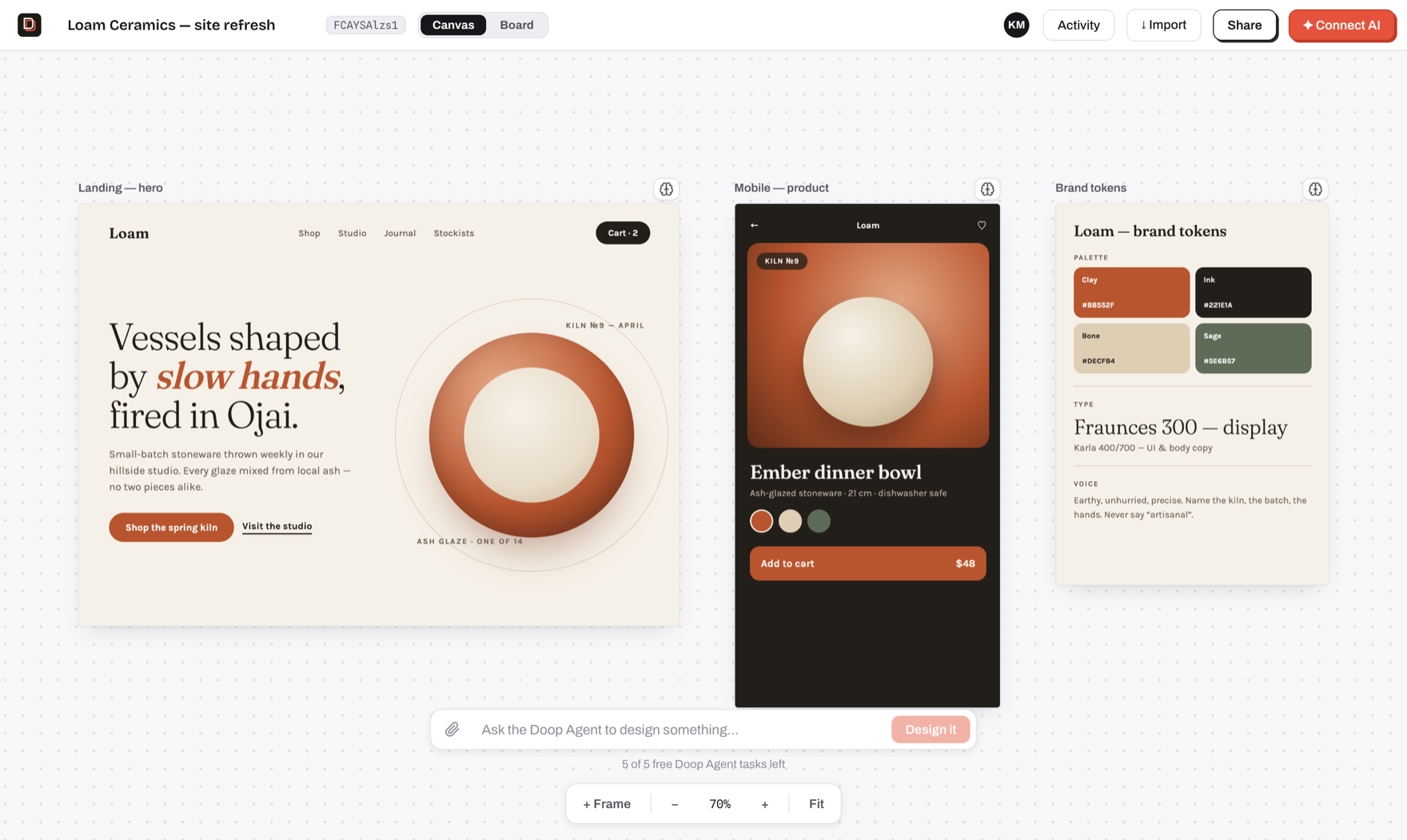
- **Design with agents, not prompts-and-refresh** — connect Claude Code (or any MCP client) once,
then watch it sketch, stream and self-review designs on your canvas, next to your cursor.
- **A built-in Doop Agent** — queue a card or @mention a role and it designs on its own, no client
to connect. Runs on the server's `ANTHROPIC_API_KEY` for a handful of free tasks, then on the
**ChatGPT subscription** (or OpenAI key) each user connects ([setup](#the-doop-agent)); the
first-canvas welcome performance is scripted and runs without any of it.
- **True multiplayer** — live cursors, presence, per-frame editing indicators, undo/redo, comments
pinned to elements, and an activity feed, all over one WebSocket room.
- **Design memory** — pin exemplar frames, capture decisions, and let the distiller propose durable
style rules that every agent follows.
- **Private by default** — invite collaborators by email or flip on link sharing per canvas;
agents inherit exactly their human's access.
- **Self-host in one command** — `docker compose up`, or `bun run dev` with zero configuration
(embedded Postgres, no external services required).
## Quickstart
```bash
git clone https://github.com/kgoedecke/doop && cd doop
bun install
bun run dev
```
Doop builds and installs with [bun](https://bun.sh) (`bun.lock` is the only
lockfile); the server itself runs on Node.
- Web app: **http://localhost:4300**
- API + WebSocket + MCP server: **http://localhost:4400** (the web port proxies `/api`, `/ws`, `/mcp` to it)
Everything works with no configuration: data persists to an embedded Postgres (PGlite) in `data/pg`,
and every optional integration (SMTP, stock photos, object storage, analytics) degrades gracefully
until its variable in [.env.example](.env.example) is set. The one you will most likely want is
`ANTHROPIC_API_KEY`, which turns on the built-in [Doop Agent](#the-doop-agent) — agents you connect
yourself over MCP need no key.
Or self-host the production build with Docker:
```bash
BETTER_AUTH_SECRET=$(openssl rand -hex 32) docker compose up -d # app + Postgres on :4400
```
Production build without Docker: `bun run build && bun run start` (single server on :4400 serving
everything). Set `DATABASE_URL` to use a real Postgres — same code path as PGlite.
Prefer not to run anything? **[doop.design](https://doop.design)** is the hosted version.
## Hook up Claude Code
One command connects Claude Code (or any MCP client) to your canvas:
```bash
claude mcp add --transport http doop http://localhost:4300/mcp
```
That triggers the standard MCP OAuth flow — a browser window opens, you approve, and from then on
the agent works **as you**. Ask it to design something on your canvas id and watch it happen live.
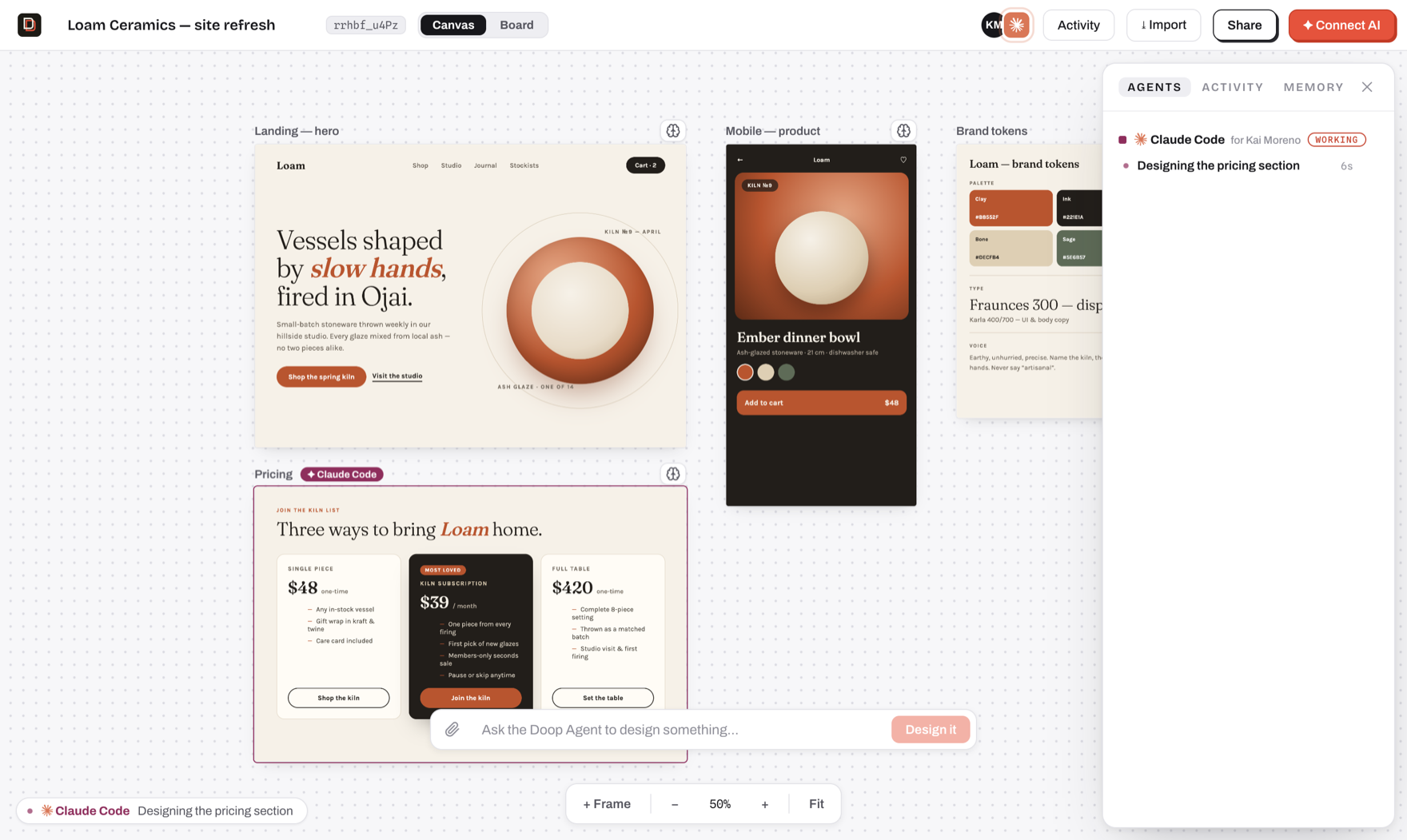
Everything in this shot is the real flow: Claude Code announced itself with `set_status`, created a
frame, and is streaming the pricing section in — presence avatar, "for Kai Moreno" attribution,
the frame chip, the working strip, and the task in the Agents panel.
## Watch an agent design
The first canvas after signup comes with a performance: the Doop Agent streams a welcome
design in while you watch — status in the working strip, a task in the panel, a pulsing border on
the frame it's building.
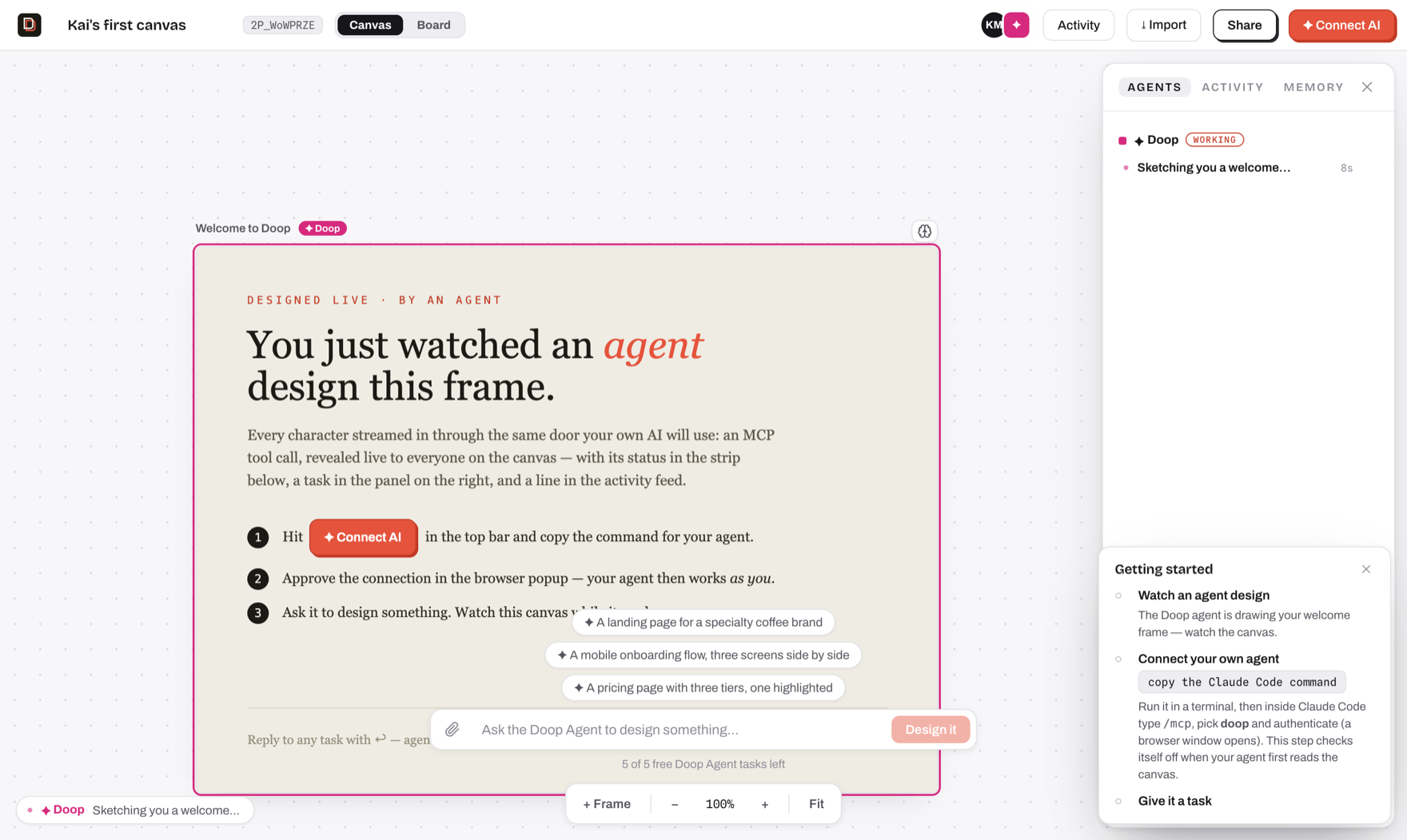
That welcome performance is **scripted** (`server/demo.ts`) — a pre-authored frame replayed through
the same machinery real agents use, so it runs with no configuration at all. The Doop Agent proper
needs a key.
## The Doop Agent
Doop ships a built-in design team that lives in the server and picks work up on its own: queue a
board card, `@mention` a role on an element comment, or leave feedback on a task, and it runs
without a human in the loop. Roles (Doop builds; specialists own one pass each — UX, copy, brand,
accessibility) are defined in [`shared/agents.ts`](shared/agents.ts), and a card can be routed
through several in order.
The server pays for the free tier, on Anthropic by default:
```bash
ANTHROPIC_API_KEY=sk-ant-... # in .env, or the environment of your deployment
```
Same key gates the **guideline distiller** ([`server/distill.ts`](server/distill.ts)), which proposes
durable style rules from your canvas.
The free tier can run on **Azure OpenAI** instead — useful when your organisation's credits or
compliance rules live there:
```bash
DOOP_AGENT_PROVIDER=azure
AZURE_OPENAI_ENDPOINT=https://my-resource.openai.azure.com
AZURE_OPENAI_API_KEY=...
AZURE_OPENAI_DEPLOYMENT=my-deployment
```
The distiller stays on `ANTHROPIC_API_KEY` either way and quietly turns off without it.
### Past the free tasks: connect your own ChatGPT
When a user's `RESIDENT_TASK_LIMIT` free tasks are gone, they don't lose the agent — they connect a
model account and the Doop Agent keeps running on it. **A connected account takes over immediately**,
from the very next task: the free tier is a trial that gets people here, not a balance to spend down
first, and connecting stops costing the server anything from that moment. The connection is
account-level, so it lives at **/settings** (Home → Settings); the free-tier wall links there rather
than carrying its own copy, and "Connect an AI agent" on a canvas stays about MCP clients only. Two
kinds of account:
- **ChatGPT subscription** — OAuth against `auth.openai.com`, then inference through the Codex
backend that Plus/Pro/Business plans include. Tokens live in `model_accounts` and never reach a
browser.
- **OpenAI API key** — pay-as-you-go on the user's own OpenAI account, no subscription involved.
Azure OpenAI is deliberately _not_ a connectable account kind: a user-supplied endpoint would be a
URL the server fetches with the run's full context — an SSRF vector — so Azure stays a server-level
provider only.
Either way the user picks their **model tier** in Settings — `gpt-5.6-sol` (flagship),
`gpt-5.6-terra` (the default workhorse) or `gpt-5.6-luna` (cheap and fast). They are paying for it,
so the choice is theirs; `DOOP_AGENT_OPENAI_MODEL` only sets the default they start on. Note that
`gpt-5.4` and `gpt-5.4-mini` retire from ChatGPT-authenticated Codex on **31 August 2026**, so
pinning a 5.4 id via that env var will break the subscription path after that date.
OpenAI registers no redirect URI for a hosted app, so connecting ChatGPT takes one of three shapes
and Doop picks the cheapest one available:
| Where Doop runs | Flow | What the user does |
| -------------------------------------------- | -------------------------------------------- | ------------------------------------------------------------- |
| Same machine as the browser (dev, self-host) | Loopback catch — Doop holds `127.0.0.1:1455` | Approve in the OpenAI tab. Nothing to copy, no setup |
| Hosted (doop.design) | Device code (`/api/accounts/deviceauth/*`) | Type a short code at `auth.openai.com/codex/device` |
| Device codes disallowed | Browser redirect + paste | Paste the dead `localhost:1455` page's address back into Doop |
The device flow needs **device code authorization** switched on in ChatGPT → Settings → Security
(workspace members need an admin to allow it) — that is why the loopback flow, which needs no
setting at all, stays the default when Doop is local. All three end at the same server-side PKCE
exchange.
> **Before you turn this on for real users:** driving a ChatGPT subscription from a third-party
> server is not something OpenAI's terms sanction, and heavy use can get an account rate-limited or
> suspended. The API-key path is the fully supported alternative and shares all the same code.
> `CHATGPT_CONNECT_DISABLED=1` switches the subscription path off and leaves the key path.
Runs are attributed to the human whose card, comment or feedback they picked up, so the person who
asked for the work is the person whose account runs it. The translation between the agent's
Anthropic-shaped loop and OpenAI's Responses API lives in
[`server/openaiAgent.ts`](server/openaiAgent.ts); which credential a run gets is decided in
[`server/agentModel.ts`](server/agentModel.ts).
**With no server key and no connected account** the Doop Agent is off, and it fails quietly by
design — queued cards and `@mentions` simply wait for some agent to claim them. The startup banner
tells you which state you're in.
**All of this is separate from connecting your own agent.** Claude Code and any other MCP client
authenticate over OAuth and drive the canvas from outside, on your own subscription — never metered.
Three paths, same canvas: the Doop Agent on our key (free tier), the Doop Agent on your key, or your
own agent over MCP.
| Variable | Default | What it does |
| ------------------------------- | --------------------------- | ------------------------------------------------------------------------ |
| `DOOP_AGENT_PROVIDER` | `anthropic` | What the free tier runs on: `anthropic` \| `azure` |
| `ANTHROPIC_API_KEY` | _unset_ | Pays for the free Doop Agent tier (default provider) and the distiller |
| `AZURE_OPENAI_ENDPOINT` | _unset_ | The free tier's Azure OpenAI resource, when `DOOP_AGENT_PROVIDER=azure` |
| `AZURE_OPENAI_API_KEY` | _unset_ | A key of that resource |
| `AZURE_OPENAI_DEPLOYMENT` | _unset_ | The deployment the free tier runs on |
| `AZURE_OPENAI_API_VERSION` | _unset_ | Pins an `api-version` query parameter; the v1 surface needs none |
| `AZURE_OPENAI_REASONING_EFFORT` | _unset_ | Reasoning effort on Azure runs; unset sends none (non-reasoning-safe) |
| `RESIDENT_TASK_LIMIT` | `5` | Free Doop Agent tasks per account before a connection is needed |
| `DOOP_AGENT_MODEL` | `claude-opus-5` | Model for the Doop Agent on the server's Anthropic key |
| `DOOP_AGENT_OPENAI_MODEL` | `gpt-5.6-terra` | Default tier on a user's account; each user can pick another in Settings |
| `CHATGPT_CONNECT_DISABLED` | _unset_ | `1` hides the ChatGPT flow, leaving the API-key path |
| `DOOP_DISTILL_MODEL` | `claude-haiku-4-5-20251001` | Model for the guideline distiller |
`RESIDENT_TASK_LIMIT` is the free-tier meter for the hosted version. It counts only tasks a user
_initiates_ — feedback replies and retries on existing work stay free — and users who have connected
either their own MCP agent or a model account bypass it entirely. There is no "unlimited" value:
self-hosting with your own key, set it to a large number, since you're paying Anthropic directly
either way.
## Accounts
The web app requires an account (better-auth, email/password — open signup). Your account
name is your identity everywhere: cursors, presence, the activity feed, and feedback
attribution are all server-authoritative from the session, and the WebSocket rejects
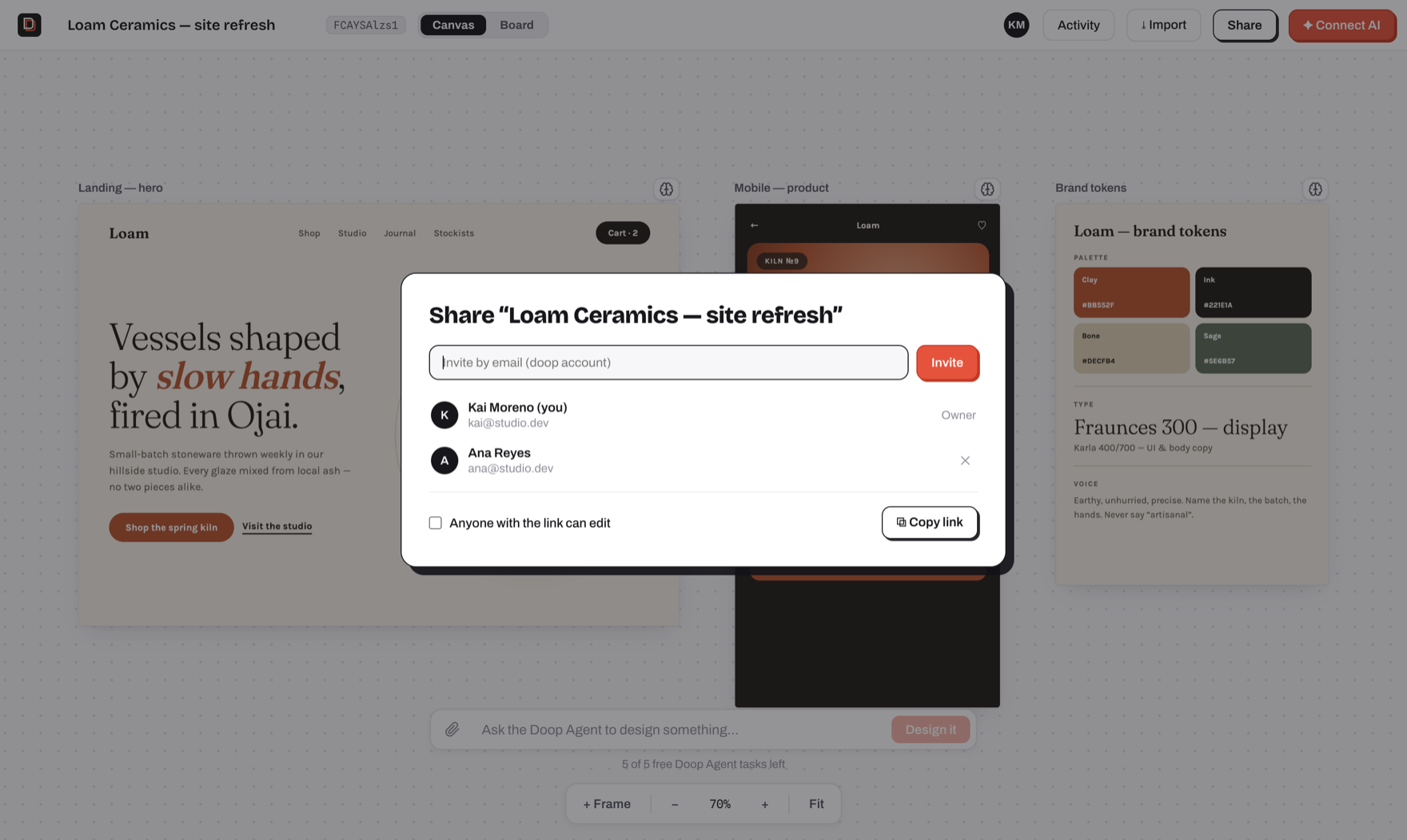
unauthenticated joins. **Canvases are private by default**, Figma-style: only the owner
and people they invite (Share → invite by email, existing doop accounts) can open one.
The Share modal can also turn on link sharing per canvas ("anyone with the link can
edit"), which restores drop-a-link collaboration for that canvas. Your home screen lists
your own canvases plus ones shared with you (plus unowned legacy ones, claimable there).
Agents connected over MCP act under the account that approved them and get exactly that
user's access.
With SMTP configured (`SMTP_HOST` etc. — see [.env.example](.env.example)), signups require email
verification and "forgot password" sends real reset links. Without it, signup stays open and every
email is printed to the server log, links included — the flows still work in development.
Set `REQUIRE_EMAIL_VERIFICATION=false` to let people in before they verify — the link is still
emailed, it just stops gating sign-in. Admin promotion is deliberately not part of that trade:
`ADMIN_EMAILS` only ever promotes a verified address (see below).
If signup or password reset **hangs** rather than failing, the cause is almost always a host that
blocks outbound SMTP: Railway and most PaaS block 25/465/587. Resend also serves 2465/2587, so
`SMTP_PORT=2587` is the usual fix.
Env: `BETTER_AUTH_SECRET` (required in production), `TRUSTED_ORIGINS` (comma-separated,
defaults to the localhost dev origins).
### Instance admins
`ADMIN_EMAILS` (comma-separated) names the accounts that get the `admin` role, applied at
signup, on email verification, and at boot — so you can name an admin before or after they
have an account. **This requires SMTP in production**: an address only identifies someone
once they have proven they own it, and without a mailer signup is open, so anyone could sign
up as your address and take the role with it. A production instance without SMTP promotes
nobody and warns at boot; set the role directly in the database if that is your setup.
Admins get `/admin`: every canvas and account on the instance, and "view as", which hands
them a real but **read-only** 15-minute session as that user. Being an admin does not widen
canvas access itself: the gate in [`server/access.ts`](server/access.ts) is shared with MCP,
so a privileged read there would give every agent holding an admin's token the run of the
instance. View-as sessions cannot write, cannot connect agents, and record who is behind
them in `session.impersonated_by`.
## Agent auth (MCP OAuth)
The `/mcp` endpoint requires OAuth. Adding the server in Claude Code / Codex triggers
the standard MCP OAuth flow: a browser window opens, you sign in to Doop and approve,
and the client stores a bearer token. Every tool call then carries your identity —
agent tasks show "for ⟨you⟩" in the Tasks panel, and presence tooltips name the owner.
Unauthenticated calls get a 401 with `WWW-Authenticate` discovery pointers
(`/.well-known/oauth-authorization-server` + `oauth-protected-resource`), which is what
kicks off the flow. Dynamic client registration is enabled, so no manual client setup.
In production also set `BETTER_AUTH_URL` to the public origin — OAuth URLs are built on it.
## Deploy
The repo ships a production `Dockerfile` (client build + Chromium for frame screenshots).
Any container host works; Railway/Fly are the least friction:
1. Create the app from this repo (both auto-detect the Dockerfile).
2. Add a managed Postgres and set `DATABASE_URL`. **Don't skip this in real deployments** —
the PGlite fallback is embedded/single-process and only suits a single instance with a
persistent volume mounted at `/app/data`.
3. Set `BETTER_AUTH_SECRET` (long random string) and `BETTER_AUTH_URL` (the public origin,
e.g. `https://doop.example.com`). Extra allowed origins: `TRUSTED_ORIGINS` (comma-separated).
4. Health check: `GET /healthz`. The server trusts one proxy hop (`trust proxy`), so
TLS termination at the platform edge works out of the box.
Local sanity check of the exact production image:
```bash
docker build -t doop .
docker run -p 4400:4400 -e BETTER_AUTH_URL=http://localhost:4400 -e BETTER_AUTH_SECRET=dev-only doop
```
## Connect an AI agent
The MCP endpoint (streamable HTTP, stateless) is at:
```
http://localhost:4300/mcp
```
Claude Code:
```bash
claude mcp add --transport http doop http://localhost:4300/mcp
```
Generic MCP config:
```json
{ "mcpServers": { "doop": { "type": "http", "url": "http://localhost:4300/mcp" } } }
```
Then tell the agent something like:
> Work on canvas `` (shown in the top bar). Call `get_canvas` to see the existing frames.
> To design, create a frame with `create_frame`, then stream the design into it with `append_frame_html`
> in ~300–500 character chunks (`start=true` on the first, `done=true` on the last) so people watch it
> build up live. Complete HTML with inline CSS. After finishing, call `get_frame_screenshot` to see it,
> fix what looks wrong, and re-check. Pick an `agent_name` and reuse it on every call.
Screenshots render in your system Chrome/Chromium via `puppeteer-core` (set `CHROME_PATH` if it isn't
auto-detected). Humans can hit the same renderer at `GET /api/frames/:id/screenshot.png?scale=2`.
For website viewing/imports, setting `CONTEXT_DEV_API_KEY` makes Context.dev acquire the rendered
HTML while Doop still sanitizes it and renders the preview locally; without the key, Doop navigates
to the public page directly in Chromium.
### Design sync: push an app's live screens onto a canvas
Server-side import can't reach apps behind SSO or a VPN. The **doop-sync snippet** flips the capture
to the user's browser: mint a write-only key in a canvas's Share dialog, drop one tag into the app —
```html
```
— and every distinct screen people visit lands on that canvas as a frame (one row per app), imported
once: a short grace window lets the first capture settle (scroll reveals, late images), then the frame
freezes so later visits — different viewports, other users' data, open menus — never churn it. Deleting
a frame re-imports it on the next visit; navigation counts keep accumulating regardless. Routes are
normalized (`/orders/8231` → `/orders/:id`) so each screen maps to one
frame; captures are serialized from the CSSOM (so styled-components/emotion output survives), and
same-origin webfonts and small images are inlined as data: URIs — fonts require CORS inside the
sandboxed frame, and intranet URLs would never render for viewers outside the network. Scripts are
stripped client- and server-side, input values are always dropped, and anything marked `data-doop-mask`
is redacted before upload (`data-doop-sync-ignore` excludes an element entirely). The key is the whole
credential: it can only write frames to its one canvas, so revoking it in the Share dialog cuts the
app off instantly. Endpoint: `POST /ingest/` (CORS-open, no cookies).
### How streaming looks (server-side smoothing)
Agent HTML lands in the store immediately, but viewers see it through a **typewriter reveal**: the server
broadcasts the accumulated HTML at a steady rate (~500 chars/s, accelerating to clear backlogs in ~8s),
so even an agent that sends few large chunks — or a one-shot `set_frame_html` / `create_frame` with
full HTML — plays back as a smooth live stream. Mid-reveal HTML is _healed_ before broadcast: a trailing
half-written tag is dropped, an unclosed `