## About the project
This project allows you to create a Kubernetes cluster on [Proxmox VE](https://pve.proxmox.com/wiki/Main_Page) using [Terraform](https://www.terraform.io/) and [Kubespray](https://github.com/kubernetes-sigs/kubespray) in a declarative manner.
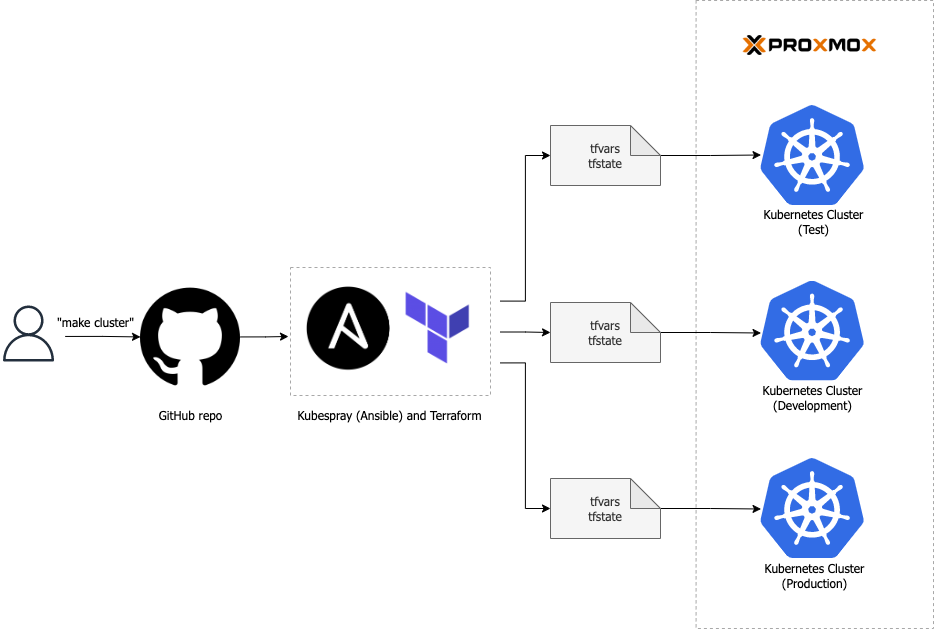
## Prerequisites
### Software requirements
Ensure the following software versions are installed:
* [Proxmox VE](https://www.proxmox.com/en/proxmox-ve/get-started/) `7.x` or `8.x`.
* [Terraform](https://developer.hashicorp.com/terraform/tutorials/aws-get-started/install-cli/) `>=1.3.3`
> Kubespray will be set up automatically.
### System requirements
Before proceeding with the setup for Proxmox VE, make sure you have the following components in place:
* Internal network
* VM template
* SSH key pair
* Bastion host
### Usage
Follow these steps to use the project:
1. Clone the repo:
```sh
$ git clone https://github.com/khanh-ph/proxmox-kubernetes.git
```
2. Open the `example.tfvars` file in a text editor and update all the mandatory variables with your own values.
3. Initialize the Terraform working directory.
```sh
$ terraform init
```
4. Generate an execution plan and review the output to ensure that the planned changes align with your expectations.
```sh
$ terraform plan -var-file="example.tfvars"
```
5. If you're satisfied with the plan and ready to apply the changes. Run the following command:
```sh
$ terraform apply -var-file="example.tfvars"
```
## Terraform configurations
The project provides several Terraform variables that allow you to customize the cluster to suit your needs. Please see the following:
### Inputs
| Name | Description | Type | Default | Required |
|------|-------------|------|---------|:--------:|
| env\_name | The stage of the development lifecycle for the k8s cluster. Example: `prod`, `dev`, `qa`, `stage`, `test` | `string` | `"test"` | no |
| location | The city or region where the cluster is provisioned | `string` | `null` | no |
| cluster\_number | The instance count for the k8s cluster, to differentiate it from other clusters. Example: `00`, `01` | `string` | `"01"` | no |
| cluster\_domain | The cluster domain name | `string` | `"local"` | no |
| use\_legacy\_naming\_convention | Whether to use legacy naming convention for the VM and cluster name. If your cluster was provisioned using version <= 3.x, set it to `true` | `bool` | `false` | no |
| pm\_api\_url | The base URL for Proxmox VE API. See https://pve.proxmox.com/wiki/Proxmox_VE_API#API_URL | `string` | n/a | yes |
| pm\_api\_token\_id | The token ID to access Proxmox VE API. | `string` | n/a | yes |
| pm\_api\_token\_secret | The UUID/secret of the token defined in the variable `pm_api_token_id`. | `string` | n/a | yes |
| pm\_tls\_insecure | Disable TLS verification while connecting to the Proxmox VE API server. | `bool` | n/a | yes |
| pm\_host | The name of Proxmox node where the VM is placed. | `string` | n/a | yes |
| pm\_parallel | The number of simultaneous Proxmox processes. E.g: creating resources. | `number` | `2` | no |
| pm\_timeout | Timeout value (seconds) for proxmox API calls. | `number` | `600` | no |
| internal\_net\_name | Name of the internal network bridge | `string` | `"vmbr1"` | no |
| internal\_net\_subnet\_cidr | CIDR of the internal network | `string` | `"10.0.1.0/24"` | no |
| ssh\_private\_key | SSH private key in base64, will be used by Terraform client to connect to the Kubespray VM after provisioning. We can set its sensitivity to false; otherwise, the output of the Kubespray script will be hidden. | `string` | n/a | yes |
| ssh\_public\_keys | SSH public keys in base64 | `string` | n/a | yes |
| vm\_user | The default user for all VMs | `string` | `"ubuntu"` | no |
| vm\_sockets | Number of the CPU socket to allocate to the VMs | `number` | `1` | no |
| vm\_max\_vcpus | The maximum CPU cores available per CPU socket to allocate to the VM | `number` | `2` | no |
| vm\_cpu\_type | The type of CPU to emulate in the Guest | `string` | `"host"` | no |
| vm\_os\_disk\_storage | Default storage pool where OS VM disk is placed | `string` | n/a | yes |
| add\_worker\_node\_data\_disk | Whether to add a data disk to each worker node of the cluster | `bool` | `false` | no |
| worker\_node\_data\_disk\_storage | The storage pool where the data disk is placed | `string` | `""` | no |
| worker\_node\_data\_disk\_size | The size of worker node data disk in Gigabyte | `string` | `10` | no |
| vm\_ubuntu\_tmpl\_name | Name of Cloud-init template Ubuntu VM | `string` | `"ubuntu-2404"` | no |
| bastion\_ssh\_ip | IP of the bastion host, could be either public IP or local network IP of the bastion host | `string` | `""` | no |
| bastion\_ssh\_user | The user to authenticate to the bastion host | `string` | `"ubuntu"` | no |
| bastion\_ssh\_port | The SSH port number on the bastion host | `number` | `22` | no |
| vm\_k8s\_control\_plane | Control Plane VM specification | `object({ node_count = number, vcpus = number, memory = number, disk_size = number })` | {
"disk_size": 20,
"memory": 1536,
"node_count": 1,
"vcpus": 2
} | no |
| vm\_k8s\_worker | Worker VM specification | `object({ node_count = number, vcpus = number, memory = number, disk_size = number })` | {
"disk_size": 20,
"memory": 2048,
"node_count": 2,
"vcpus": 2
} | no |
| create\_kubespray\_host | Whether to provision the Kubespray as a VM | `bool` | `true` | no |
| kubespray\_image | The Docker image to deploy Kubespray | `string` | `"quay.io/kubespray/kubespray:v2.25.0"` | no |
| kube\_version | Kubernetes version | `string` | `"v1.29.5"` | no |
| kube\_network\_plugin | The network plugin to be installed on your cluster. Example: `cilium`, `calico`, `kube-ovn`, `weave` or `flannel` | `string` | `"calico"` | no |
| enable\_nodelocaldns | Whether to enable nodelocal dns cache on your cluster | `bool` | `false` | no |
| podsecuritypolicy\_enabled | Whether to enable pod security policy on your cluster (RBAC must be enabled either by having 'RBAC' in authorization\_modes or kubeadm enabled) | `bool` | `false` | no |
| persistent\_volumes\_enabled | Whether to add Persistent Volumes Storage Class for corresponding cloud provider (supported: in-tree OpenStack, Cinder CSI, AWS EBS CSI, Azure Disk CSI, GCP Persistent Disk CSI) | `bool` | `false` | no |
| helm\_enabled | Whether to enable Helm on your cluster | `bool` | `false` | no |
| ingress\_nginx\_enabled | Whether to enable Nginx ingress on your cluster | `bool` | `false` | no |
| argocd\_enabled | Whether to enable ArgoCD on your cluster | `bool` | `false` | no |
| argocd\_version | The ArgoCD version to be installed | `string` | `"v2.11.4"` | no |
## Blog posts
For more detailed instructions, refer to the following blog post: [Create a Kubernetes cluster on Proxmox with Terraform & Kubespray](https://www.khanhph.com/install-proxmox-kubernetes/)