## Layout - sample
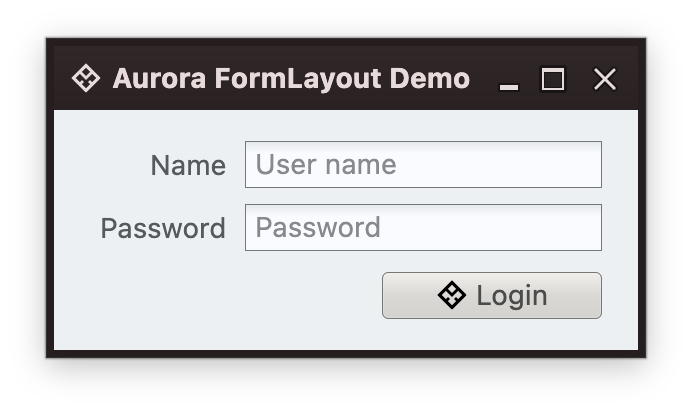 This is a simple login form with text fields for user name and password, and the button to log in. First, we define the column and row structure for the main part of this form:
```kotlin
FormLayout(
modifier = Modifier.fillMaxSize().padding(Paddings.Dialog),
encodedColumnSpecs = "end:pref, 2dlu, 60dlu:grow",
encodedRowSpecs = "p, 4dlu, p, 6dlu, p",
)
```
Taking a look at each one of the parameters.
The first `modifier` is the expected part of any composable function signature. Here, our form takes up the entire available space via the `fillMaxSize` modifier, and configures to have dialog-consistent paddings around its content with `Paddings.Dialog`.
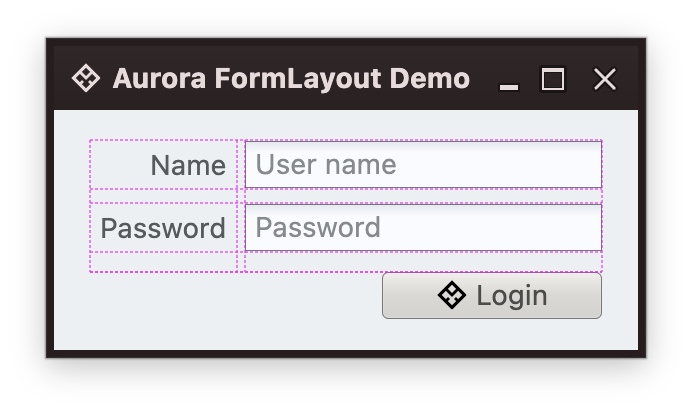
The next part is `encodedColumnSpecs` which configures the column structure of our layout. Taking a look at each part:
* The first column is `end:pref`, saying that the column content should be end-aligned (right in LTR mode, left in RTL mode), and that the column should be as wide as its widest cell (`pref` for preferred size).
* The second column is the gap, which is `2dlu`. More about the `dlu` units in [this part](Dlu.md) of the documentation.
* The third column is our text fields. It is `60dlu:grow`. The first part defines the minimum width for this column in the `dlu` units. The second part (`grow`) instructs the layout to give any extra available width to this column. The counterpart to this in core Compose layout is the `weight` modifier with `fill=true` parameter.
The last part is `encodedRowSpecs` which configures each content row to have its preferred height with `p` (short for `pref`), and the gaps to be `4dlu` and `6dlu`.
This is how this grid looks like in debug mode:
This is a simple login form with text fields for user name and password, and the button to log in. First, we define the column and row structure for the main part of this form:
```kotlin
FormLayout(
modifier = Modifier.fillMaxSize().padding(Paddings.Dialog),
encodedColumnSpecs = "end:pref, 2dlu, 60dlu:grow",
encodedRowSpecs = "p, 4dlu, p, 6dlu, p",
)
```
Taking a look at each one of the parameters.
The first `modifier` is the expected part of any composable function signature. Here, our form takes up the entire available space via the `fillMaxSize` modifier, and configures to have dialog-consistent paddings around its content with `Paddings.Dialog`.
The next part is `encodedColumnSpecs` which configures the column structure of our layout. Taking a look at each part:
* The first column is `end:pref`, saying that the column content should be end-aligned (right in LTR mode, left in RTL mode), and that the column should be as wide as its widest cell (`pref` for preferred size).
* The second column is the gap, which is `2dlu`. More about the `dlu` units in [this part](Dlu.md) of the documentation.
* The third column is our text fields. It is `60dlu:grow`. The first part defines the minimum width for this column in the `dlu` units. The second part (`grow`) instructs the layout to give any extra available width to this column. The counterpart to this in core Compose layout is the `weight` modifier with `fill=true` parameter.
The last part is `encodedRowSpecs` which configures each content row to have its preferred height with `p` (short for `pref`), and the gaps to be `4dlu` and `6dlu`.
This is how this grid looks like in debug mode:
 Now we proceed to populate the form content as child composables of our `FormLayout`:
```kotlin
LabelProjection(
contentModel = LabelContentModel(text = "Name"),
).project(Modifier.xy(1, 1))
var textName by rememberSaveable { mutableStateOf("") }
TextFieldStringProjection(
contentModel = TextFieldStringContentModel(
value = textName,
placeholder = "User name",
onValueChange = { textName = it },
),
presentationModel = TextFieldPresentationModel(singleLine = true)
).project(Modifier.xy(3, 1))
LabelProjection(
contentModel = LabelContentModel(text = "Password"),
).project(Modifier.xy(1, 3))
var textPassword by rememberSaveable { mutableStateOf("") }
TextFieldStringProjection(
contentModel = TextFieldStringContentModel(
value = textPassword,
placeholder = "Password",
onValueChange = { textPassword = it },
),
presentationModel = TextFieldPresentationModel(singleLine = true)
).project(Modifier.xy(3, 3))
ButtonBar(Modifier.xyw(1, 5, 3), Paddings.Empty) {
glue()
button {
CommandButtonProjection(
contentModel = Command(
text = "Login",
icon = radiance_menu(),
action = { println("Login!") }
),
presentationModel = CommandButtonPresentationModel(
backgroundAppearanceStrategy = BackgroundAppearanceStrategy.Always,
iconDimension = DpSize(16.dp, 16.dp),
iconActiveFilterStrategy = IconFilterStrategy.ThemedFollowColorTokens,
iconEnabledFilterStrategy = IconFilterStrategy.ThemedFollowColorTokens,
presentationState = CommandButtonPresentationState.MediumFitToIcon,
)
).project()
}
}
```
The last row which is our button bar is using the `ButtonBar` composable provided by this module, with `glue()` as the invisible element that "pushes" our command button to the right / end edge of the row.
### Next
Continue to a [basics](Basics.md).
Now we proceed to populate the form content as child composables of our `FormLayout`:
```kotlin
LabelProjection(
contentModel = LabelContentModel(text = "Name"),
).project(Modifier.xy(1, 1))
var textName by rememberSaveable { mutableStateOf("") }
TextFieldStringProjection(
contentModel = TextFieldStringContentModel(
value = textName,
placeholder = "User name",
onValueChange = { textName = it },
),
presentationModel = TextFieldPresentationModel(singleLine = true)
).project(Modifier.xy(3, 1))
LabelProjection(
contentModel = LabelContentModel(text = "Password"),
).project(Modifier.xy(1, 3))
var textPassword by rememberSaveable { mutableStateOf("") }
TextFieldStringProjection(
contentModel = TextFieldStringContentModel(
value = textPassword,
placeholder = "Password",
onValueChange = { textPassword = it },
),
presentationModel = TextFieldPresentationModel(singleLine = true)
).project(Modifier.xy(3, 3))
ButtonBar(Modifier.xyw(1, 5, 3), Paddings.Empty) {
glue()
button {
CommandButtonProjection(
contentModel = Command(
text = "Login",
icon = radiance_menu(),
action = { println("Login!") }
),
presentationModel = CommandButtonPresentationModel(
backgroundAppearanceStrategy = BackgroundAppearanceStrategy.Always,
iconDimension = DpSize(16.dp, 16.dp),
iconActiveFilterStrategy = IconFilterStrategy.ThemedFollowColorTokens,
iconEnabledFilterStrategy = IconFilterStrategy.ThemedFollowColorTokens,
presentationState = CommandButtonPresentationState.MediumFitToIcon,
)
).project()
}
}
```
The last row which is our button bar is using the `ButtonBar` composable provided by this module, with `glue()` as the invisible element that "pushes" our command button to the right / end edge of the row.
### Next
Continue to a [basics](Basics.md).