## Layout - cortex
Cortex is a top-level composable that configures everything that `FormLayout` and the DSL wrappers need to convert `dlu` units to pixels and create commonly used components.
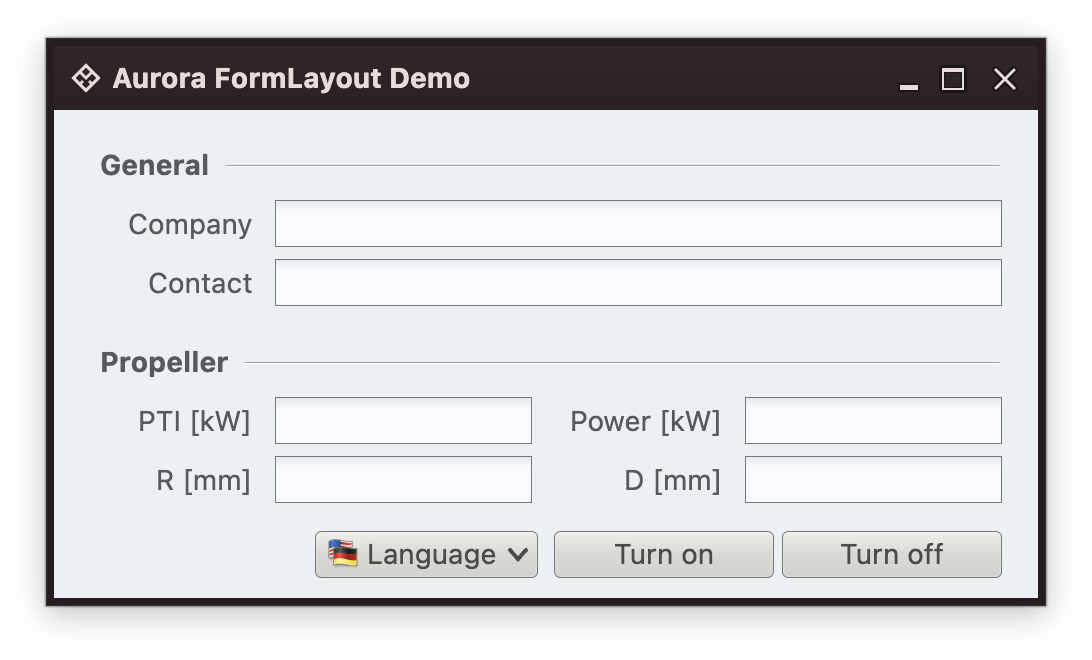
This is a `FormLayout`-based layout under one of Aurora skins:
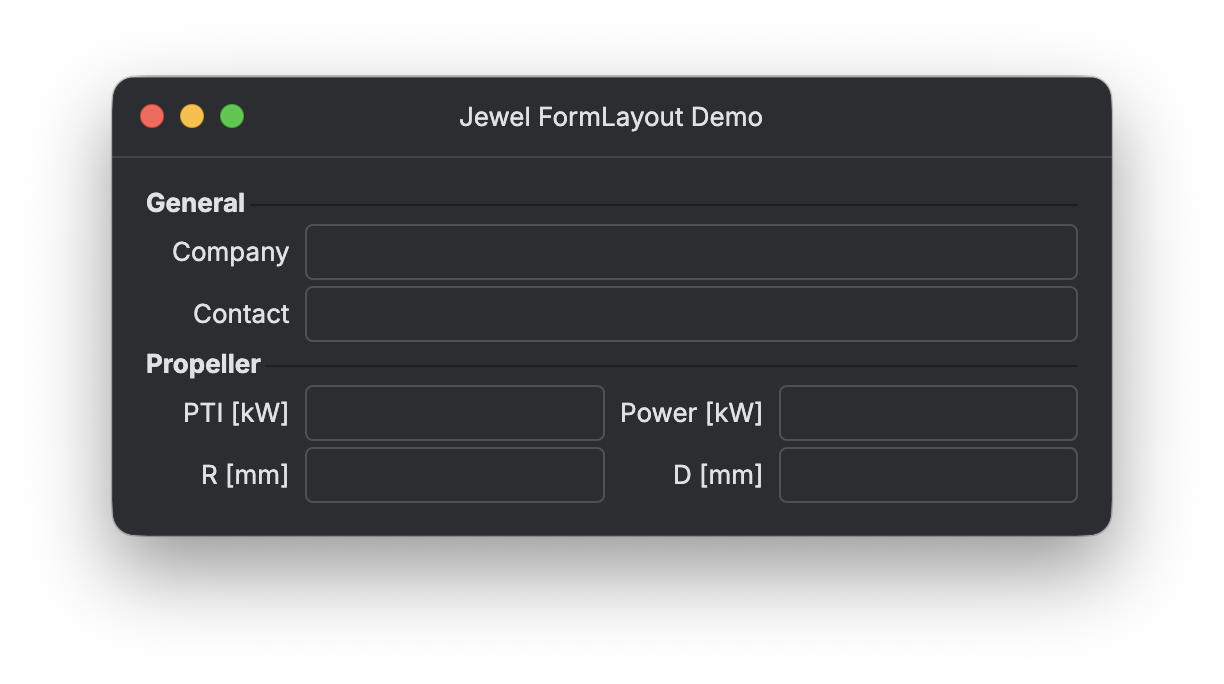
 And this is the same layout, but this time using [Jewel](https://jewel-ui.dev/) theming and components:
 ### Configuration
There are two ways to configure `FormLayout` in your application. The first is through the `FormCortex` composable function:
```kotlin
@Composable
public fun FormCortex(
textStyle: TextStyle,
componentFactory: ComponentFactory,
content: @Composable () -> Unit
)
```
Pass in the `TextStyle` that is "representative" of the body / copy typography used in your design system. Typically this would be the text style used for your labels, buttons and text blocks. The second `ComponentFactory` parameter is an interface with a number of `createXyz` functions. Implement this interface to return buttons, labels and separators that match the visuals of your design system.
Sample usage of `FormCortex` at the top level of your UI hierarchy might look like this:
```kotlin
FormCortex(
textStyle = AcmeDesignSystemTextStyle(),
componentFactory = AcmeDesignSystemComponentFactory()
) {
MyAcmeWindowContent()
}
```
Alternatively, you can use this function to get an array of composition locals:
```kotlin
@Composable
public fun getFormCortexCompositionLocals(
textStyle: TextStyle,
componentFactory: ComponentFactory
): Array>
```
Sample usage of `getFormCortexCompositionLocals` at the top level of your UI hierarchy might look like this:
```kotlin
val formCortexCompositionLocals = getFormCortexCompositionLocals(
textStyle = AcmeDesignSystemTextStyle(),
componentFactory = AcmeDesignSystemComponentFactory()
)
// Combine my design system composition locals with FormLayout composition locals
val compositionLocals = arrayOf(
AcmeColorsCompositionLocal provides AcmeColors(),
AcmeTypographyCompositionLocal provides AcmeTypography(),
...
) + formCortexCompositionLocals
// And set them all in one go
CompositionLocalProvider(*compositionLocals) {
MyAcmeWindowContent()
}
```
### Sample integration with Jewel
[This GitHub project](https://github.com/kirill-grouchnikov/aurora-jewel-layout-demo) provides a sample implementation that bridges `FormLayout` and the Jewel library.
`JewelFormCortex` is a composable function that configures `FormCortex` with Jewel-specific typography and component factory:
```kotlin
@Composable
fun JewelFormCortex(content: @Composable () -> Unit) {
FormCortex(
textStyle = JewelTheme.defaultTextStyle,
componentFactory = JewelFormsComponentFactory()
) {
content()
}
}
```
while `JewelFormsComponentFactory` implements the `ComponentFactory` interface and returns the matching Jewel components:
```kotlin
class JewelFormsComponentFactory : ComponentFactory {
override fun createLabel(text: String): ComponentLambda {
return { Text(text = text, style = JewelTheme.defaultTextStyle) }
}
override fun createButton(
text: String,
icon: Painter?,
action: () -> Unit,
isEnabled: Boolean
): ComponentLambda {
return {
OutlinedButton(onClick = action) {
if (icon != null) {
Icon(painter = icon, contentDescription = text, modifier = Modifier.size(16.dp))
Spacer(modifier = Modifier.width(4.dp))
}
Text(text = text, style = JewelTheme.defaultTextStyle)
}
}
}
override fun createReadOnlyLabel(text: String): ComponentLambda {
return {
Text(
text = text,
color = JewelTheme.globalColors.text.disabled,
style = JewelTheme.defaultTextStyle
)
}
}
...
}
```
Now, putting it all together, you wrap your application content with `JewelFormCortex` (needs to be under `IntUiTheme` or `SwingBridgeTheme` as those set up the top-level Jewel theming):
```kotlin
fun main() = application {
val state = rememberWindowState(
placement = WindowPlacement.Floating,
position = WindowPosition.Aligned(Alignment.Center),
size = DpSize(280.dp, 220.dp)
)
IntUiTheme(
theme = JewelTheme.darkThemeDefinition(),
styling = ComponentStyling.default().decoratedWindow(
titleBarStyle = TitleBarStyle.dark(),
windowStyle = DecoratedWindowStyle.dark()
)) {
DecoratedWindow(
title = "Jewel FormLayout Demo",
state = state,
onCloseRequest = ::exitApplication
) {
TitleBar(Modifier.newFullscreenControls()) {
Text("Jewel FormLayout Demo")
}
JewelFormCortex {
ButtonStack(
modifier = Modifier.fillMaxSize().background(JewelTheme.globalColors.panelBackground),
padding = Paddings.Dialog
) {
button(text = "Start", action = { println("Start!") })
unrelatedGap()
button(text = "Pause", action = { println("Pause!") })
relatedGap()
button(text = "Stop", action = { println("Stop!") })
}
}
}
}
}
```
### Integration with Aurora
Out of the box, Aurora's window composables - `AuroraWindow` and `AuroraRibbonWindow` - come with pre-integrated Aurora-specific implementation of this cortex configuration.
In case you are using Aurora in a custom way, you can:
* Use `resolveAuroraDefaults()` for the text style
* Use `AuroraFormsComponentFactory()` for the component factory
### Configuration
There are two ways to configure `FormLayout` in your application. The first is through the `FormCortex` composable function:
```kotlin
@Composable
public fun FormCortex(
textStyle: TextStyle,
componentFactory: ComponentFactory,
content: @Composable () -> Unit
)
```
Pass in the `TextStyle` that is "representative" of the body / copy typography used in your design system. Typically this would be the text style used for your labels, buttons and text blocks. The second `ComponentFactory` parameter is an interface with a number of `createXyz` functions. Implement this interface to return buttons, labels and separators that match the visuals of your design system.
Sample usage of `FormCortex` at the top level of your UI hierarchy might look like this:
```kotlin
FormCortex(
textStyle = AcmeDesignSystemTextStyle(),
componentFactory = AcmeDesignSystemComponentFactory()
) {
MyAcmeWindowContent()
}
```
Alternatively, you can use this function to get an array of composition locals:
```kotlin
@Composable
public fun getFormCortexCompositionLocals(
textStyle: TextStyle,
componentFactory: ComponentFactory
): Array>
```
Sample usage of `getFormCortexCompositionLocals` at the top level of your UI hierarchy might look like this:
```kotlin
val formCortexCompositionLocals = getFormCortexCompositionLocals(
textStyle = AcmeDesignSystemTextStyle(),
componentFactory = AcmeDesignSystemComponentFactory()
)
// Combine my design system composition locals with FormLayout composition locals
val compositionLocals = arrayOf(
AcmeColorsCompositionLocal provides AcmeColors(),
AcmeTypographyCompositionLocal provides AcmeTypography(),
...
) + formCortexCompositionLocals
// And set them all in one go
CompositionLocalProvider(*compositionLocals) {
MyAcmeWindowContent()
}
```
### Sample integration with Jewel
[This GitHub project](https://github.com/kirill-grouchnikov/aurora-jewel-layout-demo) provides a sample implementation that bridges `FormLayout` and the Jewel library.
`JewelFormCortex` is a composable function that configures `FormCortex` with Jewel-specific typography and component factory:
```kotlin
@Composable
fun JewelFormCortex(content: @Composable () -> Unit) {
FormCortex(
textStyle = JewelTheme.defaultTextStyle,
componentFactory = JewelFormsComponentFactory()
) {
content()
}
}
```
while `JewelFormsComponentFactory` implements the `ComponentFactory` interface and returns the matching Jewel components:
```kotlin
class JewelFormsComponentFactory : ComponentFactory {
override fun createLabel(text: String): ComponentLambda {
return { Text(text = text, style = JewelTheme.defaultTextStyle) }
}
override fun createButton(
text: String,
icon: Painter?,
action: () -> Unit,
isEnabled: Boolean
): ComponentLambda {
return {
OutlinedButton(onClick = action) {
if (icon != null) {
Icon(painter = icon, contentDescription = text, modifier = Modifier.size(16.dp))
Spacer(modifier = Modifier.width(4.dp))
}
Text(text = text, style = JewelTheme.defaultTextStyle)
}
}
}
override fun createReadOnlyLabel(text: String): ComponentLambda {
return {
Text(
text = text,
color = JewelTheme.globalColors.text.disabled,
style = JewelTheme.defaultTextStyle
)
}
}
...
}
```
Now, putting it all together, you wrap your application content with `JewelFormCortex` (needs to be under `IntUiTheme` or `SwingBridgeTheme` as those set up the top-level Jewel theming):
```kotlin
fun main() = application {
val state = rememberWindowState(
placement = WindowPlacement.Floating,
position = WindowPosition.Aligned(Alignment.Center),
size = DpSize(280.dp, 220.dp)
)
IntUiTheme(
theme = JewelTheme.darkThemeDefinition(),
styling = ComponentStyling.default().decoratedWindow(
titleBarStyle = TitleBarStyle.dark(),
windowStyle = DecoratedWindowStyle.dark()
)) {
DecoratedWindow(
title = "Jewel FormLayout Demo",
state = state,
onCloseRequest = ::exitApplication
) {
TitleBar(Modifier.newFullscreenControls()) {
Text("Jewel FormLayout Demo")
}
JewelFormCortex {
ButtonStack(
modifier = Modifier.fillMaxSize().background(JewelTheme.globalColors.panelBackground),
padding = Paddings.Dialog
) {
button(text = "Start", action = { println("Start!") })
unrelatedGap()
button(text = "Pause", action = { println("Pause!") })
relatedGap()
button(text = "Stop", action = { println("Stop!") })
}
}
}
}
}
```
### Integration with Aurora
Out of the box, Aurora's window composables - `AuroraWindow` and `AuroraRibbonWindow` - come with pre-integrated Aurora-specific implementation of this cortex configuration.
In case you are using Aurora in a custom way, you can:
* Use `resolveAuroraDefaults()` for the text style
* Use `AuroraFormsComponentFactory()` for the component factory