## Aurora theming - color tokens association kinds
Color tokens association kinds in Aurora are best illustrated by a simple example:
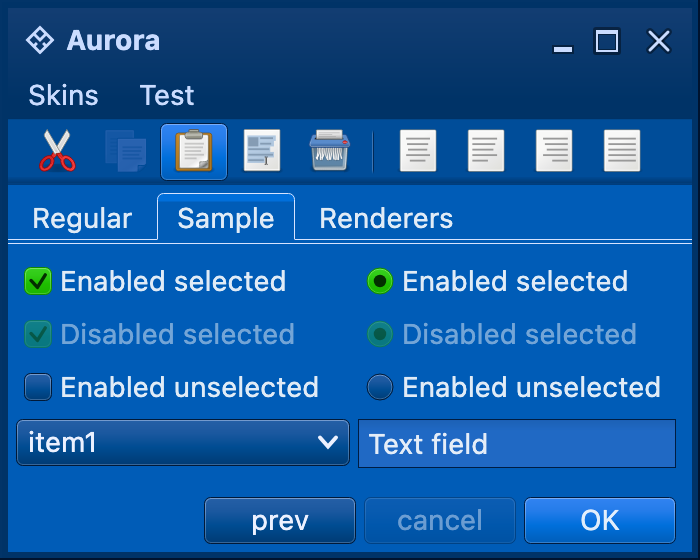 This is a screenshot of a sample application UI window with a variety of Aurora composable controls - buttons, checkboxes, comboboxes, menu items, etc. Of a particular interest to us in this instance are controls in selected state:
* The green checkbox and radio button (with "Enabled selected" text)
* The light blue button in the bottom right corner (with "OK" text)
All three have their selected bit turned on, but the button is light blue while the other two controls tokens with different visual areas of Aurora controls.
The `ContainerColorTokensAssociationKind` is the base class for core and custom color tokens association kinds. Where is this class used?
* The skin definition, and more specifically the `ContainerColorTokensBundle` APIs that allow associating different color tokens with different visual areas of Aurora controls.
* The specific UI delegates that query the current skin for the color tokens that match the relevant visual areas of the specific control that is painted by that UI delegate.
Let's go back to our application window above. How do we use the color tokens association kinds to specify different color tokens for controls (buttons vs checkboxes and radio buttons) in selected state?
As detailed in the [skin documentation](overview.md), each skin has a number of [color tokens bundles](colortokensbundles.md). This means that two controls with the same model state (`selected` in our case) can have different visuals, depending on the [decoration areas](../painters/decoration.md) they reside in. In the definition of the specific color tokens bundle, you can specify different [color tokens](colortokens.md) for different component states. This means that a selected checkbox can use colors different from those of a rollover selected checkbox.
In our case, we want to specify different color tokens for **selected** buttons vs **selected** checkboxes in the default decoration area. The relevant method in the `ContainerColorTokensBundle` is:
```kotlin
/**
* Registers the container color tokens to be used for controls in specified active states.
* For example, if light orange color tokens are to be used for rollover selected and rollover
* controls in highlights, the parameters would be:
*
* * `stateContainerTokens`=light orange color tokens
* * `associationKind`=[ContainerColorTokensAssociationKind.Highlight]
* * `states`=[ComponentState.RolloverSelected], [ComponentState.RolloverUnselected]
*
* @param colorTokens Container color tokens for the specified active component states.
* @param associationKind Color tokens association kind that specifies the visual areas
* of controls to be painted with this color tokens.
* @param activeStates Component states that further restrict the usage of the
* specified color tokens.
*/
fun registerActiveContainerTokens(
colorTokens: ContainerColorTokens,
associationKind: ContainerColorTokensAssociationKind = ContainerColorTokensAssociationKind.Default,
vararg activeStates: ComponentState
)
```
* Buttons use the default `ContainerColorTokensAssociationKind.Default` kind
* Check marks of components such as checkboxes and radio buttons use `ContainerColorTokensAssociationKind.Mark`
Going back once again to the original image:
Here is the outline of the relevant configuration code:
```java
val magellanDefaultBundle = ContainerColorTokensBundle(
activeContainerTokens, mutedContainerTokens, neutralContainerTokens, true)
magellanDefaultBundle.registerActiveContainerTokens(magellanGreenContainerTokens,
ContainerColorTokensAssociationKind.Mark,
ComponentState.Selected)
```
The active container tokens passed to the `ContainerColorTokensBundle` constructor are used as the fallback color tokens for all active states (`ComponentState.Selected` included). The fallback mechanism also extends to the other color tokens association kinds.
Here is the constructor signature of the `ContainerColorTokensAssociationKind`:
```kotlin
/**
* Allows associating different color tokens to different visual parts of UI components. For
* example, the checkbox's checkmark can be configured with [.Mark].
*
* Applications can create custom instances of this class to further refine the control over the
* painting. In this case, the custom UI delegates must be created to use these new association
* kinds.
*/
class ContainerColorTokensAssociationKind(
/**
* Name for this association kind.
*/
private val name: String,
/**
* Fallback for this association kind. This is used when no color tokens are associated with
* this kind. For example, [.HighlightText] specifies that its fallback is [.Highlight].
* When the highlighted text is painted, it will try to use the color tokens associated with
* [.HighlightText]. If none was registered, it will fall back to use the color tokens associated with
* [.Highlight], and if that is not registered as well, will use the color tokens associated with [.Default].
*/
val fallback: ContainerColorTokensAssociationKind?
)
```
The second parameter specifies what should happen when the color tokens bundle definition does not have explicitly registered color tokens for the specific color tokens association kind under the specific component state.
The registered associations are used by the Aurora composables during the component painting. Specifically for the checkbox, the UI delegate queries `ContainerColorTokensAssociationKind.Mark` and uses the relevant painters ([surface](../painters/surface.md) and [outline](../painters/outline.md)) to paint the matching visual areas.
Applications that want to provide [custom skinning](../painters/custom-skinning.md) of their UIs can use the following two supported APIs in order to get the relevant color tokens.
First, get the current skin colors from `AuroraSkin.colors`. Then, use the followings API in the obtained `AuroraSkinColors` object to get the color tokens for the relevant visual area:
* `getActiveContainerTokens`
* `getMutedContainerTokens`
* `getNeutralContainerTokens`
This methods will always return a non-`null` value, using the fallback mechanism discussed above to return the matching color tokens.
This is a screenshot of a sample application UI window with a variety of Aurora composable controls - buttons, checkboxes, comboboxes, menu items, etc. Of a particular interest to us in this instance are controls in selected state:
* The green checkbox and radio button (with "Enabled selected" text)
* The light blue button in the bottom right corner (with "OK" text)
All three have their selected bit turned on, but the button is light blue while the other two controls tokens with different visual areas of Aurora controls.
The `ContainerColorTokensAssociationKind` is the base class for core and custom color tokens association kinds. Where is this class used?
* The skin definition, and more specifically the `ContainerColorTokensBundle` APIs that allow associating different color tokens with different visual areas of Aurora controls.
* The specific UI delegates that query the current skin for the color tokens that match the relevant visual areas of the specific control that is painted by that UI delegate.
Let's go back to our application window above. How do we use the color tokens association kinds to specify different color tokens for controls (buttons vs checkboxes and radio buttons) in selected state?
As detailed in the [skin documentation](overview.md), each skin has a number of [color tokens bundles](colortokensbundles.md). This means that two controls with the same model state (`selected` in our case) can have different visuals, depending on the [decoration areas](../painters/decoration.md) they reside in. In the definition of the specific color tokens bundle, you can specify different [color tokens](colortokens.md) for different component states. This means that a selected checkbox can use colors different from those of a rollover selected checkbox.
In our case, we want to specify different color tokens for **selected** buttons vs **selected** checkboxes in the default decoration area. The relevant method in the `ContainerColorTokensBundle` is:
```kotlin
/**
* Registers the container color tokens to be used for controls in specified active states.
* For example, if light orange color tokens are to be used for rollover selected and rollover
* controls in highlights, the parameters would be:
*
* * `stateContainerTokens`=light orange color tokens
* * `associationKind`=[ContainerColorTokensAssociationKind.Highlight]
* * `states`=[ComponentState.RolloverSelected], [ComponentState.RolloverUnselected]
*
* @param colorTokens Container color tokens for the specified active component states.
* @param associationKind Color tokens association kind that specifies the visual areas
* of controls to be painted with this color tokens.
* @param activeStates Component states that further restrict the usage of the
* specified color tokens.
*/
fun registerActiveContainerTokens(
colorTokens: ContainerColorTokens,
associationKind: ContainerColorTokensAssociationKind = ContainerColorTokensAssociationKind.Default,
vararg activeStates: ComponentState
)
```
* Buttons use the default `ContainerColorTokensAssociationKind.Default` kind
* Check marks of components such as checkboxes and radio buttons use `ContainerColorTokensAssociationKind.Mark`
Going back once again to the original image:
Here is the outline of the relevant configuration code:
```java
val magellanDefaultBundle = ContainerColorTokensBundle(
activeContainerTokens, mutedContainerTokens, neutralContainerTokens, true)
magellanDefaultBundle.registerActiveContainerTokens(magellanGreenContainerTokens,
ContainerColorTokensAssociationKind.Mark,
ComponentState.Selected)
```
The active container tokens passed to the `ContainerColorTokensBundle` constructor are used as the fallback color tokens for all active states (`ComponentState.Selected` included). The fallback mechanism also extends to the other color tokens association kinds.
Here is the constructor signature of the `ContainerColorTokensAssociationKind`:
```kotlin
/**
* Allows associating different color tokens to different visual parts of UI components. For
* example, the checkbox's checkmark can be configured with [.Mark].
*
* Applications can create custom instances of this class to further refine the control over the
* painting. In this case, the custom UI delegates must be created to use these new association
* kinds.
*/
class ContainerColorTokensAssociationKind(
/**
* Name for this association kind.
*/
private val name: String,
/**
* Fallback for this association kind. This is used when no color tokens are associated with
* this kind. For example, [.HighlightText] specifies that its fallback is [.Highlight].
* When the highlighted text is painted, it will try to use the color tokens associated with
* [.HighlightText]. If none was registered, it will fall back to use the color tokens associated with
* [.Highlight], and if that is not registered as well, will use the color tokens associated with [.Default].
*/
val fallback: ContainerColorTokensAssociationKind?
)
```
The second parameter specifies what should happen when the color tokens bundle definition does not have explicitly registered color tokens for the specific color tokens association kind under the specific component state.
The registered associations are used by the Aurora composables during the component painting. Specifically for the checkbox, the UI delegate queries `ContainerColorTokensAssociationKind.Mark` and uses the relevant painters ([surface](../painters/surface.md) and [outline](../painters/outline.md)) to paint the matching visual areas.
Applications that want to provide [custom skinning](../painters/custom-skinning.md) of their UIs can use the following two supported APIs in order to get the relevant color tokens.
First, get the current skin colors from `AuroraSkin.colors`. Then, use the followings API in the obtained `AuroraSkinColors` object to get the color tokens for the relevant visual area:
* `getActiveContainerTokens`
* `getMutedContainerTokens`
* `getNeutralContainerTokens`
This methods will always return a non-`null` value, using the fallback mechanism discussed above to return the matching color tokens.