# SymvaCAS

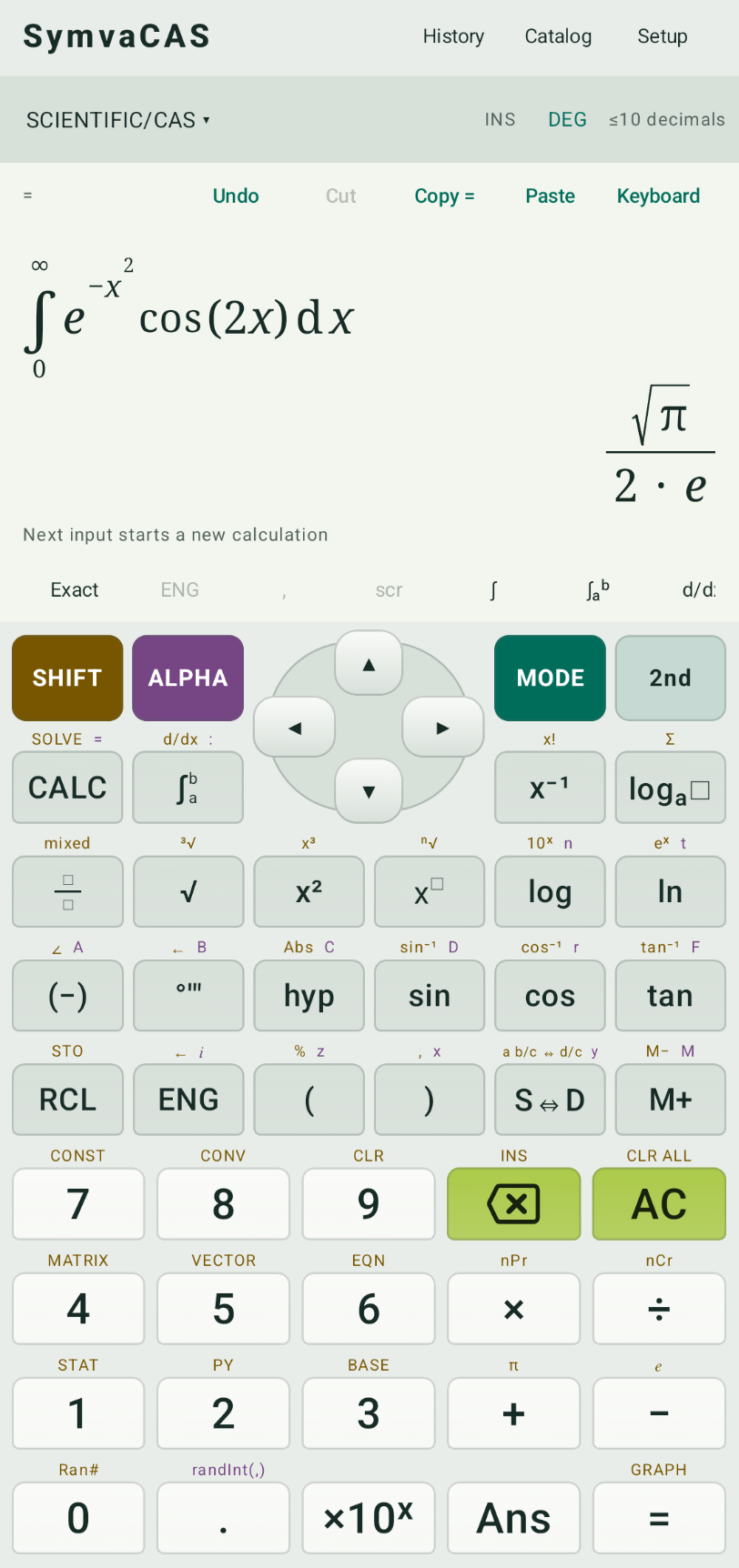
**SymvaCAS** is an all-in-one scientific calculator, computer algebra system (CAS), graphing tool, and advanced statistical analysis platform for **Android, Windows and the web**. Powered by a shared Python/SymPy engine, it offers symbolic mathematics, step-by-step solutions, interactive 2D/3D graphing, and comprehensive statistical analysis—all running locally on your device.
[**Download Android**](https://github.com/kirinonakar/symvacas/releases) · [**Open web version**](https://kirinonakar.github.io/symvacas/)
## Features
| Workspace | Features |
| --- | --- |
| Scientific / CAS | Exact arithmetic, symbolic algebra, calculus with step-by-step explanations, limits, series, transforms, complex numbers |
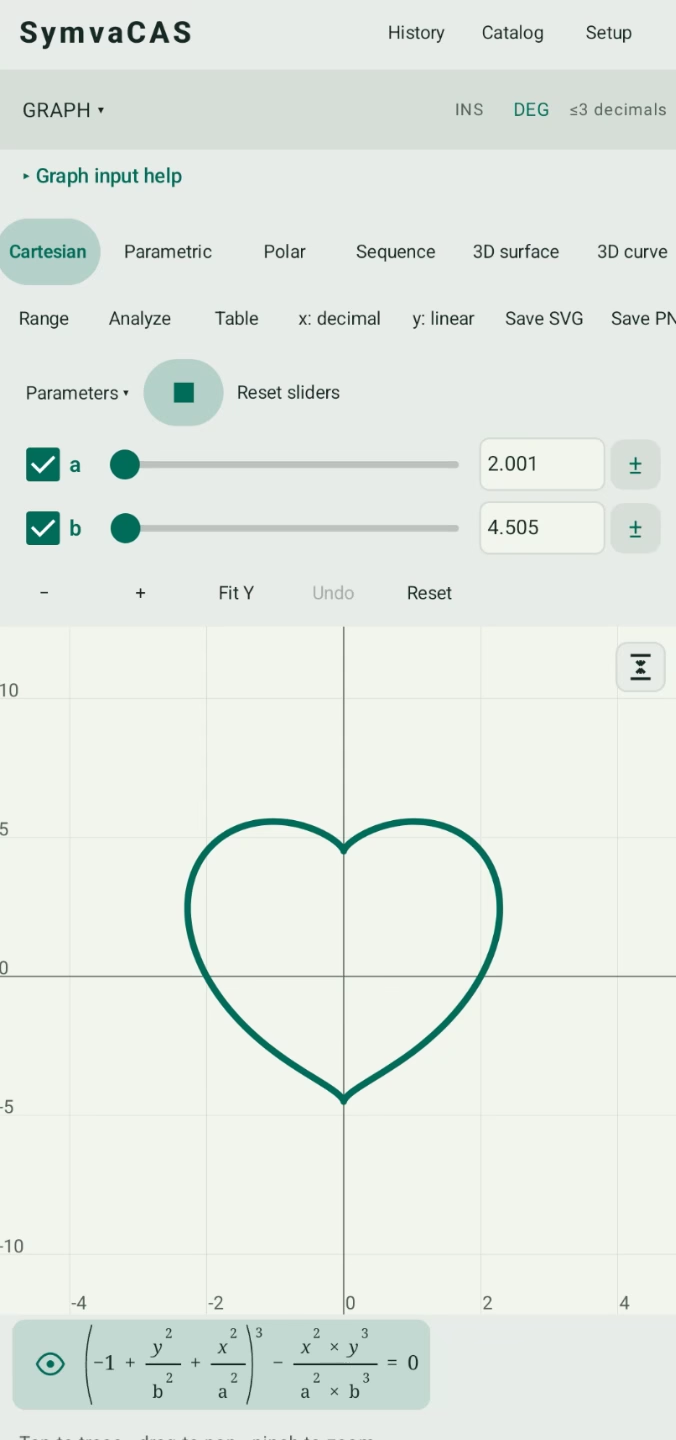
| Graphing | Function and implicit plots, parametric, polar, sequence, 3D explicit/implicit surfaces, 3D curves and ODE plots; trace, analysis, parameter sliders and animation |
| Equations | Polynomial equations, systems, exact/numeric solving, differential equations, Step-by-step solution |
| Matrix / Vector | Matrix algebra, determinants, eigenvalues and vector operations |
| Statistics | Datasets, descriptive statistics, hypothesis tests, confidence intervals, correlation, regression, plots, forecasting, survival analysis, advanced statistical analysis |
| Probability | Distributions, tail/interval/quantile queries, and editable coin, dice, card and sampling examples |
| Python | Script editor, local `.py` files, calculator functions, SymPy/mpmath and interactive input |
| Programmer | Binary/octal/decimal/hex, fixed-width integers and signed/unsigned shifts |
| Utilities | Units, constants, finance, currency, tips and reusable custom functions |
Both versions support Korean/English, light/dark/system themes, calculation history, stored variables and editable LaTeX paste. Internal precision is configurable from **3–200 significant digits** (default 30); display precision is separate, and `Ans` and stored variables retain their full value. Trigonometry supports **DEG / RAD / GRAD**.
Adjacent lowercase `x`, `y`, `z` form products: `xy` means `x*y`, `xyz` means `x*y*z`, `xy^2` means `x*y^2`, and `ax` means `a*x`.
In Statistics, a nonzero value that would round to zero at the selected display precision automatically expands to two significant digits, including a trailing zero. At 3 display digits, `0.0000123 → 0.000012`, `0.0000103 → 0.000010`, and `0.0000126 → 0.000013`. This applies to results, p-values, regression equations and their copied text; calculation values remain unchanged.
Enable **Copy as LaTeX** in Setup to copy calculator, graph and equation formulas as LaTeX, including selected input and results. This saved option defaults off; full solution copies retain explanatory text and convert their formulas.
Setup includes Android/Web data import/export for variables, saved statistics datasets and custom functions, plus data deletion and a settings reset that preserves those datasets and definitions. The reset clears history and workspace drafts as well as preferences and view state.
### Step-by-step explanations
Android and Web share step-by-step explanations for supported equations, systems, ODEs, derivatives, integrals and limits. Explanations preserve the computed answer and domain restrictions; unsupported cases show a solver summary. See catalog help for coverage and limits.
## Examples
```text
1/3 + 1/6
sqrt(8)
sin(30°)
factor(x^4 - 1)
diff(sin(x^2), x)
integrate(exp(-x^2)*cos(2*x), (x, 0, oo))
solve(x^2 - 5*x + 6 = 0, x)
solve([x+y=3, x-y=1], [x,y])
limit(sin(x)/x, x, 0)
det([[1,2],[3,4]])
normcdf(-1.96, 1.96)
convert(32, degF, degC)
npv(0.1, -1000, [300,400,500])
```
Define `f(x)=x^3-8x+7`, then evaluate `f(2)`. In Cartesian graphing, enter one curve per line, such as `x+1`, `y=x+1`, or `x^2+y^2=1`. Free parameters such as `a` and `b` create sliders; use this implicit curve to try parameter animation:
```text
(-1 + y^2/b^2 + x^2/a^2)^3 - x^2*y^3/(a^2*b^3) = 0
```
Supported LaTeX pasted into calculator, graph and equation inputs is immediately converted to editable calculator syntax, with or without `$...$`, `$$...$$`, `\(...\)` or `\[...\]` delimiters. Graph curves and equation systems retain one expression per line; pasting into a selection preserves surrounding text:
```latex
\frac{x^2+1}{x-1}
\int_{0}^{\infty} e^{-x^2}\cos(2x)\,dx
\lim_{x \to 0} \frac{\sin x}{x}
\begin{bmatrix}1 & 2 \\ 3 & 4\end{bmatrix}
```
## Build and run
Run the following commands from the repository root unless stated otherwise.
### Android
Requirements: **JDK 21**, **Android SDK 37**, and **Python 3.14** on `PATH`. Supported devices: Android 8 / API 26 or later, `arm64-v8a` and `x86_64`.
```powershell
$env:JAVA_HOME='C:\Program Files\Android\Android Studio\jbr'
.\gradlew.bat :app:assembleDebug
```
APK: `app/build/outputs/apk/debug/app-debug.apk`. Use `:app:assembleRelease` for an unsigned release build and your own signing credentials for distribution.
### Web
Requirements: **Python 3.10+** to build and serve the static site. The first build downloads the WebAssembly runtime and Python wheels; later builds reuse them. No calculation backend or npm build is needed.
```powershell
python web/build.py
python web/serve.py
```
Open [http://localhost:8080](http://localhost:8080). Opening `index.html` through `file://` is unsupported. Use `python web/build.py --skip-download` to refresh the engine, catalogs and cache manifest with already downloaded dependencies.
For **GitHub Pages**, select **Settings → Pages → Source → GitHub Actions**. The included [deployment workflow](.github/workflows/pages.yml) builds and publishes on relevant pushes to `main`, or through **Actions → Deploy SymvaCAS Web → Run workflow**.
For another static host, create a deployment directory:
```powershell
python web/build.py --output build/web
```
Upload the complete contents of `build/web/`. Serve `.wasm` as `application/wasm` and `.js`/`.mjs` as JavaScript; missing assets must not return an HTML fallback. Hosting under a path such as `/symvacas/` is supported.
### Windows (Tauri)
The [Windows version](win/README.md) reuses the web UI with native embedded CPython instead of WASM. Build with `cd win`, `npm ci`, then `npm run build`; the portable application is created in `win/release/SymvaCAS/`.
Use **Python / MCP → Install Python dependencies** to install Python, SymPy, mpmath and pip into **`python_embeded` beside the executable**. Windows also includes a headless CLI, stdio MCP server and an agent skill. See the Windows guide for setup and commands.
## Storage and platform behavior
- **Android:** the bundled engine works offline. Android backup includes settings and saved work, including the Python draft, subject to the device's backup and encryption support. File access grants remain device-specific; a restored script may need **Save as**.
- **Web:** history, variables, functions, datasets, drafts and settings are saved in browser local storage. Use **Setup → Export full backup / Import backup** to keep a copy; clearing site data removes saved work. After engine startup, the service worker caches the application for offline use on HTTPS or localhost.
- **Python:** the web version bundles the standard library, SymPy and mpmath. Interactive `input()` requires WebAssembly Promise Integration in the browser; pre-entered input values work without it. Input waiting does not consume the execution deadline.
- **Currency:** refreshed exchange rates require internet access.
## Development and tests
`math/` contains the Kotlin parser and expression model, `app/` the Android UI and service, `app/src/main/python/` the shared engine, and `web/` the JavaScript parser, UI and WebAssembly Worker. Calculator expressions use a validated AST rather than unrestricted string `eval` or SymPy `parse_expr`. Python mode runs user scripts separately from expression evaluation.
Android and desktop engine tests:
```powershell
.\gradlew.bat :math:test :math:exportCases :app:testDebugUnitTest
python -m venv .venv
.\.venv\Scripts\python.exe -m pip install sympy==1.14.0
.\.venv\Scripts\python.exe -X utf8 -m unittest discover -s tests -v
```
`scripts/verify.ps1` runs the Kotlin and Android unit tests, parser fixture export, Android build/lint, and shared Python engine tests together.
Web tests require **Node.js 22+** and Python. After parser changes, export Kotlin fixtures with `:math:exportCases` and refresh the web build before running:
```powershell
cd web
npm ci
npm test
```
## Limits
Symbolic operations depend on SymPy's algorithms and computation budgets; some results remain unevaluated.
`variance`, `stdev`, and `covariance` default to **sample** values (divide by n−1; ddof=1). Pass a final `0` for **population** values (divide by n): `variance([1,2,3],0)`, `stdev([1,2,3],0)`, or `covariance([1,2,3],[2,4,6],0)`. Sample values require at least two observations; `stats(list)` shows both conventions.
Expensive calculations and scripts can be stopped, with a default 60-second service/Worker deadline. Enable **Remove computation limit** in the options to disable this deadline on Android and Web; manual cancellation remains available. Graphs use finite sampling and may miss very narrow features. Matrix entry grids support up to 9 × 9 values and vectors up to 9 components.
For other details, refer to the catalog help.
## License
[MIT](LICENSE) · Copyright © 2026 kirinonakar.
Android dependency licenses are included in `app/src/main/assets/licenses/` and the packaged runtime notices. See [web third-party notices](web/THIRD_PARTY.md) for the WebAssembly distribution and font licenses.