## Obstacle_Challenge Code Overview
### **Obstacle Challenge Problem Decomposition and Controller Responsibility Allocation**
Based on the technical characteristics of controllers like the **Jetson Orin Nano** and the **Raspberry Pi Pico W**, we decomposed the problems faced in the Obstacle Challenge rounds and **allocated functional responsibilities**.
- #### Responsibilities of the Jetson Orin Nano (Main Control Unit)
This time, the **Jetson Orin Nano** not only includes **image recognition** and **direction detection** capabilities but has also **added obstacle recognition functionality**. Leveraging its powerful computing capability, the Jetson Orin Nano can:
* Perform **real-time image analysis and processing**.
* **Precisely detect the vehicle's direction of travel**.
* **Quickly identify and avoid obstacles on the path**, thereby enhancing the **stability and safety** of autonomous driving.
- #### Responsibilities of the Raspberry Pi Pico W (Auxiliary Unit)**
Furthermore, this time the **Raspberry Pi Pico W** is not only tasked with controlling the **DC motor speed** and **vehicle steering** but also requires the use of **infrared sensors to detect the distance between the vehicle and the walls**. Leveraging its **efficient GPIO control capability**, the Raspberry Pi Pico W can:
* Perform **precise distance measurement** and **hardware management**.
* **Ensure the vehicle is safely parked within the parking lot** and **maintains an appropriate safe distance**.
- ### Jetson Orin Nano library
**All functions related to image recognition, image processing, and key visual identification** have been **highly integrated** into the **[function.py](../common/function.py) module** and can be directly **imported and called** by the higher-level program. The **specific functionalities** of these modules are outlined as follows:
- The **`display_roi()` function** is designed to **visualize** multiple **Regions of Interest (ROIs)** on an image. It accepts the **source image (`img`)**, a **list containing the coordinates of multiple ROIs (`ROIs`)**, and the **drawing color (`color`)** for the boundary boxes as input parameters.Its mechanism involves **drawing four line segments** to form the **rectangular boundary** for each ROI. Upon completion, the function **returns** the processed image marked with the boundary boxes.
```python
def display_roi(img, ROIs, color):
# Draw Region of Interest (ROI) bounding boxes on the image
for ROI in ROIs:
# Iterate through all ROIs
# ROI format: [x1, y1, x2, y2]
img = cv2.line(img, (ROI[0], ROI[1]), (ROI[2], ROI[1]), color, 4) # Top line
img = cv2.line(img, (ROI[0], ROI[1]), (ROI[0], ROI[3]), color, 4) # Left line
img = cv2.line(img, (ROI[2], ROI[3]), (ROI[2], ROI[1]), color, 4) # Right line
img = cv2.line(img, (ROI[2], ROI[3]), (ROI[0], ROI[3]), color, 4) # Bottom line
return img # Return the image with drawings
```
- The **`find_contours()` function** is used to **detect object contours** within a specific color range in an image.It first **extracts** the **Region of Interest (ROI)** portion of the image. It then performs **color thresholding** using the **LAB color space** and the predefined **`lab_range` parameters** to convert this area into a **binary mask**. To **enhance contour accuracy**, the function performs **morphological operations**—specifically **erosion** and **dilation**—on the mask. Finally, the function **extracts the external contours** from the processed mask and **returns** them.
```python
def find_contours(img_lab, lab_range, ROI):
# Find contours in ROI using LAB color range
x1, y1, x2, y2 = ROI # Unpack ROI coordinates
seg = img_lab[y1:y2, x1:x2] # Crop the image to the ROI area
lo = np.array(lab_range[0]); hi = np.array(lab_range[1]) # Get color low and high thresholds
mask = cv2.inRange(seg, lo, hi) # Create color mask
k = np.ones((5,5), np.uint8) # 5x5 rectangular kernel
mask = cv2.erode(mask, k, iterations=1) # Erode operation
mask = cv2.dilate(mask, k, iterations=1) # Dilate operation
contours = cv2.findContours(mask, cv2.RETR_EXTERNAL, cv2.CHAIN_APPROX_SIMPLE)[-2] # Find external contours
return contours # Return found contours
```
- The **`max_contour()` function** is used to **identify and select the largest valid target contour** from an input **list of contours (`contours`)**.The function first **filters out** all **noise contours** with an **area less than 150**. For the qualified contours, it calculates their **area** and the **center-bottom coordinates (`maxX`, `maxY`)** relative to the original image. Finally, the function **returns** the value of the largest area, its corresponding corrected coordinates, and the **contour object itself**, serving as the key basis for the vehicle's **line following or target recognition**.
```python
def max_contour(contours, ROI):
# Find the largest contour by area and its center point
maxArea = 0; maxY = 0; maxX = 0; mCnt = 0 # Initialize max area, center coordinates, and max contour
for cnt in contours:
area = cv2.contourArea(cnt) # Calculate contour area
if area > 100: # Only consider contours with area greater than 100
approx = cv2.approxPolyDP(cnt, 0.01*cv2.arcLength(cnt, True), True) # Polygon approximation
x,y,w,h = cv2.boundingRect(approx) # Get bounding box
x += ROI[0] + w//2 # Calculate center point X (relative to original image)
y += ROI[1] + h # Calculate bottom center point Y (relative to original image)
if area > maxArea:
# If current contour area is larger
maxArea = area; maxY = y; maxX = x; mCnt = cnt # Update maximum values
return [maxArea, maxX, maxY, mCnt] # Return max area, center X, center Y, and max contour
```
- The **`pOverlap()` function** is used to **detect composite contours** that involve a combination of black and magenta within a **specific Region of Interest (ROI)** in an image, primarily intended for the detection of walls or special markers.The function determines how to combine these two color regions based on the boolean parameter `add`:
1. **If `add=True`:** The function **logically combines (Union)** the black and magenta areas to find the resulting composite contours.
2. **If `add=False`:** The function searches for the **pure black area**, which means **subtracting the portion covered by magenta from the black area**.
- In either scenario, the function performs **morphological operations (implied erosion and dilation)** on the resulting mask to **optimize the contour shape**. Finally, it **extracts and returns the external contours**.
```python
def pOverlap(img_lab, ROI, add=False):
# Process contours for black and magenta overlapping regions
x1, y1, x2, y2 = ROI # Unpack ROI coordinates
seg = img_lab[y1:y2, x1:x2] # Crop the image to the ROI area
from masks import rBlack, rMagenta # Re-import color ranges to ensure availability
loB, hiB = np.array(rBlack[0]), np.array(rBlack[1]) # Black range
loM, hiM = np.array(rMagenta[0]), np.array(rMagenta[1]) # Magenta range
mB = cv2.inRange(seg, loB, hiB) # Black mask
mM = cv2.inRange(seg, loM, hiM) # Magenta mask
if add:
mask = cv2.add(mB, mM) # If add is True, add them (Union)
else:
mask = cv2.bitwise_and(mB, cv2.bitwise_not(mM)) # Else, Black AND (NOT Magenta) (Difference)
k_open = np.ones((3,3), np.uint8) # Kernel for opening
k_close = np.ones((7,7), np.uint8) # Kernel for closing
mask = cv2.morphologyEx(mask, cv2.MORPH_OPEN, k_open, iterations=1) # Perform Opening
mask = cv2.morphologyEx(mask, cv2.MORPH_CLOSE, k_close, iterations=1) # Perform Closing
contours = cv2.findContours(mask, cv2.RETR_EXTERNAL, cv2.CHAIN_APPROX_SIMPLE)[-2] # Return found contours
```
- ### Overview of the Jetson Orin Nano Obstacle Challenge Code
- #### Obstacle Challenge Code Jetson Orin Nano Library
```python
# Import the time module for delays.
import time
# Import standard system, math, and concurrency libraries.
import os, sys, math, json, threading, asyncio
# Import the OpenCV library for computer vision.
import cv2
# Import NumPy for numerical operations.
import numpy as np
# Import the serial library for UART communication.
import serial
# Import SMBus for I2C communication (used for BNO055).
from smbus2 import SMBus
# Import Jetson.GPIO for hardware pin control.
import Jetson.GPIO as GPIO
# Import custom functions from function.py (aliased as fj, though fj is not used).
import function as fj
# -------------------- Path and Utilities --------------------
# Add the current script's directory to the system path.
sys.path.append(os.path.abspath(os.path.dirname(__file__)))
# Import color range masks from the 'masks.py' file.
from masks import rMagenta, rRed, rGreen, rBlue, rOrange, rBlack
# Import all functions from 'function.py' (e.g., find_contours, max_contour).
from function import *
```
- #### Introduction to Running Programs on the Jetson Orin Nano Controller:
- ##### [jetson_Orin_Nano_final.py](./jetson_Orin_Nano_final.py)
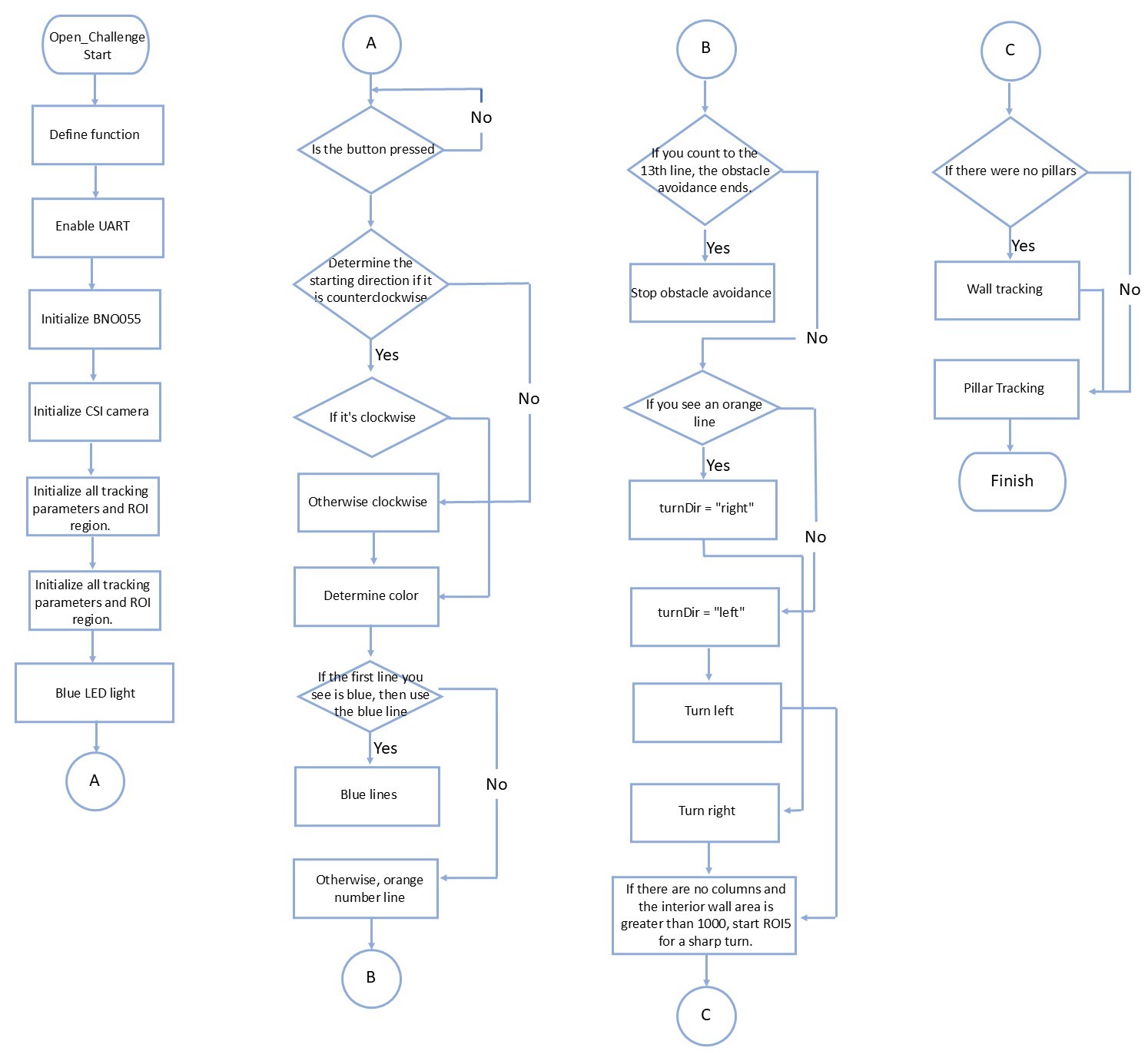
- The startup process of the self-driving car system employs a **master-slave collaboration mechanism**: After the Jetson Orin Nano boots up, the **Raspberry Pi Pico W** immediately enters a **hardware standby state**. Upon the user pressing the **physical start switch**, the Jetson Orin Nano receives the activation signal and transmits a **high-level signal** to initiate its core program, **`jetson_Orin_Nano_final.py`**.This main program is entirely responsible for **supervising and coordinating** the execution flow of the entire autonomous driving mission. Its core functionalities encompass **wall avoidance (wall following navigation)**, **precise direction control (steering decision-making)**, **dynamic obstacle evasion**, and **lap counting**. Once running, the program continuously transmits the calculated **servo motor (steering)** and **DC motor (drive)** data to the Raspberry Pi Pico W via the **UART interface** for execution, thereby **guaranteeing driving stability and mission integrity** and ensuring the vehicle completes all competition tasks according to the predetermined plan.
- Upon program startup, the vehicle first executes the **Parking Lot Exit Mode**. In this mode, the obstacle avoidance system **calculates in real-time** the range of the detected **pillars or side walls**, converting this range into a **steering angle for the servo motor**. Subsequently, this angle is used for **PD steering control** to ensure the vehicle **stably exits the parking zone** and **avoids any collision with the walls**. As the vehicle approaches a **turning area**, the system will **detect the blue or orange lines on the track** to serve as the criterion for **switching to the turning mode**.
- In the **Straight Line Following Mode**, the system prioritizes using the **red and green pillars** (specifically, the **center deviation** calculated by the `detect_color_final()` function) as the **primary reference for steering correction**. Only when **no color blocks are detected** (under the condition `cPillar.area == 0`) does the system activate the **area difference of the side walls** as an **auxiliary reference for line following correction**.
- While in **Straight Line Following Mode**, the system continuously monitors the **Region of Interest (ROI4)** for the detection of **blue or orange lines** on the track. This detection serves as the trigger signal, **setting the `rTurn` or `lTurn` flag to initiate the turning mode**.Once the turning mode is activated, the **servo steering angle is locked to a fixed value**. The complete criterion for **determining whether the turn is complete** and **switching back to the straight line following mode** is as follows: The vehicle continuously uses **visual wall perception** during the turn to confirm whether the **contour area of the inner wall** is **greater than a preset threshold** (e.g., **4000**). Once the inner wall area is confirmed to satisfy this condition, the system determines the turn is complete and **immediately returns to the straight line following mode**.
__Program operation flow__
- Upon execution, the `jetson_Orin_Nano_final.py` program first performs the **initialization of all system variables**. Subsequently, the program enters a **Main Loop**, where it continuously calls the `find_contours` and `max_contour` functions to **acquire real-time visual perception data**. The system then branches into different **conditional blocks** based on the **current operating status** to execute the corresponding **control logic and decisions**.At the conclusion of each cycle, the program **packages** the calculated **DC motor drive values**, **servo motor steering angle**, and the **current vehicle status** into a **binary data format**. This package is then transmitted via the **UART interface** to the Raspberry Pi Pico W for **low-level hardware drive control**.
- ##### Jetson Orin Nano Controller Main Program Flowchart Overview
- ### Raspberry Pi Pico W Obstacle Challenge Code Overview
- #### Raspberry Pi Pico W Function Library for the Obstacle Challenge Program
```python
from machine import Pin, PWM # Import Pin and PWM classes from machine module
import time # Import time module
import uos # Import uos module
import ujson as json # Import ujson module as json
from machine import UART # Import UART class from machine module
```
- #### Introduction to running programs on the Raspberry Pi Pico W controller:
- ##### [pico_main_final.py](./pico_main_final.py)
- The **`pico_main_final.py` program** runs on the **Raspberry Pi Pico W controller**, serving as the **low-level intermediate control unit** for the autonomous vehicle system. It is responsible for **managing the drive and operation of both the DC motor and the servo motor**. The program receives **real-time calculation results** from the **Jetson Orin Nano** controller via the **UART interface**, using this data to **precisely control the rotational speed of the rear DC motor** and the **steering angle of the front servo motor**, while also being responsible for **monitoring vehicle status parameters**.
- When controlling the rear DC motor, we utilize the **L293D driver chip**. The system achieves **rotational speed control of the rear DC motor** by precisely regulating the output voltage through **adjusting the PWM signal's duty cycle**. Furthermore, by setting the **high/low logic levels of the two control pins (20 and 21)** on the L293D chip, we can also control the **forward and reverse rotation of the rear DC motor**.
- When controlling the front servo motor, we **directly utilize the PWM signal's duty cycle** to **adjust the width of the output pulse**, thereby **precisely controlling the servo motor's steering angle**. The **slight variation in the PWM signal's duty cycle** directly corresponds to **different angle settings** of the servo motor, which ensures the **accuracy of the vehicle's steering**.
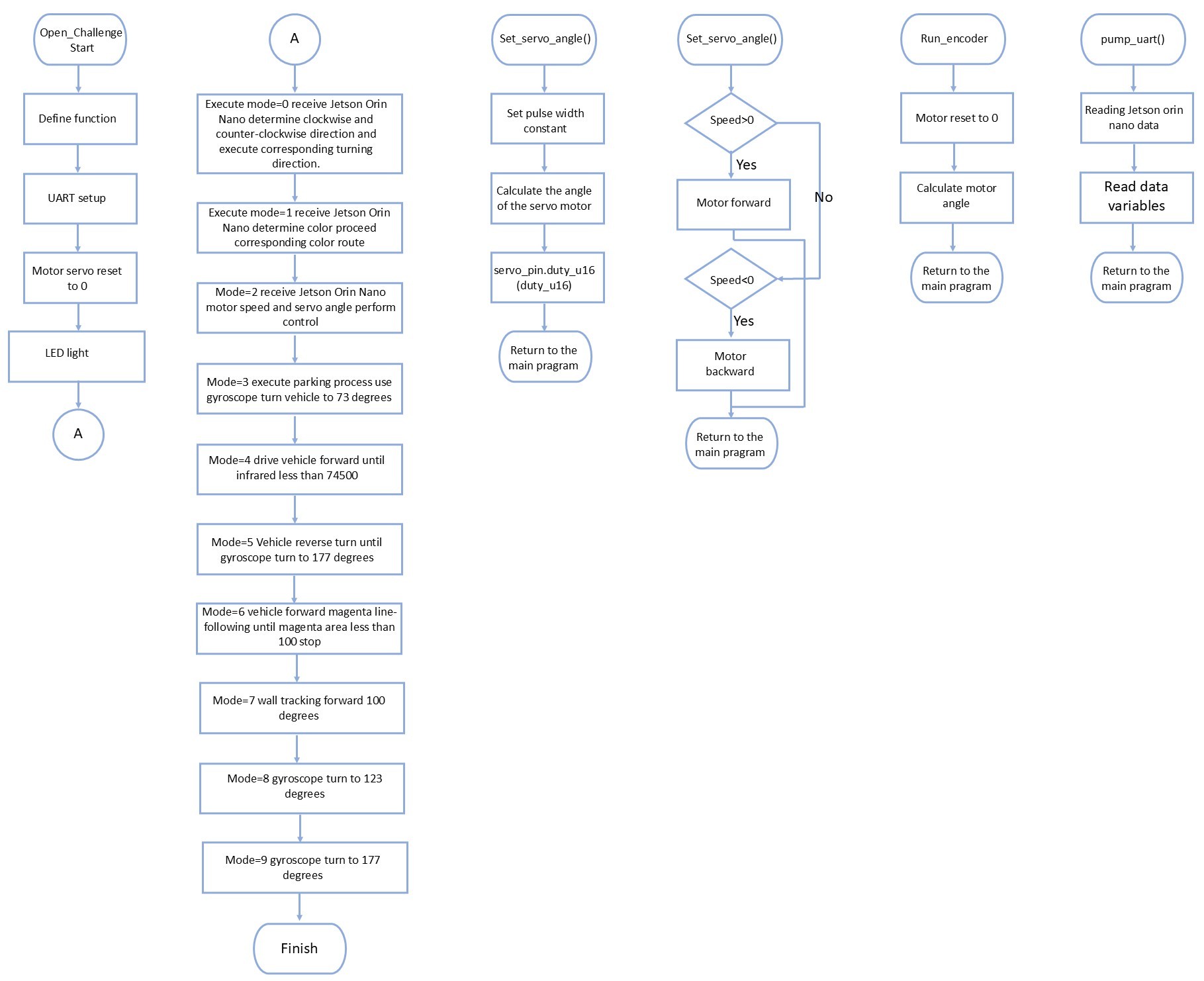
- When the program operates in **`mode=3`**, the system assumes control of the DC motor and initiates a **forward turn**. The vehicle continues its forward movement until the **infrared sensor detects a wall**, immediately switching to a **reverse turn** and commencing **line tracking of the magenta marker** for the parking zone.During magenta tracking, the vehicle persists in following the marker until the **magenta contour area is less than the threshold (100)**. At this point, the system utilizes the **wall-following mechanism to move forward by a set distance** (e.g., 100 units/steps), subsequently employing the **gyroscope** to execute a **precise angle turn** and finally entering the parking bay, thereby **ensuring the accuracy of the final parking position**.
__Program operation flow__
- Upon the **start of the `pico_main_final.py` program**, it immediately enters a **hardware waiting mode**. The program remains in this state until the **physical start button is pressed**. Once triggered, the **Jetson Orin Nano controller** sends an activation signal to the Pico W controller. At this point, `pico_main_final.py` **enters its main loop**, beginning to **continuously receive** control data transmitted by the Jetson Orin Nano via the **UART interface**, and executes routine motor driving tasks.Specifically, when the received **status parameter is `mode=3`**, the **Pico W takes over the vehicle's full control authority** and independently executes the **parking (bay entry) operation**.
- ##### Raspberry Pi Pico W Controller Program Flowchart
- #### `set_servo_angle()`: Servo Motor Angle Setting (Pico W Responsibility)
* **Function:** Responsible for calculating and **converting** the input **angle value (typically within the $\pm 180^\circ$ range)** into the required **PWM duty cycle range (0 to 65535)** for the servo motor.
* **Output:** Outputs the calculated PWM signal precisely to the **front servo motor** for accurate steering.
- #### `control_motor()`: DC Motor Speed and Direction Control (Pico W Responsibility)
* **Function:** Accepts a numerical value ranging from **-100 to 100** as input, controlling both speed and direction simultaneously.
* **PWM Conversion:** Takes the **absolute value** of the number and converts it into the **PWM duty cycle for the DC motor** (representing the rotational speed).
* **Direction Control:** Based on the **sign (positive/negative)** of the input value, it sets the high/low state of the driver pins to achieve **forward rotation, reverse rotation, or motor stop**.
- #### `run_encoder_Auto()`: Encoder-Assisted Automatic Running (Pico W Support)
* **Function:** Within this function, the system typically calls **`run_encoder()`** to execute precise movement based on encoder counts.
* **Control Stability:** During this operation, the **servo motor angle is fixed to a set value** to ensure **stable control over the vehicle's position and direction**.
- #### `pump_uart()`: UART Control Data Transmission (Jetson Responsibility)
* **Function:** This function executes on the **Jetson Orin Nano controller**. It utilizes the **UART protocol** to transmit the latest control parameters, including the **updated mode**, **servo angle**, and **DC motor speed** values, to an **output queue**.
* **Purpose:** Ensures continuous control flow, maintaining **real-time data updates** and synchronization between the Jetson and the Pico W.
- #### `extract_magenta_from_json()`: Magenta Data Transmission (Jetson Responsibility)
* **Function:** This function executes on the **Jetson Orin Nano controller**. It uses the **UART protocol** to transmit the visually acquired values for the **magenta wall area**, **X-coordinate**, and **Y-coordinate** to an **output queue**.
* **Purpose:** Ensures continuous flow, providing real-time data input for the Pico W to execute complex **parking bay entry** or **visual assistance** tasks.
# [Return Home](../../../)