Tusk
Refined Evernote desktop app

## Description
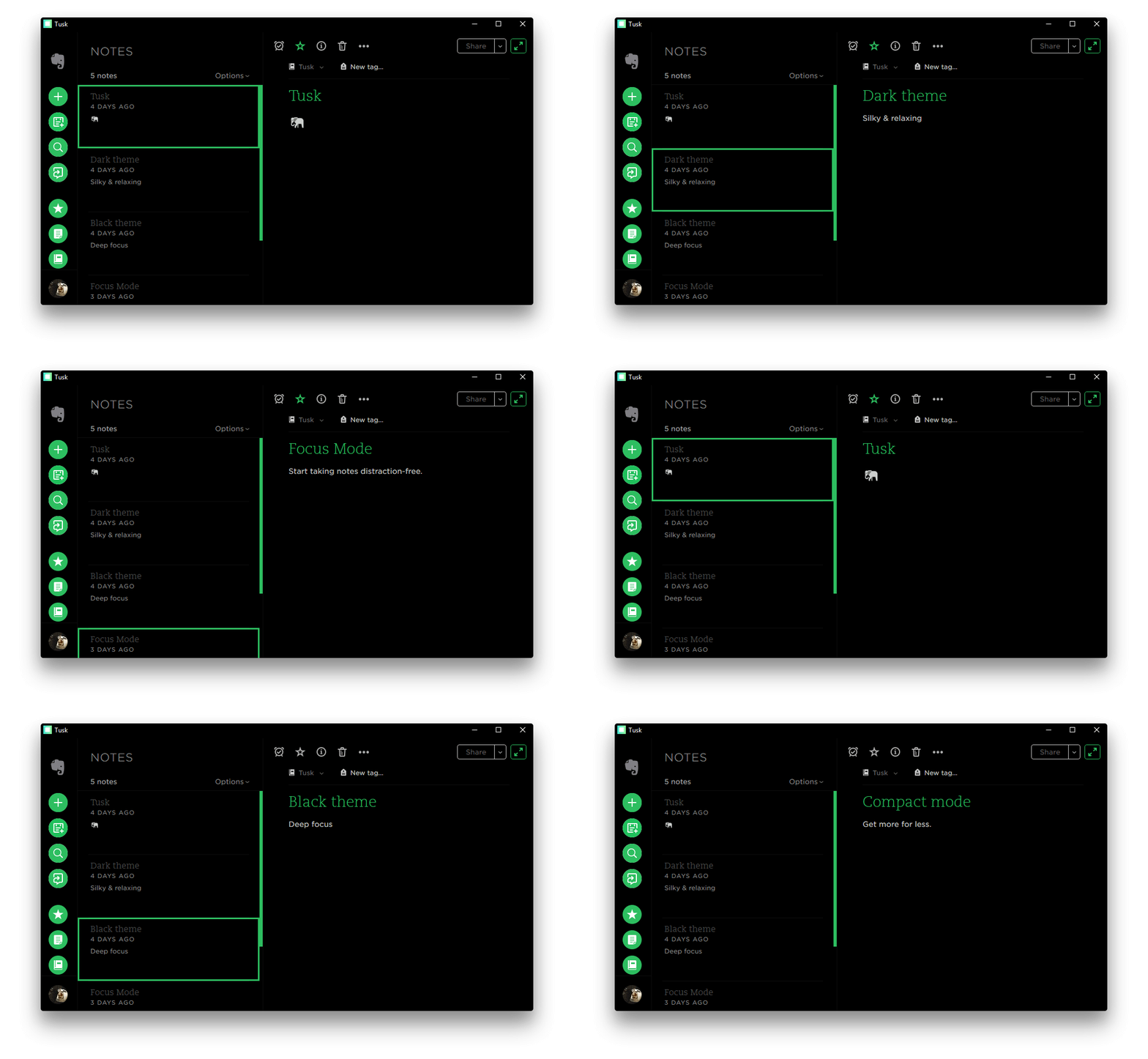
Tusk is an unofficial, featureful, open source, community-driven, free Evernote app used by people in more than [140 countries](https://snapcraft.io/tusk).
Tusk is [indicated by Evernote](https://help.evernote.com/hc/en-us/articles/208313748-Evernote-on-Linux) as an alternative client for Linux environments trusted by the open source community.
Read this document in: [Albanian - Shqip](https://github.com/klaudiosinani/tusk/blob/master/docs/translations/readme.AL.md).
You can now support the development process through [GitHub Sponsors](https://github.com/sponsors/klaudiosinani).
Visit the [contributing guidelines](https://github.com/klaudiosinani/tusk/blob/master/contributing.md#translating-documentation) to learn more on how to translate this document into more languages.
You can find more apps [here](#related-apps).
## Highlights
- Black, Dark & Sepia Themes
- Focus, Compact & Auto-Night Modes
- Local & Global Customizable Keyboard Shortcuts
- Export Notes as PDF, HTML & Markdown Files
- Note Navigation
- Yinxiang Support
- Cross Platform
- Scalable Interface
- Update Notifications
- Drag and Drop Files
## Contents
- [Description](#description)
- [Highlights](#highlights)
- [Install](#install)
- [Features](#features)
- [Keyboard Shortcuts](#keyboard-shortcuts)
- [Development](#development)
- [Related Apps](#related-apps)
- [Team](#team)
- [Sponsors](#sponsors)
- [Disclaimer](#disclaimer)
- [License](#license)
## Install
#### Github Releases
Head to the [releases](https://github.com/klaudiosinani/tusk/releases/latest) page and download the appropriate installer for your system.
#### Snapcraft
Ubuntu Linux users can directly install through [Snapcraft](https://snapcraft.io/tusk) `snap install tusk`
#### Homebrew
Macos users can directly install through [Homebrew Cask](https://caskroom.github.io/) `brew cask install tusk`
#### Note
The version available on `Homebrew Cask` may not be the latest, since unlike `Snapcraft`, it is not offically maintained. If that is the case, please consider downloading directly from the [Github releases](https://github.com/klaudiosinani/tusk/releases/latest) page.
## Features
Visit the project [homepage](https://klaudiosinani.com/tusk) to view all features in detail.
- Auto Night Mode - Press Cmd/Ctrl Alt N to allow Tusk to adjust to your environment.
- Black Theme - Activate it by pressing Cmd/Ctrl Alt E.
- Compact Mode - Downsize the window to enter the mode.
- Custom Shortcut Keys - Navigate to `~/.tusk.json` or press Cmd/Ctrl . to modify any shortcut key. To reset delete `~/.tusk.json` & restart the app.
- Dark Theme - Activate it by pressing Cmd/Ctrl D.
- Drag & Drop Files - Attach files by dragging them to the app window.
- Export Notes as Markdown - Press Cmd/Ctrl O to save your notes as `Markdown` files.
- Export Notes as HTML - Press Cmd/Ctrl Shift H to save your notes as `HTML` files.
- Export Notes as PDF - Press Cmd/Ctrl Shift E to save your notes as `PDF` files.
- Focus Mode - Activate it by pressing Cmd/Ctrl K.
- Global Shortcut Keys - Enable them by using the `File` > `Enable Global Shortcut Keys` option.
- Note Navigation - Navigate your notes by pressing Cmd/Ctrl Tab / Cmd/Ctrl Shift Tab or jump directly to one by using Cmd/Ctrl 1 - 9.
- Note Printing - Press Cmd/Ctrl Alt P to print your notes.
- Scalable Interface - Adjust the zooming factor by pressing Cmd/Ctrl Shift = or Cmd/Ctrl -.
- Sepia Theme - Activate it by pressing Cmd/Ctrl G.
- Update Notifications - Customize the apps update checking frequency.
- Yinxiang Support - Login to Yinxiang by using the `File` > `Switch to Yinxiang` option.
## Keyboard Shortcuts
### Local Shortcut Keys
70+ local keyboard shortcuts. Toggle anything in a flash.
| Description | Keys |
| ------------------------- | -------------------------------------------------------------- |
| Activate Auto Night Mode | Cmd/Ctrl Alt N |
| Add Link | Cmd/Ctrl Shift K |
| Add Shortcut | Cmd/Ctrl Alt S |
| Align Center | Cmd/Ctrl Alt M |
| Align Left | Cmd/Ctrl Alt L |
| Align Right | Cmd/Ctrl Alt R |
| Attach File | Cmd/Ctrl Shift F |
| Bold Text | Cmd/Ctrl B |
| Bulleted List | Cmd/Ctrl Shift . |
| Change Font Size | Cmd/Ctrl Alt 1 - 6 |
| Code Block | Cmd/Ctrl Shift L |
| Decrease Indentation | Cmd/Ctrl Shift M |
| Delete Note | Delete |
| Edit Shortcut Keys | Cmd/Ctrl . |
| Export Note as HTML | Cmd/Ctrl Shift H |
| Export Note as Markdown | Cmd/Ctrl O |
| Export Note as PDF | Cmd/Ctrl Shift E |
| Increase Indentation | Cmd/Ctrl Alt K |
| Insert Date Stamp | Cmd/Ctrl Shift ; |
| Insert Date-Time Stamp | Cmd/Ctrl ; |
| Insert from Drive | Cmd/Ctrl Shift D |
| Insert Horizontal Rule | Cmd/Ctrl Shift - |
| Italic Text | Cmd/Ctrl I |
| Jump to Note | Cmd/Ctrl 1 - 9 |
| Make Text Larger | Cmd/Ctrl Shift = |
| Make Text Smaller | Cmd/Ctrl - |
| Navigate to Next Note | Cmd/Ctrl Tab |
| Navigate to Previews Note | Cmd/Ctrl Shift Tab |
| New Note | Cmd/Ctrl N |
| New Notebook | Cmd/Ctrl Shift N |
| New Tag | Cmd/Ctrl Shift T |
| Numbered List | Cmd/Ctrl Shift O |
| Print Note | Cmd/Ctrl Alt P |
| Remove Formatting | Cmd/Ctrl Shift Space |
| Reset Zoom Level | Cmd/Ctrl 0 |
| Return to Notes | Esc |
| Save Note | Cmd/Ctrl S |
| Search Notes | Cmd/Ctrl F |
| Set Always on Top | Cmd/Ctrl Shift P |
| Set Reminder | Cmd/Ctrl E |
| Strikethrough Text | Cmd/Ctrl T |
| Subscript Text | Cmd/Ctrl Shift ] |
| Superscript Text | Cmd/Ctrl Shift [ |
| Toggle Black Theme | Cmd/Ctrl Alt E |
| Toggle Checkbox | Cmd/Ctrl Shift B |
| Toggle Dark Theme | Cmd/Ctrl D |
| Toggle Focus Mode | Cmd/Ctrl K |
| Toggle Notebooks | Alt Shift N |
| Toggle Sepia Theme | Cmd/Ctrl G |
| Toggle Settings | Cmd/Ctrl , |
| Toggle Shortcuts | Cmd/Ctrl Shift S |
| Toggle Sidebar | Cmd/Ctrl \\ |
| Toggle Tags | Alt Shift T |
| Toggle Window Menu | Alt |
| Underline Text | Cmd/Ctrl U |
### Global Shortcut Keys
Access Tusk at any moment from anywhere within your operating system. All global shortcuts can be customized to match your own preference through the configuration file `~/.tusk.json`.
| Description | Global Shortcut |
| ------------------ | ----------------------------------------------- |
| Toggle Tusk Window | Cmd/Ctrl Alt A |
| Create New Note | Cmd/Ctrl Alt C |
| Search Notes | Cmd/Ctrl Alt F |
## Development
For more info on how to contribute to the project, please read the [contributing guidelines](https://github.com/klaudiosinani/tusk/blob/master/contributing.md).
- Fork the repository and clone it to your machine
- Navigate to your local fork: `cd tusk`
- Install the project dependencies: `npm install` or `yarn install`
- Run Tusk on dev mode: `npm start` or `yarn start`
- Lint code for errors: `npm test` or `yarn test`
- Build binaries and installers: `npm run release` or `yarn release`
## Related Apps
- [Ao](https://github.com/klaudiosinani/ao) - Elegant Microsoft To-Do desktop app.
- [Taskbook](https://github.com/klaudiosinani/taskbook) - Tasks, boards & notes for the command-line habitat.
## Team
- Klaudio Sinani [(@klaudiosinani)](https://github.com/klaudiosinani)
- Mario Sinani [(@mariosinani)](https://github.com/mariosinani)
## Sponsors
A big thank you to all the people and companies supporting our Open Source work:
- [Better Stack: Spot, Resolve, and Prevent Downtime.](https://betterstack.com/)
## Disclaimer
Tusk is an unofficial, open source, third-party, community-driven, free app and is not affiliated in any way with Evernote.
## License
[MIT](https://github.com/klaudiosinani/tusk/blob/master/license.md)