> [!IMPORTANT]
> This branch reflects **version 4.0.0**, which is in active development with a complete redesign of the UI.
> The live demo at [demo.portkey.page](https://demo.portkey.page) shows this in-development version, **not** the latest stable release.
> The screenshots later in this document still show the previous stable version and have not yet been updated to reflect the 4.0.0 redesign.

portkey
⚡🚀🔗
Repository of the portkey application
A simple web portal that can act as startup page and shows a collection of links/urls. It also supports adding small custom pages.
## Table of Contents
- [Features](#features)
- [Screenshots](#screenshots)
- [Installation](#installation)
- [Usage](#usage)
- [Configuration](#configuration)
- [Metrics](#metrics)
- [Docker](#docker)
- [Development](#development)
- [See Also](#see-also)
- [License](#license)
## Features
- 🔗 Shows a collection of links acting as startup page or similar.
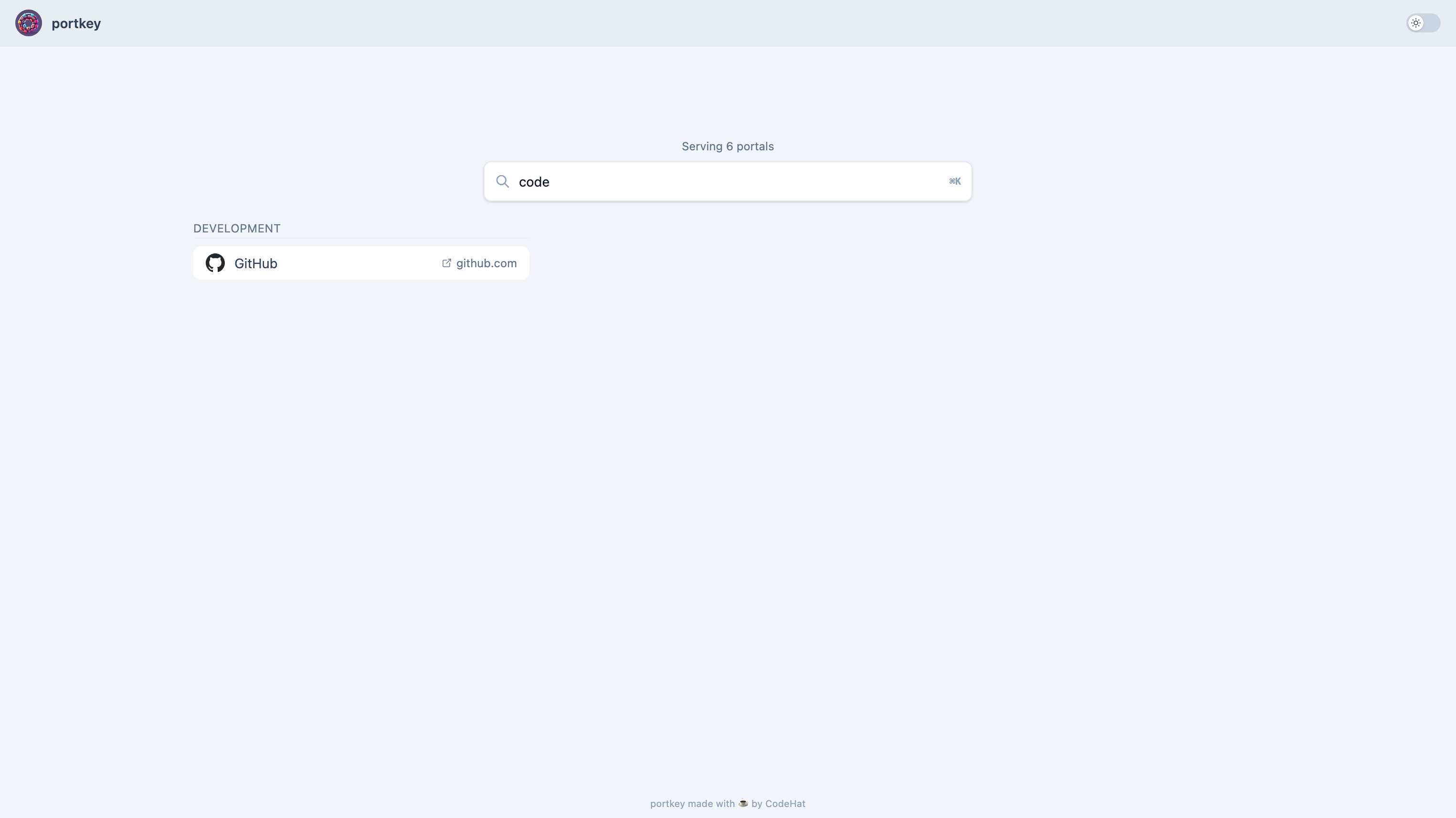
- 🔎 Includes a search box with configurable keyword support and fuzzy matching.
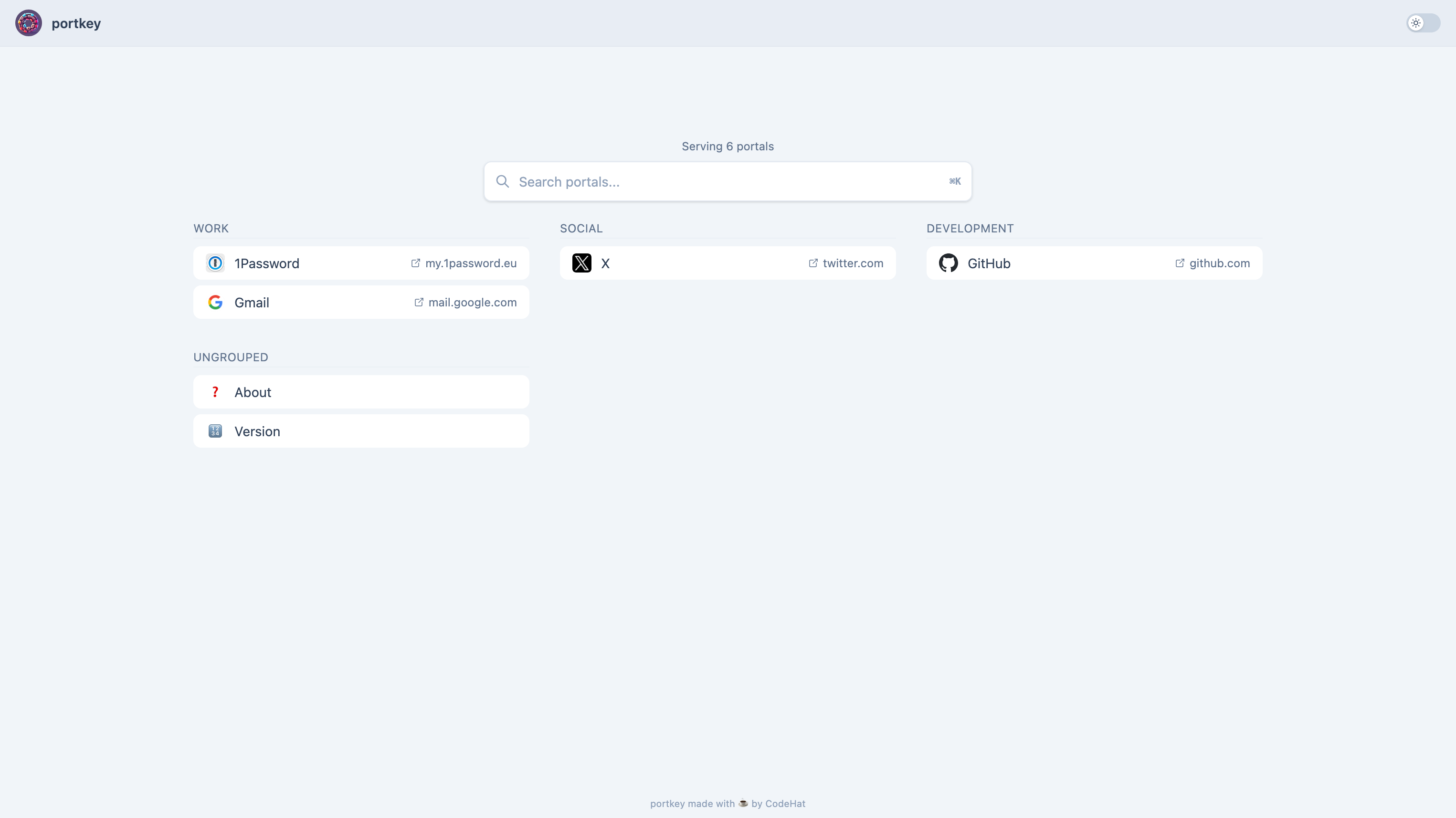
- 📂 Portals can be organised into named groups/sections on the home page.
- 📐 Optional multi-column grid layout for portals and groups (configurable column count, mobile-responsive).
- 📄 Can be configured easily by modifying only one file.
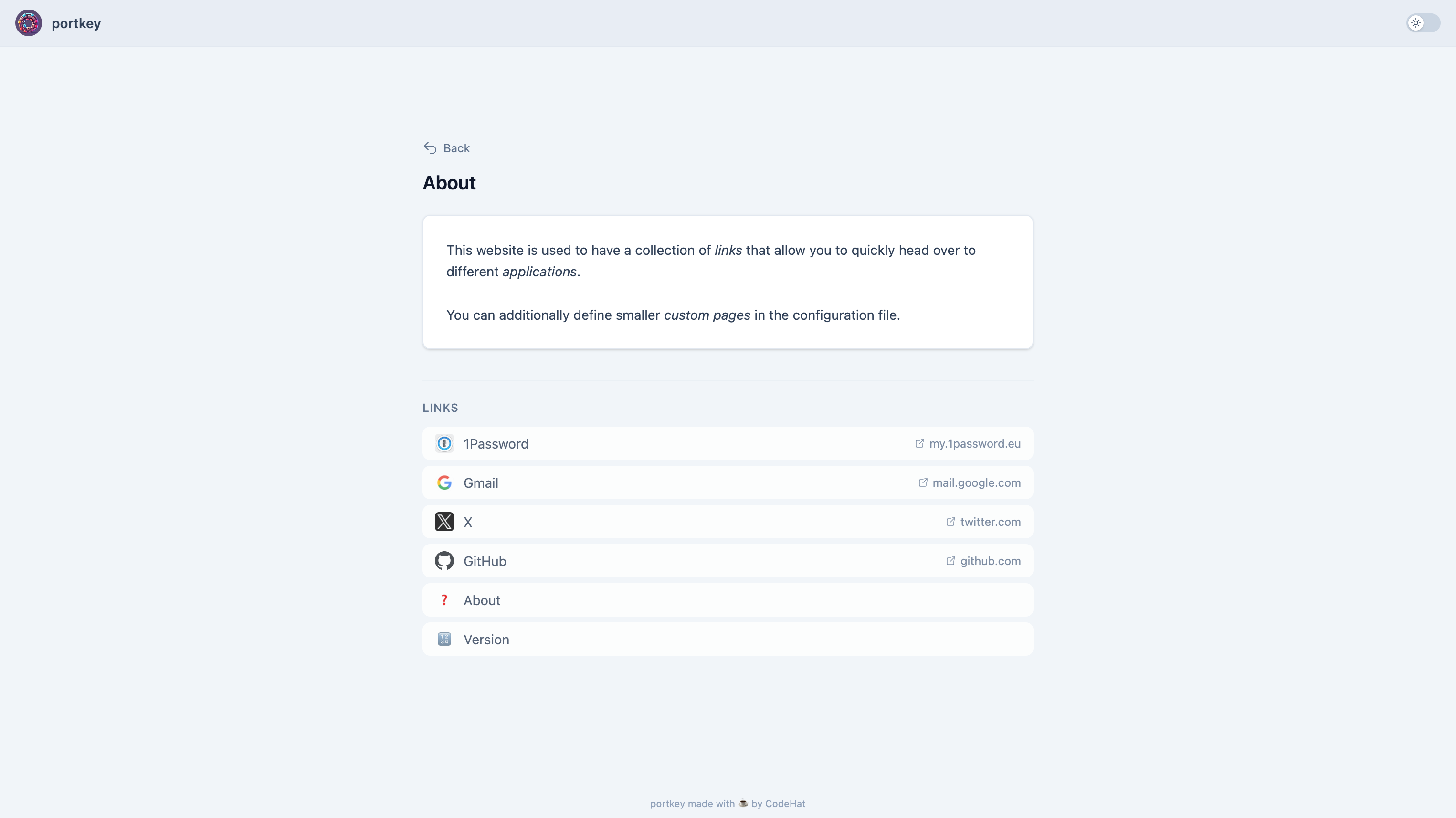
- 🗒️ Also supports adding smaller custom pages.
- 🌓 Dark and light mode available.
- 🪰 Very lightweight application with Docker images available.
## Screenshots
You can also find a demo here
Click to view screenshots
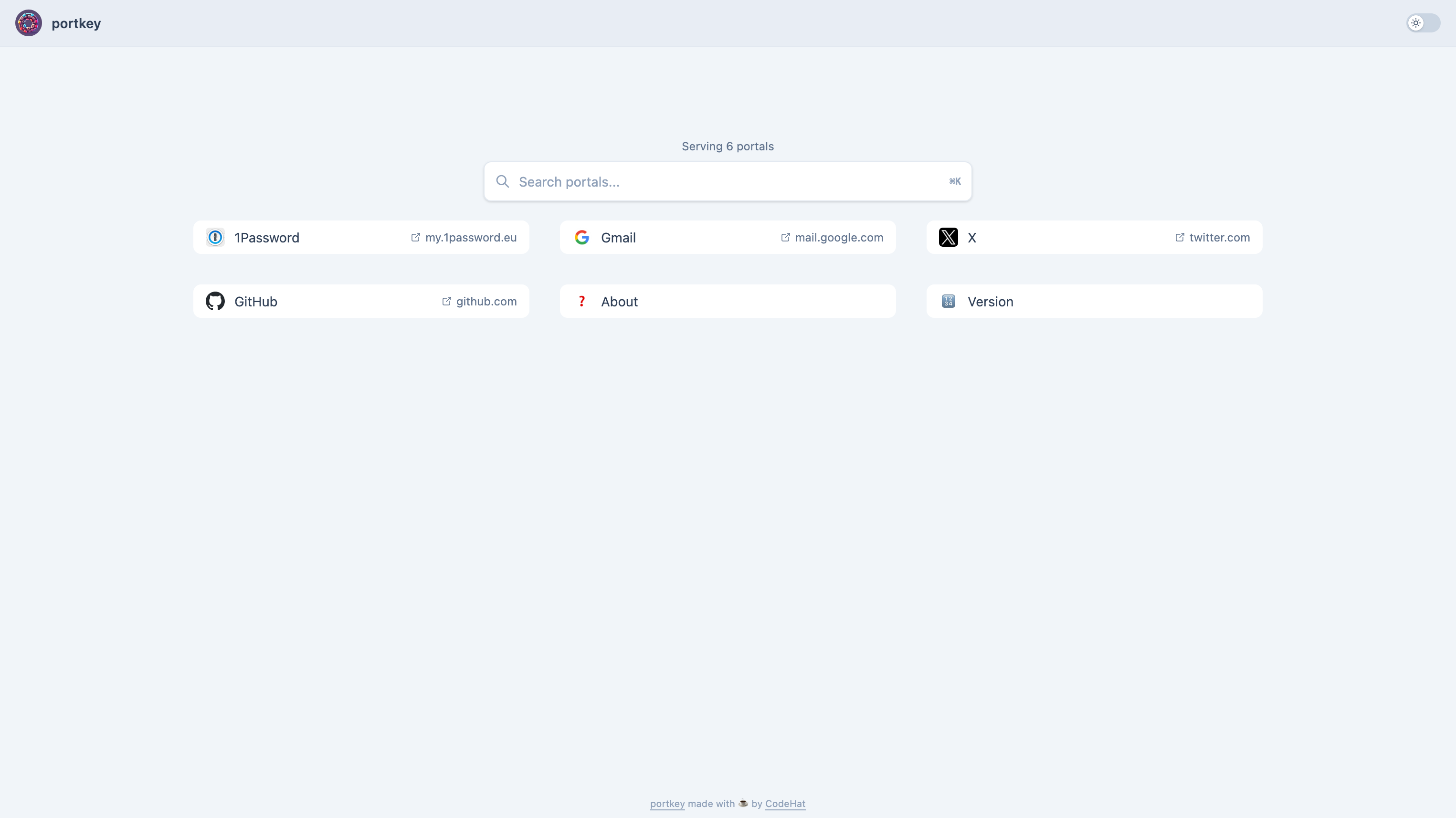
#### Link collection (no groups)
#### Link collection (with groups)
#### Search for a link
#### Custom page
## Installation
Download the `portkey` file for your OS. Probably to a location that is in your `PATH`, so you can use it right away.
## Usage
1. Create a `config.yml` or use the [example configuration](https://github.com/kodehat/portkey/blob/main/config.yml) from this repository and configure it as you want.
> You can find a detailed explanation of all configuration options [here](#configuration).
2. Start the application with `portkey --config-path=`. Providing the path to the configuration file is optional if it's in the working directory.
3. Open your browser at the defined host and port. Default is
## Configuration
`portkey` is configured with a single configuration file called `config.yml`. You can pass its location using the `--config-path` argument.
You can also overwrite configuration values from file by using environment variables in uppercase and prefixed with `PORTKEY_`. For instance, the configuration key `host` can be passed as environment variable `PORTKEY_HOST`.
The `config.yml` contains the following configuration options:
### Server
```yaml
# Can be changed to reduce or increase logs. Values could be "ERROR", "WARN", "INFO" (default) or "DEBUG".
logLevel: INFO
# If enabled logs are in JSON format.
logJson: false
# Set the host where the application should bind to.
host: localhost
# Set the port where the application should bind to.
port: 3000
# Set the context path (aka base-url) portkey is hosted under. Must not be specified unless you're using a reverse proxy and are hosting portkey under a directory. If that's the case then you can set this value to e.g. /portkey or whatever the directory is called. Note that the forward slash (/) in the beginning is required!
contextPath: ""
# Enables the HTTP server that serves metrics that can be scraped by e.g. Prometheus.
enableMetrics: false
# Set the host where the metrics server should bind to.
metricsHost: localhost
# Set the port where the metrics server should bind to.
metricsPort: 3030
```
### Styling
```yaml
# Title of the application shown in the browser tab and on the front page.
title: "portkey"
# Allows to hide the title.
hideTitle: false
# Allows adding additional scripts/stylesheets etc. to the HTML header. Can be useful for analytics or smaller style modifications.
headerAddition: |-
# Footer (HTML support) that is shown on every page.
# Remember that Tailwind CSS classes used here do only work if already used somewhere else in the application because the bundler couldn't look here!
footer: |-
This is a footer!
# Defines whether portkey's application icon should be shown at the top left of the front page.
showTopIcon: true
# If true keywords of portals are shown as tooltip on hover.
showKeywordsAsTooltips: false
# If true all links are sorted alphabetically when shown on the front page. Otherwise they are shown in the order they are defined.
sortAlphabetically: false
# If true search query is also compared to portals and keywords using Levenshtein string metric.
searchWithStringSimilarity: false
# Minimum required similarity for results when 'searchWithStringSimilarity' is 'true'. Must be between '0.0' (0%) and '1.0' (100%).
minimumStringSimilarity: 0.5
# If true, search bar is hidden. Can be useful with a low amount of portals making the search unnecessary.
hideSearchBar: false
# Number of columns for the grid layout (0 = disabled/vertical).
# On mobile (<768px) the layout always falls back to vertical stacking.
# When groups exist, each group occupies one grid cell.
# When no groups, portals are distributed across N columns.
layoutColumns: 0
# On-disk favicon cache directory. Mountable as a Docker volume for persistence across restarts.
faviconCacheDir: ./favicon-cache
# Set to true to bypass local favicon caching and always discover + download fresh.
faviconCacheDisabled: false
# Directory for custom icon files (SVG, PNG). Files are served at /_/icons/.
# Mountable as a Docker volume. Requires creating the directory and placing icon files.
customIconsDir: ./icons
```
### Portals (Links)
```yaml
# Defines a list of portals (links) that have additional attributes defining their appearance.
portals:
# Name of the link
- title: example
# (Optional) Icon shown in front of the title. Supports multiple formats:
# - Emoji: icon: "🔗"
# - Custom SVG/PNG: icon: /_/icons/github.svg (place file in customIconsDir)
# - Absolute URL: icon: https://example.com/icon.png
# - Data URI: icon: data:image/svg+xml,%3Csvg...
# If empty, the global favicon is used for external links (cached automatically)
# and a file icon is shown for internal pages.
# Link where the portal will lead to (can be relative for custom pages or absolute otherwise)
link: https://example.com/
# Additional keywords used by the search feature.
keywords:
- url
- example
# (Optional) Group name for organising portals into sections on the home page.
# Portals sharing the same group value are rendered together under a labelled heading.
# Portals without a group are shown ungrouped at the bottom. Groups appear in the
# order the first portal of each group is defined.
group: My Group
```
> **Tip:** When a search query is active, portals are still grouped by their group field. Groups with no matching portals are hidden.
### Custom pages
```yaml
# Defines a list of custom pages that are made available at the defined paths.
# Important: These are not automatically added to the list of portals and have to be added manually!
# This may be changed in the future.
pages:
# Heading for the custom page. Shown in browser tab and as heading on the page.
- heading: Custom
# If true, shows the (optionally configured) subtitle also on this page.
showSubtitle: true
# Path where the custom page will be available.
path: /custom
# Content of the custom page and it supports using HTML.
# The same CSS rules apply as for the footer!
content: |-
This is a custom page
It also supports using HTML!
```
## Metrics
Metrics can be enabled with the `enableMetrics` configuration key and are served on a dedicated HTTP server. By default they are served on `http://localhost:3030/metrics`. Use this address to configure your tool of choice (e.g. [Prometheus](https://prometheus.io/)) to scrape the exported metrics.
Besides the default metrics provided by the [Prometheus instrumentation library for Go applications ](https://github.com/prometheus/client_golang), the following additional metrics are provided:
```plain
# HELP portkey_portal_handler_requests_total Total number of HTTP requests by portal.
# TYPE portkey_portal_handler_requests_total counter
portkey_portal_handler_requests_total{portal=""} 0
# HELP portkey_page_handler_requests_total Total number of HTTP requests by page.
# TYPE portkey_page_handler_requests_total counter
portkey_page_handler_requests_total{path=""} 0
# HELP portkey_search_requests_with_results_total Total number of HTTP requests for search with at least one result.
# TYPE portkey_search_requests_with_results_total counter
portkey_search_requests_with_results_total 0
# HELP portkey_search_requests_no_results_total Total number of HTTP requests for search with no results.
# TYPE portkey_search_requests_no_results_total counter
portkey_search_requests_no_results_total 0
# HELP portkey_search_duration_seconds Search query duration in seconds.
# TYPE portkey_search_duration_seconds histogram
portkey_search_duration_seconds_bucket{le="0.001"} 0
portkey_search_duration_seconds_bucket{le="0.005"} 0
portkey_search_duration_seconds_bucket{le="0.01"} 0
portkey_search_duration_seconds_bucket{le="0.025"} 0
portkey_search_duration_seconds_bucket{le="0.05"} 0
portkey_search_duration_seconds_bucket{le="0.1"} 0
portkey_search_duration_seconds_bucket{le="+Inf"} 0
portkey_search_duration_seconds_sum 0
portkey_search_duration_seconds_count 0
# HELP portkey_http_request_duration_seconds HTTP request duration by handler pattern.
# TYPE portkey_http_request_duration_seconds histogram
portkey_http_request_duration_seconds_bucket{handler="/",le="0.005"} 0
portkey_http_request_duration_seconds_bucket{handler="/",le="0.01"} 0
portkey_http_request_duration_seconds_bucket{handler="/",le="0.025"} 0
portkey_http_request_duration_seconds_bucket{handler="/",le="0.05"} 0
portkey_http_request_duration_seconds_bucket{handler="/",le="0.1"} 0
portkey_http_request_duration_seconds_bucket{handler="/",le="0.25"} 0
portkey_http_request_duration_seconds_bucket{handler="/",le="0.5"} 0
portkey_http_request_duration_seconds_bucket{handler="/",le="1"} 0
portkey_http_request_duration_seconds_bucket{handler="/",le="2.5"} 0
portkey_http_request_duration_seconds_bucket{handler="/",le="5"} 0
portkey_http_request_duration_seconds_bucket{handler="/",le="10"} 0
portkey_http_request_duration_seconds_bucket{handler="/",le="+Inf"} 0
portkey_http_request_duration_seconds_sum{handler="/"} 0
portkey_http_request_duration_seconds_count{handler="/"} 0
# HELP portkey_favicon_cache_hits_total Total number of favicon cache hits.
# TYPE portkey_favicon_cache_hits_total counter
portkey_favicon_cache_hits_total 0
# HELP portkey_favicon_cache_misses_total Total number of favicon cache misses.
# TYPE portkey_favicon_cache_misses_total counter
portkey_favicon_cache_misses_total 0
# HELP portkey_favicon_fetch_failures_total Total number of failed favicon fetches.
# TYPE portkey_favicon_fetch_failures_total counter
portkey_favicon_fetch_failures_total 0
# HELP portkey_favicon_cache_size Current number of favicons in the on-disk cache.
# TYPE portkey_favicon_cache_size gauge
portkey_favicon_cache_size 0
# HELP portkey_portals_total Total number of configured portals.
# TYPE portkey_portals_total gauge
portkey_portals_total 0
# HELP portkey_groups_total Total number of portal groups.
# TYPE portkey_groups_total gauge
portkey_groups_total 0
# HELP portkey_version_info Version information about portkey.
# TYPE portkey_version_info gauge
portkey_version_info{buildTime="2024.10.09_17:29:19",commitHash="4fd1a0f",goVersion="1.23.1",version="dev"} 1
```
## Docker
There are also Docker images available at Docker hub that you can use. You can start a container with the following command:
```sh
# Assumes that there is a config.yml in the current directory.
# It is probably better to use a specific version than 'latest'.
docker run --rm -it \
-v $(PWD)/config.yml:/opt/config.yml \
-v $(PWD)/favicon-cache:/opt/favicon-cache \
-v $(PWD)/icons:/opt/icons \
-e PORTKEY_FAVICONCACHEDIR=/opt/favicon-cache \
-e PORTKEY_CUSTOMICONSDIR=/opt/icons \
-p 3000:3000 \
codehat/portkey:latest
```
## Development
### Application Code
**portkey** is a *Go* application. You can install its dependencies with `go mod download`.
### Frontend
The frontend dependencies (e.g. TailwindCSS, AlpineJS) can be installed with `npm install --include dev`.
They can be watched with `npm run watch` and built with `npm run build`.
### Templates
A library called [templ](https://templ.guide) is used for the templates. To generate the `.go` files from the templates, it has to be installed. `templ` is installed using go tools and can be invoked with:
```sh
go tool templ
```
Afterwards you can generate the compiled templates with `templ generate`.
### Live Reload
Live reloading is possible by installing [air](https://github.com/cosmtrek/air) and calling `air`.
`air` is installed using go tools and can be invoked with:
```sh
go tool air
```
## License
[AGPL-3.0](https://www.tldrlegal.com/license/gnu-affero-general-public-license-v3-agpl-3-0) 

