# Multi-Agent Computer Use (MACU)
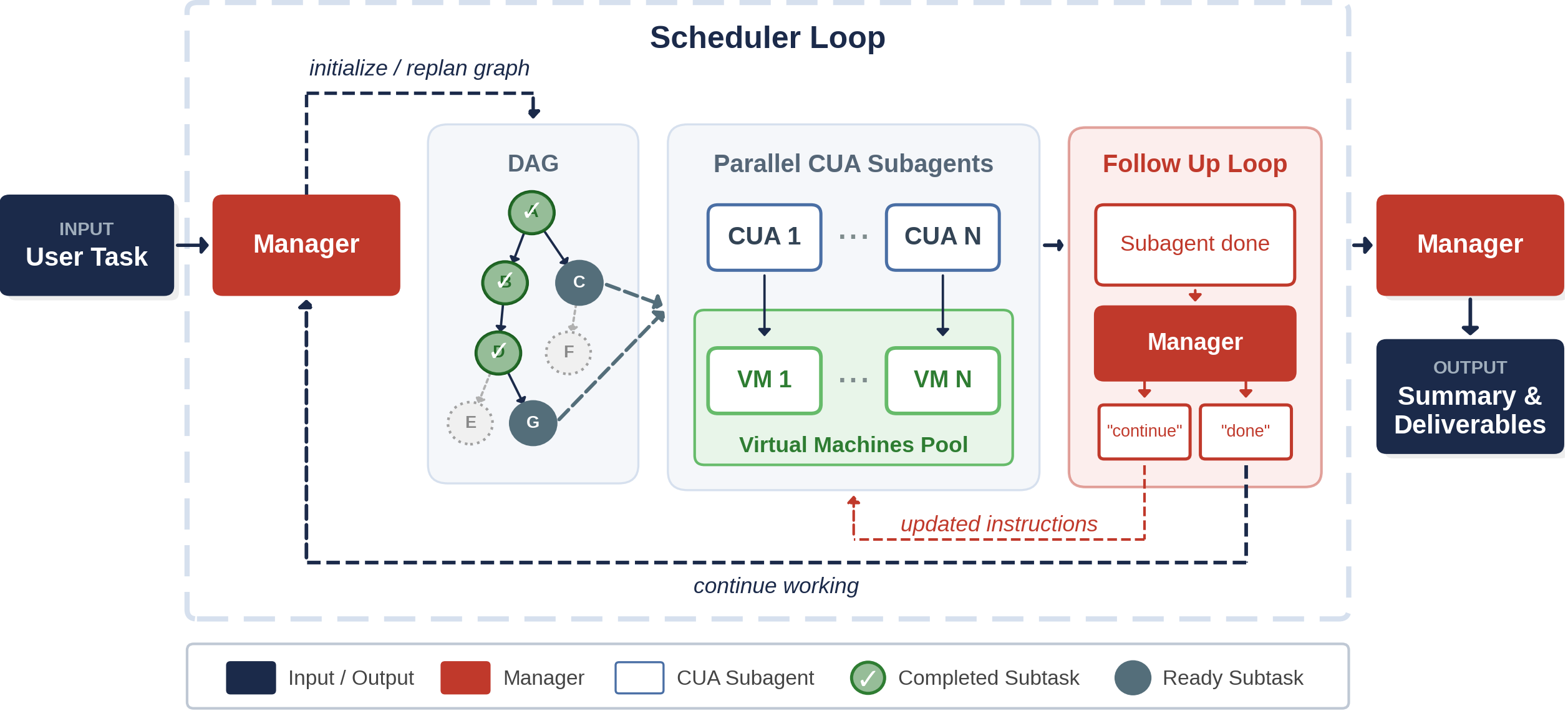
This is the code repository for the Multi-Agent Computer Use paper. We propose and implement a general multi-agent computer use (MACU) setup. A manager LLM decomposes computer-use tasks into a directed acyclic graph of subtasks, dispatches parallel CUA subagents, and continuously revises the DAG as new findings arrive.
MACU improves over single-agent CUAs by 4.7 - 25.5% across three benchmarks, and achieves 1.5x faster wall-clock time on long-horizon tasks.
[Project website](https://jykoh.com/multi-agent-computer-use/) | [arXiv paper](https://arxiv.org/abs/2606.01533)
## Example MACU Run
## Project Structure
```
multi-agent-computer-use/
|-- run_macu.py # MACU CLI entrypoint
|-- prompts/ # Manager prompts for graph generation, replanning, followup, and aggregation
|-- scripts/ # CUA runner and replay/backfill utilities
|-- evals/ # Offline evaluators for completed run directories
|-- utils/ # Runtime, graph, manager, VM, file, and benchmark helpers
|-- osworld/ # Local OSWorld patches and agent shims
|-- tests/ # Unit tests and small graph fixtures
|-- requirements.txt
`-- README.md
```
## Setup
Requires Python 3.12 for the OSWorld/torch stack. You also need an OSWorld checkout and a configured VM provider (we support `vmware` and `apptainer` (QEMU)) for real CUA runs.
```bash
uv venv --python python3.12 .venv
source .venv/bin/activate
uv pip install -r requirements.txt
```
### OSWorld Checkout
Clone [OSWorld](https://github.com/xlang-ai/OSWorld/) locally and follow their setup instructions to install the virtual machines. Please also install its dependencies into the same `.venv` created above, and pass that checkout to MACU when running OSWorld-backed tasks:
```bash
git clone https://github.com/xlang-ai/OSWorld ../OSWorld
# TODO: Follow the setup instructions to install OSWorld virtual envs
export OSWORLD_ROOT="$(realpath ../OSWorld)"
uv pip install -r "$OSWORLD_ROOT/requirements.txt" -r requirements.txt
```
Use `--osworld-root "$OSWORLD_ROOT"` and `--osworld-data-dir "$OSWORLD_ROOT/evaluation_examples"` in `run_macu.py` commands so the runner can import OSWorld and resolve its task JSON files.
### Online-Mind2Web Data
Online-Mind2Web runs use the same OSWorld-backed CUA runner. Download the task file from Hugging Face into the local `data/online_m2w/` directory:
```bash
mkdir -p data/online_m2w
curl -L \
-o data/online_m2w/Online_Mind2Web.json \
https://huggingface.co/datasets/osunlp/Online-Mind2Web/resolve/main/Online_Mind2Web.json
```
### Odysseys Data
Download the Odysseys task file into the local `data/odysseys/` directory:
```bash
mkdir -p data/odysseys
curl -L \
-o data/odysseys/odysseys.json \
https://raw.githubusercontent.com/ljang0/Odysseys/main/data/odysseys.json
```
### API Keys
Copy `.example_env` to a local `.env`, replace the dummy values, then export them before launching MACU:
```bash
cp .example_env .env
set -a
source .env
set +a
```
## Quick Start
Start a vLLM server for the Qwen CUA subagents first:
```bash
vllm serve Qwen/Qwen3.6-27B \
--host 127.0.0.1 --port 8000 \
--tensor-parallel-size 2 \
--mm-encoder-tp-mode data \
--mm-processor-cache-type shm \
--reasoning-parser qwen3 \
--enable-auto-tool-choice \
--tool-call-parser qwen3_coder \
--attention-backend FLASH_ATTN \
--enable-prefix-caching \
--max-model-len 65536 \
--max-num-seqs 8 \
--data-parallel-size 1 \
--performance-mode interactivity \
--mamba-block-size 8
```
Then point the Qwen CUA provider at the OpenAI-compatible vLLM endpoint:
```bash
export OPENAI_BASE_URL=http://127.0.0.1:8000/v1
```
```bash
source .venv/bin/activate
set -a && source .env && set +a
python run_macu.py data/osworld/evaluation_examples/test_small.json \
--result-dir runs/osworld_test_small_qwen \
--osworld-root "$OSWORLD_ROOT" \
--osworld-data-dir "$OSWORLD_ROOT/evaluation_examples" \
--manager-provider anthropic --manager-model claude-opus-4-6 \
--cua-provider qwen \
--max-parallelism 4 \
-- --headless --provider_name vmware \
--model Qwen/Qwen3.6-27B --max_steps 60 --sleep_after_execution 5.0
```
To run Online-Mind2Web or Odysseys directly with `run_macu.py`, use the same command and replace only the input JSON and result directory:
| Benchmark | Input JSON | Suggested `--result-dir` |
| --- | --- | --- |
| Online-Mind2Web | `data/online_m2w/Online_Mind2Web.json` | `runs/online_m2w_macu` |
| Odysseys | `data/odysseys/odysseys.json` | `runs/odysseys_macu` |
To use GPT-5.4-mini as the CUA subagent instead of vLLM-backed Qwen, switch the CUA provider and model:
```bash
python run_macu.py data/osworld/evaluation_examples/test_small.json \
--result-dir runs/osworld_test_small_gpt54mini \
--osworld-root "$OSWORLD_ROOT" \
--osworld-data-dir "$OSWORLD_ROOT/evaluation_examples" \
--manager-provider anthropic --manager-model claude-opus-4-6 \
--cua-provider openai \
--max-parallelism 4 \
-- --headless --provider_name vmware \
--model gpt-5.4-mini --max_steps 60 --sleep_after_execution 5.0
```
Use `--task-id ` to run one task from a larger task file. OSWorld runs call the OSWorld evaluator at the end.
### Output Layout
Each task writes a directory under the selected result root:
```
runs//
|-- dependency_graph.json
|-- graph_snapshots/
|-- replan_log.jsonl
|-- summary.json
|-- final_results.json
|-- final_traj/
|-- manager_prompt_*.yaml
|-- manager_response_*.yaml
|-- /
| |-- task.json
| |-- meta.json
| |-- subprocess.log
| `-- vm_info.json
`-- /
`-- manager_response.txt
```
### CUA Subagents
We have implemented several models to use as CUA subagents (more to come!):
| Provider | Agent | Typical model | Notes |
| --- | --- | --- | --- |
| `openai` | GPT-5.4 CUA | `gpt-5.4-mini` or `gpt-5.4` | Uses `OPENAI_API_KEY` |
| `qwen` | Qwen CUA via OpenAI-compatible vLLM | `Qwen/Qwen3.6-27B` | Uses `OPENAI_BASE_URL`; `OPENAI_API_KEY` can be a dummy value for local vLLM |
Manager providers are selected with `--manager-provider {anthropic,openai,google,huggingface}` and `--manager-model`.
## Evaluation
OSWorld task scores are written directly into each task's `final_results.json` when the run completes.
Online-Mind2Web-style web runs can be judged with WebJudge:
```bash
.venv/bin/python evals/webjudge_eval.py \
--run-dir runs/online_mind2web_macu \
--judge-model o4-mini \
--max-parallel 32
```
Odysseys-style runs can be judged per rubric:
```bash
.venv/bin/python evals/odysseys_eval.py \
--runs-dir runs/odysseys_macu \
--task-source-json data/odysseys/tasks.json \
--model gemini-3.1-flash-lite-preview \
--num-workers 16 \
--max-concurrent-rubrics 4
```
### Benchmark Results
We achieved the following results, as described in more detail in our [paper](https://arxiv.org/abs/2606.01533):
| Benchmark |
Single Agent |
MACU |
Delta |
| SR (%) |
Wall-clock (min) |
SR (%) |
Wall-clock (min) |
SR (pts) |
Wall-clock (min) |
| OSWorld |
43.8 |
26.6 |
48.6 |
21.4 |
+4.7 |
-5.2 |
| Online-Mind2Web |
50.7 |
18.5 |
56.5 |
33.6 |
+5.8 |
+15.1 |
| Odysseys |
8.5 |
162.4 |
34.0 |
110.3 |
+25.5 |
-52.1 |
## Run MACU on Your Task
Use `--task` to run any ad hoc instruction with MACU. The runner writes a one-item task file under `--result-dir/_input_tasks/`. First verify that a VMware VM can boot and register it in the OSWorld pool. Use `-T fusion` instead of `-T ws` on macOS:
```bash
export OSWORLD_ROOT="$(realpath ../OSWorld)"
export MACU_VM_PATH="/absolute/path/to/Ubuntu.vmx"
vmrun -T ws revertToSnapshot "$MACU_VM_PATH" init_state
vmrun -T ws start "$MACU_VM_PATH" nogui
vmrun -T ws stop "$MACU_VM_PATH" hard
printf '%s|free\n' "$MACU_VM_PATH" > "$OSWORLD_ROOT/.vmware_vms"
```
The stop leaves the VM available for `run_macu.py`; the first CUA worker claims it from `.vmware_vms` and starts it again.
Then source credentials and launch MACU on the raw task string:
```bash
source .venv/bin/activate
set -a
source .env
set +a
python run_macu.py \
--task "Find 3 cafes near Carnegie Mellon University and list 3 interesting items on the menu of each" \
--task-id cafes_near_cmu \
--result-dir runs/cafes_near_cmu \
--osworld-root "$OSWORLD_ROOT" \
--manager-provider anthropic --manager-model claude-opus-4-6 \
--cua-provider openai \
--max-parallelism 3 \
-- --headless --provider_name vmware \
--model gpt-5.4-mini --max_steps 100 \
--sleep_after_execution 3.0 --env_ready_wait_seconds 60
```
For local Qwen CUA workers, keep the vLLM server from the Quick Start running, export `OPENAI_BASE_URL=http://127.0.0.1:8000/v1`, and switch the command to `--cua-provider qwen` plus `--model Qwen/Qwen3.6-27B` (or whatever Qwen model you are hosting locally).
### Visualize a Completed Run
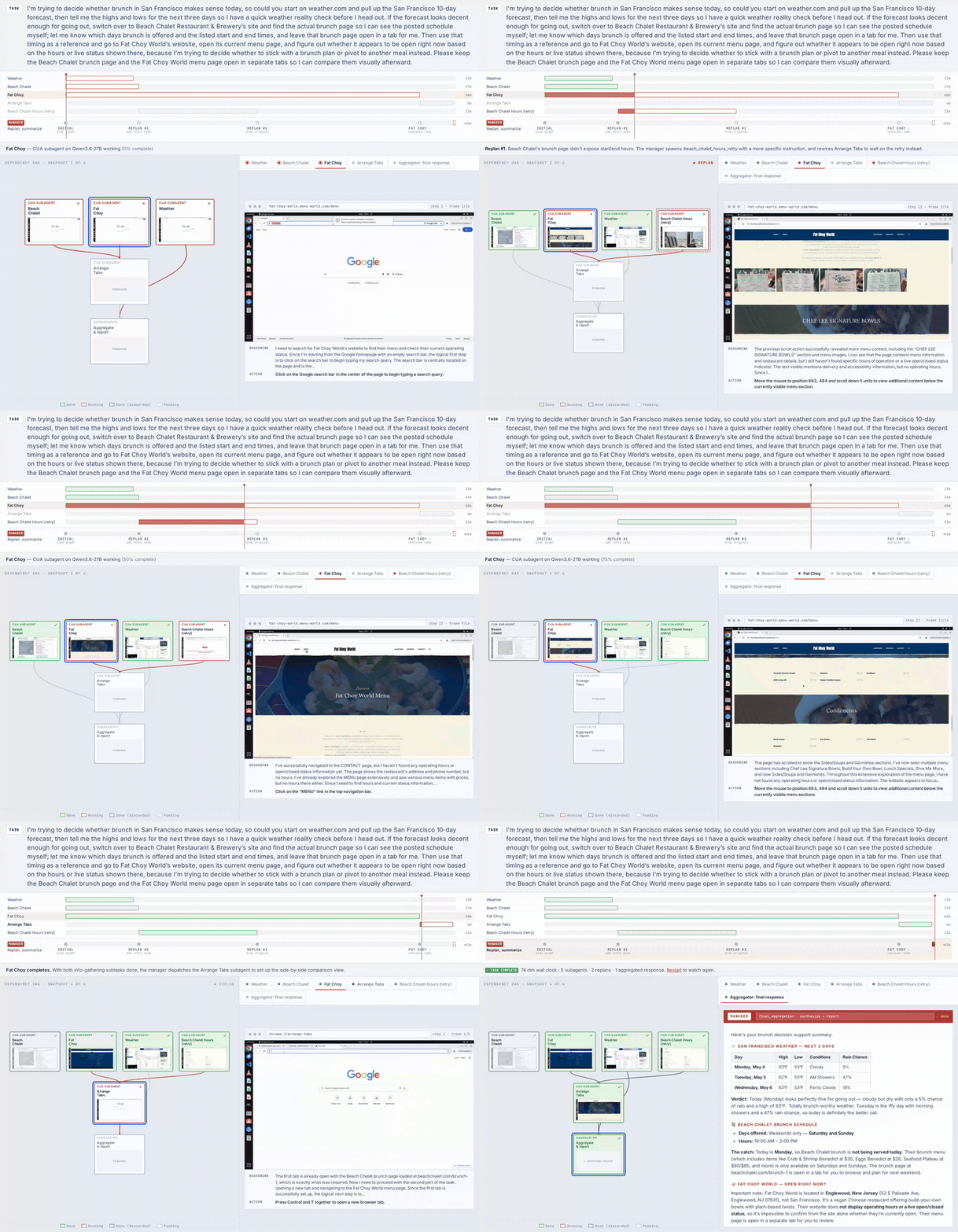
After a run finishes, build a self-contained HTML viewer for it with `scripts/visualize_run.py`. It mirrors the animated player on the project homepage: a gantt chart with playback controls and replan markers, a live DAG that updates as subagents finish, per-subagent screenshot strips with the model's reasoning + action, and the aggregator's final response.
```bash
python scripts/visualize_run.py runs/cafes_near_cmu
```
This writes everything to `runs/cafes_near_cmu/visualization/`. Open `runs/cafes_near_cmu/visualization/index.html` in any browser — CSS, JS, and the run JSON are inlined into the HTML, so it works directly via `file://` with no local server required (only the screenshots live as separate files alongside it).
Useful flags:
- `--output-dir DIR` — write the viewer somewhere other than `/visualization`
- `--max-frames N` — cap keyframes per subtask (default 16); bump higher for very long subtasks
## Citation
```bibtex
@article{koh2026multiagentcomputeruse,
title={Multi-Agent Computer Use},
author={Koh, Jing Yu and Salakhutdinov, Ruslan and Fried, Daniel},
journal={arXiv preprint arXiv:2606.01533},
year={2026}
}
```
## Acknowledgements
Our CUA subagent implementations were based off the official [OSWorld](https://github.com/xlang-ai/OSWorld/tree/main) implementations. Our evaluation scripts were directly lifted from the official [Online-Mind2Web](https://github.com/OSU-NLP-Group/Online-Mind2Web), [WebTailBench](https://github.com/microsoft/fara/blob/main/webeval/src/webeval/benchmarks/webtailbench/webtailbench.py) and [Odysseys](https://github.com/ljang0/Odysseys/) repositories.