CIE - Code Intelligence Engine

20+ MCP tools that give AI agents semantic code search, call graph analysis, and endpoint discovery — 100% local, indexes 100k LOC in seconds.
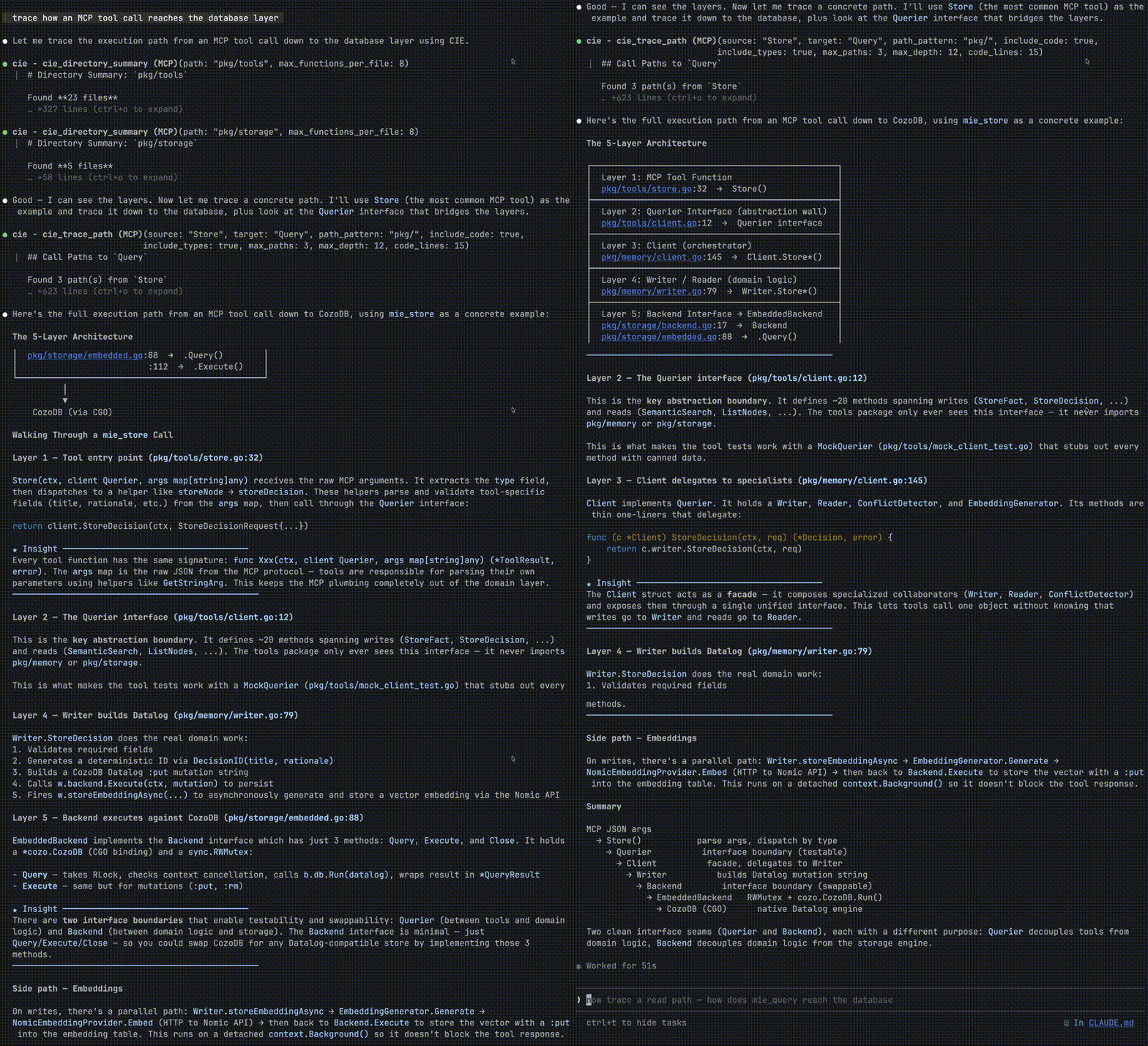
CIE Demo

In practice: Tracing a call graph through MIE's codebase, Claude Code needed 34 tool calls without CIE. With CIE, it needed 3. Results vary by query, but structured code intelligence consistently reduces agent round-trips.

[![Release](https://github.com/kraklabs/cie/actions/workflows/release.yml/badge.svg)](https://github.com/kraklabs/cie/actions/workflows/release.yml) [![codecov](https://codecov.io/gh/kraklabs/cie/branch/main/graph/badge.svg)](https://codecov.io/gh/kraklabs/cie) [![Go Report Card](https://goreportcard.com/badge/github.com/kraklabs/cie)](https://goreportcard.com/report/github.com/kraklabs/cie) [![Go Version](https://img.shields.io/github/go-mod/go-version/kraklabs/cie)](go.mod) [![License](https://img.shields.io/badge/license-AGPL%20v3-blue.svg)](LICENSE)

Quick Start • Features • Documentation • Support

--- CIE indexes your codebase and provides semantic search, call graph analysis, and AI-powered code understanding through the Model Context Protocol (MCP). ## Why CIE? - **Semantic Search** - Find code by meaning, not just text matching - **Call Graph Analysis** - Trace execution paths including interface dispatch resolution - **MCP Native** - Works seamlessly with Claude Code, Cursor, and any MCP client - **Fast** - Indexes 100k LOC in seconds, queries in milliseconds - **Private** - All data stays local, your code never leaves your machine - **Accurate** - Keyword boosting ensures relevant results for function searches ## Installation | Method | Command | |--------|---------| | **Homebrew** | `brew tap kraklabs/cie && brew install cie` | | **Install Script** | `curl -sSL https://raw.githubusercontent.com/kraklabs/cie/main/install.sh \| sh` | | **GitHub Releases** | [Download binary](https://github.com/kraklabs/cie/releases/latest) | ## Features ### Semantic Code Search Find code by meaning, not keywords: ```bash # Ask: "Where is authentication middleware?" # Use cie_semantic_search tool via MCP ``` **Example output:** ``` [95%] AuthMiddleware (internal/http/auth.go:42) [76%] ValidateToken (internal/auth/jwt.go:103) ``` ### Call Graph Analysis Trace how execution reaches any function: ```bash # Question: "How does main() reach database.Connect()?" # Use cie_trace_path tool ``` **Example output:** ``` main → InitApp → SetupDatabase → database.Connect ├─ File: cmd/server/main.go:25 ├─ File: internal/app/init.go:42 └─ File: internal/database/setup.go:18 ``` ### HTTP Endpoint Discovery List all API endpoints automatically: ```bash # Use cie_list_endpoints tool ``` **Example output:** ``` [GET] /api/v1/users → HandleGetUsers [POST] /api/v1/users → HandleCreateUser [DELETE] /api/v1/users/:id → HandleDeleteUser ``` ### Multi-Language Support Supports Go, Python, JavaScript, TypeScript, and more through Tree-sitter parsers. ## Quick Start ### 1. Install the CLI **Homebrew (macOS/Linux):** ```bash brew tap kraklabs/cie brew install cie ``` **Script:** ```bash curl -sSL https://raw.githubusercontent.com/kraklabs/cie/main/install.sh | sh ``` **Manual download:** Download from [GitHub Releases](https://github.com/kraklabs/cie/releases/latest) ### 2. Index Your Repository ```bash cd /path/to/your/repo cie init -y # Initialize project configuration cie index # Index the codebase (works without Ollama too) ``` **Example output:** ``` Project: your-repo-name Files: 1,234 Functions: 5,678 Types: 890 Last indexed: 2 minutes ago ``` > **Note:** CIE works without Ollama -- you'll have access to 20+ tools including grep, call graph, function finder, and more. Semantic search requires embeddings from Ollama or another provider. ### Management Commands | Command | Description | |---------|-------------| | `cie init -y` | Initialize project configuration | | `cie index` | Index (or re-index) the codebase | | `cie reset --yes` | Delete all indexed data for the project | ### MCP Server Mode CIE can run as an MCP server for integration with Claude Code: ```bash cie --mcp ``` Configure in your Claude Code settings: ```json { "mcpServers": { "cie": { "command": "cie", "args": ["--mcp"] } } } ``` ## Configuration CIE uses a YAML configuration file (`.cie/project.yaml`): ```yaml version: "1" project_id: my-project embedding: provider: ollama base_url: http://localhost:11434 model: nomic-embed-text ``` > **Embeddings are optional.** CIE works without Ollama or any embedding provider. You get full access to all structural tools (grep, call graph, function finder, etc.). Only semantic search (`cie_semantic_search`) requires embeddings. You can also configure an LLM for `cie_analyze` narrative generation: ```yaml # Optional: LLM for cie_analyze narrative generation llm: enabled: true base_url: http://localhost:11434 # Ollama model: llama3 # For OpenAI: base_url: https://api.openai.com/v1, model: gpt-4o-mini ``` **Note:** The `llm` section is optional. Without it, `cie_analyze` returns raw analysis data. With it configured, you get synthesized narrative summaries. ## MCP Tools When running as an MCP server, CIE provides 20+ tools organized by category: ### Navigation & Search | Tool | Description | |------|-------------| | `cie_grep` | Fast literal text search (no regex) | | `cie_semantic_search` | Meaning-based search using embeddings | | `cie_find_function` | Find functions by name (handles receiver syntax) | | `cie_find_type` | Find types/interfaces/structs | | `cie_find_similar_functions` | Find functions with similar names | | `cie_list_files` | List indexed files with filters | | `cie_list_functions_in_file` | List all functions in a file | ### Call Graph Analysis | Tool | Description | |------|-------------| | `cie_find_callers` | Find what calls a function | | `cie_find_callees` | Find what a function calls | | `cie_trace_path` | Trace call paths from entry points to target | | `cie_get_call_graph` | Get complete call graph for a function | ### Code Understanding | Tool | Description | |------|-------------| | `cie_analyze` | Architectural analysis (LLM narrative optional) | | `cie_get_function_code` | Get function source code | | `cie_directory_summary` | Get directory overview with main functions | | `cie_find_implementations` | Find types that implement an interface | | `cie_get_file_summary` | Get summary of all entities in a file | ### HTTP/API Discovery | Tool | Description | |------|-------------| | `cie_list_endpoints` | List HTTP/REST endpoints from common Go frameworks | | `cie_list_services` | List gRPC services and RPC methods from .proto files | ### Security & Verification | Tool | Description | |------|-------------| | `cie_verify_absence` | Verify patterns don't exist (security audits) | ### System | Tool | Description | |------|-------------| | `cie_index_status` | Check indexing health and statistics | | `cie_search_text` | Regex-based text search in function code | | `cie_raw_query` | Execute raw CozoScript queries | > **For detailed documentation of each tool with examples, see [Tools Reference](docs/tools-reference.md)** ## Data Storage CIE stores indexed data locally in `//` (default: `~/.cie/data//`) using embedded CozoDB with RocksDB backend. This ensures: - Your code never leaves your machine - Fast local queries - Persistent index across sessions ## Embedding Providers CIE supports multiple embedding providers: | Provider | Configuration | |----------|--------------| | **Ollama** | `OLLAMA_HOST`, `OLLAMA_EMBED_MODEL` | | **OpenAI** | `OPENAI_API_KEY`, `OPENAI_EMBED_MODEL` | | **Nomic** | `NOMIC_API_KEY` | ## Documentation | Guide | Description | |-------|-------------| | [Getting Started](docs/getting-started.md) | Step-by-step tutorial from installation to first query | | [Configuration](docs/configuration.md) | Complete configuration reference | | [Tools Reference](docs/tools-reference.md) | All 20+ MCP tools with examples | | [Architecture](docs/architecture.md) | How CIE works internally | | [MCP Integration](docs/mcp-integration.md) | Setting up with Claude Code, Cursor | | [Migration Guide](docs/migration-guide.md) | Migrating from Docker to embedded mode | | [Testing Guide](docs/testing.md) | Running tests and adding new tests | | [Benchmarks](docs/benchmarks.md) | Performance data and tuning | | [Exit Codes](docs/exit-codes.md) | CLI exit codes for scripting | | [Troubleshooting](docs/troubleshooting.md) | Common issues and solutions | ## Architecture CIE uses an embedded architecture -- a single binary handles indexing, querying, and MCP serving with no external services required: ``` ┌──────────────────────────────────────────────────────────────┐ │ Host Machine │ │ ┌──────────────────────────────────────────────────────┐ │ │ │ CLI `cie` │ │ │ │ - cie init → Creates .cie/project.yaml │ │ │ │ - cie index → Parses code, writes to local CozoDB │ │ │ │ - cie --mcp → Reads from local CozoDB │ │ │ │ │ │ │ │ Data: // (RocksDB) │ │ │ └──────────────────────────────────────────────────────┘ │ │ │ │ ┌──────────────┐ (optional) │ │ │ Ollama │ For semantic search embeddings │ │ │ :11434 │ Install: brew install ollama │ │ └──────────────┘ Model: nomic-embed-text │ └──────────────────────────────────────────────────────────────┘ ``` **Key Components:** - **CIE CLI**: Single binary handles indexing, querying, and MCP serving - **CozoDB + RocksDB**: Embedded database stored locally at `/` (default `~/.cie/data/`) - **Ollama (optional)**: Local embedding generation for semantic search - **Tree-sitter**: Code parsing for Go, Python, JS, TS **Code Structure:** ``` cie/ ├── cmd/cie/ # CLI tool with init, index, query, MCP commands ├── pkg/ │ ├── ingestion/ # Tree-sitter parsers and indexing pipeline │ ├── tools/ # 20+ MCP tool implementations │ ├── llm/ # LLM provider abstractions (OpenAI, Ollama) │ ├── cozodb/ # CozoDB wrapper for Datalog queries │ └── storage/ # Storage backend interface └── docs/ # Documentation ``` For in-depth architecture details, see [Architecture Guide](docs/architecture.md). ## Development ### Testing ```bash # Run all tests go test ./... # Run with short flag go test -short ./... # Run integration tests with CozoDB go test -tags=cozodb ./... ``` For detailed testing documentation, see [docs/testing.md](docs/testing.md). ### Writing Tests Use the CIE testing helpers for easy test setup: ```go import cietest "github.com/kraklabs/cie/internal/testing" func TestMyFeature(t *testing.T) { backend := cietest.SetupTestBackend(t) cietest.InsertTestFunction(t, backend, "func1", "MyFunc", "file.go", 10, 20) result := cietest.QueryFunctions(t, backend) require.Len(t, result.Rows, 1) } ``` ### Building ```bash # Build all commands make build-all # Format code make fmt # Run linter make lint ``` ## Support Need help or want to contribute? - **Documentation**: [docs/](docs/) - **Report Issues**: [GitHub Issues](https://github.com/kraklabs/cie/issues/new?labels=cie) - **Discussions**: [GitHub Discussions](https://github.com/kraklabs/cie/discussions) - **Email**: support@kraklabs.com **Before opening an issue:** 1. Check the [troubleshooting guide](docs/troubleshooting.md) 2. Search [existing issues](https://github.com/kraklabs/cie/issues?q=label%3Acie) 3. Include CIE version: `cie --version` 4. Provide minimal reproduction steps ## Contributing See [CONTRIBUTING.md](CONTRIBUTING.md) for guidelines. ## CIE Enterprise **Scale code intelligence across your entire organization.** CIE Enterprise brings the power of semantic code search and call graph analysis to teams of any size. Built for organizations that demand reliability, security, and collaboration. ### Why Enterprise? | Feature | Open Source | Enterprise | |---------|-------------|------------| | Semantic Search | ✅ | ✅ | | Call Graph Analysis | ✅ | ✅ | | Local Embeddings (768 dim) | ✅ | ✅ | | **Distributed Architecture** | — | ✅ | | **Team Collaboration** | — | ✅ | | **CI/CD Integration** | — | ✅ | | **High-Fidelity Embeddings (1536 dim)** | — | ✅ | | **Integrated LLMs** | — | ✅ | | **Priority Support** | — | ✅ | ### Enterprise Features **Distributed Architecture** Deploy CIE across your infrastructure with a Primary Hub and Edge Caches. All team members connect to the same indexed codebase with millisecond-latency queries worldwide. **Team Collaboration** Share code intelligence across your entire engineering organization. One index, one source of truth—no more siloed knowledge. **CI/CD Integration** Automatically keep your code index up-to-date with every commit. Native integration with GitHub Actions, GitLab CI, Jenkins, and more. **High-Fidelity Embeddings** OpenAI-powered 1536-dimension embeddings for superior semantic search accuracy. Find exactly what you're looking for, even in massive codebases. **Integrated LLMs** Connect your preferred LLM provider for enhanced code analysis, architectural insights, and natural language queries about your codebase. **Priority Support** Direct access to our engineering team. SLAs, dedicated support channels, and implementation assistance. ### Get Started **Contact us:** enterprise@kraklabs.com Schedule a demo to see how CIE Enterprise can transform your team's development workflow. --- ## License CIE is dual-licensed: ### Open Source License (AGPL v3) CIE is free and open source under the **GNU Affero General Public License v3.0** (AGPL v3). **Use CIE for free if:** - You're building open source software - You can release your modifications under AGPL v3 - You're okay with the copyleft requirements See [LICENSE](LICENSE) for full AGPL v3 terms. ### Commercial License Need to use CIE in a closed-source product or service? We offer commercial licenses that remove AGPL requirements. **Commercial licensing is right for you if:** - You want to use CIE in a proprietary product - You want to offer CIE as a managed service without releasing your code - Your organization's policies prohibit AGPL-licensed software - You want to modify CIE without releasing your modifications **Pricing:** Contact licensing@kraklabs.com for details. See [LICENSE.commercial](LICENSE.commercial) for more information. **Why dual licensing?** This model allows us to: - Keep CIE free for the open source community - Ensure improvements benefit everyone through AGPL's copyleft - Sustainably fund development through commercial licensing - Enable enterprise adoption without legal concerns ### Third-Party Components CIE includes some third-party components with their own licenses: - **CozoDB C Headers** (MPL 2.0) - See [THIRD_PARTY_LICENSES.md](THIRD_PARTY_LICENSES.md) for details These components are compatible with AGPL v3 and retain their original licenses. ## Related Projects - [CozoDB](https://github.com/cozodb/cozo) - The embedded database powering CIE - [Tree-sitter](https://tree-sitter.github.io/) - Parser generator for code analysis - [MCP](https://modelcontextprotocol.io/) - Model Context Protocol specification