srunx logo # srunx **A unified CLI, web dashboard, and Python API for SLURM job management.** Stop juggling `sbatch` scripts, `squeue` loops, and SSH sessions. [![PyPI](https://img.shields.io/pypi/v/srunx)](https://pypi.org/project/srunx/) [![Downloads](https://img.shields.io/pypi/dm/srunx)](https://pypi.org/project/srunx/) [![Python 3.12+](https://img.shields.io/badge/python-3.12+-blue.svg)](https://www.python.org/downloads/) [![License](https://img.shields.io/badge/license-Apache--2.0-blue.svg)](LICENSE) [![CI](https://github.com/ksterx/srunx/workflows/CI/badge.svg)](https://github.com/ksterx/srunx/actions) [![Docs](https://img.shields.io/badge/docs-GitHub%20Pages-blue)](https://ksterx.github.io/srunx/) [![Ask DeepWiki](https://deepwiki.com/badge.svg)](https://deepwiki.com/ksterx/srunx)

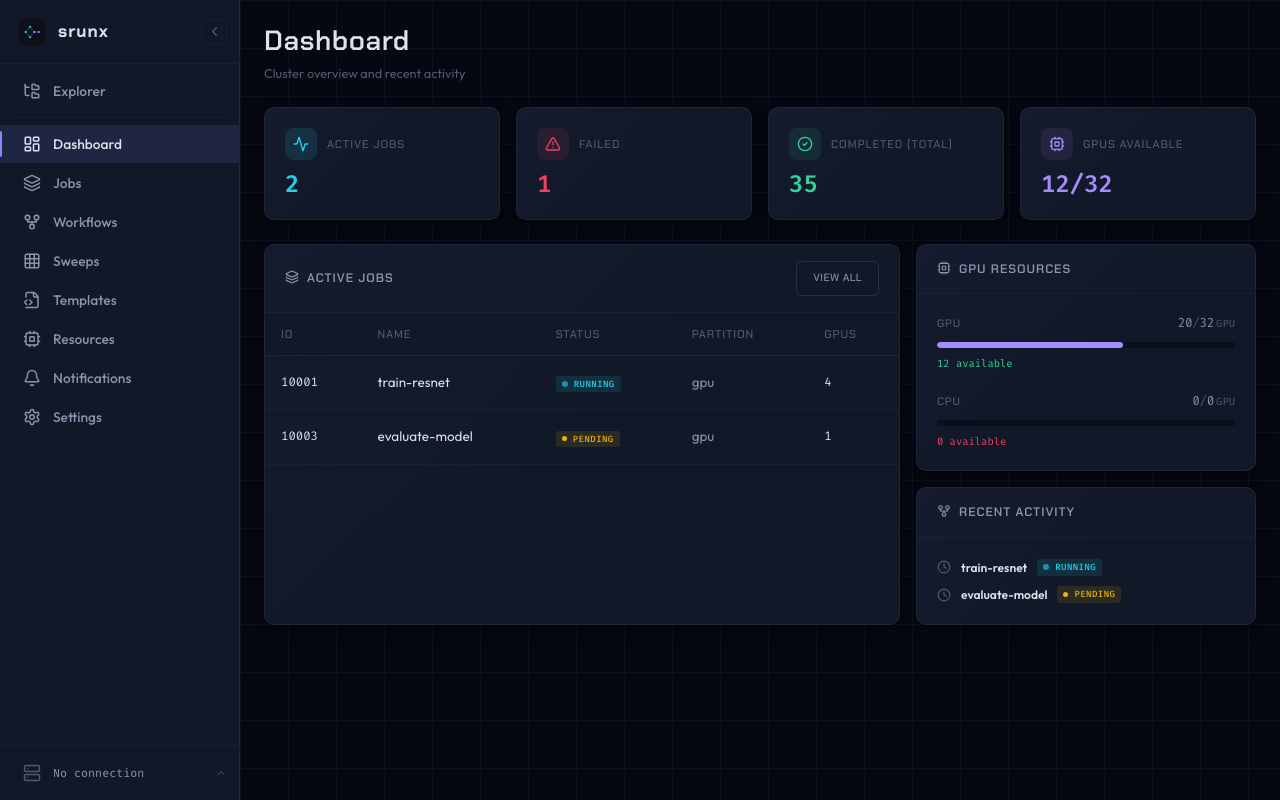
srunx web dashboard
- **Submit & manage** SLURM jobs from CLI, browser, or Python - **Orchestrate** multi-step workflows with YAML and dependency graphs - **Monitor** GPU availability and job states with Slack notifications - **Local or remote, one CLI** — target a local SLURM or any SSH'd cluster with `--profile `; no shell-in, no separate "remote" commands — the same verbs you already know - **Container-native** — Pyxis, Apptainer, and Singularity support built in ## Installation Requires Python 3.12+ and access to a SLURM cluster (local or via SSH). ```bash uv add srunx # with uv (recommended) pip install srunx # or with pip ``` The web dashboard and Slack notifications are included in the base install — no extras required. For AI agent integration (MCP server), add the `mcp` extra: ```bash uv add "srunx[mcp]" ``` ## Quick Start Submit a job, wait for it, and view the logs — end to end: ```bash # 1. Submit $ srunx sbatch --job-name training --gpus-per-node 2 --conda ml_env --wrap "python train.py" ✅ Submitted job training (id=847291) # 2. Follow until completion $ srunx watch jobs 847291 ⠋ 847291 training PENDING → RUNNING → COMPLETED (4m 12s) # 3. Inspect output $ srunx tail 847291 -n 20 ``` Or describe the whole pipeline once and let srunx drive it: ```bash srunx flow run workflow.yaml ``` ### Same commands, remote cluster Every command above accepts `--profile ` and dispatches transparently over SSH — same syntax, same output, same feel as local: ```bash srunx sbatch --profile dgx --job-name training --gpus-per-node 2 --conda ml_env --wrap "python train.py" srunx squeue --profile dgx srunx tail --profile dgx 847291 --follow srunx flow run pipeline.yaml --profile dgx ``` srunx rsyncs your code under a per-mount lock, runs `sbatch` in place on the remote, and streams logs back. Your shell never leaves the laptop. ## Why srunx? Instead of stitching together `sbatch`, `squeue`, SSH, and a pipeline runner, srunx offers one coherent surface that covers the day-to-day SLURM loop. | Capability | srunx | submitit | simple-slurm | Snakemake | |---|:---:|:---:|:---:|:---:| | CLI for submit / status / cancel | ✅ | ❌ | ❌ | ⚠️ partial | | Python API | ✅ | ✅ | ✅ | ✅ | | Web dashboard | ✅ | ❌ | ❌ | ❌ | | Workflow DAG with dependencies | ✅ | ❌ | ❌ | ✅ | | Inter-job value passing (load-time) | ✅ | ❌ | ❌ | ⚠️ via files | | Matrix parameter sweeps | ✅ | ⚠️ manual | ❌ | ⚠️ via wildcards | | GPU availability monitoring | ✅ | ❌ | ❌ | ❌ | | SSH remote submit + file sync | ✅ | ❌ | ❌ | ❌ | | Container support (Pyxis / Apptainer / Singularity) | ✅ | ⚠️ limited | ❌ | ⚠️ via rules | | Slack notifications | ✅ | ❌ | ❌ | ⚠️ plugin | If you need full-featured scientific workflow tooling, Snakemake / Nextflow are still the right call. srunx targets the sweet spot of *"SLURM + a few dependencies + a nice UI"* without Airflow-scale infrastructure. ## CLI **Every command below runs locally _or_ against a remote cluster over SSH.** Add `--profile ` (or set `$SRUNX_SSH_PROFILE`) and `sbatch` / `squeue` / `sinfo` / `sacct` / `history` / `gpus` / `tail` / `watch` / `flow run` transparently dispatch through the SSH adapter — no shell-in first, no separate "remote" subcommand. `srunx ssh` is just for managing those profiles (add / list / sync / test); it does not run jobs itself. `Type` column: **SLURM** = mirrors the native SLURM CLI (muscle memory maps directly); **srunx** = srunx-original command with no direct SLURM counterpart. ### Job submission & control (SLURM parity) | Command | Type | Description | |---------|------|-------------| | `srunx sbatch