Bella

# Bella – AI assistant for ABAP in Eclipse Bella brings Claude into the SAP ABAP Development Tools (ADT). You can use it with an API key, **with your Claude subscription**, **with your GitHub Copilot subscription**, or with another model through an OpenAI-compatible endpoint. - Explain code: right-click → *What happens here?* - Chat with the code in your editor as context - Generate code, rework a selection or implement a method, written **into the editor only** - Inline AI completion as ghost text Bella reaches the SAP system through your existing ADT logon. ARC-1 or any other MCP server can be added. The user interface is available in 14 languages.

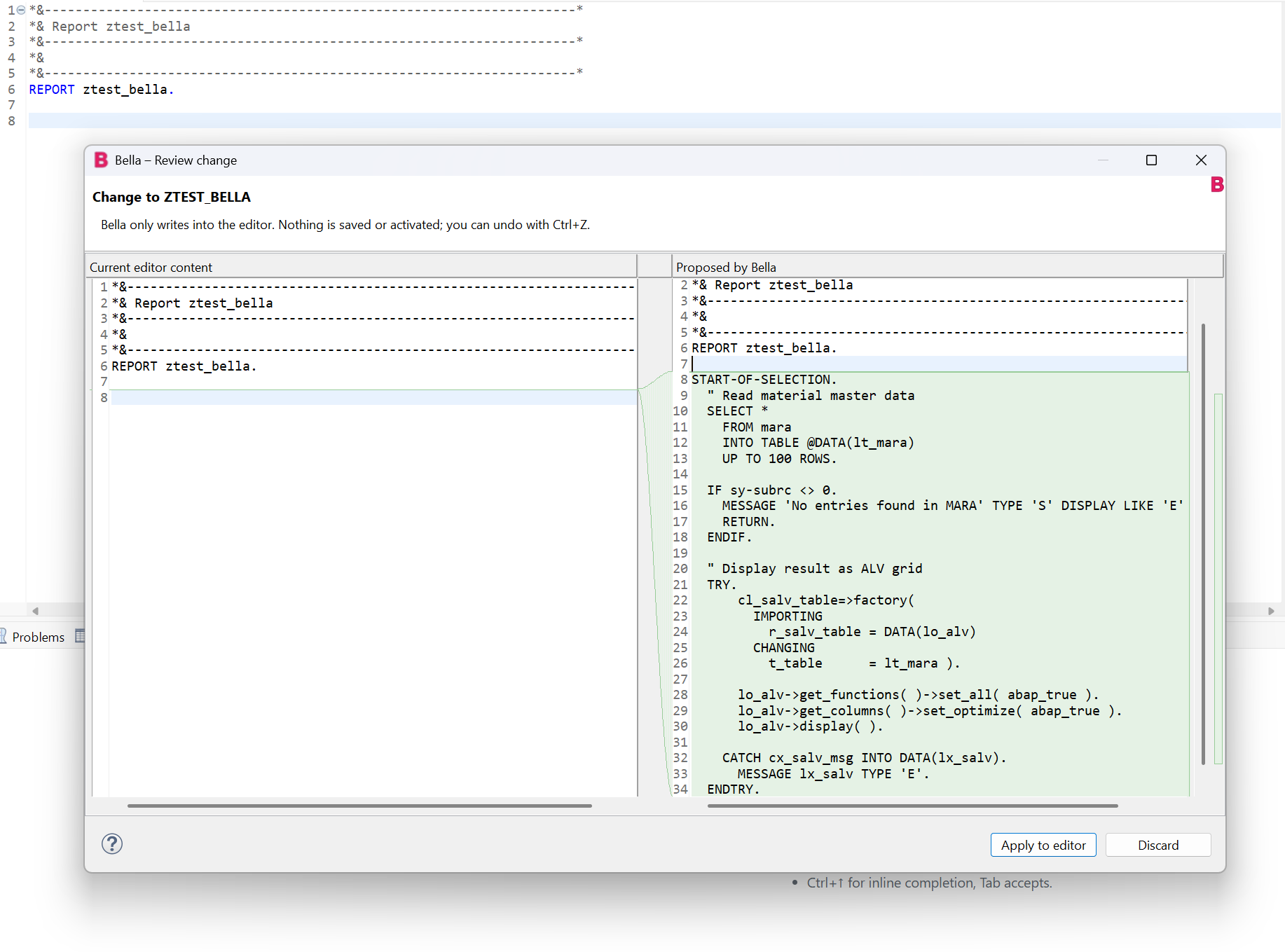
Bella shows a diff preview before it writes generated code into the ABAP editor

## Features | | Feature | Where | |---|---|---| | | **What happens here?** Explains the selection or, without a selection, the method at the cursor | Right-click in the editor → Bella | | | **Generate code here…** Writes code at the cursor position, using the real definitions of the tables, classes and function modules involved | Right-click → Bella | | | **Rework selection…** Fix errors, modern syntax, ABAP Cloud, performance, comments | Right-click → Bella | | | **Implement method** Writes the body of the METHOD/FORM/FUNCTION at the cursor | Right-click → Bella | | | **AI completion** as grey ghost text; Tab accepts, Esc dismisses | `Ctrl+↑` (macOS: `Cmd+Option+Enter`), or automatically while typing (not with the Claude subscription or GitHub Copilot) | | | **Check with ATC and fix…** Runs ATC on the object, lists the findings; Bella fixes the ticked ones in the editor (diff preview, not saved) | Right-click → Bella, toolbar | | | **Review transport request…** Pick one of your requests (or enter a number); Bella reviews it in the chat: what it does, findings per object, security, syntax/ATC/ABAP Unit, completeness, verdict. Read only | Menu *Bella*, right-click → Bella | | | **Review code** Checks the selection or the method at the cursor with abap_lint, syntax check and ATC and reports blocking points, performance and Clean ABAP issues, most important first (read only) | Right-click → Bella (chat) | | | **Suggest refactoring / unit test** | Right-click → Bella (chat) | | | **Chat** with editor context, streaming and tool calls; insert code blocks, replace the selection or take them over as a method body | `Ctrl+Alt+B`, pink B in the toolbar, menu *Bella* | | | **SAP tools**: search, read (also DDIC tables, structures, data elements, domains, table types, function modules, message classes, classic DDIC views, lock objects, transactions, enhancement implementations and knowledge transfer documents), table contents, context of used objects, where-used, syntax check (also for unsaved code), ABAP Unit and ATC (for one object or a whole package), style check, write, create, activate, test OData and REST services | automatically in the chat | | | **Chat modes** from *Diff mode only* to *Automode*, and **Planning Mode** with accept, change or cancel (see below) | Drop-down and button below the chat input | | | **Questions with options**: when a decision is yours, Bella asks with a menu as Claude Code does; pick with the mouse, arrow keys or digits, or type your own answer | in the chat | | | **Chat history**: chats are saved; open an earlier one to read and continue it | *Chats ▾* below the chat input, toolbar of the chat view |
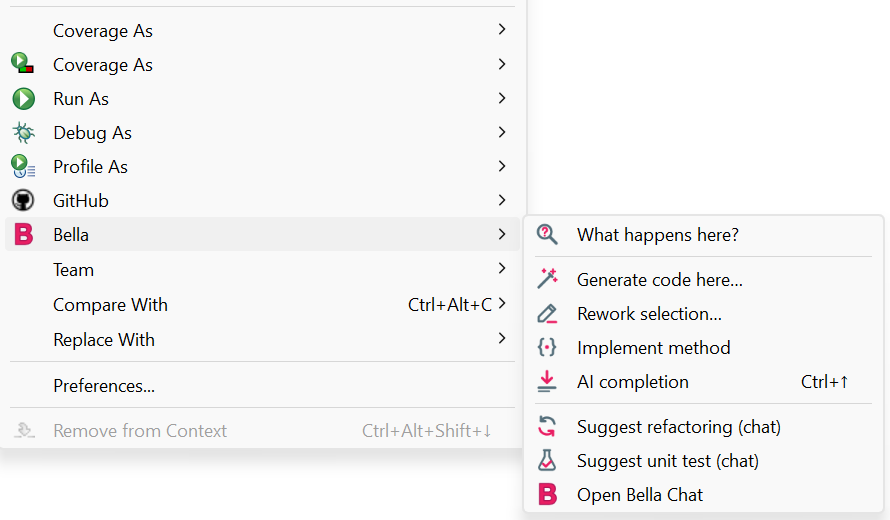
Right-click in the ABAP editor: submenu Bella with its actions

**Changing shortcuts:** *Preferences → General → Keys*, filter for "Bella". `Ctrl+↑` only applies in editors Bella is attached to and replaces "Scroll Line Up" there. Bella does not use `Ctrl+Alt+Space`, because the Claude desktop app takes it for its quick entry on Windows.
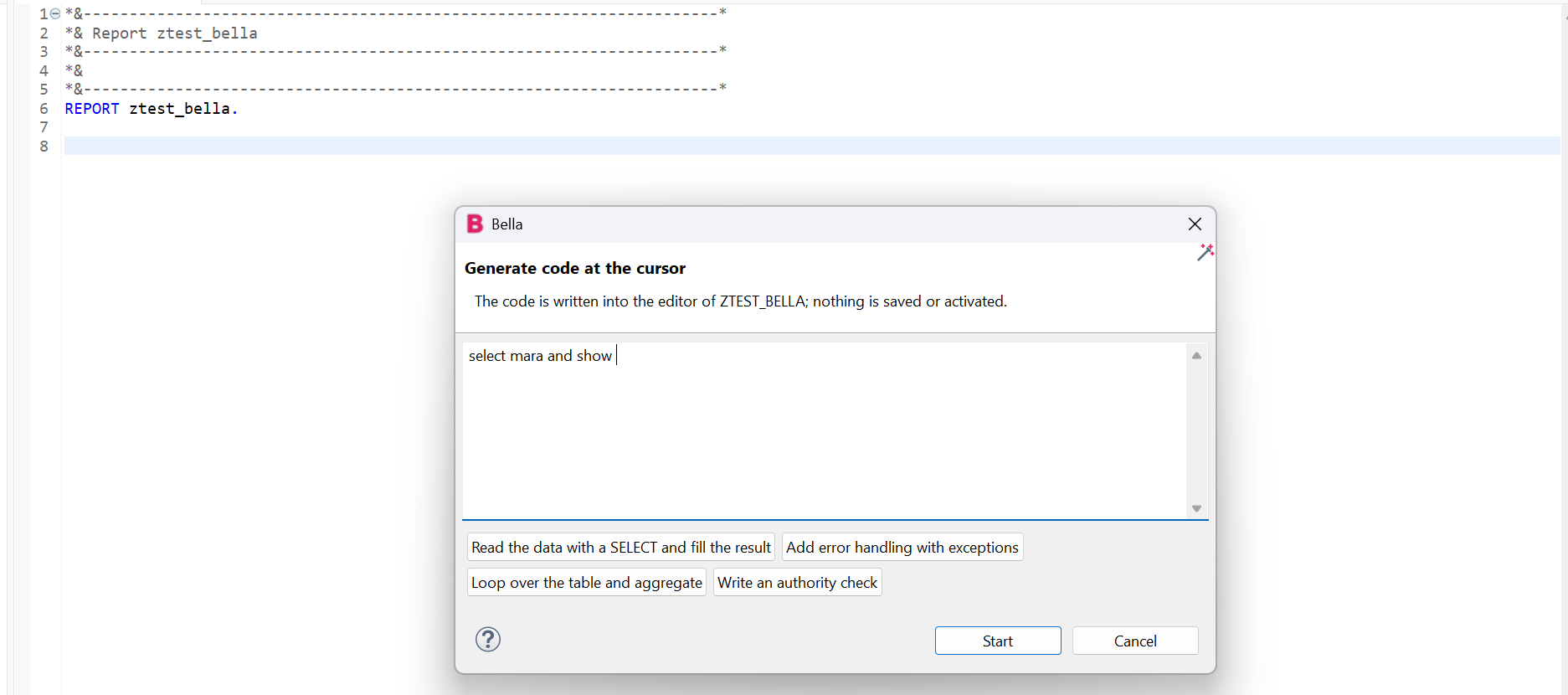
Dialog 'Generate code at the cursor' with suggestions
Generate code at the cursor. Describe what you need or pick a suggestion.
Bella explains a report and lists side effects and suspicious points
What happens here? The explanation also lists side effects and suspicious points, here a missing authority check.
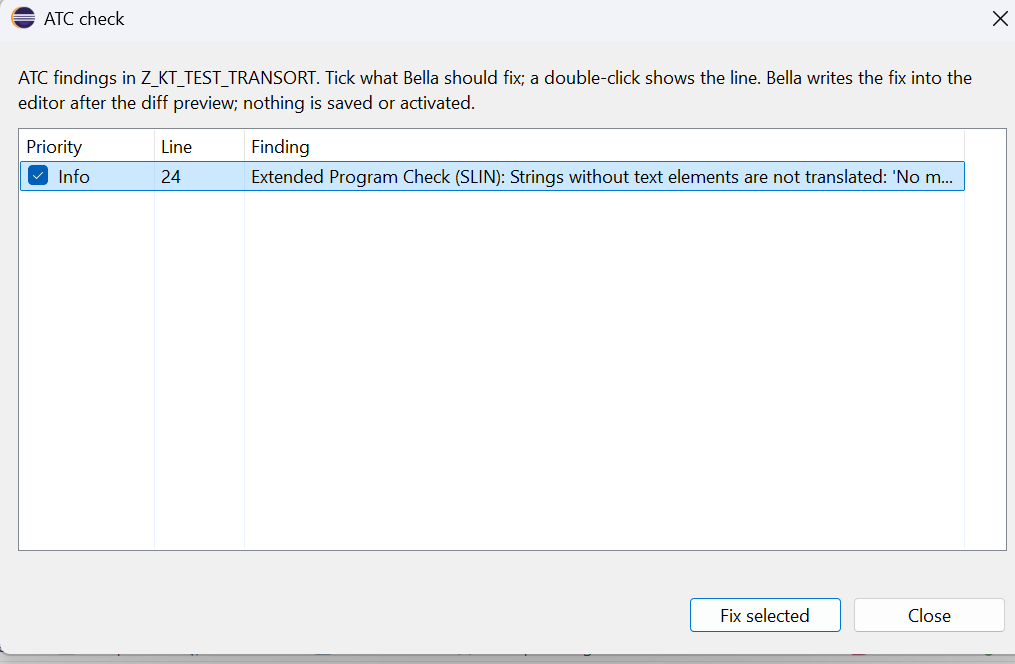
Dialog 'ATC check' with the findings of a report, sorted by priority, each with a tick box
Check with ATC and fix. The findings, most important first; Bella fixes the ticked ones in the editor after the diff preview.
### Chat modes A drop-down below the chat input sets how freely Bella may act, from careful to free. It applies from the next tool call on, and every chat starts with *Ask before changes*. | Mode | Reading | Table contents | Writing into an open editor | Saving, creating, activating in SAP | |---|---|---|---|---| | **Diff mode only (suggest)** | runs | asks | diff preview | refused | | **Ask before changes** (default) | runs | asks | diff preview | asks | | **Read data without asking** | runs | runs | diff preview | asks | | **Write and activate** | runs | asks | diff preview | runs | | **Automode** | runs | runs | diff preview | runs, plus ABAP Unit after each activation (`adt_activate` with `run_unit_tests`); Bella carries the task out and fixes errors, ATC priority 1 and 2 findings and failing tests | - Choosing one of the two modes that write without asking asks once for confirmation. - **Planning Mode** (button next to *Send*): Bella reads and analyses what you typed and answers with a numbered plan; nothing is changed, also not in the editor. Below the plan you then choose: - **Accept plan**: Bella carries the plan out in the mode chosen in the drop-down (e.g. asking before each change, or everything at once in *Automode*). - **Change plan**: you type what should be different; Bella answers with a revised plan and asks again. - **Cancel**: the plan is dropped and nothing happens. - In every mode the allowed packages, your `DENY` rules and the ban on releasing transports stay, and objects open in an editor are only changed in the editor (you save and activate those). - The modes work the same with an API key, the Claude subscription and GitHub Copilot. - Use the modes that write without asking in development systems only. ### How Bella gets SAP context A model that does not know your system guesses field names and signatures. Bella therefore reads them from the system through your ADT logon: - **Editor actions** (*Generate code here…*, *Rework selection…*, *Implement method*) first collect the objects the code and your instruction mention: tables in `SELECT`, types after `TYPE`, classes before `=>` or after `NEW`, function modules in `CALL FUNCTION`, and names such as `MARA` in "select mara and show". Bella loads their definitions (at most 12 objects, 8 seconds), adds them to the request and lists them in the diff preview under *SAP definitions used*. You can switch this off under *Preferences → Bella → Editor*. It needs ADT and an ABAP editor of a logged-on system; the completion (`Ctrl+↑`) stays without it so that it stays fast. - **In the chat** the model calls `adt_context` or `adt_read_source` itself. To save tokens, `adt_read_source` can return a single method (`method`) or only the matching lines (`grep`), and `adt_write_source` can replace a single method. Sources are cached and revalidated with SAP (ETag), and a note tells the model when an object has saved changes that are not activated yet. `adt_context` takes an object name, a piece of code or a list of names and returns in one call: the public section of classes, interfaces, table and structure fields, CDS views, function module signatures, data elements and table types. - **Style check**: `abap_lint` checks code without SAP access for obsolete statements (`MOVE`, `CALL METHOD`, `CREATE OBJECT`, header lines, `FORM` …), `SELECT *`, `SELECT` in loops, `SELECT … ENDSELECT`, unchecked `SELECT SINGLE`, `CATCH cx_root`, empty `CATCH` blocks, break-points, aborting messages, texts the user sees as literals instead of text symbols, selection texts set in code (`%_p_name_%_app_%-text`), unused variables, unused local types and private methods, unreachable code, `sy-subrc` not checked after `READ TABLE`, `ASSIGN`, `AUTHORITY-CHECK` or `CALL FUNCTION` with `EXCEPTIONS`, database changes in loops, `DELETE … INDEX sy-tabix` inside a loop over the same table, `MANDT` in SQL, `INTO` before `WHERE` in strict SQL, `EXIT`/`CHECK` outside loops, `EXPORTING` where `RETURNING` fits, an empty `CATCH` of a down cast, commented-out code, repeated `ELSEIF` conditions, mismatched `BEGIN OF`/`END OF` names, deep nesting, long or complex methods, a missing `@` in strict Open SQL, long lines, trailing spaces, runs of blank lines and mixed keyword case (rules after ARC-1's abaplint presets and [rules.abaplint.org](https://rules.abaplint.org), compared with abaplint on abapGit's sources). It knows the target system: syntax the system's SAP_BASIS release does not have yet (inline declarations, constructor expressions and table expressions before 7.40, `RAISE EXCEPTION NEW` before 7.52, `FINAL( )` before 7.57) is an error, and on ABAP Cloud so are classic statements, lists, dynpros, obsolete statements and SQL without `@`. Where the release offers them it suggests modern forms: `xsdbool( )`, `line_exists( )`, `CORRESPONDING #( )` and `RAISE EXCEPTION NEW`. CDS data definitions get CDS rules: obsolete DDIC-based views (`DEFINE VIEW` without `ENTITY`) and association names without a leading underscore. The diff preview shows its findings for generated code. It is a small rule set of Bella's own, not abaplint and no replacement for ATC. - **Checks before and after writing, as with ARC-1**: before `adt_write_source` saves an ABAP main source, SAP's syntax check runs on the new source; a write that adds syntax errors is refused (unless `allow_errors` says the errors are an intended step). Unlike ARC-1's local abaplint parser, SAP's compiler knows the system's real DDIC. A clean change costs one check, whose result also stands in for the check after saving. `adt_write_source` and `adt_create_object` add the style check of the code written and a syntax check of the saved version to their result (for CDS views, access controls, metadata extensions, behavior and service definitions only the syntax check), so the model fixes them before activating. `adt_activate` with `run_atc` runs ATC on the activated objects in the same call, because ATC checks the active version; findings are listed by priority. *Write and activate* and *Automode* run ATC once when a change is complete (not on every activation), fix priority 1 and 2 and explain what they leave. - **Quick fixes and pretty printer**: `adt_quickfix` lists SAP's own quick fixes (Ctrl+1) for the line of a syntax or ATC finding and previews one as a diff, ready for `adt_write_source`; `adt_format` formats code with the system's pretty printer settings; `adt_format_settings` changes those settings for everybody and always asks first. - **Targeted class and program changes**: `adt_edit_code` adds a method (with an empty implementation), changes a method's signature, moves it to another section (keeping its body and ABAP Doc), deletes it, replaces the class definition, or replaces or adds a `FORM`/`MODULE` — without rewriting the whole source. A change that would add syntax errors is refused, and one that would leave a method declared without implementation (or the reverse) too, as in ARC-1's class surgery. Open objects are changed in the editor with a diff preview. - **Source code search**: `adt_search_objects` with `search_in` `source` searches the text of ABAP sources through ADT's text search (as ARC-1's `SAPSearch` does), optionally only in one package or object type, and returns the objects with their matching lines. It needs SAP_BASIS 7.51 or later and the authorization S_ADT_RES. - **Speed**: `adt_context` and the editor actions load up to three definitions at the same time. The tool lists of MCP servers such as ARC-1 are kept for five minutes instead of being fetched before every chat question; a server that does not answer is asked again after a minute, and its tools stay out of the chat meanwhile. - **Size limit**: a tool result longer than 120,000 characters (about 30,000 tokens) is cut at a line end with a note to ask for less, so a large table, trace or source cannot fill the model's context. - **Navigation and object information**: `adt_navigate` finds the definition of the symbol at a position, its references, ADT's code completion and a class hierarchy; `adt_object_info` shows the release state of an SAP API (C0–C4, successor of a deprecated API), the version history and a version's source, and program variants. `adt_object_info 'diff'` shows a unified diff between two versions of a source: by default the active one and the saved changes that are not activated yet, or two numbers from the version history (as ARC-1's `SAPRead` diff). `adt_navigate 'impact'` lists what a CDS view reads, associates and composes (from its source) and what uses it, grouped into CDS views, behavior and service definitions, service bindings, access controls, metadata extensions and ABAP code, direct uses only unless `include_indirect`; `adt_navigate 'structure'` shows the includes of a table or structure, followed five levels deep, and its append structures (as ARC-1's `SAPContext impact` and `structure`). - **Deleting**: `adt_delete_object` checks the where-used list first, refuses while other objects use the object unless told otherwise, and always asks. - **Text elements**: `adt_text_elements` reads and `adt_write_text_elements` writes the text pool of a program, class or function group through ADT's textelements service, as ARC-1's `SAPWrite edit_text_symbols` does: text symbols (`TEXT-001`), selection texts of `PARAMETERS` and `SELECT-OPTIONS`, and list headings, in the body format ADT and ARC-1 use (one `@MaxLength` per symbol, symbols separated by blank lines, unpadded selection names). SAP keeps selection texts only for fields of the active program; those it does not keep are listed for the developer to maintain in SE38. Bella adds a missing `@MaxLength` to text symbols, reads the part back to check that SAP kept the texts, and activates the text pool; `adt_activate` takes an inactive text pool of the activated program, class or function group along (or activate it alone with type `REPT`). - **Creating objects**: `adt_create_object` creates classes, interfaces, programs, includes, function groups and function modules (with processing type normal, RFC or update), message classes with their messages, data elements, domains (with fixed values), table types, tables, structures, CDS views, access controls, metadata extensions, behavior definitions, service definitions and service bindings, as ARC-1's `SAPWrite create` does. `adt_write_metadata` changes data elements, domains, table types and the messages of a message class; it reads the object first and changes only the fields given. Objects that depend on each other (a domain and its data element, a table and its CDS view, a RAP stack) go together into `objects` of `adt_create_object`: up to 20, created in that order and activated together at the end, as ARC-1's `batch_create`; every entry passes the same checks before anything is created, and the first failure stops the rest. Tables and structures are read as source on newer ABAP releases (7.52 and later). On older releases, and for data elements, domains, table types and message classes, Bella summarizes the object's ADT description. - **Table contents**: `adt_table_contents` reads rows of a table or CDS view through ADT's data preview, like SE16 or the SQL console: `table` with optional `columns`, `where` and `max_rows` (default 100, at most 1000), or a complete ABAP SQL `SELECT` in `sql`. Only a single `SELECT` is sent, and SAP checks your authorization for the data. Because the rows go to the model provider, Bella asks before each read unless the chat mode is *Read data without asking* or *Automode*. - **System knowledge**: `adt_list_systems` shows each system's SAP_BASIS release or whether it is an ABAP Cloud system, and the editor actions tell the model the release. `adt_transports 'for_object'` asks SAP which transport request a change needs, `adt_transports 'history'` lists the requests an object was changed in (from its version history), and `adt_diagnose 'short_dumps'` lists and reads runtime errors (ST22). - **Diagnostics**: `adt_diagnose` reads system messages, gateway errors, ABAP profiler traces (hit list, statements, database accesses) and trace requests, the state and directory of the SQL trace (ST05), the authorization trace (STUSERTRACE; it contains user names and authorization values, so Bella asks first like for table contents) and the ATC check variants. `adt_trace_control` arms or cancels a profiler trace for the next run of a user and switches the SQL trace on or off; it always asks. - **Debugging** (experimental): while the ABAP debugger in Eclipse is stopped, `debug_context` gives the model the current line, the call stack, the variables of the current frame (tables and structures two levels deep, at most 10 rows; one variable in full with `variable`, e.g. `LT_ITEMS/[3]`), the exception it stopped at and the breakpoints. `debug_breakpoint` sets or removes a line breakpoint through Eclipse's own *Toggle Breakpoint* command in the open editor of the object, and `debug_step` steps into, over, out or resumes. Bella reads the session through Eclipse's debug framework, not through internal SAP APIs. Variable values reach the model provider, so `debug_context` asks first like table contents (not in the *Read data* mode); `debug_breakpoint` asks, and `debug_step` asks in every mode, because resuming may run `COMMIT WORK`. The model suggests breakpoints with the reason before it sets them. *Bella: Explain debugger state* in the context menu of the Debug and Variables views sends the state to the chat; *Analyse newest short dump* (Bella menu) reads the newest ST22 dump, finds the cause and proposes a fix. When the debugger stops at an exception, a notification offers an analysis (switch it off under *Preferences > Bella*); nothing is sent before you click it. - **Testing services** (experimental): `adt_diagnose 'odata_request'` sends a GET to an OData service of the system (`/sap/opu/odata/…` or `/sap/opu/odata4/…`, e.g. `$metadata` or an entity set with `$top`) and returns the status, the answer and the `sap-statistics` timing split with a verdict where the time goes (database, ABAP, Gateway framework, authorization), as ARC-1's `SAPDiagnose 'odata_perf'` does. Because the answer is business data, Bella asks first like for table contents. `adt_http_send` sends POST, PUT, PATCH or DELETE to a service of the system (OData, `/sap/bc/rest/…`, own ICF nodes) to test creating, changing or deleting; it fetches the CSRF token in the same session and always asks, also in Automode, and Planning Mode and *Diff mode only* refuse it. Both take only host-relative paths on the connected system and run with your ADT logon; ADT and gCTS paths (`/sap/bc/adt`, `/sap/bc/cts_abapvcs`), logon parameters and the headers `Authorization`, `Cookie` and `x-csrf-token` are refused, and cookies and tokens of the answer do not go to the model. They have no package scope, since a URL names no repository object. Whether a service accepts requests through the ADT connection, and the CSRF token of the ADT session, depends on the system; this was tested against a simulated backend only. - **Transports and packages**: `adt_transport_manage` creates a request (with the package's route or a target), gives a request and its open tasks to another owner, deletes a request or removes one object from it, and always asks; releasing stays impossible. `adt_transports 'layers'` and `'targets'` list transport layers and targets. `adt_package_manage` creates a package (super package, software component, transport layer) and deletes one after asking. - **Git**: `adt_git` lists abapGit repositories and checks one, and reads gCTS repositories, branches, history and objects. `adt_git_write` clones, pulls, switches branches and pushes (all or chosen objects) through abapGit's ADT backend and always asks. Bella never passes Git credentials; repositories that need them must have them stored in the SAP system. - **RAP and UI5**: `adt_rap 'generate_handlers'` adds the handler methods a behavior definition requires (actions, determinations, validations, instance features and authorizations) to the local types of the behavior pool, as Eclipse's quick fix does; `publish_srvb` and `unpublish_srvb` publish an OData service binding. `adt_ui5` lists BSP/UI5 apps, reads their files and the deploy information, and reads Fiori launchpad catalogs, groups and tiles (read only, as in ARC-1). - **Whole packages**: `adt_run_unit_tests` and `adt_atc_check` take a `package` instead of a `name` and run over all its classes, programs and function groups (ATC also interfaces, CDS and RAP objects, tables, data elements and domains), with `include_subpackages` also over its subpackages, as ARC-1's `unittest_ci` and `atc_ci` do. Bella collects the objects through ADT's repository search, so the result says how many objects ran; includes and function modules run with their program or group. Large packages run in requests of 50 objects, at most 300 objects per call, and the result lists at most 200 ATC findings, most important first, with the counts per priority. With a development package set, only that package runs, and customer objects of its subpackages are left out. - **Transport review**: `adt_transports` lists requests, `adt_transport_review` collects a review dossier for one: per source the diff between the version in the request and the version before it (version choice as in ARC-1's transport diff), syntax check, ATC and ABAP Unit in one run each, objects not activated, and customer objects the changed code uses that are missing, inactive or held in another open request. The review answer starts with the verdict and at most five blocking and five should-fix points, then an overview table per object, then the details. **Compared with ARC-1:** Bella's tools now cover what ARC-1's `SAPRead`, `SAPSearch`, `SAPContext`, `SAPQuery`, `SAPNavigate`, `SAPWrite` (create, metadata, class and unit surgery, text elements, delete), `SAPActivate` (incl. publishing service bindings), `SAPDiagnose` (incl. `odata_perf` as `adt_diagnose 'odata_request'`), `SAPTransport` (without releasing), `SAPManage` (packages), `SAPGit` and the quick fixes and pretty printer of its dev tools offer, plus a package allowlist for writes and changing requests to services (`adt_http_send`). ARC-1's 12 tools are grouped by intent; Bella keeps reading and writing in separate tools (so the chat modes and rules can tell them apart) but groups related reads, e.g. transports in `adt_transports` and short dumps in `adt_diagnose`. Risky actions ask in every chat mode. ARC-1 is still worth adding for the real abaplint rule set (`SAPLint`; Bella has its own smaller rule set), a central audit log and rate limits, or when the tools should run on a server instead of in Eclipse. The ADT requests of the new tools follow ARC-1 and were tested against a simulated backend only; the OData services (UI5 deploy information, launchpad) and gCTS live outside ADT and may not be reachable through ADT's connection on every system. ### Ground rule: open objects are only changed in the editor - **Code for an open method or class goes only into the Eclipse editor**, never directly into the SAP system. The editor holds the lock on the object. - A diff preview first shows old and new side by side (can be switched off). - Afterwards the editor is dirty: nothing is saved or activated. `Ctrl+Z` undoes the change. - You save and activate as usual with `Ctrl+S` and `Ctrl+F3`. - If Claude tries to change an open object through a tool in the chat, Bella's **router** redirects the write into the editor. - **Objects that are not open** may be written, created and activated in the SAP system, after you confirm. ## Architecture: who calls whom

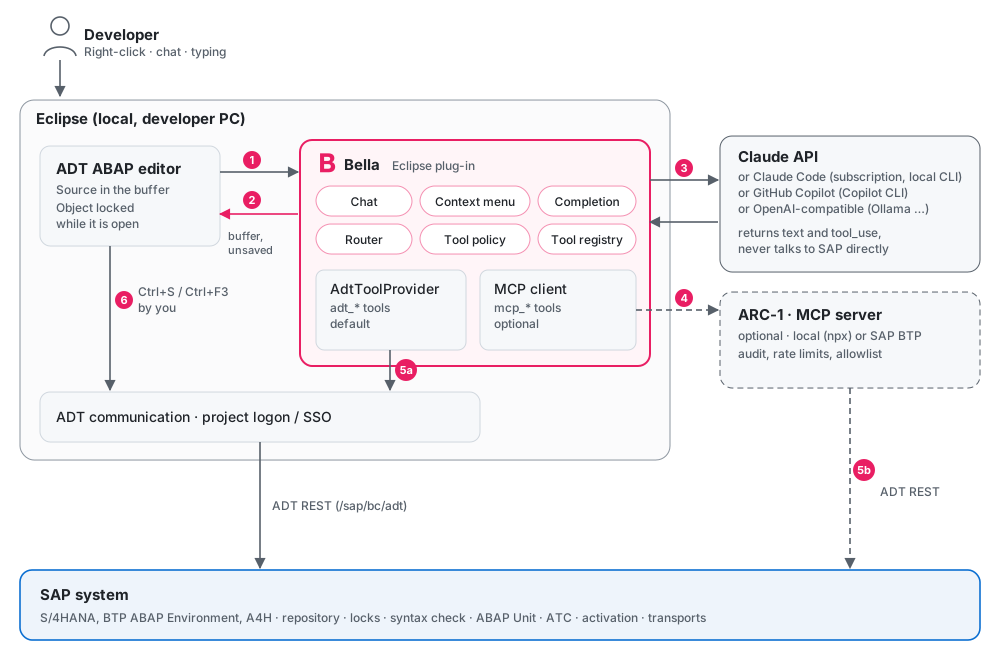
Architecture: developer, Eclipse with ADT editor and Bella, Claude, optional ARC-1, SAP system

1. and 2. Bella reads the source from the ADT editor and writes suggestions only into its buffer. 3. **Only Bella calls the model.** Prompt, code context and tool list go out; text and `tool_use` requests come back. With the Claude subscription or GitHub Copilot, the local Claude Code CLI or Copilot CLI makes this call for Bella. 4. Optionally Bella runs tool requests through ARC-1 or another MCP server. 5. Tools reach the SAP system in one of two ways: - **5a (default):** Bella's own `adt_*` tools use the ADT communication layer with the logon of your ABAP projects, including SSO. There is no second logon and no extra process. - **5b (optional):** ARC-1 talks to the SAP system and adds audit, rate limits and a package allowlist. 6. You save and activate open objects yourself in ADT. **The model never talks to the SAP system directly.** Your system does not need to be reachable from the internet.

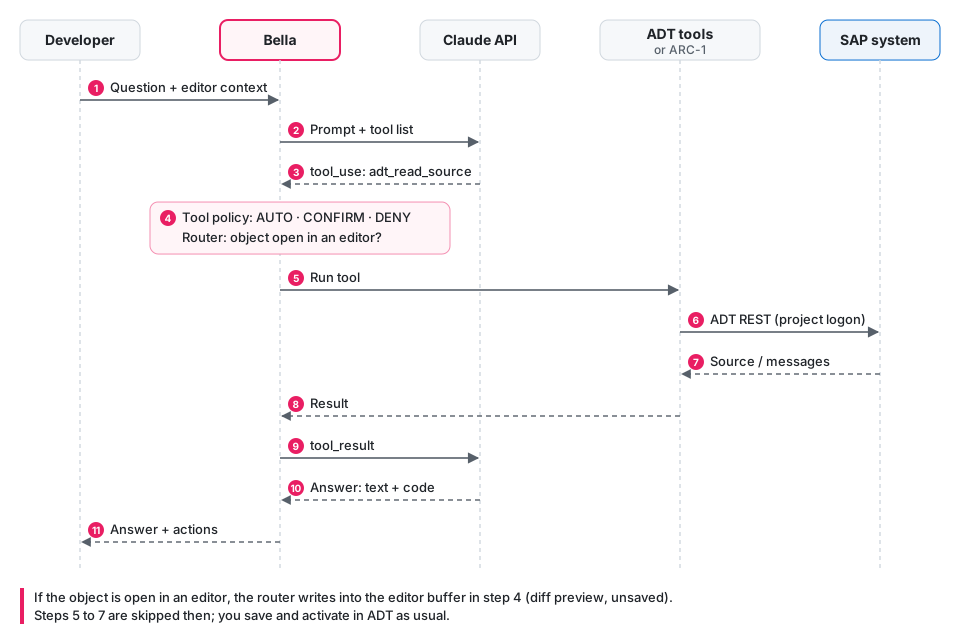
Sequence of a tool call

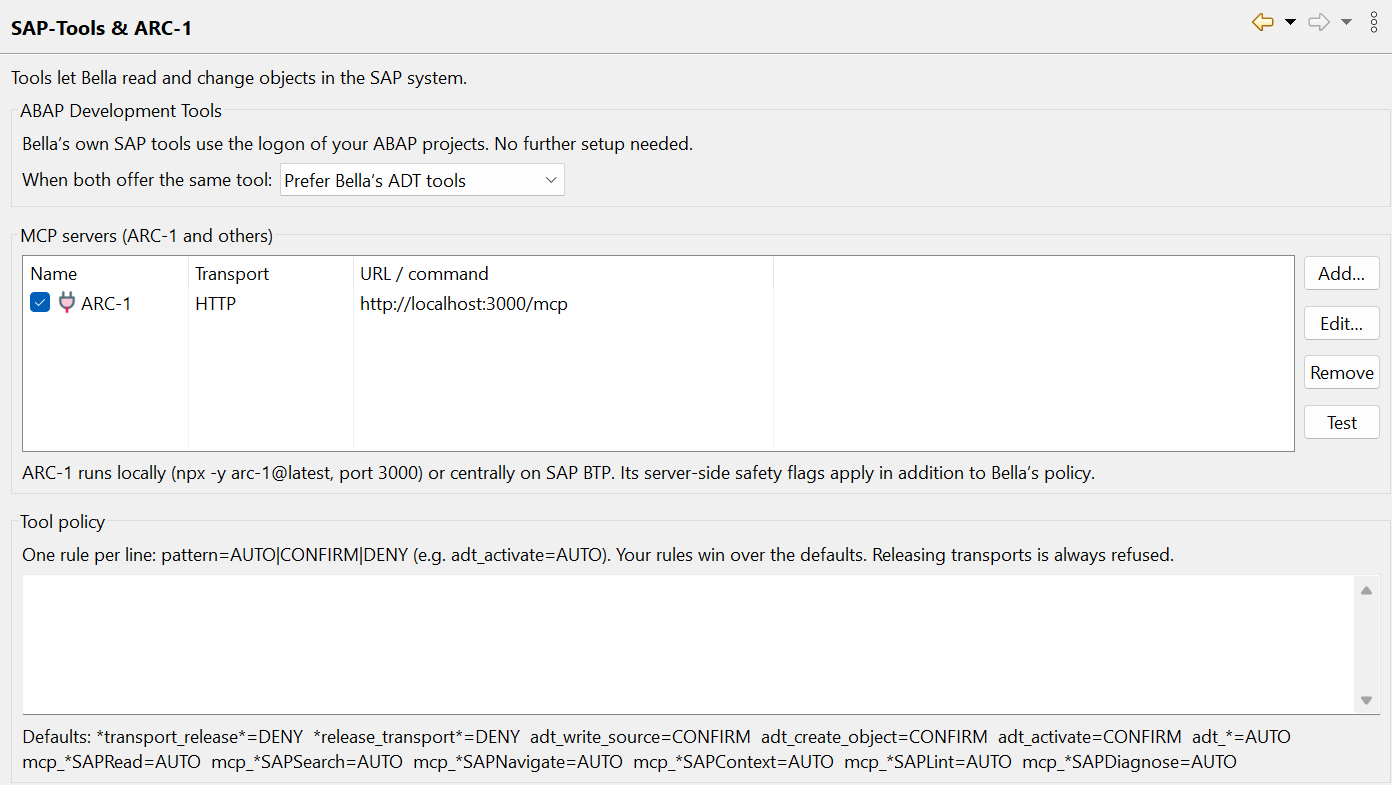
### Tool policy | Tool | Default | |---|---| | Read and check (`adt_search_objects`, `adt_read_source`, `adt_context`, `adt_syntax_check`, `adt_run_unit_tests`, `adt_atc_check`, `adt_text_elements`, `adt_quickfix`, `adt_format`, `adt_navigate`, `adt_object_info`, `adt_transports`, `adt_transport_review`, `adt_diagnose`, `adt_git`, `adt_ui5`, `abap_lint`; ARC-1: SAPRead, SAPSearch, …) | runs automatically | | Table contents and service answers (`adt_table_contents`, `adt_diagnose` 'odata_request'; ARC-1: SAPQuery) | asks first | | Write, create, activate (`adt_write_source`, `adt_edit_code`, `adt_create_object`, `adt_write_metadata`, `adt_write_text_elements`, `adt_activate`, `adt_rap`, `adt_package_manage` 'create'; ARC-1: SAPWrite, SAPActivate, …) | asks first | | Delete objects, create or change transport requests, Git clone/pull/push, delete packages, start traces, change system settings, send changing requests to services (`adt_delete_object`, `adt_transport_manage`, `adt_git_write`, `adt_package_manage` 'delete', `adt_trace_control`, `adt_format_settings`, `adt_http_send`; rules with `ASK`, also for ARC-1's matching actions) | asks in every chat mode, also in Automode | | Release transports | always refused | The chat mode can tighten or loosen this (see *Chat modes*); refusals stay refusals in every mode. - Add your own rules under *Preferences → Bella → SAP-Tools & ARC-1*, one per line as `pattern=AUTO|CONFIRM|ASK|DENY`; `ASK` asks even in Automode, and `tool:action=…` matches only one action of a multi-purpose tool (e.g. `mcp_arc1_SAPTransport:create=ASK`). Rules that still name tools Bella has merged, also through a wildcard such as `adt_short_dump*`, keep their effect on exactly the calls they covered: `adt_short_dumps` applies to `adt_diagnose 'short_dumps'`, `adt_where_used` to `adt_navigate 'references'`, `adt_transport_info` to `adt_transports 'for_object'`, `adt_list_transports` to `adt_transports` 'list', 'layers' and 'targets', `adt_settings_write` to `adt_format_settings`. - **Development package**: a chat works in one package. With an object from the editor in the chat it is the package of the first such object, unless you named a package before (then that one stays and the editor object is only context); switching to another include or class later keeps package and request, and changes to objects of other packages are refused. Without an editor object Bella asks you which package to develop in and records your answer with `adt_dev_package` (you confirm it, also in Automode). Customer objects (Z*, Y*) of other packages are ignored: the search lists their names only as taken, `adt_context` and the class hierarchy and where-used list of `adt_navigate` leave them out, and reading them (also as a table in a `SELECT` of `adt_table_contents`) or changing them is refused, as is any write before the package is known. The editor actions leave such objects out of the definitions they load, too; if the package of the edited object cannot be read, they load the definitions without this filter. - **New chat** (button next to *Planning Mode*, also in the view's toolbar): starts over; the model forgets the conversation, a running answer stops, package and transport request are reset. The chat before is kept in the chat history. - **Chat history** (*Chats ▾* below the input, or the clock in the view's toolbar): the last chats with their age, and *All chats…* to filter, open or delete them. An opened chat shows what you saw (answers, tool calls, answered questions, code blocks with their buttons) and goes on where it stopped: with an API key or an OpenAI-compatible endpoint and the same model Bella takes the conversation over as it was; otherwise (Claude subscription, GitHub Copilot, another model) the next message carries the conversation so far as text. Package and transport request of the chat are set again with the usual checks, and its chat mode unless it writes without asking. Chats are saved in `/.metadata/.plugins/de.kiliantaubmann.bella.ui/chats/`; *Preferences → Bella* switches the history off and sets how many chats are kept (default 50). - **Questions with options** (`ask_user`): when a decision is yours and Bella cannot settle it from the code or the system (which approach, package or object, what a requirement means), it asks one to four questions with two to four options each, recommended option first, as Claude Code's AskUserQuestion. The menu appears in the answer: click an option, or use ↑/↓ and Enter or the digits, Space ticks options of a question that allows several, the last line takes your own answer, Esc dismisses. It runs in every chat mode, also in Planning Mode (before the plan), and with every provider. - **Transport request**: before the first change in a non-local package Bella asks you which request to use; only your own open requests are accepted, every write uses that request (Bella fills it in), and a different one is refused. A new package can be created before a development package is set, with one of your own open requests; it then becomes the chat's development package with that request. A new chat starts without package and request. - **Package bar above the chat**: shows the chat's development package and transport request, whoever set them, and a note in the chat marks each change. Type a package (Enter) or pick one of your last ten, search the system with **…**, and choose one of your own open requests in the drop-down; Bella checks them like `adt_dev_package` and the next message tells the model, so it does not ask again. With an editor object in the chat the package is locked; the bar is locked while Bella answers. It reads package and request again when you return to the chat (e.g. after logging on). - **Allowed packages** (same page, default `$TMP, Z*, Y*`): Bella's tools write, create and activate only there; other writes are refused before you are asked. Empty allows all packages. Writing into an open editor is not affected. - With ARC-1, its server-side safety flags apply in addition.

Preferences page SAP-Tools and ARC-1 with MCP servers and tool policy

## Installation Requirements: - Eclipse 2026-09 or newer with Java 21 - SAP ABAP Development Tools - on Linux also WebKitGTK (`libwebkit2gtk-4.1`) for the chat **From the update site (recommended):** 1. In Eclipse: *Help → Install New Software… → Add…*, name *Bella*, location: ``` https://bella.kilian-taubmann.de/ ``` 2. Install both features: - **Bella**: chat, editor actions, completion, MCP/ARC-1. - **Bella ADT integration**: Bella's own SAP tools through the ADT logon. Requires ADT. 3. Restart Eclipse. New versions then arrive through *Help → Check for Updates*. **From a ZIP (offline):** download `bella-update-site-vX.Y.Z.zip` from [Releases](https://github.com/ktaubmann/Bella/releases), do not unzip it, and choose *Add… → Archive…* instead of entering the address. *Check for Updates* does not find new versions of a local ZIP; install the next ZIP the same way. Bella does not ship or download ADT. The update site contains only Bella's own bundles, and they accept any installed ADT version, so an existing ADT installation is left as it is. To be on the safe side, you can untick *Contact all update sites during install to find required software* in the install dialog; Eclipse then only looks at Bella's update site. ## Setup *Window → Preferences → Bella*

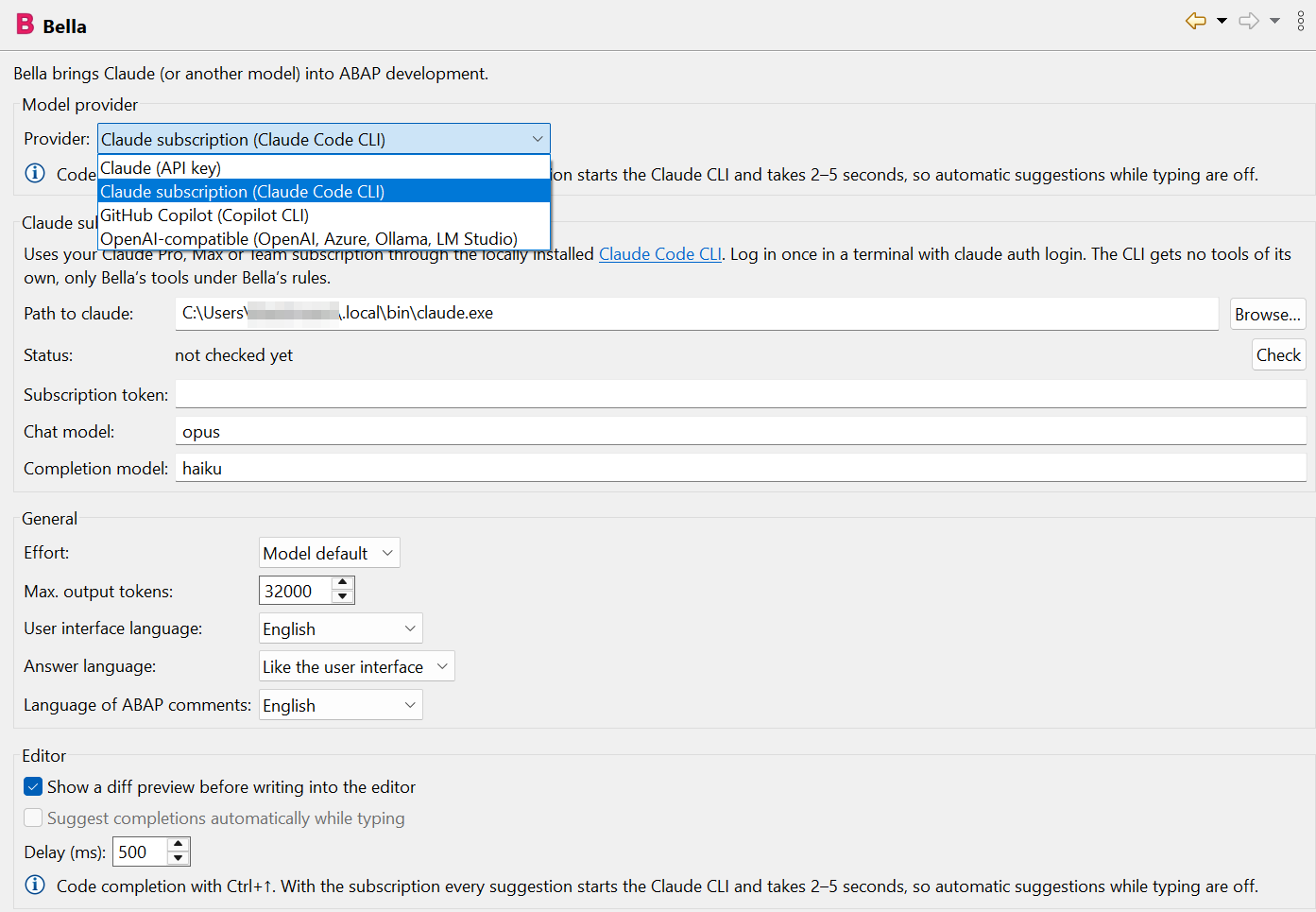
Bella preferences with the provider drop-down (Claude API key, Claude subscription, GitHub Copilot, OpenAI-compatible) and the Claude subscription settings

- **Provider** (drop-down at the top): *Claude (API key)*, *Claude subscription (Claude Code CLI)*, *GitHub Copilot (Copilot CLI)* or *OpenAI-compatible*. The page only shows the fields of the selected provider, plus a note on code completion. - **Claude (API key)**: - Enter an API key from [console.anthropic.com](https://console.anthropic.com/settings/keys). It is stored encrypted in Eclipse secure storage. - Default models: `claude-opus-5` for chat and code, `claude-haiku-4-5` for fast completion. - Effort and the server-side fallback model for declined requests can be set. - **Claude subscription** and **GitHub Copilot**: see the next sections. - **OpenAI-compatible** (optional): base URL, key and model, e.g. `http://localhost:11434/v1` for Ollama. The source code then stays in-house. - **Languages**: - User interface: like Eclipse or fixed. Menus switch right away, no restart needed. - Answers: like the user interface, like the question, or fixed. - ABAP comments in generated code: separate setting, English by default. - **Editor**: diff preview, automatic completion while typing and its delay. ### Claude subscription instead of an API key With a Claude subscription (Pro, Max, Team or Enterprise) you do not need an API key. Bella then uses the locally installed [Claude Code CLI](https://claude.com/claude-code), which handles logon and billing through your subscription. 1. Install Claude Code and log in once in a terminal: ```bash claude auth login # log in with your Claude account in the browser ``` If Eclipse does not see this logon (e.g. a different user), `claude setup-token` creates a long-lived subscription token. Enter it in Bella as *Subscription token*; it is kept in secure storage. 2. Choose *Preferences → Bella → Provider: Claude subscription (Claude Code CLI)* and click **Check**. The status line shows e.g. "logged in (max)". - You only need to set the path to `claude` if Bella does not find it. Bella searches `PATH`, `~/.local/bin`, `/opt/homebrew/bin`, `/usr/local/bin` and on Windows `%USERPROFILE%\.local\bin` and `%APPDATA%\npm`. To find the path, run `(Get-Command claude).Source` in PowerShell or `which claude` on macOS/Linux, and paste the result (or use **Browse…**). If the command is not found, the CLI is not installed yet, or the terminal was opened before the installation: open a new one. - Models: alias or full ID, default `opus` for the chat and `haiku` for completion. Which models are available depends on your plan. What happens: - Bella starts `claude` headless (`-p`, `stream-json`) in its own working directory in the Eclipse workspace metadata. One CLI process runs per chat; *New chat* ends it. - The CLI's built-in tools are switched off (`--tools ""`), so Claude can neither read files nor run commands. - The CLI gets Bella's SAP tools through a **local MCP server** inside Bella. It listens on `127.0.0.1` only and requires a random token. Other MCP configurations of the user are ignored (`--strict-mcp-config`). - Every tool call passes the same rules as with an API key: tool policy, confirmation dialog and the router for open objects (code only goes into the editor). - Bella removes an `ANTHROPIC_API_KEY` from the CLI's environment so that the subscription is really used. Limits: - **Completion:** every suggestion starts the CLI and takes 2–5 seconds. With the subscription there are therefore no automatic suggestions while typing, only on `Ctrl+↑`. - Your subscription's usage limits apply. When the limit is reached, Bella says so in the chat. - *Stop* interrupts the running answer. If the CLI does not react within 3 seconds, Bella ends the process; the next message then starts without the earlier conversation, and Bella tells you. ### GitHub Copilot subscription With a GitHub Copilot subscription, Bella uses the locally installed [GitHub Copilot CLI](https://github.com/features/copilot/cli). It handles logon and billing through your Copilot plan, and you can pick any model your plan offers (Claude, GPT and others). 1. Install the Copilot CLI and log in once in a terminal: ```powershell winget install GitHub.Copilot # Windows; or: npm install -g @github/copilot, brew install copilot-cli copilot login # opens the browser ``` Instead of `copilot login` you can create a fine-grained personal access token with the **Copilot Requests** permission and enter it in Bella as *Token*. Classic `ghp_` tokens are not supported. 2. Choose *Preferences → Bella → Provider: GitHub Copilot (Copilot CLI)* and click **Check**. The status line shows "logged in", the CLI version and the models your plan offers. - You only need to set the path to `copilot` if Bella does not find it. Bella searches `PATH` and on Windows also `%LOCALAPPDATA%\Microsoft\WinGet\Links` and `%APPDATA%\npm`. To find the path, run `(Get-Command copilot).Source` in PowerShell or `which copilot` on macOS/Linux, and paste the result (or use **Browse…**). Typical results: `C:\Users\\AppData\Local\Microsoft\WinGet\Links\copilot.exe` (winget) or `C:\Users\\AppData\Roaming\npm\copilot.cmd` (npm). If the command is not found, open a new terminal after the installation. - Models: leave empty for the Copilot default, or enter a model ID from the list shown by **Check**. What happens: - Bella starts `copilot --acp` (Agent Client Protocol) in its own empty working directory in the Eclipse workspace metadata. One CLI process runs per chat; *New chat* ends it. - The CLI's own abilities are switched off: no shell commands (`--deny-tool shell`), no file changes (`--deny-tool write`), no web access (`--deny-tool url`), no GitHub MCP server and none of your own Copilot MCP servers. - The CLI gets Bella's SAP tools through the same **local MCP server** as the Claude subscription (loopback only, random token). Tool policy, confirmation dialog and the router for open objects apply as usual. Bella rejects every other action the CLI asks permission for and says so in the chat. Limits: - **Premium requests:** every chat message, explanation or completion counts against your Copilot plan's premium requests, depending on the model. - **Completion:** every suggestion starts the CLI and takes a few seconds, so there are no automatic suggestions while typing, only on `Ctrl+↑`. - *Stop* cancels the running answer; if the CLI does not react within 3 seconds, Bella ends the process and the next message starts a new conversation. ### Project conventions Under *Preferences → Bella → Project conventions* you describe your project for Bella, for all systems and per ABAP project (a system's settings are added to those for all systems): - **Project information** (Markdown): package structure, architecture, dos and don'ts. Bella gives it to the model in the chat and in the editor actions. - **Naming rules**, one per line as `kind = pattern, pattern` (`*` any characters, `?` one character), e.g. ``` class = ZCL_SD_* local_data = lv_*, lt_*, ls_*, lo_*, lr_* importing = iv_*, it_*, is_*, io_* field_symbol = , test_class = ltc_* ``` *Insert standard rules* fills in common SAP conventions. The model follows the rules, and the style check (`abap_lint`, diff preview) reports names that break them: data by where it is declared (local, global, attribute), constants, field symbols, types, methods and their parameters, local and test classes, and the names of programs, global classes and interfaces. - **Derive from package…** reads the objects and a few sources of a package and lets the model propose both parts; review them before you apply. - **ATC check variant** for *Check with ATC and fix…*, the transport review, *Review code* and `adt_atc_check`. A system's own variant wins over the one for all systems; left empty, Bella uses the system's default variant. Useful when the default variant runs remote checks through a central check system that cannot be reached (RFC destination errors). The parameters of ATC check variants (e.g. a naming check) cannot be read through ADT, so they cannot be imported; findings of such a check are fixed with *Check with ATC and fix…*. ### Connecting ARC-1 (optional) Under *Preferences → Bella → SAP-Tools & ARC-1 → Add…*: - **HTTP**: URL of the ARC-1 server, e.g. locally `http://localhost:3000/mcp` or a BTP instance, optionally with a bearer token. - **stdio**: Bella starts ARC-1 itself, e.g. with `npx -y arc-1@latest`. Configure the SAP connection as described in the [ARC-1 documentation](https://github.com/arc-mcp/arc-1). Bella does not start an HTTP server itself. If the server is not reachable, the chat shows this once with the URL, and **Test** shows the same message. When the server comes back, or after it was restarted, Bella reconnects on the next question. **Test** lists the tools a server offers. When two tools offer the same capability (e.g. reading source code), Bella's ADT tools win by default. You can prefer ARC-1 instead, e.g. when governance should run centrally through ARC-1. ## Troubleshooting: log file When something does not work, switch on the log under *Preferences → Bella → Log file* (it is off by default) and repeat what went wrong. - **Normal** records what Bella does, with status, duration and errors: - model requests: provider, model, tokens, stop reason, - tool calls with the policy decision, - every ADT request with path and HTTP status, plus the SAP error text, - Claude Code and Copilot CLI processes with command line, exit code and stderr, - MCP connections. - **Details** (a second checkbox) adds the content: prompts, answers, tool input and output, source code and every protocol line of the CLIs. Only switch it on while you reproduce a problem. - API keys, tokens, passwords and authorization headers (also `x-csrf-token`, `Proxy-Authorization`, and every scheme such as Basic, Bearer, Negotiate or NTLM) are removed from every entry. Environment variables are logged by name only. - **Masking** (same page, on by default): confidential data in the log is replaced with placeholders, so you can attach the file to a bug report. The model still gets the real data. - Customer objects (Z*, Y*): `ZCL_ACME_ORDER` → `ZCL_MASK1`, `zcl_acme_order` → `zcl_mask1`. - System data: SID, ABAP project and logon user → `MASKSYS2`, `MASKUSER3`. - E-mail addresses and IBANs → `maskmail4@example.invalid`, `MASKIBAN5`; with this option also user names SAP gives in its messages ("locked by user MUELLER"), but not ABAP code such as `DATA user TYPE syuname`. - Own terms (company, customer, project, namespace such as `/ACME/`), one per line → `MASKTERM6`, `/MASK7/`. - A value keeps its placeholder for the Eclipse session, so you can follow an object through the log. Names of people in free text, comments or string literals are only masked if you add them as terms. - The file is `bella.log` in `/.metadata/.plugins/de.kiliantaubmann.bella.ui/`. The preference page opens it, opens its folder or clears it; the chat view menu (▾) has *Open log*. At 5 MB it moves to `bella.log.1`. - Please attach the file to a bug report. Errors also still go to Eclipse's *Error Log* view. ## Security and privacy - The selected model provider receives your question, source excerpts from the editor and tool results. With Ollama everything stays local. - API keys and tokens are kept in Eclipse secure storage, not in plain-text preferences. - Bella never opens an SAP logon itself. Tools only use projects that are already logged on. - Writing tools ask first, releasing transports is blocked, and open objects are only changed in the editor. - The log file is off by default and never contains keys or tokens; with details on it contains source code. - The chat history stays in the workspace and contains your messages, the answers and shortened tool calls, so also source code. Results of table contents, service answers and debugger values are not stored. Switch it off under *Preferences → Bella*, or delete chats in *All chats…*. - With a personal subscription (Claude Pro/Max, GitHub Copilot for individuals) the provider's data settings apply. Check whether your chats may be used for model training, and switch that off if your company's code must not be used for it. Anthropic and GitHub do not train on data from API keys or business plans by default. ## Development ```bash ./mvnw verify # core, UI, unit tests (without the SAP SDK) xvfb-run -a ./mvnw verify # plus the workbench smoke test on Linux ./mvnw -Padt verify # plus the ADT bundle and the update site # (downloads ADT from tools.hana.ondemand.com) python3 releng/i18n/generate.py # generate translations from releng/i18n/*.py ``` `mvnw` (`mvnw.cmd` on Windows) uses Maven 3.9.16, the version the build and the release workflow use; Maven 3.10 on the GitHub runners did not start the earlier Tycho 4 build. `-Padt` downloads ADT from SAP's update site; SAP's license terms for these downloads (SAP Developer License Agreement) apply to whoever runs the build. The ADT bundles are only used to compile against and are not part of Bella's update site. **Release:** raise the version in all `pom.xml`, `MANIFEST.MF` and `feature.xml` files and in `BellaPlugin.VERSION` (e.g. with `./mvnw org.eclipse.tycho:tycho-versions-plugin:set-version -DnewVersion=0.3.0-SNAPSHOT`) and commit. Then push a tag `v0.3.0`, or enter the version `0.3.0` under *Actions → Release → Run workflow*. The `release.yml` workflow builds everything including the ADT integration, runs the tests and attaches `bella-update-site-v0.3.0.zip` to a GitHub release. When the repository variable `PAGES_ENABLED` is `true`, it then publishes the same update site on GitHub Pages (`pages.yml`, address from the variable `UPDATE_SITE_URL`); *Actions → Update site → Run workflow* publishes an existing release again. | Module | Contents | |---|---| | `bundles/de.kiliantaubmann.bella.core` | no UI and no ADT: Anthropic and OpenAI-compatible providers (streaming, tool use, prompt caching), Claude Code integration (CLI, `stream-json`, local MCP server), GitHub Copilot integration (Copilot CLI, Agent Client Protocol), tool registry and policy, MCP client (HTTP and stdio), chat tool loop, ABAP scanner, reference finder and style check, prompts, ADT REST client, `adt_*` tools and the context builder | | `bundles/de.kiliantaubmann.bella.ui` | chat view, context menu, diff preview, router, ghost text, preferences, icons, translations | | `bundles/de.kiliantaubmann.bella.adt` | the only dependency on the ADT SDK: projects, logon and REST transport as an OSGi service | | `tests/…core.tests` | unit tests for providers, MCP client and server, Claude Code and Copilot sessions (with simulated CLIs), tool loop, ABAP scanner, reference finder, style check, ADT client and context (with a simulated ADT backend), logging and redaction, translations | | `tests/…ui.tests` | workbench smoke test: commands, chat, preferences (provider drop-down, subscription and Copilot hints), `Ctrl+↑` without key conflict, menus in Bella's language, writing into the editor without saving, style check in the diff preview, log file on/off, router, language switch | The Claude integration deliberately uses `java.net.http` instead of the Anthropic Java SDK. This keeps the OSGi bundle free of OkHttp, Kotlin and Jackson. ### Status and known limits - The **GitHub Copilot** integration is tested with a simulated CLI speaking the Agent Client Protocol; handshake, command-line options and the "not logged in" case were checked against the real Copilot CLI 1.0.89. A chat with the Copilot Free plan works. - The **ADT bundle** compiles in CI (`-Padt`) against the current ADT SDK from SAP's p2 site. Generating, explaining and writing into the editor have been used with a real ABAP system; the SAP tools in the chat (search, where-used, ATC, activation …) still need broader testing. - Stateful sessions (for locks) and the object reference of an editor are read via reflection. - If an API is missing in your ADT version, Bella reports it in the chat. ARC-1 remains available as a route for the SAP tools. - If the connection to the SAP system breaks (network, VPN), ADT may still show the project as logged on. Bella tries a read once more; after that, the tools report the lost connection instead of claiming objects do not exist. Writes are never repeated. - Reading DDIC objects and loading definitions for editor actions was tested against a simulated ADT backend. The ADT endpoints for tables, structures and data elements differ between releases, so please report objects Bella cannot read. - If ADT itself uses `Ctrl+↑` in the ABAP editor, *Preferences → General → Keys* shows a conflict. Change the shortcut there. - Command names in *Keys* and *Quick Access* still follow the operating system language; Eclipse resolves them before Bella starts. - All translations except German and English were machine-generated. Corrections are welcome. ## License, disclaimer and trademarks [MIT](LICENSE) © 2026 Kilian Taubmann Bella's Clean ABAP rules in the prompts are based on SAP's [Clean ABAP style guide](https://github.com/SAP/styleguides) (CC BY 3.0). The layout of the transport review report draws on ARC-1's [`sap-transport-review`](https://github.com/arc-mcp/arc-1/tree/main/skills/sap-transport-review) skill (MIT). The ADT requests for creating DDIC objects, quick fixes, the pretty printer, navigation, class surgery, diagnostics (incl. the OData `sap-statistics` verdict), transports, packages, abapGit/gCTS, RAP and UI5, and the extra style rules follow [ARC-1](https://github.com/arc-mcp/arc-1) (MIT, © the ARC-1 authors). Bella is free software provided as is, without warranty. It can change ABAP code and, after you confirm, write and activate objects in SAP systems. Review what it generates, use it in development systems, and keep your usual transport and review process. You are responsible for the code you save and activate. Bella is an independent project and is not affiliated with, endorsed or sponsored by SAP, Anthropic, GitHub, OpenAI or the Eclipse Foundation. SAP, ABAP and the other SAP products mentioned are trademarks or registered trademarks of SAP SE (or an SAP affiliate company) in Germany and other countries. Claude and Anthropic are trademarks of Anthropic, PBC. GitHub and GitHub Copilot are trademarks of GitHub, Inc. OpenAI is a trademark of OpenAI. Eclipse is a trademark of the Eclipse Foundation. All other names are trademarks of their respective owners and are used only to describe compatibility.