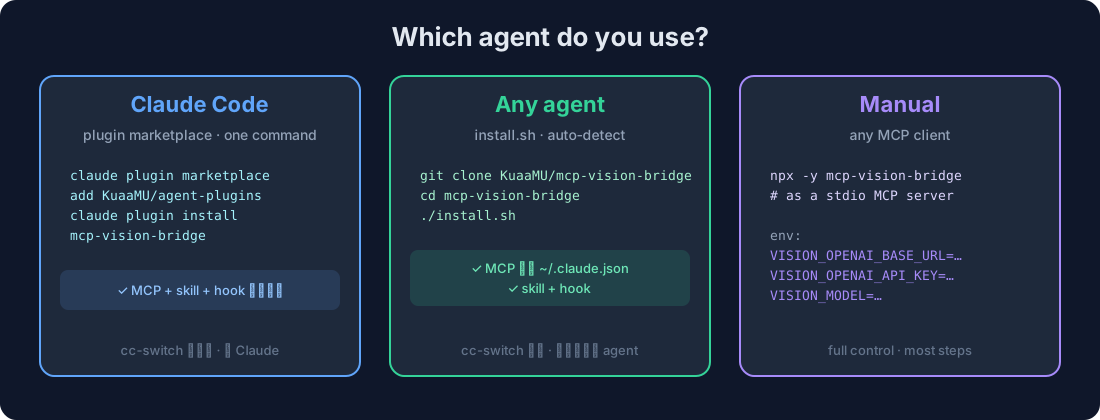
 ### Claude Code (one command)
```bash
claude plugin marketplace add KuaaMU/agent-plugins
claude plugin install mcp-vision-bridge
```
That's it — the plugin bundles the **MCP server + vision skill + auto-loop hook**. Claude Code will prompt you for your vision endpoint, API key, and model once.
> **Auto-updating:** the MCP server self-syncs the bundled skill + hook into
> `~/.claude/` on startup, so every restart pulls the latest version along with
> the npm package. Set `VISION_NO_SYNC=1` to disable auto-sync.
> Prefer to manage it in **cc-switch** (see it + sync to Codex/opencode/Gemini)? Use the installer below instead.
### Codex / Reasonix / opencode / Kimi / anything else (one command)
```bash
git clone https://github.com/KuaaMU/mcp-vision-bridge && cd mcp-vision-bridge
./install.sh # auto-detects your agent
```
`./install.sh claude | reasonix | codex | opencode | kimi` if it doesn't auto-detect. You'll be asked for three values: **endpoint**, **key**, **model**.
**Reasonix** reads the same `.mcp.json` as Claude Code, so `./install.sh reasonix`
(or a manual `.mcp.json` with the `vision` server) works — pasted images land in
`.reasonix/attachments/` and `image="recent"` finds them.
### Manual (no install script)
Add this as a stdio MCP server in your agent:
```json
{
"command": "npx",
"args": ["-y", "mcp-vision-bridge"],
"env": {
"VISION_OPENAI_BASE_URL": "https://your-endpoint/v1",
"VISION_OPENAI_API_KEY": "sk-your-key",
"VISION_MODEL": "your-vision-model"
}
}
```
Requires **Node.js ≥ 18**.
---
## 🎯 Use
After install, **restart your agent**, then:
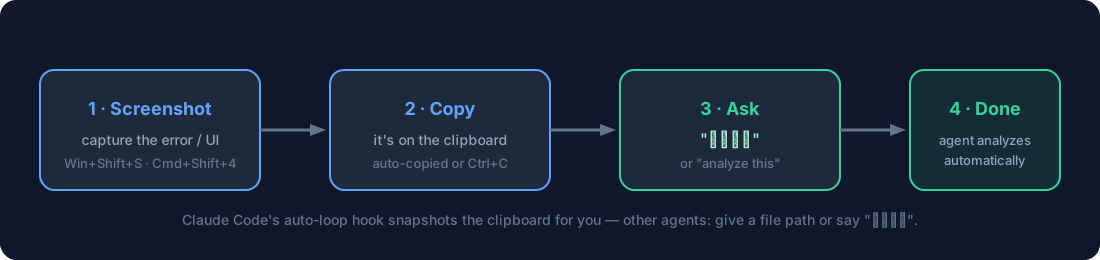 **Best way — drag the image file into the chat.** Dragging an image file into
any agent (TUI or GUI) inserts its real path, which `analyze_image` accepts
directly — works identically in Claude Code, Cowork, Codex, opencode, PI, and
more. No clipboard, no paste quirks.
1. **Drag an image file into the input box** (or Ctrl+V in Claude Code / Cowork)
2. Say **"看看这个"** (or "analyze this", "what's the error?")
3. Your agent calls `analyze_image` → the vision model describes it in detail
Paste 3 images? The hook reads your session transcript (lossless, multi-image).
`image="recent"` auto-finds pasted images across **Claude Code CLI, Reasonix,
Cowork, and Codex** — no clipboard needed. If a desktop GUI doesn't register a
paste (it can fail silently), just **drag the file in** — a path always works.
### The one tool
> Agent docs → [**README_AGENT.md**](README_AGENT.md) (tool contract, source choice, error handling).
```
analyze_image(
image = "path | URL | clipboard | recent | session | data:URI", // single, or
["path","path",...] // several in one call
task = "describe | ocr | ui | layout | qa", // or use prompt:
prompt = "What error is on screen?",
detail = "high" | "low",
save_to = "optional file for long output"
)
```
- **`image`** — local path, http(s) URL, `"clipboard"`, `"recent"` (most recent
pasted image **in this session**), `"session"` (**every image pasted in this
session, analyzed in one call**), a base64 data URI, or an **array** of these
to analyze multiple images at once (e.g. "compare these two").
- **`task`** — prompt presets for common jobs; `ocr` asks the vision model to
extract text, `ui` specs a screen, etc. (There's no bundled OCR engine — the
model itself does the reading.)
- **`prompt`** — free-form question (overrides `task`). **Pass the user's actual
question here** — the vision model answers what you ask, so a specific question
("what error is shown?") beats a generic `describe`.
### How pasted images are discovered
Pasting an image into a coding agent stores it somewhere. `image="recent"` /
`"session"` find it automatically — no clipboard, no manual paths:
| Agent | Where pasted images land | Auto-found? |
|---|---|---|
| Claude Code CLI/TUI | `~/.claude/image-cache/
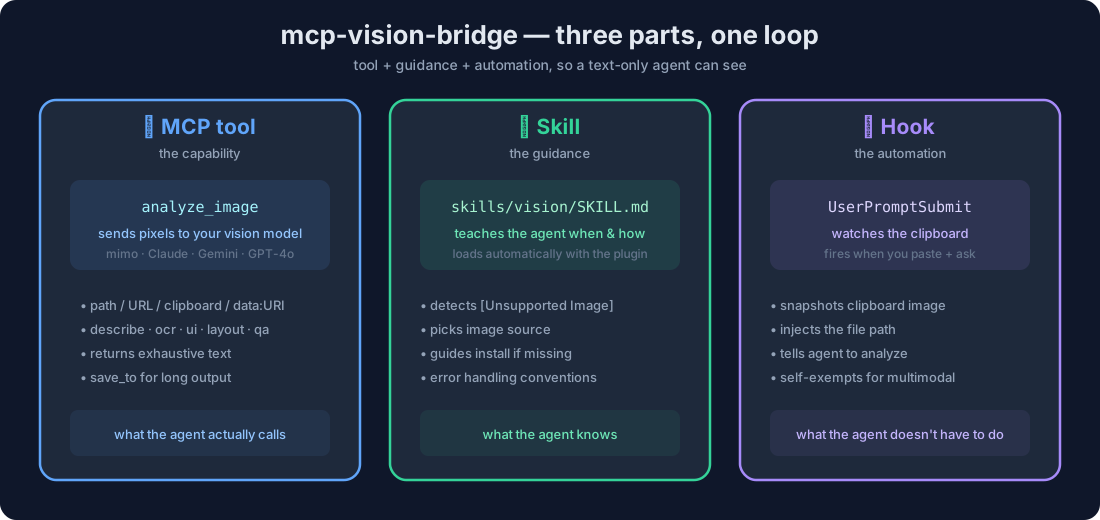 Three parts that close the loop for a text-only agent:
- **MCP tool** (`analyze_image`) — the capability. Sends pixels to your vision model, returns text.
- **Skill** (`skills/vision/`) — the guidance. Tells the agent *when* and *how* to call it.
- **Hook** (`UserPromptSubmit`) — the automation. Captures a pasted image from the session transcript and triggers the call for you.
Install them all with the plugin (Claude Code) or `install.sh` (any agent).
---
## How it works
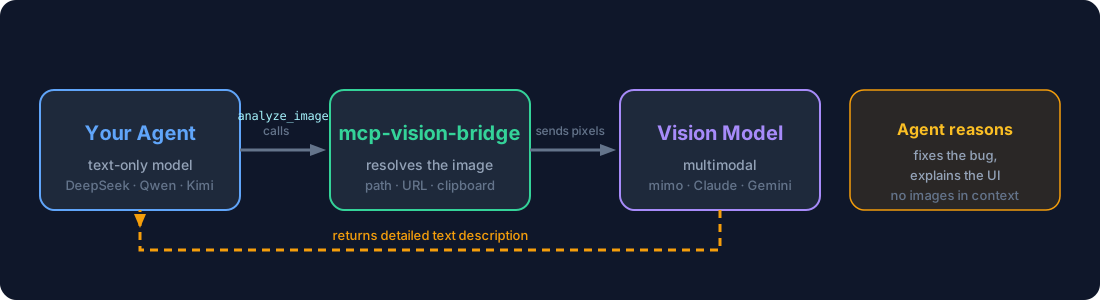 Pure text in, pure text out. The server never interprets the image — it fetches
the bytes and lets your vision model do the seeing.
---
## Configuration
All via environment variables (the MCP reads them from your agent's server config).
| Variable | When | Example |
|---|---|---|
| `VISION_OPENAI_BASE_URL` | OpenAI-compatible | `https://opencode.ai/zen/go/v1` |
| `VISION_OPENAI_API_KEY` | OpenAI-compatible | `sk-...` |
| `VISION_MODEL` | always | `mimo-v2.5`, `gpt-4o`, `qwen-vl-max` |
| `VISION_PROVIDER` | non-openai | `anthropic` \| `gemini` |
| `VISION_ANTHROPIC_API_KEY` | anthropic | `sk-ant-...` |
| `VISION_GEMINI_API_KEY` | gemini | `AIza...` |
| `VISION_MAX_TOKENS` | optional | `4096` per image — **multi-image multiplies it ×N** (each image keeps its own budget, capped 32000) so detailed descriptions aren't truncated |
| `VISION_TIMEOUT_MS` | optional | `30000` |
| `VISION_BLOCK_PRIVATE_URLS` | optional | `true` to block localhost fetches |
---
## Development
```bash
npm install
npm run build # tsc → dist/
npm test # vitest
npm run test:e2e # stdio pipeline against a mock provider
```
Layout: `src/` (server), `skills/vision/` (skill), `hooks/` (auto-loop hook),
`install.sh` (installer), `examples/` (per-agent templates).
**Release:** bump the version in `package.json`, push, then
`git tag vX.Y.Z && git push origin vX.Y.Z` — GitHub Actions runs tests and
publishes to npm automatically.
---
## Security
- Keys live in env/config only — never in tool arguments.
- Optional SSRF guard for URL sources.
- Images go only to your configured vision provider.
## License
[MIT](LICENSE)
---