[](https://cocoapods.org/pods/KVKCalendar)
[](https://swiftpackageindex.com/kvyatkovskys/KVKCalendar)
[](https://cocoapods.org/pods/KVKCalendar)
[](https://cocoapods.org/pods/KVKCalendar)
# KVKCalendar
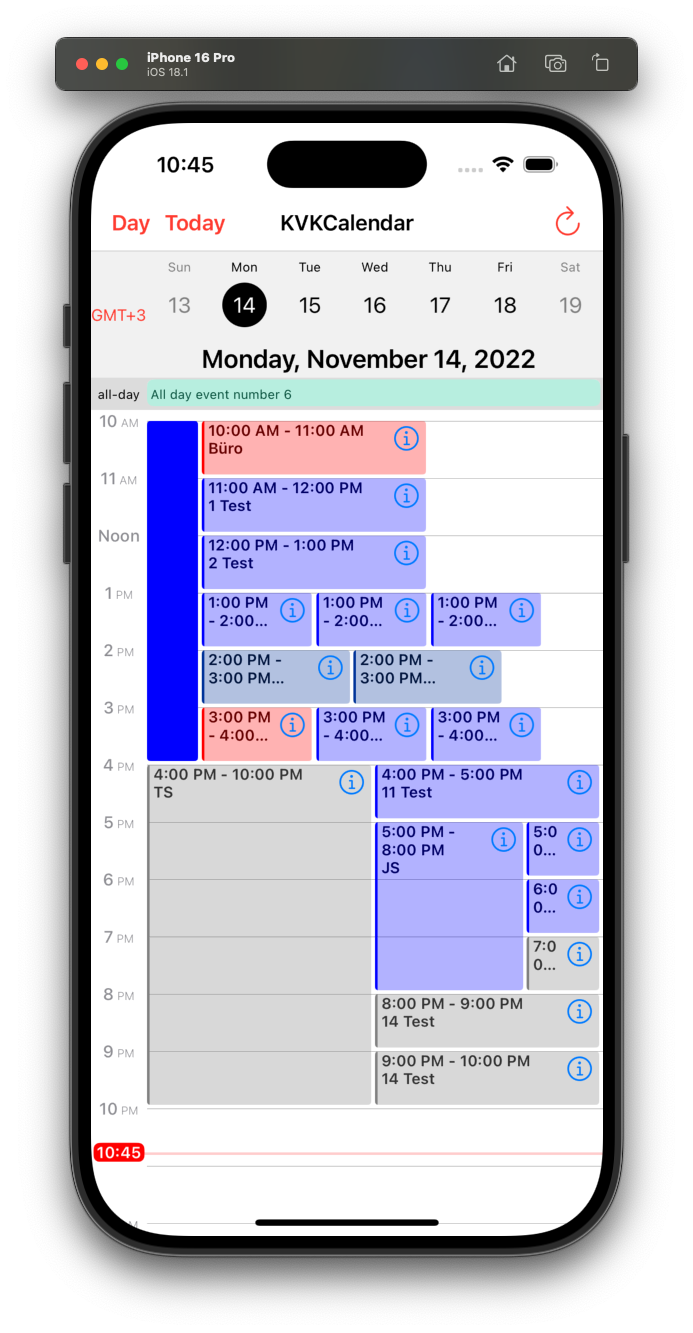
**KVKCalendar** is a most fully customization calendar. Library consists of five modules for displaying various types of calendar (*day*, *week*, *month*, *year*, *list of events*). You can choose any module or use all. It is designed based on a standard iOS calendar, but with additional features. Timeline displays the schedule for the day and the week.
**Additional features:**
- [x] Switch between time zones
- [x] Dark mode
- [ ] Skeleton loading (month/list)
- [x] Custom event view
- [x] Custom date cell
- [x] Custom header view and collection view
- [x] Custom calendar localization
- [x] Event list mode for weekly viewing
- [x] Ability to set a divider line (day/week)
- [x] [Supporting Multiple Windows on iPad](https://developer.apple.com/design/human-interface-guidelines/ios/system-capabilities/multitasking/)
- [x] UIMenu supports in event view (iOS and Mac Catalyst 14.0+)
- [x] [Ability to configure the frame for viewing events](https://github.com/kvyatkovskys/KVKCalendar/pull/198)
 ## Need Help?
If you have a **question** about how to use KVKCalendar in your application, ask it on StackOverflow using the [KVKCalendar](https://stackoverflow.com/questions/tagged/kvkcalendar) tag.
Please, use [Issues](https://github.com/kvyatkovskys/KVKCalendar/issues) only for reporting **bugs** or requesting a new **features** in the library.
## Requirements
- iOS 13.0+, iPadOS 13.0+, MacOS 11.0+ (supports Mac Catalyst)
- Swift 5.0+
## Installation
**KVKCalendar** is available through [CocoaPods](https://cocoapods.org) or [Swift Package Manager](https://swift.org/package-manager/).
### CocoaPods
~~~bash
pod 'KVKCalendar'
~~~
[Adding Pods to an Xcode project](https://guides.cocoapods.org/using/using-cocoapods.html)
### Swift Package Manager (Xcode 12 or higher)
1. In Xcode navigate to **File** → **Swift Packages** → **Add Package Dependency...**
2. Select a project
3. Paste the repository URL (`https://github.com/kvyatkovskys/KVKCalendar`) and click **Next**.
4. For **Rules**, select **Version (Up to Next Major)** and click **Next**.
5. Click **Finish**.
[Adding Package Dependencies to Your App](https://developer.apple.com/documentation/swift_packages/adding_package_dependencies_to_your_app)
## Usage for UIKit
Import `KVKCalendar`.
Create a subclass view `CalendarView` and implement `CalendarDataSource` protocol. Create an array of class `[Event]` and return the array.
```swift
import KVKCalendar
final class KVKCalendarVC: UIViewController {
var events = [Event]()
override func viewDidLoad() {
super.viewDidLoad()
let calendar = CalendarView()
calendar.dataSource = self
view.addSubview(calendar)
calendar.translatesAutoresizingMaskIntoConstraints = false
let top = calendar.topAnchor.constraint(equalTo: view.topAnchor)
let leading = calendar.leadingAnchor.constraint(equalTo: view.leadingAnchor)
let trailing = calendar.trailingAnchor.constraint(equalTo: view.trailingAnchor)
let bottom = calendar.bottomAnchor.constraint(equalTo: view.bottomAnchor)
NSLayoutConstraint.activate([top, leading, trailing, bottom])
calendarView.layoutIfNeeded()
createEvents { (events) in
self.events = events
self.calendarView.reloadData()
}
}
override func viewDidLayoutSubviews() {
calendarView.layoutIfNeeded()
}
}
extension KVKCalendarVC {
func createEvents(completion: ([Event]) -> Void) {
let models = // Get events from storage / API
let events = models.compactMap({ (item) in
var event = Event(ID: item.id)
event.start = item.startDate // start date event
event.end = item.endDate // end date event
event.color = item.color
event.isAllDay = item.allDay
event.isContainsFile = !item.files.isEmpty
event.recurringType = // recurring event type - .everyDay, .everyWeek
// Add text event (title, info, location, time)
if item.allDay {
event.text = "\(item.title)"
} else {
event.text = "\(startTime) - \(endTime)\n\(item.title)"
}
return event
})
completion(events)
}
}
extension KVKCalendarVC: CalendarDataSource {
func eventsForCalendar(systemEvents: [EKEvent]) -> [Event] {
// if you want to get events from iOS calendars
// set calendar names to style.systemCalendars = ["Test"]
let mappedEvents = systemEvents.compactMap { Event(event: $0) }
return events + mappedEvents
}
}
```
Implement `CalendarDelegate` to handle user action and control calendar behaviour.
```swift
calendar.delegate = self
```
To use a custom view for specific event or date you need to create a new view of class `EventViewGeneral` and return the view in function.
```swift
class CustomViewEvent: EventViewGeneral {
override init(style: Style, event: Event, frame: CGRect) {
super.init(style: style, event: event, frame: frame)
}
}
// an optional function from CalendarDataSource
func willDisplayEventView(_ event: Event, frame: CGRect, date: Date?) -> EventViewGeneral? {
guard event.ID == id else { return nil }
return customEventView
}
```
## Need Help?
If you have a **question** about how to use KVKCalendar in your application, ask it on StackOverflow using the [KVKCalendar](https://stackoverflow.com/questions/tagged/kvkcalendar) tag.
Please, use [Issues](https://github.com/kvyatkovskys/KVKCalendar/issues) only for reporting **bugs** or requesting a new **features** in the library.
## Requirements
- iOS 13.0+, iPadOS 13.0+, MacOS 11.0+ (supports Mac Catalyst)
- Swift 5.0+
## Installation
**KVKCalendar** is available through [CocoaPods](https://cocoapods.org) or [Swift Package Manager](https://swift.org/package-manager/).
### CocoaPods
~~~bash
pod 'KVKCalendar'
~~~
[Adding Pods to an Xcode project](https://guides.cocoapods.org/using/using-cocoapods.html)
### Swift Package Manager (Xcode 12 or higher)
1. In Xcode navigate to **File** → **Swift Packages** → **Add Package Dependency...**
2. Select a project
3. Paste the repository URL (`https://github.com/kvyatkovskys/KVKCalendar`) and click **Next**.
4. For **Rules**, select **Version (Up to Next Major)** and click **Next**.
5. Click **Finish**.
[Adding Package Dependencies to Your App](https://developer.apple.com/documentation/swift_packages/adding_package_dependencies_to_your_app)
## Usage for UIKit
Import `KVKCalendar`.
Create a subclass view `CalendarView` and implement `CalendarDataSource` protocol. Create an array of class `[Event]` and return the array.
```swift
import KVKCalendar
final class KVKCalendarVC: UIViewController {
var events = [Event]()
override func viewDidLoad() {
super.viewDidLoad()
let calendar = CalendarView()
calendar.dataSource = self
view.addSubview(calendar)
calendar.translatesAutoresizingMaskIntoConstraints = false
let top = calendar.topAnchor.constraint(equalTo: view.topAnchor)
let leading = calendar.leadingAnchor.constraint(equalTo: view.leadingAnchor)
let trailing = calendar.trailingAnchor.constraint(equalTo: view.trailingAnchor)
let bottom = calendar.bottomAnchor.constraint(equalTo: view.bottomAnchor)
NSLayoutConstraint.activate([top, leading, trailing, bottom])
calendarView.layoutIfNeeded()
createEvents { (events) in
self.events = events
self.calendarView.reloadData()
}
}
override func viewDidLayoutSubviews() {
calendarView.layoutIfNeeded()
}
}
extension KVKCalendarVC {
func createEvents(completion: ([Event]) -> Void) {
let models = // Get events from storage / API
let events = models.compactMap({ (item) in
var event = Event(ID: item.id)
event.start = item.startDate // start date event
event.end = item.endDate // end date event
event.color = item.color
event.isAllDay = item.allDay
event.isContainsFile = !item.files.isEmpty
event.recurringType = // recurring event type - .everyDay, .everyWeek
// Add text event (title, info, location, time)
if item.allDay {
event.text = "\(item.title)"
} else {
event.text = "\(startTime) - \(endTime)\n\(item.title)"
}
return event
})
completion(events)
}
}
extension KVKCalendarVC: CalendarDataSource {
func eventsForCalendar(systemEvents: [EKEvent]) -> [Event] {
// if you want to get events from iOS calendars
// set calendar names to style.systemCalendars = ["Test"]
let mappedEvents = systemEvents.compactMap { Event(event: $0) }
return events + mappedEvents
}
}
```
Implement `CalendarDelegate` to handle user action and control calendar behaviour.
```swift
calendar.delegate = self
```
To use a custom view for specific event or date you need to create a new view of class `EventViewGeneral` and return the view in function.
```swift
class CustomViewEvent: EventViewGeneral {
override init(style: Style, event: Event, frame: CGRect) {
super.init(style: style, event: event, frame: frame)
}
}
// an optional function from CalendarDataSource
func willDisplayEventView(_ event: Event, frame: CGRect, date: Date?) -> EventViewGeneral? {
guard event.ID == id else { return nil }
return customEventView
}
```
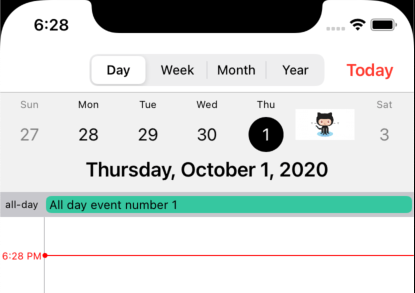
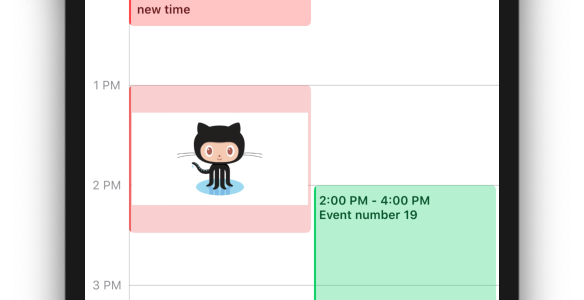 To use a custom date cell, just subscribe on this optional method from `CalendarDataSource` (works for Day/Week/Month/Year views).
```swift
func dequeueCell(parameter: CellParameter, type: CalendarType, view: T, indexPath: IndexPath) -> KVKCalendarCellProtocol? where T: UIScrollView {
switch type {
case .year:
let cell = (view as? UICollectionView)?.dequeueCell(indexPath: indexPath) { (cell: CustomYearCell) in
// configure the cell
}
return cell
case .day, .week, .month:
let cell = (view as? UICollectionView)?.dequeueCell(indexPath: indexPath) { (cell: CustomDayCell) in
// configure the cell
}
return cell
case .list:
let cell = (view as? UITableView)?.dequeueCell { (cell: CustomListCell) in
// configure the cell
}
return cell
}
}
```
To use a custom date cell, just subscribe on this optional method from `CalendarDataSource` (works for Day/Week/Month/Year views).
```swift
func dequeueCell(parameter: CellParameter, type: CalendarType, view: T, indexPath: IndexPath) -> KVKCalendarCellProtocol? where T: UIScrollView {
switch type {
case .year:
let cell = (view as? UICollectionView)?.dequeueCell(indexPath: indexPath) { (cell: CustomYearCell) in
// configure the cell
}
return cell
case .day, .week, .month:
let cell = (view as? UICollectionView)?.dequeueCell(indexPath: indexPath) { (cell: CustomDayCell) in
// configure the cell
}
return cell
case .list:
let cell = (view as? UITableView)?.dequeueCell { (cell: CustomListCell) in
// configure the cell
}
return cell
}
}
```
 ## Usage for SwiftUI
- Create a struct `KVKCalendarWrapper` and declare the protocol `UIViewControllerRepresentable`
- Use the created calendar controller
```swift
import SwiftUI
private struct KVKCalendarWrapper: UIViewControllerRepresentable {
func makeUIViewController(context: Context) -> some UIViewController {
KVKCalendarVC()
}
func updateUIViewController(_ uiViewController: UIViewControllerType, context: Context) {}
}
struct CalendarContentView: View {
var body: some View {
NavigationStack {
KVKCalendarWrapper()
}
}
}
```
## Styles
To customize calendar create an object `Style` and add to `init` class `CalendarView`.
```swift
public struct Style {
public var event = EventStyle()
public var timeline = TimelineStyle()
public var week = WeekStyle()
public var allDay = AllDayStyle()
public var headerScroll = HeaderScrollStyle()
public var month = MonthStyle()
public var year = YearStyle()
public var list = ListViewStyle()
public var locale = Locale.current
public var calendar = Calendar.current
public var timezone = TimeZone.current
public var defaultType: CalendarType?
public var timeHourSystem: TimeHourSystem = .twentyFourHour
public var startWeekDay: StartDayType = .monday
public var followInSystemTheme: Bool = false
public var systemCalendars: Set = []
}
```
## Author
[Sergei Kviatkovskii](https://github.com/kvyatkovskys)
## License
KVKCalendar is available under the [MIT license](https://github.com/kvyatkovskys/KVKCalendar/blob/master/LICENSE.md)
## Usage for SwiftUI
- Create a struct `KVKCalendarWrapper` and declare the protocol `UIViewControllerRepresentable`
- Use the created calendar controller
```swift
import SwiftUI
private struct KVKCalendarWrapper: UIViewControllerRepresentable {
func makeUIViewController(context: Context) -> some UIViewController {
KVKCalendarVC()
}
func updateUIViewController(_ uiViewController: UIViewControllerType, context: Context) {}
}
struct CalendarContentView: View {
var body: some View {
NavigationStack {
KVKCalendarWrapper()
}
}
}
```
## Styles
To customize calendar create an object `Style` and add to `init` class `CalendarView`.
```swift
public struct Style {
public var event = EventStyle()
public var timeline = TimelineStyle()
public var week = WeekStyle()
public var allDay = AllDayStyle()
public var headerScroll = HeaderScrollStyle()
public var month = MonthStyle()
public var year = YearStyle()
public var list = ListViewStyle()
public var locale = Locale.current
public var calendar = Calendar.current
public var timezone = TimeZone.current
public var defaultType: CalendarType?
public var timeHourSystem: TimeHourSystem = .twentyFourHour
public var startWeekDay: StartDayType = .monday
public var followInSystemTheme: Bool = false
public var systemCalendars: Set = []
}
```
## Author
[Sergei Kviatkovskii](https://github.com/kvyatkovskys)
## License
KVKCalendar is available under the [MIT license](https://github.com/kvyatkovskys/KVKCalendar/blob/master/LICENSE.md)