
`fzf-make` is a command line tool that executes commands using fuzzy finder with preview window. Currently supporting [**make**](https://www.gnu.org/software/make/), [**npm**](https://docs.npmjs.com/about-npm), [**pnpm**](https://github.com/pnpm/pnpm), [**yarn**](https://github.com/yarnpkg/berry), [**just**](https://github.com/casey/just), [**task**](https://github.com/go-task/task).
[](https://www.rust-lang.org/)
[](https://ratatui.rs/)
[](https://github.com/kyu08/fzf-make/blob/main/LICENSE)
[](https://crates.io/crates/fzf-make)
[](https://formulae.brew.sh/formula/fzf-make)
[](https://github.com/kyu08/fzf-make/releases/latest)
[](https://crates.io/crates/fzf-make)
# 🛠️ Features
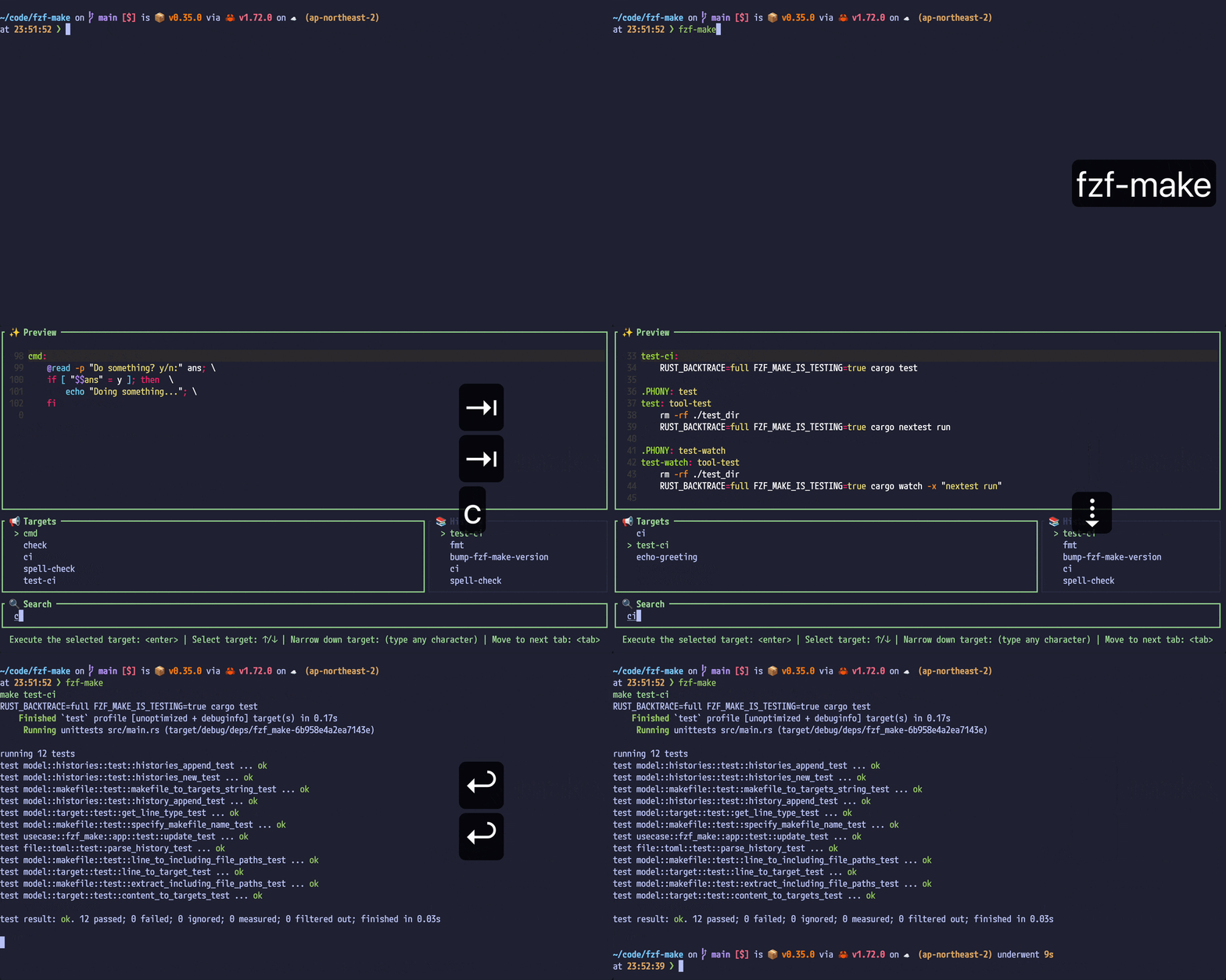
- Select and execute a make target or (npm | pnpm | yarn) scripts or just recipe or task using fuzzy-finder with a preview window by running `fzf-make`!
- Execute the last executed command(By running `fzf-make --repeat`.)
- Command history
- Support [**make**](https://www.gnu.org/software/make/), [**npm**](https://docs.npmjs.com/about-npm), [**pnpm**](https://github.com/pnpm/pnpm), [**yarn**](https://github.com/yarnpkg/berry), [**just**](https://github.com/casey/just), [**task**](https://github.com/go-task/task).
- Support passing additional arguments to the command using popup window. The UI looks like: https://github.com/kyu08/fzf-make/pull/447
- [make] Support `include` directive
- [npm] Support workspace (collect scripts from all `package.json` files in the workspace using `npm query`).
- **Note that the minimum supported npm version for workspace support is `8.16.0` (required for `npm query`).**
- [pnpm] Support workspace(collect scripts all of `package.json` in the directory where fzf-make is launched.)
- [yarn] Support workspace(collect all scripts which is defined in `workspaces` field in root `package.json`.)
- [just] Support execution inside of directory of justfile.
- [task] Support `includes` with both file and directory paths, following [Taskfile schema](https://taskfile.dev/docs/reference/schema#taskfile). (fzf-make is just using output of `task --list-all --json`)
- **Note that the minimum supported task version is [`v3.44.0`](https://github.com/go-task/task/releases/tag/v3.44.0).**
- **(Scheduled to be developed)** Support config file
# 📦 Installation
## macOS
### Homebrew
```sh
# install
brew install fzf-make
```
```sh
# update
brew upgrade fzf-make
```
## Arch Linux
`fzf-make` can be installed from the [AUR](https://aur.archlinux.org/packages/fzf-make) using an [AUR helper](https://wiki.archlinux.org/title/AUR_helpers). For example:
```sh
paru -S fzf-make
```
## NixOS / Nix (package manager)
`fzf-make` can be run from the repository (latest version)
```sh
nix run github:kyu08/fzf-make
```
Or from the nixpkgs (channel >= 23.05)
```sh
nix run nixpkgs#fzf-make
```
> **Note**
> You may need to enable experimental feature. In that case, execute the following command to enable them
> `echo "experimental-features = nix-command flakes" | tee ~/.config/nix/nix.conf`
## Cargo
```sh
cargo +1.90.0 install --locked fzf-make
# Or build from the latest source
cargo +1.90.0 install --git https://github.com/kyu08/fzf-make/
```
## Pre-built binaries for Linux
Pre-built binaries are available for `linux_amd64` and `linux_arm64`.
> [!NOTE]
> Replace `/usr/local/bin` with any directory in your `$PATH` if you prefer another installation place.
### linux_amd64
```sh
TAG=$(curl -fsSL https://api.github.com/repos/kyu08/fzf-make/releases/latest | grep -m1 tag_name | cut -d '"' -f 4) && curl -fsSL "https://github.com/kyu08/fzf-make/releases/download/${TAG}/fzf-make_${TAG}_linux_amd64.tar.gz" | tar -xz && sudo mv fzf-make /usr/local/bin/
```
### linux_arm64
```sh
TAG=$(curl -fsSL https://api.github.com/repos/kyu08/fzf-make/releases/latest | grep -m1 tag_name | cut -d '"' -f 4) && curl -fsSL "https://github.com/kyu08/fzf-make/releases/download/${TAG}/fzf-make_${TAG}_linux_arm64.tar.gz" | tar -xz && sudo mv fzf-make /usr/local/bin/
```
# 💡 Usage
## Run target using fuzzy finder
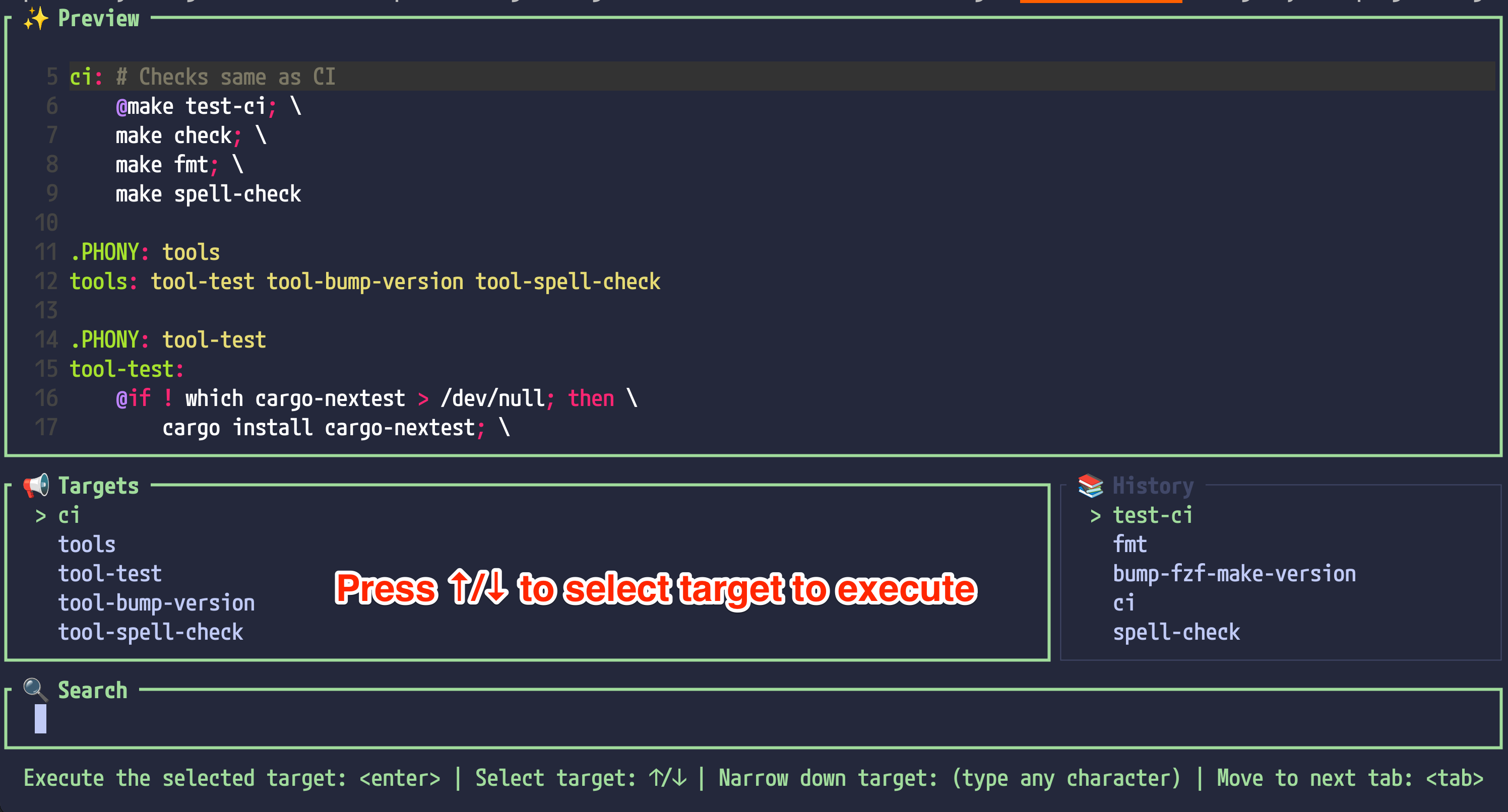
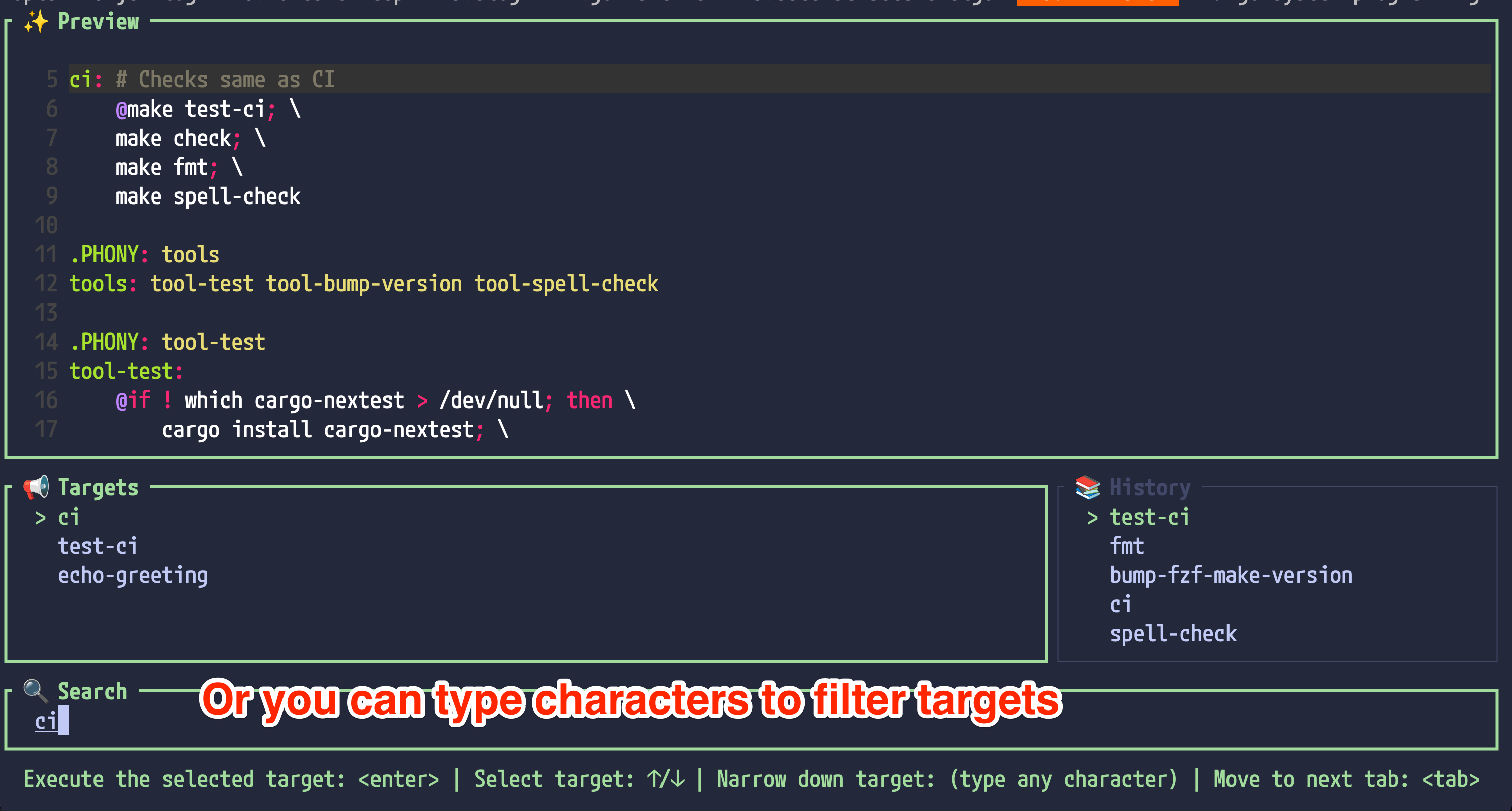
1. Execute `fzf-make` in the directory you want to run make target, or (npm | pnpm | yarn) scripts or just recipe.
1. Select command you want to execute. If you type some characters, the list will be filtered.
 ## Run target from history
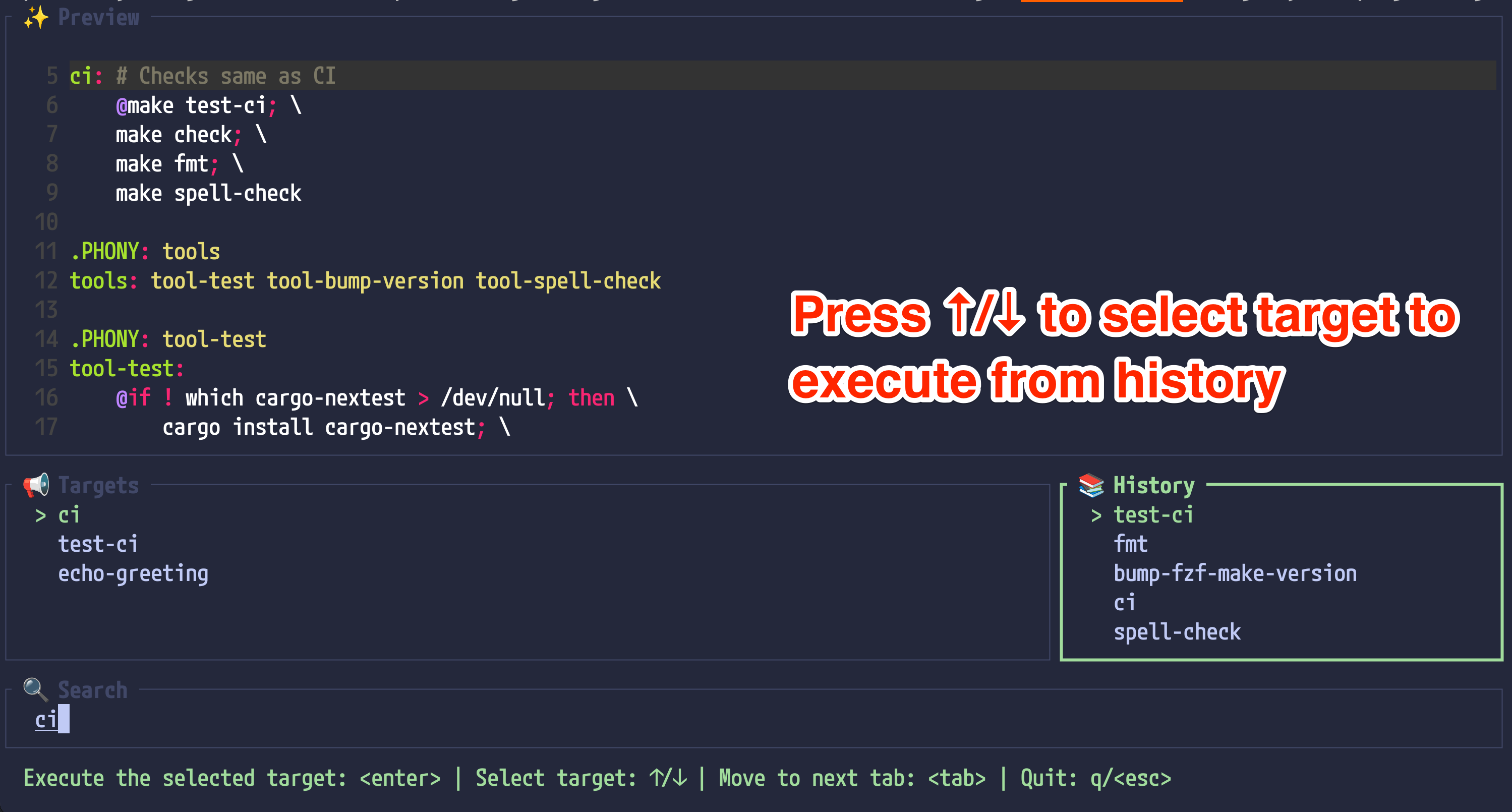
1. Execute `fzf-make` in the directory you want to run make target, or (npm | pnpm | yarn) scripts or just recipe.(For just, we support execution inside of directory of justfile.)
1. Press `Tab` to move to the history pane.
1. Select command you want to execute.
## Run target from history
1. Execute `fzf-make` in the directory you want to run make target, or (npm | pnpm | yarn) scripts or just recipe.(For just, we support execution inside of directory of justfile.)
1. Press `Tab` to move to the history pane.
1. Select command you want to execute.
 ## How fzf-make judges which command runner can be used
### make
Whether makefile(file name should be one of `GNUmakefile`, `makefile`, `Makefile`) is in the current directory.
### npm
Whether `package.json` and `package-lock.json` are in the current directory or `package-lock.json` exists in an ancestor directory.
### pnpm
Whether `package.json` and `pnpm-lock.yaml` are in the current directory.
### yarn
Whether `package.json` and `yarn.lock` are in the current directory.
### just
Whether `justfile` or `.justfile` are in the current directory or ancestor directories. If the lower cased file name matches `justfile` or `.justfile`, it is treat as a justfile. (e.g. `justFile` or `.JustFile` are also valid.)
## Commands Supported
| Command | Description |
| -------- | -------- |
| `fzf-make` | Launch fzf-make |
| `fzf-make --repeat` / `fzf-make -r` / `fzf-make repeat` | Execute last executed target |
| `fzf-make --history` / `fzf-make -h` / `fzf-make history` | Launch fzf-make with the history pane focused |
| `fzf-make --help` / `fzf-make help` | Show help |
| `fzf-make --version` / `fzf-make -v` / `fzf-make version` | Show version |
## Example Aliases
To simplify the usage of `fzf-make`, you can define aliases in your shell configuration. Below is an example configuration that works for most shells (bash, zsh, fish, etc.):
```sh
alias fm='fzf-make'
alias fr='fzf-make repeat'
alias fh='fzf-make history'
```
# 💻 Development
1. Clone this repository
1. Change the codes
1. Run `make run`
To execute test, run `make test`(needs `nextest`).
## nix
Or you can use `nix` to create a development shell with the project dependencies.
Within the repo root, execute the following command:
```nix
nix develop
```
# 👥 Contribution
See [CONTRIBUTING.md](./CONTRIBUTING.md).
# 🗒 Related Article(s)
- [fzf-make - A command runner with fuzzy finder and preview window for make, pnpm - reddit](https://www.reddit.com/r/commandline/comments/1h7btkl/fzfmake_a_command_runner_with_fuzzy_finder_and/)
- [Show HN: fzf-make – a command runner with a fuzzy finder for make, pnpm and yarn - Hacker News](https://news.ycombinator.com/item?id=42357587)
- (Japanese)[[make,pnpm,yarnに対応]タスクランナーのコマンドをfuzzy finder形式で選択できるCLIツール fzf-makeの紹介](https://zenn.dev/kyu08/articles/974fd8bc25c303)
- (Japanese)[Makefileに定義されたtargetをfzfで選択して実行するCLIツールをRustでつくった](https://blog.kyu08.com/posts/fzf-make)
## How fzf-make judges which command runner can be used
### make
Whether makefile(file name should be one of `GNUmakefile`, `makefile`, `Makefile`) is in the current directory.
### npm
Whether `package.json` and `package-lock.json` are in the current directory or `package-lock.json` exists in an ancestor directory.
### pnpm
Whether `package.json` and `pnpm-lock.yaml` are in the current directory.
### yarn
Whether `package.json` and `yarn.lock` are in the current directory.
### just
Whether `justfile` or `.justfile` are in the current directory or ancestor directories. If the lower cased file name matches `justfile` or `.justfile`, it is treat as a justfile. (e.g. `justFile` or `.JustFile` are also valid.)
## Commands Supported
| Command | Description |
| -------- | -------- |
| `fzf-make` | Launch fzf-make |
| `fzf-make --repeat` / `fzf-make -r` / `fzf-make repeat` | Execute last executed target |
| `fzf-make --history` / `fzf-make -h` / `fzf-make history` | Launch fzf-make with the history pane focused |
| `fzf-make --help` / `fzf-make help` | Show help |
| `fzf-make --version` / `fzf-make -v` / `fzf-make version` | Show version |
## Example Aliases
To simplify the usage of `fzf-make`, you can define aliases in your shell configuration. Below is an example configuration that works for most shells (bash, zsh, fish, etc.):
```sh
alias fm='fzf-make'
alias fr='fzf-make repeat'
alias fh='fzf-make history'
```
# 💻 Development
1. Clone this repository
1. Change the codes
1. Run `make run`
To execute test, run `make test`(needs `nextest`).
## nix
Or you can use `nix` to create a development shell with the project dependencies.
Within the repo root, execute the following command:
```nix
nix develop
```
# 👥 Contribution
See [CONTRIBUTING.md](./CONTRIBUTING.md).
# 🗒 Related Article(s)
- [fzf-make - A command runner with fuzzy finder and preview window for make, pnpm - reddit](https://www.reddit.com/r/commandline/comments/1h7btkl/fzfmake_a_command_runner_with_fuzzy_finder_and/)
- [Show HN: fzf-make – a command runner with a fuzzy finder for make, pnpm and yarn - Hacker News](https://news.ycombinator.com/item?id=42357587)
- (Japanese)[[make,pnpm,yarnに対応]タスクランナーのコマンドをfuzzy finder形式で選択できるCLIツール fzf-makeの紹介](https://zenn.dev/kyu08/articles/974fd8bc25c303)
- (Japanese)[Makefileに定義されたtargetをfzfで選択して実行するCLIツールをRustでつくった](https://blog.kyu08.com/posts/fzf-make)