# VM iGPU Passthrough
## Working setup
The following shows the versions that are known to be working at the time of writing:
| Hardware | Host | Guest |
| -------- | -------- | -------- |
| Bosgame M5
AXB35-02 SixUnited
BIOS 1.07 | [Proxmox 9.1](https://www.proxmox.com/en/downloads)
Kernel 6.17.4-1-pve | [CachyOS](https://cachyos.org)
Kernel Linux 6.18.2-3-cachyos
Mesa Mesa 25.3.2-arch1.2
Vulkan 1.4.335 |
CachyOS is not necessarily needed, but it's a convenient way to get a rolling distro in a friendly way. Once you've got it working, it's much easier to know if it's a guest issue.
### Setting Up
There are various guides out there, but the following gives precise instructions that result in a *confirmed working* setup with iGPU passthrough.
1. Install Proxmox 9.1 and run an apt dist-upgrade after installing. Ensure you have kernel 6.17.4 or later
2. Setup the following config
```bash
# /etc/kernel/cmdline
... initcall_blacklist=sysfb_init
```
```bash
# /etc/modprobe.d/pve-blacklist.conf
blacklist radeon
blacklist amdgpu
blacklist snd_hda_intel
```
```bash
# /etc/modprobe.d/vfio.conf
options vfio-pci ids=1002:1586,1002:1640 disable_vga=1
```
3. Create a VM. Settings don't matter too much for now, but ensure the following:
- 32GB memory, no baloon
- 'host' setting on CPU arch
- q35 machine
- Use the latest CachyOS desktop ISO
Do *NOT* yet try to passthrough any devices
4. Boot the VM and install Cachy via the Proxmox console.
5. Open a shell within Cachy and type "update", to get the latest.
6. Edit the config of vi /etc/pve/qemu-server/100.conf and add these lines, but making sure the devices match the output of lspci on your particular machine:
```
hostpci0: 0000:c5:00.0,pcie=1,romfile=vbios.bin,x-vga=1
hostpci1: 0000:c5:00.1,pcie=1,rombar=0
hostpci3: 0000:c5:00.4,pcie=1,rombar=0
```
Note that the last one is a USB controller - you'll need to plugin a keyboard and mouse initially. Also not that you *do not* need a BIOS for the audio device.
7. Extract your *own* VBIOS according to https://github.com/isc30/ryzen-gpu-passthrough-proxmox?tab=readme-ov-file#configuring-the-gpu-in-the-windows-vm. There's no guarantee someone else's VBIOS will work for you.
After that, you should now be able to start the VM, and CachyOS will show up on your monitor.
## USB passthrough
As noted above, in order to use a desktop environment, you can passthrough a USB controller. On the Bosgame M5, the USB controller in the same group as the iGPU is the physical USB 3 port at the back, next to the power supply connector. It might not start with "5"
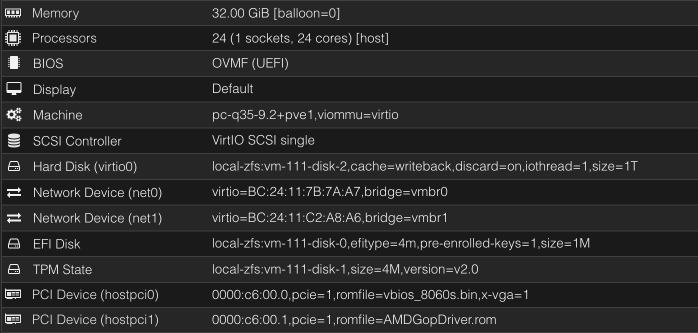
Proxmox VM:
### Windows VMs
- hardware IDs are `1002:1586` (iGPU) and `1002:1640` (audio)
- the 'reset bug' is here, I found no way to avoid it, so **you can passthrough the iGPU to a Windows guest only once per boot of the host**
- don't bother with `vendor-reset` module and/or `RadeonResetBugFix` service, they are severely outdated and don't do anything in our case
- if your VM crashes during GPU driver install, switch the CPU type to something generic (`x86-64-v4` for example seems to work fine), install the driver, then return it back to `host`
- if you see unknown PCI device (`1af4:1057`) in your Device Manager, install `viomem` driver manually from virtio drivers ISO
- set the fixed VRAM amount in the BIOS and never change it on the OS level, otherwise expect major slowdowns and crashes
- [this issue](https://github.com/isc30/ryzen-gpu-passthrough-proxmox/issues/112) might be worth looking into
### Linux VMs
- the guide and configuration are valid for Linux too
- Proxmox 9 seems to be a must to avoid the reset bug
- use recent kernels (6.15+), if you see amdgpu driver errors during boot most likely your kernel is too old
- just like with Windows, dynamic VRAM allocation seems to be very unstable, set the fixed amount in the BIOS
### Additional Info (Discord)
- [my personal experience and why I gave up on the idea of the iGPU passthrough](https://discord.com/channels/1384139280020148365/1384139280632250492/1430532693208334368)
- [a discussion thread with additional links for LXC passthrough](https://discord.com/channels/1384139280020148365/1425880739638939770)
### Forums
The following forums can help with Proxmox and passthrough issues in general:
- Reddit
- https://www.reddit.com/r/Proxmox/
- https://www.reddit.com/r/VFIO/ ("VFIO" stands for "Virtual Function I/O", and is the tech behind hardware pasthrough)
- Proxmox https://forum.proxmox.com
### Other guides
This guide seems to work for Strix Halo:
https://github.com/isc30/ryzen-gpu-passthrough-proxmox
There's also a guide from a Framework Desktop owner available here:
https://community.frame.work/t/anyone-using-proxmox-ve/74863/6?u=beralt
### Files
(taken from [EVO-X2](../Hardware/PCs/GMKtec_EVO-X2.md), BIOS version 1.04)
- [vbios_8060s.bin](./VM_iGPU_Passthrough/vbios_8060s.bin)
- [AMDGopDriver.rom](./VM_iGPU_Passthrough/AMDGopDriver.rom)