EasyPostman Logo # EasyPostman **An open-source Postman-style API client + JMeter-style load testing desktop app**
*Postman-like debugging · JMeter-style performance testing · Java desktop · Local-first* [![GitHub license](https://img.shields.io/github/license/lakernote/easy-postman?style=flat-square)](https://github.com/lakernote/easy-postman/blob/main/LICENSE) [![GitHub release](https://img.shields.io/github/v/release/lakernote/easy-postman?style=flat-square&color=brightgreen)](https://github.com/lakernote/easy-postman/releases) [![GitHub downloads](https://img.shields.io/github/downloads/lakernote/easy-postman/total?style=flat-square&color=blue)](https://github.com/lakernote/easy-postman/releases) [![GitHub stars](https://img.shields.io/github/stars/lakernote/easy-postman?style=flat-square&color=yellow)](https://github.com/lakernote/easy-postman/stargazers) [![Java](https://img.shields.io/badge/Java-17+-ED8B00?style=flat-square&logo=openjdk&logoColor=white)](https://openjdk.org/) [![Platform](https://img.shields.io/badge/Platform-Windows%20%7C%20macOS%20%7C%20Linux-0078D4?style=flat-square&logo=windows&logoColor=white)](https://github.com/lakernote/easy-postman/releases) [![GitHub](https://img.shields.io/badge/GitHub-lakernote-0969DA?style=flat-square&logo=github&logoColor=white)](https://github.com/lakernote) [![Gitee](https://img.shields.io/badge/Gitee-lakernote-C71D23?style=flat-square&logo=gitee)](https://gitee.com/lakernote) [简体中文](README_zh.md) · [English](README.md) · [📦 Download](https://github.com/lakernote/easy-postman/releases) · [📖 Docs](docs/FEATURES.md) · [💬 Discuss](https://github.com/lakernote/easy-postman/discussions) · WeChat: `lakernote`




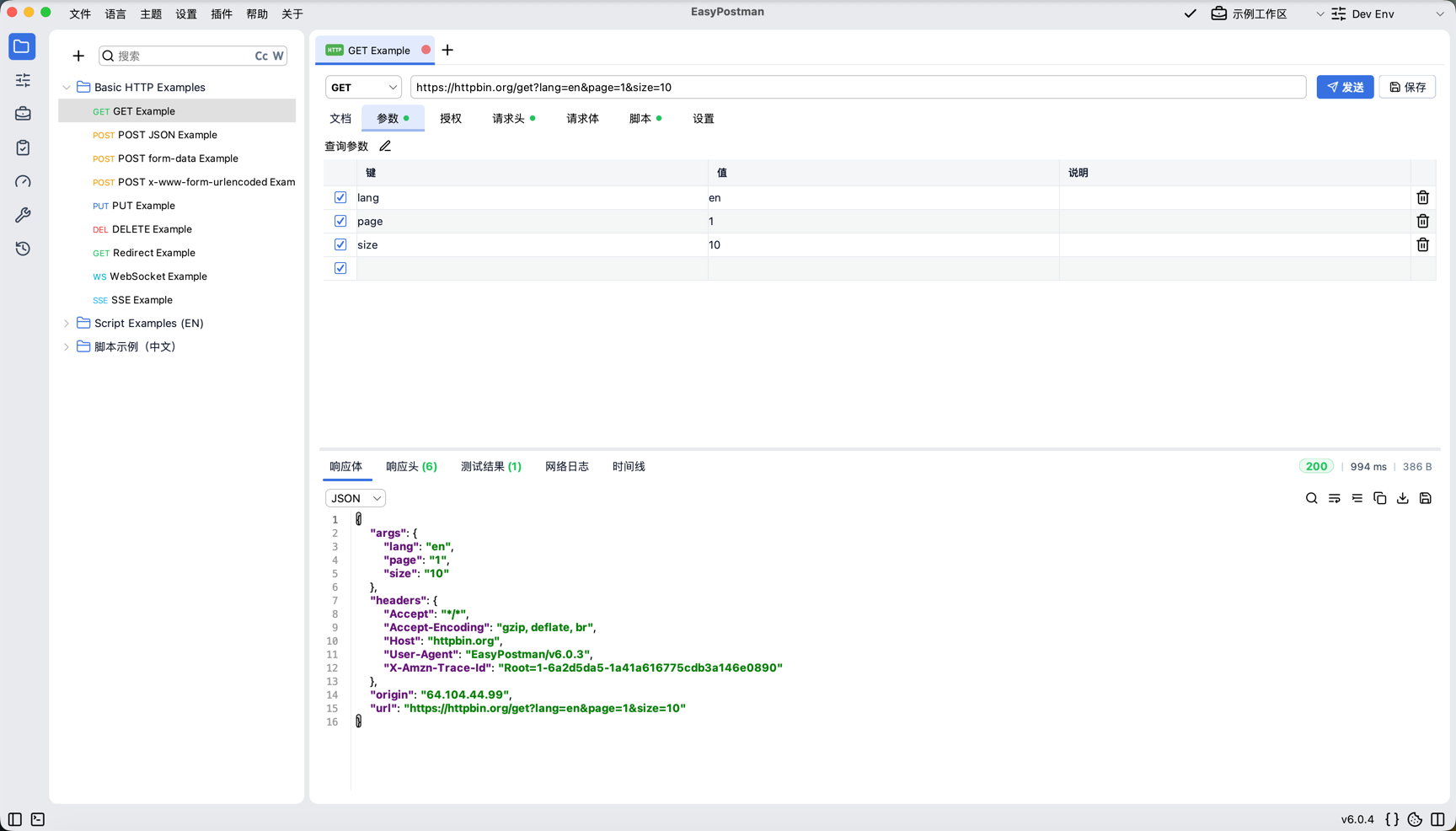
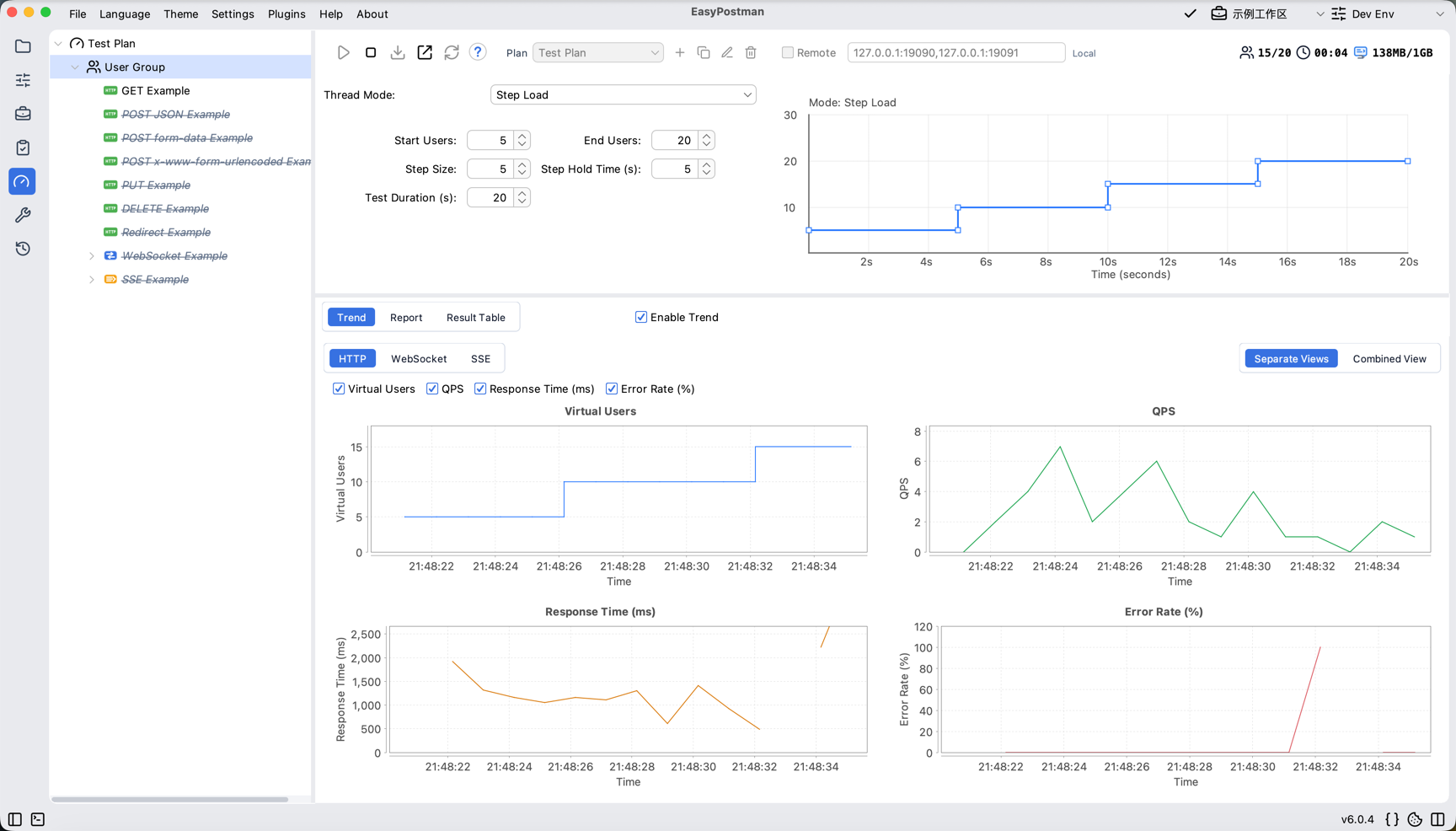
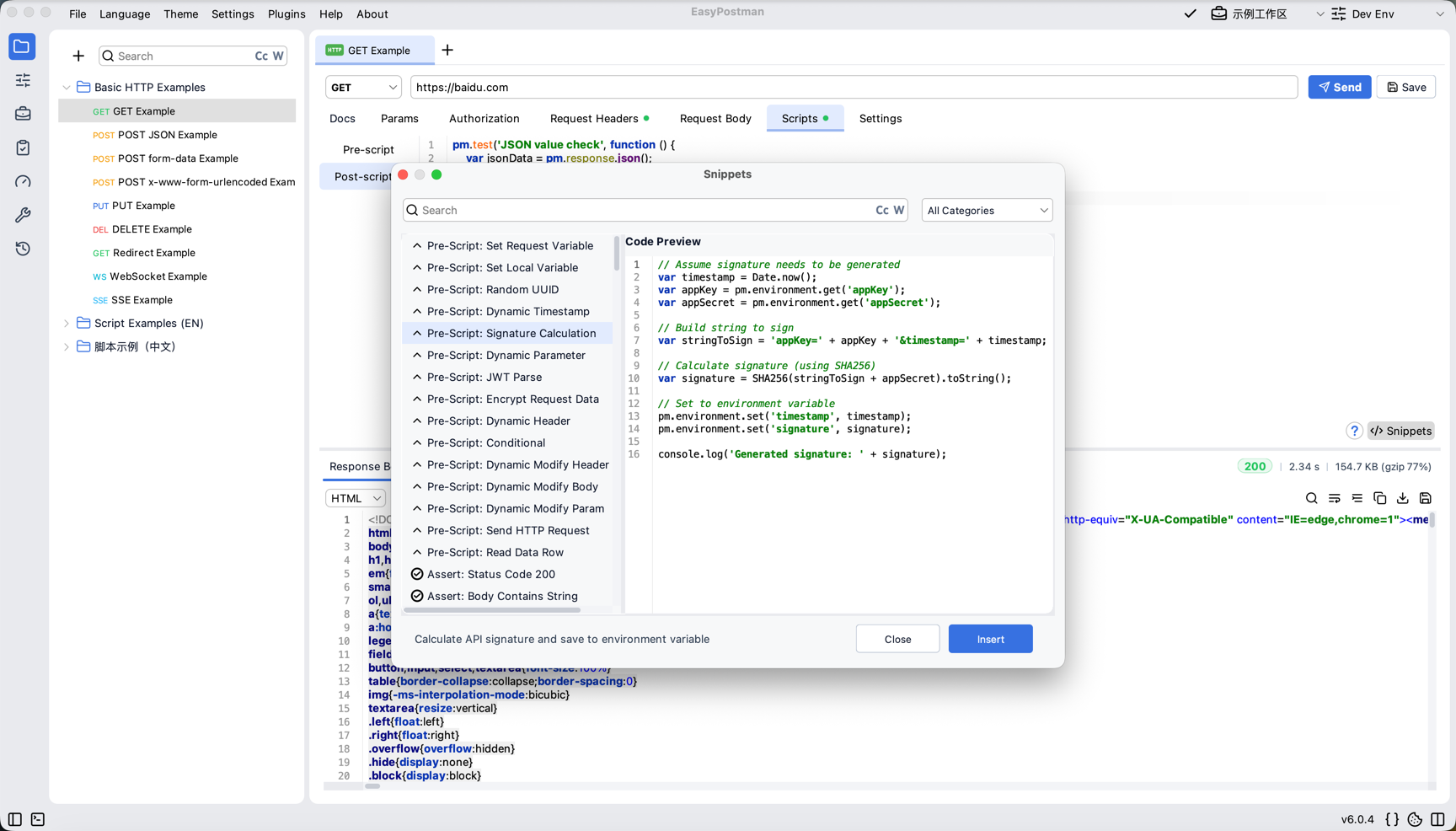
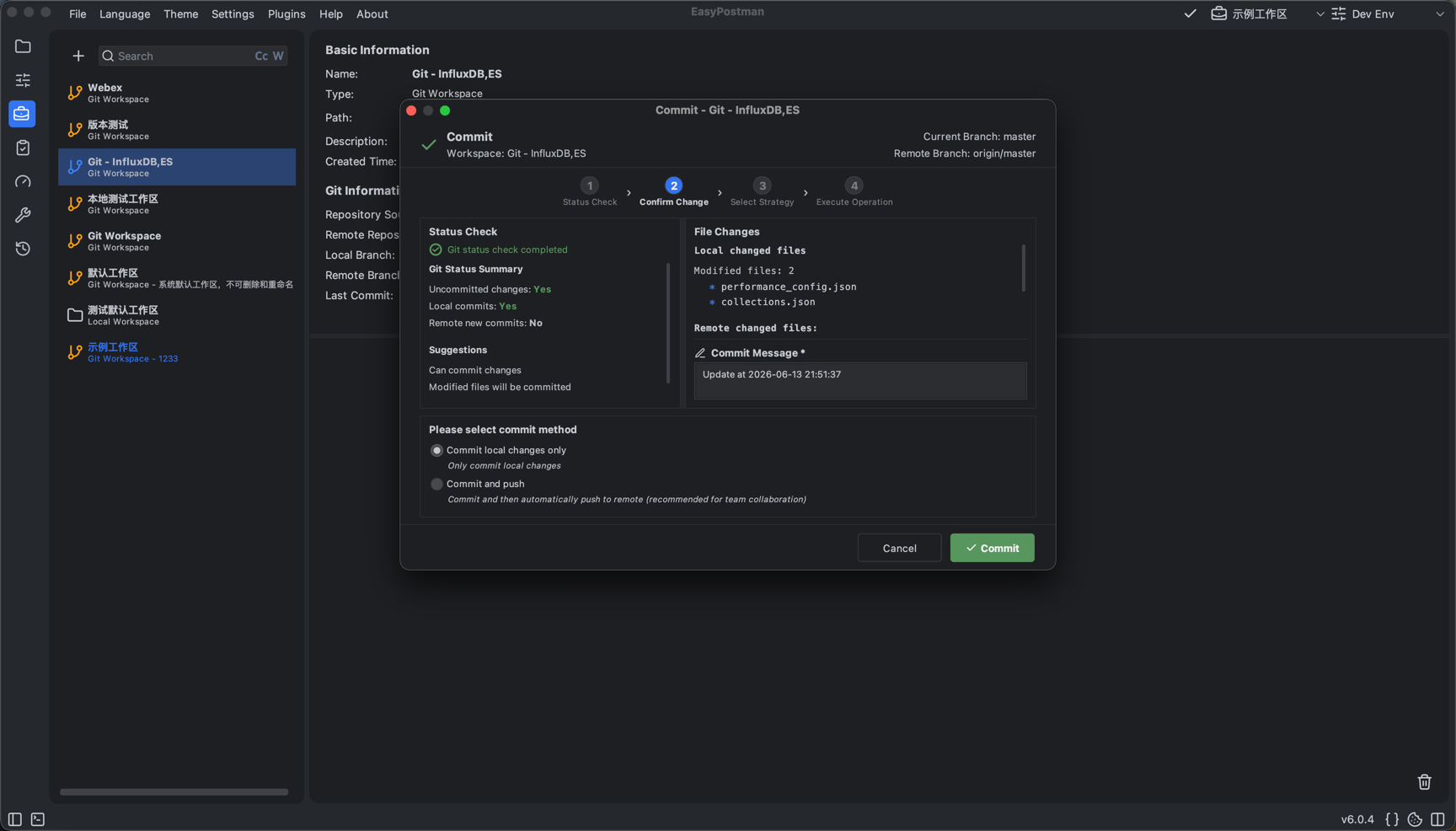
--- ## 📖 Table of Contents - [💡 About](#-about) - [🖼️ Visual Tour](#️-visual-tour) - [🧭 Example Workflows](#-example-workflows) - [✨ Features](#-features) - [📦 Download](#-download) - [🚀 Quick Start](#-quick-start) - [🧪 Collection / Functional CLI](#-collection--functional-cli) - [🛠️ Development](#️-development) - [🤝 Contributing](#-contributing) - [📚 Documentation](#-documentation) - [❓ FAQ](#-faq) - [💖 Support](#-support) --- ## 💡 About EasyPostman combines a **Postman-style API debugging workspace** with **JMeter-style performance testing** in one local-first desktop app. It is built with Java 17, Swing, and FlatLaf, stores data locally by default, and uses Git workspaces when teams need sync, review, and version control without a hosted cloud service. | 🎯 Postman-style Debugging | ⚡ JMeter-style Load Testing | 🔒 Local-first Desktop | |:---:|:---:|:---:| | Collections, environments, auth, scripts, imports, history, and response inspection | Thread groups, timers, extractors, assertions, realtime metrics, reports, and distributed runs | Your API and test data stay on disk unless you choose a Git workspace | --- ## 🖼️ Visual Tour EasyPostman is a GUI-first tool, and the project value is easier to judge when both halves are visible: Postman-style API work and JMeter-style load testing. These screenshots are from the current desktop app.
Postman-style API Debugging JMeter-style Load Testing
API workspace with collections and response viewer Performance trend dashboard
Scripts & Assertions Git Workspace Collaboration
Script snippets and editor support Git workspace management
📸 **[View the full screenshot gallery →](docs/SCREENSHOTS.md)** --- ## 🧭 Example Workflows | Workflow | What it looks like in practice | |----------|--------------------------------| | **Debug a REST API like Postman** | Create or import a collection, choose an environment, send a request, inspect formatted response bodies, headers, cookies, timing, and the network event log. | | **Chain requests with scripts** | Use pre-request scripts and test scripts to read variables, create signatures, extract response data, assert results, and pass values into the next request. | | **Share API work through Git** | Keep workspace data local, then use Git workspace operations to commit, pull, push, and review collection/environment changes with your team. | | **Run EasyPostman workspaces in CI** | Download the cross-platform JAR or build it from source, then run native workspaces with their collections, environments, scripts, assertions, and uploads. | | **Run load tests like JMeter** | Build a performance plan visually, export `plan.json`, run it headlessly, or distribute it with master/worker mode while preserving global user and CSV sharding. | --- ## ✨ Features ### 🏢 Workspace & Collaboration - **Local workspaces** - Keep personal API projects fully on disk - **Git workspaces** - Commit, pull, push, and share collections or environments through your own Git repository - **Workspace isolation** - Each workspace keeps its own collections, environments, settings, and history - **Portable mode** - Run with data beside the app when the portable marker or system property is enabled ### 🔌 Postman-style API Testing - **HTTP/HTTPS** - REST requests with headers, params, cookies, auth, redirects, and body editors - **SSE & WebSocket** - Stream and realtime protocol workflows - **Multiple body types** - Form Data, x-www-form-urlencoded, JSON, XML, text, and binary payloads - **Variables** - Environment, global, request, and iteration data support for repeatable runs - **Import/Export** - Postman v2.1 and cURL support, with HAR and OpenAPI/Swagger paths under active development - **Headless workspace runs** - Use separate collection and functional commands to run native EasyPostman workspaces from the cross-platform JAR with CI exit codes ### ⚡ JMeter-style Performance Testing - **Scenario design in the GUI** - Thread groups, timers, extractors, assertions, and result views - **Thread group modes** - Fixed, ramp-up, stair-step, and spike load profiles - **Realtime monitoring** - TPS/QPS, response time, error rate, trend charts, and result trees - **Headless & distributed runs** - Export `plan.json` from the GUI, then run it with CLI or master/worker mode - **Global user sharding** - GUI virtual users represent total concurrency; workers split continuous ranges and CSV rows follow the same ranges to avoid duplicates ### 🧩 Scripts, Assertions & Plugins - **Pre-request and test scripts** - Postman-style `pm` APIs, assertions, variables, and request chaining - **Bundled JS helpers** - `crypto-js`, `lodash`, and `moment` - **Script extension points** - Plugins can register script APIs, completions, snippets, toolbox panels, and services - **Official plugins** - Plugin manager, client certificates, capture proxy, Redis, Kafka, and Java decompiler - **Network event log** - Detailed request/response and stream diagnostics ### 🎨 User Experience - **Light & Dark Mode** - Comfortable viewing in any lighting - **Multi-language** - English, 简体中文 - **Syntax Highlighting** - JSON, XML, JavaScript - **Cross-platform** - Windows, macOS, Linux 📖 **[View All Features →](docs/FEATURES.md)** --- ## 📦 Download ### Latest Release 🔗 **[GitHub Releases](https://github.com/lakernote/easy-postman/releases)** | **[Gitee Mirror (China)](https://gitee.com/lakernote/easy-postman/releases)** ### Install with WinGet (Windows) Package ID: [`Laker.EasyPostman`](https://github.com/microsoft/winget-pkgs/tree/master/manifests/l/Laker/EasyPostman) ```powershell winget install --id Laker.EasyPostman --exact ``` Upgrade to the latest version: ```powershell winget upgrade --id Laker.EasyPostman --exact ``` > WinGet Community Repository updates may become available shortly after the corresponding GitHub Release. ### Platform Downloads | Platform | Package | Notes | |----------|---------|-------| | 🍎 **macOS (Apple Silicon)** | `EasyPostman-{version}-macos-arm64.dmg` | M1/M2/M3/M4 | | 🍏 **macOS (Intel)** | `EasyPostman-{version}-macos-x86_64.dmg` | Intel-based Mac | | 🪟 **Windows (WinGet)** | `Laker.EasyPostman` | Install and upgrade from the WinGet Community Repository | | 🪟 **Windows (Installer)** | `EasyPostman-{version}-windows-x64.exe` | Auto-update support | | 🪟 **Windows (Portable)** | `EasyPostman-{version}-windows-x64-portable.zip` | No install needed | | 🐧 **Linux AMD64 (Generic)** | `EasyPostman-{version}-linux-amd64.deb` | For common `x86_64` / `amd64` Linux systems | | 🐧 **Linux ARM64 (Generic)** | `EasyPostman-{version}-linux-arm64.deb` | For common `aarch64` / `arm64` Linux systems | | 🐧 **Linux ARM64 (Compatibility)** | `EasyPostman-{version}-linux-arm64-compat.deb` | Same app as the generic ARM64 package, repacked for older Debian / Ubuntu `dpkg` environments | | 🐧 **RHEL / Rocky / CentOS / Fedora (x64)** | `EasyPostman-{version}-1.x86_64.rpm` | Available on GitHub Releases only | | 🐧 **RHEL / Rocky / CentOS / Fedora (ARM64)** | `EasyPostman-{version}-1.aarch64.rpm` | Available on GitHub Releases only | | ☕ **Cross-platform JAR** | `easy-postman-{version}.jar` | Requires Java 17+ | > 🐧 **About the ARM64 Compatibility DEB** > > The compatibility package contains the same EasyPostman application and runtime as `linux-arm64.deb`. It only changes the DEB archive format to use xz-compressed members, which helps older `dpkg` versions that cannot install packages containing newer compression formats such as `control.tar.zst` or `data.tar.zst`. Prefer `linux-arm64.deb` first; use `linux-arm64-compat.deb` only when the generic package fails during installation because of DEB archive compression compatibility. > ⚠️ **First Run Notice** > > - **Windows**: SmartScreen warning → "More info" → "Run anyway" > - **macOS**: "Cannot be opened" → Right-click → "Open" → "Open" > > The app is 100% open-source. Warnings appear because we don't purchase code signing certificates. > 🌏 **Gitee Mirror** only provides macOS (ARM) DMG and Windows packages. Linux DEB/RPM packages are published on GitHub Releases only. --- ## 🚀 Quick Start ### Option 1: Download Pre-built Release 1. Grab the package for your platform from [Releases](https://github.com/lakernote/easy-postman/releases) 2. Install and run: | Platform | Command / Action | |----------|-----------------| | macOS | Open DMG → drag to Applications | | Windows (WinGet) | `winget install --id Laker.EasyPostman --exact` | | Windows Installer | Run `.exe`, follow wizard | | Windows Portable | Extract ZIP → run `EasyPostman.exe` | | Linux DEB (AMD64, Generic) | `sudo dpkg -i EasyPostman-{version}-linux-amd64.deb` | | Linux DEB (ARM64, Generic) | `sudo dpkg -i EasyPostman-{version}-linux-arm64.deb` | | Linux DEB (ARM64, Compatibility) | `sudo dpkg -i EasyPostman-{version}-linux-arm64-compat.deb` | | Linux RPM (x64) | `sudo rpm -ivh EasyPostman-{version}-1.x86_64.rpm` | | Linux RPM (ARM64) | `sudo rpm -ivh EasyPostman-{version}-1.aarch64.rpm` | | JAR | `java -jar easy-postman-{version}.jar` | If you're not sure which Linux package to use, run `uname -m` first: - `x86_64` -> use `EasyPostman-{version}-linux-amd64.deb` or `x86_64.rpm` - `aarch64` -> use `EasyPostman-{version}-linux-arm64.deb` - if `dpkg` reports an unsupported archive compression format while installing the generic ARM64 DEB -> use `EasyPostman-{version}-linux-arm64-compat.deb` ### Option 2: Build from Source ```bash git clone https://github.com/lakernote/easy-postman.git cd easy-postman mvn -pl easy-postman-app -am -DskipTests clean package java -jar easy-postman-app/target/easy-postman-*.jar ``` 📖 **[Build Guide →](docs/BUILD.md)**
🔌 **[Plugin Architecture & Installation (Chinese) →](docs/PLUGINS_zh.md)** ### First Steps 1. **Create a Workspace** — Local (personal) or Git (team) 2. **Create a Collection** — Organize your API requests 3. **Send Your First Request** — Enter URL, configure params, click Send 4. **Set Up Environments** — Switch between dev / test / prod easily --- ## 🧪 Collection / Functional CLI Run EasyPostman's native desktop workspaces headlessly without exporting collections or environments. ### Step 1: Get the JAR Choose either option: **A. Download the latest JAR:** Open either release page and download `easy-postman-{version}.jar` from the latest `v*` release assets: - [Latest GitHub Release](https://github.com/lakernote/easy-postman/releases/latest) - [Gitee Releases (China mirror)](https://gitee.com/lakernote/easy-postman/releases) Gitee assets may appear later than GitHub assets. If the latest Gitee release does not yet contain the standalone JAR, use GitHub. Then verify the commands: ```bash java -version # Java 17+ is required java -jar easy-postman-6.x.x.jar collection run --help java -jar easy-postman-6.x.x.jar functional run --help ``` If either command isn't shown, download a newer release or build the current source. **B. Build from source:** ```bash git clone https://github.com/lakernote/easy-postman.git cd easy-postman mvn -pl easy-postman-app -am -DskipTests clean package java -jar easy-postman-app/target/easy-postman-*.jar \ collection run --help java -jar easy-postman-app/target/easy-postman-*.jar \ functional run --help ``` ### Step 2: Run a workspace `collection run` selects requests by collection/folder. `functional run` selects requests from `functional_config.json`. Both accept a workspace directory directly, so CI does not need desktop registration or GUI state. From a checked-out Git workspace root: ```bash java -jar easy-postman.jar collection run . java -jar easy-postman.jar functional run . ``` You can also pass an absolute workspace path and select a collection and environment: ```bash java -jar easy-postman.jar collection run /srv/api-workspace \ -c "Basic HTTP Examples" \ -e "Dev Env" ``` The repository example directory is itself a native EasyPostman workspace: ```bash java -DCONSOLE_LOG_LEVEL=ERROR \ -jar easy-postman-app/target/easy-postman-*.jar \ collection run docs/examples/collection-cli \ --folder "Smoke" \ --bail \ --out target/collection-cli-result.json ``` The functional example is a separate workspace with its own `functional_config.json`: ```bash java -DCONSOLE_LOG_LEVEL=ERROR \ -jar easy-postman-app/target/easy-postman-*.jar \ functional run docs/examples/functional-cli \ --bail \ --out target/functional-run-result.json ``` The CLI automatically reads `collections.json` and `environments.json` from the workspace and the app-level `global_variables.json`. Use `-c` and `-e` to select collection and environment names, and `-d` for CSV/JSON iteration data. Relative iteration-data and upload paths resolve from the workspace directory unless `--working-dir` is supplied. Use `functional run` to reproduce the desktop Functional panel's selected requests and embedded CSV iterations; add `-d` to override those rows with CI-specific CSV/JSON data. A normal workspace can be copied to the runner as an artifact, while a Git workspace can run directly from its checked-out repository directory. Exit code `0` means success, `1` means a request, script, or assertion failed, and `2` means invalid arguments or workspace data. `--out` writes a JSON report containing the resolved workspace, collections, environment, and request details. 📖 **[Collection CLI guide →](docs/COLLECTION_CLI_zh.md)** 📖 **[Functional CLI guide →](docs/FUNCTIONAL_CLI_zh.md)** --- ## 🛠️ Development ### Common Commands | Task | Command | |------|---------| | Full package, skip tests | `mvn clean package -DskipTests` | | Fast host app package | `mvn -pl easy-postman-app -am -DskipTests clean package` | | Quick compile check | `mvn -q -pl easy-postman-app -am -DskipTests compile` | | Build app plus one plugin | `mvn -pl easy-postman-app,easy-postman-plugins/plugin-redis -am clean package -DskipTests` | | Run one test class headlessly | `mvn -q -pl easy-postman-app -am -Dtest= -Dsurefire.failIfNoSpecifiedTests=false -Djava.awt.headless=true test` | The host JAR is written to `easy-postman-app/target/easy-postman-{version}.jar`. Native packaging scripts live under `build/` and produce platform installers with `jpackage`. --- ## 🤝 Contributing We welcome all forms of contribution — bug reports, feature requests, code, or docs! | Type | How | |------|-----| | 🐛 Bug Report | [Open an issue](https://github.com/lakernote/easy-postman/issues/new/choose) | | ✨ Feature Request | [Share your idea](https://github.com/lakernote/easy-postman/issues/new/choose) | | 💻 Code | Fork → branch → PR | | 📝 Docs | Fix typos, add examples, translate | Every PR triggers automated checks: build, tests, code quality, and format validation. 📖 **[Contributing Guide →](.github/CONTRIBUTING.md)** --- ## 📚 Documentation | Doc | Description | |-----|-------------| | 📖 [Features](docs/FEATURES.md) | Comprehensive feature documentation | | 🚀 [Build Guide](docs/BUILD.md) | Build from source & generate installers | | 🧪 [Headless Collection CLI](docs/COLLECTION_CLI_zh.md) | Native EasyPostman workspace runs with variables, scripts, data files, uploads, and CI exit codes (Chinese) | | 🧪 [Headless Functional CLI](docs/FUNCTIONAL_CLI_zh.md) | Run selected requests and embedded CSV iterations from `functional_config.json` in CI (Chinese) | | ⚡ [Distributed Performance Testing](docs/PERFORMANCE_CLUSTER_LOAD_TEST_zh.md) | GUI remote mode, CLI master/worker, CSV sharding, realtime refresh, and result details | | 🔌 [Plugin Architecture](docs/PLUGINS_zh.md) | Plugin modules, development flow, and installation (Chinese) | | 🖼️ [Screenshots](docs/SCREENSHOTS.md) | All application screenshots | | 📝 [Script API Reference](docs/SCRIPT_API_REFERENCE_zh.md) | Pre-request & test script API | | ❓ [FAQ](docs/FQA.MD) | Frequently asked questions | --- ## ❓ FAQ
Q: Why local storage instead of cloud sync? We value developer privacy. Local storage ensures your API data is never leaked to third parties. Use Git workspace for team collaboration while maintaining full control over your data.
Q: How to import Postman data? In the Collections view, click **Import** and select a Postman v2.1 JSON file. Collections, requests, and environments are converted automatically.
Q: Why does Windows/macOS show security warnings? - **Windows SmartScreen**: No code signing cert (~$100–400/year). → Click "More info" → "Run anyway". Warnings decrease as download count grows. - **macOS Gatekeeper**: No Apple Developer cert ($99/year). → Right-click → "Open", or run: `sudo xattr -rd com.apple.quarantine /Applications/EasyPostman.app` This project is **fully open-source** and auditable on GitHub.
--- ## 💖 Support the Project If EasyPostman helps you, consider: - ⭐ **Star this repo** — it means a lot! - 🍴 **Fork & contribute** — help make it better - 📢 **Share with friends** — spread the word - 💬 **WeChat group** — add **lakernote** for direct communication - 💬 **GitHub Discussions** — [ask questions & share ideas](https://github.com/lakernote/easy-postman/discussions) - 📮 **Contact** — WeChat: `lakernote` --- ## 🙏 Acknowledgements Thanks to these awesome open-source projects: | Project | Role | |---------|------| | [FlatLaf](https://github.com/JFormDesigner/FlatLaf) | Modern Swing theme | | [RSyntaxTextArea](https://github.com/bobbylight/RSyntaxTextArea) | Syntax highlighting editor | | [OkHttp](https://github.com/square/okhttp) | HTTP client | | [Termora](https://github.com/TermoraDev/termora) | Terminal emulator inspiration | ---
**Postman-style API debugging. JMeter-style load testing. Local-first desktop workflow.** [![GitHub](https://img.shields.io/badge/GitHub-lakernote-0969DA?style=flat-square&logo=github&logoColor=white)](https://github.com/lakernote) [![Gitee](https://img.shields.io/badge/Gitee-lakernote-C71D23?style=flat-square&logo=gitee)](https://gitee.com/lakernote) Made with ❤️ by [laker](https://github.com/lakernote)