---
sidebar_label: Quick Start
sidebar_position: 0
table_of_contents: true
---
import {
CodeTabs,
python,
typescript,
ShellBlock,
} from "@site/src/components/InstructionsWithCode";
import { RegionalUrl } from "@site/src/components/RegionalUrls";
# Observability Quick Start
This tutorial will get you up and running with our observability SDK by showing you how to
trace your application to LangSmith.
If you're already familiar with the observability SDK, or are interested in tracing more than just
LLM calls you can skip to the [next steps section](#next-steps),
or check out the [how-to guides](../observability/how_to_guides).
:::tip Trace LangChain or LangGraph Applications
If you are using [LangChain](https://python.langchain.com/docs/introduction/) or [LangGraph](https://langchain-ai.github.io/langgraph/), which both integrate seamlessly with LangSmith,
you can get started by reading the guides for tracing with [LangChain](./observability/how_to_guides/trace_with_langchain) or tracing with [LangGraph](./observability/how_to_guides/trace_with_langgraph).
:::
## 1. Install Dependencies
## 2. Create an API key
To create an API key head to the . Then click **Create API Key.**
## 3. Set up your environment
## 4. Define your application
We will instrument a simple [RAG](https://www.mckinsey.com/featured-insights/mckinsey-explainers/what-is-retrieval-augmented-generation-rag)
application for this tutorial, but feel free to use your own code if you'd like - just make sure
it has an LLM call!
Application Code
## 5. Trace OpenAI calls
The first thing you might want to trace is all your OpenAI calls. LangSmith makes this easy with the [`wrap_openai`](https://docs.smith.langchain.com/reference/python/wrappers/langsmith.wrappers._openai.wrap_openai) (Python) or [`wrapOpenAI`](https://docs.smith.langchain.com/reference/js/functions/wrappers_openai.wrapOpenAI) (TypeScript) wrappers.
All you have to do is modify your code to use the wrapped client instead of using the `OpenAI` client directly.
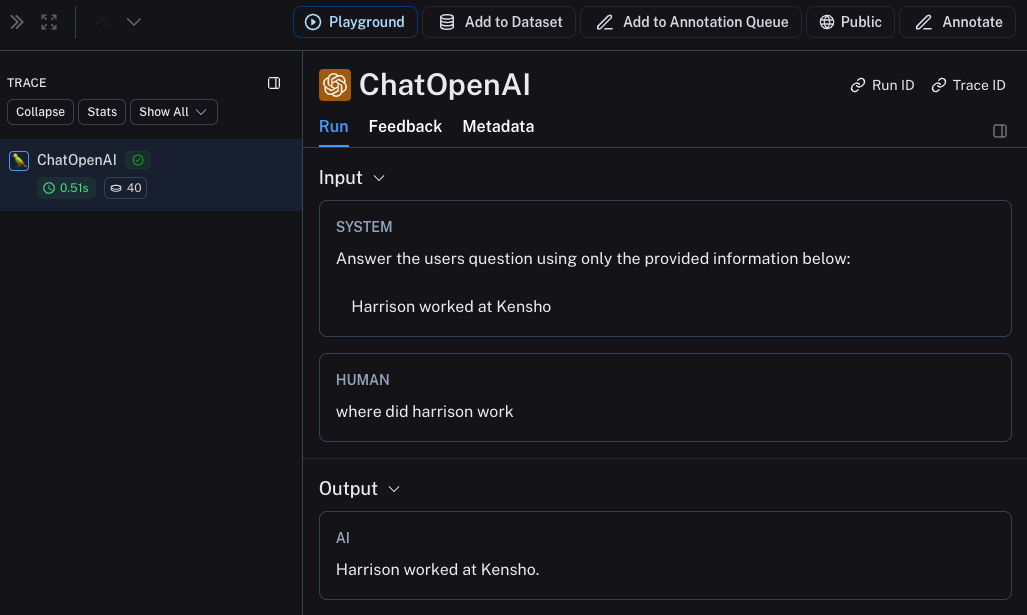
Now when you call your application as follows:
```python
rag("where did harrison work")
```
This will produce a trace of just the OpenAI call in LangSmith's default tracing project. It should look something like [this](https://smith.langchain.com/public/e7b7d256-10fe-4d49-a8d5-36ca8e5af0d2/r).
## 6. Trace entire application
You can also use the `traceable` decorator ([Python](https://docs.smith.langchain.com/reference/python/run_helpers/langsmith.run_helpers.traceable) or [TypeScript](https://langsmith-docs-bdk0fivr6-langchain.vercel.app/reference/js/functions/traceable.traceable)) to trace your entire application instead of just the LLM calls.
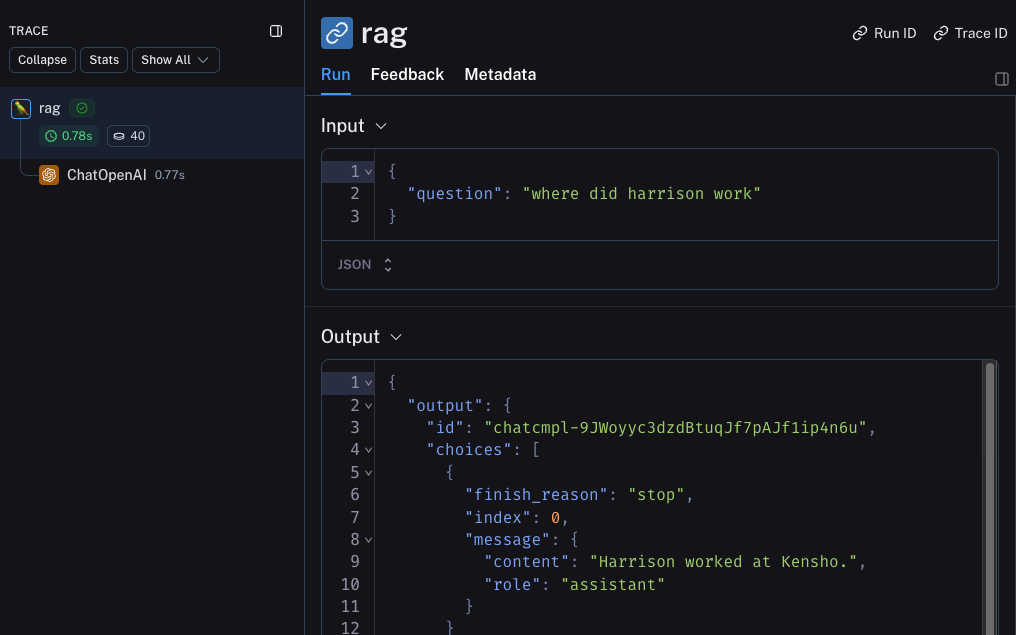
Now if you call your application as follows:
```python
rag("where did harrison work")
```
This will produce a trace of just the entire pipeline (with the OpenAI call as a child run) - it should look something like [this](https://smith.langchain.com/public/2174f4e9-48ab-4f9e-a8c4-470372d976f1/r)
## Next steps
Congratulations! If you've made it this far, you're well on your way to being an expert in observability with LangSmith.
Here are some topics you might want to explore next:
- [Trace multiturn conversations](./observability/how_to_guides/threads)
- [Send traces to a specific project](./observability/how_to_guides/log_traces_to_project)
- [Filter traces in a project](./observability/how_to_guides/filter_traces_in_application)
Or you can visit the [how-to guides page](./observability/how_to_guides) to find out about all the things you can do with LangSmith observability.
If you prefer a video tutorial, check out the [Tracing Basics video](https://academy.langchain.com/pages/intro-to-langsmith-preview) from the Introduction to LangSmith Course.