
Share an encrypted note that opens only once.




Live demo · Quick start · Self-hosting · SDK · CLI · Security
Type a password or a message, or drop a file: it's encrypted in your browser, and you get a link that works once. The server never sees what you send. Secret runs in a single Docker container you host yourself. There are no accounts and no analytics, and the logs hold no content, keys or IP addresses. It's an open-source alternative to PrivateBin, OneTimeSecret and Yopass, built with Svelte 5, Hono and TypeScript.
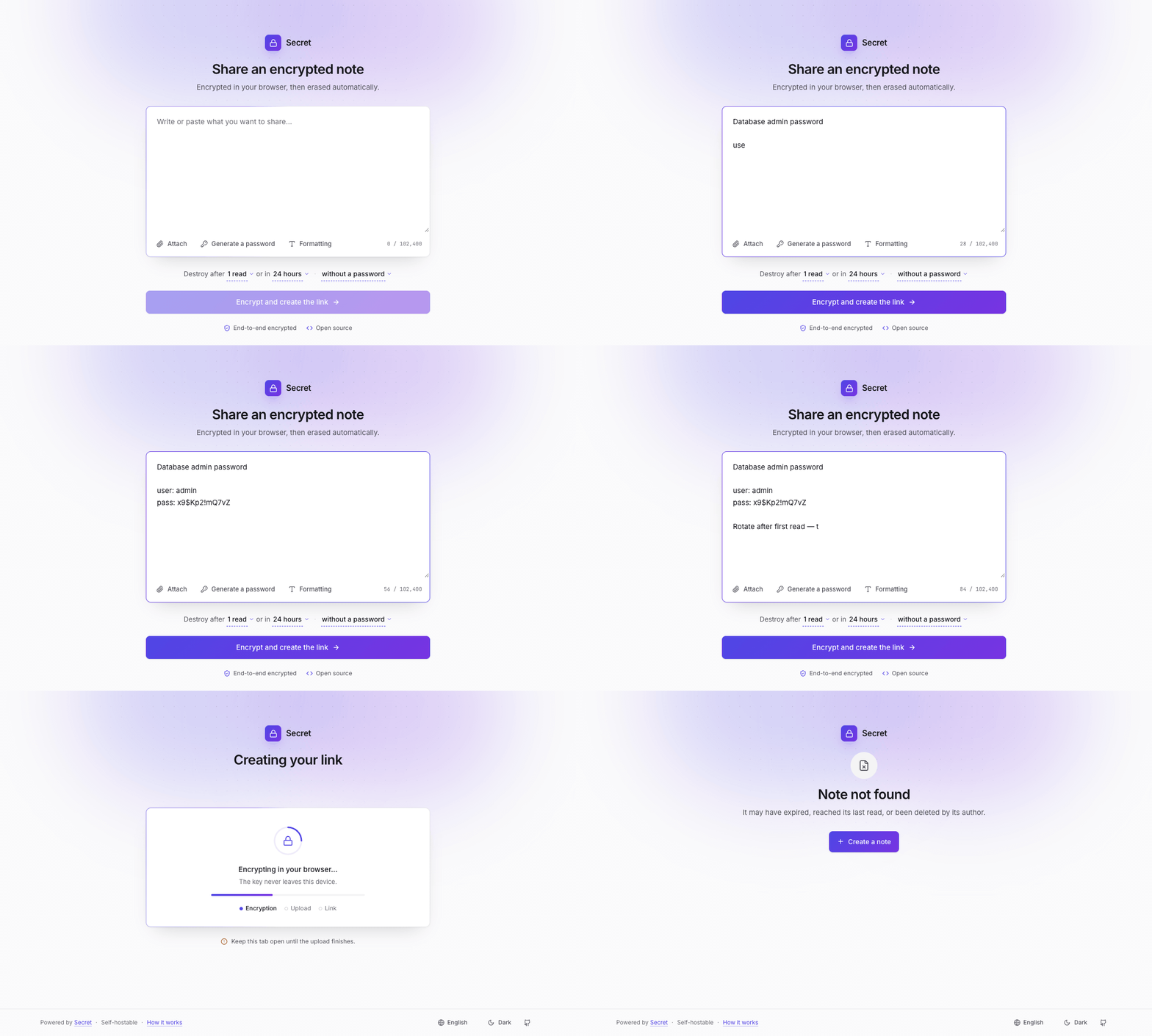


Create: encrypted locally · Share: a one-time link, the key never sent · Read: decrypted in the browser, then gone
## Features - End-to-end encryption with XChaCha20-Poly1305 in the browser, plus an AES-256-GCM layer on the server. - Text and files: up to 10 files and 500 MB per note, with drag and drop. Files are encrypted and uploaded in chunks, and decrypted straight to disk, so a large file never sits in memory. - Burn after reading, or after a set number of reads, and an expiry from 5 minutes to 30 days. - An optional password, stretched with Argon2id. The server checks a proof of the password before serving anything: a wrong one spends no read, and the fifth deletes the note. - Padding to a size class, 4 KiB at least, so the server doesn't learn how long a note is. - A delete link, to remove a note before anyone reads it. - Markdown with a preview (sanitized with DOMPurify), a password generator, and previews of images, video and audio once decrypted. - QR codes, light and dark themes, and 10 languages (en, fr, es, de, pt, it, ja, zh, ru, ko). [Adding one](CONTRIBUTING.md#adding-a-language) takes a JSON file in [`messages/`](messages/) and four registrations. - A [JS/TS SDK](packages/sdk-js/README.md) and a [command line](packages/cli/README.md), `secret send` and `secret read`. - Files on the data volume or in any S3-compatible bucket (AWS S3, Cloudflare R2, RustFS, Garage), and your own name, accent color and footer. ## Comparison | Feature | Secret | PrivateBin | OneTimeSecret | Yopass | |------------------------|---------------------|---------------------|---------------------|---------------------| | Zero-knowledge | Yes | Yes | No (server-side) | Yes | | Client cipher | XChaCha20-Poly1305 | AES-256-GCM | — | OpenPGP | | Encryption at rest | Yes (AES-256-GCM)¹ | No | Yes | No | | File attachments | Up to 10, 500 MB | Single, opt-in | No | Single, streaming | | File previews | Image/AV | Image/PDF/media | No | No | | Burn after read | Yes | Yes | Yes | Yes (toggleable) | | Read limits (N reads) | Yes | No | No | No | | Password protection | Yes (Argon2id) | Yes (PBKDF2) | Yes (passphrase) | Yes | | Official SDK | Yes (JS/TS) + CLI | No | REST API only | CLI only | | Stack | Svelte 5 + Hono | PHP | Ruby | Go + React | | Deploy | Single Docker | PHP server | Ruby + Redis | Single Docker | ¹ A server-held key, on top of the end-to-end layer. On its own it protects a leaked database or S3 bucket, not a stolen data volume when the key is stored on that volume, which is the default. See [what the server can see](SECURITY.md#what-the-server-can-see). The comparison reflects each project's public documentation when it was written. Check their docs for the latest. ## Quick start With Docker, there's nothing to clone or build: ```bash mkdir secret && cd secret curl -O https://raw.githubusercontent.com/largerio/secret/main/docker-compose.yml docker compose up -d ``` Open `http://localhost:3000`. The server's encryption key is generated on the first launch and saved in the data volume, so there's nothing to configure. The API reference is at `/api/v1/docs`. To serve it on your own domain over HTTPS, add `docker-compose.tls.yml`. It runs Caddy, which gets and renews the certificate. Point the domain at the host first: ```bash curl -O https://raw.githubusercontent.com/largerio/secret/main/docker-compose.tls.yml echo "DOMAIN=secret.example.com" > .env docker compose -f docker-compose.yml -f docker-compose.tls.yml up -d ``` The [self-hosting guide](docs/self-hosting.md) covers the rest: settings, a reverse proxy you already run, Synology, Coolify, Portainer and Render, backups, monitoring and updates. If something goes wrong, start with `docker compose logs -f` and [Troubleshooting](docs/self-hosting.md#troubleshooting). [](https://render.com/deploy?repo=https://github.com/largerio/secret) ## SDK Create and read notes from your own code, on any Secret instance: ```bash npm install @largerio/secret-sdk ``` ```typescript import { SecretClient } from "@largerio/secret-sdk"; const client = await SecretClient.create({ baseUrl: "https://secret.example.com", apiKey: "your-api-key", }); // Create a note const { id, keyFragment } = await client.createNote({ text: "Hello, World!" }); const shareUrl = client.buildShareUrl(id, keyFragment); // Read a note from a share URL const parsed = SecretClient.parseShareUrl(shareUrl); const { payload } = await client.readNote(parsed.id, parsed.keyFragment); console.log(payload.text); // "Hello, World!" ``` Reading is open. Writing needs an API key from the instance's operator, or a proof of work: see the [SDK's README](packages/sdk-js/README.md). ## Command line Send and read notes from a terminal or a script, on any instance (Node.js 22 or later): ```bash npm install -g @largerio/secret-cli echo "the launch code is 0000" | secret send --instance https://secret.example.com secret read # asks for the link, without echo ``` To write, it takes an API key in `SECRET_API_KEY`, or solves the instance's proof of work as the browser does. See the [CLI's README](packages/cli/README.md). ## How it works ``` Browser Server ┌──────────────────────┐ ┌──────────────────┐ │ 1. Generate key │ │ │ │ 2. Encrypt (XChaCha) │──ciphertext►│ 3. Encrypt (AES) │ │ │ │ 4. Store │ │ URL: /note/id#key │ │ │ │ └─ never sent │ │ Never sees key │ └──────────────────────┘ └──────────────────┘ ``` The key lives in the URL fragment (`#key`), which browsers never send to the server. Opening a note works the other way round: the browser proves it holds the link, the server sends the ciphertext, and the browser decrypts it. [PROTOCOL.md](PROTOCOL.md) specifies the format and the API, with test vectors, for anyone writing a client in another language. ## Security - The server stores ciphertext it can't read, and only serves it to a reader who proves they hold the link. - The code that encrypts comes from the server, though. The web app is a reproducible build: each release publishes its digest, which every instance reports, so anyone can [check](SECURITY.md#verifying-the-web-app) what an instance serves them. - The images are signed, with a build provenance attestation ([how to verify](docs/self-hosting.md#verifying-the-image)). - A strict Content Security Policy, a non-root container on a read-only filesystem, and per-IP rate limits. [SECURITY.md](SECURITY.md) covers the threat model, what the server can and can't see, the known limitations, and how to report a vulnerability. ## Contributing [CONTRIBUTING.md](CONTRIBUTING.md) explains how to set up the project, run the tests and send a change. ## License [MIT](LICENSE)