Reddit Growth MCP
Find where to post, learn each subreddit's viral recipe, and score your draft before you publish — no Reddit API key required.



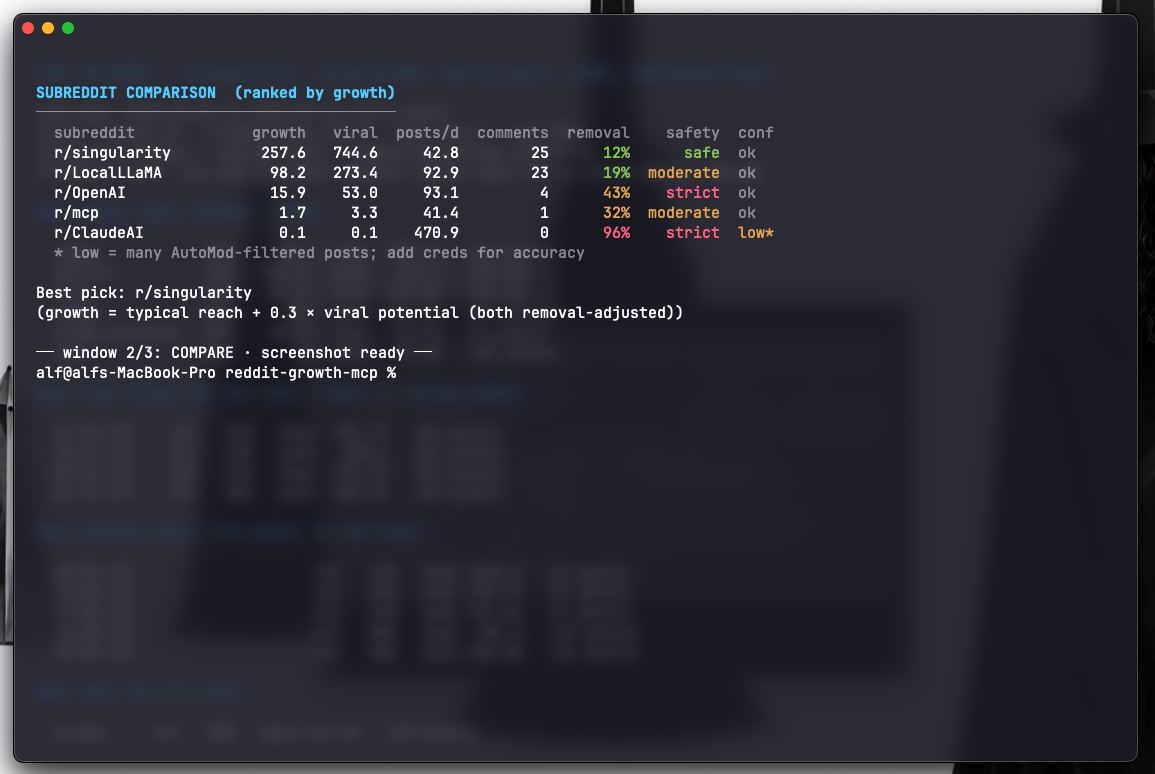
One command each: plan where to post, draft to score a post before you publish, and compare to rank subreddits by removal risk.
▶ Watch the full-quality 30s MP4
Reddit Growth MCP turns a list of subreddits into a plan — **where** to post,
**what** to post, and **when** — by reading each community's format, flair,
timing, and keyword recipe from a public historical archive. The whole core
workflow runs with no account or API key. It works as an MCP server (for Claude,
Cursor, and other MCP clients) and as a standalone command-line tool.
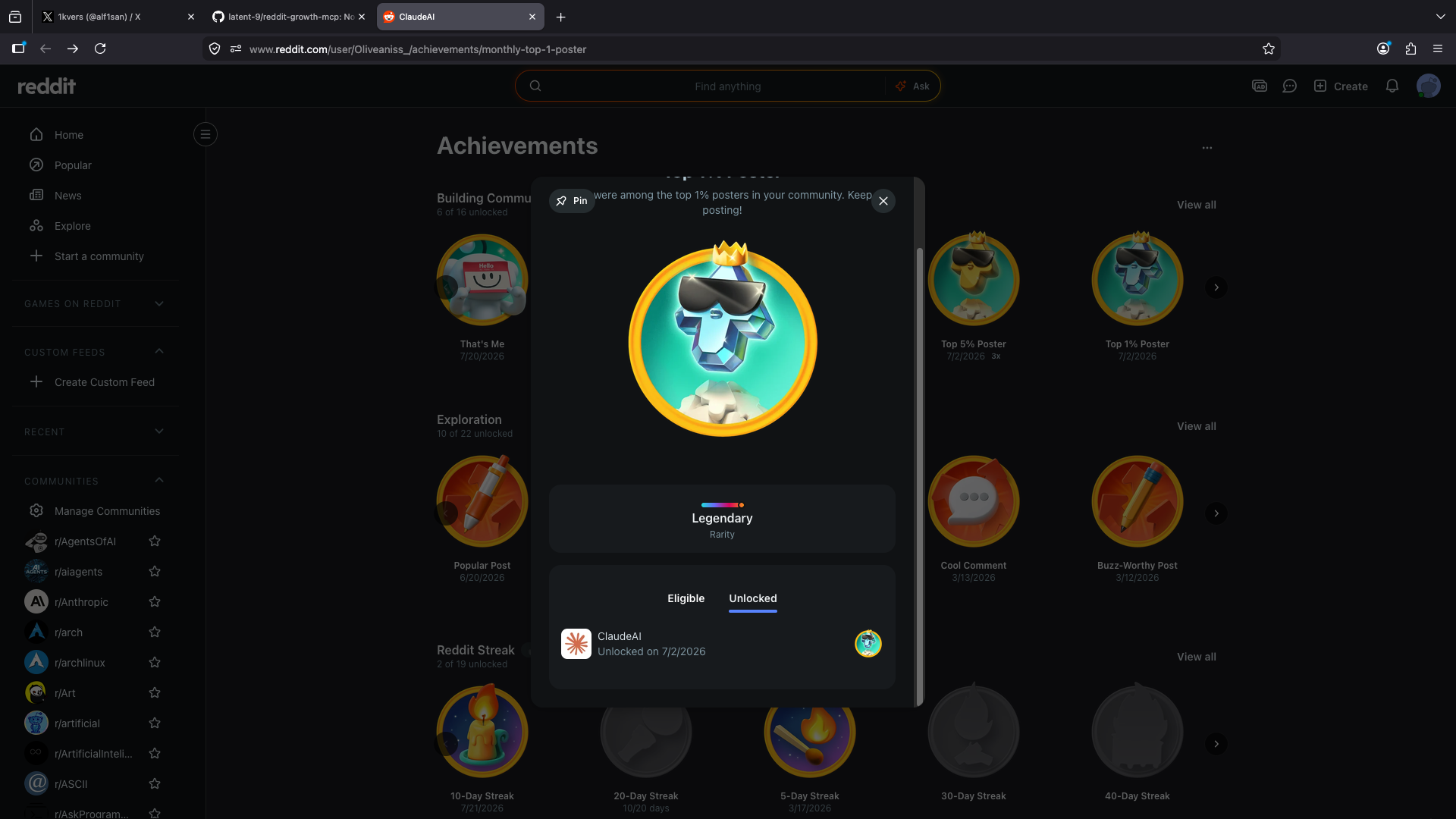
> **Built by a [Top 1% Poster in r/ClaudeAI](https://www.reddit.com/user/Oliveaniss_/)** — the
> heuristics here encode what actually gets upvoted and what gets removed, not guesswork.
## Quick start
Requirements: Python 3.11+ and [uv](https://docs.astral.sh/uv/). No Reddit
account or API keys are needed to get started.
Install from PyPI:
```bash
uvx reddit-growth-mcp # run the MCP server instantly
pipx install reddit-growth-mcp # or install the CLI + server
reddit-growth plan singularity LocalLLaMA mcp # your first growth plan
```
Or from a clone (for development):
```bash
uv sync # install dependencies
uv run python -m src.cli plan singularity LocalLLaMA mcp # your first growth plan
```
That prints where to post, what to post, and when — using only the public
archive. Every command has the form `uv run python -m src.cli [options]`
(shown throughout as `reddit-growth `, which is the installed alias).
Add `-h` to any command for help, e.g. `uv run python -m src.cli plan -h`.
If you activate the virtualenv directly (`source .venv/bin/activate`) and zsh
still reports `command not found: reddit-growth`, run `rehash` — zsh caches
command locations at startup and needs a nudge after the venv is added to PATH.
Opening a new terminal also works, or call the binary by path without activating:
`.venv/bin/reddit-growth plan singularity LocalLLaMA mcp`.
### Interactive launcher
Prefer a menu to flags? Run:
```bash
bash scripts/menu.sh
```
Pick a mode (plan, compare, patterns, draft, …), choose subreddits from a
searchable preset list, and it runs the command for you — all in one window.
With [gum](https://github.com/charmbracelet/gum) installed you get an arrow-key
TUI with fuzzy search; otherwise it falls back to a numbered menu. Type `h` for
a built-in guide.
## What it answers
- Which subreddits fit my topic, and how much reach do they have?
- Will my post survive here, or does this community remove a lot of posts?
- What actually performs here: which format, title style, timing, and flair?
- Given a specific draft, how is it likely to do, and how do I improve it?
## See it work
`compare` ranks candidate subreddits by growth, viral ceiling, discussion, and
removal risk — so you post where you'll be seen and skip communities that remove
most submissions (note r/ClaudeAI below: 96% removed, strict):
`patterns` reads one community's viral recipe — the media types, hours, days,
flairs, and keywords that actually perform, ranked by median so a single lucky
post can't crown a category:
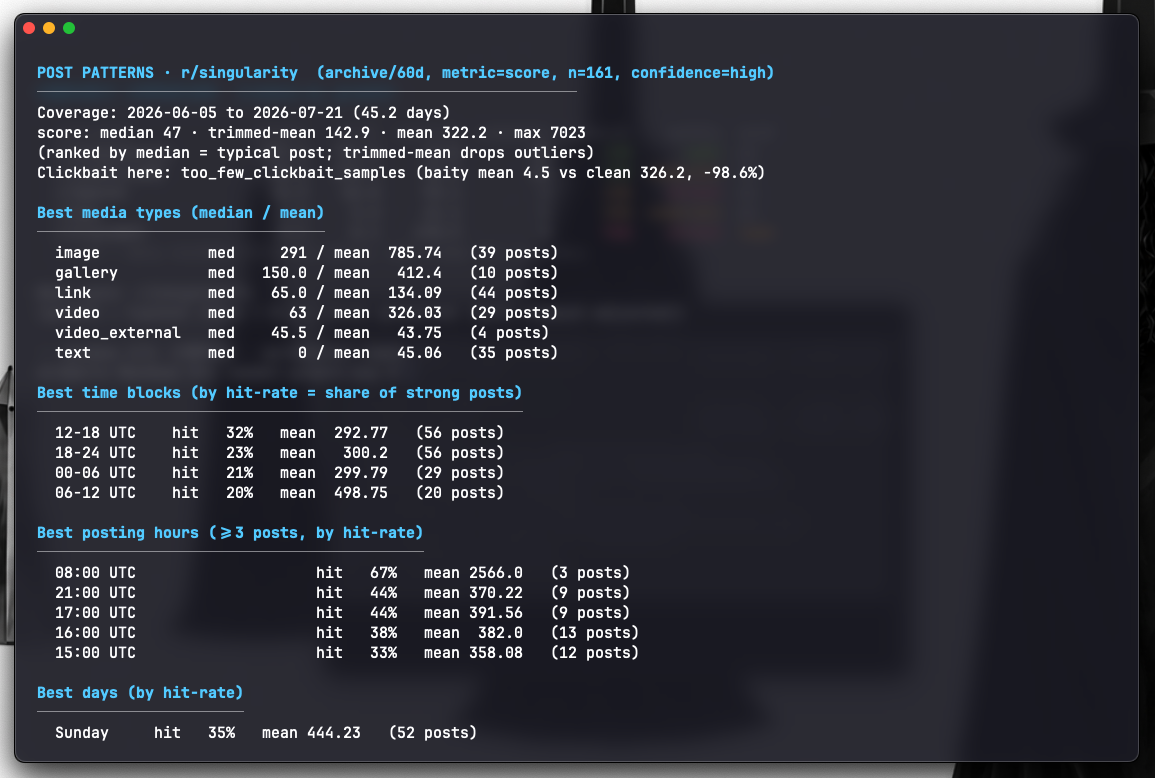
Figures are live estimates from a sample and shift over time — run the commands
yourself for current numbers.
## Tools
| Tool | Purpose | Needs credentials |
| --- | --- | --- |
| `analyze_post_patterns` | What performs in a sub: timing, media, title style, flair, keywords, by a configurable metric | No |
| `analyze_acceptance` | Removal rate and what tends to get removed; official rules when credentials are present | No |
| `compare_subreddits` | Rank subreddits by growth (typical reach + viral upside), with traffic (posts/day), discussion, removal risk, and a safety label; `rank_by` switches to viral/opportunity/insight | No |
| `analyze_insight` | Discussion depth (comment substance) plus a heuristic sentiment read (supportive/mixed/critical) — not just comment count | No |
| `growth_plan` | One call: safest strong target, cross-post options, viral recipe, and best posting times | No |
| `evaluate_draft` | Predict a draft's performance (0-100) and acceptance risk, with drivers and fixes | No |
| `evaluate_draft_across` | Score one draft across subs, ranked by size-fair fit (percentile) vs raw reach | No |
| `analyze_subreddit` | Estimate a subreddit's activity (posts/day); uses the archive without credentials | No |
| `find_target_subreddits_tool` | Discover and rank subreddits for topics by estimated traffic | Yes |
| `fetch_posts`, `fetch_multiple`, `search_subreddit`, `fetch_comments` | Raw data access | Yes |
The analysis tools are subreddit-agnostic — they work on any archived sub. The
launcher ships 40+ presets across AI, dev, and startup communities (`ChatGPT`,
`DeepSeek`, `LocalLLaMA`, `StableDiffusion`, `SaaS`, `indiehackers`, …).
## Data sources
- PRAW for live Reddit access (read-only). Requires API credentials.
- Arctic Shift (https://github.com/ArthurHeitmann/arctic_shift), a public
historical archive and the successor to Pushshift. Requires no credentials.
Removal detection follows the reveddit approach: the archive records what was
posted, and moderator removals are read from that record. When Reddit
credentials are available, `analyze_acceptance` performs an accurate live diff
(archive vs. current Reddit) to resolve ambiguous cases; without credentials it
runs archive-only and flags its confidence.
## Reddit credentials (optional)
Everything above works with no account. Credentials only unlock the
credential-only tools (raw data access, `find_target_subreddits_tool`) and the
accurate live-removal check. Create a "script" app at
https://www.reddit.com/prefs/apps, then:
```bash
cp .env.sample .env
# REDDIT_CLIENT_ID=...
# REDDIT_CLIENT_SECRET=...
# REDDIT_USER_AGENT=reddit-growth-mcp/0.2.1 by u/your_username
```
## Command-line usage
Every command runs credential-free from the archive. The commands are:
`traffic`, `insight`, `patterns`, `acceptance`, `compare`, `plan`, `report`,
`draft`, and `fit` (run `-h` on any of them for options).
```bash
uv run python -m src.cli traffic LocalLLaMA
uv run python -m src.cli insight mcp
uv run python -m src.cli patterns Fedora --time month
uv run python -m src.cli patterns commandline --metric discussion
uv run python -m src.cli acceptance technology
uv run python -m src.cli compare Fedora gnome linux
uv run python -m src.cli plan singularity LocalLLaMA mcp --tz 7
uv run python -m src.cli draft ClaudeAI --title "I built an ASCII art tool" --type image
uv run python -m src.cli fit singularity LocalLLaMA mcp --title "..." --type video
```
`fit` scores one draft across several subreddits and ranks by a size-fair fit
(the draft's percentile within each sub's own score distribution) alongside raw
expected reach, so a small sub where the post lands in the top decile isn't
buried by a big sub's larger absolute numbers.
Add `--json` to any command for raw output.
Time-based commands (`patterns`, `plan`, `draft`, `fit`, `report`) accept
`--time day|week|month|year|all` — shorter is fresher but a smaller sample.
`patterns` accepts `--metric`:
- `score`: upvotes (reach).
- `comments`: comment volume.
- `discussion`: comments per upvote, a proxy for genuine engagement rather than
drive-by upvotes.
- `quality`: upvotes damped by a clickbait penalty.
## Use as an MCP server
Register the server once (Claude Code shown):
```bash
claude mcp add reddit-growth-mcp -- uvx reddit-growth-mcp
```
For Cline, Cursor, Claude Desktop, and other clients, add it to the MCP
settings JSON (no separate install — `uvx` fetches it from PyPI):
```json
{
"mcpServers": {
"reddit-growth": {
"command": "uvx",
"args": ["reddit-growth-mcp"]
}
}
}
```
Then ask in natural language, for example "analyze what performs in r/Fedora"
or "will this title get accepted in r/linux?" The client calls the tools.
For the full flow in one step, ask for a growth plan ("build a growth plan for
r/singularity, r/LocalLLaMA, r/mcp") to invoke `growth_plan`, or select the
`reddit_growth` prompt, which guides the assistant through finding a safe
high-traffic subreddit and crafting a post that fits its viral recipe.
To run the server directly over stdio:
```bash
uv run python -m src.server
```
### Docker
The server also ships as a container (stdio transport):
```bash
docker build -t reddit-growth-mcp .
docker run -i --rm reddit-growth-mcp
# with credentials:
docker run -i --rm -e REDDIT_CLIENT_ID=... -e REDDIT_CLIENT_SECRET=... reddit-growth-mcp
```
## Targeting workflow
To find where to post for growth, `compare_subreddits` reports, per subreddit:
- viral potential (90th-percentile reach adjusted for removal risk) and ceiling,
- posts per day (a credential-free traffic proxy),
- typical discussion (median comments),
- removal rate and a safety label (safe / moderate / strict), so you can avoid
communities that remove most posts.
A typical flow: `compare` to shortlist safe, high-traffic, high-ceiling subs,
then `patterns` to read the viral recipe, then `evaluate_draft` to score a draft
against it before posting.
Reach and insight are different goals. `compare` counts comments (volume);
`analyze_insight` measures their *depth* — median comment length and the share
of substantive comments. A sub can have many short one-line replies (high volume,
low insight) or fewer long technical comments (low volume, high insight). Use
reach-oriented ranking for visibility, and `analyze_insight` to find where
thoughtful discussion happens and reputation is built.
## Accuracy and methodology
The tool is built to avoid the common failure modes of naive Reddit analytics.
- Robust central tendency. Categories (media, flair, time) are ranked by the
median, with the mean shown for reference, so a single viral post cannot crown
a category.
- Minimum-sample gating. A category or time bucket must contain enough posts to
be reported as "best". Small buckets are not treated as reliable signals, and
draft scoring ignores title signals whose with/without groups are too small,
so a single lucky post cannot swing a projection or seed a bogus suggestion.
- Confidence labelling. Each pattern report states a confidence level based on
its sample size, and each acceptance report states a reliability level.
- Settled scores. Archived scores stabilise after roughly 36 hours, so analysis
excludes the most recent two days.
- AutoMod awareness. Posts that were only AutoMod-filtered at capture time are
treated as uncertain, not confirmed removals, because they are frequently
approved later. On AutoMod-heavy subreddits this is flagged, and an accurate
live check requires credentials.
- Removal-aware verdicts. A draft's acceptance verdict folds in the sub's base
removal rate, so a compliant post in a subreddit that removes most of what it
gets is flagged risky rather than "likely accepted".
- Anti-clickbait. Clickbait titles are detected (hype phrases, shouted words,
emoji and punctuation spam), and each report states whether the community
actually rewards or penalises clickbait, so guidance never pushes you toward
it. `evaluate_draft` penalises a clickbaity draft only where the sub dislikes
it.
## Limitations
- Traffic figures are estimates. Reddit does not expose true daily visitor
counts through its public API.
- Findings are correlations from a sample, not Reddit's ranking algorithm and
not a guarantee of performance.
- AutoModerator configuration is private. Karma and account-age gates are
inferred from rule text and require credentials to read.
## Development
```bash
uv sync --extra dev
uv run pytest -q # tests
uv run ruff check src tests # lint
uv run ruff format src tests # format
```
CI runs the lint, format check, and tests on every push and pull request.
The analysis logic lives in `src/analysis/` (traffic, acceptance, patterns,
draft, compare, arctic, helpers). The MCP surface is `src/server.py` and the
CLI is `src/cli.py`.
## License
MIT
mcp-name: io.github.latent-9/reddit-growth-mcp