# dsh-quota-usage
[中文](README.md) | English
[](https://github.com/lbqcgza/dsh-quota-usage/releases)
[](https://github.com/lbqcgza/dsh-quota-usage)
[](LICENSE)


A sidebar-foot widget for DeepSeek Harness: it shows your account's **remaining credit** directly
**above your user name**, and refreshes on click.
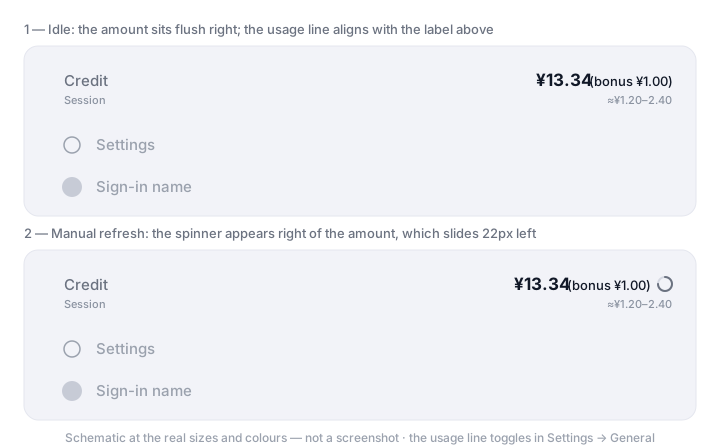
Idle, the amount sits flush right; click the row to refresh, and the spinner appears only then.
## Install
Install it from DSH with `plugin_manager` (Creator mode, or the Plugins page in Settings):
```sh
plugin_manager install_bundle target = github:lbqcgza/dsh-quota-usage
```
A path to a local clone of this repository works the same way:
```sh
plugin_manager install_bundle target =
```
**Restart the desktop app once after installing.** The client boot graph is captured once when the
host process starts, so a page refresh cannot pick up a newly added client module — unlike most DSH
plugins. The reason is in [Implementation notes](#implementation-notes). On `dsh web`, a page
refresh is enough.
Once it is up, a `Credit` row appears at the sidebar foot, **above** the row holding `Settings` and
your avatar / user name.
**Requires DSH 0.2.0-rc.2 or newer, on a Web client** (the desktop app or `dsh web`). It depends on
the `sidebar.footer.action` seat and the shipped `remote.account` namespace, so headless / SDK / ACP
profiles without a Web client are not supported.
## What you get
- **The total at a glance** — the headline is the sum of Platform's recharge wallets (`normal_wallets`) and bonus wallets (`bonus_wallets`) in one currency; the parenthesized part is the bonus, and **below one cent (zero included) the whole bracket goes away with its cell** rather than leaving a gap or a `<0.01` noise value
- **A usage sub-title** — one line under the credit shows the **current session's** real token count and an **estimate** of what it cost (see [Usage sub-title](#usage-sub-title)); with no session open the line is not rendered and the widget stays one line
- **Click to refresh** — clicking the row re-reads immediately and shows a circular spinner to the right of the amount for exactly as long as the read runs. Background polling, refocusing the window, and account state changes never flash the spinner
- **The make-room motion is eased** — the amount sits flush to the right edge when idle (no space reserved for the spinner) and slides 22px left while it is up, on `cubic-bezier(.22,.61,.36,1)`. Only `transform`/`opacity` animate, so nothing reflows
- **It never silently disappears** — loading, failed, not connected, and signed out each say so. A widget that quietly does not appear is indistinguishable from a broken plugin, so this one always renders its state
- **It cannot take the boot down** — every mount step is isolated, and a failure parks a trace where it can be read back. That is not just tidiness: on the desktop, one entry that fails to activate aborts the whole page boot, and the launcher's recovery path rewrites your profile
- **No telemetry** — nothing is written to disk or reported; the balance is read from the official account API with exactly the metadata the official account page sends
- **Follows your UI language** — bilingual, switched by DSH's language setting
## What it looks like
It occupies one row at the sidebar foot, above `sidebar.settings` (the Settings control plus the
account launcher).
| Phase | Shown | Meaning |
| --- | --- | --- |
| `loading` | Loading… | The first read has not returned |
| `ready` | `¥13.34 (bonus ¥1.00)` | Normal |
| `failed` | Unavailable | The call failed, came back not ready, or came back with no wallet at all (the last good value is kept) |
| `unavailable` | Not connected | The page has no `remote.account` service yet; retrying fast |
| `signed-out` | Signed out | The host holds no usable credential |
The tooltip carries the breakdown and the cadence:
```text
Total credit ¥13.34 · Recharge balance ¥12.34 · Bonus balance ¥1.00 · Updated 14:32 · Auto refresh every 60s · Click to refresh now
```
Collapsed into the 56px rail (macOS / plain Web) it becomes a 36px circular button with the number
centered and the spinner as a ring around it. Under the Windows native title bar, collapsing the
sidebar hides the whole foot area, so it hides together with the user-name row. The rail shows no
usage sub-title — 36px has no room for it.
## Usage sub-title
The line under the credit is the **current session's** estimated usage, and it forms one
label/value list with the row above it:
```text
Credit ¥13.34 (bonus ¥1.00)
Session ≈¥1.20–2.40
```
Both rows share one layout: `Credit` / `Session` are the left label column (`flex:none`, so the two
labels share a left edge), and each value is pinned with `margin-left:auto` to the same right edge.
**A `