# Tigris
**Languages:** [English](README.en.md) · [Simplified Chinese](README.md)
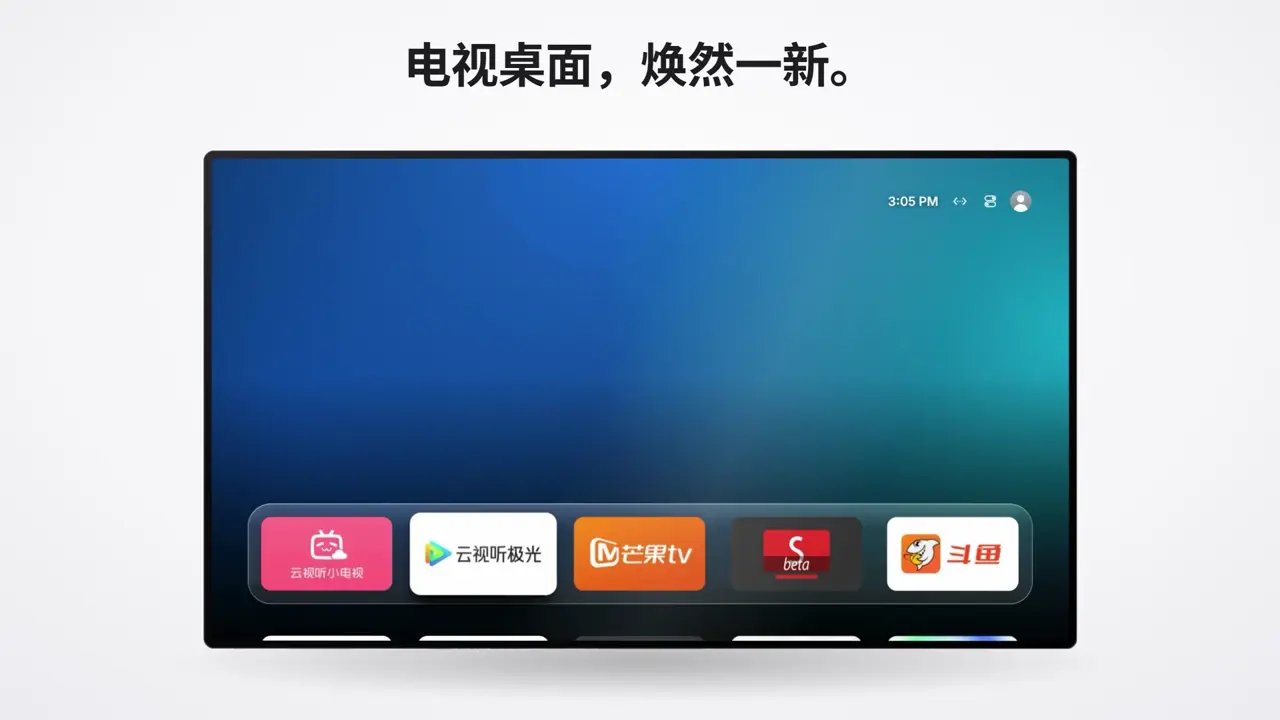
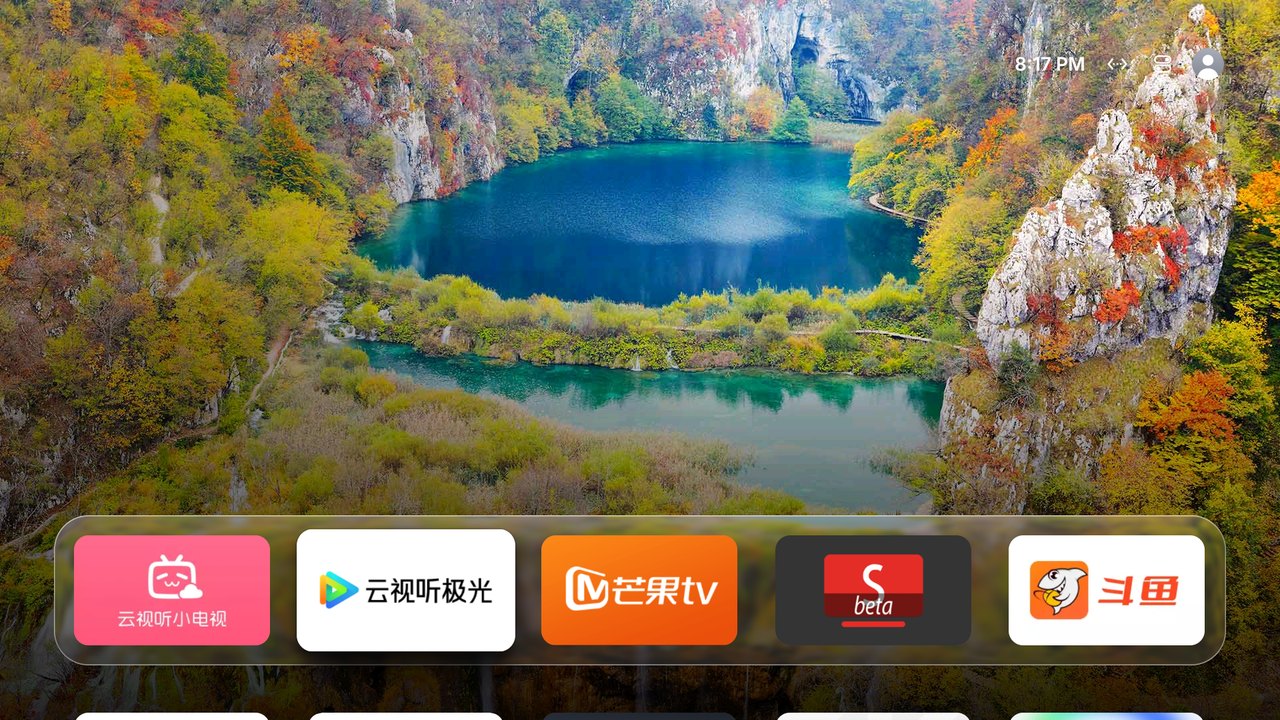
A tvOS-inspired launcher for Android TV, featuring a Liquid Glass Dock, Top Shelf-like content, a translucent Control Center, photographic wallpapers, and a photo-frame screensaver.
> The third project in the open-source Chinese Zodiac series: Tiger. *Tigris* means “tiger” in Latin and Greek.
Earlier versions were tested on Sony BRAVIA devices. New firmware-specific takeover fixes and video optimizations still need model-level verification. Other devices and firmware variants may require adjustments.
**Website:** [tigris-tv.pages.dev](https://tigris-tv.pages.dev) · **[v2.0.28 Release](https://github.com/lesnolie/Tigris/releases/tag/v2.0.28)** ([Standard APK](https://github.com/lesnolie/Tigris/releases/download/v2.0.28/Tigris-v2.0.28.apk) · [Compatibility Guard APK](https://github.com/lesnolie/Tigris/releases/download/v2.0.28/Tigris-guard-v2.0.28.apk) · [SHA-256 checksums](https://github.com/lesnolie/Tigris/releases/download/v2.0.28/SHA256SUMS-v2.0.28.txt))
[](https://tigris-tv.pages.dev/#film)
▶ [Watch the v2.0.28 film (54 s) and the 42-second film](https://tigris-tv.pages.dev/#film) (with audio)
## Which APK should I install? Check the TV OS and firmware
> **Latest stable release: v2.0.28.** Grouped Home Screen Settings, a clock screen saver in four styles (Neon, Flip, LCD, Minimal) and custom app icons uploaded from your phone. Upgrade with the matching Standard/Guard package. See the [release notes](docs/releases/v2.0.28.md).
| TV / platform | First choice | When to use another build | Important limits |
|---|---|---|---|
| Sony BRAVIA Android TV | **Standard** | Evaluate Guard only after firmware-specific HOME detection shows a real blocker | Some firmware uses a stock HOME alias or special registration |
| Stock Android TV / Google TV, general Android boxes | **Standard** | Only assess Guard after confirming HOME selection is blocked | APK installed does not verify physical Home, boot or wake |
| TCL / FFalcon Android TV | **Inspect first**. Use Standard when accepted; use **Compatibility Guard** on firmware that rejects launcher APKs | If `INSTALL_FAILED_VERIFICATION_FAILURE` occurs, use an official Guard package and an authorized on-TV T-Cast installation where supported | Guard declares **no HOME role**, and may need manufacturer-specific autostart and accessibility permissions |
| Xiaomi / Redmi MIUI TV / HyperOS TV | **Try Standard first** | When PatchWall ignores HOME, diagnose the exact firmware; Guard is only a conditional workaround | Do not disable PatchWall, Settings or other essential system components |
| Skyworth / Coocaa, Hisense / Vidda, OPPO, XGIMI, Konka, LeTV **running Android 9+** | **Standard as the safe starting point**, then inspect device firmware | Guard only for verified firmware limitations | No blanket brand-level takeover certification |
| LG **webOS** | **No Android APK**. Separate [webOS IPK developer preview](https://github.com/lesnolie/Tigris/releases/tag/webos-v0.1.0-preview.1) | Neither Standard nor Guard | Developer Mode; hardware unverified and no HOME takeover |
| Samsung **Tizen**, Hisense **native VIDAA** | **No supported Android APK** | Neither | Do not run Android ADB installer commands |
**Verification:** After installing, open another app and press the physical Home key; check reboot, standby/wake and long-press Home cleanup separately. If Home does not return to Tigris, keep the stock launcher enabled and use the [brand install and recovery guide](docs/installation-compatibility.md). Preserve the existing APK signing identity and user data; **do not uninstall merely to bypass installation restrictions**.
## v2.0.28: grouped settings, clock screen saver and custom icons
- **Grouped Home Screen Settings:** the main page lists groups only (Home Screen, Appearance, Wallpaper, Screen Saver, Top Shelf & Weather, Boot animation, Apps, Memory & power, Home Guard & System); each is a short page and returning focuses the row you came from. Settings and stored values are unchanged.
- **Clock screen saver:** Screen Saver → Content → Clock. Neon, Flip, LCD and Minimal, each in several colours; optional seconds (otherwise the colon blinks) and snow or stars. Neon tubes buzz as they strike up and seconds can tick, both optional. While it shows, Left/Right change the style and Up/Down the colour.
- **Custom app icons:** long press an app → Change icon, scan the QR code and upload a picture under App Icons; wide pictures fill the tile, square ones are centred. Restore the default from the long-press menu or the phone page.
Version code 47 upgrades v2.0.27 in place with the same signing identity. See the [v2.0.28 release notes](docs/releases/v2.0.28.md).
## v2.0.27: brand banners and stacked app previews
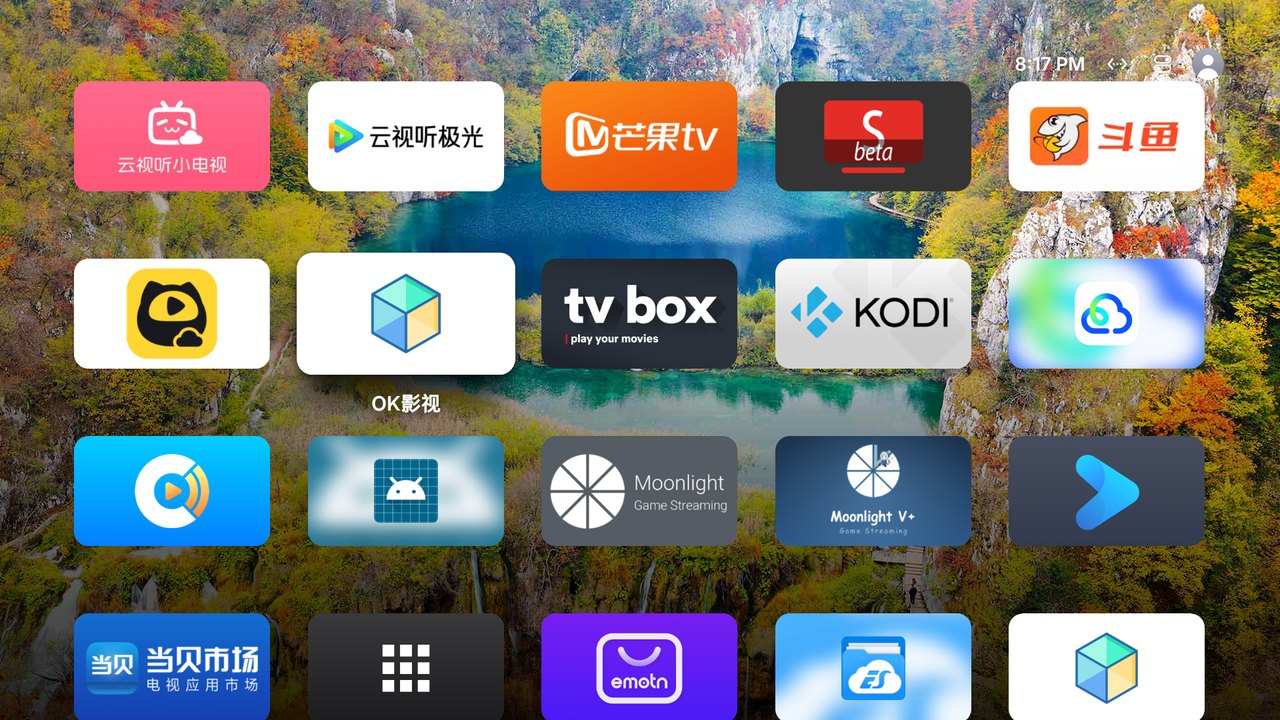
- **Home artwork:** uniform 16:9 cards automatically prefer the app's TV banner; missing banners use white cards with original icons. Manual overrides remain. Selection scales to 1.12x without added frames or halos; the Liquid Glass Dock stays.
- **App switching:** stacked screen cards, Left/Right to choose and OK to open, with the newest task selected first. Missing previews never hide tasks; dark frames remain valid. Menu attempts native Recents.
- **Controls and reading:** simpler Control Center tabs, retained TV and active-session media controls, remote Top Shelf browsing, improved Home return focus, and 90% / 100% / 115% / 130% text scale.
Previews are saved accessibility screenshots on Android 11+, not continuously live screens. Android 9/10, protected content or missing permissions may have no preview, while tasks remain usable. Up removes a card; force-stop requires authorized local ADB. Version code 46 upgrades Preview 12 (45) in place with the same signing identity. See the [v2.0.27 release notes](docs/releases/v2.0.27.md).
## v2.0.26: one frost-grey surface for every app tile
Every home-screen app tile now uses the same `#E1E5EA` frost-grey card: a barely-there top-light/bottom-dark gradient, a 1 dp grey hairline and a soft outer shadow. Icons keep their original artwork, colour and proportions; nothing is redrawn, cropped or feathered. Settings uses its gear icon, the wallpaper screen keeps its blue-violet icon, and focus adds a white ring with a soft blue halo so the selected tile stays readable on dark, light, photo and video wallpapers. App order, launch, long-press and update behaviour are unchanged. This build also includes v2.0.25's MiracastReceiver package rename fix. See the [v2.0.26 release notes](docs/releases/v2.0.26.md).
## v2.0.25: casting update follows the renamed package
Upstream MiracastReceiver v1.2.14 renamed its package from `com.weekd.miracastreceiver` to `top.jast.miracastreceiver` for its AirPlay support, which Android treats as a different app. Tigris still checked the old identity, so the official APK was refused with "package identity mismatch". This release checks, installs and opens the new package, still pinned to the same upstream signing key and the `miracast-receiver-vX.Y.Z-universal.apk` asset rule.
When 1.2.13 or older (pre-rename) is still present, the casting card offers **Uninstall old** and asks you to confirm in the system uninstaller before installing the new package; upstream documents that app data is not carried across the rename. The new package is also recognized as a casting receiver, so the screensaver keeps yielding during casting. See the [v2.0.25 release notes](docs/releases/v2.0.25.md).
## v2.0.24: glass and backdrop switch together
Opening Settings, changing wallpapers, and entering or leaving Top Shelf now prepare Extreme Liquid Glass with the backdrop, apply both in the same frame, and fade them together. Settings scrolling also takes less drawing work. On a Sony XR-55A80J (Android 12), Settings settled in 0.13–0.22 seconds instead of about 1.05–1.27 seconds.
Extreme Liquid Glass remains off by default; enable it below Control Center style in Home Settings. The first frame after a key press can still be late while the GPU wakes from idle; other TV models remain unverified. Matching Standard/Compatibility Guard upgrades keep the existing signing identity and user data. See the [v2.0.24 release notes](docs/releases/v2.0.24.md).
## v2.0.23: unified photo-frame timing after HOME takeover
After verified HOME takeover and the required permissions, Android's standard screensaver follows Tigris's photo-frame delay. Opting out or losing takeover attempts to restore the original settings while preserving later user edits. A confirmed paused foreground video may enter the system-triggered photo frame; playback and casting remain protected. Normal app mode leaves system timers alone. See the [v2.0.23 release notes](docs/releases/v2.0.23.md).
## v2.0.22: cleaner app artwork and optional extreme glass
App icons now retain their original shapes in the existing 16:9 tvOS tiles: properly proportioned TV banners fill the card, while square or unusually wide artwork fits without destructive center cropping. Low-resolution banners fall back to the app icon; apps without banners receive a consistent, restrained gradient background and a clean, properly scaled icon instead of an enlarged blurred duplicate. Dock layout, user order, folders, focus motion and the original launcher remain unchanged. The optional extreme Liquid Glass material (merged in [#86](https://github.com/lesnolie/Tigris/pull/86)) adds transparent video Dock/Control Center surfaces and refined static-wallpaper glass; it is off by default. Details: [v2.0.22 release notes](docs/releases/v2.0.22.md).
## v2.0.21: reliable updates and idle photo-frame safeguards
The photo frame now starts ahead of Android's system sleep deadline, and an idle Tigris Home, Settings, Updates or Wallpaper page may show it. An external video player is eligible only when the foreground media session explicitly reports PAUSED and Android starts its dream; active playback and recognized casting (even silent) take priority and block the photo frame. Sony install confirmations now use the actual PackageInstaller intent, cached update offers survive temporary GitHub network failures, and HGTV numeric release tags are recognized. Device-specific install/casting still require testing. See [v2.0.21 release notes](docs/releases/v2.0.21.md).
Older release notes (v2.0.13–v2.0.20)
## v2.0.20: dock glass on Android 11 and older
On Android 11 and older, the dock over a moving video is drawn at its real size: a rounded mask, a slow heavy blur at about 55% opacity, and a light veil if a snapshot is too slow. The video keeps playing underneath. Android 12 and newer are unchanged. See the [v2.0.20 release notes](docs/releases/v2.0.20.md).
## v2.0.19: installation recovery, screensavers and power-key shutdown
Continue recommits an interrupted installation; Force retry replaces its old task without removing app data. System screensavers no longer exit because Home’s timer was reset, and automatic standby cannot trigger the optional power-key full shutdown. See the [v2.0.19 release notes](docs/releases/v2.0.19.md).
## v2.0.18: install confirmation, photo frame, and wake animation
TVs with no install confirmation page keep the verified APK and show an `adb install -r` command. The photo frame does not interrupt active video or recognized casting; v2.0.21 further refined the idle and paused-video rules. On Android 9–11 the wake animation waits until the panel is lit. See the [v2.0.18 release notes](docs/releases/v2.0.18.md).
## v2.0.17: Sony Android 9 sync permissions
The manifest declares the normal permissions `READ_SYNC_SETTINGS` and `WRITE_SYNC_SETTINGS`. `RevivalSync.ensure()` can read and set the sync adapter on Android 9 without the `SecurityException` recorded in [#53](https://github.com/lesnolie/Tigris/issues/53). Android grants them at install time. There is no new runtime prompt, and the guard and sync lifecycle are unchanged. See [PR #72](https://github.com/lesnolie/Tigris/pull/72). Physical Home, boot, and accessibility revival on that TV still need a retest, so #53 stays open. See the [v2.0.17 release notes](docs/releases/v2.0.17.md).
## v2.0.16: Sony controls and ADB diagnostics
Background Sony BRAVIA reads no longer initiate repeated registration. Explicit writes use a persistent retry backoff; failed HDMI switching may fall back to an unambiguous Android input or the TV settings. Local ADB diagnostics distinguish connection, authentication, handshake and protocol failures without replacing existing keys. The v2.0.15 guard architecture stays intact. See the [v2.0.16 release notes](docs/releases/v2.0.16.md).
## v2.0.15: Home returns to Tigris
A Home press on the remote is no longer limited by the automatic boot-takeover budget. Automatic retries during the first three minutes are still capped so the factory launcher is not fought forever. Android 12 and newer can turn on “Keep filtering the Home key”; it is off by default and is not offered on Xiaomi. The installer enables the guard for Xiaomi, TCL/FFalcon, Coocaa and Hisense, and adds `repair`. The website guide has “Home still opens the original screen”. The stock launcher is not disabled. See the [v2.0.15 release notes](docs/releases/v2.0.15.md).
## v2.0.14: Glass Settings and sky welcome
Settings and Apps & Updates share refracting glass and the current Home wallpaper. Scrolling no longer replaces stale row textures after motion stops. Settings adds visual switches, app icons and checkboxes, glass dialogs and working About details. The first-use Tigris logo writes itself across a blue sky; press OK to continue, or replay it later from Settings. See the [v2.0.14 release notes](docs/releases/v2.0.14.md).
## v2.0.13: Optional casting and HGTV (install on demand)
From Tigris on the TV, open **Home Settings → Apps, casting & updates** to opt in to two independent applications:
- **MiracastReceiver casting** — downloads an official [GitHub Release](https://github.com/weekdayjast/MiracastReceiver/releases) only after the user requests installation.
- **HGTV short dramas** — downloads an official [HGTV Release](https://github.com/pan8664716/HGTV/releases) only when requested. HGTV is an independent third-party client relying on unofficial content interfaces; upstream changes can affect playback.
The redesigned **Apps & Updates** screen presents one tvOS-style card per app with just one contextual action (Get, Open or Update); download progress and Retry only appear when needed. Neither APK is bundled with Tigris, auto-installed for new users, or pinned to the Dock by default. Once installed, each becomes a normal launcher app and may be moved to the Dock. The installer checks release SHA-256 and a documented signing identity, and refuses incompatible upgrades instead of deleting app data. Automatic updates apply only to already installed apps. [Policy and limitations](docs/updater.md).
TV screenshots and demonstrations
## Screenshots
| Top Shelf content | All apps |
|---|---|
|  |  |
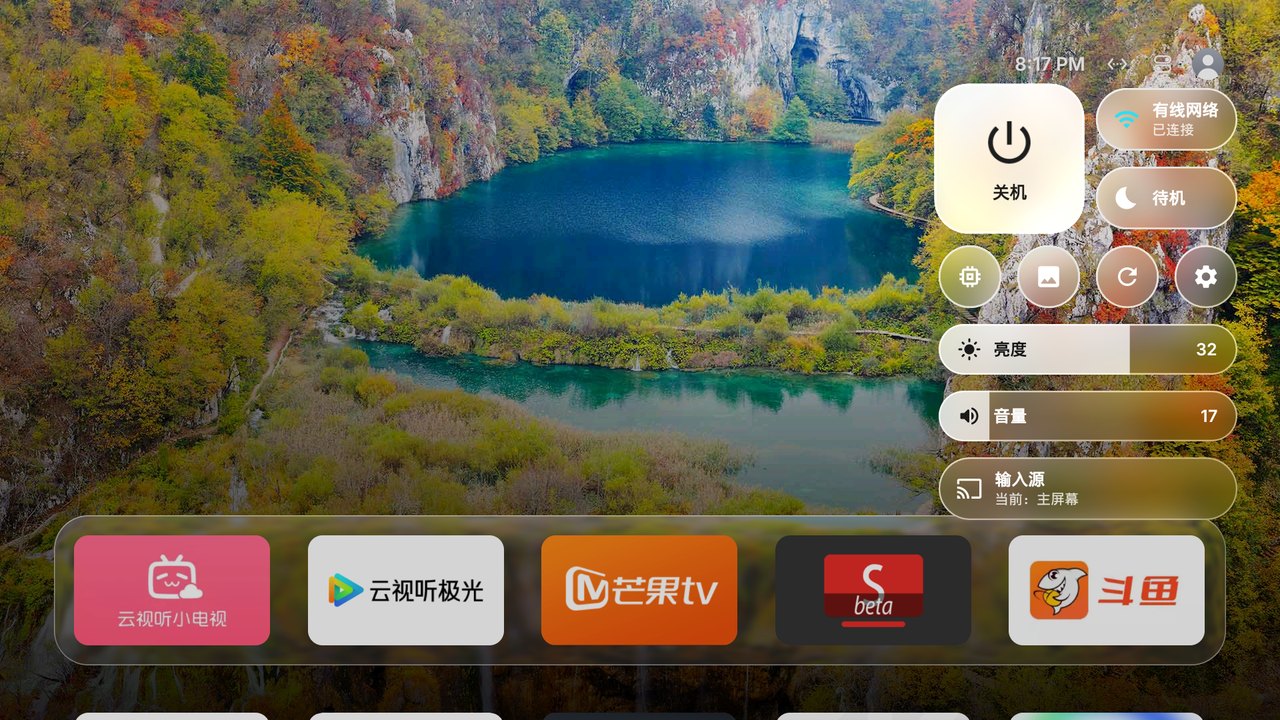
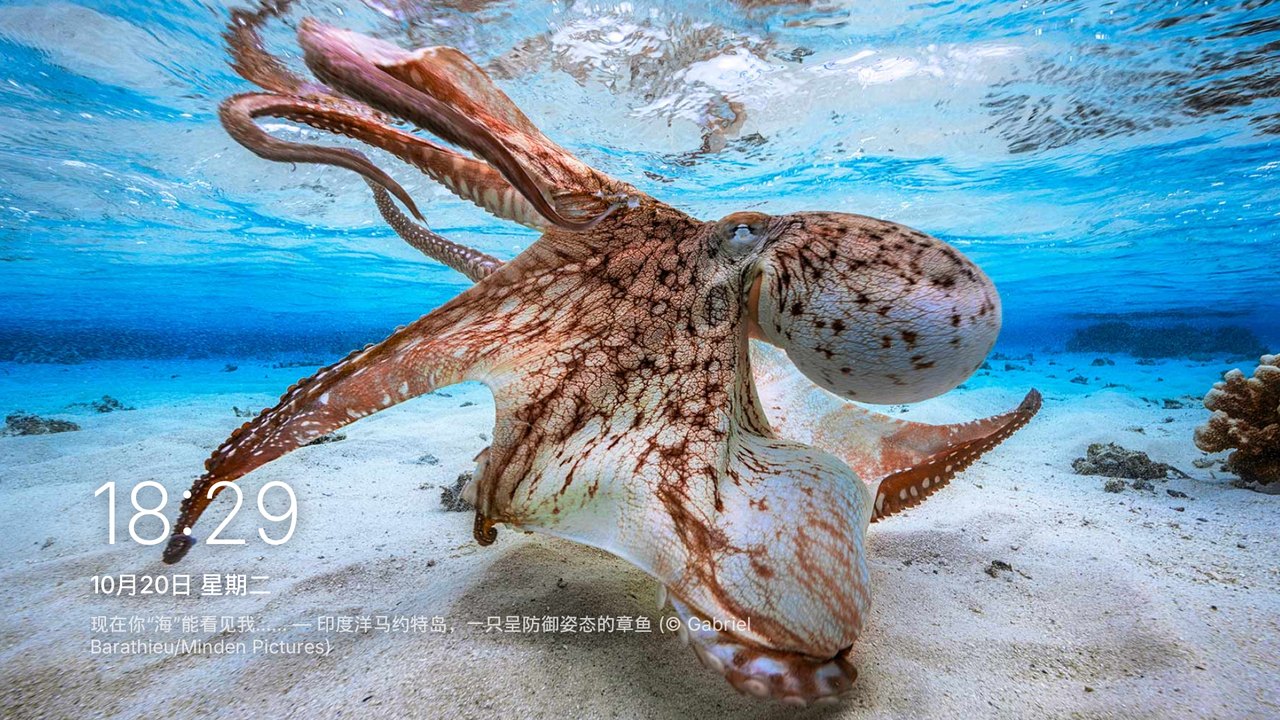
| **Control Center** | **Photo frame / screensaver** |
|  |  |
Device compatibility reports and community feedback
## TV installation and compatibility reports
> **Snapshot: October 24, 2026. Official APKs require Android 9 (API 28) or newer.** The table records observations on **specific models, OS builds, and Tigris versions**. It is not blanket certification of a brand. **APK installed ≠ launcher activated ≠ HDMI, brightness, wallpaper and other features verified.** Historic bugs may be fixed in source without a subsequent hardware retest.
| TV model | Android / firmware | Installation / launch result | Evidence and limitations | Source |
|---|---|---|---|---|
| **Sony BRAVIA XR-55A80J** | Android TV 12 | ✅ Maintainer-tested on real hardware | Primary supported test TV; not a promise for every Sony model | Maintainer's project notes |
| **Sony BRAVIA VH1** | Android TV 10 / API 29 | ✅ Running on v1.9; rapid Back presses no longer reproduce the crash | Rapid Back had crashed v1.8; this does not certify every v2.0.2 feature | [#2](https://github.com/lesnolie/Tigris/issues/2) |
| **Sony KD-55X9500H** | Android TV 10 / API 29 | ✅ Reported running v1.9 | Glass capsule clipping was observed; fix landed on `main` via [#11](https://github.com/lesnolie/Tigris/pull/11), but no new-TV retest confirmed | [#10](https://github.com/lesnolie/Tigris/pull/10) |
| **FFalcon 75R685C** (`tcl_mt5879_cn`) | Android 11 / API 30, China firmware | ✅ Community hardware-tested with Guard build and TCL installation method | Direct `adb install` rejected; TCL T-Cast sideload used. Tested volume, vendor settings and source picker. Brightness slider intentionally hidden | [#1](https://github.com/lesnolie/Tigris/pull/1) |
| **Xiaomi MiTV-ANSP0** | Android 9 / API 28 | ⚠️ APK installed but **older release crashed on startup** | `BlendMode` API crash fixed in v2.0+; **no confirmed v2.0.2 retest on this TV** | [#9](https://github.com/lesnolie/Tigris/issues/9) |
| **Xiaomi MiTV-ASTR0** | Android 14 / Xiaomi OS3 | ⚠️ App usage reported, with functional problems | Wallpaper count stayed at zero; system rejected some guard service starts. Installation method and full feature set not verified | [#8](https://github.com/lesnolie/Tigris/issues/8) |
| **Older Xiaomi TV (model not supplied)** | OS/API unknown, below APK requirement | ❌ Official APK rejected (`INSTALL_FAILED_OLDER_SDK`) | Specific model and API level still requested. This says nothing about all Xiaomi TVs | [#3](https://github.com/lesnolie/Tigris/issues/3) |
| **Skyworth / Coocaa 7S710_A3** | Android 8 / API 26 | ❌ Official APK unsupported; ✅ contributor's API 26 fork worked | Fork tested HDMI2 and Back-to-Tigris. **Official v2.0.2 Coocaa adapter has not been hardware-verified** | [#4](https://github.com/lesnolie/Tigris/pull/4) |
**Which APK?** Use [Releases](https://github.com/lesnolie/Tigris/releases/latest): `Tigris-vX.Y.Z.apk` for most TVs; `Tigris-guard-vX.Y.Z.apk` plus [T-Cast installation](tools/tcast-push.py) for TCL/FFalcon China firmware. Each published file includes the release version; [the download helper](tools/download-release.py) selects the appropriate asset and checks its SHA-256. `INSTALL_FAILED_OLDER_SDK` means the device's API is below the APK's `minSdk`; trying another installer does not resolve that. Some OEM firmware requires additional home-guard setup; see [AGENTS.md](AGENTS.md).
### Submit a TV report
Please [open a structured TV compatibility report](https://github.com/lesnolie/Tigris/issues/new/choose) containing the exact model, Android version, Tigris version, APK, observed installation result and logs. **Automation reads the form's structured fields and proposes reviewed pull requests updating both README languages.** It never certifies self-reported devices, auto-merges, or writes unreviewed results to `main`. The historical reports above were manually corroborated from issues and PR discussions.
#### Incoming structured community reports (unverified)
| TV model | Android | Tigris / APK | Installation result | Issue state | Source |
|---|---|---|---|---|---|
| TCL Q10L | 安卓12 | 2.0.22 / Standard | Installed and launched (reported) | Open | [#89](https://github.com/lesnolie/Tigris/issues/89) |
| SONY 9500G | 10 | 2.0.17 / Standard | Installed and launched (reported) | Open | [#77](https://github.com/lesnolie/Tigris/issues/77) |
| Sony XR-55A80K | BRAVIA 4K VH21 | Android 12 (API level 31) | v2.0.15 / Standard | Installed and launched (reported) | Closed (fix unverified) | [#69](https://github.com/lesnolie/Tigris/issues/69) |
| Sony BRAVIA 4K GB(BRAVIA_ATV2_CN,国行,2017 平台) | Android 9 (API 28) | v2.0.11 / Standard | Installed and launched (reported) | Open | [#53](https://github.com/lesnolie/Tigris/issues/53) |
| GOOJODOQ HY300 Pro+ | Android 14 | v2.0.9 / Standard | Installed and launched (reported) | Open | [#47](https://github.com/lesnolie/Tigris/issues/47) |
| 创维酷开 85P3DMAX | Android 11 | 2.0.2 / Custom fork | Installed and launched (reported) | Closed (fix unverified) | [#15](https://github.com/lesnolie/Tigris/issues/15) |
| 雷鸟 75S545C | Android 9 | V2.0.2 / Guard | Installed and launched (reported) | Closed (fix unverified) | [#14](https://github.com/lesnolie/Tigris/issues/14) |
Installation with an AI coding agent or ADB
## Install with an AI coding agent
You can also **install manually** using the APKs above. An agent is optional; it can help with ADB setup, default-home selection and vendor-specific features.
### 1. Enable ADB debugging on the TV
Connect the TV and computer to the same LAN and find the TV's IP address (usually Settings → Network / About).
| TV | Enabling ADB |
|---|---|
| **Xiaomi / Redmi** | Settings → About → press OK on **Model** repeatedly to enable developer mode; under Account & Security, enable **ADB debugging** and **Unknown sources** |
| **TCL / FFalcon** | Settings → About → Device information, then press **Up, Down, Left, Right** in quick succession; the hidden **More** section contains ADB |
| **Sony BRAVIA** | Settings → System → About → press OK seven times on **Build**; then Settings → Developer options → USB debugging |
| **Stock Android TV / Google TV / other OEMs** | Settings → Device Preferences → About → press Build seven times; enable USB, network, or ADB debugging in Developer options |
When the TV prompts to allow debugging from your computer, select **Allow**, preferably **Always allow**. Xiaomi may disable ADB on waking; Tigris has an optional setting to keep it enabled.
### 2. Ask an agent to install it
Give a command-capable agent such as Codex or Claude Code:
> Follow https://github.com/lesnolie/Tigris/AGENTS.md to install Tigris on my TV. My TV's IP address is 192.168.x.x. Ask before changing TV system settings.
The [installation guide for agents](AGENTS.md) covers connecting, choosing the APK, configuring the launcher, requesting permissions and Sony-specific setup. Approve any on-TV prompts yourself. On TCL, accept the **T-Cast / 多屏互动** installation prompt.
### 3. Install or restore with Bash (macOS / Linux)
Install Android Platform-Tools (`adb`), `curl` and Python 3 on your computer first. The script downloads the latest stable APK, checks its SHA-256, backs up the original HOME configuration and preserves app settings on compatible upgrades. Replace the sample IP with your TV's address.
```sh
# Standard APK (most Android TVs):
curl -fsSL https://raw.githubusercontent.com/lesnolie/Tigris/main/install.sh \
| TV=192.168.1.20 bash
# Guard APK for TCL / FFalcon China firmware:
curl -fsSL https://raw.githubusercontent.com/lesnolie/Tigris/main/install.sh \
| TV=192.168.1.20 bash -s -- -s guard
# Restore using the same computer and saved snapshot:
curl -fsSL https://raw.githubusercontent.com/lesnolie/Tigris/main/install.sh \
| TV=192.168.1.20 bash -s -- restore
```
To explicitly keep ADB enabled, add `KEEP_ADB=1` before `bash`. New releases ship `Tigris-vX.Y.Z.apk`, `Tigris-guard-vX.Y.Z.apk` and `SHA256SUMS-vX.Y.Z.txt`; the installer also accepts older filenames. The installer will not silently uninstall an APK when signatures differ. See the [installation and restore guide](docs/installation.md). On Windows, follow [AGENTS.md](AGENTS.md) with a command-capable desktop agent or use PowerShell/ADB manually; phone chat alone cannot operate the TV.
Complete feature list and historical milestones
## Features
### What's new in v2.0.6
- **Choose your app order:** Settings → App → **Recently opened apps first**. Off by default on a fresh v2.0.6 install or first upgrade from an older release. Keep your current layout and folders in manual mode, or turn it on to move a successfully launched app or folder to the front. Toggling does not reset the layout.
- **Versioned release assets:** `Tigris-v2.0.6.apk`, `Tigris-guard-v2.0.6.apk`, and `SHA256SUMS-v2.0.6.txt`. The in-app updater and install script recognize both current and historical release naming.
- **Upgrade in place:** compatible installations retain their data and settings using the established stable signing key. See the [v2.0.6 release notes](docs/releases/v2.0.6.md).
### Highlights introduced in 2.0.4
App folders, phone-based avatar upload, an update center for Tigris and MiracastReceiver, and frosted app-list scrolling. The Dock and top-right controls scroll off-screen with the grid. Bundled startup media and settings artwork are defaults; existing customizations take priority. Upload or reset an avatar from the TV's Settings screen using the on-screen QR code. Updates are under Control Center → Settings → Software updates & casting.
### Core features
- **tvOS-style home screen:** docked 16:9 app tiles, focus zoom, directional tilt, animated light sweep and shadow; optional portrait icon; compact clock, large clock with date, or no clock; 12/24-hour time.
- **Settings:** a large-icon tvOS-inspired settings screen with grouped controls. Focus animation and Control Center style default to *Auto*, choosing a lighter style on TVs with under 2.5 GB RAM, Android below 10, or fewer than four CPU cores.
- **Recently opened apps first (optional):** off by default when installing v2.0.6 or first upgrading from an older release; after that, your saved preference is retained. Turn it on under Settings → App → Recently opened apps first to move successfully launched apps or folders to the front; turn it off to preserve the current manual order. Long-press a tile and choose Edit Home Screen to rearrange it. Focus changes, failed launches and HDMI switching never reorder apps.
- **Manage apps:** long-press items for actions including removing preinstalled user-visible packages with `pm uninstall --user 0` when allowed (system partition APKs are not deleted). Restore them from the deleted-preinstalled-apps section. Essential TV system components are protected from this action.
- **Liquid Glass Dock:** precomputed blur, refraction, highlights and shadows from the wallpaper avoid expensive per-frame GPU effects.
- **Top Shelf-style content:** focusing 云视听小电视, the third-party Bilibili client `com.tutu.myblbl`, or Douyu in the first dock row cycles that service's public feed. Settings can also attach one JSON URL to a dock app. The format, fallback, and the Jellyfin / Emby proxy note are in [docs/top-shelf.md](docs/top-shelf.md).
- **Control Center:** open with Back or the top-right icon. Floating glass controls or a lower-overhead dark panel; network, sleep, shutdown, restart, memory cleanup, photo frame, settings, brightness, volume and TV inputs.
- **Boot/wake animation:** optional video uploaded from your phone, or a built-in Tigris wordmark animation. Choose startup only or startup and wake, with adjustable wake delay; skip with any key.
- **Wallpapers:** Bing daily imagery, 360 scenery and pet images, all-ages anime (Wallhaven, falling back to China-accessible sources), artworks, personal photos, custom image sources and gradient themes. Download photos as needed and clean old cached files.
- **Wallpaper picker and phone setup:** select previews on TV, scan a QR code to upload photos, provide custom photo/image-feed URLs, change wallpapers/screensavers, upload a boot movie or customize the settings icon and backdrop. The LAN configuration page runs while the picker is open and for five minutes afterward. **The phone companion page now automatically follows the phone browser's language (Chinese or English)**, independently of the TV's system language, including upload buttons, wallpaper labels, status messages and errors.
- **Photo frame and Apple TV aerial screensaver:** slowly pan/zoom photos or stream aerial footage from Apple with location labels. It can be the system screensaver. It starts on its own only after the Tigris home screen has been idle. “Start After” is an in-app countdown and does not change the TV’s screen-off timeout. It does not appear while another app is in front, while media or a cast is playing, or while another window holds the screen on.
- **HDMI shortcuts on the home screen:** Control Center → Inputs → Show on Home, where available.
- **Home guard:** helps keep Tigris in front on OEM firmware that forces its own launcher. Does not require root and is off by default.
- **Background memory cleanup:** periodic cleanup and a configurable keep-alive list.
Platform features and manufacturer limitations
## Compatibility by feature
These are **implementation capabilities**, not proof of hardware compatibility on every brand.
| Feature | Standard Android TV 9+ | Local ADB approval | Sony-specific |
|---|:---:|:---:|:---:|
| Home screen, Dock, focus effects | ✓ | | |
| Bilibili / Douyu / custom Top Shelf | Matching TV app, or a JSON URL in Settings | | |
| Wallpapers, photo frame and basic Control Center | ✓ | | |
| Cache cleanup | ✓ | | |
| Force-stop selected background apps | | ✓ | |
| Remove certain preinstalled apps for current user | | ✓ | |
| Sleep, shutdown and restart | | ✓ | |
| Photo-frame idle timer (home screen only; does not change screen-off) | ✓ | | |
| Set photo frame as the system screensaver | | ✓ | |
| Volume | Android media stream | | BRAVIA volume |
| Inputs / HDMI | When exposed by system TV framework | | Current input and switching |
| Backlight slider | Xiaomi adapter may use an approved ADB grant | | BRAVIA backlight |
| Home guard and recovery | Device-dependent | ✓ | |
Sony TVs can use the local BRAVIA IP-control endpoint for brightness, TV volume and input selection when enabled. Generic Android TVs use `AudioManager` for volume and `TvInputManager` for inputs. Android provides no universal backlight API; unsupported sliders are hidden. ARC/eARC setups may require vendor-specific volume handling.
### Home guard and permissions
On firmware that enforces the manufacturer's launcher, Tigris uses an accessibility service to watch foreground window changes without reading screen content. A physical Home press always returns to Tigris. Boot, wake and process recovery take over only when the front is a confirmed stock home; an unknown front, an app or HDMI is left alone. Automatic retries during the first three minutes are rate-limited so a boot fight with the factory launcher stops. The Home key itself is not rate-limited. The notification listener helps recover the process after OEM termination without reading notifications.
| Permission or service | Purpose |
|---|---|
| `WRITE_SECURE_SETTINGS` | With user authorization, restore guard, screensaver and ADB settings; support Xiaomi backlight control. |
| Notification listener | Help revive the process after firmware cleanup without reading notification content. |
| `SYSTEM_ALERT_WINDOW` | Permit background home launches where supported by firmware. |
| TCL `APP_AUTO_START` / `APP_ASSOC_START` | Allow autostart and associated launches on compatible TCL firmware. |
The home guard is off by default. Firmware behavior varies, so cold boot, standby/wake and Home key behavior must be verified on each TV. See [guard stability notes](docs/guard-stability.md).
### TCL / FFalcon China firmware
Community-tested on FFalcon 75R685C ([PR #1](https://github.com/lesnolie/Tigris/pull/1)). This firmware does not expose standard HDMI input services or a usable brightness API. Tigris offers a single **TCL source picker** action, opens TCL's settings app and hides the backlight slider. It is **not** direct control of each HDMI port.
For this specific firmware, `adb install` rejects the package and APKs declaring themselves HOME are blocked. Use the **Guard** APK via TCL's built-in **T-Cast (多屏互动)** service and [tools/tcast-push.py](tools/tcast-push.py), then enable the home guard as appropriate.
### Xiaomi / Redmi China firmware
The Xiaomi adapter can use `picture_backlight` for brightness after `WRITE_SECURE_SETTINGS` approval, Xiaomi's external-source player for input switching, and Xiaomi's settings/Wi-Fi screens. The photo frame keeps its own idle timer and appears only while the home screen is in front, with nothing playing and no other window holding the screen on. A missing or non-positive `screen_saver_timeout` uses the in-app minutes; a positive value still starts 15 seconds early so Xiaomi's screensaver does not win. The setting does not write the system screen-off timeout. **These paths have not been comprehensively tested by this project's maintainers on Xiaomi hardware.** See the issue reports above for observed problems.
**Never disable Xiaomi's stock launcher** (`com.mitv.tvhome` / PatchWall); it can leave the TV with a black screen on boot. Use Tigris's optional home guard instead. The guard uses an accessibility service to detect vendor-home foreground changes, a notification listener to help restart after OEM process termination, and optional secure settings/overlay permissions. Those operations require user authorization and can behave differently across firmware versions.
### Skyworth / Coocaa
`tv/CoocaaAdapter.kt` uses the vendor's source picker when standard HDMI input discovery is empty. Official v2.0.2 support remains **unverified on Coocaa hardware**. The community's Android 8 / API 26 fork test on 7S710_A3 is not an official APK install test ([PR #4](https://github.com/lesnolie/Tigris/pull/4)). The official app still requires API 28+.
### Other Android TVs
The brand-specific adapters live under [`app/src/main/java/com/leslie/tvhome/tv/`](app/src/main/java/com/leslie/tvhome/tv/): `TvControls.kt`, `AndroidAdapter.kt`, `SonyAdapter.kt`, `TclAdapter.kt`, `XiaomiAdapter.kt`, and `CoocaaAdapter.kt`. Each brand overrides only its non-standard behavior; standard Android methods remain the fallback.
To contribute a new model, have a developer or coding agent follow [AGENTS.md §9](AGENTS.md#9-adapting-tigris-to-a-tv-that-isnt-fully-supported), inspect that TV's actual interfaces and submit a pull request. Never disable/uninstall a stock launcher or change critical TV settings without the owner's approval.
Manual builds, casting recommendations and developer instructions
## Build and install manually
Requires **JDK 17**, Android SDK **compileSdk 36**, Gradle wrapper and ADB. Or simply download [the latest release](https://github.com/lesnolie/Tigris/releases/latest).
```sh
./gradlew assembleStandardRelease assembleGuardRelease
adb connect :5555
adb install -r app/build/outputs/apk/standard/release/app-standard-release.apk
adb shell cmd package set-home-activity com.leslie.tvhome/.HomeActivity
```
These locally built APKs use the local debug key and may not be installable over an already installed release signed with another key (`INSTALL_FAILED_UPDATE_INCOMPATIBLE`). **Back up configuration and request consent before uninstalling to change signing keys.** On TCL use the versioned Guard APK and its dedicated installation method.
For supported Sony BRAVIA TVs, register an IP-control client (the TV displays a four-digit PIN):
```sh
BODY='{"method":"actRegister","id":1,"version":"1.0","params":[{"clientid":"tvhome:1","nickname":"TVHome","level":"private"},[{"value":"yes","function":"WOL"}]]}'
curl -s http:///sony/accessControl -d "$BODY"
curl -s -u ":" http:///sony/accessControl -d "$BODY"
```
See [AGENTS.md](AGENTS.md) for permissions, setup and verification. Official release APKs are signed with the project's stable release key; locally built APKs may use a different key, so verify signatures before attempting an in-place upgrade.
## Casting recommendation
Tigris has no built-in casting receiver. The open-source [Miracast Receiver](https://github.com/weekdayjast/MiracastReceiver) is one option for AirPlay, DLNA and Miracast (some firmware features may require root). Install the APK matching your TV's CPU architecture. Tigris's cleanup keep-alive defaults account for this app.
## License and third-party notices
Tigris is licensed under [MIT](LICENSE). Copyright and licensing details for third-party code, fonts, icons and dependencies are in [third-party notices](THIRD_PARTY_NOTICES.md). Community contributions are linked in the corresponding Issues and PRs, including FFalcon [#1](https://github.com/lesnolie/Tigris/pull/1), Coocaa [#4](https://github.com/lesnolie/Tigris/pull/4), and focus improvements [#10](https://github.com/lesnolie/Tigris/pull/10) / [#11](https://github.com/lesnolie/Tigris/pull/11).
This project is not affiliated with Apple, Sony, Xiaomi, TCL, Bilibili or Douyu. Apple TV aerial videos stream from Apple's servers; the app does not distribute those videos. Wallpaper and screenshot media belong to their respective rights holders.