Kiri: a tiny, fast container runtime for macOS, Windows and Linux
Docker Desktop is slow to start and heavy when idle. Kiri is a lightweight replacement written in Rust. It runs your Docker images and works with the docker CLI, Compose and buildx you already use.
---
## Before you begin
Make sure you have one of:
- macOS 14 or later, on Apple silicon or Intel
- Windows 10 or 11 with WSL 2, on x86-64 or Arm
- Linux (Ubuntu, Fedora and others)
## Step 1: Install and start Kiri
macOS, with Homebrew:
```bash
brew install --cask libracoder/kiri/kiri
```
Or download the installer for your system:
| Platform | Get it |
|----------|--------|
| macOS 14+ (Apple silicon or Intel) | `.dmg` from [runkiri.com/releases](https://runkiri.com/releases/), or `brew install --cask libracoder/kiri/kiri` |
| Windows 10 and 11 (x86-64 or Arm, through WSL 2) | `.msi` from [runkiri.com/releases](https://runkiri.com/releases/) |
| Linux (Ubuntu, Fedora and others) | `.deb` or `.rpm` from [runkiri.com/releases](https://runkiri.com/releases/) |
The first time you open Kiri, it sets up a `kiri` Docker context. Kiri updates itself, and checks each new release's signature first.
Then run your first container:
```bash
docker --context kiri run --rm alpine echo hello
```
---
## Table of Contents
- [Before you begin](#before-you-begin)
- [Install and start Kiri](#step-1-install-and-start-kiri)
- [Why Kiri?](#why-kiri)
- [Quick Start](#quick-start)
- [Features](#features)
- [Docker commands](#docker-commands)
- [Benchmarks](#benchmarks)
- [Comparison](#comparison)
- [How Kiri Works](#how-kiri-works)
- [Documentation](#documentation)
- [Roadmap](#roadmap)
- [Community](#community)
- [Security](#security)
- [License](#license)
---
## Why Kiri?
Kiri runs containers in one small Linux VM (or straight on the kernel on
Linux) and speaks the Docker Engine API, so your tools just work. The name
comes from the Igbo word *ntakịrị*, "small".
- **Fast**: a container starts and exits in about 2.5 ms through the Docker API. That's around 80 times faster than Docker Desktop.
- **Light**: the VM sleeps after 60 s idle, the daemon stays at about 15 MB, and it wakes in about 0.15 s.
- **Compatible**: `docker`, Compose, buildx, `docker login` and amd64 images through Rosetta.
- **Local domains**: `http://.kiri.local`, with HTTPS from Kiri's own certificate authority.
- **More than containers**: a one-command Kubernetes cluster and Linux machines.
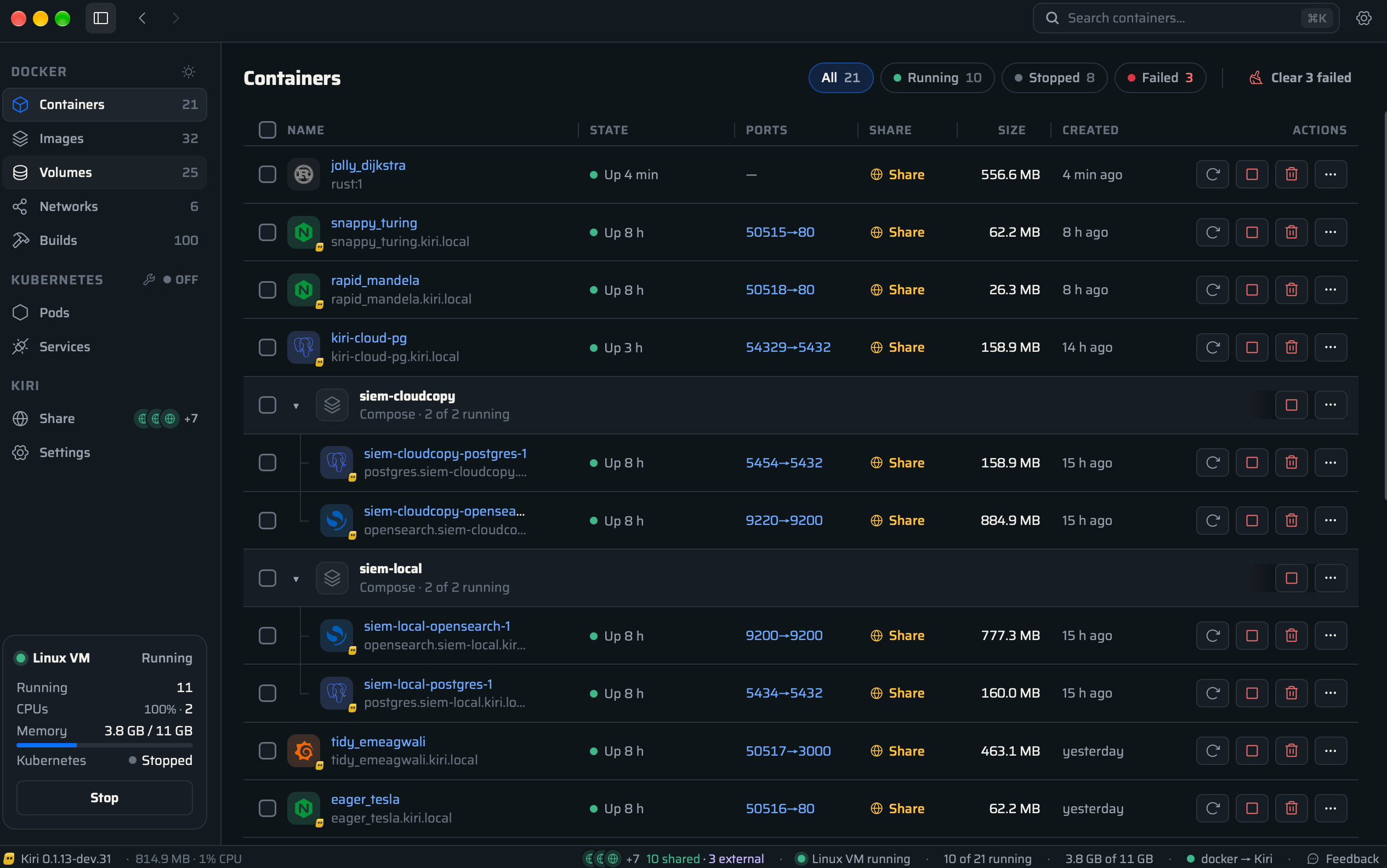
- **A native window** for containers, images, volumes and networks, plus a menu bar item.
- **In your language**: the window comes in 38 languages, on macOS, Windows and Linux alike.
---
## Quick Start
```sh
docker --context kiri run --rm alpine echo hello
docker --context kiri compose up -d
kiri k8s start # single-node Kubernetes as the `kiri` kubectl context
kiri machine create dev --distro ubuntu && kiri machine shell dev
kiri import # bring images, volumes and containers over from OrbStack or Docker Desktop
```
Docker's commands also work as `kiri` commands (`kiri run`, `kiri ps`,
`kiri compose up`, and so on), and always target Kiri.
---
## Features
| Area | What you get |
|------|--------------|
| **Containers** | The full lifecycle: `run`, `exec`, `logs`, `attach`, `stop`, `kill`, `restart`, `pause`, `update`, `stats`, `top`, `diff`, `export`, `commit` and `cp` both ways. Records survive a daemon restart. |
| **Limits and security** | `--memory`, `--cpus`, `--pids-limit`, `--shm-size`. Docker's default capabilities and a default seccomp filter, `--cap-add`/`--cap-drop`, `--privileged`, `--read-only`, `no-new-privileges`. |
| **Networking** | A default bridge, user networks with DNS by name and alias, `-p`/`-P` for TCP and UDP, `--network host\|none\|container:`, IPAM (`--subnet`, `--gateway`, `--ip`), IPv6, `host.docker.internal`. |
| **Local domains** | `http://.kiri.local` for every container and `..kiri.local` for Compose, with HTTPS from Kiri's own certificate authority. |
| **Storage** | Named and anonymous volumes, bind mounts of host paths, `--tmpfs`, `--mount`. |
| **Images** | `pull`, `push`, `tag`, `save`, `load`, `history`, `search`, with `docker login` credentials. amd64 images run through Rosetta on Apple silicon. |
| **Builds** | `docker build` and `buildx build` through BuildKit, which stops when idle. |
| **Compose** | `up`, `down`, `ps`, `logs`, `exec`, multiple networks, events. Projects are grouped in the window. |
| **Kubernetes** | `kiri k8s start`: a single-node k3s cluster, ready in about 20 s, as the `kiri` kubectl context. LoadBalancer services are published on `localhost`. |
| **Linux machines** | `kiri machine create dev --distro ubuntu`: your user, sudo and your home folder at the same path, with systemd if you want it. |
| **Share** | `kiri share 3000` puts a local port or a container on the internet. |
| **USB devices (beta)** | Hand a serial adapter, a Zigbee stick or a development board to your containers. |
| **Memory** | A balloon gives unused memory back while running, and the VM sleeps after 60 s idle. |
| **The window** | Containers, images, volumes and networks, each container with live logs, a command line and its files. A menu bar item shows what's running. |
| **Import** | `kiri import` brings images, volumes and containers over from OrbStack or Docker Desktop. |
| **Updates** | Kiri updates itself after checking each release's SHA-256 and signature. |
Every flag and the known issues are in **[docs/features.md](docs/features.md)**.
---
## Docker commands
Kiri speaks the Docker Engine API, so the `docker` CLI you already have works
against it. Pick the context once and nothing else changes:
```bash
docker context use kiri
```
| Area | Commands that work |
|------|--------------------|
| Containers | `run` `create` `start` `stop` `kill` `restart` `rm` `exec` `logs` `attach` `wait` `rename` `pause` `unpause` `update` `stats` `top` `diff` `export` `commit` `cp` `ps` `inspect` `container prune` |
| Images | `pull` `push` `tag` `images` `rmi` `save` `load` `history` `search` `login` `image prune` |
| Builds | `build` `buildx build` |
| Networks | `network create` `ls` `rm` `inspect` `connect` `disconnect` |
| Volumes | `volume create` `ls` `rm` `inspect` `prune` |
| Compose | `compose up` `down` `ps` `logs` `exec` |
| System | `system df` `events` `info` `version` |
The same commands work as `kiri` commands and always target Kiri:
```bash
kiri run -d --name web -p 8080:80 nginx # then open http://web.kiri.local
kiri ps
kiri logs -f web
kiri exec -it web sh
kiri compose up -d
kiri build -t myapp .
```
Kiri's own commands:
| Command | What it does |
|---------|--------------|
| `kiri k8s start \| stop \| status \| delete` | A single-node Kubernetes cluster |
| `kiri machine create NAME [--distro D] \| list \| shell NAME \| stop \| delete NAME` | Linux machines |
| `kiri share PORT\|CONTAINER [--name N]` | Share a local port or container on the internet |
| `kiri import [orbstack \| desktop-linux]` | Bring images, volumes and containers over |
| `kiri domains [set --http N --https N \| reset]` | The ports local domains answer on |
| `kiri usb [list] \| attach DEVICE \| detach DEVICE` | USB devices for containers (beta) |
| `kiri build-with [docker \| kiri]` | Which builder `docker build` uses |
| `kiri update [--check]` | Install the newest release |
| `kiri diag logs \| report` | Logs, and a report file to send with a bug |
| `kiri bench [--runs N] [--network none\|bridge]` | Measure container start on your machine |
| `kiri ui` | Open the window |
---
## Benchmarks
All figures are medians, measured with the same `docker` CLI and the same
images for every engine, in one session on one machine.
### macOS
`alpine` running `true` and removed, 30 runs, Apple silicon Mac:
| Engine | Docker Engine API, p50 | p99 | `docker` CLI, p50 | p99 |
|--------|----------------------:|----:|------------------:|----:|
| **Kiri** | **2.55 ms** | **4.72 ms** | **14.2 ms** | **17.4 ms** |
| Docker Desktop | 213 ms | 774 ms | 243 ms | 351 ms |
| OrbStack | 380 ms | 829 ms | 442 ms | 2383 ms |
Most of Kiri's 14 ms through the `docker` CLI is the CLI itself starting up.
What the engine costs you while it runs:
| Metric | Kiri |
|--------|-----:|
| VM cold boot to ready | 112 ms |
| Guest kernel boot to PID 1 | 8 ms |
| Clean VM shutdown | 2.2 ms |
| Wake from sleep | about 150 ms |
| Daemon memory while the VM sleeps | about 15 MB |
| Memory per container for a shim | 0 MB (there is no shim) |
| Daemon CPU when idle | 0.0 % |
| Host to guest round trip, p50 / p99 | 31 µs / 62 µs |
| Guest kernel image | 10 MB |
| Guest agent (PID 1 and the container runtime) | under 1 MB |
### Linux
Six engines on one 16-core x86-64 Ubuntu 24.04 machine:
| Engine | `run --rm alpine true` | 200 MB container → host | 1 GB bind-mount write | 1 GB bind-mount read | `build`, 3 layers, no cache | Published port |
|--------|----:|----:|----:|----:|----:|----:|
| **Kiri** | **188 ms** | **209 MB/s** | **1467 MB/s** | **3851 MB/s** | **1113 ms** | 10.3 Gbit/s |
| Docker Engine | 697 ms | 56 MB/s | 819 MB/s | 1307 MB/s | 1723 ms | **100.7 Gbit/s** |
| Podman | 1105 ms | 70 MB/s | 593 MB/s | 907 MB/s | 1148 ms | 51.9 Gbit/s |
| nerdctl | 631 ms | 72 MB/s | 845 MB/s | 1485 MB/s | 1211 ms | 52.4 Gbit/s |
| Colima | 635 ms | 20 MB/s | 493 MB/s | 1496 MB/s | 2472 ms | 0.8 Gbit/s |
| Docker Desktop | 714 ms | 114 MB/s | 826 MB/s | 1283 MB/s | 2008 ms | 87.8 Gbit/s |
Kiri starts a container 3.4 times faster than Docker Engine and reads a
bind mount 2.9 times faster. It is slower on bulk traffic through a published
port, which Kiri relays in user space: fine for a web app, visible for large
transfers. The full write-up is in
[`bench/ubuntu-2026-10-26.md`](bench/ubuntu-2026-10-26.md).
### Windows
Windows 11 on a 16-core x86-64 PC, both engines on WSL 2:
| | Kiri | Docker Desktop |
|---|----:|----:|
| `docker run --rm alpine true` | **78 ms** | 491 ms |
| `docker exec … true` | **57 ms** | 89 ms |
| 200 MB container → host | **255 MB/s** | 40 MB/s |
The full write-up is in [`bench/windows-2026-10-25.md`](bench/windows-2026-10-25.md).
### Run them yourself
```bash
kiri bench --network bridge --runs 30 # container start, on your machine
bench/suite.sh # the full Linux comparison
```
Method and every other figure are in [`bench/results.json`](bench/results.json).
---
## Comparison
| | Kiri | Docker Desktop | OrbStack | Colima |
|---|:---:|:---:|:---:|:---:|
| Open source | ✅ Apache-2.0 | ❌ | ❌ | ✅ MIT |
| Free for work use | ✅ | Paid for larger companies | Paid | ✅ |
| macOS | ✅ | ✅ | ✅ | ✅ |
| Windows | ✅ | ✅ | ❌ | ❌ |
| Linux | ✅ | ✅ | ❌ | ✅ |
| Works with the `docker` CLI, Compose and buildx | ✅ | ✅ | ✅ | ✅ |
| A window for containers, images, volumes and networks | ✅ | ✅ | ✅ | ❌ |
| Kubernetes | ✅ | ✅ | ✅ | ✅ |
| Linux machines | ✅ | ❌ | ✅ | ❌ |
| Local domains with HTTPS | ✅ | ❌ | ✅ | ❌ |
| VM sleeps when idle | ✅ | ✅ | ❌ | ❌ |
| Import from the others | ✅ | ❌ | ✅ | ❌ |
| Container start on macOS (Docker API, p50) | **2.55 ms** | 213 ms | 380 ms | not measured |
---
## How Kiri Works
```
docker CLI ─┐
compose ────┼─ Docker Engine API ─► kiri daemon ── vsock ──► guest agent (PID 1)
buildx ─────┤ owns the VM clone3 → container
kiri UI ────┘
```
The VM uses a custom 10 MB kernel, and its PID 1 is a ~900 KB Rust agent.
That agent starts containers with a single `clone3` into namespaces and a
cgroup. There's no runc, no shim and no dockerd. More detail is in
[docs/development.md](docs/development.md#architecture).
---
## Documentation
- [docs.runkiri.com](https://docs.runkiri.com): guides for every feature
- [Features](docs/features.md): everything supported today, release files and known issues
- [Development](docs/development.md): building, running from source, architecture and repository layout
- [Release notes](docs/releases)
---
## Roadmap
Next are more ways to share (Tailscale and Cloudflare Tunnel, in 0.3.0) and
Coolify support (0.4.0). See [ROADMAP.md](ROADMAP.md) for what's in each
release.
---
## Community
Kiri is built in the open. Issues and pull requests are welcome: see
**[CONTRIBUTING.md](CONTRIBUTING.md)** and the [Code of Conduct](CODE_OF_CONDUCT.md).
Looking for a first contribution? Browse the
[`good first issue`](https://github.com/libracoder/kiri/issues?q=is%3Aissue+is%3Aopen+label%3A%22good+first+issue%22) tickets.
Thanks goes to these amazing people:
---
## Security
Kiri updates itself, and checks each new release's signature first. To report
a vulnerability privately, see **[SECURITY.md](SECURITY.md)**.
---
## License
[Apache-2.0](LICENSE). Third-party licences are in [NOTICE](NOTICE). The guest
kernel is Linux (GPL-2.0); its config, patches and the source offer are in
[`guest/kernel`](guest/kernel).
The name "Kiri" and the Kiri logo are not covered by the licence. Forks are
welcome, under a different name and logo.