# dsh-capability-toggle-plugin
**Control agent capabilities from the DSH WebUI — with real runtime enforcement.**
[](#quick-start)


[](https://github.com/lifeopsgo/dsh-capability-toggle-plugin/releases)
[](./LICENSE)
**English** · [简体中文](./README.zh-CN.md)
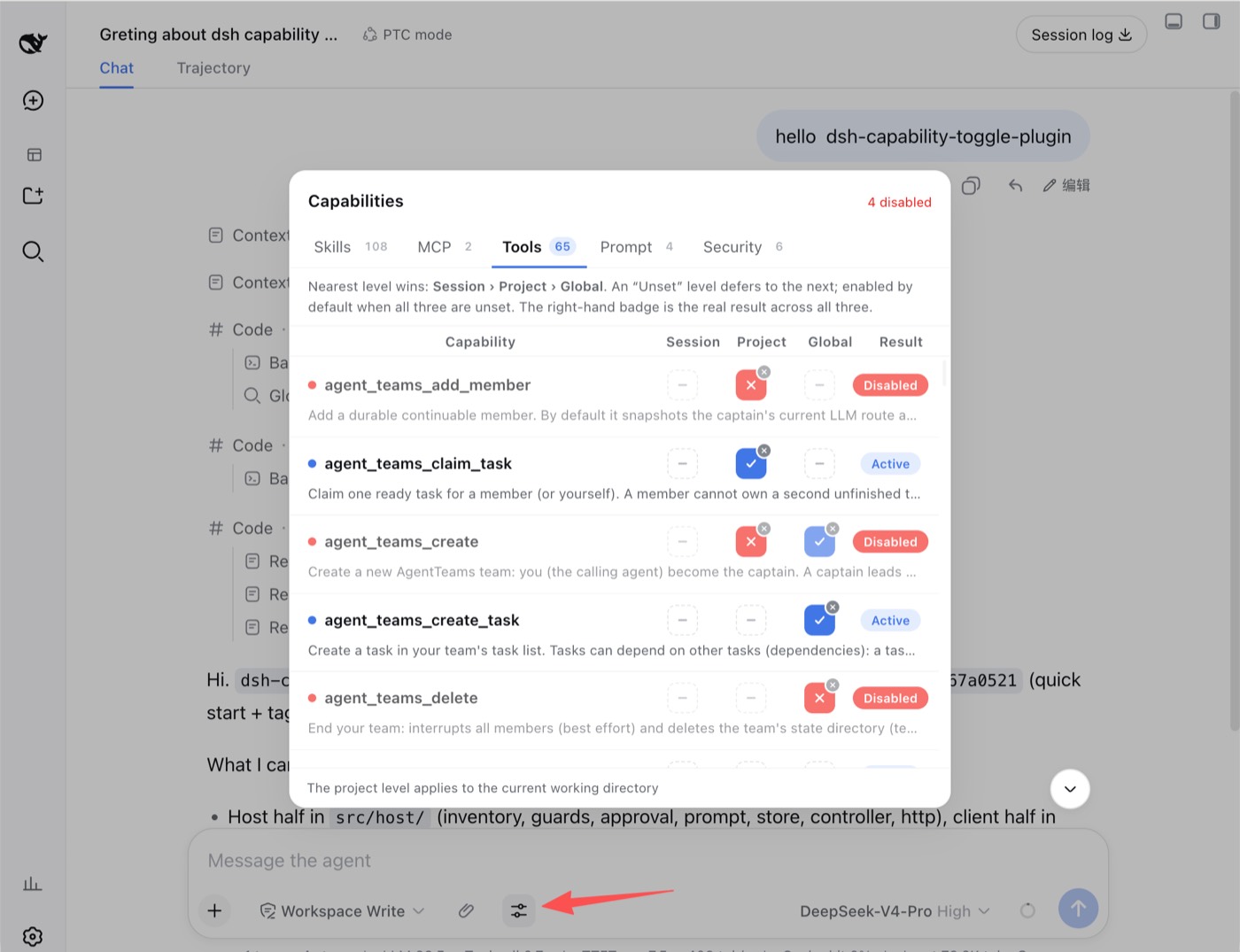
Session · Project · Global — blue check = on, red cross = off, dashed dash = unset.
## What it is
A **DeepSeek Harness (DSH) WebUI** plugin for controlling **skills, MCP servers, tools, prompt injections, approval escalation, and safety guards** at session, project, or global scope. Depending on the family, disabling removes, suppresses, rejects, or intercepts the capability on the agent's next step.
## Quick start
Requires **Node.js ≥ 22.6**.
```bash
dsh plugin --profile web add github:lifeopsgo/dsh-capability-toggle-plugin#v1.0.2
```
Restart the existing DSH Web GUI process, then refresh the page. Start it with the command below when it is stopped:
```bash
dsh --profile web web
```
Open the control beside the ➕ button while the agent is idle. Replace `web` with another profile name when needed.