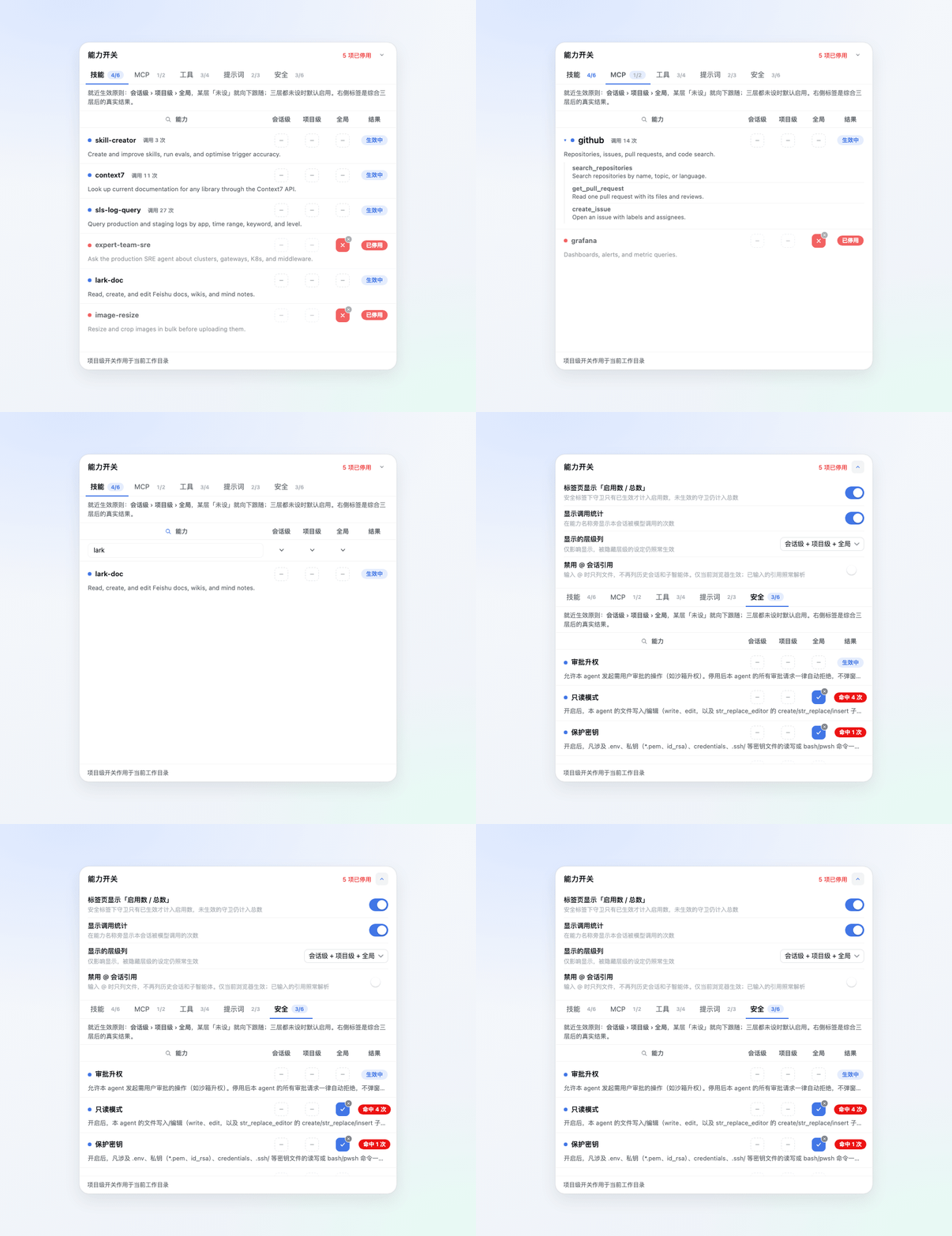
# dsh-capability-toggle-plugin **Control agent capabilities from the DSH WebUI — with real runtime enforcement.** [![platform](https://img.shields.io/badge/platform-DSH%20WebUI-2b7cd3?style=flat-square)](#quick-start) ![tests](https://img.shields.io/badge/tests-426%20passing-3fb950?style=flat-square) [![release](https://img.shields.io/github/v/release/lifeopsgo/dsh-capability-toggle-plugin?style=flat-square)](https://github.com/lifeopsgo/dsh-capability-toggle-plugin/releases) [![license](https://img.shields.io/badge/license-MIT-blue?style=flat-square)](./LICENSE) [![中文](https://img.shields.io/badge/README-中文-red?style=flat-square)](./README.md) [![English](https://img.shields.io/badge/README-English-blue?style=flat-square)](./README.en.md) Capability controls for Skills, MCP, Tools, Prompt, and Security Session · Project · Global — blue check = on, red cross = off, dashed dash = unset.

## What it is A **DeepSeek Harness (DSH) WebUI** plugin for controlling **skills, MCP servers, tools, prompt injections, approval escalation, and safety guards** at session, project, or global scope. Depending on the family, disabling removes, suppresses, rejects, or intercepts the capability on the agent's next step. ## Compatible DSH versions This plugin targets the **DSH 0.2 generation**, declared as one range: ``` >=0.2.0-0 <0.3.0-0 ``` That means "any 0.2 release, prereleases included". Every DSH version on npm is a prerelease, so enumerating exact release candidates meant the plugin was declared incompatible and skipped at startup whenever the host shipped a new one. Since v2.4.0 a single generation-scoped range covers the whole 0.2 line. The upper bound is `<0.3.0-0` on purpose. The compatibility gate evaluates semver with `includePrerelease: true`, where `0.3.0-rc.1` sorts *below* `0.3.0`; writing `<0.3.0` would let the next generation through, and 0.3 carries breaking changes. | DSH version | How it was checked | | --- | --- | | 0.2.0-rc.1 | Full suite green under those dependencies at v2.0.1 (380 tests) | | 0.2.1-rc.2 | The same gates at v2.1.0, plus browser verification | | 0.2.1-rc.5 | Typecheck, 412 tests and production build at v2.3.0 | | 0.2.2-rc.3 | Typecheck, 412 tests and production build at v2.4.0, plus confirmation that the host config entry and the client slot occupant are live in that runtime | **A range states whether the plugin installs; it cannot state whether an API exists.** The plugin relies on two host seams — the composer's `data-composer-overlay` escape hatch and the `inputTriggers` source roster — and tests assert both against the installed artifacts. If a seam disappears the related feature degrades instead of throwing. Other 0.2.x versions have not been run through the gates one by one. ## Quick start Requires **Node.js ^22.19.0 or ≥ 24.0.0** (same as DSH 0.2.x). ```bash dsh plugin --profile web add github:lifeopsgo/dsh-capability-toggle-plugin#v2.5.0 ``` Restart the existing DSH Web GUI process, then refresh the page. Start it with the command below when it is stopped: ```bash dsh --profile web web ``` Open the control beside the ➕ button. The panel opens while an agent runs — writes land once it is idle. Replace `web` with another profile name when needed.
Upgrade or remove ```bash # Upgrade or downgrade: use any tag listed on the releases page dsh plugin --profile web add github:lifeopsgo/dsh-capability-toggle-plugin#v2.5.0 # Remove dsh plugin --profile web remove dsh-capability-toggle-plugin ```
## Features ### Three-level resolution Each capability has three independent levels: ```text session › project › global › default (enabled) ``` Precedence is **session › project › global**; an **Unset** level defers to the next, and with every level unset the capability remains enabled. The row badge always shows the resolved result. **Session level reaches a session's subagents.** A subagent reads the same session layer as the session that spawned it: what you switch off there is off for the child too, and what you switch on there still overrides a project-level off for the child. A stance written on the subagent's own session ranks after the inherited one, so adjusting one child never leaks back to its parent. A subagent's panel shows only its own session entries; the inherited part still counts, and the row badge is the authoritative result. Inheritance follows the parent-child links the runtime recorded. A child restored on its own, with its parent absent, can only inherit the one parent link in its own header. The button displays only its current state: click to toggle **on ↔ off**, or use its small clear badge to return to **unset**. ### Capability families | Tab | Controls | | :-- | :-- | | **Skills** | Individual model-invocable skills, including project-level skills discovered from the session's workspace (`.dsh/skills`, `.agents/skills`) | | **MCP** | MCP servers; expand a row to inspect member tools | | **Tools** | Individual model-visible tools and their guidance sections | | **Prompt** | A safe, presence-checked allowlist of prompt injections | | **Security** | Approval escalation and five opt-in safety guards | ### Enforcement Every mechanism is scoped to the current agent; global registrations are not mutated. | Family | Enforcement | | :-- | :-- | | `tool` | Removed with `ctx.tools.restrict({ deny })`; forced calls are refused, and the tool's `tool:` guidance section is shadowed out of the prompt | | `mcp` | Member tools removed with `ctx.tools.restrict({ deny })`; the server's `mcp:` instructions section (its `### MCP server: ` block, including directives like "call kb.recall first") is shadowed out of the prompt, and shared resource calls (`list_mcp_resources` / `list_mcp_resource_templates` / `read_mcp_resource`) naming the switched-off server are refused | | `skill` | Shadowed by a same-named `modelInvocable:false` runtime skill | | `prompt` | Shadowed with empty text, or suppressed with `suppressRuntimeContext()` | | `approval` | Scoped approval requests resolve to `rejected` | | `guard` | `tools/pre-execute` blocks or requests confirmation for matching calls | ### Security controls Turning off **Approval escalation** rejects every approval request from that agent without changing the system `/permission` setting. Safety guards are opt-in: | Guard | Action | | :-- | :-- | | Read-only mode | Block file writes, creates, and edits | | Protect secrets | Block access to common secret files and credentials | | Dangerous shell | Confirm high-risk shell commands | | Destructive git | Confirm history- or work-losing git commands | | Outbound network | Confirm network tools and outbound shell actions | ### Usage stats Skills, MCP servers, and tools carry a small badge showing how many times the model called them this session (`called 7`). Counts update when a turn ends while the panel is open, live for one agent's lifetime, and are never persisted — the same retention as a safety guard's `matched N` badge. The tally counts **requests**, not successful runs: a call a guard blocked or sent to confirmation still counts, because the model asking for a capability is the signal worth seeing. Guards are matched against rather than called, so they keep their own badge and show no usage count; prompt and approval rows show none either. ### Panel preferences A disclosure arrow beside the panel title opens four settings, stored in `localStorage` so they survive page reloads and restarts: | Preference | Effect | | :-- | :-- | | **Show “enabled / total” on tabs** | Renders each tab badge as a fraction (`67/106`) instead of a bare total, so the strip reports how much of each family is active at a glance. The tooltip states both numbers in words either way. | | **Show call stats** | Hides or shows the per-row usage badge described above. | | **Level columns to show** | Narrows the grid to Session, Session + Project, or all three columns. | | **Disable @ session references** | Typing `@` lists files only, with no historic or subagent sessions. It filters the candidate menu only: mentions already written into the draft still resolve, the setting is per browser (`localStorage`), and the host still issues its session lookup. | The fraction counts a guard as enabled only while it is **active**. A guard row reuses the same `disabled` field to mean ACTIVE — the inverse of every default-on family — so a Security tab with the approval gate open and all five guards inactive reads `1/6`, not `6/6`. Narrowing the level columns is **display-only**: the three-level resolution keeps running exactly as before, so a hidden project or global override still applies. Each row's badge and level switches always reflect the resolved state — a default-on family reads `Active`/`Disabled`, a guard reads `Guarding`/`Inactive` — which is why hiding a column cannot hide an effect. The name column absorbs the freed width, and the layout is driven by CSS variables so it stays aligned with the narrow-screen adaptation. Text in the popup and in the blocking-guard card can be selected with the mouse and copied with Ctrl+C; dragging across a button label selects it without also triggering the button. Additional behavior: while the agent runs, the controls that write a stance lock — each row's level switches, their clear badges, and the bulk menus — but browsing stays open, so the search box, the level-column selector, the tabs, and a row's expand still work. State survives popup close and turn boundaries, and the UI follows the WebUI language. ## Development Requires Node.js ^22.19.0 or >= 24.0.0 (same as DSH 0.2.x). ```bash pnpm install pnpm typecheck && pnpm build && pnpm test # 414 tests ``` ## Roadmap Planned, not yet implemented: - **Cross-project config sync** — copy or link project-level settings from another project instead of configuring each project from scratch. - ~~**Capability invocation stats**~~ — shipped in v1.2.0: skills, MCP servers, and tools badge how many times the model called them this session. - ~~**Fraction-format tab counts**~~ — shipped in v1.3.0: each tab badge renders as `enabled / total`, and the panel's disclosure arrow holds three display preferences. A guard counts as enabled only while active, so its inverted `disabled` flag never inflates the Security numerator. - **Settings menu for customizable defaults** — expose the plugin's own options in a settings menu, such as the default stance for newly discovered capabilities (today a capability with all three levels unset resolves to enabled, except the opt-in safety guards, which stay inactive). - **Show only enabled / only disabled** — add a state filter next to the search box, which today matches names and descriptions only. Guards need the same care the fraction counts need: a guard reuses `disabled` to mean ACTIVE, so "only disabled" must not list a guard that is actually enforcing. The filter would also narrow what bulk actions apply to, since they act on every currently visible row. - ~~**Filter and select-all**~~ — shipped in v1.1.0: the toolbar's search box filters rows, and each level's bulk menu applies enable/disable/clear to every currently visible row. - ~~**Bulk actions on a filtered selection**~~ — shipped in v1.1.0 together with the filter (search narrows, bulk acts on what's shown). - ~~**WebUI sidebar chrome toggles**~~ — shipped in the companion plugin **dsh-ui-toggle-plugin** (its own Settings section, "UI toggle"): hide the sidebar brand area, keep only the Settings button at the sidebar foot, lay the global panel icons out horizontally, hide the New Session and collapse-sidebar buttons, and hide the composer placeholder — all applied live and migrated from this plugin's stored values on first start. ---
MIT — see LICENSE