
Modly logo

# Modly **Local, open source, AI-powered image-to-3D mesh generation.** Turn any photo into a 3D model using open source AI models running entirely on your GPU. Modly is a desktop application for Windows, Linux, and Apple Silicon macOS. > Created by [Lightning Pixel](https://github.com/lightningpixel)

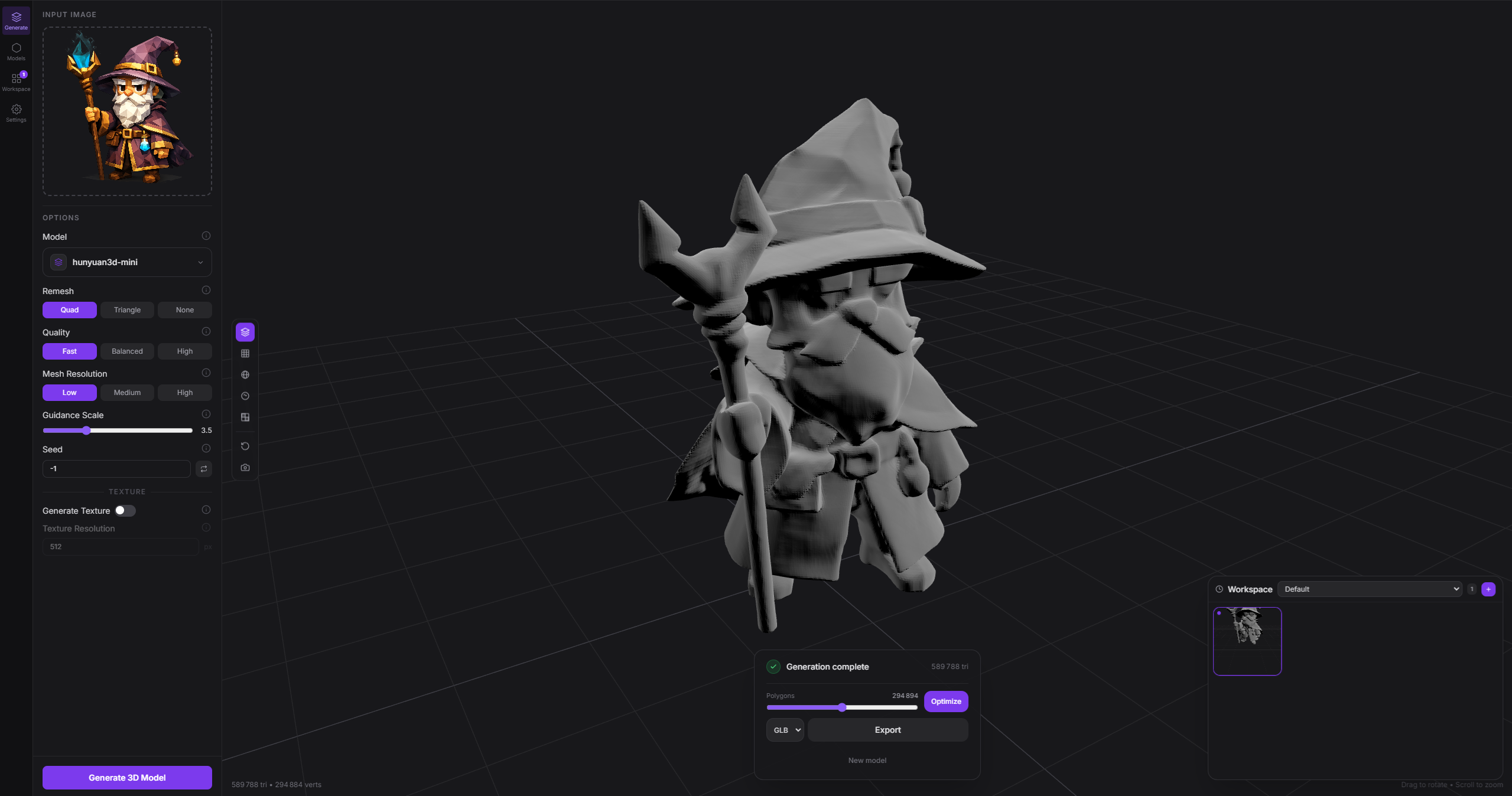
Modly screenshot

--- ## Download Head to the [Releases](../../releases/latest) page to download the latest installer for Windows, Linux, or Apple Silicon macOS. Alternatively, you can clone the repository and run the app directly without installing: ```bash # Windows launch.bat # Linux / macOS ./launch.sh ``` --- ## Getting started ### 1. Install JS dependencies ```bash npm install ``` ### 2. Set up Python backend ```bash cd api python -m venv .venv .venv\Scripts\activate # Windows source .venv/bin/activate # Linux / macOS pip install -r requirements.txt ``` ### 3. Run in development ```bash npm run dev ``` ### 4. Test ```bash npm test ./node_modules/.bin/tsc --noEmit -p tsconfig.node.json npm run build ``` ## Platform notes - AMD GPUs are supported through ROCm on Linux and Windows: a Radeon card is detected automatically and extensions are steered to ROCm PyTorch wheels, with no ROCm install required. See [docs/running-on-amd-rocm.md](docs/running-on-amd-rocm.md). - macOS support targets Apple Silicon only. - macOS uses native window controls. Windows and Linux keep the existing custom controls. - The top bar includes a live RAM indicator sourced from the main process. - Workflow wiring is validated before run; invalid graphs stay in place and surface inline/toast warnings instead of dropping the current mesh view. - Package Apple Silicon macOS with `npm run package:mac`. - Imported meshes can be smoothed and decimated in-app; optimized results are written back into the workspace. --- ## Extension system Modly supports external model and process extensions. Each extension is a GitHub repository containing a `manifest.json` plus the runtime entry files required by its type. ### Official extensions | Extension | Model | URL | |-----------|-------|-----| | [modly-hunyuan3d-mini-extension](https://github.com/lightningpixel/modly-hunyuan3d-mini-extension) | Hunyuan3D 2 Mini | https://github.com/lightningpixel/modly-hunyuan3d-mini-extension | | [modly-hunyuan3d-mini-turbo-extension](https://github.com/lightningpixel/modly-hunyuan3d-mini-turbo-extension) | Hunyuan3D 2 Mini Turbo | https://github.com/lightningpixel/modly-hunyuan3d-mini-turbo-extension | | [modly-hunyuan3d-mini-fast-extension](https://github.com/lightningpixel/modly-hunyuan3d-mini-fast-extension) | Hunyuan3D 2 Mini Fast | https://github.com/lightningpixel/modly-hunyuan3d-mini-fast-extension | | [modly-triposg-extension](https://github.com/lightningpixel/modly-triposg-extension) | TripoSG | https://github.com/lightningpixel/modly-triposg-extension | | [modly-trellis2-gguf-extension](https://github.com/lightningpixel/modly-trellis2-gguf-extension) | Trellis2 GGUF | https://github.com/lightningpixel/modly-trellis2-gguf-extension | ### How to install an extension **1.** Go to the **Models** page and click **Install from GitHub**. ![Install from GitHub](docs/install-from-github.png) **2.** Enter the HTTPS URL of the extension repository and confirm. ![Enter extension URL](docs/install-extension.png) **3.** If the extension exposes model nodes, download the model or one of its variants. Process extensions are ready once installation and setup complete. ![Install models](docs/install-models.png) ### Multiple Hugging Face repositories per model node A model node whose weights are split across repositories can declare `model_sources`. Modly validates every source, downloads them sequentially in one Models-page action, and considers the node installed only when every declared check exists. ```json { "id": "generate", "model_sources": [ { "id": "primary", "provider": "huggingface", "repo_id": "org/main-model", "destination": ".", "checks": ["model.safetensors"] }, { "id": "encoder", "provider": "huggingface", "repo_id": "org/encoder", "revision": "v1.0", "destination": "auxiliary/encoder", "include_prefixes": ["config.json", "model.safetensors"], "checks": ["config.json", "model.safetensors"] } ] } ``` `destination`, filters, and checks use safe POSIX paths relative to the node's model directory. Every check must name a regular, non-empty file included by that source's filters; invalid plans fail before any file is downloaded. Pin a tag or commit in `revision` when reproducible weights are required. The only supported provider is `huggingface`. Existing nodes that use `hf_repo`, `download_check`, `hf_include_prefixes`, and `hf_skip_prefixes` keep their original behavior. ### Shared weights inside one model extension Multi-node model extensions can declare extension-scoped `weight_groups` and reference them from any sibling node. Shared files are downloaded once under `//_shared/`, while node-specific `model_sources` stay under the node's existing model directory. ```json { "id": "pixal3d", "type": "model", "weight_groups": [ { "id": "pixal3d-base", "model_sources": [ { "id": "base", "provider": "huggingface", "repo_id": "TencentARC/Pixal3D", "revision": "", "destination": ".", "checks": ["pipeline.json"] } ] } ], "nodes": [ { "id": "generate", "weight_groups": ["pixal3d-base"] }, { "id": "worldsculpt", "weight_groups": ["pixal3d-base"], "model_sources": [ { "id": "adapter", "provider": "huggingface", "repo_id": "AlayaLab/WorldSculpt", "revision": "", "destination": ".", "checks": ["model.safetensors"] } ] } ] } ``` At runtime, `MODEL_DIR` remains the selected node's private directory. Subprocess extensions also receive `MODEL_ID`, `MODEL_NODE_ID`, and a JSON `SHARED_MODEL_DIRS` map in their environment. Both direct and subprocess generator instances receive `MODEL_ID`, `MODEL_NODE_ID`, and the resolved mapping in `shared_model_dirs` before `load()`. Direct generators use these instance attributes, not process-global environment variables, to distinguish sibling nodes. Shared groups are installed through their dependent nodes; the drawer exposes shared-group status and explicit removal. Removing private node data never removes a shared group; shared-group removal is a separate action that identifies every affected node. ### Separately installable weight variants A model node that publishes the same weights in several variants (quantizations, precisions…) can declare `weight_variants` next to `hf_repo`. The Extensions page lists every variant under the node, and each one is downloaded or deleted on its own. ```json { "id": "generate", "hf_repo": "org/model-gguf", "download_check": "pipeline.json", "hf_include_prefixes": ["pipeline.json", "encoder/", "dit/"], "params_schema": [ { "id": "quant", "label": "Quantization", "type": "select", "default": "Q5_K_M", "options": [ { "value": "Q4_K_M", "label": "Q4_K_M" }, { "value": "Q5_K_M", "label": "Q5_K_M" } ] } ], "weight_variants": { "param": "quant", "default": "Q5_K_M", "options": [ { "id": "Q4_K_M", "label": "Q4_K_M", "size_gb": 2.4, "vram_gb": 6, "include_prefixes": ["dit/model_Q4_K_M.gguf"], "checks": ["dit/model_Q4_K_M.gguf"] }, { "id": "Q5_K_M", "include_prefixes": ["dit/model_Q5_K_M.gguf"], "checks": ["dit/model_Q5_K_M.gguf"] } ] } } ``` - `param` names the `params_schema` select whose values are the variant ids. That param must exist on the node (or on the extension, as its fallback), and when it declares `options` they must cover every variant id. - `size_gb` (download size) and `vram_gb` (approximate VRAM the variant needs) are optional positive numbers, shown next to the variant when present. - Every install downloads the shared files (`hf_include_prefixes`, with every variant's files excluded automatically) plus one variant: the one asked for, or the `default` one — the first option when `default` is omitted. Files already complete on disk are skipped, so adding a second variant only fetches that variant. Only declared variants are excluded from the shared pass: keep `hf_include_prefixes` narrow enough that a variant the repository publishes but the manifest does not declare (e.g. an extra `dit/model_Q8_0.gguf`) is not downloaded with every install. - A variant is installed when all of its `checks` exist; the node is installed once its `download_check` and at least one variant are present. - Generation fails with an explicit message when the selected variant is not installed, and the node's selector labels those options `(not installed)`. - `include_prefixes` and `checks` are safe POSIX paths relative to the node's model directory. Prefixes of two variants cannot overlap, `download_check` stays outside every variant, and `weight_variants` cannot be combined with `model_sources`. --- ## Workflows Start with a basic workflow first. For example, on the "Workflows" tab, try: Image -> Generate Mesh -> Add to Scene. Make sure there is a connection between each of the steps. Go to the "Generate" tab, make sure the workflow is selected, then click on "Generate 3D Model". Click on "Settings/Logs/Errors" to see any issues. Model extensions may also declare `scene` as a node input or output. A scene is a workspace directory containing `scene-manifest.json` with schema `modly.scene-manifest.v1`; it is not an arbitrary JSON file. Use the **Load Scene** workflow node to select and validate an existing scene directory. Scene-capable generators implement `generate_artifact(input_kind, artifact_path, ...)`; legacy image generators and `POST /generate/from-image` remain unchanged. The generic `POST /generate/from-artifact` boundary currently accepts only `scene`, leaving future artifact kinds to separate reviewed changes. For this first contract, `scene` is model-only and must be declared as the single `input` value (not inside `inputs`); process and mixed-input scene nodes are rejected. Model nodes may still accept multiple images and produce a scene. ## Modly CLI Agents and scripts can call a running Modly desktop app without using the UI via the stdlib-only CLI. The CLI is a thin helper over Modly's canonical automation concepts and keeps final machine-readable JSON on stdout: ```bash python tools/modly-cli/agent.py health python tools/modly-cli/agent.py model list python tools/modly-cli/agent.py workflow-run status python tools/modly-cli/agent.py generate --image ./input.png --output ./export.glb ``` Canonical commands are `health`, `model`, `workflow-run`, `capability`, and `process-run`. The friendly `generate` command starts `POST /workflow-runs/from-image`, polls the returned run, exports the final mesh when requested, and includes recovery metadata such as `workflow-run status ...` and `workflow-run cancel ...` in the JSON response. Compatibility and helper surfaces are intentionally separated: `legacy` wraps old `/generate/*` job endpoints, `dev serve-api` / `dev ensure-server` start only the FastAPI backend and do not prove Electron/Desktop bridge readiness, and `experimental comfy-image` / `experimental generate-from-workflow` are external ComfyUI orchestration helpers rather than the canonical Modly agent contract. Hidden helper aliases such as `status`, `export`, and `batch` remain parseable for scripts, but they are not presented as canonical root commands. `experimental generate-from-workflow --workflow --output ` treats `--output` as the final artifact location. When the ComfyUI workflow produces a downloadable 3D asset, the CLI downloads it directly; image-only workflows remain a compatibility path through Modly image-to-3D generation. See `tools/modly-cli/SKILL.md` for the agent workflow and output contract. --- ### Community Join the [Discord server](https://discord.gg/BvjDCvS3yr) to stay up to date with the latest news, report bugs, and share feedback. --- ## Sponsors

Thanks to our early sponsors for believing in Modly and helping make local AI 3D generation more accessible.

DrHepa
DrHepa
   benjapenjamin
benjapenjamin
   iammojogo-sudo
iammojogo-sudo

--- ## License MIT License — see [LICENSE](LICENSE) for details. **If you fork this project and build your own app from it, you must credit the original project and its creator:** > Based on [Modly](https://github.com/lightningpixel/modly) by [Lightning Pixel](https://github.com/lightningpixel) This is a requirement of the MIT license attribution clause. Please keep this credit visible in your app's UI or documentation.