Logo

Lightpanda Browser

The headless browser built from scratch for AI agents and automation.
Not a Chromium fork. Not a WebKit patch. A new browser, written in Zig.

[![License](https://img.shields.io/github/license/lightpanda-io/browser)](https://github.com/lightpanda-io/browser/blob/main/LICENSE) [![Twitter Follow](https://img.shields.io/twitter/follow/lightpanda_io)](https://twitter.com/lightpanda_io) [![GitHub stars](https://img.shields.io/github/stars/lightpanda-io/browser)](https://github.com/lightpanda-io/browser) [![Discord](https://img.shields.io/discord/1391984864894521354?style=flat-square&label=discord)](https://discord.gg/K63XeymfB5)



[ ](https://github.com/lightpanda-io/demo)   [ ](https://github.com/lightpanda-io/demo)
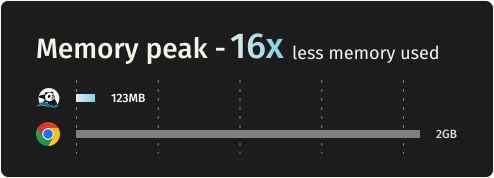
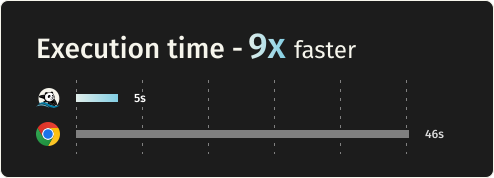
## Benchmarks Requesting 933 real web pages over the network on a AWS EC2 m5.large instance. See [benchmark details](https://github.com/lightpanda-io/demo/blob/main/BENCHMARKS.md#crawler-benchmark). | Metric | Lightpanda | Headless Chrome | Difference | | :---- | :---- | :---- | :---- | | Memory (peak, 100 pages) | 123MB | 2GB | ~16 less | | Execution time (100 pages) | 5s | 46s | ~9x faster | ## Quick start ### Install **Package Managers** Latest nightly from Homebrew: ```console brew install lightpanda-io/browser/lightpanda ``` Latest nightly from Arch Linux User Repository: ```console yay -S lightpanda-nightly-bi ``` **Download from the nightly builds** You can download the last binary from the [nightly builds](https://github.com/lightpanda-io/browser/releases/tag/nightly) for Linux and MacOS for both x86_64 and aarch64. *For Linux* ```console curl -L -o lightpanda https://github.com/lightpanda-io/browser/releases/download/nightly/lightpanda-x86_64-linux && \ chmod a+x ./lightpanda ``` Verify the binary before running anything: ```console ./lightpanda version ``` [Linux aarch64 is also available](https://github.com/lightpanda-io/browser/releases/tag/nightly) > **Note:** The Linux release binaries are linked against glibc. On musl-based distros (Alpine, etc.) the binary fails with `cannot execute: required file not found` because the glibc dynamic linker is missing. Use a glibc-based base image (e.g., `FROM debian:bookworm-slim` or `FROM ubuntu:24.04`) or [build from sources](#build-from-sources). *For MacOS* ```console curl -L -o lightpanda https://github.com/lightpanda-io/browser/releases/download/nightly/lightpanda-aarch64-macos && \ chmod a+x ./lightpanda ``` [MacOS x86_64 is also available](https://github.com/lightpanda-io/browser/releases/tag/nightly) *For Windows + WSL2* Lightpanda has no native Windows binary. Install it inside WSL following the Linux steps above. WSL not installed? Run `wsl --install` from an administrator shell, restart, then open `wsl`. See [Microsoft's WSL install guide](https://learn.microsoft.com/en-us/windows/wsl/install) for details. Your automation client (Puppeteer, Playwright, etc.) can run either inside WSL or on the Windows host. WSL forwards `localhost:9222` automatically. **Install from Docker** Lightpanda provides [official Docker images](https://hub.docker.com/r/lightpanda/browser) for both Linux amd64 and arm64 architectures. The following command fetches the Docker image and starts a new container exposing Lightpanda's CDP server on port `9222`. ```console docker run -d --name lightpanda -p 127.0.0.1:9222:9222 lightpanda/browser:nightly ``` ### Dump a URL ```console ./lightpanda fetch --obey-robots --dump html --log-format pretty --log-level info https://demo-browser.lightpanda.io/campfire-commerce/ ``` You can use `--dump markdown` to convert directly into markdown. `--wait-until`, `--wait-ms`, `--wait-selector` and `--wait-script` are available to adjust waiting time before dump. ### Start a CDP server ```console ./lightpanda serve --obey-robots --log-format pretty --log-level info --host 127.0.0.1 --port 9222 ``` Once the CDP server started, you can run a Puppeteer script by configuring the `browserWSEndpoint`.
Example Puppeteer script ```js import puppeteer from 'puppeteer-core'; // use browserWSEndpoint to pass the Lightpanda's CDP server address. const browser = await puppeteer.connect({ browserWSEndpoint: "ws://127.0.0.1:9222", }); // The rest of your script remains the same. const context = await browser.createBrowserContext(); const frame = await context.newPage(); // Dump all the links from the frame. await frame.goto('https://demo-browser.lightpanda.io/amiibo/', {waitUntil: "networkidle0"}); const links = await frame.evaluate(() => { return Array.from(document.querySelectorAll('a')).map(row => { return row.getAttribute('href'); }); }); console.log(links); await frame.close(); await context.close(); await browser.disconnect(); ```
### Agent mode `lightpanda agent` lets you drive the browser with a native agent. Describe what you want in plain English or with slash commands, and it controls the browser: navigating pages, clicking through flows, filling forms, extracting structured data. Think of it as a robot you're directing to use the web, more than a chatbot you're having a conversation with. Because the agent runs inside the same process as the browser, every tool call is a direct operation and you retain Lightpanda's speed and memory advantage. The output of an agent session is a [PandaScript](https://lightpanda.io/docs/usage/pandascript): vanilla JavaScript with a small set of native browser primitives built directly into Lightpanda. Run `/save` to export one from your current session, then replay it with `lightpanda agent