# Proxy Switch · dsh-proxy-switch [![test](https://github.com/lightrivers/dsh-proxy-switch/actions/workflows/test.yml/badge.svg)](https://github.com/lightrivers/dsh-proxy-switch/actions/workflows/test.yml) [![version](https://img.shields.io/github/package-json/v/lightrivers/dsh-proxy-switch?label=version)](package.json) [![license: MIT](https://img.shields.io/badge/license-MIT-blue.svg)](LICENSE) [![DeepSeek Harness 0.2.x](https://img.shields.io/badge/DeepSeek%20Harness-0.2.x-4176e6.svg)](#requirements) [![platform](https://img.shields.io/badge/platform-macOS%20%7C%20Windows%20%7C%20Linux-lightgrey.svg)](#requirements) [中文](README.md) · English **Does DeepSeek Harness `web_fetch` stop working while Clash, Surge or v2rayN is running? This plugin fixes it.** It finds the proxy on your computer by itself. While the proxy runs, `web_fetch` goes through it; when the proxy is off, `web_fetch` goes direct. No `.env` editing, no port numbers to remember.

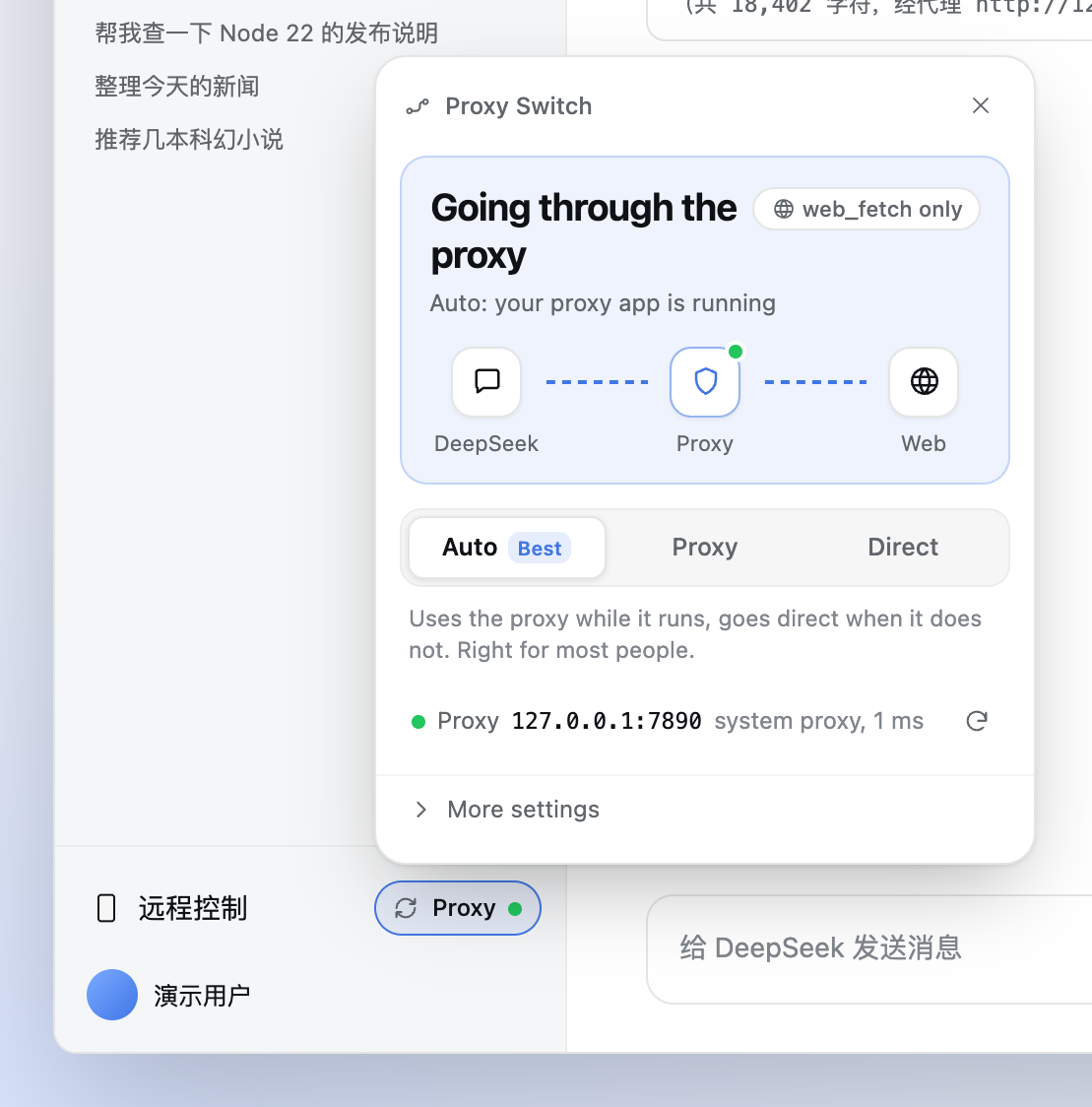
Proxy Switch panel: going through the proxy, chosen automatically

[Requirements](#requirements) · [Install](#install) · [Usage](#usage) · [When a notice appears](#when-a-notice-appears) · [FAQ](#faq) · [How it works](#how-it-works) --- ## What problem it solves This plugin is for you if you have seen any of these: - `web_fetch` fails with **`non-public IP address`**, or says a site resolved to **`198.18.x.x`**; - your proxy app runs in **TUN / enhanced mode / fake-IP**, and every page fetch fails; - you hard-coded `HTTP_PROXY` into `~/.dsh/.env` to make `web_fetch` work, and now **even chatting with the model breaks** whenever the proxy is off; - you edit configuration every time you turn the proxy on or off.

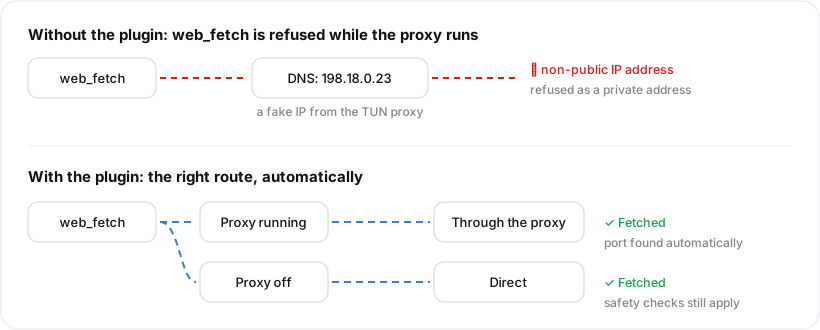
Without the plugin, the fake IP is refused by the safety check; with it, web_fetch uses the proxy while it runs and goes direct when it is off

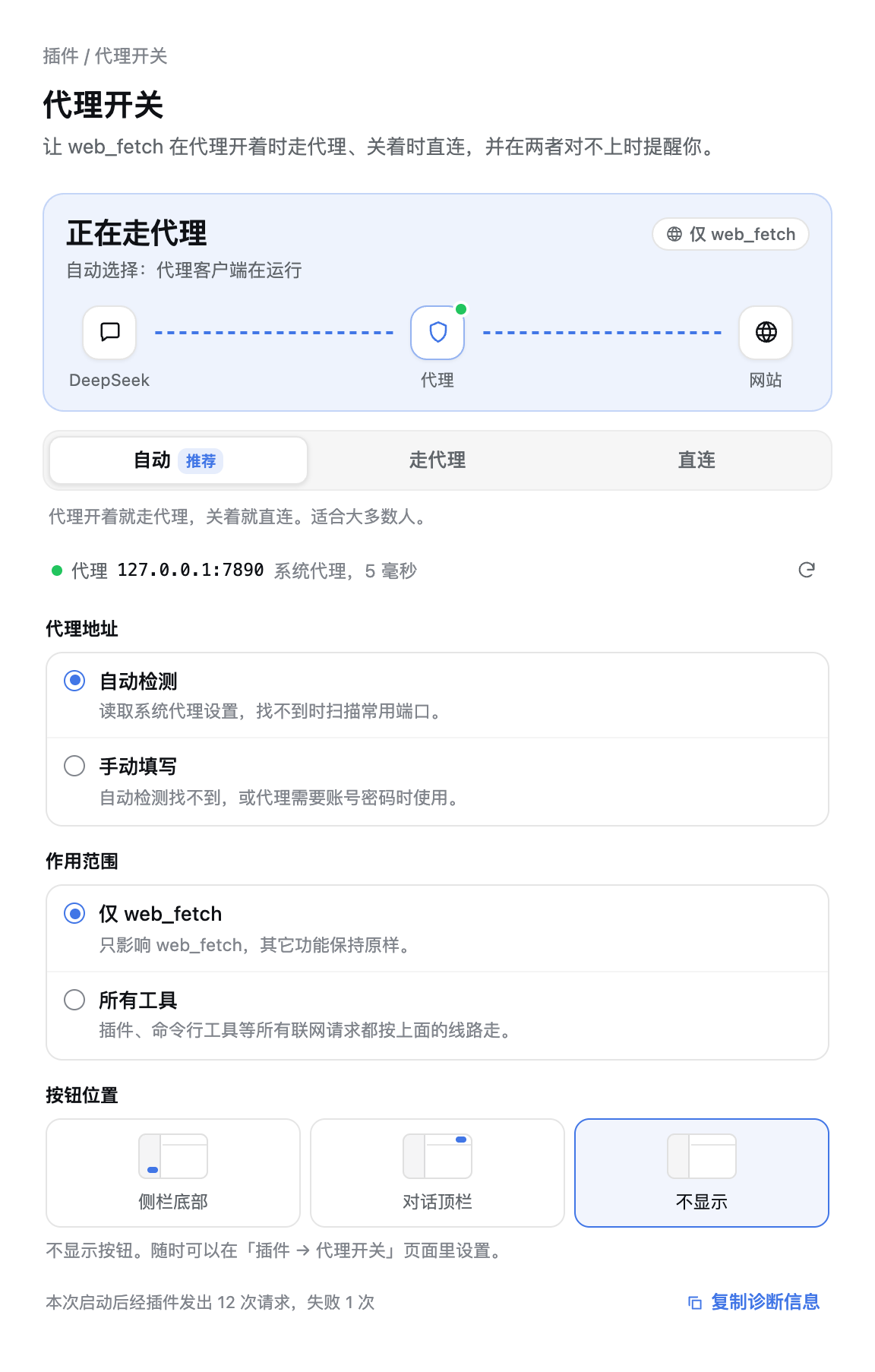
Why it happens: a proxy in TUN mode answers every DNS lookup with a "fake" address in `198.18.0.0/15`. When `web_fetch` connects directly, its safety check refuses private addresses, so the request is rejected. Hard-coding the proxy fixes that, until the proxy is turned off and nothing connects at all. This plugin gives `web_fetch` its own switchable route. **By default, model calls and other features are not affected.** ## Requirements | Item | Requirement | |---|---| | DeepSeek Harness | Desktop 0.2.x | | System | macOS (fully verified); Windows and Linux (supported in code, not yet fully verified on real machines) | | Proxy | A local HTTP proxy or "mixed port" (Clash / mihomo / Clash Verge, Surge, v2rayN all provide one). SOCKS and PAC are not supported | | License | [MIT](LICENSE) | ## Install 1. Get the source: ```bash git clone https://github.com/lightrivers/dsh-proxy-switch.git ~/dsh-proxy-switch ``` 2. In DeepSeek Harness, ask the model: "Install the plugin at `~/dsh-proxy-switch` with plugin_manager" (it runs `plugin_manager action=install_bundle target=`). 3. **Quit DSH completely and open it again.** A small pill appears at the bottom right of the sidebar, showing the current route and a status dot (for example "Proxy ●"). > If you previously put `HTTP_PROXY` / `HTTPS_PROXY` in `~/.dsh/.env`, remove them before restarting. Otherwise DSH falls back to the hard-coded proxy whenever the plugin is off. To upgrade: run `git pull` in the source folder, then repeat steps 2 and 3. When upgrading from 0.4.1 or earlier (0.4.2 renames the package to `@lightrivers/dsh-proxy-switch`), first ask the model to uninstall `dsh-proxy-switch` with `plugin_manager`, then install the new version following the steps above. Your settings and state are kept. ## Usage **Most people do not need to do anything.** The default is **Auto**: the plugin reads your system proxy settings, finds the proxy port, routes `web_fetch` through the proxy while it runs, and switches to direct when the proxy is turned off. Click the pill at the bottom of the sidebar to open the panel: | Part | What it shows | |---|---| | **The large card at the top** | The route in use right now. A flowing line means traffic gets through. When something is wrong, a mark sits where the problem is: ✕ means that hop is broken, 🔒 means the proxy wants a login, ❗ with a stuttering line means the route is unreliable (some sites will fail). A glint sweeping a grey line means it is checking. The tag in the top right is the scope: *web_fetch only* or *All tools*. | | **Auto / Proxy / Direct** | Choose the route. **Auto** suits almost everyone; the other two pin the route regardless of whether the proxy is running. | | **The proxy line** | The proxy address it found, how it was found (system proxy, environment variable or port scan), and the latency. The button on the right checks again. | | **More settings** | Enter a proxy address yourself, change the scope, choose where the button lives. | The dot on the pill: 🟢 fine, 🟠 needs attention, 🔴 something is wrong, ⚪ checking. ### Where the button lives The bottom of the sidebar can get crowded with plugin buttons. Under **More settings → Button location** you can choose: - **Sidebar** (default) - **Chat header**: handy if you usually keep the sidebar collapsed. On Windows, this footer row is hidden while the sidebar is collapsed. - **Hidden**: every setting is still on the **Plugins → Proxy Switch** page. The plugin page has the full panel and every setting. *(The screenshots below show the Chinese interface; the plugin follows the DSH language setting.)*

Plugin page with all settings: proxy address, scope, button location

## When a notice appears When the route and the proxy disagree, the panel explains it in one sentence and offers a button that fixes it. Click the button.
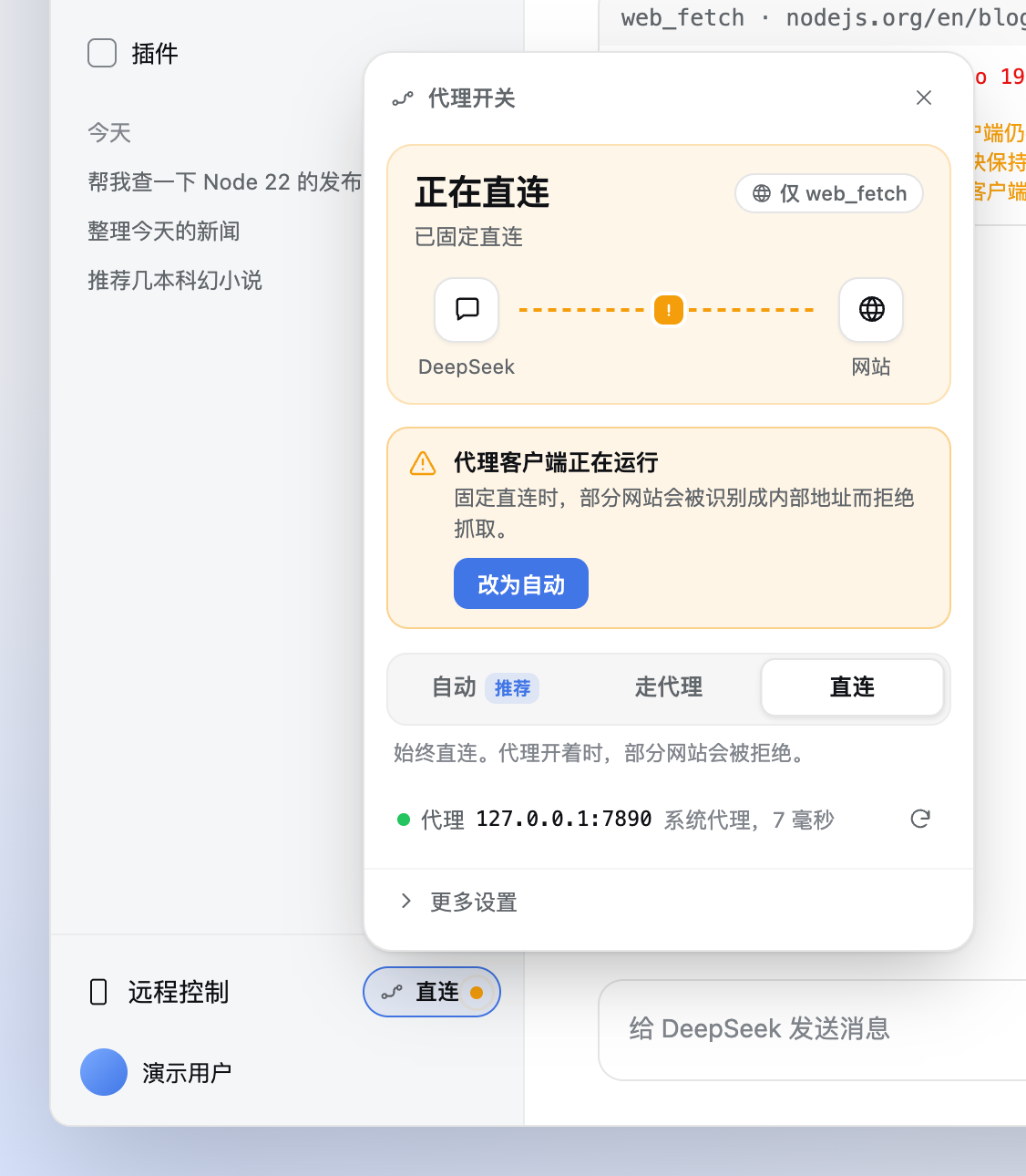
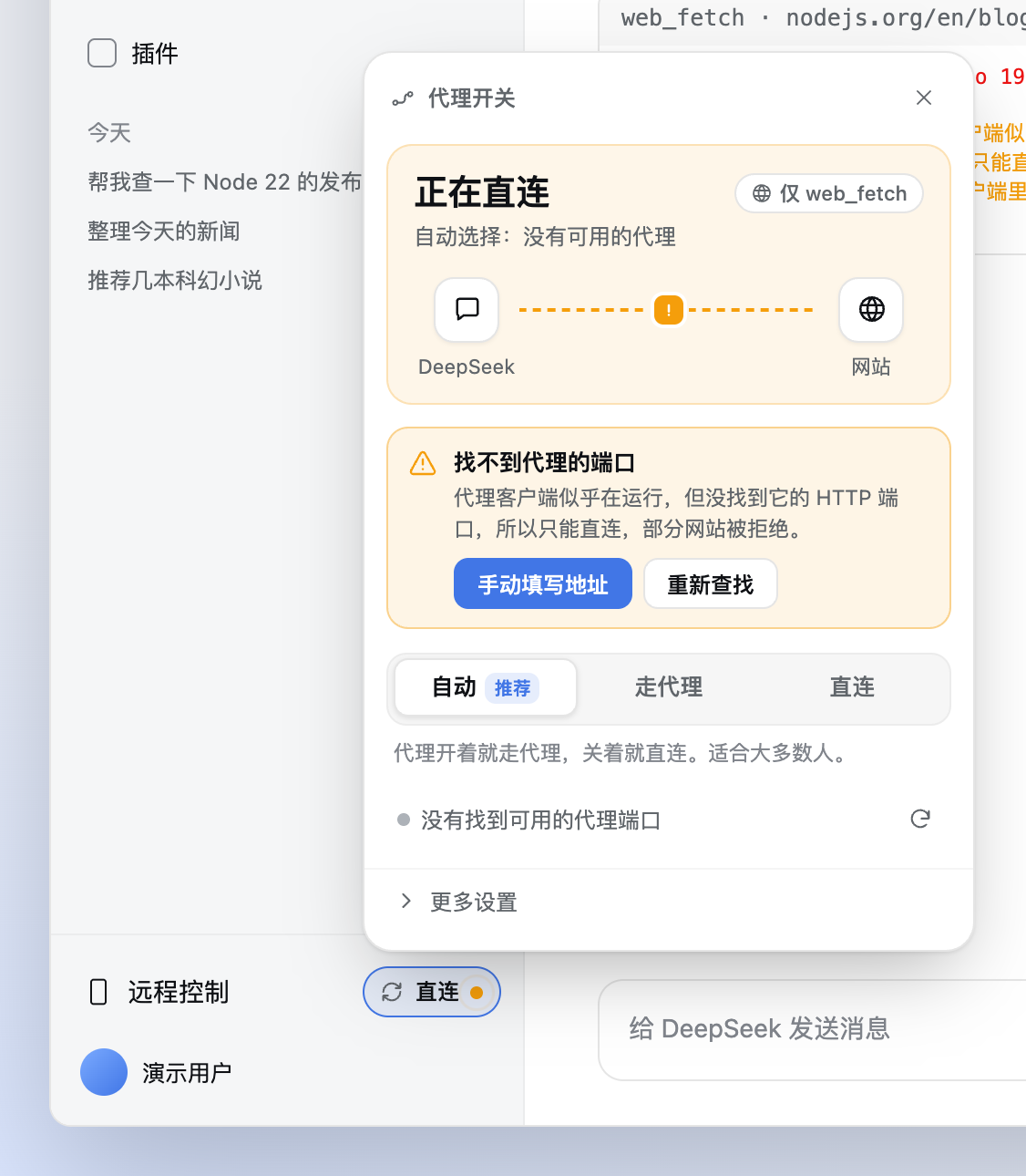
Direct is pinned while the proxy runs: click Switch to Auto The proxy seems to run but its port was not found: click Enter the address
Your proxy app is running: you pinned Direct, but the proxy is on, so some sites will be refused. Click Switch to Auto. Proxy port not found: the proxy seems to be running, but it does not set the system proxy and its port is not a common one. Click Enter the address; a port number alone (for example 7890) is enough.
Other notices work the same way: do what the button says. The same notice is also appended to `web_fetch` results, so the model sees it and can tell you. ## FAQ ### Does it affect model calls, search or other tools? Not by default. The scope is *web_fetch only*: the plugin does not change global network settings, the process environment or child-process environments. Other modules use this route only if you choose *All tools*. ### My proxy app does not use port 7890. Will it be found? Yes. The plugin reads the **system proxy settings** first (Network settings on macOS, Internet Options on Windows, GNOME/KDE proxy settings on Linux), so any port works as long as your proxy app has "system proxy" turned on. Otherwise it reads `HTTPS_PROXY`-style variables from the DSH launch environment, and finally scans common ports (7890, 7897, 6152, 1087, 10809 and others). Each candidate is verified with a real `CONNECT` handshake and used only if it answers like an HTTP proxy. ### Can Auto pick the wrong route? Before each `web_fetch`, the plugin checks the proxy port locally (about 1 ms), so it will not keep using the proxy right after you turn it off. If no proxy is found, it goes direct, and the direct-mode safety check still applies. ### What if my proxy needs a username and password? Detection notices that the proxy asks for a login, and the panel asks you to enter `http://user:pass@host:port` yourself. The password is stored only on this computer with file mode 600, and is shown as `***` in the interface, logs and notices. ### In proxy mode, could the model use the plugin to reach my local network? The plugin blocks what it can, but it cannot guarantee it. In proxy mode, your proxy app resolves the name and makes the connection, so the plugin cannot see where it finally goes. Before handing a request to the proxy, the plugin checks it locally: local names such as `localhost`, `.local` and `.lan` are refused, and so are names that resolve to a private address on this computer. With TUN on, however, this computer only sees fake addresses (`198.18.x.x`), so the real target cannot be judged and the request is allowed. This is the same exposure you had with a hard-coded `HTTP_PROXY` in `~/.dsh/.env`. Direct mode checks every DNS answer. The other way round: if your DNS is polluted and answers a normal site with a private address, proxy mode will refuse that site by mistake, and the notice says *Forward mode refused …*. Turning on your proxy app's TUN (or switching to a trusted DNS) fixes it. ### Are SOCKS, HTTPS or PAC proxies supported? Only HTTP proxies for now. Almost every proxy app offers an HTTP port or a "mixed port"; use that one. ### Does it work on Windows and Linux? The code covers all three platforms, and detection reads each system's proxy settings, but so far it has been fully verified only on macOS. Feedback is welcome. ## How it works ``` web_fetch ──▶ the plugin's own web_fetch provider ──▶ private local channel (random port, 127.0.0.1 only) ├─ Proxy: CONNECT / absolute URI ──▶ your HTTP proxy └─ Direct: DNS + safety check ──────▶ the website ``` - The plugin replaces only the "send the request" step of `web_fetch`. Redirects, timeouts, size limits and decoding still use DSH's own implementation. - In direct mode, every DNS answer must be a public address: fake IPs, private, loopback and NAT64-embedded private addresses are all refused. - In proxy mode, local names and targets that resolve to a private address on this computer are refused. The proxy resolves the name in the end, so this is a mitigation (see the FAQ above). - The private channel uses a random token generated at each start, so other programs on this computer cannot use it, or the proxy credentials you saved. - Every request opens a new connection, so a route change never reuses an old proxy tunnel. - Design details, security boundaries and test coverage: [docs/ARCHITECTURE.md](docs/ARCHITECTURE.md) (Chinese). Earlier review notes: [REVIEW.md](REVIEW.md). ### Settings file Everything you can change in the panel is saved in `~/.dsh/storages/dsh-proxy-switch/state.json` (folder mode 0700, file mode 0600). You normally never need to edit it. | Field | Default | Meaning | |---|---|---| | `mode` | `auto` | `auto` (follow detection) / `forward` (always use the proxy) / `direct` (always go direct) | | `upstreamSource` | `auto` | `auto`: the proxy address follows detection; `manual`: only the address you entered is used | | `upstream` | `http://127.0.0.1:1082` | Proxy address. Only `http://host:port` is accepted, optionally with `user:pass@` | | `scope` | `web_fetch_only` | `web_fetch_only` / `global` (all tools) | | `listenPort` | `7899` | Local port used only by the *All tools* scope | | `probeIntervalMs` | `15000` | How often the proxy is checked in the background (3000–600000 ms); not shown in the interface | The button location is a browser-side preference, stored in `localStorage` as `dsh-proxy-switch.placement`. When upgrading from 0.3, your route choice is kept. A proxy address left at the old default switches to automatic detection; an address you entered stays manual. ### State API ``` GET /dsh-proxy-switch/state POST /dsh-proxy-switch/mode { "mode": "auto" | "forward" | "direct" } POST /dsh-proxy-switch/settings { "scope"?, "upstream"?, "upstreamSource"?, "listenPort"?, "probeIntervalMs"? } POST /dsh-proxy-switch/probe check the current proxy now POST /dsh-proxy-switch/detect search for a proxy again ``` The routes accept only local requests whose `Host` is DSH's own address, and check `Origin` and `Sec-Fetch-Site`. `POST` also requires `Content-Type: application/json` and the header `x-dsh-proxy-switch-request: 1`. Main fields in `state`: `mode`, `effectiveMode` (the route in use), `upstream` (credentials masked), `upstreamSource`, `detection`, `probe`, `warning`, `provider`, `scope`, `stats`. ## Development and tests ```bash npm test # unit tests (including client rendering) DSH_RUNTIME_MODULES=/path/to/dsh/node_modules node scripts/e2e-host.mjs # integration tests on the real Cordis/WebRuntime node scripts/e2e-real.mjs # optional: through a real local HTTP proxy node scripts/e2e-web-fetch-warning.mjs # the notice text appended to web_fetch results ``` `DSH_RUNTIME_MODULES` points at the DSH runtime's `node_modules`. You can extract it from the app: `npx @electron/asar extract "/Applications/DeepSeek Harness.app/Contents/Resources/app.asar" out`, then use `out/dsh/node_modules`. Runtime packages must stay in `peerDependencies`, never `dependencies`; a second copy of `@deepseek-ai/dsh-http-proxy` would make the *All tools* scope fail silently. ## Uninstall 1. Ask the model to "uninstall dsh-proxy-switch with plugin_manager" (`remove_bundle`), then restart DSH. 2. Delete `~/.dsh/storages/dsh-proxy-switch/`. 3. If you want the hard-coded proxy back, put `HTTP_PROXY` / `HTTPS_PROXY` back into `~/.dsh/.env` and restart. ## Changelog - **0.4.0**: Added the **Auto** route and automatic proxy detection (system proxy, environment variables, common ports); redesigned the panel and the compact sidebar pill, with a route diagram that marks where a problem is; hardened after an adversarial security review (private-channel token, `Host` check on the control routes, a local target check in proxy mode, HTTPS handshake timeouts and more; see [docs/ARCHITECTURE.md](docs/ARCHITECTURE.md)). - **0.3.0**: `web_fetch` moved to the plugin's own private channel; global network settings are no longer changed. ## License [MIT](LICENSE) © lightrivers