---
title: Model Context Protocol (MCP)
---
# Model Context Protocol (MCP)
The Model Context Protocol enables LLMs to interact with external tools, data sources, and services through a standardized interface. SMG acts as an MCP client, connecting models to MCP servers on their behalf.
---
## Overview
### :material-tools: External Tools
Give models access to web search, code execution, database queries, and API calls through standardized tool interfaces.
### :material-shield-check: Secure Execution
Models never have direct network access. SMG mediates all external interactions with credential isolation.
### :material-gavel: Policy-Based Approval
Control tool execution with trust levels, per-tool policies, and comprehensive audit logging.
### :material-cached: Tool Discovery
Automatic tool discovery with caching, TTL-based refresh, and qualified names to prevent collisions.
---
## How It Works
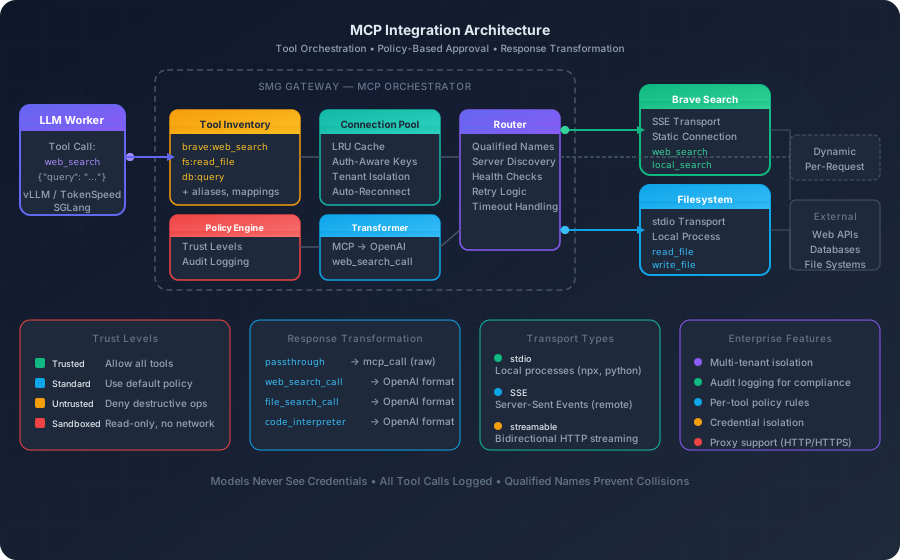
SMG's MCP Orchestrator manages all interactions between LLM workers and external MCP servers.
### Request Flow
1. **LLM Worker** generates a tool call (e.g., `web_search`)
2. **Tool Inventory** resolves the qualified name (`brave:web_search`)
3. **Policy Engine** evaluates trust level and approval rules
4. **Connection Pool** provides an authenticated connection
5. **MCP Server** executes the tool and returns results
6. **Transformer** converts the response to OpenAI format
---
## Approval System
SMG's approval system provides fine-grained control over tool execution—critical for enterprise deployments.
### Trust Levels
Each MCP server can be assigned a trust level that determines default behavior:
| Trust Level | Behavior | Use Case |
|-------------|----------|----------|
| **Trusted** | Allow all tools unconditionally | Internal tools, verified vendors |
| **Standard** | Use default policy | General-purpose servers |
| **Untrusted** | Deny destructive operations | Third-party, unverified servers |
| **Sandboxed** | Read-only, no network access | Experimental, testing |
### Policy Evaluation
Policies are evaluated in order of specificity:
1. **Explicit tool policy** — `brave:delete_data` → deny
2. **Server policy + trust level** — `brave` → trusted
3. **Default policy** — allow
### Example Policy Configuration
```yaml
policy:
default: allow
servers:
brave:
trust_level: trusted
internal-tools:
trust_level: standard
default: allow
external-api:
trust_level: untrusted
default: deny
tools:
"internal-tools:delete_all": deny
"external-api:execute_code":
deny_with_reason: "Code execution not allowed"
```
---
## Transport Types
MCP supports multiple transport protocols:
### :material-console: stdio
Local processes via stdin/stdout.
- **Best for**: Local tools, sandboxed environments
- **Latency**: Lowest
- **Example**: `npx @anthropic/mcp-server-filesystem`
### :material-broadcast: SSE
HTTP-based Server-Sent Events.
- **Best for**: Remote hosted services
- **Latency**: Low
- **Proxy**: Supported
### :material-swap-horizontal: Streamable HTTP
Bidirectional HTTP streaming.
- **Best for**: High-throughput tools
- **Latency**: Low
- **Proxy**: Limited
---
## Response Transformation
SMG transforms MCP responses to OpenAI-compatible formats:
| Response Format | Output Type | Use Case |
|-----------------|-------------|----------|
| `passthrough` | `mcp_call` | Raw MCP response |
| `web_search_call` | `web_search_call` | Search results with URLs |
| `file_search_call` | `file_search_call` | File search results |
| `code_interpreter_call` | `code_interpreter_call` | Code execution results |
### Tool Configuration
Configure response formats and argument mappings per tool:
```yaml
servers:
- name: brave
protocol: sse
url: "https://mcp.brave.com/sse"
token: "${BRAVE_API_KEY}"
tools:
brave_web_search:
alias: web_search # LLM sees "web_search"
response_format: web_search_call
arg_mapping:
renames:
q: query # Rename arguments
defaults:
count: 10 # Default values
```
---
## Configuration
### CLI Option
```bash
smg --worker-urls http://localhost:8000 --mcp-config-path /etc/smg/mcp.yaml
```
### Configuration File
```yaml
# Static MCP servers (connected at startup)
servers:
- name: brave
protocol: sse
url: "https://mcp.brave.com/sse"
token: "${BRAVE_API_KEY}"
required: true
- name: filesystem
protocol: stdio
command: "npx"
args: ["-y", "@anthropic/mcp-server-filesystem", "/workspace"]
# Connection pool for dynamic servers
pool:
max_connections: 100
idle_timeout: 300
# Tool inventory settings
inventory:
enable_refresh: true
tool_ttl: 300
refresh_interval: 60
# Approval policy
policy:
default: allow
servers:
brave:
trust_level: trusted
```
### Keeping Credentials Out of Config Files
SMG parses `mcp.yaml` as plain YAML and does not expand environment
variables inside server `token` values. To keep credentials out of the
checked-in config, substitute placeholders before the gateway loads the
file — for example, render the YAML through `envsubst` from a shell
wrapper, use a templating tool (Helm, Kustomize, Jinja), or inject the
final config via a secret mount.
For MCP-specific HTTP proxy configuration, SMG does read the
`MCP_HTTP_PROXY`, `MCP_HTTPS_PROXY`, and `MCP_NO_PROXY` environment
variables (falling back to `HTTP_PROXY`, `HTTPS_PROXY`, and `NO_PROXY`)
when no `proxy:` block is set in `mcp.yaml`.
---
## Static vs Dynamic Servers
SMG supports two connection models:
### :material-server: Static Servers
Defined in configuration, connected at startup.
- **Always available** — no connection delay
- **Never evicted** — persistent connection
- **Use for**: Core tools, critical integrations
### :material-server-network: Dynamic Servers
Specified per-request via `server_url` parameter.
- **On-demand** — connected when needed
- **Pooled** — LRU eviction when idle
- **Use for**: Tenant-specific tools, optional integrations
### Connection Pool Performance
| Operation | Latency |
|-----------|---------|
| Cache hit (existing connection) | <1ms |
| Cache miss (new connection) | 70-650ms |
---
## Multi-Tenant Patterns
SMG supports sophisticated multi-tenant deployments with tenant-isolated connections:
### :material-account-group: Shared Tools
Common tools available to all tenants via static configuration.
**Examples**: Web search, calculator, datetime
### :material-account-key: Tenant-Specific Tools
Per-tenant tools via dynamic `server_url` with isolated credentials.
**Examples**: Internal APIs, proprietary tools
---
## Security Model
#### :material-check-circle: Best Practices
- Store tokens in environment variables
- Use `${VAR}` syntax in config
- Gateway manages all credentials
- Models never see secrets
- All tool calls logged for audit
#### :material-close-circle: Avoid
- Hardcoded tokens in config files
- Passing credentials through models
- Exposing MCP servers directly
- Sharing tokens across tenants
**Key principle**: Models and clients never have direct access to internal systems. All access is mediated through SMG and MCP servers.
---
## Qualified Tool Names
Multiple MCP servers can expose tools with the same name. SMG uses **qualified names** to prevent collisions:
```
server-a:run_query # Different from
server-b:run_query # Same tool name, different servers
```
Tool aliases can provide simpler names to the LLM while maintaining qualified routing internally.
---
## Troubleshooting
| Symptom | Cause | Solution |
|---------|-------|----------|
| "Failed to connect" at startup | Server unreachable or auth invalid | Test URL with curl, verify token |
| "Tool not found" during inference | Inventory not refreshed | Enable `refresh_on_error` |
| Connection timeouts | Proxy blocking | Check `no_proxy` patterns |
---
## What's Next?
### :material-puzzle: WASM Plugins
Extend SMG with custom middleware logic.
[WASM Plugins →](wasm-plugins.md)
### :material-sitemap: Architecture
Where MCP fits in the SMG pipeline.
[Architecture Overview →](../architecture/overview.md)