---
title: Tokenizer Caching
---
# Tokenizer Caching
SMG implements a two-level tokenizer cache that dramatically reduces tokenization overhead for repeated content, achieving 60-90% cache hit rates in typical production workloads.
---
## Overview
### :material-lightning-bolt: L0 Cache (Exact Match)
Hash-based O(1) lookup for complete tokenization results. Achieves 60-90% hit rate for repeated prompts like system instructions.
### :material-layers: L1 Cache (Prefix Match)
Boundary-aligned prefix matching that tokenizes only the suffix on hit. Ideal for multi-turn conversations with growing context.
### :material-memory: Memory Efficient
~2.2KB per L0 entry with configurable L1 memory bounds. Scale from 36MB (small) to 210MB (large) deployments.
### :material-chart-line: Observable
Full Prometheus metrics for hit rates, memory usage, and cache sizing. Monitor and tune in real-time.
---
## Why Cache Tokenization?
Tokenization—converting text to token IDs—happens on every request. While individual tokenization is fast (~1-5ms), it adds up at scale.
### :material-robot: System Prompts
Same instructions sent with every request. Perfect for L0 exact-match caching.
### :material-forum: Multi-Turn Conversations
Growing context with shared prefix. L1 cache tokenizes only new messages.
### :material-file-document-multiple: RAG Applications
Common document snippets across queries. Both L0 and L1 provide benefits.
### :material-tray-full: Batch Processing
Similar prompt templates with variable parts. High L0 hit rates.
---
## Cache Architecture
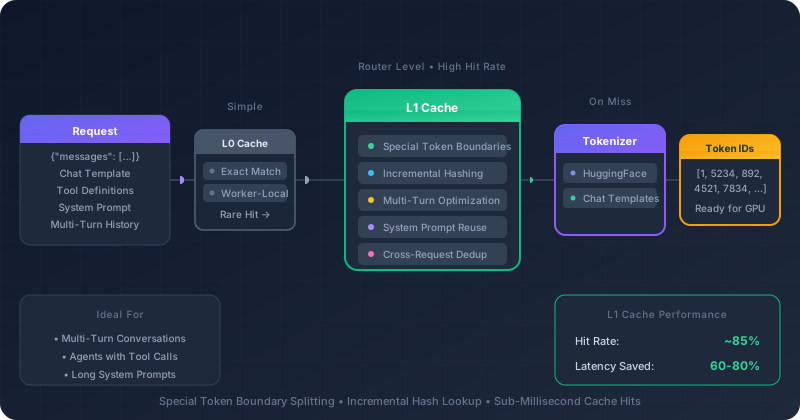
### :material-lightning-bolt: L0 Cache (Exact Match)
**Router-level cache** storing complete tokenization results for exact string matches.
- Hash-based O(1) lookup
- ~2.2KB per entry
- 60-90% hit rate for repeated prompts
- LRU eviction when full
**Best for**: Repeated system prompts, identical requests, batch inference
### :material-layers: L1 Cache (Prefix Match)
**Router-level cache** storing tokens at special token boundaries for prefix reuse.
- Tokenize only the suffix on hit
- Cross-request deduplication
- Memory-bounded (configurable)
- Automatic boundary detection
**Best for**: Multi-turn conversations, growing contexts, incremental content
---
## Special Token Boundaries (L1)
L1 cache identifies boundaries at special tokens for efficient prefix matching:
| Model Family | Boundary Tokens | Example |
|--------------|-----------------|---------|
| **ChatML** (Qwen, Yi) | `<\|im_start\|>`, `<\|im_end\|>` | Each message boundary |
| **Llama 3** | `<\|begin_of_text\|>`, `<\|eot_id\|>`, `<\|start_header_id\|>` | Text start, turn end |
| **GPT** | `<\|endoftext\|>` | Document end |
---
## Multi-Turn Conversation Example
Consider how caching helps a typical chat application:
#### Turn 1 (Cold)
```
System: You are a helpful assistant.
User: What is Python?
```
**L0**: Miss → Full tokenization (~3ms)
**L1**: Miss → Store at boundaries
#### Turn 2 (Warm)
```
System: You are a helpful assistant.
User: What is Python?
Assistant: Python is a programming language...
User: How do I install it?
```
**L0**: Miss (text changed)
**L1**: **Hit!** → Only tokenize new content (~0.5ms)
**Result**: Turn 2 tokenizes only ~20% of the content, saving ~2.5ms per request.
---
## Configuration
### Model & Tokenizer Paths
#### `--model-path`
HuggingFace model ID or local path to load the tokenizer from.
| Option | `--model-path` |
|--------|----------------|
| Default | None |
**Usage**:
```bash
# HuggingFace model ID (downloads automatically)
smg --model-path meta-llama/Llama-3.1-8B-Instruct ...
# Local path to model directory
smg --model-path /models/llama-3.1-8b-instruct ...
# Local path to tokenizer.json file
smg --model-path /models/llama-3.1-8b-instruct/tokenizer.json ...
```
When pointing to a local directory, SMG looks for either a HuggingFace
`tokenizer.json` or a tiktoken file (`tiktoken.model` or `*.tiktoken`). When
pulling from the HuggingFace Hub, SMG additionally falls back to
`tokenizer_config.json` and `vocab.json` in the downloaded snapshot if a
primary tokenizer file is not present.
#### `--tokenizer-path`
Explicit path to a tokenizer file. Overrides `--model-path` for tokenizer loading.
| Option | `--tokenizer-path` |
|--------|-------------------|
| Default | None |
**When to use**:
- When the tokenizer is stored separately from the model
- When using a custom tokenizer with a standard model
- When the model directory structure is non-standard
```bash
# Use model for metadata but separate tokenizer
smg \
--model-path meta-llama/Llama-3.1-8B-Instruct \
--tokenizer-path /custom/tokenizers/llama3-tokenizer.json \
...
```
---
### Chat Templates
Chat templates convert structured messages (system, user, assistant roles) into the prompt format expected by specific models. SMG uses Jinja2 templates, the same format used by HuggingFace Transformers.
#### `--chat-template`
Path to a Jinja2 chat template file.
| Option | `--chat-template` |
|--------|-------------------|
| Default | Auto-discovered from model |
**Template discovery priority**:
1. Explicit `--chat-template` path (highest priority)
2. `chat_template.json` in model directory
3. `chat_template.jinja` in model directory
4. Any `.jinja` file in model directory
5. `chat_template` field in `tokenizer_config.json`
#### Template Variables
Chat templates use Jinja2 syntax with access to:
| Variable | Description |
|----------|-------------|
| `messages` | Array of message objects with `role` and `content` |
| `add_generation_prompt` | Boolean to add assistant prompt prefix |
| `tools` | Optional array of tool definitions |
| `documents` | Optional array of document context |
#### Template Examples
**ChatML** (Qwen, Yi)
```jinja
{%- for message in messages %}
<|im_start|>{{ message.role }}
{{ message.content }}<|im_end|>
{% endfor %}
{%- if add_generation_prompt %}
<|im_start|>assistant
{% endif %}
```
**Llama 3**
```jinja
<|begin_of_text|>{% for message in messages %}
<|start_header_id|>{{ message.role }}<|end_header_id|>
{{ message.content }}<|eot_id|>
{% endfor %}
{% if add_generation_prompt %}<|start_header_id|>assistant<|end_header_id|>
{% endif %}
```
---
### L0 Cache Configuration
The L0 cache stores complete tokenization results for exact string matches.
#### `--tokenizer-cache-enable-l0`
Enable the L0 exact match cache.
| Option | `--tokenizer-cache-enable-l0` |
|--------|-------------------------------|
| Default | `false` |
#### `--tokenizer-cache-l0-max-entries`
Maximum number of entries in the L0 cache.
| Option | `--tokenizer-cache-l0-max-entries` |
|--------|-----------------------------------|
| Default | `10000` |
### L1 Cache Configuration
The L1 cache stores tokenization results at special token boundaries.
#### `--tokenizer-cache-enable-l1`
Enable the L1 prefix matching cache.
| Option | `--tokenizer-cache-enable-l1` |
|--------|-------------------------------|
| Default | `false` |
#### `--tokenizer-cache-l1-max-memory`
Maximum memory for the L1 cache in bytes.
| Option | `--tokenizer-cache-l1-max-memory` |
|--------|----------------------------------|
| Default | `52428800` (50 MB) |
---
## Memory Planning
### L0 Cache Sizing
Each L0 entry uses approximately **2.2 KB**:
| Entries | Memory | Recommended For |
|---------|--------|-----------------|
| 1,000 | ~2.2 MB | Development, testing |
| 10,000 | ~22 MB | Standard production |
| 25,000 | ~55 MB | High-repetition workloads |
| 50,000 | ~110 MB | Large-scale deployments |
| 100,000 | ~220 MB | Enterprise with many prompt variants |
!!! tip "Sizing Guideline"
Set L0 entries to **1-2x the number of unique system prompt variants** in your workload.
### L1 Cache Sizing
L1 cache is bounded by total memory:
| Memory | Recommended For |
|--------|-----------------|
| 25 MB | Memory-constrained environments |
| 50 MB | Standard deployments (default) |
| 100 MB | Multi-turn conversation heavy |
| 200 MB | Long context applications |
!!! tip "Sizing Guideline"
Estimate **~1 KB per active conversation context** for L1 sizing.
### Total Cache Budget
#### :material-server: Small Deployment
- **L0**: 5,000 entries (~11 MB)
- **L1**: 25 MB
- **Total**: ~36 MB
#### :material-server-network: Medium Deployment
- **L0**: 25,000 entries (~55 MB)
- **L1**: 50 MB
- **Total**: ~105 MB
#### :material-server-network-outline: Large Deployment
- **L0**: 50,000 entries (~110 MB)
- **L1**: 100 MB
- **Total**: ~210 MB
---
## Recommended Configurations
### :material-flash: High-Throughput Chat
For workloads with repeated system prompts.
```bash
smg \
--model-path meta-llama/Llama-3.1-8B-Instruct \
--tokenizer-cache-enable-l0 \
--tokenizer-cache-l0-max-entries 50000
```
**Expected**: 60-90% cache hit rate
### :material-forum: Multi-Turn Conversations
For chat applications with varying conversation lengths.
```bash
smg \
--model-path Qwen/Qwen2.5-7B-Instruct \
--tokenizer-cache-enable-l0 \
--tokenizer-cache-l0-max-entries 20000 \
--tokenizer-cache-enable-l1 \
--tokenizer-cache-l1-max-memory 104857600
```
**Expected**: L0 catches exact repeats, L1 accelerates prefix sharing
### :material-memory: Memory-Constrained
For deployments with limited memory.
```bash
smg \
--model-path meta-llama/Llama-3.1-8B-Instruct \
--tokenizer-cache-enable-l0 \
--tokenizer-cache-l0-max-entries 5000
```
**Expected**: Moderate benefit with minimal memory
### :material-close-circle: No Caching
For stateless deployments or when memory is critical.
```bash
smg \
--model-path meta-llama/Llama-3.1-8B-Instruct
# Caching is disabled by default
```
**Use when**: Diverse, unique requests dominate
---
## Complete Example
Production configuration with tokenizer and caching:
```bash
smg \
--worker-urls http://worker1:8000 http://worker2:8000 \
--policy cache_aware \
--model-path meta-llama/Llama-3.1-70B-Instruct \
--chat-template /templates/llama3.jinja \
--tokenizer-cache-enable-l0 \
--tokenizer-cache-l0-max-entries 25000 \
--tokenizer-cache-enable-l1 \
--tokenizer-cache-l1-max-memory 104857600 \
--host 0.0.0.0 \
--port 8080
```
---
## Monitoring & Observability
The cache implementation tracks per-level hit/miss counters and L1 memory
usage internally (`CacheStats` and `L1CacheStats` in the `tokenizer` crate).
These statistics are not currently exported to the gateway's Prometheus
`/metrics` endpoint, so hit-rate monitoring must rely on application-level
logging or benchmark runs until dedicated metrics are wired up.
### Sizing Signals to Watch
Without dedicated cache metrics, use these indirect signals when tuning
`--tokenizer-cache-l0-max-entries` and `--tokenizer-cache-l1-max-memory`:
- Rising tokenization latency at steady request rate suggests more unique
prompts than L0 can retain — increase `max-entries`.
- Multi-turn chat traffic with growing context benefits from larger L1
memory budgets; set L1 based on the estimate of ~1 KB per active
conversation described in [L1 Cache Sizing](#l1-cache-sizing).
- Resident process memory approaching the sum of L0 (~2.2 KB per entry)
plus L1 (`max-memory`) bounds indicates you are near the configured
cache budget.
---
## Integration with Other Caching Layers
Tokenizer caching is part of SMG's **three-level caching strategy**:
| Layer | What's Cached | Benefit |
|-------|--------------|---------|
| **Tokenizer L0/L1** | Token IDs | Skip tokenization |
| **Router radix tree** | Prefix → worker mapping | Consistent routing decisions |
| **Worker KV cache** | Attention states | Skip prefill computation |
!!! info "Synergy with Cache-Aware Routing"
When using the `cache_aware` routing policy, tokenizer cache results feed directly into the radix tree for routing decisions. This creates a powerful optimization chain where cached tokens determine worker selection for maximum KV cache reuse.
---
## What's Next?
### :material-routes: Cache-Aware Routing
Maximize KV cache hits with prefix-based worker affinity.
[Cache-Aware Routing →](../routing/cache-aware.md)
### :material-chart-box: Metrics Reference
Complete list of cache-related metrics.
[Metrics Reference →](../../reference/metrics.md)
### :material-scale-balance: Load Balancing
Compare all available routing policies.
[Load Balancing →](../routing/load-balancing.md)