Telegram bridge for AI coding agents.
Send tasks by voice or text, stream progress live, and approve changes — from your phone, anywhere.
Works with Claude Code · Codex · OpenCode · Pi · Gemini CLI · Amp





Quick Start · Features · Engines · Guides · Commands · Contributing
---
Your AI coding agents need a terminal, but you don't need to sit at one. Untether runs on your machine and connects your agents to a Telegram bot. Send a task from your phone — by voice or text — and watch your agent work in real time. When it needs permission, tap a button. When it's done, read the result. No desk, no SSH, no screen sharing.
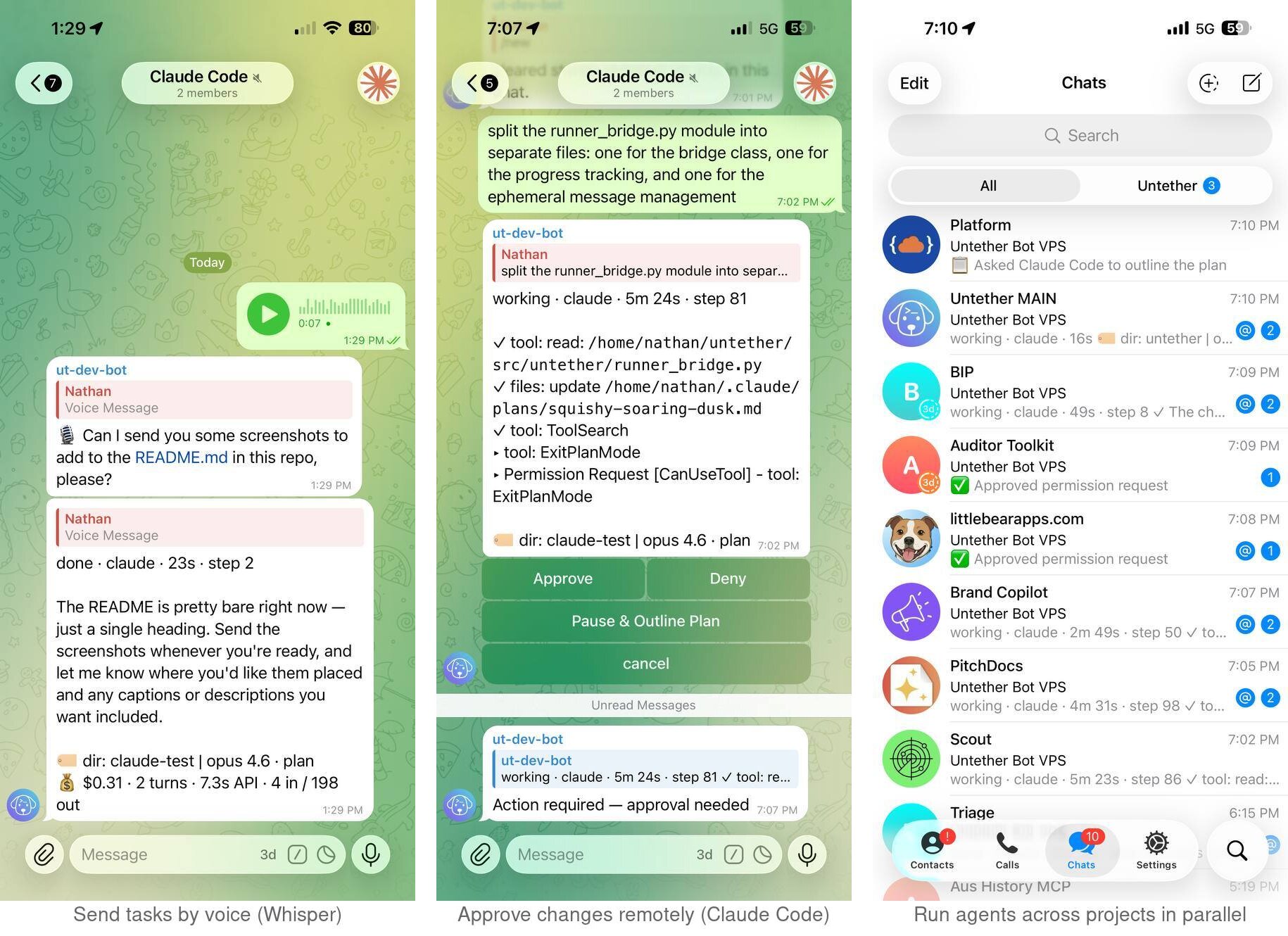
* Feature availability varies by engine — see engine compatibility
---
## 🐕 Why Untether?
AI coding agents are powerful, but they're chained to a terminal window. Untether breaks that chain:
- **Your machine does the work** — agents run on your computer (or server) as normal. Untether just bridges them to Telegram.
- **Work from anywhere** — walking the dog, at the gym, on the train, at a friend's place. If you have Telegram, you have your agents.
- **Agents run in the background** — start a task from your phone and put it away. The agent keeps working even if you close Telegram, lose signal, or your phone dies. Check the result when you're ready.
- **Any device, any time** — phone, tablet, laptop, or [Telegram Web](https://web.telegram.org). Start a task on your phone at the park, review results on your laptop at home.
- **Talk instead of type** — send a voice note and Untether transcribes it. Hands full? Dictate your next task.
- **Swap projects and agents** — switch between repos, branches, and engines from the same chat. No restarting, no SSH, no context switching.
- **Stay in control remotely** — budgets, cost tracking, and interactive approval buttons mean you can trust your agents to run without hovering over a terminal.
---
## ⚡ Quick start
```sh
uv tool install untether # recommended
# or
pipx install untether # alternative
```
```sh
untether # run setup wizard
```
Update: `uv tool upgrade untether` · Uninstall: `uv tool uninstall untether && rm -rf ~/.untether/`
The wizard creates a Telegram bot, picks your workflow, and connects your chat. Then send a message to your bot:
> fix the failing tests in src/auth
That's it. Your agent runs on your machine, streams progress to Telegram, and you can reply to continue the conversation.
The wizard offers three **workflow modes** — pick the one that fits:
| Mode | How it works |
|------|-------------|
| **Assistant** | Ongoing chat — messages auto-resume your session. `/new` to start fresh. |
| **Workspace** | Forum topics — each topic bound to a project/branch with independent sessions. |
| **Handoff** | Reply-to-continue — resume lines shown for copying to terminal. |
[Choose a mode →](https://untether.littlebearapps.com/how-to/choose-a-mode/) · [Conversation modes tutorial →](https://untether.littlebearapps.com/tutorials/conversation-modes/)
**Tip:** Already have a bot token? Pass it directly: `untether --bot-token YOUR_TOKEN`
📖 See our [help guides](#-help-guides) for detailed setup, engine configuration, and troubleshooting.
---
## 🎯 Features
- 📡 **Progress streaming** — watch your agent work in real time; see tool calls, file changes, and elapsed time as they happen
- 🔐 **Interactive permissions** — approve plan transitions and answer clarifying questions with inline option buttons; tools auto-execute, with progressive cooldown after "Pause & Outline Plan"
- 📋 **Plan mode** — toggle per chat with `/planmode`; choose full manual approval, auto-approved transitions, or no plan phase
- 📁 **Projects and worktrees** — register repos with `untether init`, target with `/myproject @feat/thing`, run branches in isolated worktrees in parallel
- 💰 **Cost and usage tracking** — run agents remotely with confidence; per-run and daily budgets, `/usage` breakdowns, and optional auto-cancel keep spending visible
- 💡 **Actionable error hints** — friendly messages for API outages, rate limits, billing errors, and network failures with resume guidance
- 🏷 **Model and mode metadata** — every completed message shows model with version, effort level, and permission mode (e.g. `🏷 opus 4.6 · medium · plan`) across all engines
- 🎙️ **Voice notes** — hands full? Dictate tasks instead of typing; Untether transcribes via a configurable Whisper-compatible endpoint
- 🔄 **Cross-environment resume** — start a session in your terminal, pick it up from Telegram with `/continue`; works with Claude Code, Codex, OpenCode, Pi, and Gemini ([guide](docs/how-to/cross-environment-resume.md))
- 📎 **File transfer** — upload files to your repo with `/file put`, download with `/file get`; agents can also deliver files automatically by writing to `.untether-outbox/` during a run — sent as Telegram documents on completion
- 🛡️ **Graceful recovery** — orphan progress messages cleaned up on restart; stall detection with CPU-aware diagnostics; auto-continue for Claude Code sessions that exit prematurely
- ⏰ **Scheduled tasks** — cron expressions with timezone support, webhook triggers, one-shot delays (`/at 30m `), `run_once` crons, master pause/resume toggle, and hot-reload configuration (no restart required). `/ping` shows per-chat trigger summary; trigger-initiated runs show provenance in the footer (`⏰ cron:` / `⚡ webhook:` / `⏰ at:`); `/stats` reports per-engine triggered-vs-manual breakdown
- 🔁 **Autonomous loops (Claude only)** — opt-in observation of Claude Code's `/loop` and `ScheduleWakeup`; Untether re-fires iterations after the subprocess exits so loops keep running between turns. Off by default; enable per chat via `/config → 🔁 Loop mode`. Cost guarded by `[cost_budget]`, runaway-safety capped by `[loop]` (max iterations, total duration, expiry)
- 💬 **Forum topics** — map Telegram topics to projects and branches
- 📤 **Session export** — `/export` for markdown or JSON transcripts
- 🗂️ **File browser** — `/browse` to navigate project files with inline buttons
- ⚙️ **Inline settings** — `/config` opens an in-place settings menu; toggle plan mode, ask mode, approval policy (Codex), approval mode (Gemini), verbose, engine, model, reasoning, and listen mode with buttons; dedicated `📡 Triggers` page lists per-chat crons/webhooks with last-fired times and a master pause/resume toggle
- 🔄 **Hot-reload configuration** — edit `untether.toml` and changes apply in ~1 second; covers triggers, voice transcription, allowed-user lists, watchdog timing, progress verbosity, file-transfer/outbox config, and per-engine overrides. Only `bot_token`, `chat_id`, `session_mode`, `topics`, and `message_overflow` require a restart. Extend the engine-subprocess env allowlist via `[security] env_extra_allow` / `env_extra_prefix_allow` to thread credential-manager tokens (1Password, Doppler, Vault, …) without forking
- 🧩 **Plugin system** — extend with custom engines, transports, and commands
- 🔌 **Plugin-compatible** — Claude Code plugins detect Untether sessions via `UNTETHER_SESSION` env var, preventing hooks from interfering with Telegram output; works with [PitchDocs](https://github.com/littlebearapps/lba-plugins) and other Claude Code plugins
- 📊 **Session statistics** — `/stats` shows per-engine run counts, action totals, and duration across today, this week, and all time
- 💬 **Three workflow modes** — **assistant** (ongoing chat with auto-resume), **workspace** (forum topics bound to projects/branches), or **handoff** (reply-to-continue with terminal resume lines); [choose a mode](https://untether.littlebearapps.com/how-to/choose-a-mode/) to match your workflow
---
## 🔌 Supported engines
| Engine | Install | What it's good at |
|--------|---------|-------------------|
| [Claude Code](https://docs.anthropic.com/en/docs/claude-code) | `npm i -g @anthropic-ai/claude-code` | Complex refactors, architecture, long context |
| [Codex](https://github.com/openai/codex) | `npm i -g @openai/codex` | Fast edits, shell commands, quick fixes |
| [OpenCode](https://github.com/opencode-ai/opencode) | `npm i -g opencode-ai@latest` | 75+ providers via Models.dev, local models |
| [Pi](https://github.com/mariozechner/pi-coding-agent) | `npm i -g @mariozechner/pi-coding-agent` | Multi-provider auth, conversational |
| [Gemini CLI](https://github.com/google-gemini/gemini-cli) | `npm i -g @google/gemini-cli` | Google Gemini models, configurable approval mode |
| [Amp](https://ampcode.com) | `npm i -g @sourcegraph/amp` | Sourcegraph's AI coding agent, mode selection |
**Note:** Use your existing Claude or ChatGPT subscription — no extra API keys needed (unless you want API billing).
### Engine compatibility
| Feature | Claude Code | Codex CLI | OpenCode | Pi | Gemini CLI | Amp |
|---------|:-----------:|:---------:|:--------:|:--:|:----------:|:---:|
| **Progress streaming** | ✅ | ✅ | ✅ | ✅ | ✅ | ✅ |
| **Session resume** | ✅ | ✅ | ✅ | ✅ | ✅ | ✅ |
| **Model override** | ✅ | ✅ | ✅ | ✅ | ✅ | ✅¹ |
| **Model in footer** | ✅ | ✅ | ✅ | — | ✅ | — |
| **Approval mode in footer** | ✅ | ~⁴ | — | — | ~² | — |
| **Voice input** | ✅ | ✅ | ✅ | ✅ | ✅ | ✅ |
| **Verbose progress** | ✅ | ✅ | ✅ | ✅ | ✅ | ✅ |
| **Error hints** | ✅ | ✅ | ✅ | ✅ | ✅ | ✅ |
| **Preamble injection** | ✅ | ✅ | ✅ | ✅ | ✅ | ✅ |
| **Cost tracking** | ✅ | ~³ | ✅ | ~³ | ~³ | ~³ |
| **Interactive permissions** | ✅ | — | — | — | — | — |
| **Approval policy** | ✅ | ~⁴ | — | — | ~² | — |
| **Plan mode** | ✅ | — | — | — | — | — |
| **Ask mode (option buttons)** | ✅ | — | — | — | — | — |
| **Diff preview** | ✅ | — | — | — | — | — |
| **Auto-approve safe tools** | ✅ | — | — | — | — | — |
| **Progressive cooldown** | ✅ | — | — | — | — | — |
| **Subscription usage** | ✅ | — | — | — | — | — |
| **Reasoning/effort levels** | ✅ | ✅ | — | — | — | — |
| **Device re-auth (`/auth`)** | — | ✅ | — | — | — | — |
| **Context compaction** | — | — | — | ✅ | — | — |
| **Cross-env resume (`/continue`)** | ✅ | ✅ | ✅ | ✅⁵ | ✅ | —⁶ |
¹ Amp model override maps to `--mode` (deep/free/rush/smart).
² Defaults to full access (`--approval-mode=yolo`, all tools auto-approved); toggle via `/config` to edit files (`auto_edit`, files OK but no shell) or read-only; pre-run policy, not interactive mid-run approval.
³ Token usage counts only — no USD cost reporting.
⁴ Toggle via `/config` between full auto (default) and safe (`--ask-for-approval=untrusted`, untrusted tools blocked); pre-run policy, not interactive mid-run approval.
⁵ Pi requires `provider = "openai-codex"` in engine config for OAuth subscriptions in headless mode.
⁶ AMP requires an explicit thread ID; no "most recent" mode.
Claude effort levels: `low`, `medium`, `high`, `xhigh`, `max` (`xhigh` requires Claude Code v2.1.114+).
---
## 🤖 Commands
| Command | What it does |
|---------|-------------|
| `/cancel` | Stop the running agent |
| `/agent` | Show or set the engine for this chat |
| `/model` | Override the model for an engine |
| `/planmode` | Toggle plan mode (on/auto/off) |
| `/usage` | Show API costs for the current session (`/usage debug` shows fetch state, OAuth expiry, schema-mismatch counter) |
| `/export` | Export session transcript |
| `/browse` | Browse project files |
| `/new` | Cancel running tasks and clear stored sessions |
| `/continue` | Resume the most recent CLI session in this project ([guide](docs/how-to/cross-environment-resume.md)) |
| `/file put/get` | Transfer files |
| `/topic` | Create or bind forum topics |
| `/restart` | Gracefully restart Untether (drains active runs first) |
| `/verbose` | Toggle verbose progress mode (show tool details) |
| `/config` | Interactive settings menu (plan mode, ask mode, verbose, engine, model, reasoning, listen, approval mode, cost & usage); `📡 Triggers` page for cron/webhook list + master pause/resume |
| `/ctx` | Show or update project/branch context |
| `/reasoning` | Set reasoning level override |
| `/listen` | Set group chat listen mode (`all` / `mentions` / `clear`); `/trigger` still works as a deprecated alias |
| `/stats` | Per-engine session statistics (today/week/all-time) |
| `/auth` | Codex device re-authentication |
| `/at 30m ` | Schedule a one-shot delayed run (60s–24h; `/cancel` to drop) |
| `/ping` | Health check / uptime (shows per-chat trigger summary if any) |
| `/health` | System snapshot: RAM/swap, process diagnostics, trigger counts, today's API cost, uptime |
Prefix any message with `/` to pick an engine for that task, or `/` to target a repo:
> /claude /myproject @feat/auth implement OAuth2
---
## ⚙️ Configuration
Untether reads `~/.untether/untether.toml`. The setup wizard creates this for you, or configure manually:
```toml
default_engine = "codex"
[transports.telegram]
bot_token = "123456789:ABC..."
chat_id = 123456789
session_mode = "chat"
[projects.myapp]
path = "~/dev/myapp"
default_engine = "claude"
[cost_budget]
enabled = true
max_cost_per_run = 2.00
max_cost_per_day = 10.00
```
See the [full configuration reference](https://github.com/littlebearapps/untether/blob/master/docs/reference/config.md) for all options.
**Warning:** Never commit your `untether.toml` — it contains your bot token. The default location (`~/.untether/`) keeps it outside your repos.
---
## 🔄 Upgrading
```sh
uv tool upgrade untether # if installed with uv
# or
pipx upgrade untether # if installed with pipx
```
Then restart to apply:
```sh
/restart # from Telegram (preferred — drains active runs first)
```
Or from your terminal:
```sh
untether # start (or restart — Ctrl+C first if already running)
```
> **Note:** If you've set up a systemd service on Linux, use `systemctl --user restart untether` instead.
---
## 📦 Requirements
- **Python 3.12+** — `uv python install 3.14`
- **uv** — `curl -LsSf https://astral.sh/uv/install.sh | sh`
- At least one agent CLI on PATH: `claude`, `codex`, `opencode`, `pi`, `gemini`, or `amp`
---
## 📖 Help Guides
Full documentation is available in the [`docs/`](https://github.com/littlebearapps/untether/tree/master/docs) directory.
### Getting Started
- [Install and onboard](https://github.com/littlebearapps/untether/blob/master/docs/tutorials/install.md) — setup wizard walkthrough
- [First run](https://github.com/littlebearapps/untether/blob/master/docs/tutorials/first-run.md) — send your first task
- [Conversation modes](https://github.com/littlebearapps/untether/blob/master/docs/tutorials/conversation-modes.md) — assistant, workspace, and handoff
- [Projects and branches](https://github.com/littlebearapps/untether/blob/master/docs/tutorials/projects-and-branches.md) — multi-repo workflows
- [Multi-engine workflows](https://github.com/littlebearapps/untether/blob/master/docs/tutorials/multi-engine.md) — switching between agents
### How-To Guides
- [Interactive approval](https://github.com/littlebearapps/untether/blob/master/docs/how-to/interactive-approval.md) — approve and deny tool calls from Telegram
- [Plan mode](https://github.com/littlebearapps/untether/blob/master/docs/how-to/plan-mode.md) — control plan transitions and progressive cooldown
- [Cost budgets](https://github.com/littlebearapps/untether/blob/master/docs/how-to/cost-budgets.md) — per-run and daily budget limits
- [Inline settings](https://github.com/littlebearapps/untether/blob/master/docs/how-to/inline-settings.md) — `/config` button menu
- [Voice notes](https://github.com/littlebearapps/untether/blob/master/docs/how-to/voice-notes.md) — dictate tasks from your phone
- [File browser](https://github.com/littlebearapps/untether/blob/master/docs/how-to/browse-files.md) — `/browse` inline navigation
- [Session export](https://github.com/littlebearapps/untether/blob/master/docs/how-to/export-sessions.md) — markdown and JSON transcripts
- [Verbose progress](https://github.com/littlebearapps/untether/blob/master/docs/how-to/verbose-progress.md) — tool detail display
- [Group chats](https://github.com/littlebearapps/untether/blob/master/docs/how-to/group-chat.md) — multi-user and listen modes
- [Context binding](https://github.com/littlebearapps/untether/blob/master/docs/how-to/context-binding.md) — per-chat project/branch binding
- [Webhooks and cron](https://github.com/littlebearapps/untether/blob/master/docs/how-to/webhooks-and-cron.md) — automated runs from external events
- [Update Untether](https://github.com/littlebearapps/untether/blob/master/docs/how-to/update.md) — upgrade to the latest version
- [Uninstall Untether](https://github.com/littlebearapps/untether/blob/master/docs/how-to/uninstall.md) — remove CLI, config, and state files
### Engine Guides
- [Claude Code](https://github.com/littlebearapps/untether/blob/master/docs/reference/runners/claude/runner.md) — permission modes, plan mode, cost tracking, interactive approvals
- [Codex](https://github.com/littlebearapps/untether/blob/master/docs/reference/runners/codex/exec-json-cheatsheet.md) — profiles, extra args, exec mode
- [OpenCode](https://github.com/littlebearapps/untether/blob/master/docs/reference/runners/opencode/runner.md) — model selection, 75+ providers, local models
- [Pi](https://github.com/littlebearapps/untether/blob/master/docs/reference/runners/pi/runner.md) — multi-provider auth, model and provider selection
- [Gemini CLI](https://github.com/littlebearapps/untether/blob/master/docs/reference/runners/gemini/runner.md) — Google Gemini models, approval mode passthrough
- [Amp](https://github.com/littlebearapps/untether/blob/master/docs/reference/runners/amp/runner.md) — mode selection, thread management
### Reference
- [Configuration reference](https://github.com/littlebearapps/untether/blob/master/docs/reference/config.md) — full walkthrough of `untether.toml`
- [Troubleshooting](https://github.com/littlebearapps/untether/blob/master/docs/how-to/troubleshooting.md) — common issues and solutions
- [Architecture](https://github.com/littlebearapps/untether/blob/master/docs/explanation/architecture.md) — how the pieces fit together
---
## 🔒 What Untether accesses
Untether runs on your machine and bridges your agents to Telegram. Here's exactly what it touches:
| Category | What | Details |
|----------|------|---------|
| **Network** | Telegram Bot API (`api.telegram.org`) | Core transport — always active during operation |
| **Network** | Whisper-compatible endpoint | Voice transcription — **disabled by default**, opt-in via config |
| **Network** | Agent APIs (Anthropic, OpenAI, etc.) | Called by agent subprocesses, not by Untether directly |
| **Filesystem** | `~/.untether/untether.toml` | Config file containing bot token — protect with `chmod 600` |
| **Filesystem** | `~/.untether/*.json` | Chat preferences, session state, usage stats |
| **Filesystem** | `.untether-outbox/` | Agent-delivered files (optional, per-project) |
| **Filesystem** | `/file put` upload paths | User-initiated file uploads from Telegram, written to configured destinations (default: project working dir) |
| **Filesystem** | Webhook `file_write` action | When configured, webhooks can write POST bodies to disk at admin-defined paths (deny-globs apply) |
| **Network** | Webhook `http_forward` action | When configured, webhooks can forward payloads to admin-defined URLs (SSRF-protected) |
| **Processes** | Agent CLIs (claude, codex, etc.) | Spawned as subprocesses with your user permissions; agents have full filesystem access in their working directory |
| **Credentials** | Telegram bot token | Stored in config file (plaintext TOML) |
| **Credentials** | API keys | Read from environment variables, never stored by Untether |
**What Untether does NOT do:** no telemetry, no analytics, no phone-home, no auto-updates, no root access. Sensitive tokens (bot token, OpenAI keys, GitHub tokens) are automatically [redacted from logs](https://github.com/littlebearapps/untether/blob/master/docs/how-to/security.md).
**What Untether *can* do at your direction:** spawned agents, `/file put`, the outbox, and webhook actions can all touch paths outside `~/.untether/` — that's the whole point. Use [`allowed_user_ids`](https://github.com/littlebearapps/untether/blob/master/docs/how-to/security.md), file deny-globs, and webhook auth to control who can trigger these flows.
---
## 🤝 Contributing
Found a bug? Got an idea? [Open an issue](https://github.com/littlebearapps/untether/issues) — we'd love to hear from you.
Want to contribute code? See [CONTRIBUTING.md](https://github.com/littlebearapps/untether/blob/master/CONTRIBUTING.md) for development setup, testing, and guidelines.
---
## 🙏 Acknowledgements
Untether is a fork of [takopi](https://github.com/banteg/takopi) by [@banteg](https://github.com/banteg), which provided the original Telegram-to-Codex bridge. Untether extends it with interactive permission control, multi-engine support, plan mode, cost tracking, and many other features.
---
## 📄 Licence
[MIT](https://github.com/littlebearapps/untether/blob/master/LICENSE) — Made by [Little Bear Apps](https://github.com/littlebearapps) 🐶