






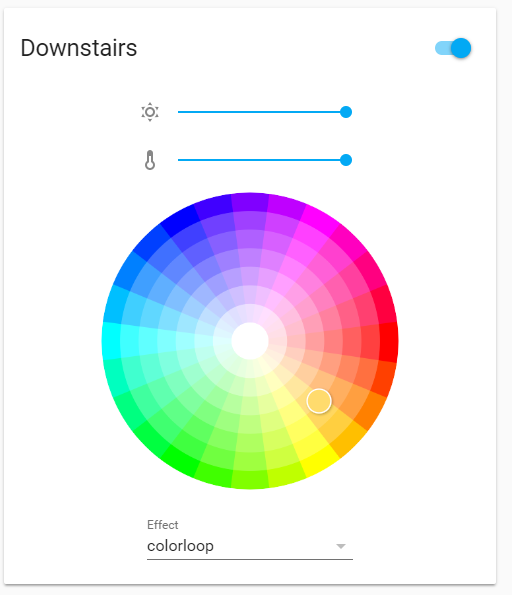
 ## Features
* Works on any light and switch based entity
* Toggle on/off
* HS Color wheel
* Color temperature and white value support
* Support for configured language
* Compact card support for grouped entities
* use `persist_features: true` to always show entity features
* use `effects_list` to add custom effects list or use `input_select` entity
* always show or hide header and each input
## Installation
Add through [HACS](https://github.com/custom-components/hacs)
Issues with the installation should be asked in the [Home Assistant forums](https://community.home-assistant.io/t/light-entity-card/96146)
## Configurations
```yaml
type: custom:light-entity-card
entity: light.downstairs
```
```yaml
type: custom:light-entity-card
entity: light.downstairs
effects_list:
- effect1
- effect2
```
```yaml
type: custom:light-entity-card
entity: light.downstairs
effects_list: input_select.custom_effect_list
```
```yaml
type: custom:light-entity-card
entity: light.downstairs
group: true
```
## Options
| Name | Type | Requirement | `Default value` Description |
| -------------------- | ------------------- | ------------ | --------------------------------------------------------------------------- |
| type | string | **Required** | `custom:light-entity-card` |
| entity | string | **Required** | The entity name of the light entity to control |
| shorten_cards | boolean | **Optional** | `false` show a compact version of the card |
| consolidate_entities | boolean | **Optional** | `false` if entity is a group you can consolidate all entities into one |
| persist_features | boolean | **Optional** | `false` always show entity features |
| effects_list | list/string/boolean | **Optional** | custom list of effects, an input_select entity, or set false to always hide |
| header | string / list | **Optional** | custom header name. Accepts a [structured name](#structured-names) on Home Assistant 2026.4 and later |
| hide_header | boolean | **Optional** | `false` hides the entity header of the card including toggle |
| show_header_icon | boolean | **Optional** | `false` shows the entity icon of the card including toggle |
| brightness | boolean | **Optional** | `true` show brightness slider if available |
| color_temp | boolean | **Optional** | `true` show color temp slider if available |
| white_value | boolean | **Optional** | `true` show white value slider if available |
| color_picker | boolean | **Optional** | `true` show color picker wheel if available |
| speed | boolean | **Optional** | `false` show speed slider if available |
| intensity | boolean | **Optional** | `false` show intensity slider if available |
| force_features | boolean | **Optional** | `false` force showing all features in card |
| full_width_sliders | boolean | **Optional** | `false` makes slider the full width of card |
| brightness_icon | string | **Optional** | `weather-sunny` change the brightness slider icon |
| white_icon | string | **Optional** | `file-word-box` change the white slider icon |
| temperature_icon | string | **Optional** | `thermometer` change the temperature slider icon |
| speed_icon | string | **Optional** | `speedometer` change the speed slider icon |
| intensity_icon | string | **Optional** | `transit-connection-horizontal` change the intensity slider icon |
| show_slider_percent | boolean | **Optional** | `false` show percent next to sliders |
| child_card | boolean | **Optional** | `false` remove padding/margin to make this card within another card |
## Structured names
*Requires Home Assistant 2026.4 or later. On earlier versions a structured `header` falls back to the entity's friendly name.*
Home Assistant composes an entity's display name out of its registry context
(entity, device, area, floor) rather than one `friendly_name` string. From 2026.4
the card header uses that composed name by default, and `header` can be a list of
those parts instead of a plain string:
```yaml
type: custom:light-entity-card
entity: light.kitchen_ceiling
header:
- type: area
- type: entity
```
Available part types are `entity`, `device`, `area`, `floor`, and
`text` (a literal, written as `{type: text, text: Ceiling}`). Parts that resolve to
nothing are dropped. A plain string `header` keeps working exactly as before.
See the [Home Assistant developer documentation](https://developers.home-assistant.io/docs/frontend/data#hassformatentitynamestateobj-name-options) for details.
## Features
* Works on any light and switch based entity
* Toggle on/off
* HS Color wheel
* Color temperature and white value support
* Support for configured language
* Compact card support for grouped entities
* use `persist_features: true` to always show entity features
* use `effects_list` to add custom effects list or use `input_select` entity
* always show or hide header and each input
## Installation
Add through [HACS](https://github.com/custom-components/hacs)
Issues with the installation should be asked in the [Home Assistant forums](https://community.home-assistant.io/t/light-entity-card/96146)
## Configurations
```yaml
type: custom:light-entity-card
entity: light.downstairs
```
```yaml
type: custom:light-entity-card
entity: light.downstairs
effects_list:
- effect1
- effect2
```
```yaml
type: custom:light-entity-card
entity: light.downstairs
effects_list: input_select.custom_effect_list
```
```yaml
type: custom:light-entity-card
entity: light.downstairs
group: true
```
## Options
| Name | Type | Requirement | `Default value` Description |
| -------------------- | ------------------- | ------------ | --------------------------------------------------------------------------- |
| type | string | **Required** | `custom:light-entity-card` |
| entity | string | **Required** | The entity name of the light entity to control |
| shorten_cards | boolean | **Optional** | `false` show a compact version of the card |
| consolidate_entities | boolean | **Optional** | `false` if entity is a group you can consolidate all entities into one |
| persist_features | boolean | **Optional** | `false` always show entity features |
| effects_list | list/string/boolean | **Optional** | custom list of effects, an input_select entity, or set false to always hide |
| header | string / list | **Optional** | custom header name. Accepts a [structured name](#structured-names) on Home Assistant 2026.4 and later |
| hide_header | boolean | **Optional** | `false` hides the entity header of the card including toggle |
| show_header_icon | boolean | **Optional** | `false` shows the entity icon of the card including toggle |
| brightness | boolean | **Optional** | `true` show brightness slider if available |
| color_temp | boolean | **Optional** | `true` show color temp slider if available |
| white_value | boolean | **Optional** | `true` show white value slider if available |
| color_picker | boolean | **Optional** | `true` show color picker wheel if available |
| speed | boolean | **Optional** | `false` show speed slider if available |
| intensity | boolean | **Optional** | `false` show intensity slider if available |
| force_features | boolean | **Optional** | `false` force showing all features in card |
| full_width_sliders | boolean | **Optional** | `false` makes slider the full width of card |
| brightness_icon | string | **Optional** | `weather-sunny` change the brightness slider icon |
| white_icon | string | **Optional** | `file-word-box` change the white slider icon |
| temperature_icon | string | **Optional** | `thermometer` change the temperature slider icon |
| speed_icon | string | **Optional** | `speedometer` change the speed slider icon |
| intensity_icon | string | **Optional** | `transit-connection-horizontal` change the intensity slider icon |
| show_slider_percent | boolean | **Optional** | `false` show percent next to sliders |
| child_card | boolean | **Optional** | `false` remove padding/margin to make this card within another card |
## Structured names
*Requires Home Assistant 2026.4 or later. On earlier versions a structured `header` falls back to the entity's friendly name.*
Home Assistant composes an entity's display name out of its registry context
(entity, device, area, floor) rather than one `friendly_name` string. From 2026.4
the card header uses that composed name by default, and `header` can be a list of
those parts instead of a plain string:
```yaml
type: custom:light-entity-card
entity: light.kitchen_ceiling
header:
- type: area
- type: entity
```
Available part types are `entity`, `device`, `area`, `floor`, and
`text` (a literal, written as `{type: text, text: Ceiling}`). Parts that resolve to
nothing are dropped. A plain string `header` keeps working exactly as before.
See the [Home Assistant developer documentation](https://developers.home-assistant.io/docs/frontend/data#hassformatentitynamestateobj-name-options) for details.