



Since Facebook introduced reactions in 2016, it became a standard in several applications as a way for users to interact with content. ReactionButton is a control that allows developers to add this functionality to their apps in an easy way.
## Features - [x] Support of Dark Mode - [x] Customizable layout using `ReactionButtonDelegateLayout` - [x] Extensible DataSource for the control - [x] Layout support for scrolling interfaces (UICollectionView/UITableView) - [x] Codable initializer for usage on storyboards - [x] Events ## Requirements * iOS 13.0+ * Swift 5.0+ ## Installation * [Installation guide](https://github.com/lojals/ReactionButton/wiki/Installation-guide) ## Usage ### 1. Basic Instance There are multiple ways to instantiate a `ReactionButton`, using a frame, storyboards, or an empty convenience initializer. #### Example Code ```swift let buttonSample = ReactionButton(frame: CGRect(x: 0, y: 0, width: 100, height: 100)) buttonSample.dataSource = self view.addSubview(buttonSample) ``` 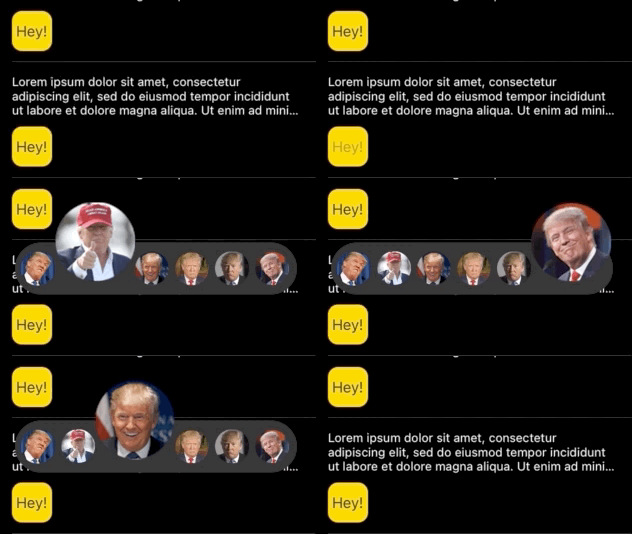 > Images from [Trump reactionpacks style](http://www.reactionpacks.com/packs/2c1a1e41-e9e9-407a-a532-3bfdfef6b3e6). ### 2. Delegate The `ReactionButton` has a delegate to communicate events of option selection, option focus, and cancel of actions. To use it, set the `ReactionButtonDelegate` conform as a delegate. ```swift let buttonSample = ReactionButton(frame: CGRect(x: 0, y: 0, width: 100, height: 100)) buttonSample.delegate = self view.addSubview(buttonSample) ```  > Images from [Trump reactionpacks style](http://www.reactionpacks.com/packs/2c1a1e41-e9e9-407a-a532-3bfdfef6b3e6). ### 3. Custom layout instance `ReactionButton` allows customization of the layout with the help of `ReactionButtonDelegateLayout`. To use it, please conform to that protocol and set it as delegate (Same pattern as UICollectionView). ```swift func ReactionSelectorConfiguration(_ selector: ReactionButton) -> ReactionButton.Config { ReactionButton.Config(spacing: 2, size: 30, minSize: 34, maxSize: 45, spaceBetweenComponents: 30) } ``` You can custom your selector with the following variables, used in the  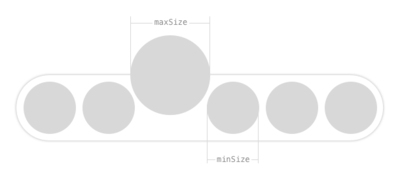 ## Author Jorge Ovalle, jroz9105@gmail.com