# synergy-age-mcp
[](https://github.com/longevity-genie/synergy-age-mcp/actions/workflows/test.yml)
[](https://github.com/longevity-genie/synergy-age-mcp/actions/workflows/ci.yml)
[](https://badge.fury.io/py/synergy-age-mcp)
[](https://www.python.org/downloads/)
[](https://opensource.org/licenses/MIT)
[](https://github.com/psf/black)
MCP (Model Context Protocol) server for SynergyAge database
This server implements the Model Context Protocol (MCP) for SynergyAge, providing a standardized interface for accessing synergistic genetic intervention and aging research data. MCP enables AI assistants and agents to query comprehensive longevity datasets through structured interfaces.
The server automatically downloads the latest SynergyAge database and documentation from [Hugging Face Hub](httpss://huggingface.co/datasets/longevity-genie/bio-mcp-data) (specifically from the `synergy-age` folder), ensuring you always have access to the most up-to-date data without manual file management.
The SynergyAge database contains:
- **models**: Experimentally validated genetic interventions and their effects on lifespan across model organisms
- **model_interactions**: Synergistic, antagonistic, and epistatic interactions between genetic interventions
- **Data for multiple model organisms**: C. elegans, Drosophila melanogaster, mice, and other aging research models
- **Quantitative lifespan effects**: Precise measurements of intervention effectiveness
## Usage Example
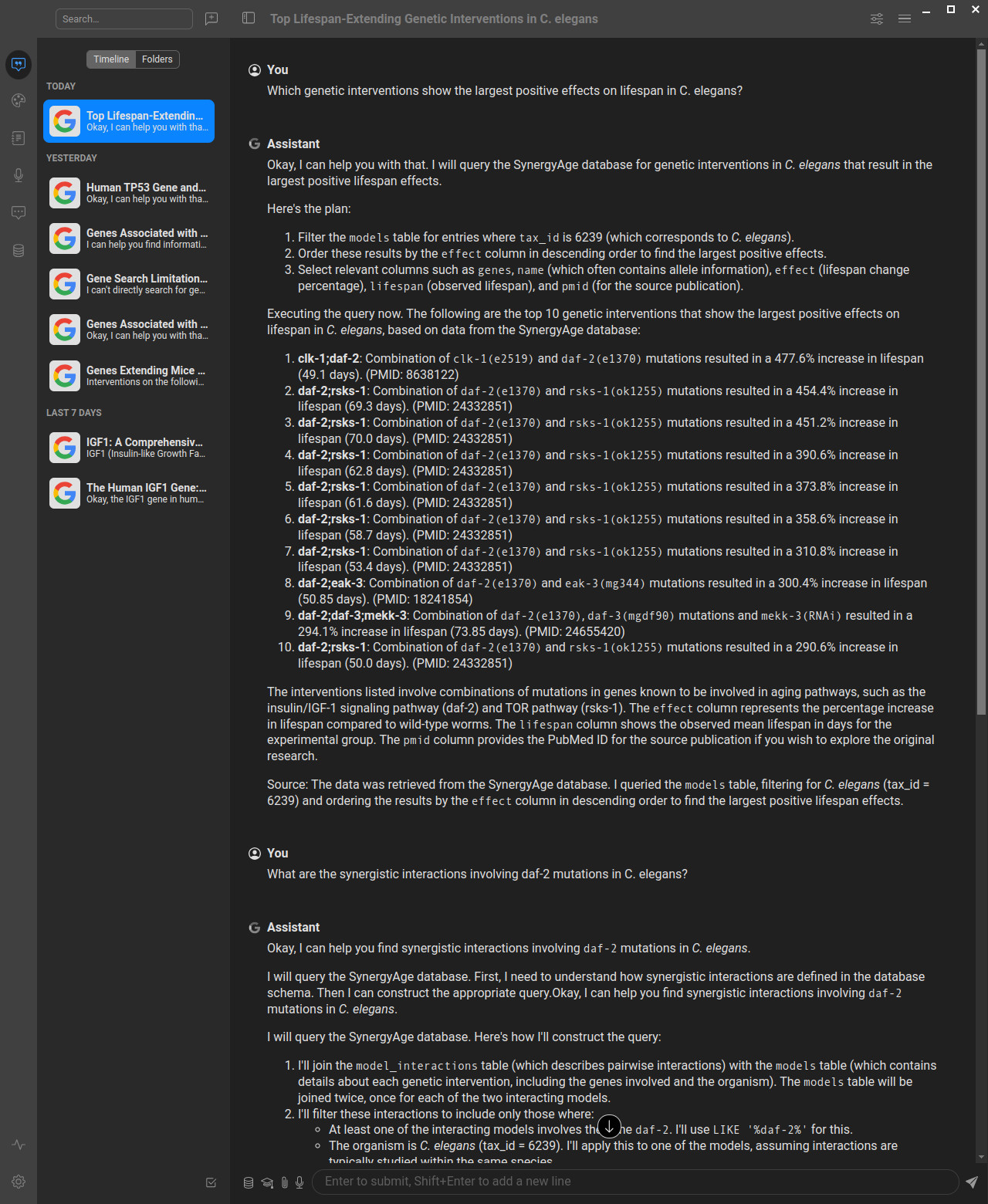
Here's how the SynergyAge MCP server works in practice with AI assistants:
*Example showing how to query the SynergyAge database through an AI assistant using natural language, which gets translated to SQL queries via the MCP server. You can use this database both in chat interfaces for research questions and in AI-based development tools (like Cursor, Windsurf, VS Code with Copilot) to significantly improve your aging and longevity research productivity by having direct access to synergistic intervention data while coding.*
## Understanding Genetic Interactions
The SynergyAge database focuses on different types of genetic interactions that affect lifespan:
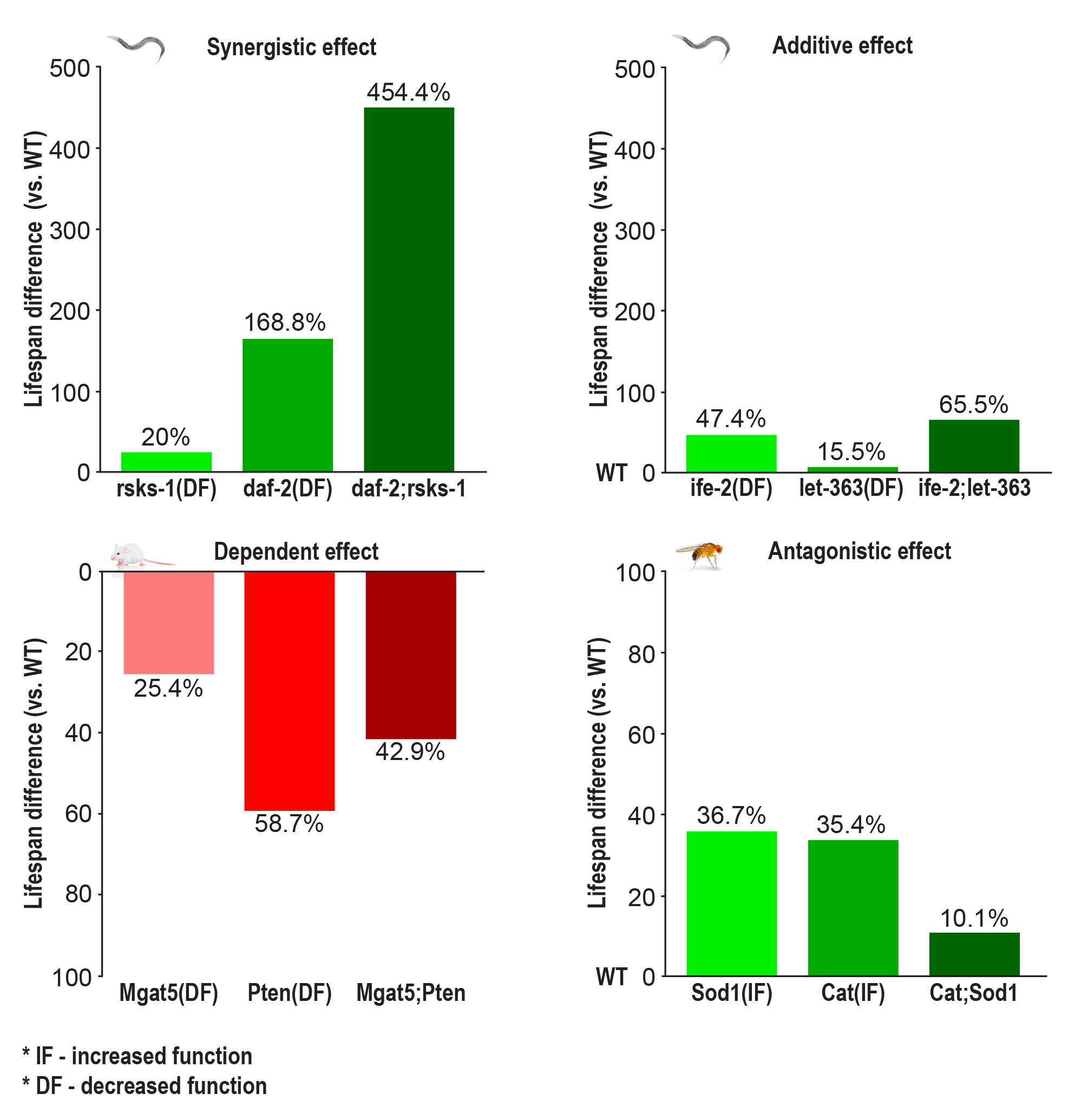
*Figure: Types of genetic interactions in longevity research - synergistic, antagonistic, and additive effects between genetic interventions (Source: [SynergyAge.info](https://www.synergyage.info))*
- **Synergistic interactions**: Combined interventions produce greater effects than the sum of individual effects
- **Antagonistic interactions**: Combined interventions produce smaller effects than expected, with one intervention suppressing another
- **Additive interactions**: Combined interventions produce effects equal to the sum of individual effects
If you want to understand more about what the Model Context Protocol is and how to use it more efficiently, you can take the [DeepLearning AI Course](https://www.deeplearning.ai/short-courses/mcp-build-rich-context-ai-apps-with-anthropic/) or search for MCP videos on YouTube.
## About MCP (Model Context Protocol)
MCP is a protocol that bridges the gap between AI systems and specialized domain knowledge. It enables:
- **Structured Access**: Direct connection to authoritative synergistic aging intervention data
- **Natural Language Queries**: Simplified interaction with specialized databases through SQL
- **Type Safety**: Strong typing and validation through FastMCP
- **AI Integration**: Seamless integration with AI assistants and agents
## About SynergyAge
SynergyAge is a curated database containing experimentally validated data on genetic interventions affecting lifespan across multiple model organisms. The database focuses on both single-gene mutants and multi-gene combinations to understand genetic interactions in aging.
### Data Validation & Quality
The SynergyAge data undergoes rigorous validation at three levels:
1. **Curation Level**: Only papers with experimentally validated results are selected for inclusion
2. **Import Validation**: Automatic checks ensure no missing values or incorrect data formats
3. **Post-deployment**: Manual investigation of outliers and random entries, with lifespan distributions plotted for each mutant at different temperatures
All survival curves from included papers are manually verified to ensure data accuracy.
### Key Features
- **Comprehensive Search**: Text search supporting multiple genes (comma or semicolon separated)
- **Categorized Results**: Search results grouped into four categories:
- Mutants with interventions in all searched genes
- Single-gene mutants (1-mutants)
- Multi-gene mutants with subset interventions (n-mutants)
- Extended combinations including additional genes
- **Interactive Network Visualization**: Visual exploration of mutant relationships with nodes representing lifespan models and edges showing genetic intervention relationships
- **Epistasis Analysis**: Assessment of genetic interactions between modulated genes
- **External Integration**: Links to KEGG pathways and model-specific databases for enhanced context
## Data Source and Updates
The SynergyAge MCP server automatically downloads data from the [longevity-genie/bio-mcp-data](httpss://huggingface.co/datasets/longevity-genie/bio-mcp-data) repository on Hugging Face Hub. This ensures:
- **Always Up-to-Date**: Automatic access to the latest SynergyAge database without manual updates
- **Reliable Distribution**: Centralized data hosting with version control and change tracking
- **Efficient Caching**: Downloaded files are cached locally to minimize network requests
- **Fallback Support**: Local fallback files are supported for development and offline use
The data files are stored in the `synergy-age` subfolder of the Hugging Face repository and include:
- `synergy-age.sqlite` - The complete SynergyAge database
- `synergyage_prompt.txt` - Database schema documentation and usage guidelines
## Available Tools
This server provides three main tools for interacting with the SynergyAge database:
1. **`synergyage_db_query(sql: str)`** - Execute read-only SQL queries against the SynergyAge database
2. **`synergyage_get_schema_info()`** - Get detailed schema information including tables, columns, and data descriptions
3. **`synergyage_example_queries()`** - Get a list of example SQL queries with descriptions
## Available Resources
1. **`resource://db-prompt`** - Complete database schema documentation and usage guidelines
2. **`resource://schema-summary`** - Formatted summary of tables and their purposes
## Quick Start
### Installing uv
```bash
# Download and install uv
curl -LsSf https://astral.sh/uv/install.sh | sh
# Verify installation
uv --version
uvx --version
```
uvx is a very nice tool that can run a python package installing it if needed.
### Running with uvx
You can run the synergy-age-mcp server directly using uvx without cloning the repository:
```bash
# Run the server in streamed http mode (default)
uvx synergy-age-mcp
```
Other uvx modes (STDIO, HTTP, SSE)
#### STDIO Mode (for MCP clients that require stdio, can be useful when you want to save files)
```bash
# Or explicitly specify stdio mode
uvx synergy-age-mcp stdio
```
#### HTTP Mode (Web Server)
```bash
# Run the server in streamable HTTP mode on default (3002) port
uvx synergy-age-mcp server
# Run on a specific port
uvx synergy-age-mcp server --port 8000
```
#### SSE Mode (Server-Sent Events)
```bash
# Run the server in SSE mode
uvx synergy-age-mcp sse
```
In cases when there are problems with uvx often they can be caused by cleaning uv cache:
```
uv cache clean
```
The HTTP mode will start a web server that you can access at `http://localhost:3002/mcp` (with documentation at `http://localhost:3002/docs`). The STDIO mode is designed for MCP clients that communicate via standard input/output, while SSE mode uses Server-Sent Events for real-time communication.
**Note:** Currently, we do not have a Swagger/OpenAPI interface, so accessing the server directly in your browser will not show much useful information. To explore the available tools and capabilities, you should either use the MCP Inspector (see below) or connect through an MCP client to see the available tools.
## Configuring your AI Client (Anthropic Claude Desktop, Cursor, Windsurf, etc.)
We provide preconfigured JSON files for different use cases:
- **For STDIO mode (recommended):** Use `mcp-config-stdio.json`
- **For HTTP mode:** Use `mcp-config.json`
- **For local development:** Use `mcp-config-stdio-debug.json`
### Configuration Video Tutorial
For a visual guide on how to configure MCP servers with AI clients, check out our [configuration tutorial video](https://www.youtube.com/watch?v=Xo0sHWGJvE0) for our sister MCP server (biothings-mcp). The configuration principles are exactly the same for the SynergyAge MCP server - just use the appropriate JSON configuration files provided above.
### Inspecting SynergyAge MCP server
Using MCP Inspector to explore server capabilities
If you want to inspect the methods provided by the MCP server, use npx (you may need to install nodejs and npm):
For STDIO mode with uvx:
```bash
npx @modelcontextprotocol/inspector --config mcp-config-stdio.json --server synergy-age-mcp
```
For HTTP mode (ensure server is running first):
```bash
npx @modelcontextprotocol/inspector --config mcp-config.json --server synergy-age-mcp
```
For local development:
```bash
npx @modelcontextprotocol/inspector --config mcp-config-stdio-debug.json --server synergy-age-mcp
```
You can also run the inspector manually and configure it through the interface:
```bash
npx @modelcontextprotocol/inspector
```
After that you can explore the tools and resources with MCP Inspector at http://127.0.0.1:6274 (note, if you run inspector several times it can change port)
### Integration with AI Systems
Simply point your AI client (like Cursor, Windsurf, ClaudeDesktop, VS Code with Copilot, or [others](https://github.com/punkpeye/awesome-mcp-clients)) to use the appropriate configuration file from the repository.
## Repository setup
```bash
# Clone the repository
git clone https://github.com/longevity-genie/synergy-age-mcp.git
cd synergy-age-mcp
uv sync
```
### Running the MCP Server
If you already cloned the repo you can run the server with uv:
```bash
# Start the MCP server locally (HTTP mode)
uv run server
# Or start in STDIO mode
uv run stdio
# Or start in SSE mode
uv run sse
```
## Database Schema
Detailed schema information
### Main Tables
- **models** (12 columns): Experimental genetic intervention data with lifespan effects across model organisms
- **model_interactions** (3 columns): Synergistic, antagonistic, and epistatic interactions between genetic interventions
### Key Fields
- **id**: Unique identifier for each genetic intervention model
- **tax_id**: NCBI Taxonomy ID for the model organism
- **name**: Descriptive name of the genetic intervention
- **genes**: Target genes for the intervention
- **temp**: Experimental temperature conditions
- **lifespan**: Measured lifespan values
- **effect**: Quantitative effect on lifespan (percentage change)
- **details**: Detailed description of the intervention method
- **interaction_type**: Classification of genetic interactions
- **phenotype_comparison**: Description of interaction effects
## Example Queries
Sample SQL queries for common research questions
```sql
-- Get top genetic interventions with highest lifespan effects
SELECT genes, effect, details, model_organism
FROM models
WHERE effect > 0
ORDER BY effect DESC
LIMIT 10;
-- Find synergistic interactions in C. elegans
SELECT m1.genes as gene1, m2.genes as gene2, mi.phenotype_comparison
FROM model_interactions mi
JOIN models m1 ON mi.id1 = m1.id
JOIN models m2 ON mi.id2 = m2.id
WHERE m1.tax_id = 6239 AND m2.tax_id = 6239
AND mi.phenotype_comparison LIKE '%synergistic%';
-- Compare insulin signaling pathway effects across organisms
SELECT tax_id, genes, effect, details
FROM models
WHERE genes LIKE '%daf-2%' OR genes LIKE '%InR%' OR genes LIKE '%IGF1R%'
ORDER BY tax_id, effect DESC;
-- Find interventions with antagonistic interactions
SELECT m1.genes, m2.genes, mi.phenotype_comparison
FROM model_interactions mi
JOIN models m1 ON mi.id1 = m1.id
JOIN models m2 ON mi.id2 = m2.id
WHERE mi.phenotype_comparison LIKE '%antagonistic%'
OR mi.phenotype_comparison LIKE '%suppress%';
-- Get average lifespan effects by organism
SELECT tax_id, COUNT(*) as intervention_count,
AVG(effect) as avg_effect,
MAX(effect) as max_effect
FROM models
WHERE effect IS NOT NULL
GROUP BY tax_id
ORDER BY avg_effect DESC;
```
## Safety Features
- **Read-only access**: Only SELECT queries are allowed
- **Input validation**: Blocks INSERT, UPDATE, DELETE, DROP, CREATE, ALTER, TRUNCATE operations
- **Error handling**: Comprehensive error handling with informative messages
## Testing & Verification
The MCP server is provided with comprehensive tests including LLM-as-a-judge tests that evaluate the quality of responses to complex queries. However, LLM-based tests are disabled by default in CI to save costs.
### Environment Setup for LLM Agent Tests
If you want to run LLM agent tests that use MCP functions with Gemini models, you need to set up a `.env` file with your Gemini API key:
```bash
# Create a .env file in the project root
echo "GEMINI_API_KEY=your-gemini-api-key-here" > .env
```
**Note:** The `.env` file and Gemini API key are only required for running LLM agent tests. All other tests and basic MCP server functionality work without any API keys.
### Running Tests
Run tests for the MCP server:
```bash
uv run pytest -vvv -s
```
You can also run manual tests:
```bash
uv run python tests/manual_test_questions.py
```
You can use MCP inspector with locally built MCP server same way as with uvx.
*Note: Using the MCP Inspector is optional. Most MCP clients (like Cursor, Windsurf, etc.) will automatically display the available tools from this server once configured. However, the Inspector can be useful for detailed testing and exploration.*
*If you choose to use the Inspector via `npx`, ensure you have Node.js and npm installed. Using [nvm](https://github.com/nvm-sh/nvm) (Node Version Manager) is recommended for managing Node.js versions.*
## Example questions that MCP helps to answer
Research questions you can explore with this MCP server
* What are the synergistic interactions involving daf-2 mutations in C. elegans?
* Which genetic interventions show the largest positive effects on lifespan in C. elegans?
* What types of synergistic interactions are found between longevity interventions?
* How do insulin signaling pathway interventions compare across different model organisms?
* Which interventions show negative effects on lifespan and why?
* Which genetic interventions show the strongest synergistic effects in C. elegans?
* What are the most effective single-gene interventions for lifespan extension across model organisms?
* How do insulin signaling pathway interventions compare between C. elegans, Drosophila, and mice?
* Which genetic combinations show antagonistic interactions that reduce lifespan benefits?
* What is the relationship between daf-2 and daf-16 mutations in C. elegans longevity?
* Which interventions target similar pathways but show different interaction patterns?
* What are the temperature-dependent effects of genetic interventions on lifespan?
* Which model organism shows the highest average lifespan extension from genetic interventions?
* How do caloric restriction mimetics interact with other longevity interventions?
* What genetic interventions show consistent effects across different strains or conditions?
* Which pathways are most commonly targeted in successful longevity interventions?
* How do single mutants compare to double or triple mutants in terms of lifespan effects?
* What is the distribution of positive vs negative lifespan effects across all interventions?
* Which genes show the most experimental validation across different studies?
* How do oxidative stress response pathways interact with other longevity mechanisms?
* What interventions show epistatic relationships indicating pathway dependencies?
* Which genetic combinations produce super-additive longevity effects?
* How do mitochondrial interventions synergize with other cellular pathways?
## Contributing
We welcome contributions from the community! 🎉 Whether you're a researcher, developer, or enthusiast interested in aging and longevity research, there are many ways to get involved:
**We especially encourage you to try our MCP server and share your feedback with us!** Your experience using the server, any issues you encounter, and suggestions for improvement are incredibly valuable for making this tool better for the entire research community.
### Ways to Contribute
- **🐛 Bug Reports**: Found an issue? Please open a GitHub issue with detailed information
- **💡 Feature Requests**: Have ideas for new functionality? We'd love to hear them!
- **📝 Documentation**: Help improve our documentation, examples, or tutorials
- **🧪 Testing**: Add test cases, especially for edge cases or new query patterns
- **🔍 Data Quality**: Help identify and report data inconsistencies or suggest improvements
- **🚀 Performance**: Optimize queries, improve caching, or enhance server performance
- **🌐 Integration**: Create examples for new MCP clients or AI systems
- **🎥 Tutorials & Videos**: Create tutorials, video guides, or educational content showing how to use MCP servers
- **📖 User Stories**: Share your research workflows and success stories using our MCP servers
- **🤝 Community Outreach**: Help us evangelize MCP adoption in the aging research community
**Tutorials, videos, and user stories are especially valuable to us!** We're working to push the aging research community toward AI adoption, and real-world examples of how researchers use our MCP servers help demonstrate the practical benefits and encourage wider adoption.
### Getting Started
1. Fork the repository
2. Create a feature branch (`git checkout -b feature/amazing-feature`)
3. Make your changes and add tests
4. Run the test suite (`uv run pytest`)
5. Commit your changes (`git commit -m 'Add amazing feature'`)
6. Push to your branch (`git push origin feature/amazing-feature`)
7. Open a Pull Request
### Development Guidelines
- Follow the existing code style (we use `black` for formatting)
- Add tests for new functionality
- Update documentation as needed
- Keep commits focused and write clear commit messages
### Questions or Ideas?
Don't hesitate to open an issue for discussion! We're friendly and always happy to help newcomers get started. Your contributions help advance open science and longevity research for everyone. 🧬✨
## Known Issues
### Database Coverage
The SynergyAge MCP server currently provides access to the core experimental data tables. Future versions may include additional metadata tables and extended functionality based on community feedback and research needs.
### Test Coverage
While we provide comprehensive tests including LLM-as-a-judge evaluations, not all test cases have been manually verified against the actual SynergyAge web interface. Some automated test results may need manual validation to ensure accuracy. Contributions to improve test coverage and validation are welcome.
## License
This project is licensed under the MIT License.
## Citations
If you use SynergyAge data in your research, please cite:
Bunu, G., Toren, D., Ion, C. et al. SynergyAge, a curated database for synergistic and antagonistic interactions of longevity-associated genes. *Sci Data* **7**, 366 (2020). https://doi.org/10.1038/s41597-020-00710-z
## Acknowledgments
- [SynergyAge Database](https://github.com/gerontomics/synergyage) for the comprehensive synergistic aging intervention data
- [Model Context Protocol](https://modelcontextprotocol.io/) for the protocol specification
- [FastMCP](https://github.com/jlowin/fastmcp) for the MCP server framework
This project is part of the [Longevity Genie](https://github.com/longevity-genie) organization, which develops open-source AI assistants and libraries for health, genetics, and longevity research.
### Other MCP Servers by Longevity Genie
We also develop other specialized MCP servers for biomedical research:
- **[opengenes-mcp](https://github.com/longevity-genie/opengenes-mcp)** - MCP server for OpenGenes database, providing access to aging-related gene data, lifespan experiments, and longevity associations
- **[biothings-mcp](https://github.com/longevity-genie/biothings-mcp)** - MCP server for BioThings.io APIs, providing access to gene annotation (mygene.info), variant annotation (myvariant.info), and chemical compound data (mychem.info)
We are supported by:
[](https://heales.org/)
*HEALES - Healthy Life Extension Society*
and
[](https://ibima.med.uni-rostock.de/)
[IBIMA - Institute for Biostatistics and Informatics in Medicine and Ageing Research](https://ibima.med.uni-rostock.de/)