# Player guide: `videojs-overtone`
The video.js plugin plays an `.overtone.json` file over your video. It picks the line cut that fits the visible
picture, styles key words, brands and numbers with a style pack, and gives viewers a plain mode. Short version:
[package README](../packages/videojs/README.md). File format: [format specification](format/spec.md).
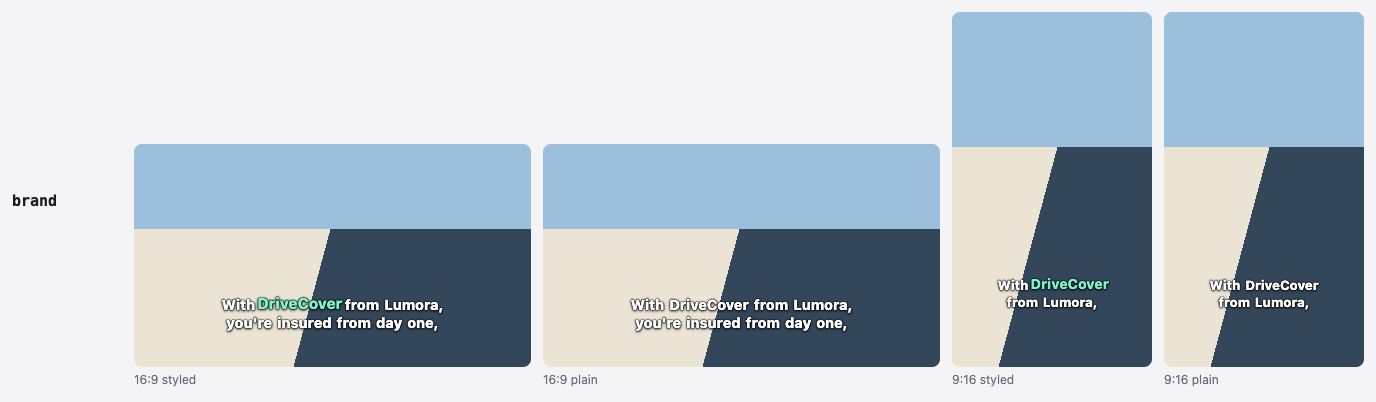
The same words, styled and plain, cut for 16:9 and for 9:16 (from the style gallery).
## With a bundler
```bash
npm install video.js videojs-overtone
```
`video.js` 8.5 or newer is a peer dependency. `overtone-format` comes with the plugin.
```js
import videojs from 'video.js';
import 'video.js/dist/video-js.css';
import 'videojs-overtone'; // registers the 'overtone' plugin
import 'videojs-overtone/themes/base.css';
import 'videojs-overtone/themes/clean.css';
import 'videojs-overtone/themes/social.css'; // load every pack you switch to
const player = videojs('my-video');
const captions = player.overtone({
src: 'clip.overtone.json',
theme: 'clean',
speakers: 'change',
fallbackTracks: { horizontal: 'clip.horizontal.vtt', vertical: 'clip.vertical.vtt' },
});
captions.setTheme('social'); // switch theme later
captions.cycle(); // same as clicking the captions button
```
In TypeScript, `import 'videojs-overtone'` types `player.overtone(options)`: it returns an `OvertoneController`
without a cast.
## With script tags
Load `video.js` before `videojs-overtone/dist/index.global.js`. The bundle uses the page's global `videojs` (and
throws "load video.js before index.global.js" without it) and exposes `window.OvertoneVideojs`.
```html
```
[examples/cdn/index.html](../examples/cdn/index.html) is this page, complete, on a NASA interview: save it and open
it in a browser. [examples/demo/index.html](../examples/demo/index.html) is the two-player demo.
## Options
| Option | Default | Meaning |
|---|---|---|
| `src` / `data` | none | URL of the `.overtone.json` file, or the document itself. One is required. On a public site, serve the player document (`overtone export clip.overtone.json --export player`), which leaves out the authoring data. |
| `profile` | `'auto'` | `'auto'` picks the profile whose aspect is closest to the visible picture. A profile id forces that profile when the document has it; otherwise `'auto'` applies. |
| `theme` | `'clean'` | Style pack name, see [Style packs](#style-packs). An empty name keeps the default. |
| `speakers` | `'never'` | Speaker names: `'never'`, `'change'` (when the speaker changes) or `'always'` (every cue) |
| `fallbackTracks` | `{}` | Profile id → `.vtt` URL, for iOS native fullscreen |
| `storageKey` | `'overtone-caption-mode'` | `localStorage` key that remembers the caption mode |
| `defaultMode` | `'styled'` | `'off'`, `'styled'` or `'plain'`, used until the viewer picks one. An invalid value keeps the default. |
## Controller
`player.overtone(options)` returns an `OvertoneController`. Calling it again on the same player replaces the
previous one.
| Member | What it does |
|---|---|
| `ready` | Promise that resolves once the document is loaded and set up, and also when loading failed |
| `error` | The load or validation error, or `undefined` |
| `getMode()`, `setMode(mode)` | Read or set the caption mode (`'off'`, `'styled'`, `'plain'`). `setMode` stores it and shows a short "Captions: …" notice. |
| `cycle()` | off → styled → plain → off, like the captions button |
| `setTheme(name)` | Switch the style pack |
| `getProfileId()` | Id of the profile in use, or `undefined` before the document is loaded |
| `dispose()` | Remove the overlay, the button and all listeners. Runs by itself when the player is disposed. |
The plugin never throws on a bad document. It logs the error, sets `error`, shows no captions and hides its button.
video.js's own captions button returns, so the page's `