dsh-input-history
简体中文 · English



终端式输入历史,用 ↑/↓ 翻查本会话发过的消息。
纯客户端插件,无宿主侧改动 — /history 指令提供可搜索的历史面板。
## 🎬 演示

## ✨ 功能
本插件给每个会话注入两条互补的输入历史召回通道:
- **⌨️ 终端式方向键翻查** — 仿 shell 命令历史,**不弹列表**,↑/↓ 直接替换输入框内容
- **📋 `/history` 历史面板** — 可搜索的悬浮列表,支持鼠标点选与键盘操作
### ⌨️ 方向键翻查
| 操作 | 效果 |
|---|---|
| ↑ / ↓(空输入框或光标在最前) | 开始翻查,取回最近一条已发送消息 |
| Esc | 还原草稿并退出翻查 |
### 📋 `/history` 面板
| 方式 | 召回语义 |
|---|---|
| 斜杠菜单选中 `/history` | **插入模式**:消息插入到 `/history` 词元位置,前后文保留 |
面板支持**搜索过滤**、鼠标点选与 ↑/↓ + Enter 操作;Esc 或点击面板外取消。
> 数据读取自当前会话的完整日志(含分页),按会话严格隔离;相邻重复消息自动折叠。
## 🚀 安装
从 NPM 安装:
```
dsh plugin --profile web add @loommii/dsh-input-history@latest
```
或从 GitHub 安装:
```
dsh plugin --profile web add github:loommii/dsh-input-history
```
安装后重启 profile(`dsh web` / `dsh --profile `)。
升级 / 卸载:
```
dsh plugin --profile web update @loommii/dsh-input-history
dsh plugin --profile web remove @loommii/dsh-input-history
```
## 💡 使用
聚焦任意会话的聊天输入框:
- **空输入框**按 ↑/↓,或光标移到**最前**按 ↑:开始终端式翻查。
- 输入 /history 并从斜杠菜单选中,或直接回车:打开历史面板。
## 🏗️ 架构
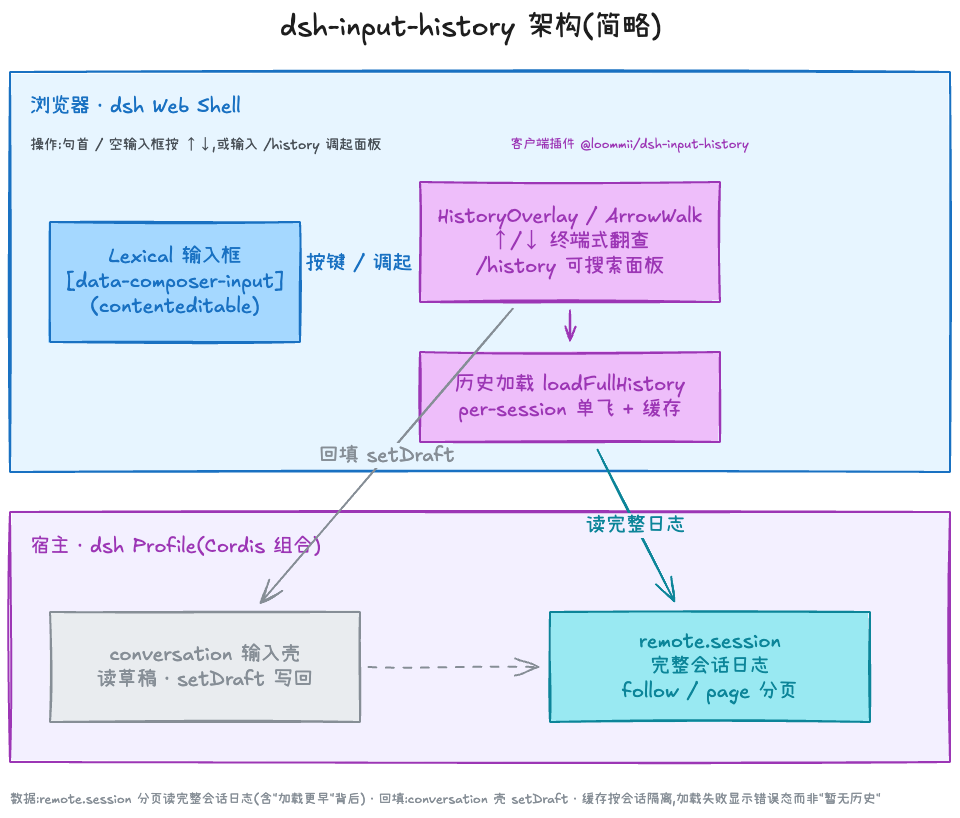
本插件是纯客户端 UI:历史从宿主 `remote.session` 完整会话日志分页读取(按会话隔离缓存),回填走 `conversation` 输入壳的 `setDraft`。
## 📄 许可
MIT