# LoongSuite observability for DeepSeek Harness
English | [简体中文](README.zh-CN.md)
`@loongsuite/dsh-plugin` is a standalone, open-source observability plugin for
[DeepSeek Harness](https://github.com/deepseek-ai/deepseek-harness) (`dsh`). It observes DSH's native
session, agent loop, LLM stream, and tool lifecycle, converts them into OpenTelemetry GenAI traces
and metrics, and exports standard OTLP/HTTP protobuf to any compatible backend.
LoongSuite is an open-source observability collection ecosystem built on OpenTelemetry. This
repository is its native DSH integration. The plugin does **not** depend on or require LoongSuite
Pilot, a sidecar, a local JSONL tap, or any particular vendor's backend.
> Status: stable `0.1.x` release. Install `@loongsuite/dsh-plugin` from npm or the DSH plugin
> market.
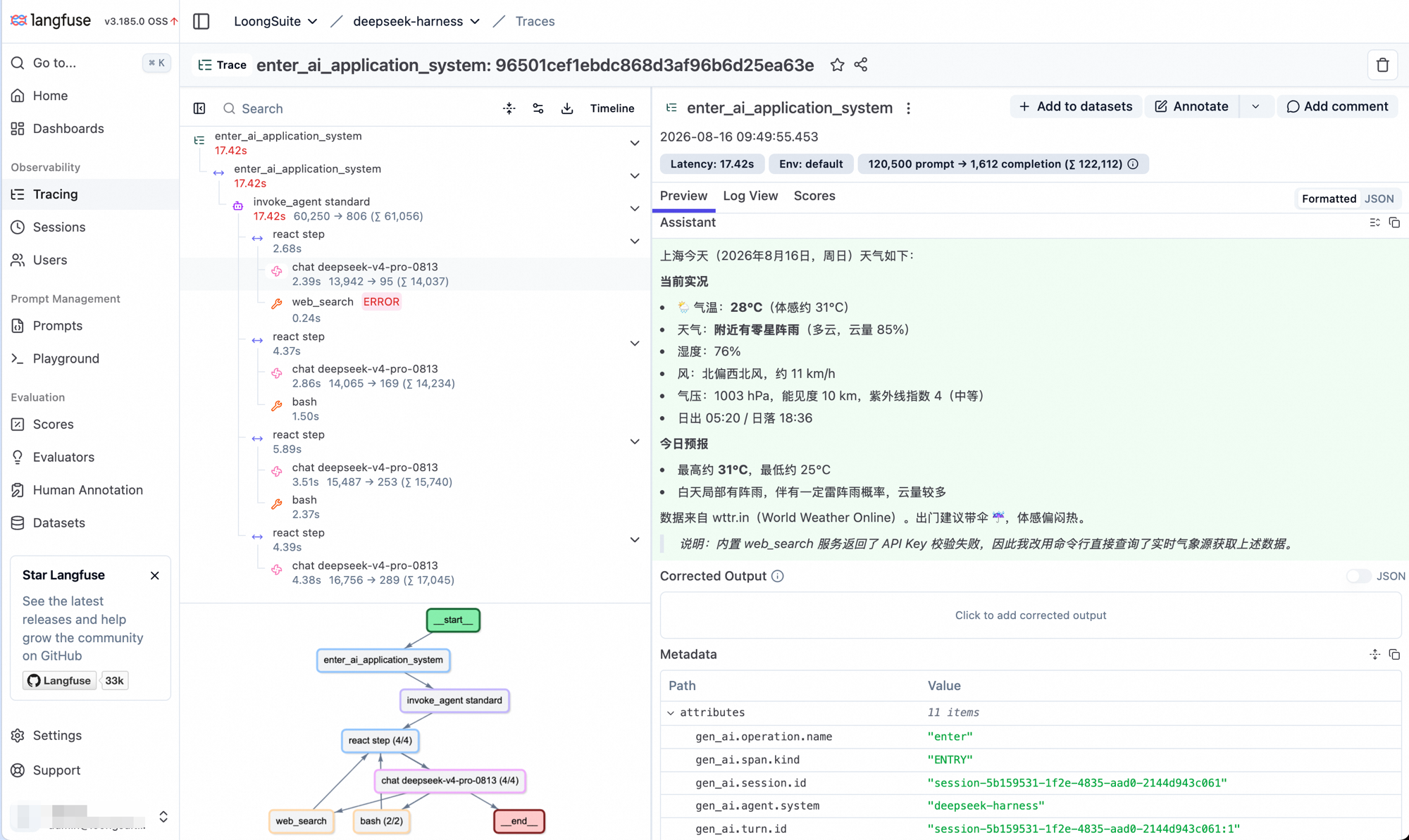
One DSH turn exported over OTLP into self-hosted Langfuse: four react steps, per-call latency
and token counts, a failed web_search followed by bash fallbacks, and the
ENTRY span's GenAI attributes. Content capture was enabled for this capture; it is off by
default.
## Data model
```text
DSH session/event + llm/stream
│
▼
lifecycle coordinator
│
▼
LoongSuite GenAI OTel utility
│
▼
private TracerProvider + MeterProvider
│ OTLP/HTTP protobuf
▼
any OpenTelemetry-compatible backend
```
One DSH turn produces a single trace with this shape:
```text
ENTRY
└── AGENT
└── STEP
├── LLM
└── TOOL
```
Each real LLM attempt gets its own `LLM` span, so retries remain visible under the same step. Tool
calls are correlated with their results by DSH call ID. Errors, aborts, incomplete streams, and
plugin shutdown close live spans with an error status instead of leaving them open. Subagent
sessions create their own trace and carry DSH parent-session and delegation attributes.
When content capture is enabled, `ENTRY` and `AGENT` input messages contain only the turn's direct
`source.kind=user` input. Synthetic DSH context such as runtime snapshots, agent instructions,
skill catalogs, goals, and coordinator relays remains visible on the `LLM` span, but prior-turn
conversation history is excluded so every trace contains only its own turn context. Later LLM
spans in a tool loop retain assistant tool calls and tool results produced earlier in the same
turn. `ENTRY` and `AGENT` output messages contain only the final `stop` response; a turn that never
reaches `stop` falls back to its last available assistant message.
The plugin also exports the standard `gen_ai.client.operation.duration` and
`gen_ai.client.token.usage` metrics. It does not export OpenTelemetry logs; it can coexist with a
separate DSH log exporter.
GenAI invocation construction and semantic attributes are powered by the
[`@loongsuite/otel-util-genai`](https://www.npmjs.com/package/@loongsuite/otel-util-genai) SDK.
## Compatibility
| Component | Supported range | Fully verified version(s) |
| --- | --- | --- |
| DeepSeek Harness | `>=0.1.0-rc.6 <0.2.0` | `0.1.0-rc.6` headless and Web profiles |
| Node.js | `>=22.19.0` | `22.19`, `24.19`, and `25.9` on macOS |
DSH release candidates older than `0.1.0-rc.6` are not supported. Each plugin release is tested
against the latest published DSH version rather than treating successful bundle composition alone
as full runtime compatibility.
## Install and run
If you have no OTLP backend yet, [`examples/quickstart`](examples/quickstart/README.md) starts a
local Jaeger backend and gets you a trace in three commands.
Add the plugin to every DSH profile you want to observe:
```sh
dsh plugin --profile web add @loongsuite/dsh-plugin
dsh plugin --profile headless add @loongsuite/dsh-plugin
```
For local development, replace the package name with the checkout path:
```sh
dsh plugin --profile web add /absolute/path/to/dsh-plugin
```
Set a service name and an OTLP/HTTP collector endpoint, then start that profile normally:
```sh
export OTEL_SERVICE_NAME=dsh-agent
export OTEL_EXPORTER_OTLP_ENDPOINT=http://localhost:4318
export OTEL_EXPORTER_OTLP_HEADERS='authorization=Bearer%20your-token'
dsh --profile web
# or: dsh --profile headless "summarize this workspace"
```
The shared endpoint is expanded to `/v1/traces` and `/v1/metrics`. The exporter uses the standard
OpenTelemetry default when no endpoint is configured.
## Configure the plugin
Environment variables are enough for most deployments. You can also edit the plugin row in
`$DSH_HOME/profiles//cordis.patch.yml` (by default under `~/.dsh`):
```yaml
- id: loongsuite-observability
config:
endpoint: http://localhost:4318
serviceName: dsh-agent
headers:
authorization: Bearer your-token
resourceAttributes:
deployment.environment.name: development
captureContent: false
exportMetrics: true
```
Explicit plugin settings take precedence over environment variables.
To enable content capture without editing the profile, set the GenAI content mode before starting
DSH:
```sh
export OTEL_INSTRUMENTATION_GENAI_CAPTURE_MESSAGE_CONTENT=SPAN_ONLY
dsh --profile web
```
| Setting | Default | Meaning |
| --- | --- | --- |
| `enabled` | `true` | Disable collection without uninstalling the bundle. |
| `endpoint` | unset | Shared OTLP/HTTP base URL; the plugin appends each signal path. |
| `traceEndpoint` / `metricEndpoint` | unset | Complete signal-specific URL; takes precedence over `endpoint`. |
| `headers` | `{}` | Headers added to both exporters. |
| `serviceName` | `OTEL_SERVICE_NAME` or `deepseek-harness` | OpenTelemetry `service.name`. |
| `resourceAttributes` | `{}` | Additional string-valued resource attributes. |
| `captureContent` | environment setting or `false` | Export prompts, responses, tool definitions, arguments, and results. |
| `contentMaxChars` | `128000` | Maximum serialized characters per captured content attribute. |
| `exportMetrics` | environment setting or `true` | Export LLM duration and token metrics. |
| `maxExportBatchSize` | `512` | Maximum spans per export batch. |
| `maxQueueSize` | `2048` | Maximum queued spans. Must not be smaller than the batch size. |
| `traceExportIntervalMs` | `5000` | Trace batch delay. |
| `metricExportIntervalMs` | `60000` | Metric export interval. |
| `exportTimeoutMs` | `30000` | OTLP export timeout. |
| `debug` | `false` | Emit additional plugin lifecycle diagnostics through the DSH logger. |
Supported standard OpenTelemetry variables are:
- `OTEL_EXPORTER_OTLP_ENDPOINT`
- `OTEL_EXPORTER_OTLP_TRACES_ENDPOINT` and `OTEL_EXPORTER_OTLP_METRICS_ENDPOINT`
- `OTEL_EXPORTER_OTLP_HEADERS`
- `OTEL_EXPORTER_OTLP_TRACES_HEADERS` and `OTEL_EXPORTER_OTLP_METRICS_HEADERS`
- `OTEL_SERVICE_NAME`
- `OTEL_RESOURCE_ATTRIBUTES`
- `OTEL_INSTRUMENTATION_GENAI_CAPTURE_MESSAGE_CONTENT` (`SPAN_ONLY` or `SPAN_AND_EVENT` enables span content when `captureContent` is omitted)
- `OTEL_METRICS_EXPORTER` (`none` disables metrics when `exportMetrics` is omitted)
Header and resource values use the standard comma-separated, percent-encoded `key=value` syntax.
## Privacy and runtime behavior
Content capture is off by default. With that default, prompts, responses, tool schemas, arguments,
and results are not attached to spans; structural metadata and token counts are still exported.
Enabling `captureContent` or setting the content-capture environment variable to `SPAN_ONLY` or
`SPAN_AND_EVENT` can send source code, credentials, personal data, or other sensitive content to
the configured backend. Review backend retention and access controls before enabling it. Set
`captureContent: false` explicitly when a profile must remain content-free regardless of the
process environment.
The plugin owns private OpenTelemetry providers and never replaces DSH's or another library's
global provider. It also disposes listeners and flushes providers with the DSH plugin lifecycle.
When attached to an already-running/HMR-reloaded profile, it adopts existing session identities but
starts collection at the next native `turn/start`; historical events are not replayed or duplicated.
## Development
Node.js 22.19 or newer and pnpm are required.
```sh
pnpm install
pnpm run check
pnpm test
pnpm run build
pnpm pack
```
See [CONTRIBUTING.md](CONTRIBUTING.md) for the implementation invariants and release checklist.
## License
[Apache-2.0](LICENSE)