
Closed-loop generalist policy improvement
from deployment rollouts.



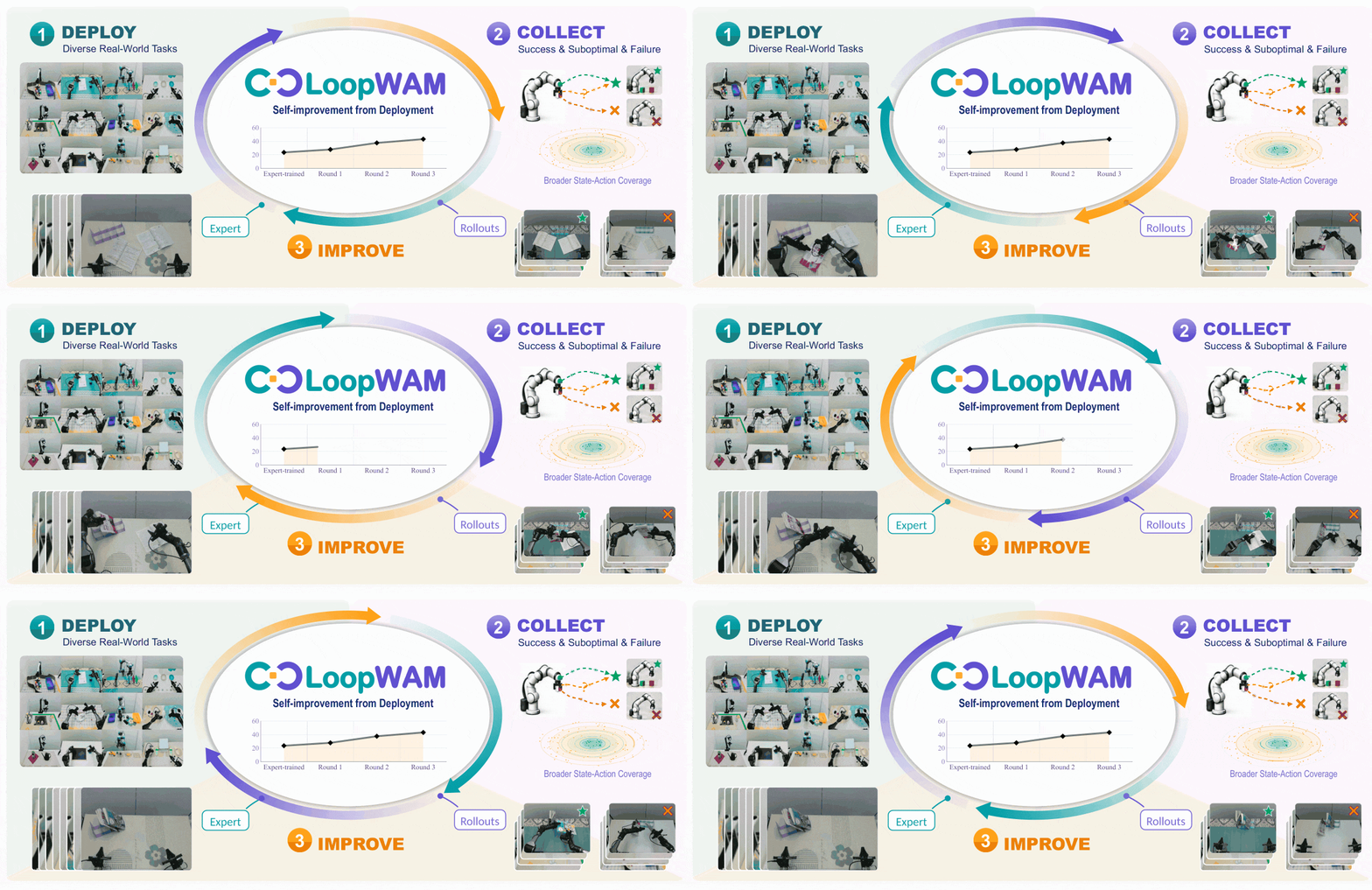
LoopWAM turns real-world experience into better robot policies. By learning from successful, suboptimal, and failed rollouts alongside expert demonstrations, it closes the loop between deployment and improvement.
## ✨ Highlights
- **SOTA performance across simulation and real-world benchmarks.** LoopWAM achieves SOTA results on RoboChallenge Table30-V2, RoboTwin 2.0, and RoboCasa365.
- **Training on non-NVIDIA GPU.** All LoopWAM models reported across the three benchmarks are trained on **Alibaba Cloud PPU-810E**.
- **Nearly 2× the training speed of the FastWAM codebase.** Building on FastWAM's dataloader, we preprocess videos before training, stitching camera views and resizing them to the training resolution to make video decoding more efficient during data loading. We also optimize video decoding around the frames sampled for each training chunk. These optimizations reduce training time from **70+ hours to 40 hours**.
| Benchmark | Setting | LoopWAM |
| --- | --- | --- |
| [RoboTwin 2.0](https://loop-wam.github.io/) | 50 bimanual tasks, clean and randomized | **94.5%** average success |
| [RoboCasa365](https://loop-wam.github.io/) | 50 tasks, seen and unseen compositions | **49.5%** overall success |
| [RoboChallenge Table30-V2](https://loop-wam.github.io/) | 30 real tasks, 4 embodiments | **43.33%** success, **56.80** score |
No extra embodied-data pretraining is used on any of the three benchmarks, covering both simulation and real-world robots.
## 📑 Contents
- [Highlights](#highlights)
- [Results](#results)
- [RoboTwin 2.0](#robotwin-20)
- [RoboCasa365](#robocasa365)
- [RoboChallenge Table30-V2](#robochallenge-table30-v2)
- [Repository](#repository)
- [Environment](#environment)
- [Pretrained weights](#pretrained-weights)
- [Dataset](#dataset)
- [RoboTwin 2.0](#robotwin-20-1)
- [Real robots (Table30-V2)](#real-robots-table30-v2)
- [Training](#training)
- [RoboTwin 2.0 evaluation](#robotwin-20-evaluation)
- [RoboCasa365 evaluation](#robocasa365-evaluation)
- [RoboChallenge evaluation](#robochallenge-evaluation)
## 🏆 Results
### 🤖 RoboTwin 2.0
50 bimanual tasks. Mixed expert–rollout training. Rollouts come from an expert-trained LoopWAM, X-VLA, and π0.5. The random seeds used for rollout collection differ from those used for evaluation.
| Method | Embodied pretraining | Clean | Randomized | Average |
| --- | --- | ---: | ---: | ---: |
| **LoopWAM** | No | **94.6** | **94.4** | **94.5** |
| LingBot-VA 2.0 | Yes | 93.8 | 93.4 | 93.6 |
| AHA-WAM | No | 93.4 | 92.2 | 92.8 |
| FastWAM | No | 91.9 | 91.8 | 91.8 |
| π0.5 | Yes | 82.7 | 76.8 | 79.8 |
### 🏠 RoboCasa365
All 16 Composite-Unseen tasks are held out of both expert data and rollout data.
| Method | Atomic seen | Composite seen | Composite unseen | Overall |
| --- | ---: | ---: | ---: | ---: |
| **LoopWAM** | **79.7** | **50.3** | 14.9 | **49.5** |
| ABot-M0.6 | 79.4 | 48.3 | 7.9 | 46.6 |
| PRTS | 66.3 | 30.3 | **18.8** | 39.6 |
### 🦾 RoboChallenge Table30-V2
30 real-world tasks on [RoboChallenge](https://robochallenge.ai/home). How to submit a run is in [RoboChallenge evaluation](#robochallenge-evaluation).
| Method | ALOHA | DOS-W1 | ARX5 | UR5 | Score | SR |
| --- | ---: | ---: | ---: | ---: | ---: | ---: |
| **LoopWAM** | **26.00** | **42.00** | 55.71 | **76.67** | **56.80** | **43.33** |
| VLA-DM0.5 | 18.00 | 42.00 | **58.57** | 70.00 | 54.42 | 40.67 |
| LoopWAM (expert-trained) | 8.00 | 38.00 | 24.29 | 26.67 | 36.10 | 23.67 |
## 🗂️ Repository
| Path | What it is |
| --- | --- |
| `train_robotwin_loopwam.sh` | RoboTwin 2.0 training |
| `eval_robotwin.sh` | RoboTwin 2.0 evaluation (released checkpoint) |
| `eval_robocasa.sh` | RoboCasa365 evaluation (`prepare` / `serve` / `client`) |
| `train_robocasa365.sh` | RoboCasa365 mixed-quality training |
| `train_table30_v2.sh` | Real-robot training for UR5, ALOHA, ARX5, and DOS-W1 |
| `checkpoints/` | Released weights, real copies, each with `dataset_stats.json` |
| `configs/` | Hydra task and data configs |
| `scripts/setup_env.sh` | Conda env, PyTorch, and `pip install -e .` |
| `scripts/download_pretrained.sh` | Wan2.2-TI2V-5B download and ActionDiT backbone |
| `scripts/prepare_eval.sh` | Soft-link RoboTwin assets / cuRobo / policy; download eval checkpoints |
| `scripts/download_robocasa365.sh` | RoboCasa365 checkpoint + `dataset_stats.json` |
| `scripts/prepare_data.sh` | RoboTwin expert + LoopWAM rollout archives |
| `rollout_collect/` | π0.5 rollout collection example in RoboTwin |
| `experiments/robotwin/` | RoboTwin 2.0 evaluation manager and policy |
| `experiments/robocasa/` | RoboCasa365 policy server (legacy client scripts kept) |
| `third_party/RoboCasa365/` | RoboCasa365 simulator client (`robocasa` + `robosuite`) |
| `third_party/table30_v2_convert/` | Table30-V2 raw export → LeRobot converter |
| `scripts/` | Training launcher (`train.py`, DeepSpeed / Accelerate configs) |
| `src/` | Model and dataset code |
## ⚙️ Environment
Python 3.10 and PyTorch 2.7.1+cu128.
```bash
bash scripts/setup_env.sh
conda activate loopwam
```
## 📦 Pretrained weights
Training and inference both need Wan2.2-TI2V-5B under `checkpoints/`, plus the ActionDiT backbone interpolated from the Wan DiT. The script downloads the Wan files (ModelScope by default) and writes `checkpoints/ActionDiT_linear_interp_Wan22_alphascale_1024hdim.pt`.
```bash
bash scripts/download_pretrained.sh
# Hugging Face instead of ModelScope
DIFFSYNTH_DOWNLOAD_SOURCE=huggingface bash scripts/download_pretrained.sh
```
Released LoopWAM checkpoints already live in `checkpoints/` next to that backbone. Training scripts set `DIFFSYNTH_MODEL_BASE_PATH` to this directory and skip a second download.
## 🗃️ Dataset
### 🤖 RoboTwin 2.0
Expert demos are generated with the official [RoboTwin 2.0](https://github.com/RoboTwin-Platform/RoboTwin) data generator, then converted into the stitched LeRobot tree used for training.
Video preprocessing stitches camera views and resizes them to the training resolution for more efficient decoding during data loading. The following command preprocesses `./data/robotwin2_0` into `./data/robotwin2_0_stitched`:
```bash
PYTHONPATH=src python scripts/stitch_robotwin_videos.py \
--src ./data/robotwin2_0 \
--dst ./data/robotwin2_0_stitched \
--workers 48 \
--crf 16 \
--preset medium \
--gop 2
```
Mixed training combines these expert demonstrations with rollouts from LoopWAM, π0.5, and X-VLA. The three rollout packages are published under `data/robotwin2_0-ours/` on [huggingface](https://huggingface.co/datasets/loop-wam/loopwam).
```bash
bash scripts/prepare_data.sh robotwin
```
That downloads the three rollout archives from `loop-wam/loopwam` and extracts them under `./data/`.
The training data is organized as follows:
```text
data/
├── robotwin2_0_stitched/ # Expert demonstrations
│ ├── meta/
│ ├── data/
│ ├── videos/
│ └── dataset_stats.json
└── robotwin2_0-ours/
└── lerobot_format_new/
├── loopwam_processed_stitched/ # LoopWAM rollouts
│ ├── meta/
│ ├── data/
│ └── videos/
├── pi05_processed_stitched/ # π0.5 rollouts
│ ├── meta/
│ ├── data/
│ └── videos/
└── xvla_processed_stitched/ # X-VLA rollouts
├── meta/
├── data/
└── videos/
```
`dataset_stats.json` under the stitched expert tree is the normalization file used by `train_robotwin_loopwam.sh`. Normalization statistics are computed exclusively from expert trajectories; rollout trajectories are excluded because they may contain anomalous actions that could skew these statistics.
To illustrate the rollout collection process, we provide the environment and collection script for π0.5 in RoboTwin. Clone the simulator root from [loop-wam/Robotwin-Rollout](https://github.com/loop-wam/Robotwin-Rollout) and set `ROBOTWIN_ROOT` to that checkout. The script writes HDF5 episodes and supports resuming collection. Details are in [rollout_collect/README.md](rollout_collect/README.md).
```bash
git clone https://github.com/loop-wam/Robotwin-Rollout.git
export ROBOTWIN_ROOT=$PWD/Robotwin-Rollout
bash rollout_collect/collect_pi05.sh task_list.txt rollout_data/pi05
```
`rollout_collect/convert_robotwin_to_lerobot.py` turns those HDF5 episodes into the LeRobot v2.1 layout used by mixed training (`meta/`, `data/chunk-*`, `videos/chunk-*`).
```bash
python rollout_collect/convert_robotwin_to_lerobot.py \
--source-root ./rollout_data/pi05 \
--output-dir ./data/robotwin2_0-ours/lerobot_format_new/pi05_processed_stitched \
--task-configs demo_clean demo_randomized
# Optional: --resume, --tasks , --merge-parts , --video-codec h264
```
Before the first training run, cache umT5 embeddings for the task prompts:
```bash
python scripts/precompute_text_embeds.py \
task=robotwin_quality_score_3low_1cam_stitched_384_1e-4_action_weighted
# or several GPUs
python scripts/precompute_text_embeds_multigpu.py \
task=robotwin_quality_score_3low_1cam_stitched_384_1e-4_action_weighted \
+processes_per_gpu=4 +overwrite=false
```
### 🦾 Real robots (Table30-V2)
We conducted real-world robot experiments on the [RoboChallenge Table30-V2](https://robochallenge.ai/home) benchmark. Raw exports are converted to LeRobot v2.1 with `third_party/table30_v2_convert/` (W1, ALOHA, ARX5, UR5). Details are in that directory's `README.md`.
```bash
cd third_party/table30_v2_convert
# Default raw root: ../data/table30 (i.e. LoopWAM/third_party/data/table30)
# Override to your export tree:
RAW_ROOT=/path/to/table30 OUT_DIR=/path/to/converted_data/table30-rc_w1_4-lerobot \
bash scripts/run.sh w1
bash scripts/run.sh aloha
bash scripts/run.sh arx5
bash scripts/run.sh ur5
```
### 🤖 Robocasa365
Expert demonstrations can be downloaded from [the official RoboCasa dataset documentation](https://robocasa.ai/docs/build/html/datasets/using_datasets.html), and we provide [the three rollout datasets](https://huggingface.co/datasets/loop-wam/loopwam/tree/main/data/robocasa365-ours) used in our training pipeline.
Before training, you should regenerate the data configuration file based on the locations where you store these rollout datasets. The existing configuration file `configs/data/robocasa365_mq_3rollout.yaml` keeps the original training paths and is provided as a reference for the remaining configuration parameters. Update data configuration with:
```bash
python scripts/robocasa365_dataconfig_gen.py \
--base-config configs/data/robocasa365_mq_3rollout.yaml \
--rollout-source root=/path/to/rldx_rollout,success=2,failure=1,mode=success_only \
--rollout-source root=/path/to/loopwam_round1_rollout,success=3,failure=1,mode=success_only \
--rollout-source root=/path/to/loopwam_round2_rollout_part2,success=4,failure=1,mode=success_only \
--rollout-source root=/path/to/loopwam_round2_rollout_part1,success=4,failure=1,mode=success_only \
--failure-source-index 3 \
--expert-score 5 \
--out configs/data/robocasa365_mq_3rollout.yaml \
--pretrained-norm-stats null \
--text-embedding-cache-root /path/to/embedded_text
```
Before the first training run, cache the umT5 text embeddings for the RoboCasa365 task prompts:
```bash
python scripts/precompute_text_embeds.py \
task=robocasa365_join_mq_3rollout
```
In addition, we also provide reference scripts for collecting rollout data on the RoboCasa365 benchmark under `rollout_collect/robocasa365_rollout`. These scripts demonstrate how to collect rollouts using our LoopWAM model. After launching a server that hosts the LoopWAM policy model (see `Section: Robocasa365 evaluation`), you can start a rollout collection client with the following command:
```bash
bash client_rollout_p.sh \
--task_set pretrain_composite1 \
--parallel_clients 4 \
--server_url http://127.0.0.1:7891 \
--split pretrain \
--num_trials 50 \
--seed 111111 \
--save_video_every 0 \
--replan_steps 48 \
--rollout_root /path/to/your/rollout \
--run_name loopwam_rollout_composite1
```
Please note that some path arguments in the provided scripts may need to be updated according to your local environment.
## 🚀 Training
The following scripts launch training on the simulation and real-world benchmarks:
```bash
bash train_robotwin_loopwam.sh # RoboTwin 2.0
bash train_robocasa365.sh # RoboCasa365
bash train_table30_v2.sh ur5 # UR5
bash train_table30_v2.sh aloha # ALOHA
bash train_table30_v2.sh arx5 # ARX5
bash train_table30_v2.sh w1 # DOS-W1
```
Set `NPROC_PER_NODE` to choose the GPU count. Pass a GPU count after the robot name, for example `bash train_table30_v2.sh ur5 1`.
Released checkpoints, each with its `dataset_stats.json`:
| Benchmark / Robot | Checkpoint |
| --- | --- |
| RoboCasa365 | [robocasa365](https://huggingface.co/datasets/loop-wam/loopwam/tree/main/robocasa365) |
| RoboTwin 2.0 | [robotwin](https://huggingface.co/datasets/loop-wam/loopwam/tree/main/robotwin) |
| ALOHA | [table30v2_aloha](https://huggingface.co/datasets/loop-wam/loopwam/tree/main/table30v2_aloha) |
| ARX5 | [table30v2_arx5](https://huggingface.co/datasets/loop-wam/loopwam/tree/main/table30v2_arx5) |
| UR5 | [table30v2_ur5](https://huggingface.co/datasets/loop-wam/loopwam/tree/main/table30v2_ur5) |
| DOS-W1 | [table30v2_w1](https://huggingface.co/datasets/loop-wam/loopwam/tree/main/table30v2_w1) |
RoboTwin 2.0 follows the final mixed-rollout recipe: expert `robotwin2_0_stitched` plus expert-trained LoopWAM, π0.5, and X-VLA rollouts, quality-weighted action loss, `num_frames=65`, `action_video_freq_ratio=8`.
RoboCasa365 uses expert demonstrations plus three rollout sources, quality-weighted action loss, and the `robocasa` three-camera stitch (`256x384`). Normalization stats are computed from the training set on the first run and saved as `dataset_stats.json` in the run directory.
Real-robot training uses RoboChallenge Table30-V2. The four embodiment rows above are those released checkpoints.
## 🧪 RoboTwin 2.0 evaluation
Released weights: `checkpoints/robotwin/step_037645.pt` and `checkpoints/robotwin/dataset_stats.json` ([Hugging Face](https://huggingface.co/datasets/loop-wam/loopwam/tree/main/robotwin)). Reported result: clean **94.6%**, randomized **94.4%**, average **94.5%**, measured with the default `eval_robotwin.sh` setup on **A800**.
**1. Install RoboTwin and download its assets.**
The RoboTwin evaluation code is already included in `third_party/RoboTwin`. After completing the [LoopWAM environment setup](#environment), follow the official instructions from the [RoboTwin repository](https://github.com/RoboTwin-Platform/RoboTwin), including the [Install & Download guide](https://robotwin-platform.github.io/doc/usage/robotwin-install.html), to install the simulator dependencies and cuRobo and download the required assets. Install the Python dependencies in the same environment used to run LoopWAM. The prepared RoboTwin directory should contain `assets/objects/` and `envs/curobo/`.
**2. Prepare the policy link and model weights.**
Return to the LoopWAM repository root and point `ROBOTWIN_PREBUILT` at the RoboTwin directory prepared in step 1:
```bash
ROBOTWIN_PREBUILT=/absolute/path/to/RoboTwin bash scripts/prepare_eval.sh
```
This script links the installed assets and cuRobo into `third_party/RoboTwin`, creates the policy symlink from `third_party/RoboTwin/policy/fastwam_policy` to `experiments/robotwin/fastwam_policy`, and downloads the released checkpoint and normalization stats into `checkpoints/robotwin/`. It also prepares the shared pretrained weights, including the Wan2.2 text encoder. The simulator installation and asset downloads in step 1 must be completed first.
If the assets and cuRobo are already installed directly under `third_party/RoboTwin/assets/` and `third_party/RoboTwin/envs/curobo/`, run `bash scripts/prepare_eval.sh` without setting `ROBOTWIN_PREBUILT`.
**3. Run evaluation.**
Run the following commands from the LoopWAM repository root. `eval_robotwin.sh` launches `experiments/robotwin/run_robotwin_manager.py` with the evaluation settings for the released LoopWAM checkpoint:
```bash
# Full 50-task suite on 8 GPUs (default)
bash eval_robotwin.sh
# A single task on one GPU
MAX_TASKS_PER_GPU=1 TASK_NAME=place_shoe bash eval_robotwin.sh 1
```
Each task is evaluated on both `demo_clean` and `demo_randomized`, with **100 episodes per setting** and unseen instructions. The default permits up to two concurrent tasks per GPU; set `MAX_TASKS_PER_GPU=1` to run one task at a time on each GPU.
To evaluate another checkpoint with the same model configuration, set `CKPT` and `STATS` to its checkpoint and normalization file:
```bash
CKPT=/path/to/checkpoint.pt STATS=/path/to/dataset_stats.json bash eval_robotwin.sh 8
```
Additional Hydra overrides can be appended after the GPU count, for example `bash eval_robotwin.sh 8 EVALUATION.eval_num_episodes=10`. Use `TASK_NAME` to select a RoboTwin task; the Hydra `task` option selects the model configuration.
Results are saved under `evaluate_results/robotwin/`. Each run contains `summary.csv`, `summary.json`, and `manager.log`, with per-task clean and randomized success rates in `_result_clean.txt` and `_result_random.txt`.
## 🧪 RoboCasa365 evaluation
RoboCasa365 is split across two processes. This repository serves the policy over HTTP. The simulator client lives under `third_party/RoboCasa365` (`robocasa` + `robosuite`); mesh assets are linked via soft links.
The server reuses `task=robocasa365_join_mq_3rollout`, so the camera stitching, 11-dimensional action space, and 14-dimensional state representation are consistent with training. The configuration file `configs/sim_robocasa.yaml` loads the Wan2.2 text encoder and skips fresh ActionDiT initialization; the trained `.pt` checkpoint provides the model weights.
If the text encoder and the released RoboCasa365 checkpoint are not already available under `checkpoints/`, download them with:
```bash
bash scripts/download_pretrained.sh
bash scripts/download_robocasa365.sh
```
We recommend maintaining two separate Conda environments: one for the policy server and one for the simulator client.
### 🖥️ Server
For the server, you can directly use the existing `loopwam` environment. Install `Flask` if it is not already available:
```bash
conda activate loopwam
pip install flask
```
Start the policy server from the repository root. `+EVALUATION.quality_score=5` is the default setting. The server listens on `0.0.0.0:7891` and responds to `POST /process_frame` with an action chunk of length `num_frames - 1` (64 for this task).
```bash
conda activate loopwam
bash eval_robocasa.sh serve
# or: GPU_ID=0 PORT=7891 bash eval_robocasa.sh serve
```
### 🏠 Client
In a separate terminal, run the client commands below from the repository root. For the client environment, follow the [official RoboCasa repository setup instructions](https://github.com/robocasa/robocasa). Alternatively, we recommend using the included `third_party` directory for a faster setup:
```bash
conda create -n robocasa365 python=3.11 -y
conda activate robocasa365
python -m pip install -e third_party/RoboCasa365/robosuite
python -m pip install -e third_party/RoboCasa365/robocasa
apt-get update
apt-get install -y libegl1 libopengl0 libgl1
```
To run the simulator properly, you also need to download two asset packages: `robocasa_assets` and `robosuite_assets`. The assets are available at: [RoboCasa365 dataset on Hugging Face](https://huggingface.co/datasets/loop-wam/loopwam/tree/main/robocasa365).
After downloading and extracting the asset archives, create the required soft links with:
```bash
ASSET_SRC_ROOT=/path/to/robocasa_assets \
ROBOSUITE_ASSET_SRC=/path/to/robosuite_assets \
bash eval_robocasa.sh prepare
```
`ASSET_SRC_ROOT` must contain `fixtures/`, `objects/`, `textures/`, and `generative_textures/`.
For single-GPU evaluation, we split the three RoboCasa365 task suites, `atomic`, `seen`, and `unseen`, into six groups. Each group uses one policy server.
The client sends three PNG images and the 14-dimensional state to the server, converts the returned 11-dimensional action back into the 12-dimensional simulator action, and executes `--replan_steps` actions before requesting the next action chunk.
Make sure to update `--server_url` according to the actual address of your running policy server.
**Atomic18 Group 1**
```bash
bash eval_robocasa.sh client \
--python_bin "$(command -v python)" \
--task_groups "CloseBlenderLid,CloseFridge;CloseToasterOvenDoor,CoffeeSetupMug;NavigateKitchen,OpenCabinet;OpenDrawer,OpenStandMixerHead" \
--server_url http://127.0.0.1:7891 \
--split pretrain \
--replan_steps 48 \
--num_trials 50 \
--save_video_every 0 \
--run_name robocasa365_eval_atomic1
```
**Atomic18 Group 2**
```bash
bash eval_robocasa.sh client \
--python_bin "$(command -v python)" \
--task_groups "PickPlaceCounterToCabinet,PickPlaceCounterToStove;PickPlaceDrawerToCounter,PickPlaceSinkToCounter;PickPlaceToasterToCounter,SlideDishwasherRack,TurnOnSinkFaucet;TurnOffStove,TurnOnElectricKettle,TurnOnMicrowave" \
--server_url http://127.0.0.1:7891 \
--split pretrain \
--replan_steps 48 \
--num_trials 50 \
--save_video_every 0 \
--run_name robocasa365_eval_atomic2
```
**Seen16 Group 1**
```bash
bash eval_robocasa.sh client \
--python_bin "$(command -v python)" \
--task_groups "StackBowlsCabinet,PreSoakPan;ScrubCuttingBoard,WashLettuce;RinseSinkBasin,KettleBoiling;LoadDishwasher,StoreLeftoversInBowl" \
--server_url http://127.0.0.1:7891 \
--split pretrain \
--replan_steps 48 \
--num_trials 50 \
--save_video_every 0 \
--run_name robocasa365_eval_seen1
```
**Seen16 Group 2**
```bash
bash eval_robocasa.sh client \
--python_bin "$(command -v python)" \
--task_groups "SetUpCuttingStation,StirVegetables;SteamInMicrowave,SearingMeat;PackIdenticalLunches,PrepareCoffee;DeliverStraw,GetToastedBread" \
--server_url http://127.0.0.1:7891 \
--split pretrain \
--replan_steps 48 \
--num_trials 50 \
--save_video_every 0 \
--run_name robocasa365_eval_seen2
```
**Unseen16 Group 1**
```bash
bash eval_robocasa.sh client \
--python_bin "$(command -v python)" \
--task_groups "RecycleBottlesByType,WaffleReheat;ArrangeBreadBasket,WeighIngredients;BreadSelection,CuttingToolSelection;GarnishPancake,ArrangeTea" \
--server_url http://127.0.0.1:7891 \
--split pretrain \
--replan_steps 48 \
--num_trials 50 \
--save_video_every 0 \
--run_name robocasa365_eval_unseen1
```
**Unseen16 Group 2**
```bash
bash eval_robocasa.sh client \
--python_bin "$(command -v python)" \
--task_groups "WashFruitColander,MakeIceLemonade;PortionHotDogs,PanTransfer;HeatKebabSandwich,CategorizeCondiments;SeparateFreezerRack,GatherTableware" \
--server_url http://127.0.0.1:7891 \
--split pretrain \
--replan_steps 48 \
--num_trials 50 \
--save_video_every 0 \
--run_name robocasa365_eval_unseen2
```
To resume an interrupted run, use the same `--run_name`, output directory, and evaluation settings. Completed episodes are recorded in `episode_results.jsonl` and skipped on the next run. Group logs are saved to `third_party/RoboCasa365/logs/eval/_group*.log`, and the combined summary is saved to `third_party/RoboCasa365/eval_videos/_merged_summary.json`. Per-group results and any recorded videos are stored under `third_party/RoboCasa365/eval_videos/_group*/`. The examples use `--save_video_every 0` to disable video recording; summary results are still saved.
## 🧪 RoboChallenge evaluation
Table30-V2 is evaluated on the real robots through [RoboChallenge](https://robochallenge.ai/home). Submit the request on that site. The client that talks to the robot is [RoboChallengeInference](https://github.com/RoboChallenge/RoboChallengeInference). It is not part of this repository. Implement `DummyPolicy` in that repo's `demo.py` so it loads one released checkpoint and returns a list of actions.
Use one checkpoint per embodiment, together with the `dataset_stats.json` beside it. At deployment the policy is conditioned on expert quality, the same setting as `quality_score=5` in the simulator evals.
The example client documents the action layout in its [robot notes](https://github.com/RoboChallenge/RoboChallengeInference#robot-specific-notes). ALOHA uses `action_type=joint` and 14 numbers (6 joints and 1 gripper on each arm). ARX5 and UR5 use `leftjoint` and 7 numbers (6 joints and 1 gripper). Camera names are `high`, `left_hand`, and `right_hand`. UR5 has no third camera, so leave out the one that robot does not expose. The example requests 224×224 images and a per-action `duration` of 0.05 seconds.
Install the client and try it against the mock server before asking for a robot:
```bash
git clone https://github.com/RoboChallenge/RoboChallengeInference.git
cd RoboChallengeInference
python -m venv venv
source venv/bin/activate
pip install -r requirements.txt
```
In `mock_server/mock_settings.py`, leave only one `ROBOT_TAG` and `RECORD_DATA_DIR` uncommented. The tag must match the episode directory. The checkout includes sample episodes for `aloha`, `arx5`, and `ur5`.
```bash
cd mock_server && python3 mock_robot_server.py
```
From the client root, in another terminal:
```bash
python3 test.py --checkpoint /path/to/checkpoint.pt
```
`test.py` calls the mock robot, so a shape or camera mismatch shows up before a real job.
Submit on the website:
1. Log in at [robochallenge.ai](https://robochallenge.ai/home) and submit an evaluation request.
2. Open the submission under My Submissions and copy the Run ID from its detail page.
3. Wait for the site or email to assign the job. During that window the client below has to be running. It exits when the job finishes. Results appear on My Submissions.
```bash
python3 demo.py \
--user_token \
--run_id \
--checkpoint /path/to/checkpoint.pt
```
`demo.py` polls until that Run ID is ready, reads `/state.pkl`, and posts the actions from `GPUClient.infer`. Keep `action_type` the same for the whole job.