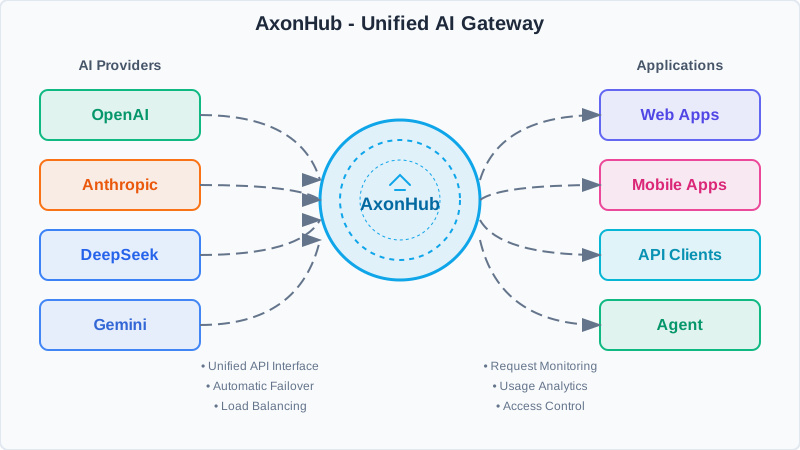
# AxonHub - All-in-one AI Development Platform
### Use any SDK. Access any model. Zero code changes.

[](https://github.com/looplj/axonhub/actions/workflows/test.yml)
[](https://github.com/looplj/axonhub/actions/workflows/lint.yml)
[](https://golang.org/)
[](https://docker.com)
[English](README.md) | [中文](README.zh-CN.md)
---
## 💖 Support Me
| Provider | Plan | Description | Links |
|----------|------|-------------|-------|
| Zhipu AI | GLM CODING PLAN | You've been invited to join the GLM Coding Plan! Enjoy full support for Claude Code, Cline, and 10+ top coding tools — starting at just $3/month. Subscribe now and grab the limited-time deal! | [English](https://z.ai/subscribe?ic=OKAF5UFZOM) / [中文](https://www.bigmodel.cn/glm-coding?ic=WIDLV0OOTJ) |
| Volcengine | CODING PLAN | Ark Coding Plan supports Doubao, GLM, DeepSeek, Kimi and other models. Compatible with unlimited tools. Subscribe now for an extra 10% off — as low as $1.2/month. The more you subscribe, the more you save! | [Link](https://volcengine.com/L/1Q-HZr5Uvk8/) / Code: LXKDZK3W |
---
## 📖 Project Introduction
### All-in-one AI Development Platform
**AxonHub is the AI gateway that lets you switch between model providers without changing a single line of code.**
Whether you're using OpenAI SDK, Anthropic SDK, or any AI SDK, AxonHub transparently translates your requests to work with any supported model provider. No refactoring, no SDK swaps—just change a configuration and you're done.
**What it solves:**
- 🔒 **Vendor lock-in** - Switch from GPT-4 to Claude or Gemini instantly
- 🔧 **Integration complexity** - One API format for 10+ providers
- 📊 **Observability gap** - Complete request tracing out of the box
- 💸 **Cost control** - Real-time usage tracking and budget management
### Core Features
| Feature | What You Get |
|---------|-------------|
| 🔄 [**Any SDK → Any Model**](docs/en/api-reference/openai-api.md) | Use OpenAI SDK to call Claude, or Anthropic SDK to call GPT. Zero code changes. |
| 🔍 [**Full Request Tracing**](docs/en/guides/tracing.md) | Complete request timelines with thread-aware observability. Debug faster. |
| 🔐 [**Enterprise RBAC**](docs/en/guides/permissions.md) | Fine-grained access control, usage quotas, and data isolation. |
| ⚡ [**Smart Load Balancing**](docs/en/guides/load-balance.md) | Auto failover in <100ms. Always route to the healthiest channel. |
| 💰 [**Real-time Cost Tracking**](docs/en/guides/cost-tracking.md) | Per-request cost breakdown. Input, output, cache tokens—all tracked. |
---
## 📚 Documentation
For detailed technical documentation, API references, architecture design, and more, please visit
- [](https://deepwiki.com/looplj/axonhub)
- [](https://zread.ai/looplj/axonhub)
---
## 🎯 Demo
Try AxonHub live at our [demo instance](https://axonhub.onrender.com)!
**Note**:The demo instance currently configures Zhipu and OpenRouter free models.
### Demo Account
- **Email**: demo@example.com
- **Password**: 12345678
---
## ⭐ Features
### 📸 Screenshots
Here are some screenshots of AxonHub in action:
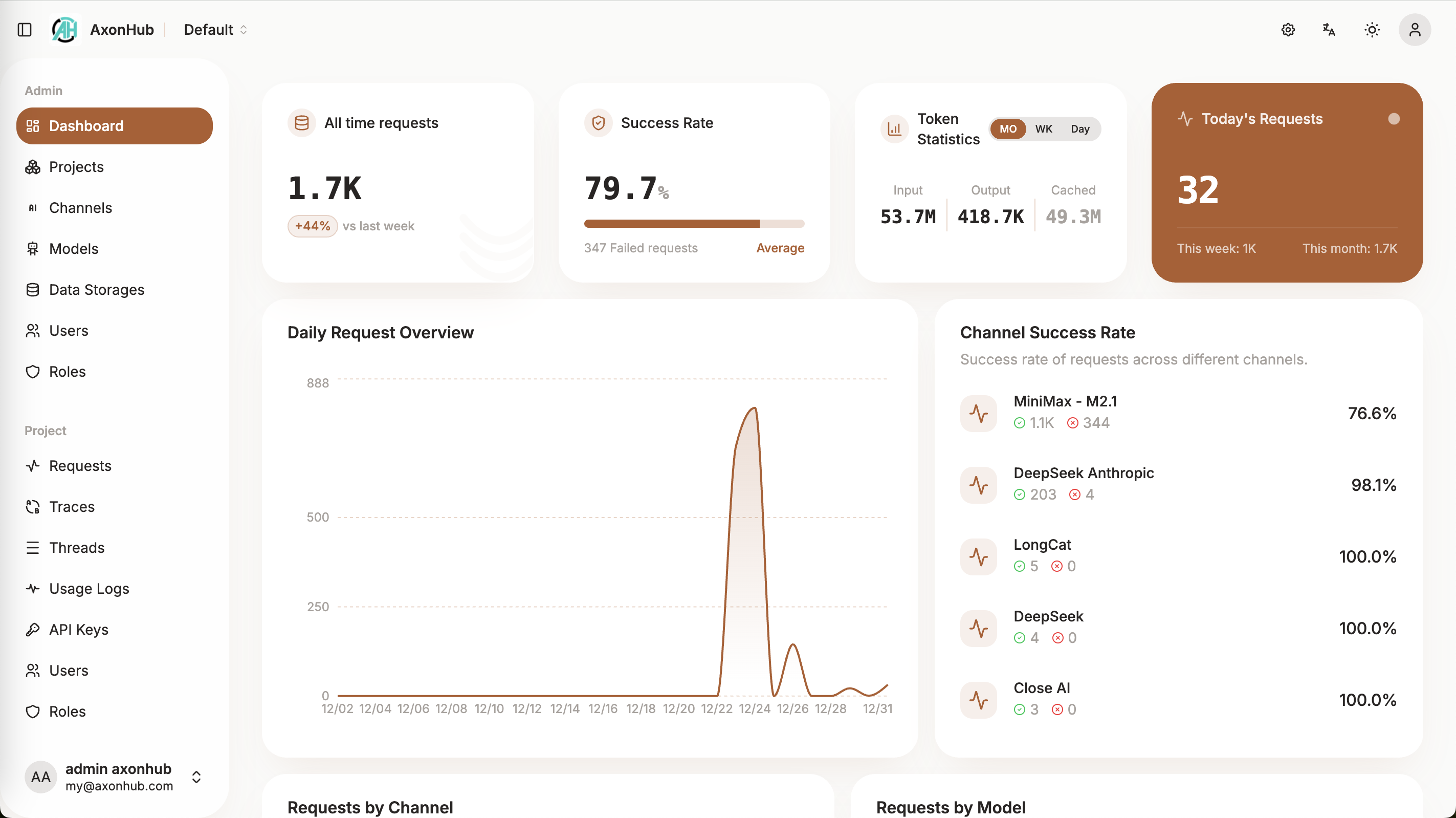
System Dashboard
|
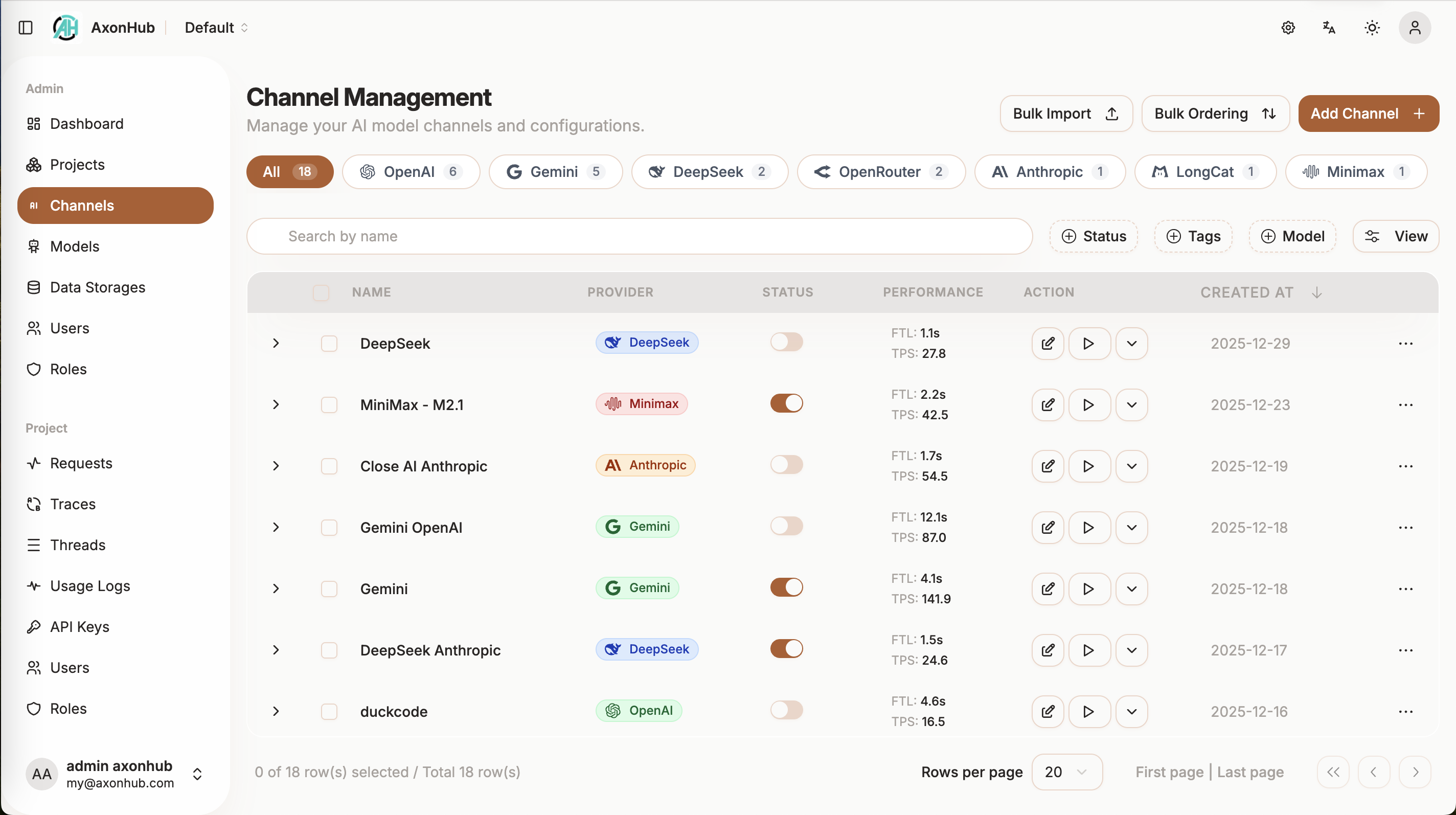
Channel Management
|
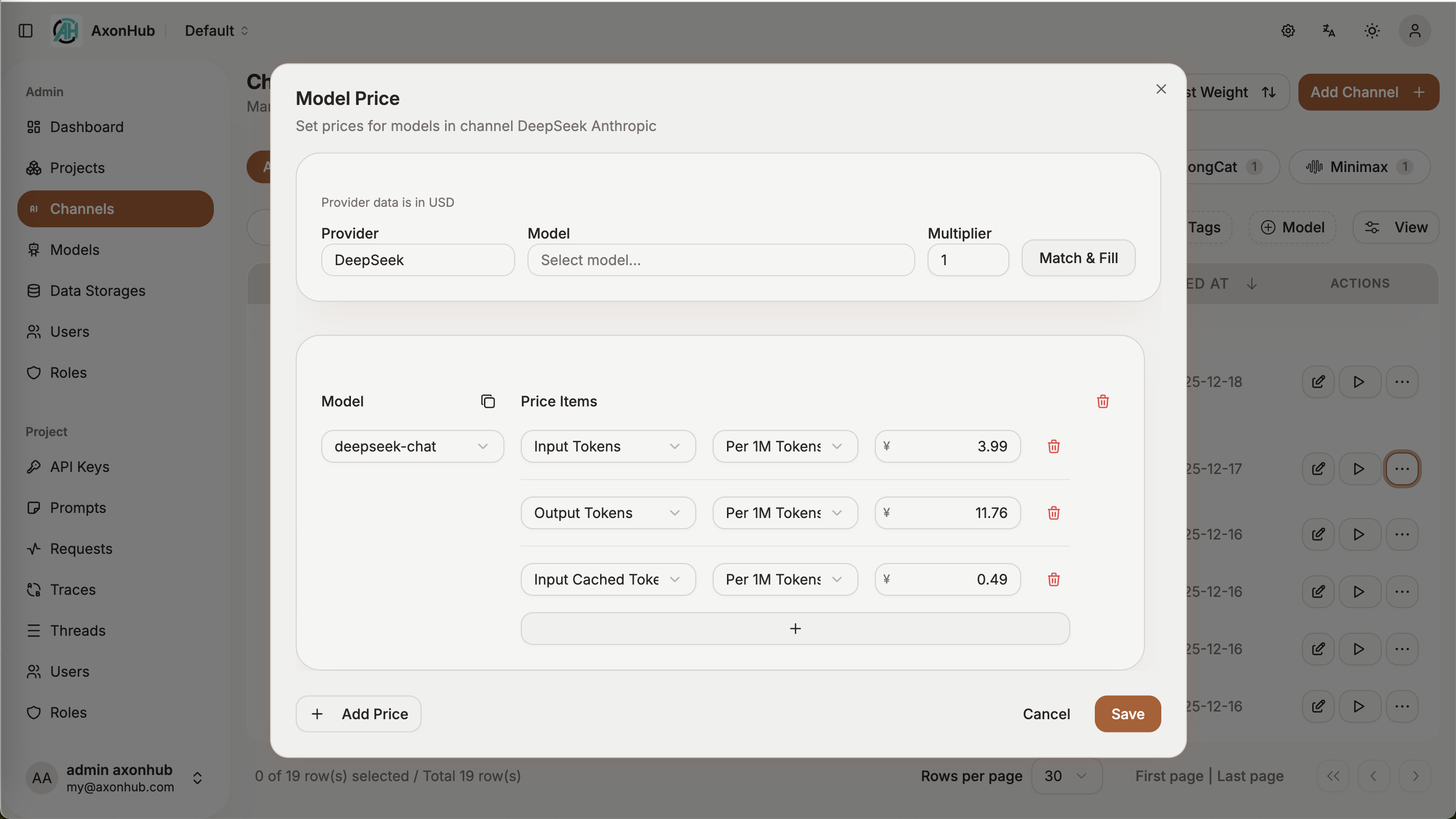
Model Price
|
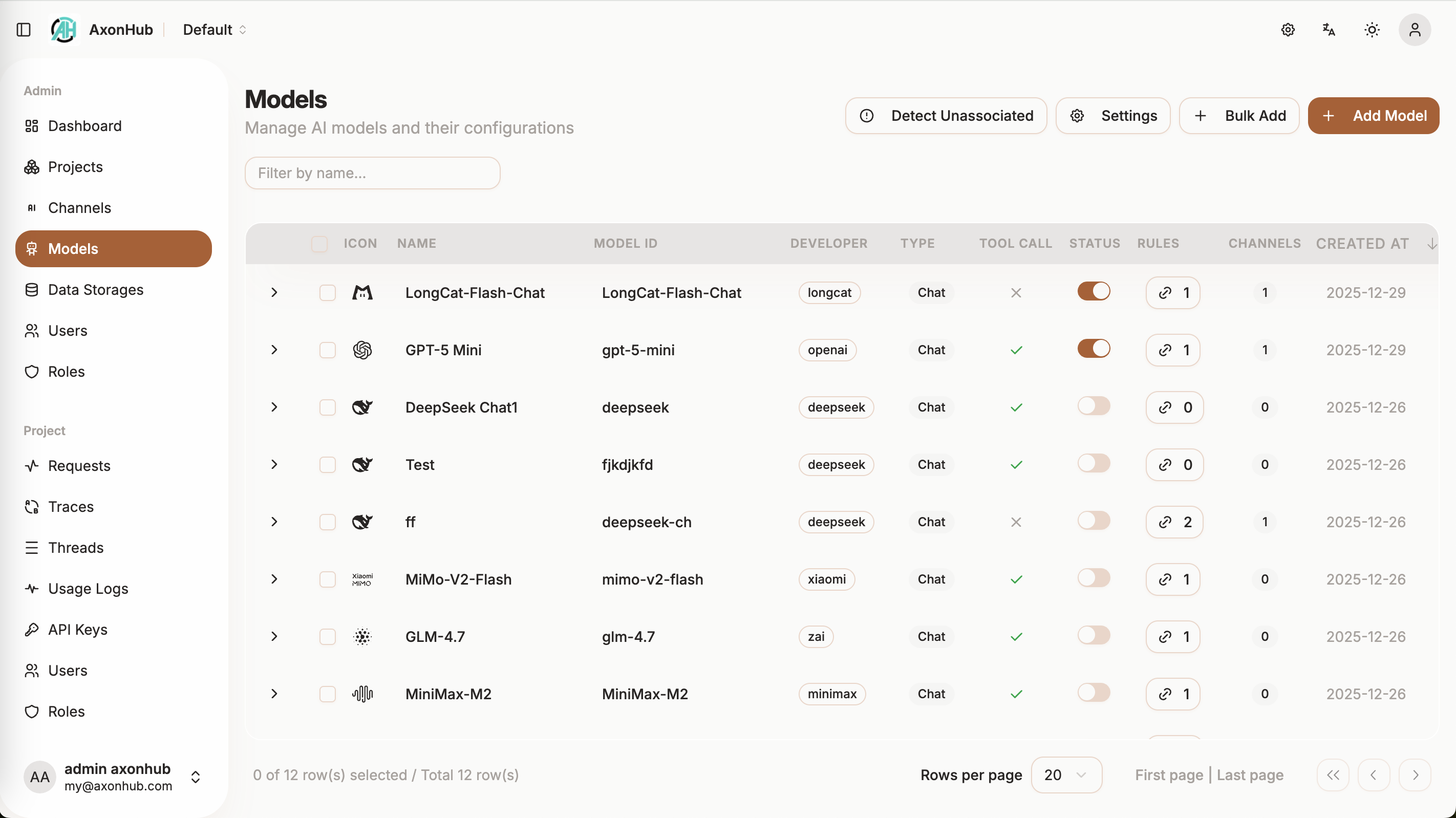
Models
|
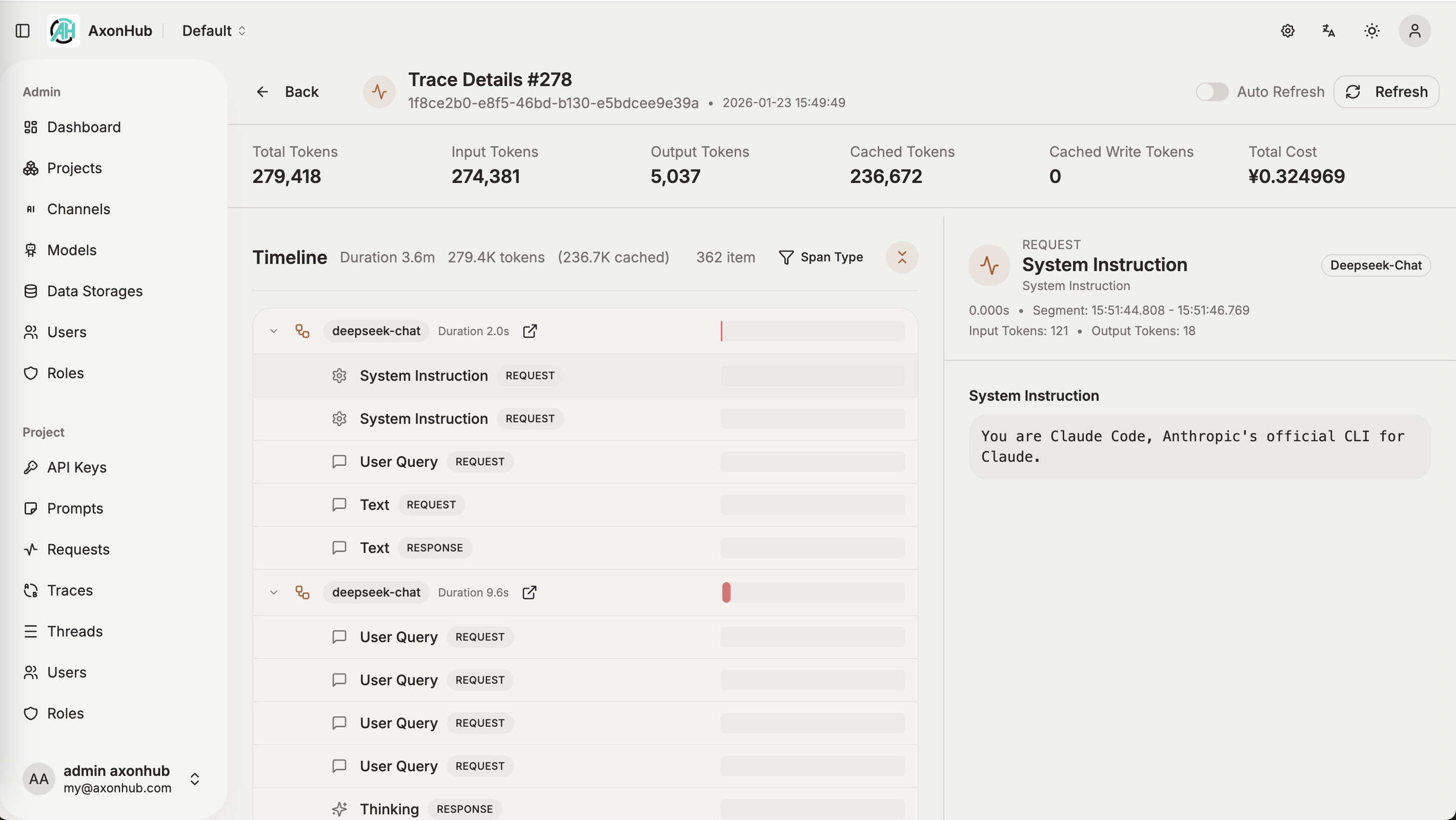
Trace Viewer
|
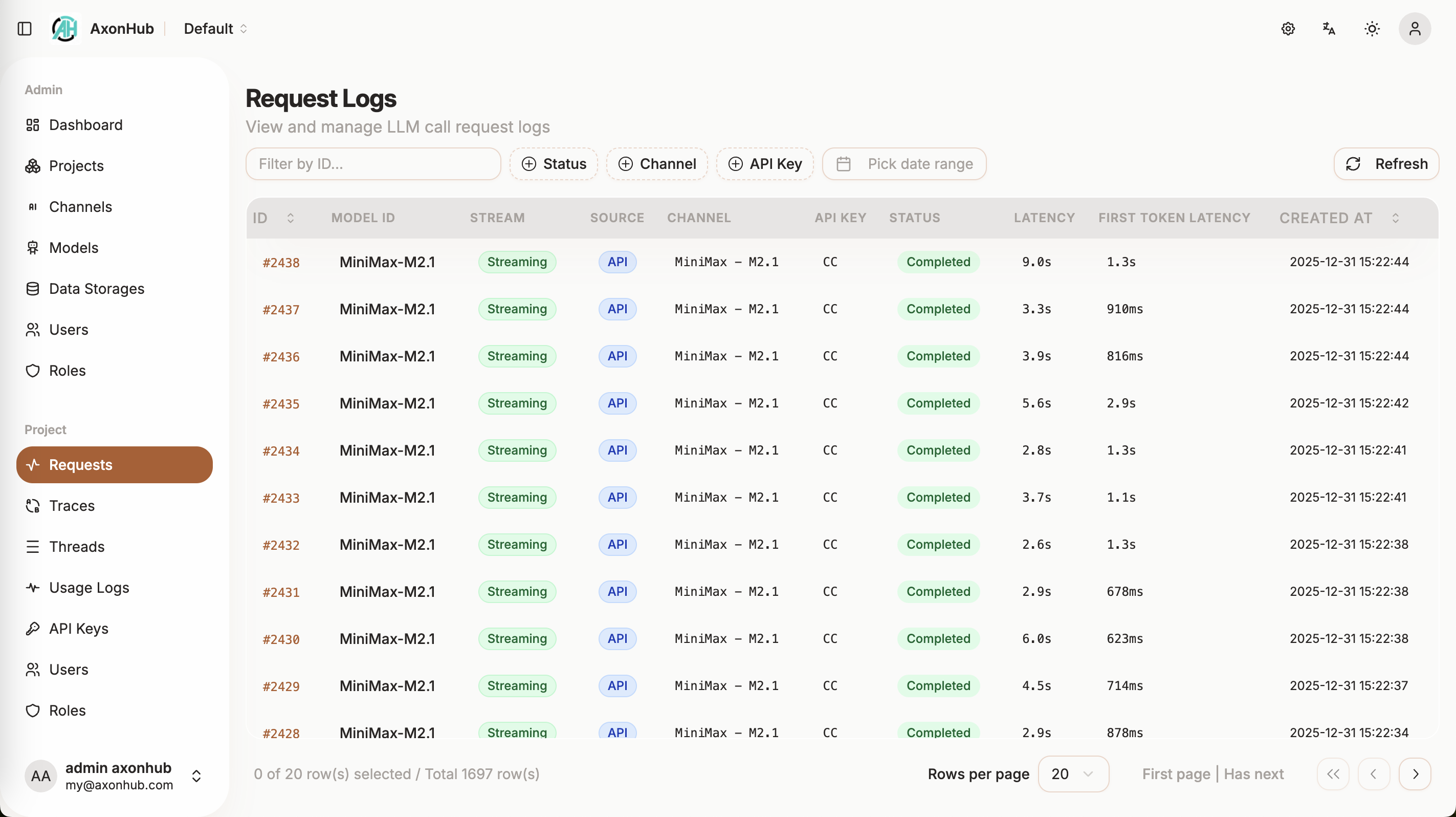
Request Monitoring
|
---
### 🚀 API Types
| API Type | Status | Description | Document |
| -------------------- | ---------- | ------------------------------ | -------------------------------------------- |
| **Text Generation** | ✅ Done | Conversational interface | [OpenAI API](docs/en/api-reference/openai-api.md), [Anthropic API](docs/en/api-reference/anthropic-api.md), [Gemini API](docs/en/api-reference/gemini-api.md) |
| **Image Generation** | ✅ Done | Image generation | [Image Generation](docs/en/api-reference/image-generation.md) |
| **Rerank** | ✅ Done | Results ranking | [Rerank API](docs/en/api-reference/rerank-api.md) |
| **Embedding** | ✅ Done | Vector embedding generation | [Embedding API](docs/en/api-reference/embedding-api.md) |
| **Realtime** | 📝 Todo | Live conversation capabilities | - |
---
### 🤖 Supported Providers
| Provider | Status | Supported Models | Compatible APIs |
| ---------------------- | ---------- | ---------------------------- | --------------- |
| **OpenAI** | ✅ Done | GPT-4, GPT-4o, GPT-5, etc. | OpenAI, Anthropic, Gemini, Embedding, Image Generation |
| **Anthropic** | ✅ Done | Claude 3.5, Claude 3.0, etc. | OpenAI, Anthropic, Gemini |
| **Zhipu AI** | ✅ Done | GLM-4.5, GLM-4.5-air, etc. | OpenAI, Anthropic, Gemini |
| **Moonshot AI (Kimi)** | ✅ Done | kimi-k2, etc. | OpenAI, Anthropic, Gemini |
| **DeepSeek** | ✅ Done | DeepSeek-V3.1, etc. | OpenAI, Anthropic, Gemini |
| **ByteDance Doubao** | ✅ Done | doubao-1.6, etc. | OpenAI, Anthropic, Gemini, Image Generation |
| **Gemini** | ✅ Done | Gemini 2.5, etc. | OpenAI, Anthropic, Gemini, Image Generation |
| **Jina AI** | ✅ Done | Embeddings, Reranker, etc. | Jina Embedding, Jina Rerank |
| **OpenRouter** | ✅ Done | Various models | OpenAI, Anthropic, Gemini, Image Generation |
| **ZAI** | ✅ Done | - | Image Generation |
| **AWS Bedrock** | 🔄 Testing | Claude on AWS | OpenAI, Anthropic, Gemini |
| **Google Cloud** | 🔄 Testing | Claude on GCP | OpenAI, Anthropic, Gemini |
| **NanoGPT** | ✅ Done | Various models, Image Gen | OpenAI, Anthropic, Gemini, Image Generation |
---
## 🚀 Quick Start
### 30-Second Local Start
```bash
# Download and extract (macOS ARM64 example)
curl -sSL https://github.com/looplj/axonhub/releases/latest/download/axonhub_darwin_arm64.tar.gz | tar xz
cd axonhub_*
# Run with SQLite (default)
./axonhub
# Open http://localhost:8090
# Default login: admin@axonhub.com / admin
```
That's it! Now configure your first AI channel and start calling models through AxonHub.
### Zero-Code Migration Example
**Your existing code works without any changes.** Just point your SDK to AxonHub:
```python
from openai import OpenAI
client = OpenAI(
base_url="http://localhost:8090/v1", # Point to AxonHub
api_key="your-axonhub-api-key" # Use AxonHub API key
)
# Call Claude using OpenAI SDK!
response = client.chat.completions.create(
model="claude-3-5-sonnet", # Or gpt-4, gemini-pro, deepseek-chat...
messages=[{"role": "user", "content": "Hello!"}]
)
```
Switch models by changing one line: `model="gpt-4"` → `model="claude-3-5-sonnet"`. No SDK changes needed.
### 1-click Deploy to Render
Deploy AxonHub with 1-click on [Render](https://render.com) for free.

---
## 🚀 Deployment Guide
### 💻 Personal Computer Deployment
Perfect for individual developers and small teams. No complex configuration required.
#### Quick Download & Run
1. **Download the latest release** from [GitHub Releases](https://github.com/looplj/axonhub/releases)
- Choose the appropriate version for your operating system:
2. **Extract and run**
```bash
# Extract the downloaded file
unzip axonhub_*.zip
cd axonhub_*
# Add execution permissions (only for Linux/macOS)
chmod +x axonhub
# Run directly - default SQLite database
# Install AxonHub to system
sudo ./install.sh
# Start AxonHub service
./start.sh
# Stop AxonHub service
./stop.sh
```
3. **Access the application**
```
http://localhost:8090
```
---
### 🖥️ Server Deployment
For production environments, high availability, and enterprise deployments.
#### Database Support
AxonHub supports multiple databases to meet different scale deployment needs:
| Database | Supported Versions | Recommended Scenario | Auto Migration | Links |
| -------------- | ------------------ | ------------------------------------------------ | -------------- | ----------------------------------------------------------- |
| **TiDB Cloud** | Starter | Serverless, Free tier, Auto Scale | ✅ Supported | [TiDB Cloud](https://www.pingcap.com/tidb-cloud-starter/) |
| **TiDB Cloud** | Dedicated | Distributed deployment, large scale | ✅ Supported | [TiDB Cloud](https://www.pingcap.com/tidb-cloud-dedicated/) |
| **TiDB** | V8.0+ | Distributed deployment, large scale | ✅ Supported | [TiDB](https://tidb.io/) |
| **Neon DB** | - | Serverless, Free tier, Auto Scale | ✅ Supported | [Neon DB](https://neon.com/) |
| **PostgreSQL** | 15+ | Production environment, medium-large deployments | ✅ Supported | [PostgreSQL](https://www.postgresql.org/) |
| **MySQL** | 8.0+ | Production environment, medium-large deployments | ✅ Supported | [MySQL](https://www.mysql.com/) |
| **SQLite** | 3.0+ | Development environment, small deployments | ✅ Supported | [SQLite](https://www.sqlite.org/index.html) |
#### Configuration
AxonHub uses YAML configuration files with environment variable override support:
```yaml
# config.yml
server:
port: 8090
name: "AxonHub"
debug: false
db:
dialect: "tidb"
dsn: ".root:@tcp(gateway01.us-west-2.prod.aws.tidbcloud.com:4000)/axonhub?tls=true&parseTime=true&multiStatements=true&charset=utf8mb4"
log:
level: "info"
encoding: "json"
```
Environment variables:
```bash
AXONHUB_SERVER_PORT=8090
AXONHUB_DB_DIALECT="tidb"
AXONHUB_DB_DSN=".root:@tcp(gateway01.us-west-2.prod.aws.tidbcloud.com:4000)/axonhub?tls=true&parseTime=true&multiStatements=true&charset=utf8mb4"
AXONHUB_LOG_LEVEL=info
```
For detailed configuration instructions, please refer to [configuration documentation](docs/en/deployment/configuration.md).
#### Docker Compose Deployment
```bash
# Clone project
git clone https://github.com/looplj/axonhub.git
cd axonhub
# Set environment variables
export AXONHUB_DB_DIALECT="tidb"
export AXONHUB_DB_DSN=".root:@tcp(gateway01.us-west-2.prod.aws.tidbcloud.com:4000)/axonhub?tls=true&parseTime=true&multiStatements=true&charset=utf8mb4"
# Start services
docker-compose up -d
# Check status
docker-compose ps
```
#### Helm Kubernetes Deployment
Deploy AxonHub on Kubernetes using the official Helm chart:
```bash
# Quick installation
git clone https://github.com/looplj/axonhub.git
cd axonhub
helm install axonhub ./deploy/helm
# Production deployment
helm install axonhub ./deploy/helm -f ./deploy/helm/values-production.yaml
# Access AxonHub
kubectl port-forward svc/axonhub 8090:8090
# Visit http://localhost:8090
```
**Key Configuration Options:**
| Parameter | Description | Default |
|-----------|-------------|---------|
| `axonhub.replicaCount` | Replicas | `1` |
| `axonhub.dbPassword` | DB password | `axonhub_password` |
| `postgresql.enabled` | Embedded PostgreSQL | `true` |
| `ingress.enabled` | Enable ingress | `false` |
| `persistence.enabled` | Data persistence | `false` |
For detailed configuration and troubleshooting, see [Helm Chart Documentation](deploy/helm/README.md).
#### Virtual Machine Deployment
Download the latest release from [GitHub Releases](https://github.com/looplj/axonhub/releases)
```bash
# Extract and run
unzip axonhub_*.zip
cd axonhub_*
# Set environment variables
export AXONHUB_DB_DIALECT="tidb"
export AXONHUB_DB_DSN=".root:@tcp(gateway01.us-west-2.prod.aws.tidbcloud.com:4000)/axonhub?tls=true&parseTime=true&multiStatements=true&charset=utf8mb4"
sudo ./install.sh
# Configuration file check
axonhub config check
# Start service
# For simplicity, we recommend managing AxonHub with the helper scripts:
# Start
./start.sh
# Stop
./stop.sh
```
---
## 📖 Usage Guide
### Unified API Overview
AxonHub provides a unified API gateway that supports both OpenAI Chat Completions and Anthropic Messages APIs. This means you can:
- **Use OpenAI API to call Anthropic models** - Keep using your OpenAI SDK while accessing Claude models
- **Use Anthropic API to call OpenAI models** - Use Anthropic's native API format with GPT models
- **Use Gemini API to call OpenAI models** - Use Gemini's native API format with GPT models
- **Automatic API translation** - AxonHub handles format conversion automatically
- **Zero code changes** - Your existing OpenAI or Anthropic client code continues to work
### 1. Initial Setup
1. **Access Management Interface**
```
http://localhost:8090
```
2. **Configure AI Providers**
- Add API keys in the management interface
- Test connections to ensure correct configuration
3. **Create Users and Roles**
- Set up permission management
- Assign appropriate access permissions
### 2. Channel Configuration
Configure AI provider channels in the management interface. For detailed information on channel configuration, including model mappings, parameter overrides, and troubleshooting, see the [Channel Configuration Guide](docs/en/guides/channel-management.md).
### 3. Model Management
AxonHub provides a flexible model management system that supports mapping abstract models to specific channels and model implementations through Model Associations. This enables:
- **Unified Model Interface** - Use abstract model IDs (e.g., `gpt-4`, `claude-3-opus`) instead of channel-specific names
- **Intelligent Channel Selection** - Automatically route requests to optimal channels based on association rules and load balancing
- **Flexible Mapping Strategies** - Support for precise channel-model matching, regex patterns, and tag-based selection
- **Priority-based Fallback** - Configure multiple associations with priorities for automatic failover
For comprehensive information on model management, including association types, configuration examples, and best practices, see the [Model Management Guide](docs/en/guides/model-management.md).
### 4. Create API Keys
Create API keys to authenticate your applications with AxonHub. Each API key can be configured with multiple profiles that define:
- **Model Mappings** - Transform user-requested models to actual available models using exact match or regex patterns
- **Channel Restrictions** - Limit which channels an API key can use by channel IDs or tags
- **Model Access Control** - Control which models are accessible through a specific profile
- **Profile Switching** - Change behavior on-the-fly by activating different profiles
For detailed information on API key profiles, including configuration examples, validation rules, and best practices, see the [API Key Profile Guide](docs/en/guides/api-key-profiles.md).
### 5. AI Coding Tools Integration
See the dedicated guides for detailed setup steps, troubleshooting, and tips on combining these tools with AxonHub model profiles:
- [OpenCode Integration Guide](docs/en/guides/opencode-integration.md)
- [Claude Code Integration Guide](docs/en/guides/claude-code-integration.md)
- [Codex Integration Guide](docs/en/guides/codex-integration.md)
---
### 6. SDK Usage
For detailed SDK usage examples and code samples, please refer to the API documentation:
- [OpenAI API](docs/en/api-reference/openai-api.md)
- [Anthropic API](docs/en/api-reference/anthropic-api.md)
- [Gemini API](docs/en/api-reference/gemini-api.md)
## 🛠️ Development Guide
For detailed development instructions, architecture design, and contribution guidelines, please see [docs/en/development/development.md](docs/en/development/development.md).
---
## 🤝 Acknowledgments
- 🙏 [musistudio/llms](https://github.com/musistudio/llms) - LLM transformation framework, source of inspiration
- 🎨 [satnaing/shadcn-admin](https://github.com/satnaing/shadcn-admin) - Admin interface template
- 🔧 [99designs/gqlgen](https://github.com/99designs/gqlgen) - GraphQL code generation
- 🌐 [gin-gonic/gin](https://github.com/gin-gonic/gin) - HTTP framework
- 🗄️ [ent/ent](https://github.com/ent/ent) - ORM framework
- 🔧 [air-verse/air](https://github.com/air-verse/air) - Auto reload Go service
- ☁️ [Render](https://render.com) - Free cloud deployment platform for hosting our demo
- 🗃️ [TiDB Cloud](https://www.pingcap.com/tidb-cloud/) - Serverless database platform for demo deployment
---
## 📄 License
This project is licensed under multiple licenses (Apache-2.0 and LGPL-3.0). See [LICENSE](LICENSE) file for the detailed licensing overview and terms.
---
**AxonHub** - All-in-one AI Development Platform, making AI development simpler
[🏠 Homepage](https://github.com/looplj/axonhub) • [📚 Documentation](https://deepwiki.com/looplj/axonhub) • [🐛 Issue Feedback](https://github.com/looplj/axonhub/issues)
Built with ❤️ by the AxonHub team